Unimania: I Need Your Facebook Data, Location, And Your Browsing History

Privacy protection is basically what we do, so I never get tired of stories about how unpredictable the ways of getting Facebook user data are. Cambridge Analytica might be dead, but the business of stealing users’ data lives on, and this article demonstrates one more example of that.

The story begins with the recent research I conducted about fake ad blockers in the Chrome Web Store. The outcome of that research was that I received dozens of questions about whether this or that extension is safe to use. This made me take a deeper look into the most popular Chrome extensions, but even so, I had no idea at that time where this investigation was going to lead me. In fact, it exposed to me a huge spyware campaign that utilizes popular Android apps and Chrome extensions to steal Facebook data and the browsing histories of millions of users.

Suspicious Chrome extensions

I conducted an automated scan of all publicly available Chrome extensions. This scan flagged quite a few different privacy issues, which I will address in more specific detail in a forthcoming post.

One of the issues that immediately caught my attention, as I noticed suspicious requests made to various Facebook domains.

Meet these nasty Chrome extensions, currently in use by an estimated 420,000 users:

  • Album & Photo Manager For Facebook (92K+ users)
  • PDF Merge — PDF Files Merger (125K+ users)
  • Pixcam — Webcam Effects (31K+ users)

So, what is wrong with them? Let's dive into the details.

The inscrutable ways of your Facebook data

If you are logged into Facebook, these spyware extensions will scrape all your data immediately after the browser startup:
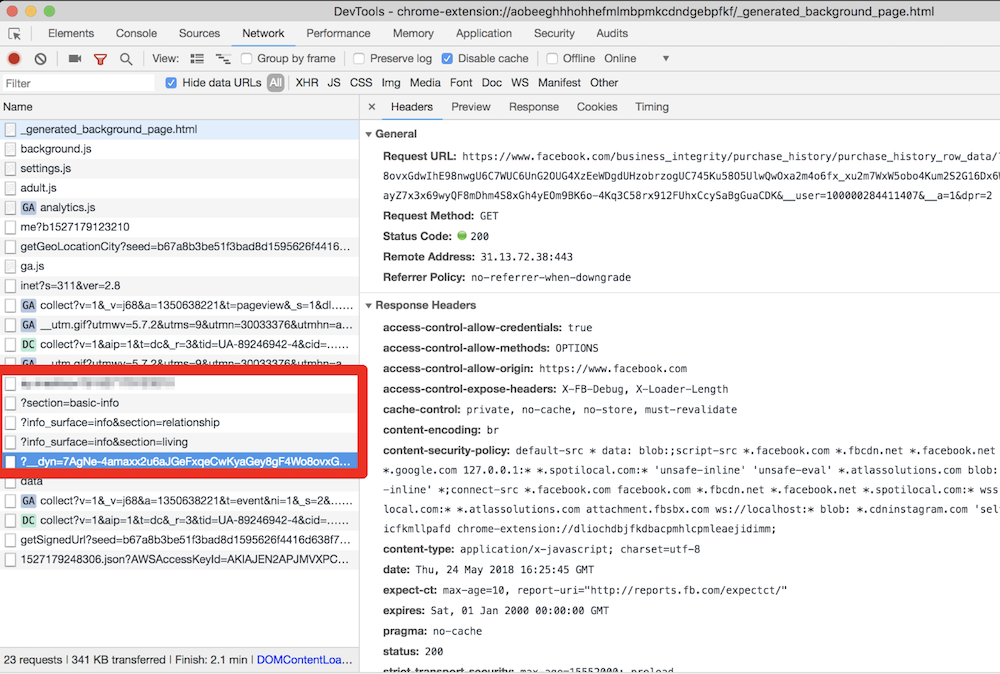
They even try to parse your purchase history! This alone is enough for these extensions to be booted from the Chrome Web Store.

All this data is then collected and sent to the um-public-panel-prod.s3.amazonaws.com domain, which is a named Amazon S3 instance rented by the spyware authors.
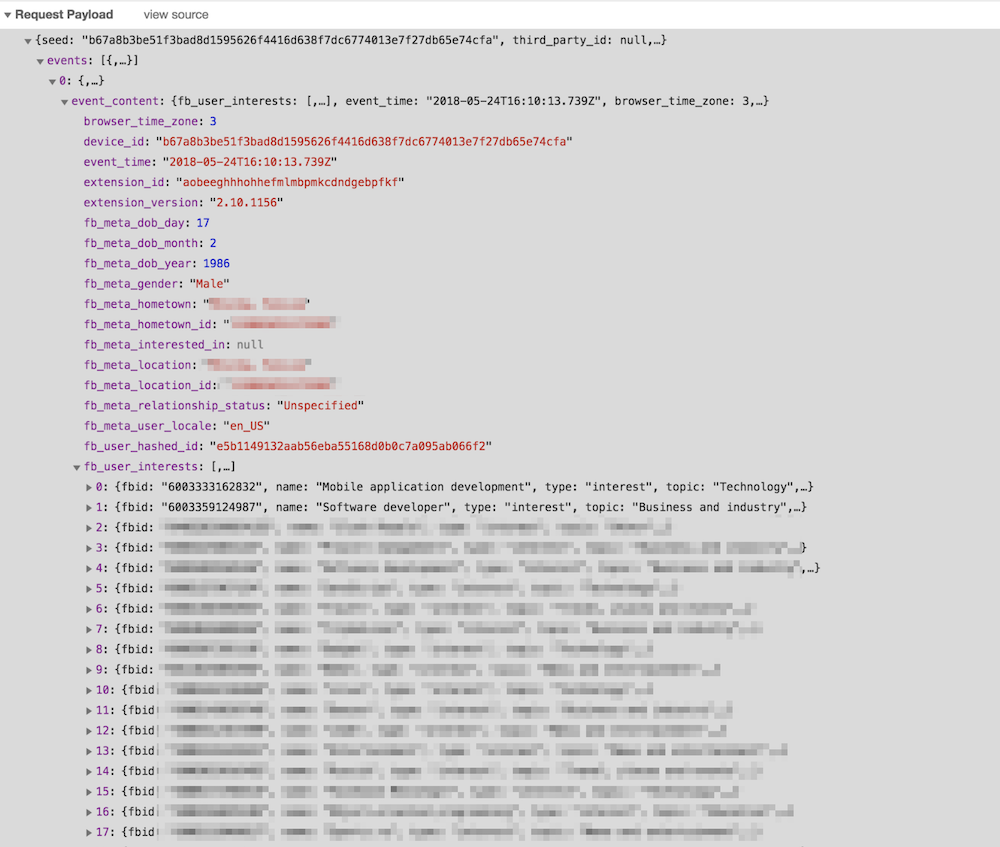
An alarming amount of data was being sent over to that server including all the Facebook "interests". In order to test this, I had to use my own account, so you can observe a piece of my own data, which I don't mind sharing with you.

As you can see on the screenshot, they do not send a plain FB identifier; instead, they send it in a hashed form. I imagine that they think that this practice allow the spyware group to say that this data has been made "anonymous."

“Dear spyware developers, come on! Do you really believe that hashing a numeric value with a static salt cannot be decoded?”

SHA1("sME9Azj8G28Y" + userId) = e5b1149132aab56eba55168d0b0c7a095ab066f2

By the way, dear reader, here is a contest for you: the first one to crack the hash and discover my FB ID gets a free AdGuard license. Write your answer in the comments. No cheating, please :)

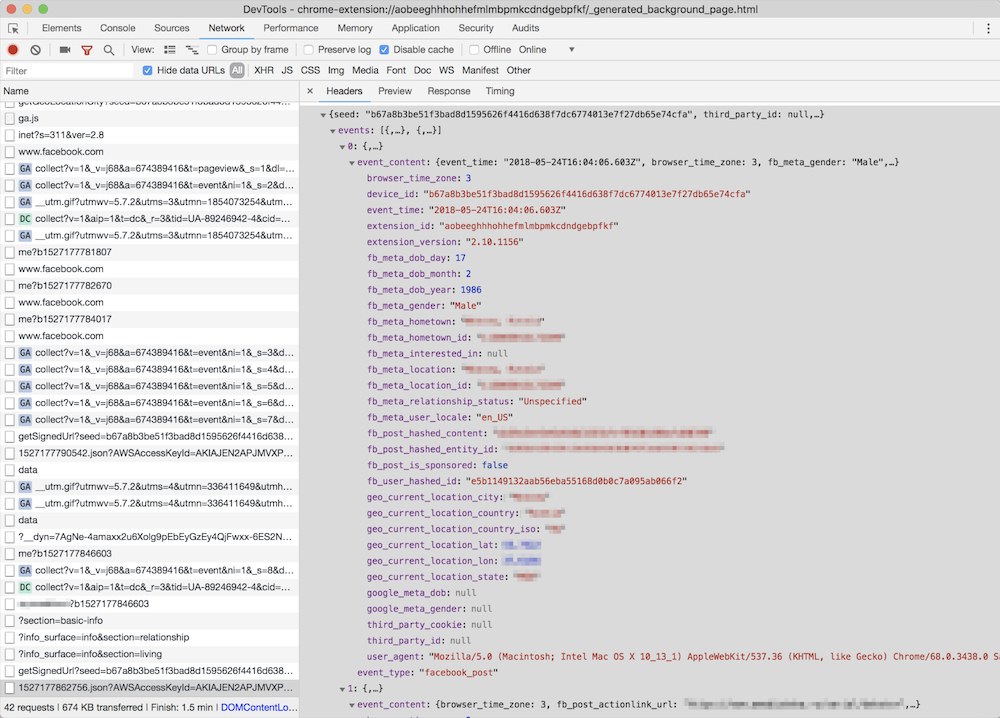
But hey, what is the good of having this data without the spyware company also knowing what exactly you do on the Internet? Wouldn't it be so much better if they knew what exact posts you read or what exact ads you see? Well, no worries, that's exactly what they do: they siphon information about all of the posts, sponsored posts, tweets, the YouTube videos and ads you see or interact with, along with a poorly hashed user ID and totally UN-hashed location data.
Meet Unimania Inc.

Who is behind this activity? The only thing I knew about the authors was the link to their extensions' privacy policy: here's a copy, just in case. As usual, there's a lot of confusing legalese about how you provide them with consent without doing anything, how seriously they care about your privacy, how strongly your data is made (or kept) anonymous and how it can in no way can be traced back to you as it is protected by a powerful mathematical "hash function."

Fortunately, it is also pretty transparent about what exact information about you is collected:

What Information We Collect and How We Collect It. In general, the Information we collect includes nonpersonally identifiable demographic and psychographic data as well as sponsored campaigns, advertisements or posts that target you directly or that have been shared with you.

Also, I found their EULA: here's the copy, from which I learned that the company name is "Unimania, Inc." and they claim to be located in Tel-Aviv, Israel. However, I could not find any information on this company in the Israeli company register.

My story might have ended here, but there was a sentence in the privacy policy that caught my attention:

Background. You have been directed to this Privacy Policy from a separate and independent third party Google Chrome Extension or Mobile Software Application (“Third Party Software”).

Mobile Software Application

"Mobile Software Application!" I said to myself.

So this was not just a matter limited to Chrome extensions, and I realized that I needed to continue my investigation. To this end, some good news was that we already had some data collected while preparing a study on mobile apps tracking and I could make use of it and query it right away.

That's how I found one particular app that was connecting to the Unimania servers. This was an alternative Facebook client called "Fast — Social App" with a record of more than 10,000,000 installs according to Google Play. The app developer does not bother to hide that fact and mentions Unimania in the privacy policy:
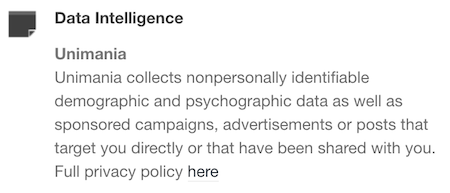
Scanning this developer apps' traffic confirmed that "Fast-Social App" transfers pretty much the same data as the Chrome extensions do, and to the same Unimania servers. I also found out that "Fast Lite - Social App + Twitter" (1,000,000+ installs) also does the same thing.

Besides that, I found a couple more apps that mention Unimania in their privacy policies. I cannot confirm that they are still leaking user data, but I can assume they were doing so in the past; otherwise, why would they mention it?

Finally, it seems that Unimania is about to launch their own "products":

  • OmniSocial — a mobile app
  • Who's following me? — a browser extension

Obviously, none of these apps describe this behavior in the app description; neither do they have an "in-app disclosure" as required by Google. I must admit that the Google Play Developer Policies look solid, and so they are likely not the reason of why the privacy of Android apps is in such a sad state. The problem is that these policies are not enforced, hence most of the app developers simply ignore them.

Summary

Congratulations for reading through such a long article (or for skipping all the boring technical details and jumping straight to the summary)!

Let's summarize what we discovered.

  1. A huge spyware campaign engaging some Mobile Apps and Chrome extensions in stealing users’ Facebook data and spying on their social network browsing history. The list of the information collected by these apps and extensions includes the user’s Facebook profile data including demographics and the list of user interests. Also, they were collecting the users' browsing history including all the Facebook regular and sponsored posts, tweets, YouTube videos and ads.
  2. Four spyware Chrome extensions with aggegrated users count of more than 400,000 users.
  3. Two Android apps with total installs count of more than 11,000,000 selling out their users data.
  4. The campaign is run by a supposed Israeli company named "Unimania, Inc." Unfortunately, I was not able to trace this further back to Unimania’s owners or affiliates and I can't say who is profiting from the data.

I've reported all the discovered apps and extensions to Google and I hope they take corrective measures soon.

How to protect yourself?

The answer to this question is both very simple and very difficult.

When installing anything on your device or browser, follow these rules:

  • Read the privacy policy. It is not useless - everything discovered in this case was mentioned in the privacy policies.
  • Never ever install anything made by a developer you don't trust. Do your homework, find out who the developer is and decide for yourself if they are trustworthy.

Also, all Unimania domains have now been added to the "AdGuard Spyware filter" and will be blocked automatically if you have it enabled in any of our AdGuard products, or if you use AdGuard DNS. Unfortunately, there is a browser limitation that prevents an extension from controlling requests made by other extensions so using the AdGuard Chrome extension or uBlock Origin may not be enough, even if you have the "AdGuard Spyware filter" enabled.

Alternatively, you can block these three domains by adding them to the "hosts" file:

  • um-public-panel-prod.s3.amazonaws.com
  • collection-endpoint-prod.herokuapp.com
  • collection-endpoint-staging.herokuapp.com

UPD (Jun 3): The Android apps mentioned in the article are no more available on Google Play.
UPD (Jun 5): The Chrome extensions are finally taken down from the Chrome Web Store.


Спадабаўся пост?
AdGuard VPN AdGuard DNS AdGuard Mail AdGuard Wallet
Галоўны экран AdGuard для Windows
Экран абароны AdGuard для Windows, які паказвае функцыі абароны і налады
Экран Статыстыка AdGuard для Windows, які паказвае статыстыку заблакіраванай рэкламы і праграм сачэння
Экран Кіраванне праграмамі ў AdGuard для Windows, які паказвае параметры кіравання абаронай для праграм, усталяваных на прыладзе
20 362 20362 водгукі
Выдатна!

AdGuard: блакіроўшчык рэкламы для Windows

AdGuard для Windows — гэта больш, чым блакіроўшчык рэкламы. Гэта шматфункцыянальны інструмент, які блакуе рэкламу, кантралюе доступ да небяспечных сайтаў, паскарае загрузку старонак і абараняе дзяцей ад непажаданага кантэнту

Спампоўваючы праграму, вы прымаеце ўмовы Ліцэнзійнага пагаднення
Microsoft Store
Спампоўваючы праграму, вы прымаеце ўмовы Ліцэнзійнага пагаднення
AdGuard для Windows версія 8.0, 14 дзён пробнага перыяду
Галоўны экран AdGuard для Mac
Экран рэжыму нябачнасці AdGuard для Mac
20 362 20362 водгукі
Выдатна!

AdGuard: блакіроўшчык рэкламы для Mac

AdGuard для Mac — гэта ўнікальны блакіроўшчык рэкламы, распрацаваны з улікам macOS. Акрамя абароны ад надакучлівай рэкламы ў браўзерах і праграмах, ён абараняе вас ад адсочвання, фішынгу і махлярства
Спампоўваючы праграму, вы прымаеце ўмовы Ліцэнзійнага пагаднення
Чытаць далей
AdGuard для Mac версія 2.19, 14 дзён пробнага перыяду
Галоўны экран AdGuard для Android
Экран Абарона ад сачэння ў AdGuard для Android
Экран Кіраванне праграмамі ў AdGuard для Android, які паказвае параметры кіравання абаронай для праграм, усталяваных на прыладзе
Экран Статыстыка AdGuard для Android, які паказвае статыстыку заблакіраванай рэкламы і праграм сачэння
Галоўны экран прыватнага браўзера AdGuard для Android
QR-код, каб спампаваць AdGuard для Android
20 362 20362 водгукі
Выдатна!

AdGuard: блакіроўшчык рэкламы для Android

Блакуе рэкламу і трэкеры ва ўсіх браўзерах, гульнях і іншых праграмах. Абараняе вашу прыватнасць і дазваляе вам кантраляваць, як вашы праграмы выкарыстоўваюць Інтэрнэт. Усталёўваецца праз APK
Спампоўваючы праграму, вы прымаеце ўмовы Ліцэнзійнага пагаднення
Чытаць далей
Сканіраванне для загрузкі
Выкарыстоўвайце любы счытвальнік QR-кодаў, даступны на вашай прыладзе
AdGuard для Android версія 4.14, 14 дзён пробнага перыяду
Галоўны экран AdGuard для iOS
Экран абароны AdGuard для iOS, які паказвае функцыі абароны і налады
Экран Статыстыка AdGuard для iOS, які паказвае статыстыку заблакіраванай рэкламы і праграм сачэння
QR-код, каб спампаваць AdGuard для iOS
20 362 20362 водгукі
Выдатна!

AdGuard: блакіроўшчык рэкламы для iOS

Найлепшы блакіроўшчык рэкламы для iOS для iPhone і iPad. AdGuard ліквідуе ўсе віды рэкламы і трэкераў у Safari і абараняе вашу прыватнасць ва ўсіх праграмах на ўзроўні DNS
Спампоўваючы праграму, вы прымаеце ўмовы Ліцэнзійнага пагаднення
Чытаць далей
Сканіраванне для загрузкі
Выкарыстоўвайце любы счытвальнік QR-кодаў, даступны на вашай прыладзе
AdGuard для iOS, 4.5
Галоўны экран AdGuard Content Blocker
Экран фільтры ў AdGuard Content Blocker
Экран налады ў AdGuard Content Blocker
20 362 20362 водгукі
Выдатна!

Блакіроўшчык кантэнту AdGuard

AdGuard Content Blocker ухіляе ўсе віды рэкламы ў мабільных браўзерах, якія падтрымліваюць тэхналогію блакіроўкі змесціва — напрыклад, Samsung Internet і Яндэкс.Браўзер. Яго функцыі абмежаваныя ў параўнанні з AdGuard для Android, але ён бясплатны, просты ў усталёўцы і эфектыўны
Спампоўваючы праграму, вы прымаеце ўмовы Ліцэнзійнага пагаднення
Чытаць далей
Блакіроўшчык кантэнту AdGuard, 2.8
Галоўны экран браузернае пашырэнне AdGuard
Экран Абарона ад сачэння ў браузернае пашырэнне AdGuard
20 362 20362 водгукі
Выдатна!

Браўзернае пашырэнне AdGuard

AdGuard — самае хуткае і лёгкае браўзарнае пашырэнне для блакавання ўсіх тыпаў рэкламы! Абірайце AdGuard для хуткага і бяспечнага сёрфінга без рэкламы.
Усталяваць
Спампоўваючы праграму, вы прымаеце ўмовы Ліцэнзійнага пагаднення
Усталяваць
Спампоўваючы праграму, вы прымаеце ўмовы Ліцэнзійнага пагаднення
Усталяваць
Спампоўваючы праграму, вы прымаеце ўмовы Ліцэнзійнага пагаднення
Усталяваць
Спампоўваючы праграму, вы прымаеце ўмовы Ліцэнзійнага пагаднення
Усталяваць
Спампоўваючы праграму, вы прымаеце ўмовы Ліцэнзійнага пагаднення
Чытаць далей
Усталяваць
Спампоўваючы праграму, вы прымаеце ўмовы Ліцэнзійнага пагаднення
Чытаць далей
Браўзернае пашырэнне AdGuard, 5.5
Галоўны экран Браўзерны памочнік AdGuard
20 362 20362 водгукі
Выдатна!

Памочнік AdGuard

Пашырэнне для браўзера-компаньён для настольных прыкладанняў AdGuard. Яно дазваляе блакіраваць карыстальніцкія элементы на вэб-сайтах, дадаваць вэб-сайты ў спіс дазволеных і адпраўляць справаздачы непасрэдна з вашага браўзера
Памочнік AdGuard, 1.4
20 362 20362 водгукі
Выдатна!

AdGuard Home

AdGuard Home — гэта сеткавае рашэнне для блакіроўкі рэкламы і праграм сачэння. Усталюйце яго адзін раз на вашым маршрутызатары, каб ахапіць усе прылады ў сетцы — дадатковае праграмнае забеспячэнне не патрабуецца. Гэта асабліва важна для розных прылад IoT, якія часта ўяўляюць пагрозу вашай прыватнасці
AdGuard Home, 0.107
Галоўны экран AdGuard Pro для iOS
Экран абароны ў AdGuard Pro для iOS, які паказвае функцыі абароны і налады
Экран Статыстыка ў AdGuard Pro для iOS, які паказвае статыстыку заблакіраванай рэкламы і праграм сачэння
20 362 20362 водгукі
Выдатна!

AdGuard Pro для iOS

AdGuard Pro для iOS пастаўляецца з усімі дадатковымі функцыямі блакіроўкі рэкламы і абароны, якія ўключаны. Ён прапануе тыя ж інструменты, што і платная версія AdGuard для iOS. Выдатна блакіруе рэкламу ў Safari, а таксама дазваляе наладжваць налады DNS, каб адаптаваць вашу абарону. Ён блакіруе рэкламу ў браўзерах і дадатках, абараняе дзяцей ад недапушчальнага кантэнту і захоўвае вашы асабістыя даныя бяспечнымі
Спампоўваючы праграму, вы прымаеце ўмовы Ліцэнзійнага пагаднення
Чытаць далей
AdGuard Pro для iOS, 4.5
Галоўны экран AdGuard Mini для Mac
Экран абароны Safari ў AdGuard Mini для Mac
Экран стварэння правіла ў AdGuard Mini для Mac
20 362 20362 водгукі
Выдатна!

AdGuard Mini для Mac — блакіроўшчык рэкламы ў Safari

AdGuard Mini для Mac — гэта магутны блакіроўшчык рэкламы для Safari. Гэта лёгкая праграма выдаляе рэкламу, блакуе праграмы сачэння і паскарае загрузку старонак. Яна дапамагае вам аглядаць вэб у Safari без адцягненняў і захоўваць вашы даныя ў прыватнасці
Усталяваць
Спампоўваючы праграму, вы прымаеце ўмовы Ліцэнзійнага пагаднення
Чытаць далей
AdGuard Mini для Mac, 2.3
Галоўны экран AdGuard для Android TV з уключанай абаронай
Экран блакіроўкі рэкламы AdGuard для Android TV, які паказвае яго функцыі і налады
Экран налады AdGuard для Android TV
Экран Кіраванне праграмамі AdGuard для Android TV, які паказвае праграмы, дзе рэклама і праграмы сачэння заблакіравана
20 362 20362 водгукі
Выдатна!

AdGuard для Android TV

AdGuard для Android TV — адзіная праграма, якая блакіруе рэкламу, ахоўвае вашу прыватнасць і працуе як міжсеткавы экран для вашага Smart TV. Атрымуйце папярэджанні аб вэб-пагрозах, выкарыстоўвайце бяспечны DNS і атрымлівайце перавагі ад шыфраванага трафіку. Адпачывайце і атрымлівайце асалоду ад улюбёных шоу з першакласнай абаронай і без рэкламы!
AdGuard для Android TV версія 4.14, 14 дзён пробнага перыяду
Маскот AdGuard, Агнар, трымае пінгвіна Linux
20 362 20362 водгукі
Выдатна!

AdGuard для Linux

AdGuard для Linux — гэта першы ў свеце сістэмны блакіроўшчык рэкламы для Linux. Блакуйце рэкламу і трэкеры на ўзроўні прылады, выбірайце з папярэдне ўсталяваных фільтраў альбо дадавайце ўласныя — усё праз інтэрфейс каманднага радка
AdGuard для Linux, 1.4
20 362 20362 водгукі
Выдатна!

AdGuard Temp Mail

Ваш часовы паштовую скрыню, каб на асноўную пошту не прыходзіў спам
20 362 20362 водгукі
Выдатна!

AdGuard VPN

75 лакацый па ўсім свеце

Доступ да любога кантэнту

Моцнае шыфраванне

Без лагавання

Самае хуткае злучэнне

Цэладзённая падтрымка

Паспрабуйце бясплатна
Спампоўваючы праграму, вы прымаеце ўмовы Ліцэнзійнага пагаднення
Чытаць далей
20 362 20362 водгукі
Выдатна!

AdGuard DNS

AdGuard DNS – гэта альтэрнатыўны спосаб заблакаваць рэкламу, абараніць асабістыя дадзеныя і ахаваць дзяцей ад дарослых матэрыялаў. Ён просты ў наладзе і выкарыстанні і забяспечвае патрэбны мінімум абароны ад рэкламы, трэкінгу і фішынгу, незалежна ад платформы.
20 362 20362 водгукі
Выдатна!

AdGuard Mail

Абараняйце сваю асобу, пазбягайце спаму і трымайце ўваходную пошту ў бяспецы з дапамогай нашых псеўданімаў і часовых адрасоў электроннай пошты. Скарыстайцеся нашым бясплатным сэрвісам перасылкі электроннай пошты і праграмамі для ўсіх аперацыйных сістэм.
20 362 20362 водгукі
Выдатна!

AdGuard Wallet

Бяспечны і прыватны крыпта-кашалёк, які дае вам поўны кантроль над вашымі актывамі. Адкрывайце для сябе тысячы крыптавалют для захоўвання, адпраўкі і абмену
Спампоўка AdGuard Каб усталяваць AdGuard, пстрыкніце файл, пазначаны стрэлкай Выберыце «Адкрыць» і націсніце «ОК», затым дачакайцеся спампоўкі файла. У акне, якое адкрылася, перацягніце значок AdGuard у папку «Праграмы». Дзякуй, што выбралі AdGuard! Выберыце «Адкрыць» і націсніце «ОК», затым дачакайцеся спампоўкі файла. У акне, якое адкрылася, націсніце «Усталяваць». Дзякуй, што выбралі AdGuard!
Усталюйце AdGuard на мабільную прыладу