AdGuard publishes the world's first ad blocker built on Manifest V3
Manifest V3, Chrome's new extension API, is no longer an illusory threat. It's now the new reality in which dozens of ad-blocking extensions, including the AdGuard Browser extension, will (or won't) work.
The wave of Manifest V3 has been building gradually but inexorably. In 2018, when Google first released a document describing the new API, the developer community erupted in criticism. We didn't stand aside either and published several articles describing the possible negative consequences of Manifest V3 implementation and even expressed hope that "things won't turn out so badly".
Despite the public outcry, Manifest V3 became available in late 2020 along with Chrome 88 Beta. Since January 2022, it became impossible to add new extensions based on Manifest V2 to the Chrome Web Store. The last phase of the launch will come very soon: starting in January 2023, all extensions on Manifest V2 will stop working, even those that were added to Chrome Web Store earlier.
If you're using AdGuard for Windows, Mac or Android, you should not worry about MV3 at all. These products are not limited by any browser.
Fortunately, we're ready for it.
Experimental AdGuard MV3 Browser extension
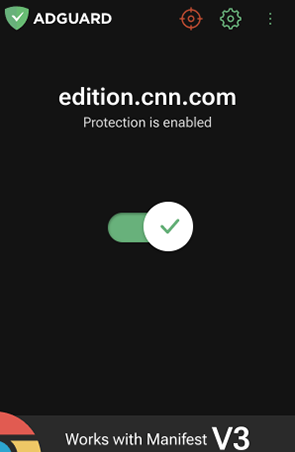
In mid-2021, we started working on the prototype of a new extension that would be able to block ads even within the strict limits of Manifest V3. The task was not an easy one: the new API was still raw, some aspects were being finalized and did not work as intended. But we coped with it, of course, and proved that ad blockers will survive even after the apocalypse that is Manifest V3.
While developing the prototype, we faced a lot of serious problems caused by the features of the new API: some of them we managed to overcome, and some we had to reconcile with. We will talk about each of them in detail.
Meanwhile, if you want to try it, you can install it from Chrome WebStore.
Here's a short video that shows how it works
Rule limits
If you don't know what filtering rules are and how ad blocking works in general, or if you'd like to refresh your knowledge, visit our Knowledge base for a brief explanation.
All the rules included in the extension filters were divided by Manifest V3 into static (built-in) and dynamic rules and their number was drastically limited.
For static rules, Chrome set a minimum guaranteed limit of 30,000 rules per extension and a total limit of 330,000 rules for all extensions installed by a single user (this also takes into account the limit of 1,000 regexp rules per extension). The trick is that one extension may get all of the allowed amount of rules, or there may be more than one, and then perhaps some of the extensions will fall short of the limit.
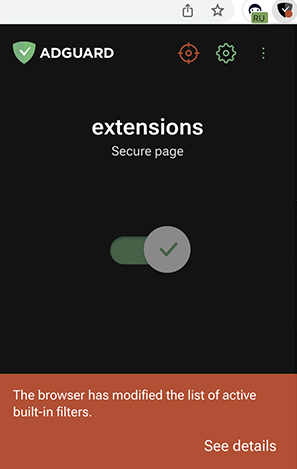
If this occurs with our extension (and this can happen at any time, e.g. after an update, service worker restart, change of filter set in our or third-party blockers), it will show a message saying that the browser has modified the list of active filters and left only AdGuard basic ad filter enabled. In the worst case, even the basic filter might not be enabled, because it contains more than 30,000 rules. Then the user would be left without AdGuard protection.
All of these cases are envisaged by us and are displayed on a separate screen with a description of what the browser has disabled and what it has left enabled.
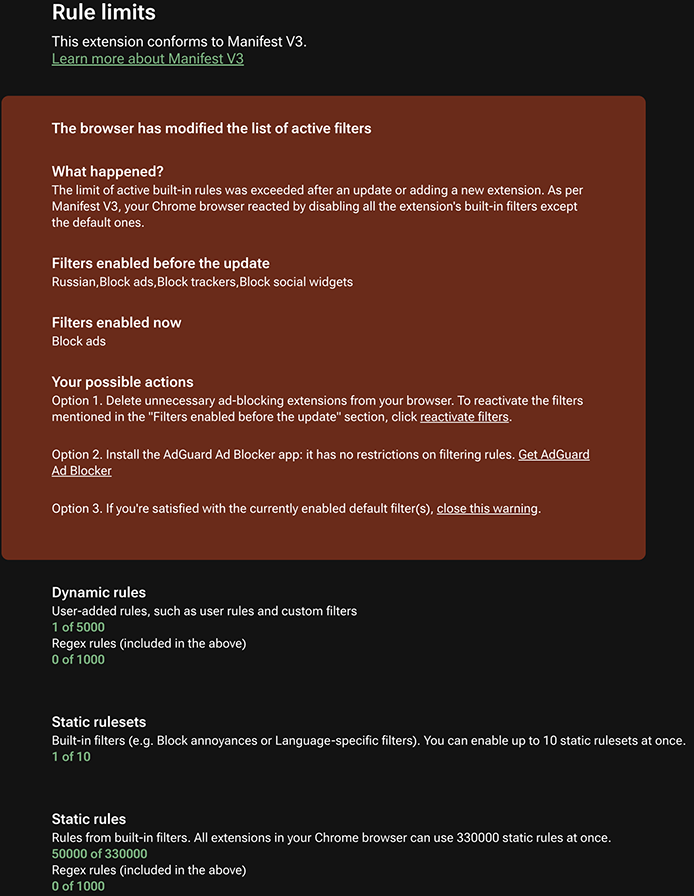
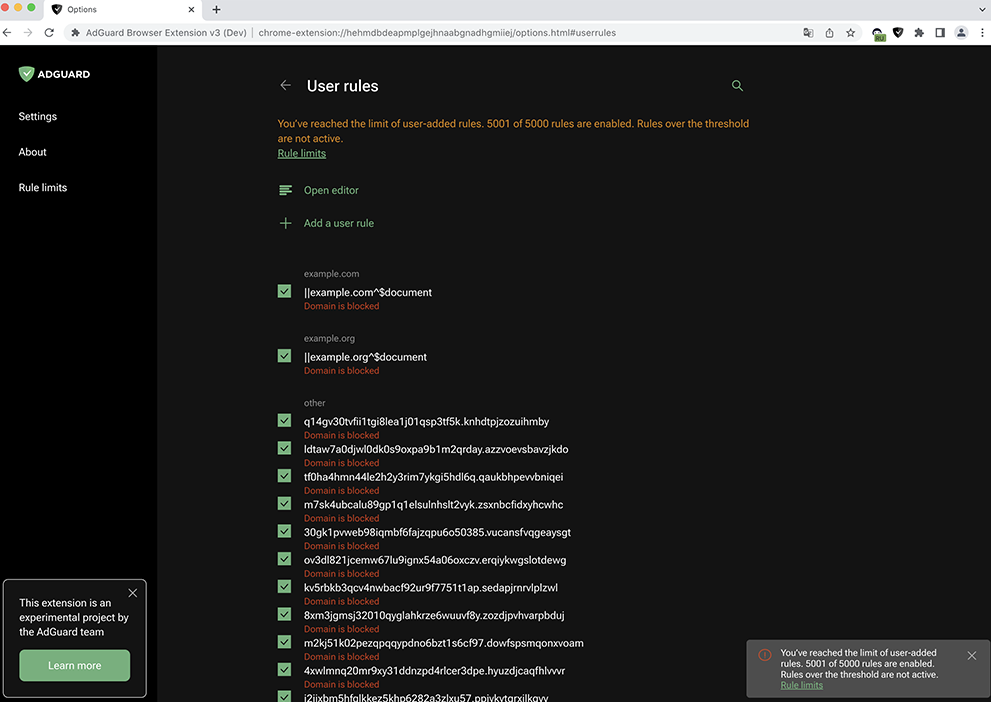
For dynamic rules, within which users can add their own rules or filters, there is a tiny limit of 5,000, including the limit of 1,000 regexp rules. If this limit is exceeded, AdGuard MV3 will only be able to apply the first 5,000 rules and the rest will remain inactive.
Notifications about exceeding the limit will look this way:
Manifest V3's restrictions harm not only filtering quality and user experience, but also the filter development community. Previously, anyone could create a filter for themselves, and over time such a filter could become popular and get on the list of recommended blockers. Now it is much more difficult to accomplish this. After all, blockers must use pre-set filters (no more than 50), and we have to be very selective about which filters will be available to users. Of course, you can still set your own filter manually. But don't forget the 5000 rule limit on all custom filters and user rules.
The further description of the problems includes a lot of details, mostly understandable to developers. If you're not a techie, you can feel free to skip this part.
Declarative rules
Before Manifest V3 was introduced, the filtering engine was dynamically built from filters downloaded from the server by the extension. Further, the rules which made up the filters were applied at different stages of page loading.
For example, rules could have been triggered before the browser sends the request: within the onBeforeRequest event, the browser asked the extension what to do with a particular request, and the extension reacted dynamically by blocking or redirecting it. The cosmetic rules were applied a little later, when the page was already loaded and the DOM appeared.
Now that Manifest V3 has taken effect, the onBeforeRequest method can no longer be applied. Instead, Chrome suggests using the declarativeNetRequest API, with which the right to modify requests is given to the browser. The extension only announces a set of declarative rules according to which the browser will modify or block network requests.
Declarative rules syntax
The syntax for declarative rules is quite different from the syntax commonly used by modern ad blockers. Many members of the community will probably give up working within Manifest V3 to avoid taking the time to create Chrome-only rules.
Each rule should consist of fields:
id– the identifier of the rule. It can be used to associate a declarative rule with a text rule.priority– the priority of the rule. It determines how the rule will be applied to the query.action– the action of a rule.
are of three kinds:block– actions that block requests.redirectorupgradeScheme– actions that redirect requests.alloworallowAllRequests– actions that allow requests.
condition– condition under which the rule is applied
Example rule:
{
  "id": 1,
  "priority": 1,
  "action": { "type" : "block" },
  "condition": {
    "urlFilter": "abc",
    "domains": ["example.org"],
    "resourceTypes": ["script"]
  }
}
This rule will block all requests to scripts that have an abc substring in their address and originate from the site with the domain example.org.
The current situation causes an acute sense of deja vu: when developing the ad-blocking extension for Safari, we had to work out a way to convert our rules syntax to the syntax imposed by the browser's developers. This time we're using a similar solution to turn our syntax into declarative Chrome rules.
To convert static and dynamic rules we added a module to our @adguard/tsurlfilter library. The library runs through the filter rules and converts them into declarative rules, then combines them into rulesets and stores them in .json files. The library builds a mapping table between text rules and JSON rules so that the connection between them is not lost.
A couple of examples of how the converter works:
The rule ||example.com^$script is converted to
{
    "id": 1,
    "action": {
        "type": "block"
    },
    "condition": {
        "urlFilter": "||example.com^",
        "resourceTypes": [
            "script"
        ],
        "isUrlFilterCaseSensitive": false
    }
}
The rule @@||example.com^$script$domain=example.org is converted to
{
    "priority": 1,
    "id": 23,
    "action": {
        "type": "allow"
    },
    "condition": {
        "urlFilter": "||example.com^$script",
        "initiatorDomains": [
            "example.org"
        ],
        "isUrlFilterCaseSensitive": false
    }
}
Most of the rules are converted correctly, but some functionality is lost because of various restrictions:
$removeparamdoes not support exclusions (~) and regular expressions (regexp)- For regular expressions, Chrome uses its own implementation of such expressions, so part of the standard functionality is not supported. For example, these are regular expressions containing backreferences, negative lookaheads, and possessive quantifiers.
negative lookaheadis often used in filters. A quick search showed that there are currently 43 rules with this expression in AdGuard filters. At first glance, this is not many, but keep in mind that most of these rules are supposed to work on many different domains so I'd say this limitation alone cripples ad blocking on 1000+ websites.- Regular expressions are additionally validated within Chrome for the amount of memory consumed. Since we're not quite sure what kind of implementation is used in this case, there may be some problems with some regular expressions.
- Cookie rules are not supported.
- There are many more issues that we have not mentioned here to not pollute the post.
The problem with declarative rules is rather obvious: their syntax severely limits what our extension can do. And, frustratingly, there is nothing we can do about it, other than hope that the Chrome developers will improve it over time.
Rulesets
According to the new API, declarative rules must be combined into rulesets.
An example of integrating a ruleset in Manifest V3:
{
  "name": "AdGuard AdBlocker MV3",
  "version": "1",
  "declarative_net_request": {
     "rule_resources": [{
       "id": "ruleset_1",
       "enabled": true,
       "path": "rules.json"
     }]
   },
   …
}
Rulesets are specified in the manifest.json file and are loaded only when the extension is installed or updated. And this is also a huge problem. Sometimes a filtering rule breaks the layout or performance of one or several websites. With such an incredibly high amount of rules, it is almost impossible statistically to completely avoid such incidents. To add to that, websites are constantly changing, and rules that used to be fine earlier might cause issues now. But that's fine: we had a simple solution for this problem.
Imagine that such a rule is in the filter and you need to disable it quickly. In Manifest V2 extension, modifier $badfilter was used for this purpose. Filter developers would add a rule with the specified modifier, the extension would get updated dynamically, the new rule would disable the referred rule, and things would get better. As you understand, this "trick" won't work with Manifest V3.
Now you can expect filters not to be updated for several days on end: after adding the new version to the Chrome Store, you need to wait for the review to be passed. Sadly, there is no other way to provide users with updated filters. The discussion about the ability to enable and disable individual rules gives some hope. There is a small chance that extensions will be given the functionality to update filters quickly after all.
Stats and filtering log
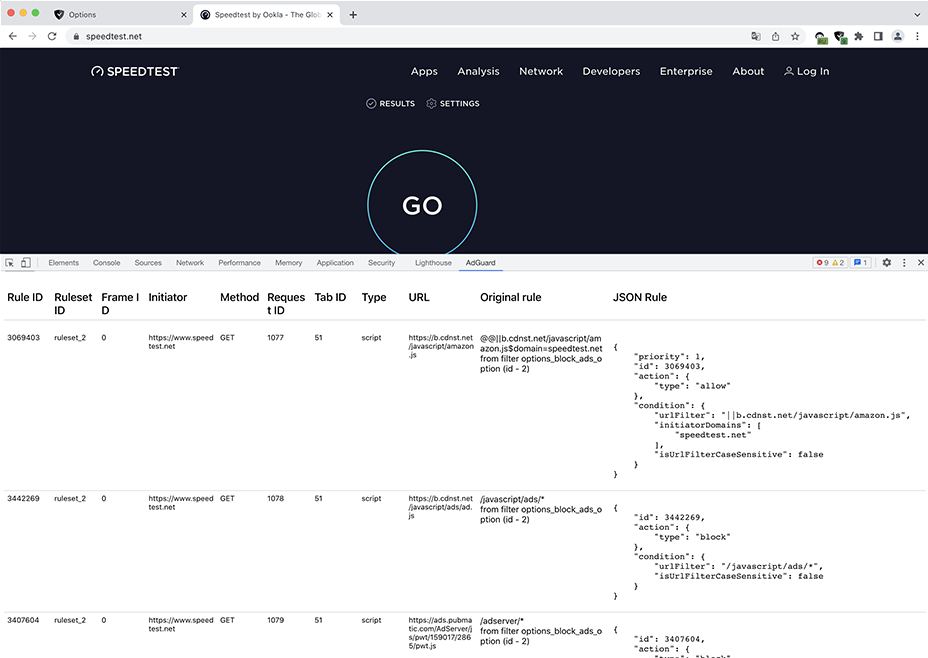
AdGuard Browser extension, based on Manifest V2, has a filtering log that shows all the requests sent by your browser and detailed information about them. In particular, you can see which filtering rule was used to block this or that rule.
Due to the fact that Chrome itself now blocks requests and shares statistics only with extensions unzipped and installed in Developer Mode, we can't implement the filtering log as we used to. But we can come up with a peculiar alternative, which we plan to do in the final version of the extension.
So, when you open the filtering log, an engine that works by the rules of Manifest V2 will be launched. It won't do anything with the requests, only show which rules may have been applied. By comparing the Chrome statistics with the results of the old engine, we will get a rough picture of how requests are processed.
The current version of the prototype does not implement a filtering log. Instead, filter developers will have to use the mechanism recommended by Chrome developers. The point is that you can still get information about which rule triggered. But there is a caveat: you need to install the extension in an "unpacked" form. That is, you will need to clone our repository, "build" the extension, switch the browser to Developer Mode, and only in this case you will be able to use the tools for debugging filters.
Service worker
With Manifest V3, the background page is gone. The background page is a separate background process where extensions could maintain their state and work with the browser APIs (like beforementioned onBeforeRequest). In Manifest V3, this page is replaced by a service worker, which is often interrupted by the browser.
When the browser stops the service worker, the extension goes into a kind of sleep mode: the declarative rules work, but the cosmetic rules that are loaded dynamically do not. For the extension to be functional, something must wake up the service worker: it can be loading a page or a message that has been sent to the service worker.
When the service worker is waking up, the extension starts to read filtering rules from the repository and process them so that it can then find them quickly. During this time, for 1.5-2 seconds, the extension does not apply cosmetic filtering, but ad requests are blocked by the browser itself. Then the engine launches and the ads disappear. We plan to reduce the wake-up time of the service worker and strive to move most of the cosmetic rules to the content script (which works in the context of the web page and is not getting killed every minute), but for some cases we will still need the service worker.
Conclusion
Despite the limitations of Manifest V3, AdGuard MV3 still protects against ads and tracking quite well:
- Blocks requests to trackers proactively
- Hides banners, social widgets and other annoying elements
- Blocks adverts on video sharing platforms, including YouTube
Although the experimental extension is not as effective as its predecessor, most users won't feel the difference. The only thing you might notice is ad flickering due to the lag in the application of cosmetic rules.
Our goal with this prototype is to test the new approach and get your feedback. So please, try it out and let us know what can be improved. As usual, this prototype is open source and published on Github. If you have any issue with it or have any suggestion, please post it to Github and we will listen.
By releasing an extension built with Manifest V3 today — first among developers of ad blockers – we can say that we've met the challenge that Google posed to us. There is still a lot of work to be done, but we can already claim that even after the discontinuation of Manifest V2, Google Chrome users will be able to protect themselves from ads and trackers with the AdGuard Browser Extension.




















































