How ad blocking is done: a look inside filter developing and why Manifest v3 is a threat

How do ad blockers work? At the very core of any ad blocker lie filter lists (also called 'filters') — literally lists of rules written in a special syntax. If we were to compress ad blockers' job into a few words, we'd say "ad blockers interpret filtering rules". They understand this complex syntax and perform actions with web traffic based on what these rules tell them to do: block specific elements, change web pages in certain ways, etc.

There is a rich variety of filter lists. Thousands of volunteers continuously work on keeping them up-to-date, making sure they block ads and don't break anything important.

You may have heard of the upcoming changes in Chrome browser, also known as Manifest v3. And these changes threaten to end the filters ecosystem as we know it. This article is aimed at Google Chrome developers: we want to believe that they don't have a goal of hurting this ecosystem, but rather simply lack a proper understanding of it. That's why we find it absolutely necessary to describe in detail how it functions and what's wrong with the current implementation of Manifest v3.

And perhaps some of our readers would like to know how it all works, too.

How ad blockers work

As it's been mentioned before, ad blockers are 'translators' that interpret filtering rules. First, an ad blocker download filter lists. It can be any filter lists, downloaded from multiple different places, it doesn't really matter. What matters is that now the ad blocker will start checking web pages' code against all these filtering rules.
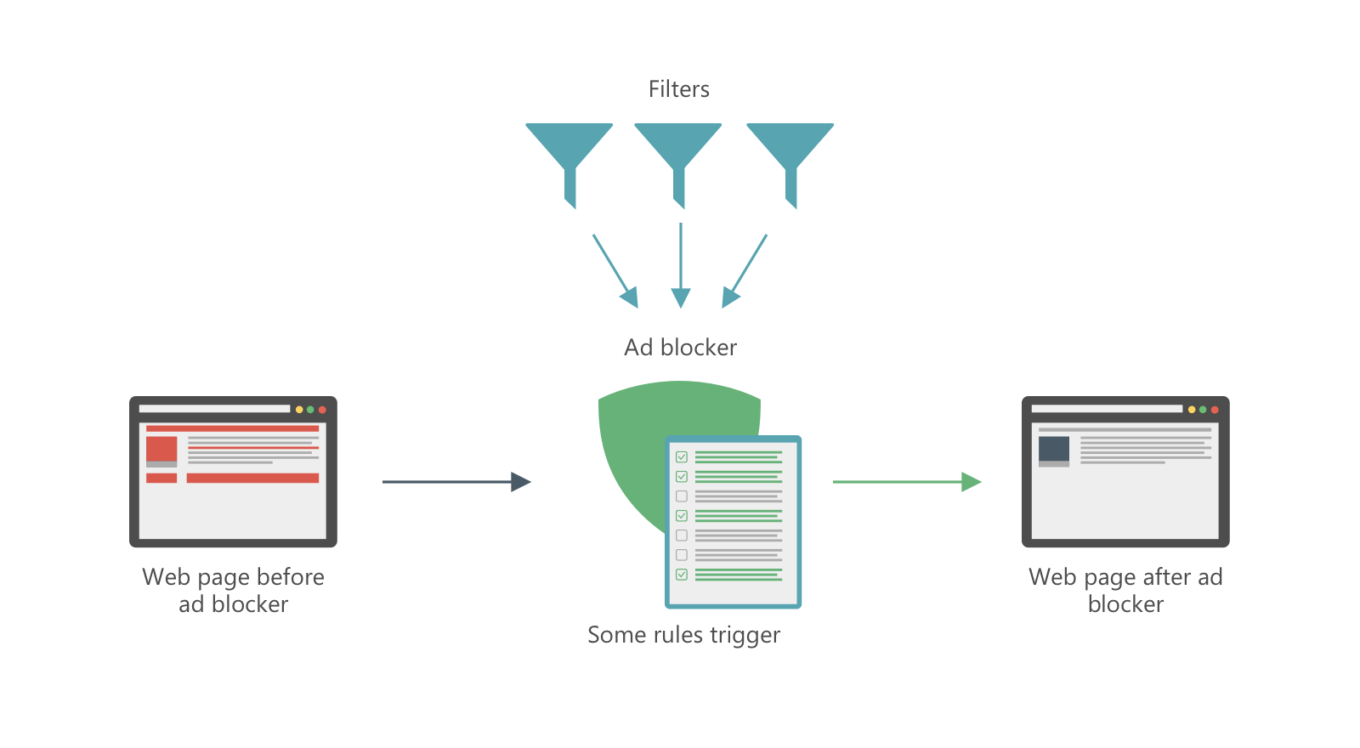
This is how ad blocking works

Let's dive a tiny little bit into technicalities, since there are probably some people who'd like to know how things work on a deeper level. There are several different ways:

Network filtering

Ads on web pages don't appear magically out of thin air. They have to be fetched somehow, i.e. downloaded from a server. To do so, browser needs to send a web request. Filtering rules tell ad blockers which requests are trying to fetch an ad and not useful content and should be blocked.

Cosmetic filtering

Every web page has a DOM ("document object model"), basically an HTML document that contains the page's structure and all its elements. Of course, ads on the page are also elements and are reflected in the DOM. Ad blockers can remove parts of the DOM, and filtering rules help them understand which parts are ads and should be removed, and which shouldn't be messed with.

Of course, in reality it's much more complicated than that, but you can see the general picture. If you'd like to know more about the technical side, check out our ad blocking syntax guide.

Filter lists

There are hundreds, if not thousands of filter lists: AdGuard Filters, EasyList, etc. It takes daily work of thousands of volunteers and professionals to keep these filters updated, so that they are always relevant and don't mess up anything.

Filters can do more than just block ads, and different people choose different combinations of filters to match their personal preferences. Here are some examples of popular filter lists that illustrate just how diverse they can be:

  • EasyList — a base filter for many users, oriented solely to block ads,
  • EasyPrivacy — another popular choice, serves to block online trackers,
  • Fanboy's SocialList — a filter that blocks social widgets, 'Like' buttons etc.,
  • AdGuard Annoyances — AdGuard's filter to block, well, annoyances. I.e. things like cookie notices, online assistants and so on,
  • A plethora of language-specific filter lists: EasyList Germany, RUAdlist, AdGuard Turkish filter, and many, many more.

Feel free to check out this website that has a huge filter lists database.

And here's the problem: the planned Google Chrome changes imply that there will be only one default filter list (so-called 'static' rules). You'd be able to modify it with a set of 'dynamic' rules, but the limit on those is ridiculously small, only 5,000. Many filter lists we mentioned above don't fit this limit alone, imagine if you want to add multiple filter lists.

How filter lists are developed

As we said, filter lists have to be constantly updated. There are two main reasons for that:

  1. To block new ads and
  2. To fix what's broken (with the amount of rules in filter lists something's bound to break at some point).

Of course, filter lists' maintainers can't monitor millions of websites themselves. They rely heavily on user feedback. To put it in perspective:

  • AdGuard Filters repository has over 40,000 closed tasks at the moment. Every week about 500 new tasks appear and approximately the same amount gets resolved.
  • EasyList and its regional filters subscriptions mostly get their feedback from the forum and it has tens of thousands of threads.

Many ad blockers have tools to help users easily report any filter-related issues they face. For example, AdGuard users have access to a special web reporting tool. Based on such complaints, filter developers correct their filter lists. Ad blockers update the filters, and — boom! — the ad is gone.
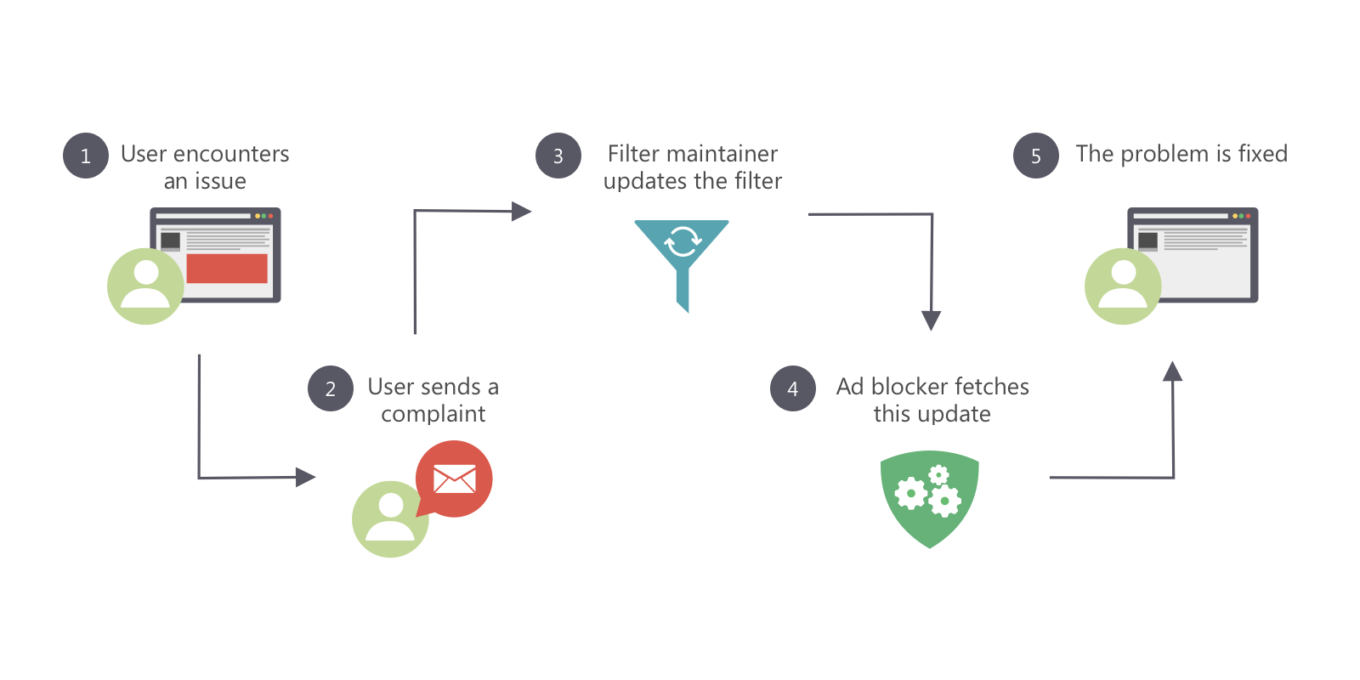
Filters are constantly being updated

This gets us to another problem: dynamic rules in Chrome are going to have a different priority compared to static ones. It only brings more chaos and makes filter lists maintainers' work so much harder.

Where do people get new filter lists?

One of the cornerstones of today's ad blocking is the users' ability to add any custom filter lists by URL (as opposed to choosing from the default list, however large it can be). This is vital for health of the filter lists ecosystem.

  • Users have an option to try new filter lists,
  • Developers can directly share their creations with users, without any third-parties.

Another face of the same problem is that under the existing dynamic rules limitation it would be impossible for all of this to happen. This would lead to slow but sure decline of the filter development community.

What awaits us in the future?

If nothing is done and all changes planned for Chrome become reality, the future will be grim for all of us:

  1. The filters ecosystem is going to receive a very painful blow.
  2. Instead of the familiar filter variety and a large, active community there will be only a handful ad blocker developers left, who'll maintain a few filter lists to the best of their ability.
  3. From users' perspective, instead of flexible approach and the ability to customize ad blocking to their preference they'll get "unified" filter lists that do more or less the same.
  4. The community will shift towards other ad blocking methods and focus its efforts on those.

At the time, we have spoken a lot of harsh words about Safari content blocking, and rightfully so. At least, thanks to countless tricks and 'duct taping' we managed to arrive at a satisfactory solution. With Google Chrome's case, there's honestly no light at the end of the tunnel.

Are there any solution?

Yes, in fact, all these problems can be addressed and solved, and even without deviating too much from the general direction Google wants to take with Chrome. What we think should be done for that:

  • A term 'Filter list' should be introduced for both static and dynamic rules,
  • The limit for dynamic rules should be drastically increased,
  • Filter rules priorities should be rethought. Dynamic rules should have the same priority as static rules.

From the developers' point of view, it would be much simpler to have only dynamic rules. To developer community dividing rules into static and dynamic categories seems not necessary and even chaos-inducing. At the same time, we are ready to have a dialogue with Google Chrome devs and find a compromise that will satisfy everyone, and most importantly — Chrome users.

PS:
If you feel like you have what it takes to become a filter maintainer, we always welcome any help! Check out this page to learn how you can help us improve AdGuard Filters and what you'll get in return for your efforts.


این پست را دوست داشتید؟
AdGuard VPN AdGuard DNS AdGuard Mail AdGuard Wallet
صفحه اصلی AdGuard برای Windows
صفحه محافظت AdGuard برای Windows که ویژگی‌ها و تنظيمات محافظت را نشان می‌دهد
صفحه آمار AdGuard برای Windows که آمار تبلیغات و رَدیاب‌های مسدود شده را نشان می‌دهد
صفحه مدیریت برنامه AdGuard برای Windows که گزینه‌های مدیریت محافظت برای برنامک‌های نصب‌شده روی دستگاه را نشان می‌دهد
۲۰٬۴۴۳ 20443 بررسی
بسیار عالی!

AdGuard برای Windows: مسدودکننده تبلیغات برای رایانه شخصی

AdGuard برای ویندوز چیزی فراتر از یک مسدودکننده تبلیغات است. این یک ابزار چندمنظوره است که تبلیغات را مسدود می‌کند، دسترسی به سایت‌های خطرناک را کنترل می‌کند، بارگذاری صفحات را سریع‌تر می‌کند و از کودکان در برابر محتوای نامناسب محافظت می‌کند

با دانلود برنامه شما شرایط توافقنامه مجوز را قبول می کنید
Microsoft Store
با دانلود برنامه شما شرایط توافقنامه مجوز را قبول می کنید
AdGuard برای Windows v8.0، دوره آزمایشی 14روزه
صفحه اصلی AdGuard برای Mac
صفحه حالت نهان AdGuard برای Mac
۲۰٬۴۴۳ 20443 بررسی
بسیار عالی!

AdGuard برای مک: مسدودکنندهٔ تبلیغات در سطح سیستم

AdGuard برای Mac یک مسدودکنندهٔ تبلیغات منحصربه‌فرد است که با در نظر گرفتن macOS طراحی شده است. علاوه بر محافظت از شما در برابر تبلیغات آزاردهنده در مرورگرها و برنامه‌ها، شما را در برابر ردیابی، فیشینگ و کلاهبرداری نیز محافظت می‌کند
با دانلود برنامه شما شرایط توافقنامه مجوز را قبول می کنید
بیشتر بخوانید
AdGuard برای Mac v2.19، دوره آزمایشی 14روزه
صفحه اصلی AdGuard برای Android
صفحه حفاظت در برابر ردیابی AdGuard برای Android
صفحه مدیریت برنامه AdGuard برای Android که گزینه‌های مدیریت محافظت برای برنامک‌های نصب‌شده روی دستگاه را نشان می‌دهد
صفحه آمار AdGuard برای Android که آمار تبلیغات و رَدیاب‌های مسدود شده را نشان می‌دهد
صفحه اصلی مرورگر خصوصی AdGuard برای Android
کد QR برای بارگیری AdGuard برای Android
۲۰٬۴۴۳ 20443 بررسی
بسیار عالی!

ادگارد برای اندروید: مسدودکنندهٔ تبلیغات برای همهٔ برنامه‌ها

تبلیغات و ردیاب‌ها را در همه مرورگرها، بازی‌ها و سایر برنامه‌ها مسدود می‌کند. از حریم خصوصی شما محافظت می‌کند و به شما امکان می‌دهد کنترل کنید برنامه‌هایتان چگونه از اینترنت استفاده می‌کنند. از طریق APK نصب می‌شود
با دانلود برنامه شما شرایط توافقنامه مجوز را قبول می کنید
بیشتر بخوانید
اسکن برای دانلود
استفاده از هر کد خوان QR موجود در دستگاه شما
AdGuard برای اندروید v4.14، دوره آزمایشی 14روزه
صفحه اصلی AdGuard برای iOS
صفحه محافظت AdGuard برای iOS که ویژگی‌ها و تنظيمات محافظت را نشان می‌دهد
صفحه آمار AdGuard برای iOS که آمار تبلیغات و رَدیاب‌های مسدود شده را نشان می‌دهد
کد QR برای بارگیری AdGuard برای iOS
۲۰٬۴۴۳ 20443 بررسی
بسیار عالی!

AdGuard برای iOS: مسدودکنندهٔ تبلیغات فراتر از Safari

بهترین مسدودکننده تبلیغات iOS برای iPhone و iPad. AdGuard همه انواع تبلیغات و ردیاب‌ها را در Safari حذف می‌کند و از حریم خصوصی شما در همه برنامه‌ها در سطح DNS محافظت می‌کند
با دانلود برنامه شما شرایط توافقنامه مجوز را قبول می کنید
بیشتر بخوانید
اسکن برای دانلود
استفاده از هر کد خوان QR موجود در دستگاه شما
AdGuard برای iOS نسخه 4.5
صفحه اصلی AdGuard Content Blocker
صفحه فیلترها در AdGuard Content Blocker
صفحه تنظيمات در AdGuard Content Blocker
۲۰٬۴۴۳ 20443 بررسی
بسیار عالی!

مسدودساز محتوای AdGuard

AdGuard Content Blocker انواع تبلیغات را در مرورگرهای تلفن همراه که از فناوری مسدود کردن محتوا پشتیبانی می کنند حذف می کند - یعنی اینترنت سامسونگ و مرورگر Yandex. ویژگی های آن در مقایسه با AdGuard برای اندروید محدود است، اما رایگان، نصب آسان و کارآمد است
با دانلود برنامه شما شرایط توافقنامه مجوز را قبول می کنید
بیشتر بخوانید
مسدودساز محتوای AdGuard نسخه 2.8
صفحه اصلی افزونه مرورگر AdGuard
صفحه حفاظت در برابر ردیابی افزونه مرورگر AdGuard
۲۰٬۴۴۳ 20443 بررسی
بسیار عالی!

افزونه مرورگر AdGuard

AdGuard سریع ترین و سبک ترین افزونه ای است که انواع تبلیغات را در صفحات وب مسدود می کند! AdGuard را برای مرورگری که میخواهید انتخاب کنید و وب گردی امن و سریع را تجربه کنید.
نصب
با دانلود برنامه شما شرایط توافقنامه مجوز را قبول می کنید
نصب
با دانلود برنامه شما شرایط توافقنامه مجوز را قبول می کنید
نصب
با دانلود برنامه شما شرایط توافقنامه مجوز را قبول می کنید
نصب
با دانلود برنامه شما شرایط توافقنامه مجوز را قبول می کنید
نصب
با دانلود برنامه شما شرایط توافقنامه مجوز را قبول می کنید
بیشتر بخوانید
نصب
با دانلود برنامه شما شرایط توافقنامه مجوز را قبول می کنید
بیشتر بخوانید
افزونه مرورگر AdGuard نسخه 5.5
صفحه اصلی AdGuard Assistant
۲۰٬۴۴۳ 20443 بررسی
بسیار عالی!

AdGuard دستیار

افزونه مرورگر همراه برای برنامه های دسکتاپ AdGuard. این امکان را به شما می دهد که آیتم های سفارشی را در وب سایت ها مسدود کنید، وب سایت ها را به لیست مجاز اضافه کنید و گزارش ها را مستقیما از مرورگر خود ارسال کنید
AdGuard دستیار نسخه 1.4
۲۰٬۴۴۳ 20443 بررسی
بسیار عالی!

AdGuard Home

AdGuard Home یک راه حل مبتنی بر شبکه برای مسدود کردن تبلیغات و ردیاب ها است. آن را یک بار روی روتر خود نصب کنید تا همه دستگاه های موجود در شبکه خانگی خود را پوشش دهید - بدون نیاز به نرم افزار مشتری اضافی. این امر به ویژه برای دستگاه های مختلف اینترنت اشیا که اغلب حریم خصوصی شما را تهدید می کنند بسیار مهم است
AdGuard Home نسخه 0.107
صفحه اصلی AdGuard Pro برای iOS
صفحه محافظت AdGuard Pro برای iOS که قابلیت‌ها و تنظيمات محافظت را نشان می‌دهد
صفحه آمار AdGuard Pro برای iOS که آمار تبلیغات و رَدیاب‌های مسدود شده را نشان می‌دهد
۲۰٬۴۴۳ 20443 بررسی
بسیار عالی!

AdGuard Pro برای iOS

AdGuard Pro برای iOS با تمام ویژگی‌های پیشرفته محافظت در برابر مسدود کردن تبلیغات ارائه می‌شود. این نسخه همان ابزارهای نسخه پولی AdGuard برای iOS را ارائه می‌دهد. این نسخه در مسدود کردن تبلیغات در سافاری عالی عمل می‌کند و به شما امکان می‌دهد تنظیمات DNS را برای محافظت متناسب با نیاز خود سفارشی کنید. این نسخه تبلیغات را در مرورگرها و برنامه‌ها مسدود می‌کند، از فرزندان شما در برابر محتوای نامناسب محافظت می‌کند و اطلاعات شخصی شما را ایمن نگه می‌دارد.
با دانلود برنامه شما شرایط توافقنامه مجوز را قبول می کنید
بیشتر بخوانید
AdGuard Pro برای iOS نسخه 4.5
صفحه اصلی AdGuard Mini برای Mac
صفحه محافظت Safari در AdGuard Mini برای Mac
صفحه ایجاد رویه در AdGuard Mini برای Mac
۲۰٬۴۴۳ 20443 بررسی
بسیار عالی!

AdGuard Mini برای Mac — مسدود کننده تبلیغات Safari

AdGuard Mini برای Mac یک مسدودکنندهٔ قدرتمند تبلیغات برای Safari است. این برنامک سبک، تبلیغات را حذف می‌کند، ردیاب‌ها را مسدود می‌کند و بارگذاری صفحه را سریع‌تر می‌کند. این ابزار به شما کمک می‌کند تا بدون حواس‌پرتی در Safari گشت‌و‌گذار کنید و داده‌های خود را خصوصی نگه دارید
نصب
با دانلود برنامه شما شرایط توافقنامه مجوز را قبول می کنید
بیشتر بخوانید
AdGuard Mini برای Mac نسخه 2.3
صفحه اصلی AdGuard برای Android TV با محافظت فعال شده
صفحه مسدودسازی تبلیغات AdGuard برای Android TV که ویژگی‌ها و تنظيمات آن را نشان می‌دهد
صفحه تنظيمات AdGuard برای Android TV
صفحه مدیریت برنامه AdGuard برای Android TV که برنامک‌هایی را نشان می‌دهد که در آن‌ها تبلیغات و رَدیاب‌ها مسدود شده‌اند
۲۰٬۴۴۳ 20443 بررسی
بسیار عالی!

AdGuard برای Android TV

AdGuard برای Android TV تنها برنامه‌ای است که تبلیغات را مسدود می‌کند، از حریم خصوصی شما محافظت کرده و همانند یک دیوار آتش برای تلویزیون هوشمند شما عمل می‌کند. در مورد تهدیدات وب هشدار دریافت کنید، از DNS ایمن استفاده کرده و از انتقال داده اینترنتی رمزگذاری شده بهره‌مند شوید. آرامش داشته باشید و غرق نمایش‌های مورد علاقه خود با امنیت عالی و تبلیغات صفر شوید!
AdGuard برای Android TV v4.14، دوره آزمایشی 14روزه
نماد AdGuard، Agnar، در حالی که پنگوئن Linux را در دست دارد
۲۰٬۴۴۳ 20443 بررسی
بسیار عالی!

AdGuard برای لینوکس

AdGuard برای لینوکس اولین مسدود کننده تبلیغات لینوکس در سراسر جهان است. تبلیغات و ردیاب‌ها را در سطح دستگاه مسدود کنید، از بین فیلترهای از پیش نصب شده انتخاب کنید یا فیلترهای خود را اضافه کنید - همه از طریق رابط خط فرمان
AdGuard برای لینوکس نسخه 1.4
۲۰٬۴۴۳ 20443 بررسی
بسیار عالی!

AdGuard Temp Mail

یک تولید‌کننده رایانشانی موقت رایگان که شما را ناشناس نگه می‌دارد و از حریم خصوصی شما محافظت می‌کند. هرزنامه‌ای در صندوق ورودی اصلی شما در کار نخواهد بود!
۲۰٬۴۴۳ 20443 بررسی
بسیار عالی!

AdGuard VPN

75 محل در سرتاسر جهان

دسترسی به هر محتوا

رمزگذاری قوی

سیاست عدم ذخیره وقایع

سریعترین اتصال

24/7 پشتیبانی

ارزیابی رایگان
با دانلود برنامه شما شرایط توافقنامه مجوز را قبول می کنید
بیشتر بخوانید
۲۰٬۴۴۳ 20443 بررسی
بسیار عالی!

AdGuard DNS

AdGuard DNS راه حلی جایگزین برای مسدودسازی تبلیغات، حفاظت حریم خصوصی و نظارت والدین است. راه اندازی آسان و استفاده رایگان، آن حداقل حفاظت لازم در برابر تبلیغات آنلاین،ردیاب ها و فیشینگ ها را میدهد،و در همه سیستم عامل ها و دستگاه ها کار می کند.
۲۰٬۴۴۳ 20443 بررسی
بسیار عالی!

AdGuard Mail

از هویت خود محافظت کنید، از هرزنامه دوری نمایید و صندوق ورودی خود را با نام‌های مستعار و رایانشانی‌های موقت ما امن نگه دارید. از خدمت رایگان فوروارد رایانامه و برنامک‌های ما برای همه سامانه‌عامل‌ها لذت ببرید
۲۰٬۴۴۳ 20443 بررسی
بسیار عالی!

AdGuard Wallet

یک کیف پول ارز دیجیتال امن و خصوصی که به شما امکان کنترل کامل بر دارایی‌هایتان را می‌دهد. چندین کیف پول را مدیریت کنید و هزاران ارز دیجیتال را برای ذخیره، ارسال و مبادله کشف کنید.
در حال بارگیری AdGuard برای نصب AdGuard، روی پرونده نشان داده شده توسط پیکان کلیک کنید گزینه "بازکردن " را انتخاب و روی "تایید" کلیک کنید — برای دانلود فایل منتظر بمانید. در پنجره باز شده، آیکون AdGuard را به پوشه "برنامه ها" بکشید.بابت انتخاب AdGuard متشکریم! گزینه "بازکردن " را انتخاب و روی "تایید" کلیک کنید — برای دانلود فایل منتظر بمانید. در پنجره باز شده روی "نصب" کلیک کنید.بابت انتخاب AdGuard متشکریم!
AdGuard را روی دستگاه تلفن همراه خود نصب کنید

















































