Meta’s rumored astronomical fee for Instagram and Facebook in EU: greedy much or just not serious?

When reports first surfaced that Meta was launching paid ad-free tiers for Instagram and Facebook in the EU, we were skeptical, to say the least. As much as we wanted to, it was impossible to take the news of Meta’s paid offering at face value, given that ad tracking has always been at the heart of the company’s business model. At the time, we were still waiting for details on how much Meta would charge for the great privilege of watching user-generated content without interruptions. And while we were happy to be proven wrong, we also had a nagging feeling that Meta was not serious about giving users a real choice between seeing ads and paying a reasonable fee. Rather, we felt it was more of a token gesture to placate the increasingly aggressive (and rightly so) EU privacy regulators challenging its data-hungry practices.

With the new Wall Street Journal report revealing how much these ad-free subscription tiers could actually cost, we had far fewer doubts about whether Meta’s offer was genuine or not: it wasn’t. The prices are not cheap, in fact they are so high that it seems pretty obvious to us that Meta never intended to offer a fair deal to its users.

So let’s cut to the chase, and dive right into the numbers.

Something does not add up

According to the report, Meta has informed the EU’s privacy watchdog in Ireland and digital competition regulators in Brussels that it wants to charge EU users a $10.5 (€10) monthly fee for using a single Facebook or Instagram account on desktop without ads. And if you want to use both Facebook and Instagram on your desktop (which would mean you’re in the absolute minority since only about 1.5% of people use Facebook on their desktop or laptop, while 98.5% use it on mobile devices), you’ll have to shell out extra $6.30 (€6) for an additional account. That means $17 to use both Instagram and Facebook on the desktop. However, if you’re more like the other 98.5% of people who prefer to use phones or tablets to access social media, you’ll have to fork over even more. On mobile, Meta reportedly plans to charge €13 per month ($13.6) for the ad-free access to one account, either Facebook or Instagram. And if we factor in an additional $6.30 (€6) for the remaining Instagram or Facebook account, the total comes to about $20 a month.
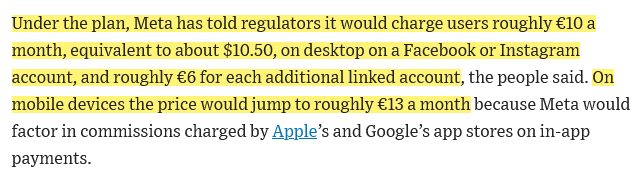
Screenshot from the WSJ report

Source: Wall Street Journal

Now, imagine you’re one of those people who occasionally uses Facebook and Instagram on both desktop and mobile. Apparently, if you want to enjoy an ad-free experience across all your devices in the EU, you’re going to have to tighten your belt, because the total amount you’ll have to pay is going to be… €10 + €6 + €13 + €6 = €35 ($36.7).

Of course, whether a certain fee is high or not is subjective. Some may argue that the price is not exorbitantly expensive, and that it is even a good value. So, let’s put things into perspective. For that, we’ll look at Netflix prices in the EU — depending on the particular EU country, the price can be lower or higher, so we choose Germany, one of the wealthiest countries in the EU per capita among the bigger states. The cheapest ad-free tier in Germany is Basic, it costs €7.99/month (compare to Meta’s €10 for one ad-free account) and allows watching movies on one device. The next cheapest tier is Standard, which costs €12.99/month. It allows you to stream on two devices and allows you to add extra member slots for €4.99 each a month (compare to Meta’s €6 for extra account).

Now, consider this: Netflix has a vast library of shows and movies, licensed content that it pays for and produces. It gives arguably much more value than Instagram or Facebook, which simply provide you access to user-generated content that Meta does not need to buy rights to (at least, not in the EU).

It doesn’t seem fair to pay more to see your friends’ and family’s posts without ads than to watch quality entertainment ad-free. Especially considering that, unlike with Netflix or any other streaming service where you are forced to sit through multiple ad breaks, with Facebook and Instagram you can at least scroll past ads in most cases.

And if you are suspicious of any attempts to compare incomparable, here’s another example — TikTok. The social media app is also reportedly considering an ad-free paid option, only that it is said to cost $4.99 a month.

But what if Meta simply wants to offset the per-user revenue it gets from showing targeted ads to Instagram and Facebook users? That wouldn’t make the fee more realistic, but it would at least explain its rationale.

Well, the issue is extremely tricky, and we can’t say for sure whether this is the case.
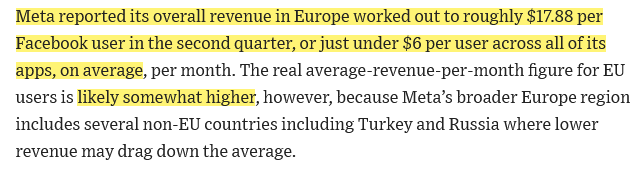
Screenshot from the Wall Street Journal report

In its earnings report for Q2 2023 Meta says that it makes about $17.88 from each person who uses Facebook and Messenger in three months. That means it makes about $6 from each person who uses Facebook in one month. However, these numbers are not very reliable, because while they include “all sources of revenue, the number of MAUs used in this calculation only includes users of Facebook and Messenger” and not the users of Instagram or WhatsApp. But they are the best estimate we have of how much Meta earns from an individual user. The Journal also points out that Meta reports an average revenue per user for a broader Europe region, which also includes non-EU countries that could bring the average down. For example, in Russia, which is also part of broader Europe region in Meta’s report, all advertising on Meta platforms has been paused since March 2022.
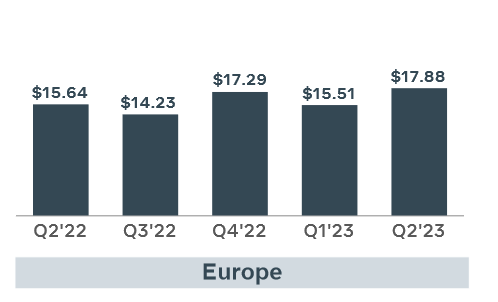
Average revenue per user reported by Meta in Europe

Source: Meta’s quarterly earnings report for Q2 2023

Why is Meta doing this?

Regardless of whether the rumored fees are comparable to what Meta is actually making by milking users’ data through targeted ads, it seems extremely unlikely that Meta really believes that its EU users are willing to shell out nearly $20 just to use ad-free versions of Instagram and Facebook on their phones.

The only conclusion that makes sense to us is that Meta is making a clumsy and very unconvincing attempt to persuade EU regulators that users actually have a choice about whether or not to trade their data for the access to the services.

The EU regulators have already forced Meta to seek consent from EU users for targeted ads. Under EU laws, this consent must be meaningful, but guess what would happen if Meta simply asked its users whether or not they want to be targeted by ads? Look no further than Apple and its App Tracking Transparency feature for the answer — only about 25% of Apple users opted into app tracking when they were faced with a choice. But since Meta does not want to lose the EU market, which generates between 21% and 25% of its global ad revenue, it had to give users some options, even despite its own volition. It seems like Meta’s latest cunning plan is to present users with a false dilemma: either accept ad targeting as usual or pay a ridiculously hefty fee for ad-free access. Besides, we cannot rule out the possibility that Meta will continue collecting your behavioral data and share it with third parties, even though it will no longer serve you ads based on that data on Facebook/Instagram.

It will be interesting to see how the EU regulators will react to this plan, and how much compromise they will accept. Will they allow Meta to get away with this, or will they demand more fairness (and perhaps lower fees) from the company? On our part, we hope they don't budge and will stand up for the rights and interests of the users.


این پست را دوست داشتید؟
AdGuard VPN AdGuard DNS AdGuard Mail AdGuard Wallet
صفحه اصلی AdGuard برای Windows
صفحه محافظت AdGuard برای Windows که ویژگی‌ها و تنظيمات محافظت را نشان می‌دهد
صفحه آمار AdGuard برای Windows که آمار تبلیغات و رَدیاب‌های مسدود شده را نشان می‌دهد
صفحه مدیریت برنامه AdGuard برای Windows که گزینه‌های مدیریت محافظت برای برنامک‌های نصب‌شده روی دستگاه را نشان می‌دهد
۲۰٬۴۳۹ 20439 بررسی
بسیار عالی!

AdGuard برای Windows: مسدودکننده تبلیغات برای رایانه شخصی

AdGuard برای ویندوز چیزی فراتر از یک مسدودکننده تبلیغات است. این یک ابزار چندمنظوره است که تبلیغات را مسدود می‌کند، دسترسی به سایت‌های خطرناک را کنترل می‌کند، بارگذاری صفحات را سریع‌تر می‌کند و از کودکان در برابر محتوای نامناسب محافظت می‌کند

با دانلود برنامه شما شرایط توافقنامه مجوز را قبول می کنید
Microsoft Store
با دانلود برنامه شما شرایط توافقنامه مجوز را قبول می کنید
AdGuard برای Windows v8.0، دوره آزمایشی 14روزه
صفحه اصلی AdGuard برای Mac
صفحه حالت نهان AdGuard برای Mac
۲۰٬۴۳۹ 20439 بررسی
بسیار عالی!

AdGuard برای مک: مسدودکنندهٔ تبلیغات در سطح سیستم

AdGuard برای Mac یک مسدودکنندهٔ تبلیغات منحصربه‌فرد است که با در نظر گرفتن macOS طراحی شده است. علاوه بر محافظت از شما در برابر تبلیغات آزاردهنده در مرورگرها و برنامه‌ها، شما را در برابر ردیابی، فیشینگ و کلاهبرداری نیز محافظت می‌کند
با دانلود برنامه شما شرایط توافقنامه مجوز را قبول می کنید
بیشتر بخوانید
AdGuard برای Mac v2.19، دوره آزمایشی 14روزه
صفحه اصلی AdGuard برای Android
صفحه حفاظت در برابر ردیابی AdGuard برای Android
صفحه مدیریت برنامه AdGuard برای Android که گزینه‌های مدیریت محافظت برای برنامک‌های نصب‌شده روی دستگاه را نشان می‌دهد
صفحه آمار AdGuard برای Android که آمار تبلیغات و رَدیاب‌های مسدود شده را نشان می‌دهد
صفحه اصلی مرورگر خصوصی AdGuard برای Android
کد QR برای بارگیری AdGuard برای Android
۲۰٬۴۳۹ 20439 بررسی
بسیار عالی!

ادگارد برای اندروید: مسدودکنندهٔ تبلیغات برای همهٔ برنامه‌ها

تبلیغات و ردیاب‌ها را در همه مرورگرها، بازی‌ها و سایر برنامه‌ها مسدود می‌کند. از حریم خصوصی شما محافظت می‌کند و به شما امکان می‌دهد کنترل کنید برنامه‌هایتان چگونه از اینترنت استفاده می‌کنند. از طریق APK نصب می‌شود
با دانلود برنامه شما شرایط توافقنامه مجوز را قبول می کنید
بیشتر بخوانید
اسکن برای دانلود
استفاده از هر کد خوان QR موجود در دستگاه شما
AdGuard برای اندروید v4.14، دوره آزمایشی 14روزه
صفحه اصلی AdGuard برای iOS
صفحه محافظت AdGuard برای iOS که ویژگی‌ها و تنظيمات محافظت را نشان می‌دهد
صفحه آمار AdGuard برای iOS که آمار تبلیغات و رَدیاب‌های مسدود شده را نشان می‌دهد
کد QR برای بارگیری AdGuard برای iOS
۲۰٬۴۳۹ 20439 بررسی
بسیار عالی!

AdGuard برای iOS: مسدودکنندهٔ تبلیغات فراتر از Safari

بهترین مسدودکننده تبلیغات iOS برای iPhone و iPad. AdGuard همه انواع تبلیغات و ردیاب‌ها را در Safari حذف می‌کند و از حریم خصوصی شما در همه برنامه‌ها در سطح DNS محافظت می‌کند
با دانلود برنامه شما شرایط توافقنامه مجوز را قبول می کنید
بیشتر بخوانید
اسکن برای دانلود
استفاده از هر کد خوان QR موجود در دستگاه شما
AdGuard برای iOS نسخه 4.5
صفحه اصلی AdGuard Content Blocker
صفحه فیلترها در AdGuard Content Blocker
صفحه تنظيمات در AdGuard Content Blocker
۲۰٬۴۳۹ 20439 بررسی
بسیار عالی!

مسدودساز محتوای AdGuard

AdGuard Content Blocker انواع تبلیغات را در مرورگرهای تلفن همراه که از فناوری مسدود کردن محتوا پشتیبانی می کنند حذف می کند - یعنی اینترنت سامسونگ و مرورگر Yandex. ویژگی های آن در مقایسه با AdGuard برای اندروید محدود است، اما رایگان، نصب آسان و کارآمد است
با دانلود برنامه شما شرایط توافقنامه مجوز را قبول می کنید
بیشتر بخوانید
مسدودساز محتوای AdGuard نسخه 2.8
صفحه اصلی افزونه مرورگر AdGuard
صفحه حفاظت در برابر ردیابی افزونه مرورگر AdGuard
۲۰٬۴۳۹ 20439 بررسی
بسیار عالی!

افزونه مرورگر AdGuard

AdGuard سریع ترین و سبک ترین افزونه ای است که انواع تبلیغات را در صفحات وب مسدود می کند! AdGuard را برای مرورگری که میخواهید انتخاب کنید و وب گردی امن و سریع را تجربه کنید.
نصب
با دانلود برنامه شما شرایط توافقنامه مجوز را قبول می کنید
نصب
با دانلود برنامه شما شرایط توافقنامه مجوز را قبول می کنید
نصب
با دانلود برنامه شما شرایط توافقنامه مجوز را قبول می کنید
نصب
با دانلود برنامه شما شرایط توافقنامه مجوز را قبول می کنید
نصب
با دانلود برنامه شما شرایط توافقنامه مجوز را قبول می کنید
بیشتر بخوانید
نصب
با دانلود برنامه شما شرایط توافقنامه مجوز را قبول می کنید
بیشتر بخوانید
افزونه مرورگر AdGuard نسخه 5.5
صفحه اصلی AdGuard Assistant
۲۰٬۴۳۹ 20439 بررسی
بسیار عالی!

AdGuard دستیار

افزونه مرورگر همراه برای برنامه های دسکتاپ AdGuard. این امکان را به شما می دهد که آیتم های سفارشی را در وب سایت ها مسدود کنید، وب سایت ها را به لیست مجاز اضافه کنید و گزارش ها را مستقیما از مرورگر خود ارسال کنید
AdGuard دستیار نسخه 1.4
۲۰٬۴۳۹ 20439 بررسی
بسیار عالی!

AdGuard Home

AdGuard Home یک راه حل مبتنی بر شبکه برای مسدود کردن تبلیغات و ردیاب ها است. آن را یک بار روی روتر خود نصب کنید تا همه دستگاه های موجود در شبکه خانگی خود را پوشش دهید - بدون نیاز به نرم افزار مشتری اضافی. این امر به ویژه برای دستگاه های مختلف اینترنت اشیا که اغلب حریم خصوصی شما را تهدید می کنند بسیار مهم است
AdGuard Home نسخه 0.107
صفحه اصلی AdGuard Pro برای iOS
صفحه محافظت AdGuard Pro برای iOS که قابلیت‌ها و تنظيمات محافظت را نشان می‌دهد
صفحه آمار AdGuard Pro برای iOS که آمار تبلیغات و رَدیاب‌های مسدود شده را نشان می‌دهد
۲۰٬۴۳۹ 20439 بررسی
بسیار عالی!

AdGuard Pro برای iOS

AdGuard Pro برای iOS با تمام ویژگی‌های پیشرفته محافظت در برابر مسدود کردن تبلیغات ارائه می‌شود. این نسخه همان ابزارهای نسخه پولی AdGuard برای iOS را ارائه می‌دهد. این نسخه در مسدود کردن تبلیغات در سافاری عالی عمل می‌کند و به شما امکان می‌دهد تنظیمات DNS را برای محافظت متناسب با نیاز خود سفارشی کنید. این نسخه تبلیغات را در مرورگرها و برنامه‌ها مسدود می‌کند، از فرزندان شما در برابر محتوای نامناسب محافظت می‌کند و اطلاعات شخصی شما را ایمن نگه می‌دارد.
با دانلود برنامه شما شرایط توافقنامه مجوز را قبول می کنید
بیشتر بخوانید
AdGuard Pro برای iOS نسخه 4.5
صفحه اصلی AdGuard Mini برای Mac
صفحه محافظت Safari در AdGuard Mini برای Mac
صفحه ایجاد رویه در AdGuard Mini برای Mac
۲۰٬۴۳۹ 20439 بررسی
بسیار عالی!

AdGuard Mini برای Mac — مسدود کننده تبلیغات Safari

AdGuard Mini برای Mac یک مسدودکنندهٔ قدرتمند تبلیغات برای Safari است. این برنامک سبک، تبلیغات را حذف می‌کند، ردیاب‌ها را مسدود می‌کند و بارگذاری صفحه را سریع‌تر می‌کند. این ابزار به شما کمک می‌کند تا بدون حواس‌پرتی در Safari گشت‌و‌گذار کنید و داده‌های خود را خصوصی نگه دارید
نصب
با دانلود برنامه شما شرایط توافقنامه مجوز را قبول می کنید
بیشتر بخوانید
AdGuard Mini برای Mac نسخه 2.3
صفحه اصلی AdGuard برای Android TV با محافظت فعال شده
صفحه مسدودسازی تبلیغات AdGuard برای Android TV که ویژگی‌ها و تنظيمات آن را نشان می‌دهد
صفحه تنظيمات AdGuard برای Android TV
صفحه مدیریت برنامه AdGuard برای Android TV که برنامک‌هایی را نشان می‌دهد که در آن‌ها تبلیغات و رَدیاب‌ها مسدود شده‌اند
۲۰٬۴۳۹ 20439 بررسی
بسیار عالی!

AdGuard برای Android TV

AdGuard برای Android TV تنها برنامه‌ای است که تبلیغات را مسدود می‌کند، از حریم خصوصی شما محافظت کرده و همانند یک دیوار آتش برای تلویزیون هوشمند شما عمل می‌کند. در مورد تهدیدات وب هشدار دریافت کنید، از DNS ایمن استفاده کرده و از انتقال داده اینترنتی رمزگذاری شده بهره‌مند شوید. آرامش داشته باشید و غرق نمایش‌های مورد علاقه خود با امنیت عالی و تبلیغات صفر شوید!
AdGuard برای Android TV v4.14، دوره آزمایشی 14روزه
نماد AdGuard، Agnar، در حالی که پنگوئن Linux را در دست دارد
۲۰٬۴۳۹ 20439 بررسی
بسیار عالی!

AdGuard برای لینوکس

AdGuard برای لینوکس اولین مسدود کننده تبلیغات لینوکس در سراسر جهان است. تبلیغات و ردیاب‌ها را در سطح دستگاه مسدود کنید، از بین فیلترهای از پیش نصب شده انتخاب کنید یا فیلترهای خود را اضافه کنید - همه از طریق رابط خط فرمان
AdGuard برای لینوکس نسخه 1.4
۲۰٬۴۳۹ 20439 بررسی
بسیار عالی!

AdGuard Temp Mail

یک تولید‌کننده رایانشانی موقت رایگان که شما را ناشناس نگه می‌دارد و از حریم خصوصی شما محافظت می‌کند. هرزنامه‌ای در صندوق ورودی اصلی شما در کار نخواهد بود!
۲۰٬۴۳۹ 20439 بررسی
بسیار عالی!

AdGuard VPN

75 محل در سرتاسر جهان

دسترسی به هر محتوا

رمزگذاری قوی

سیاست عدم ذخیره وقایع

سریعترین اتصال

24/7 پشتیبانی

ارزیابی رایگان
با دانلود برنامه شما شرایط توافقنامه مجوز را قبول می کنید
بیشتر بخوانید
۲۰٬۴۳۹ 20439 بررسی
بسیار عالی!

AdGuard DNS

AdGuard DNS راه حلی جایگزین برای مسدودسازی تبلیغات، حفاظت حریم خصوصی و نظارت والدین است. راه اندازی آسان و استفاده رایگان، آن حداقل حفاظت لازم در برابر تبلیغات آنلاین،ردیاب ها و فیشینگ ها را میدهد،و در همه سیستم عامل ها و دستگاه ها کار می کند.
۲۰٬۴۳۹ 20439 بررسی
بسیار عالی!

AdGuard Mail

از هویت خود محافظت کنید، از هرزنامه دوری نمایید و صندوق ورودی خود را با نام‌های مستعار و رایانشانی‌های موقت ما امن نگه دارید. از خدمت رایگان فوروارد رایانامه و برنامک‌های ما برای همه سامانه‌عامل‌ها لذت ببرید
۲۰٬۴۳۹ 20439 بررسی
بسیار عالی!

AdGuard Wallet

یک کیف پول ارز دیجیتال امن و خصوصی که به شما امکان کنترل کامل بر دارایی‌هایتان را می‌دهد. چندین کیف پول را مدیریت کنید و هزاران ارز دیجیتال را برای ذخیره، ارسال و مبادله کشف کنید.
در حال بارگیری AdGuard برای نصب AdGuard، روی پرونده نشان داده شده توسط پیکان کلیک کنید گزینه "بازکردن " را انتخاب و روی "تایید" کلیک کنید — برای دانلود فایل منتظر بمانید. در پنجره باز شده، آیکون AdGuard را به پوشه "برنامه ها" بکشید.بابت انتخاب AdGuard متشکریم! گزینه "بازکردن " را انتخاب و روی "تایید" کلیک کنید — برای دانلود فایل منتظر بمانید. در پنجره باز شده روی "نصب" کلیک کنید.بابت انتخاب AdGuard متشکریم!
AdGuard را روی دستگاه تلفن همراه خود نصب کنید

















































