Welcome to the Adpocalypse: Even your fridge isn’t safe anymore

First, it was cheap smart TVs that came with ads — a compromise we sort of tolerated because the price was low. If you didn’t want the ads, you shelled out more money for a “premium” model. But over the years, the terms of that reluctant deal we all made started to shift, and not in our favor.

Ads started creeping into places they had no business being in. Not just on bargain TVs, but on high-end, flagship screens too. And then — as if that wasn’t enough — they showed up in the infotainment panels of cars. Some were in the form pop-up ads, hitting you in the face every time you stop at a light, as Jeep drivers could attest, although the company has later dismissed it as a glitch.

The trajectory’s been all downhill since. It's like we’re being slowly dragged into a nightmare where no screen, no product, no inch of space is safe from ads.

Over the past few years, we’ve been losing more and more control over our physical products. First came devices that brick themselves if you're behind on payments — yes, we’re talking about Ford’s self-repossessing cars (still just a concept… for now). The gradual loss of control has come together with the steady push into subscription models. That could’ve been fine if those subscriptions actually added something meaningful like new features, better service, more value. But instead, what we’re getting is manufacturers locking basic features behind a paywall, or worse, actively degrading the user experience unless you pay up.

A perfect example of this? Samsung’s latest move to push ads onto its Family Hub fridges, which start at $1,800 in the US.

This is not cool

The update rolled out quietly, almost sneakily. In mid-September, a Reddit user spotted a changelog flash on their fridge screen, and that’s when alarm bells started ringing.
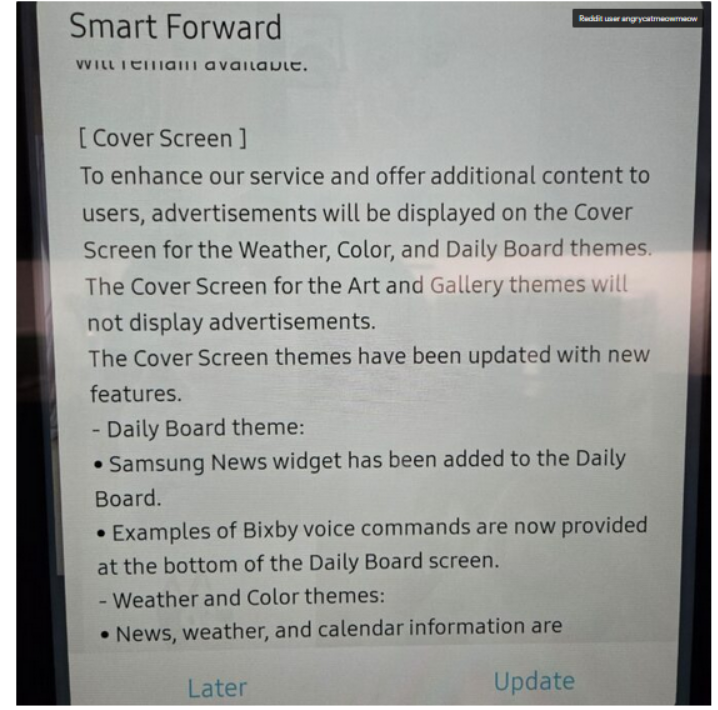
Fridge screen message

Source: Android Authority

The notice that popped up on the poster’s Samsung fridge said that ads would be shown on the door display when it’s idle and set to Weather, Color, or Daily Board themes. If it’s set to Art and Gallery themes like showing photos or pictures the ads won’t appear.

At first, people weren’t even sure it was real. Even Android Authority questioned it, wondering if the changelog was meant for some other product entirely: “There were some doubts that the changelog wasn’t real or that it belonged to a different product.”

But no, it wasn’t a mistake. It wasn’t a glitch. And it definitely wasn’t an April Fool’s joke, no matter how badly we all wished it was.

According to the Fortune, Samsung for now says it will only display ads, and not collect data about how users interact with them, like whether you dismiss an ad or engage with it. But it’s hard not to see that as just step one. More data collection is likely right around the corner.

In a statement shared with Android Authority, Samsung justified the move by saying it’s part of a “pilot program” aimed at offering “promotions and curated advertisements” to increase “everyday value.” The company said this would be done through an over-the-network (OTN) software update, and that ads will only appear when the fridge screen is idle.

Is the Fridge+ subscription on its way?

Currently, there’s no way to turn these ads off — not even a paid, ad-free option. So it seems that people who already shelled out thousands for a fridge are now stuck with ads on its door display, and can do exactly… nothing about it.

Reddit had a field day once Samsung officially confirmed the ads weren’t there by accident.“Imagine paying thousands of dollars for a fridge just to get ads on it?” one Redditor wrote. Others joked — or maybe predicted — that the fridge might soon start showing 30-second pre-roll ads before it lets you open the door, in true YouTube fashion.

And since Samsung has officially announced that it wants to put screens on everything — from ovens to washers and dryers — we can probably expect ads coming to those too.

“Of course you know this is going to end in some f*ckery where the ice maker won’t work unless you have a paid subscription,” another user posted. And honestly, that indeed feels like exactly where we’re headed. It’s not at all beyond the scope of imagination that, at some point, in order to “improve” the very user experience they just degraded, Samsung might roll out a Fridge+ subscription — so you can pay to make your $1,800 fridge feel like it did before the ads showed up.

One of the Reddit comments on the matter

Source: Reddit

Blocking Samsung Fridge ads

One of the first questions that springs to an ad blocking user’s mind is whether the Samsung Fridge ads can be blocked. And while there’s no magical “off” switch or built-in setting to kill them, there are ways to get around them. They’re not the easiest, and definitely not bulletproof, but if you’re a bit tech-savvy, there’s hope.

AdGuard Home: The best (but nerdier) way to block the ads

If you’re comfortable setting up a bit of home network infrastructure,AdGuard Home is likely the most promising method available right now.

It works as a local DNS server running on your network — for example, on a Raspberry Pi or a low-power PC — and lets you filter and block domains (including those used for ads or telemetry) before the traffic ever reaches the internet.

AdGuard Home’s dashboard gives you detailed logs of DNS requests, so if the fridge is making calls to specific ad domains, you can identify and block them manually. Once installed, AdGuard Home will cover all devices on your home network, no additional client software is required. This is especially important for various IoT devices that could pose a threat to your privacy (a smart fridge included).

That said, this approach works best when the fridge fetches ad content through standard domain name lookups, which, in most cases, it likely does. As far as we know, Samsung isn’t using more advanced methods like hardcoded IP addresses or encrypted DNS in its refrigerators, which would make DNS-level blocking much harder. While technically possible, it’s unlikely that a fridge — even a high-end one — would go to those lengths just to serve ads.

AdGuard DNS: The easier to configure but less flexible option

If AdGuard Home sounds like a bit much, there’s also AdGuard DNS that doesn’t need any hardware or installation. You just change your router’s DNS settings to point to AdGuard’s servers, and that’s it.

Most smart fridges (and smart devices in general) automatically get their DNS settings from the router via DHCP, which means they’ll use whichever DNS server the router is configured to use. So, if you set your router’s DNS to AdGuard’s public ad-blocking DNS servers, your fridge will likely start using AdGuard DNS as well — and known ad domains could be blocked at the DNS level. Just like in AdGuard Home, the AdGuard DNS paid plan lets you create custom rules and inspect traffic logs to see exactly what’s happening under the hood.


این پست را دوست داشتید؟
AdGuard VPN AdGuard DNS AdGuard Mail AdGuard Wallet
صفحه اصلی AdGuard برای Windows
صفحه محافظت AdGuard برای Windows که ویژگی‌ها و تنظيمات محافظت را نشان می‌دهد
صفحه آمار AdGuard برای Windows که آمار تبلیغات و رَدیاب‌های مسدود شده را نشان می‌دهد
صفحه مدیریت برنامه AdGuard برای Windows که گزینه‌های مدیریت محافظت برای برنامک‌های نصب‌شده روی دستگاه را نشان می‌دهد
۲۰٬۴۳۸ 20438 بررسی
بسیار عالی!

AdGuard برای Windows: مسدودکننده تبلیغات برای رایانه شخصی

AdGuard برای ویندوز چیزی فراتر از یک مسدودکننده تبلیغات است. این یک ابزار چندمنظوره است که تبلیغات را مسدود می‌کند، دسترسی به سایت‌های خطرناک را کنترل می‌کند، بارگذاری صفحات را سریع‌تر می‌کند و از کودکان در برابر محتوای نامناسب محافظت می‌کند
با دانلود برنامه شما شرایط توافقنامه مجوز را قبول می کنید
Microsoft Store
با دانلود برنامه شما شرایط توافقنامه مجوز را قبول می کنید
AdGuard برای Windows v8.0، دوره آزمایشی 14روزه
صفحه اصلی AdGuard برای Mac
صفحه حالت نهان AdGuard برای Mac
۲۰٬۴۳۸ 20438 بررسی
بسیار عالی!

AdGuard برای مک: مسدودکنندهٔ تبلیغات در سطح سیستم

AdGuard برای Mac یک مسدودکنندهٔ تبلیغات منحصربه‌فرد است که با در نظر گرفتن macOS طراحی شده است. علاوه بر محافظت از شما در برابر تبلیغات آزاردهنده در مرورگرها و برنامه‌ها، شما را در برابر ردیابی، فیشینگ و کلاهبرداری نیز محافظت می‌کند
با دانلود برنامه شما شرایط توافقنامه مجوز را قبول می کنید
بیشتر بخوانید
AdGuard برای Mac v2.19، دوره آزمایشی 14روزه
صفحه اصلی AdGuard برای Android
صفحه حفاظت در برابر ردیابی AdGuard برای Android
صفحه مدیریت برنامه AdGuard برای Android که گزینه‌های مدیریت محافظت برای برنامک‌های نصب‌شده روی دستگاه را نشان می‌دهد
صفحه آمار AdGuard برای Android که آمار تبلیغات و رَدیاب‌های مسدود شده را نشان می‌دهد
صفحه اصلی مرورگر خصوصی AdGuard برای Android
کد QR برای بارگیری AdGuard برای Android
۲۰٬۴۳۸ 20438 بررسی
بسیار عالی!

ادگارد برای اندروید: مسدودکنندهٔ تبلیغات برای همهٔ برنامه‌ها

تبلیغات و ردیاب‌ها را در همه مرورگرها، بازی‌ها و سایر برنامه‌ها مسدود می‌کند. از حریم خصوصی شما محافظت می‌کند و به شما امکان می‌دهد کنترل کنید برنامه‌هایتان چگونه از اینترنت استفاده می‌کنند. از طریق APK نصب می‌شود
با دانلود برنامه شما شرایط توافقنامه مجوز را قبول می کنید
بیشتر بخوانید
اسکن برای دانلود
استفاده از هر کد خوان QR موجود در دستگاه شما
AdGuard برای اندروید v4.14، دوره آزمایشی 14روزه
صفحه اصلی AdGuard برای iOS
صفحه محافظت AdGuard برای iOS که ویژگی‌ها و تنظيمات محافظت را نشان می‌دهد
صفحه آمار AdGuard برای iOS که آمار تبلیغات و رَدیاب‌های مسدود شده را نشان می‌دهد
کد QR برای بارگیری AdGuard برای iOS
۲۰٬۴۳۸ 20438 بررسی
بسیار عالی!

AdGuard برای iOS: مسدودکنندهٔ تبلیغات فراتر از Safari

بهترین مسدودکننده تبلیغات iOS برای iPhone و iPad. AdGuard همه انواع تبلیغات و ردیاب‌ها را در Safari حذف می‌کند و از حریم خصوصی شما در همه برنامه‌ها در سطح DNS محافظت می‌کند

با دانلود برنامه شما شرایط توافقنامه مجوز را قبول می کنید
بیشتر بخوانید
اسکن برای دانلود
استفاده از هر کد خوان QR موجود در دستگاه شما
AdGuard برای iOS نسخه 4.5
صفحه اصلی AdGuard Content Blocker
صفحه فیلترها در AdGuard Content Blocker
صفحه تنظيمات در AdGuard Content Blocker
۲۰٬۴۳۸ 20438 بررسی
بسیار عالی!

مسدودساز محتوای AdGuard

AdGuard Content Blocker انواع تبلیغات را در مرورگرهای تلفن همراه که از فناوری مسدود کردن محتوا پشتیبانی می کنند حذف می کند - یعنی اینترنت سامسونگ و مرورگر Yandex. ویژگی های آن در مقایسه با AdGuard برای اندروید محدود است، اما رایگان، نصب آسان و کارآمد است

با دانلود برنامه شما شرایط توافقنامه مجوز را قبول می کنید
بیشتر بخوانید
مسدودساز محتوای AdGuard نسخه 2.8
صفحه اصلی افزونه مرورگر AdGuard
صفحه حفاظت در برابر ردیابی افزونه مرورگر AdGuard
۲۰٬۴۳۸ 20438 بررسی
بسیار عالی!

افزونه مرورگر AdGuard

AdGuard سریع ترین و سبک ترین افزونه ای است که انواع تبلیغات را در صفحات وب مسدود می کند! AdGuard را برای مرورگری که میخواهید انتخاب کنید و وب گردی امن و سریع را تجربه کنید.
نصب
با دانلود برنامه شما شرایط توافقنامه مجوز را قبول می کنید
نصب
با دانلود برنامه شما شرایط توافقنامه مجوز را قبول می کنید
نصب
با دانلود برنامه شما شرایط توافقنامه مجوز را قبول می کنید
نصب
با دانلود برنامه شما شرایط توافقنامه مجوز را قبول می کنید
نصب
با دانلود برنامه شما شرایط توافقنامه مجوز را قبول می کنید
بیشتر بخوانید
نصب
با دانلود برنامه شما شرایط توافقنامه مجوز را قبول می کنید
بیشتر بخوانید
افزونه مرورگر AdGuard نسخه 5.5
صفحه اصلی AdGuard Assistant
۲۰٬۴۳۸ 20438 بررسی
بسیار عالی!

AdGuard دستیار

افزونه مرورگر همراه برای برنامه های دسکتاپ AdGuard. این امکان را به شما می دهد که آیتم های سفارشی را در وب سایت ها مسدود کنید، وب سایت ها را به لیست مجاز اضافه کنید و گزارش ها را مستقیما از مرورگر خود ارسال کنید
AdGuard دستیار نسخه 1.4
۲۰٬۴۳۸ 20438 بررسی
بسیار عالی!

AdGuard Home

AdGuard Home یک راه حل مبتنی بر شبکه برای مسدود کردن تبلیغات و ردیاب ها است. آن را یک بار روی روتر خود نصب کنید تا همه دستگاه های موجود در شبکه خانگی خود را پوشش دهید - بدون نیاز به نرم افزار مشتری اضافی. این امر به ویژه برای دستگاه های مختلف اینترنت اشیا که اغلب حریم خصوصی شما را تهدید می کنند بسیار مهم است
AdGuard Home نسخه 0.107
صفحه اصلی AdGuard Pro برای iOS
صفحه محافظت AdGuard Pro برای iOS که قابلیت‌ها و تنظيمات محافظت را نشان می‌دهد
صفحه آمار AdGuard Pro برای iOS که آمار تبلیغات و رَدیاب‌های مسدود شده را نشان می‌دهد
۲۰٬۴۳۸ 20438 بررسی
بسیار عالی!

AdGuard Pro برای iOS

AdGuard Pro برای iOS با تمام ویژگی‌های پیشرفته محافظت در برابر مسدود کردن تبلیغات ارائه می‌شود. این نسخه همان ابزارهای نسخه پولی AdGuard برای iOS را ارائه می‌دهد. این نسخه در مسدود کردن تبلیغات در سافاری عالی عمل می‌کند و به شما امکان می‌دهد تنظیمات DNS را برای محافظت متناسب با نیاز خود سفارشی کنید. این نسخه تبلیغات را در مرورگرها و برنامه‌ها مسدود می‌کند، از فرزندان شما در برابر محتوای نامناسب محافظت می‌کند و اطلاعات شخصی شما را ایمن نگه می‌دارد.
با دانلود برنامه شما شرایط توافقنامه مجوز را قبول می کنید
بیشتر بخوانید
AdGuard Pro برای iOS نسخه 4.5
صفحه اصلی AdGuard Mini برای Mac
صفحه محافظت Safari در AdGuard Mini برای Mac
صفحه ایجاد رویه در AdGuard Mini برای Mac
۲۰٬۴۳۸ 20438 بررسی
بسیار عالی!

AdGuard Mini برای Mac — مسدود کننده تبلیغات Safari

AdGuard Mini برای Mac یک مسدودکنندهٔ قدرتمند تبلیغات برای Safari است. این برنامک سبک، تبلیغات را حذف می‌کند، ردیاب‌ها را مسدود می‌کند و بارگذاری صفحه را سریع‌تر می‌کند. این ابزار به شما کمک می‌کند تا بدون حواس‌پرتی در Safari گشت‌و‌گذار کنید و داده‌های خود را خصوصی نگه دارید
نصب
با دانلود برنامه شما شرایط توافقنامه مجوز را قبول می کنید
بیشتر بخوانید
AdGuard Mini برای Mac نسخه 2.3
صفحه اصلی AdGuard برای Android TV با محافظت فعال شده
صفحه مسدودسازی تبلیغات AdGuard برای Android TV که ویژگی‌ها و تنظيمات آن را نشان می‌دهد
صفحه تنظيمات AdGuard برای Android TV
صفحه مدیریت برنامه AdGuard برای Android TV که برنامک‌هایی را نشان می‌دهد که در آن‌ها تبلیغات و رَدیاب‌ها مسدود شده‌اند
۲۰٬۴۳۸ 20438 بررسی
بسیار عالی!

AdGuard برای Android TV

AdGuard برای Android TV تنها برنامه‌ای است که تبلیغات را مسدود می‌کند، از حریم خصوصی شما محافظت کرده و همانند یک دیوار آتش برای تلویزیون هوشمند شما عمل می‌کند. در مورد تهدیدات وب هشدار دریافت کنید، از DNS ایمن استفاده کرده و از انتقال داده اینترنتی رمزگذاری شده بهره‌مند شوید. آرامش داشته باشید و غرق نمایش‌های مورد علاقه خود با امنیت عالی و تبلیغات صفر شوید!
AdGuard برای Android TV v4.14، دوره آزمایشی 14روزه
نماد AdGuard، Agnar، در حالی که پنگوئن Linux را در دست دارد
۲۰٬۴۳۸ 20438 بررسی
بسیار عالی!

AdGuard برای لینوکس

AdGuard برای لینوکس اولین مسدود کننده تبلیغات لینوکس در سراسر جهان است. تبلیغات و ردیاب‌ها را در سطح دستگاه مسدود کنید، از بین فیلترهای از پیش نصب شده انتخاب کنید یا فیلترهای خود را اضافه کنید - همه از طریق رابط خط فرمان
AdGuard برای لینوکس نسخه 1.4
۲۰٬۴۳۸ 20438 بررسی
بسیار عالی!

AdGuard Temp Mail

یک تولید‌کننده رایانشانی موقت رایگان که شما را ناشناس نگه می‌دارد و از حریم خصوصی شما محافظت می‌کند. هرزنامه‌ای در صندوق ورودی اصلی شما در کار نخواهد بود!
۲۰٬۴۳۸ 20438 بررسی
بسیار عالی!

AdGuard VPN

75 محل در سرتاسر جهان

دسترسی به هر محتوا

رمزگذاری قوی

سیاست عدم ذخیره وقایع

سریعترین اتصال

24/7 پشتیبانی

ارزیابی رایگان
با دانلود برنامه شما شرایط توافقنامه مجوز را قبول می کنید
بیشتر بخوانید
۲۰٬۴۳۸ 20438 بررسی
بسیار عالی!

AdGuard DNS

AdGuard DNS راه حلی جایگزین برای مسدودسازی تبلیغات، حفاظت حریم خصوصی و نظارت والدین است. راه اندازی آسان و استفاده رایگان، آن حداقل حفاظت لازم در برابر تبلیغات آنلاین،ردیاب ها و فیشینگ ها را میدهد،و در همه سیستم عامل ها و دستگاه ها کار می کند.
۲۰٬۴۳۸ 20438 بررسی
بسیار عالی!

AdGuard Mail

از هویت خود محافظت کنید، از هرزنامه دوری نمایید و صندوق ورودی خود را با نام‌های مستعار و رایانشانی‌های موقت ما امن نگه دارید. از خدمت رایگان فوروارد رایانامه و برنامک‌های ما برای همه سامانه‌عامل‌ها لذت ببرید
۲۰٬۴۳۸ 20438 بررسی
بسیار عالی!

AdGuard Wallet

یک کیف پول ارز دیجیتال امن و خصوصی که به شما امکان کنترل کامل بر دارایی‌هایتان را می‌دهد. چندین کیف پول را مدیریت کنید و هزاران ارز دیجیتال را برای ذخیره، ارسال و مبادله کشف کنید.
در حال بارگیری AdGuard برای نصب AdGuard، روی پرونده نشان داده شده توسط پیکان کلیک کنید گزینه "بازکردن " را انتخاب و روی "تایید" کلیک کنید — برای دانلود فایل منتظر بمانید. در پنجره باز شده، آیکون AdGuard را به پوشه "برنامه ها" بکشید.بابت انتخاب AdGuard متشکریم! گزینه "بازکردن " را انتخاب و روی "تایید" کلیک کنید — برای دانلود فایل منتظر بمانید. در پنجره باز شده روی "نصب" کلیک کنید.بابت انتخاب AdGuard متشکریم!
AdGuard را روی دستگاه تلفن همراه خود نصب کنید
















































