WhatsApp takes a dig at Apple, Durov — at WhatsApp, Toyota suffers a breach, and more. AdGuard’s digest

In this edition of AdGuard’s digest: Meta goes after iMessage in the new WhatsApp ad, Germany fines Telegram, DuckDuckGo brings its privacy-focused browser to desktop (Mac for now), Google relabels ads, and Toyota’s carelessness backfires.

Meta dumps on Apple in a PR stunt for WhatsApp

Meta came out swinging at Apple’s iMessage as part of its large-scale promotional campaign for WhatsApp in the US. The PR effort is spearheaded by none other than Meta CEO Mark Zuckerberg. In an Instagram post, Zuckerberg argued that WhatsApp was “far more private and secure than iMessage” due to a number of features Apple’s own instant messaging service does not have.
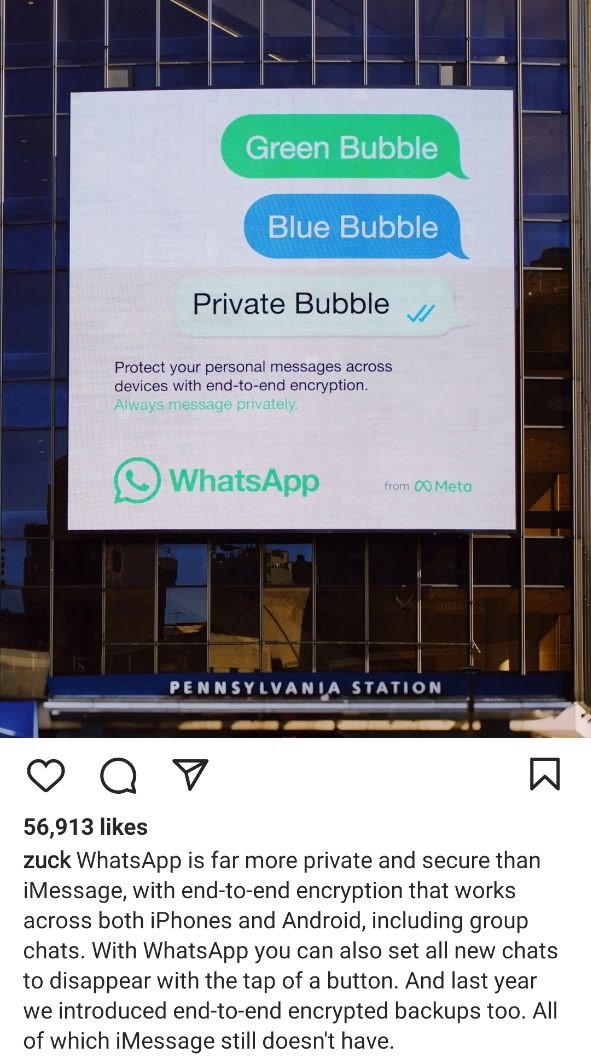
Meta promotes WhatsApp as a an alternative to iMessage

For instance, Zuckeberg noted that end-to-end encryption on WhatsApp works both on iOS and Android, while iMessage is tailor-made for Apple devices. Apple turns texts between iPhones and Android devices into SMS/MMS messages that are not encrypted. They appear in green text bubbles as opposed to blue for iPhone to iPhone texts. While iMessage’s criticism might be warranted, Meta has picked a relatively easy target. There are more secure options than WhatsApp, such as Signal.

Meta has faced privacy-related criticism over the years, including over employing an army of human “content reviewers” who can read messages from reported threads. WhatsApp also shares users’ detailed metadata with law enforcement in response to official requests, and does so almost in real time unlike other services.

Google will make ads more (or less) obvious

Google has announced a new design change that should help users better distinguish between paid and organic search results. Paid results, which were previously marked with a tiny “Ad” label, will now carry a longer “Sponsored” tag in bold black text. This change, according to Google, should “make information about paid content clear.” The company has already started rolling out the new design on mobile, and plans to begin testing it on desktop as well.
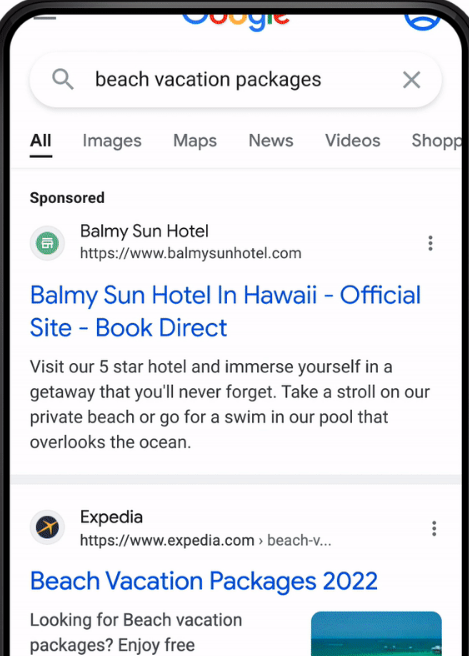
Google showcases the new look of its search ads and organic search results

In addition, Google will be adding site names and favicons on top of each search result on mobile — that should, presumably, make it easier to identify the source of the content.

It remains to be seen whether the design update will actually help distinguish ads from organic results or confuse users even more, especially when it comes to desktop. Favicons, as shown in Google’s preview, appear big enough to draw all the attention to themselves. Google has a long history of tweaking the design of its search ads to make them look less eye-catching and more like genuine search results. Back in the day Google used to shade its search ads blue, yellow, green, and even red before removing any shading in 2013. Since then and up until now, ad labeling has only gotten more subtle. AdGuard users, however, will not even notice the change because they are spared from seeing any ads, irrespective of design.

Germany fines Telegram for failure to follow its laws

In the latest back-and-forth between Berlin and Telegram, the German government has slapped a 5,1 million euro ($5 million) fine on the messaging service. The country’s justice ministry said that Telegram refused to create “a legally compliant” reporting channel where users could report “criminal content”. Telegram was also accused of failing to appoint a representative to the country.

Telegram can now appeal the fine. The move by the German government indicates that, contrary to some reports, there has been little if any rapprochement between the privacy-oriented tech company and Berlin. In August this year, Telegram surprised its German users by asking them directly if they want the company to relax rules around sharing data with law enforcement, leave them as they are or stop sharing data altogether. Currently, Telegram turns over IP addresses and phone numbers of terrorist suspects to the German police, but only if there’s a court order. The majority of users voted to keep the status quo.

Apparently, Telegram has taken feedback from users into account, and is refusing to budge. Telegram users have shown that they are not ready to compromise their privacy for the sake of potentially catching “bad guys”, which is an encouraging trend.

No love lost: Telegram CEO calls WhatsApp ‘surveillance tool’

Telegram CEO Pavel Durov did not mince words criticizing rival app WhatsApp. In a lenthy blog post, Durov cited a recently discovered vulnerability reported by WhatsApp, and noted that it could have allowed hackers to gain “full access” to everything on the potential victim’s phone.

The Telegram founder then listed other instances in which WhatsApp has encountered similar issues. He suggested that it was a vicious circle the Meta-owned messaging service was unlikely to ever break. “Every year, we learn about some issue in WhatsApp that puts everything on their users’ devices at risk. Which means it’s almost certain that a new security flaw already exists there.” Durov went on to say that he was not highlighting WhatsApp’s security issues to get users switch to Telegram, but rather to keep them away from WhatsApp, which he called a surveillance tool.”

Telegram has always been WhatsApp’s bitter rival
Photo: Adem AY/Unsplash

There is no love lost between WhatsApp and Telegram. Last year, tens of millions new users joined Telegram amid the fallout from WhatsApp’s new privacy policy. The policy revealed that the messenger in some cases shares user data with its parent company Facebook without the right to opt out. We, too, have serious concerns about WhatsApp and its past privacy record, so we don’t recommend using it, especially in the presence of other, more secure alternatives. But the final choice is yours, just be aware of the risks.

DuckDuckGo’s privacy-focused browser arrives to Mac

DuckDuckGo, a company mostly known for its privacy-first search engine, has started rolling out a web browser for Mac. The browser has been available through a waitlist since April, and has now moved into open beta. The developers also announced that they have included several new built-in privacy features in the release.

One of these features — called “Duck Player” — promises to protect users from targeted ads and cookies on YouTube. YouTube would still be able to register your views, but none of the content you view would contribute to creating your advertising profile on YouTube. This means that users won’t see personalized ads unless they want to. Other features include instant access to DDG email service that removes trackers and integrattion with open-source password manager Bitwarden. Apart from that, the developers said that they have improved the ad-blocking functionality by removing white space that used to be in place of blocked ads.

DuckDuckGo has confirmed they are working on a similar solution for Windows, and expect to release the web browser as a closed beta in the coming months. We can only salute DuckDuckGo for helping users to eschew trackers and ads. After suffering a public backlash due to its deal with Microsoft earlier this year, DDG seems to be working hard to redeem itself in the eyes of the privacy-conscious public.

Oops! Toyota says 300,000 customers’ data might have leaked due to security blunder

Japanese automaker Toyota has reported that email addresses and customer numbers of 269,019 people using its T-Connect service were exposed as a result of a data breach. T-Connect is a service that allows Toyota clients to check various types of data about their vehicles.

The breach has affected Toyota owners who registered with the T-Connect website between July 2017 and September this year, which was when Toyota discovered the security hole. According to the automaker itself, the website development subcontractor “mistakenly uploaded part of the source code to their GitHub account while it was set to be public” five years ago. The source code contained an access key to the data server where client data was stored. After discovering the vulnerability on September 15, Toyota made the code private. The company assured that other sensitive data, such as customer names, phone numbers, and credit card information, had not been leaked.

Toyota noted that while they could not confirm that any third party had actually accessed the exposed server, they could not rule that out. Toyota’s blunder shows once again that even big corporations that supposedly have all the resources and best practices to protect customer data are not immune from rather trivial security oversights.


Piditkö tästä julkaisusta?
AdGuard VPN AdGuard DNS AdGuard Mail AdGuard Wallet
AdGuard for Windows -sovelluksen päänäyttö
AdGuard for Windows -sovelluksen Suojaus-näyttö, joka näyttää suojausominaisuudet ja asetukset
AdGuard for Windows -sovelluksen Tilastot-näyttö, joka näyttää tilastot estetyistä mainoksista ja seurannasta
AdGuard for Windows -sovelluksen Sovellusten hallinta -näyttö, joka näyttää laitteelle asennettujen sovellusten suojauksen hallintavaihtoehdot
20 391 20391 arvostelua
Erinomainen!

AdGuard: mainosten estäjä Windowsille

AdGuard Windowsille on enemmän kuin mainosten estäjä. Se on monikäyttöinen työkalu, joka estää mainoksia, hallitsee pääsyä vaarallisille sivustoille, nopeuttaa sivujen latautumista ja suojaa lapsia sopimattomalta sisällöltä

Lataamalla sovelluksen hyväksyt lisenssisopimuksen ehdot
Microsoft Store
Lataamalla sovelluksen hyväksyt lisenssisopimuksen ehdot
AdGuard Windowsille v8.0, 14 päivän kokeilujakso
AdGuard for Mac -sovelluksen päänäyttö
AdGuard for Macin Häivetilan näyttö
20 391 20391 arvostelua
Erinomainen!

AdGuard: mainosten estäjä Macille

AdGuard for Mac on ainutlaatuinen mainostenesto-ohjelma, joka on suunniteltu macOS:lle. Sen lisäksi, että se suojaa sinua häiritseviltä mainoksilta selaimissa ja sovelluksissa, se suojaa sinua seurannalta, tietojenkalastelulta ja petoksilta
Lataamalla sovelluksen hyväksyt lisenssisopimuksen ehdot
Lue lisää
AdGuard Macille v2.19, 14 päivän kokeilujakso
AdGuard for Android -sovelluksen päänäyttö
AdGuard for Android -sovelluksen Seurantasuojaus-näyttö
AdGuard for Android -sovelluksen Sovellusten hallinta -näyttö, joka näyttää laitteelle asennettujen sovellusten suojauksen hallintavaihtoehdot
AdGuard for Android -sovelluksen Tilastot-näyttö, joka näyttää tilastot estetyistä mainoksista ja seurannasta
AdGuardin yksityisen selaimen päänäyttö Androidille
QR-koodi AdGuard for Android -sovelluksen lataamiseen
20 391 20391 arvostelua
Erinomainen!

AdGuard: mainosten estäjä Androidille

Estää mainokset ja seurannan kaikissa selaimissa, peleissä ja muissa sovelluksissa. Suojaa yksityisyyttäsi ja antaa sinun hallita, miten sovelluksesi käyttävät Internetiä. Asennetaan APK-tiedostona
Lataamalla sovelluksen hyväksyt lisenssisopimuksen ehdot
Lue lisää
Lataa lukemalla koodi
Käytä mitä tahansa laitteellasi olevaa QR-koodilukijaa
AdGuard Androidille v4.14, 14 päivän kokeilujakso
AdGuard for iOS -sovelluksen päänäyttö
AdGuard for iOS -sovelluksen Suojaus-näyttö, joka näyttää suojausominaisuudet ja asetukset
AdGuard for iOS -sovelluksen Tilastot-näyttö, joka näyttää tilastot estetyistä mainoksista ja seurannasta
QR-koodi AdGuard for iOS -sovelluksen lataamiseen
20 391 20391 arvostelua
Erinomainen!

AdGuard: mainosten estäjä iOS:lle

Paras iOS-mainostenesto iPhonelle ja iPadille. AdGuard poistaa kaikenlaiset mainokset ja seurantatyökalut Safarissa ja suojaa yksityisyyttäsi kaikissa sovelluksissa DNS-tasolla
Lataamalla sovelluksen hyväksyt lisenssisopimuksen ehdot
Lue lisää
Lataa lukemalla koodi
Käytä mitä tahansa laitteellasi olevaa QR-koodilukijaa
AdGuard iOS:lle v4.5
AdGuard Content Blocker -sovelluksen päänäyttö
AdGuard Content Blocker -sovelluksen Suodattimet-näyttö
AdGuard Content Blocker -sovelluksen Asetukset-näyttö
20 391 20391 arvostelua
Erinomainen!

AdGuard Sisällönesto

AdGuard Content Blocker eliminoi kaikenlaiset mainokset mobiiliselaimissa, jotka tukevat sisällönesto-tekniikkaa — eli Samsung Internet- ja Yandex Browser -selaimissa. Sen ominaisuudet ovat rajatummat verrattuna AdGuard Androidille -sovellukseen, mutta se on ilmainen, helppo asentaa ja tehokas
Lataamalla sovelluksen hyväksyt lisenssisopimuksen ehdot
Lue lisää
AdGuard Sisällönesto v2.8
AdGuard Browser Extension -laajennuksen päänäyttö
AdGuard Browser Extension -laajennuksen Seurantasuojaus-näyttö
20 391 20391 arvostelua
Erinomainen!

AdGuard Selainlaajennus

AdGuard on nopein ja kevein mainosestolaajennus, joka estää tehokkaasti kaikentyyppiset mainokset kaikilla verkkosivuiilla! Valitse AdGuard käyttämällesi selaimelle ja nauti mainosvapaasta, nopeasta ja turvallisesta surffailusta.
Asenna
Lataamalla sovelluksen hyväksyt lisenssisopimuksen ehdot
Asenna
Lataamalla sovelluksen hyväksyt lisenssisopimuksen ehdot
Asenna
Lataamalla sovelluksen hyväksyt lisenssisopimuksen ehdot
Asenna
Lataamalla sovelluksen hyväksyt lisenssisopimuksen ehdot
Asenna
Lataamalla sovelluksen hyväksyt lisenssisopimuksen ehdot
Lue lisää
Asenna
Lataamalla sovelluksen hyväksyt lisenssisopimuksen ehdot
Lue lisää
AdGuard Selainlaajennus v5.5
AdGuard Assistant -sovelluksen päänäyttö
20 391 20391 arvostelua
Erinomainen!

AdGuard Avustaja

Selaimen lisälaajennus AdGuard-työpöytäsovelluksille. Sen avulla voit estää omia kohteita verkkosivustoilla, lisätä verkkosivustoja sallittujen listalle ja lähettää raportteja suoraan selaimesta
AdGuard Avustaja v1.4
20 391 20391 arvostelua
Erinomainen!

AdGuard Home

AdGuard Home on verkkopohjainen ratkaisu mainosten ja seurantalaitteiden estämiseen. Asenna se kerran reitittimeesi kattaaksesi kaikki kotiverkon laitteet – erillistä asiakasohjelmistoa ei tarvita. Tämä on erityisen tärkeää erilaisille IoT-laitteille, jotka usein uhkaavat yksityisyyttäsi
AdGuard Home v0.107
AdGuard Pro for iOS -sovelluksen päänäyttö
AdGuard Pro for iOS -sovelluksen Suojaus-näyttö, joka näyttää suojauksen ominaisuudet ja asetukset
AdGuard Pro for iOS -sovelluksen Tilastot-näyttö, joka näyttää estettyjen mainosten ja seurannan tilastot
20 391 20391 arvostelua
Erinomainen!

AdGuard Pro iOS:lle

AdGuard Pro for iOS sisältää kaikki kehittyneet mainosten eston suojausominaisuudet käytössä. Se tarjoaa samat työkalut kuin maksullinen AdGuard for iOS -versio. Se on erinomainen mainosten estämisessä Safarissa ja antaa sinun mukauttaa DNS-asetuksia räätälöidäksesi suojauksesi. Se estää mainokset selaimissa ja sovelluksissa, suojaa lapsiasi sopimattomalta sisällöltä ja pitää henkilötietosi turvallisina.
Lataamalla sovelluksen hyväksyt lisenssisopimuksen ehdot
Lue lisää
AdGuard Pro iOS:lle v4.5
AdGuard Mini for Mac -sovelluksen päänäyttö
AdGuard Mini for Mac -sovelluksen Safari-suojausnäyttö
AdGuard Mini for Mac -sovelluksen Luo sääntö -näyttö
20 391 20391 arvostelua
Erinomainen!

AdGuard Mini Macille — Safari-mainosesto

AdGuard Mini for Mac on tehokas Safari-mainosten estäjä. Tämä kevyt sovellus poistaa mainokset, estää seurannan ja nopeuttaa sivujen latautumista. Se auttaa sinua selaamaan verkkoa Safarissa keskeytyksettä ja pitämään tietosi yksityisinä
Asenna
Lataamalla sovelluksen hyväksyt lisenssisopimuksen ehdot
Lue lisää
AdGuard Mini Macille v2.3
AdGuard for Android TV -sovelluksen päänäyttö, jossa suojaus on käytössä
AdGuard for Android TV -sovelluksen mainosten esto -näyttö, joka näyttää sen ominaisuudet ja asetukset
AdGuard for Android TV -sovelluksen Asetukset-näyttö
AdGuard for Android TV -sovelluksen Sovellusten hallinta -näyttö, joka näyttää sovellukset, joissa mainokset ja seuranta on estetty
20 391 20391 arvostelua
Erinomainen!

AdGuard Android TV:lle

AdGuard Android TV:lle on ainoa sovellus, joka estää mainoksia, suojaa yksityisyyttäsi ja toimii älytelevisiosi palomuurina. Saat varoituksia verkkouhkista, voit käyttää suojattua DNS:ää ja hyötyä tietoliikenteen salauksesta. Rentoudu ja sukella suosikkisarjoihisi huippuluokan suojauksella ja mainoksetta!
AdGuard Android TV:lle v4.14, 14 päivän kokeilujakso
AdGuard-maskotti Agnar pitelee Linux-pingviiniä
20 391 20391 arvostelua
Erinomainen!

AdGuard Linuxille

AdGuard for Linux on maailman ensimmäinen järjestelmänlaajuinen Linux-mainosten esto-ohjelma. Estä mainokset ja seurantaohjelmat laitetasolla, valitse esiasennetuista suodattimista tai lisää omasi – kaikki tämä komentorivikäyttöliittymän kautta
AdGuard Linuxille v1.4
20 391 20391 arvostelua
Erinomainen!

AdGuard Temp Mail

Ilmainen tilapäisten sähköpostiosoitteiden generaattori, joka pitää sinut nimettömänä ja suojaa yksityisyyttäsi. Ei roskapostia pääpostilaatikossasi!
20 391 20391 arvostelua
Erinomainen!

AdGuard VPN

75 sijaintia ympäri maailman

Pääsy kaikkeen sisältöön

Vahva salaus

Ei lokitietoja

Nopein yhteys

24/7 tuki

Kokeile ilmaiseksi
Lataamalla sovelluksen hyväksyt lisenssisopimuksen ehdot
Lue lisää
20 391 20391 arvostelua
Erinomainen!

AdGuard DNS

AdGuard DNS on takuuvarma tapa Internet-mainosten estoon, eikä se vaadi edes sovellusten asennusta. Se on helppokäyttöinen, täysin ilmainen, helppo määrittää laitteisiin ja tarjoaa minimaalisen toiminnallisuuden mainosten, laskureiden, haitallisten sivustojen ja aikuisille tarkoitetun sisällönestoon.
20 391 20391 arvostelua
Erinomainen!

AdGuard Mail

Suojaa henkilöllisyytesi, vältä roskapostia ja pidä postilaatikkosi turvallisena aliaksillamme ja väliaikaisilla sähköpostiosoitteilla. Käytä ilmaista sähköpostin välityspalveluamme ja sovelluksiamme kaikille käyttöjärjestelmille
20 391 20391 arvostelua
Erinomainen!

AdGuard Wallet

Turvallinen ja yksityinen kryptolompakko, joka antaa sinulle täyden hallinnan varoistasi. Hallitse useita lompakoita ja löydä tuhansia kryptovaluuttoja tallennettavaksi, lähetettäväksi ja vaihdettavaksi
AdGuardin lataus Asenna AdGuard painamalla nuolen osoittamaa painiketta Valitse "Avaa", paina "OK" ja odota tiedoston latautumista. Avautuneessa ikkunassa, raahaa AdGuardin kuvake "Sovellukset" -kansioon. Kiitos AdGuardin valinnasta! Valitse "Avaa", paina "OK" ja odota tiedoston latautumista. Avautuneessa ikkunassa, paina "Asenna". Kiitos AdGuardin valinnasta!
Asenna AdGuard myös mobiililaitteille

















































