Perplexity AI introduces ads — could this be the end of unbiased AI search?

It’s been roughly two years since AI-powered search engines first made their mark on the tech scene, and not long after, they began to introduce ads in their outputs. Bing AI (now Copilot) was the first to experiment with ads, and Microsoft is still refining its various ad formats in its AI-powered search engine. Recently, ads have started appearing in Google Overview, the AI-generated summaries of Google Search results, and they might eventually make their way to ChatGPT. OpenAI has stated that while they have no immediate plans to incorporate ads, they’re not ruling out the possibility in the future.

So, it’s not all that surprising that Perplexity AI, the first search engine built from the ground up with artificial intelligence, has also followed suit by introducing ads alongside its AI-generated answers. Founded in August 2022 by a former OpenAI employee, Perplexity AI has quickly become a buzz word in the sphere of technology, enamoured by AI, and an investor darling. With big names like Jeff Bezos backing the company, Perplexity is now seeking a valuation of $9 billion and hopes to raise $500 million in its latest fundraising round.

Ads in Perplexity AI now appear in two distinct spots: as follow-up questions to the main query, and as video ads shown separately on the right-hand sidebar.

Sponsored ads in Perplexity

The company says that any and all advertising will be labeled as “sponsored,” and that answers to these Sponsored Questions will still be generated by the technology, not influenced or written by the brands sponsoring them.

How much does an AI-powered engine cost?

When the era of AI-powered search engines first began, none of them featured ads. For a brief moment, some of us might have entertained the idea that this could be the way forward — that we’d have a clean, ad-free search experience. But that could have been nothing more than a pipe dream. The subscription model, or the freemium model where certain features are locked behind a paywall, has so far proven to be largely unsustainable, at least when it comes to search engines. We’ve seen ad-free, subscription-based search engines like Neeva shut down, (though, it’s up for a debate whether it would, have not the market been monopolized by Google), and privacy champions like Mozilla (the maker of Firefox) entrenching themselves deeper into the advertising industry.

The reality is, companies behind search engine products have not found any other way to monetize them on a large scale. Running ads seem to be the most straightforward and surefire way of doing so. One crucial factor that makes AI-powered search engines even less sustainable is that the companies behind them need to cover the hefty costs associated with the large language models (LLMs) that power them.

Running these models doesn’t come cheap — pricing for inference, which is the process of generating responses from an AI model, can vary significantly. For example, GPT-4 can cost up to $4 per 1,000 queries, while GPT-4 mini is cheaper at $0.24 per 1,000 queries, and Gemini costs around $0.12 per 1,000 queries. With models like Claude 3.5 Sonnet, the price rises to about $6 per 1,000 queries. This means that every search query and AI-generated response is draining company budgets, particularly when you scale up to millions of daily users. For instance, running ChatGPT incurs an estimated $700,000 per day in hardware inference costs.
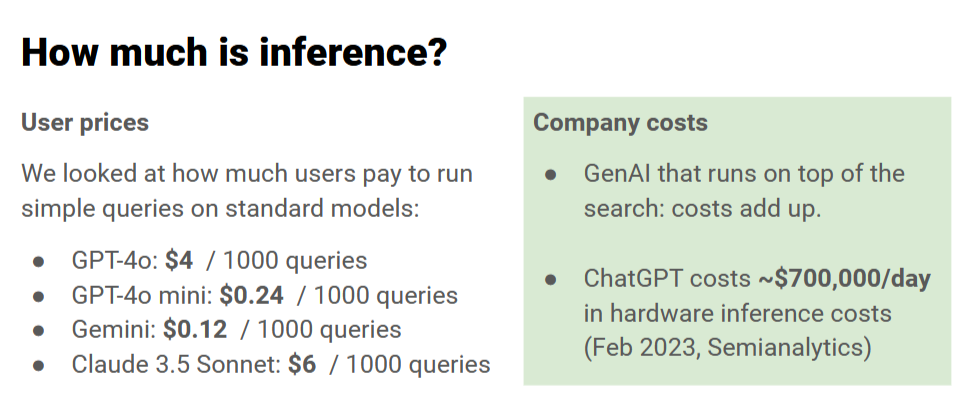
Chatbot inference costs

Perplexity, which operates on a freemium model, uses a standalone LLM based on GPT-3.5 for the free version, while the premium Perplexity Pro unlocks more advanced models like GPT-4, Claude 3.5, and proprietary in-house LLMs.
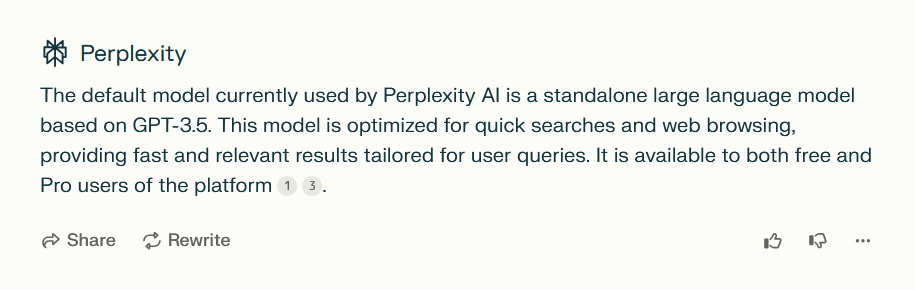
Perplexity LLM description

With costs adding up quickly, it’s clear that maintaining an AI-powered search experience is far from cheap, and finding a sustainable financial model is a significant challenge. Perplexity itself says that subscriptions alone just don’t cut it. But while it says that the ad formats may evolve over time, it insists that two principles will remain at the heart of their approach:

  1. The ads will not affect their commitment to providing “direct unbiased answers”.
  2. They will never share your personal information with advertisers.

Of course, these are Perplexity’s own claims, and while they claim their ad strategy is designed to complement the user experience, it remains to be seen how this plays out in practice.

If it looks like a duck and quacks like a duck...

In addition to the ads clearly labeled as “sponsored,” Perplexity has launched a new AI-powered “shopping assistant” that shows you product cards after you ask a shopping-related question, like “What are the best Christmas presents to buy?” For Perplexity Pro users in the US, there’s also the added convenience of a feature called “Buy with Pro,” which lets you check out directly on the Perplexity site or app. If “Buy with Pro” isn’t available for a particular product, you’re redirected to the merchant’s website to finish the transaction.

Perplexity is adamant that these are no ads although they eerily resemble such. According to the company, “When you ask Perplexity a shopping question, you’ll still get the precise, objective answers you expect, plus easy-to-read product cards.” They insist these cards are not sponsored, but rather “unbiased recommendations, tailored to your search by our AI.” This new feature is the result of a collaboration with platform integrations, including Shopify.

The product cards appear after the AI-generated answer, nestled below the ‘related questions’ section. When asking for the best Christmas presents, we were shown as many as five product cards — massive ones that take up a huge portion of the screen, requiring a fair bit of scrolling to move past them.

Search results product cards *mobile

Search results product cards *mobile

While Perplexity mentions that the product recommendations are “unbiased” and not sponsored, the reality is that AI algorithms often rely on data from merchants, reviews, and other third-party platforms. If the algorithm is influenced by sales trends, top-rated products, or specific partnerships (like Shopify), those influences might skew the recommendations, even if the AI itself isn’t directly “biased.” If a merchant pays to be featured more prominently on the platform or offers incentives to get listed more often, it could introduce subtle biases in what the AI surfaces.

Blocking the ads: does it require any new approaches?

You might assume that the rise of more sophisticated search engines would lead to even more advanced ads, and to some extent, that’s true. We’ve already seen examples of ads blending seamlessly into search results — becoming part of the response itself. Blocking those types of ads would require a more sophisticated approach, like hijacking user queries or processing chatbot responses with an ad-blocking LLM. It may sound too complex, and it really is. Click here to try the demo that showcases how blended ads work and how they can be blocked.

However, with Perplexity AI, things aren’t quite as complicated — at least not yet. The ads you encounter here can still be blocked using more traditional methods, like setting up filtering rules specifically targeting the sponsored sections.

As for the shopping cards that pop up after you ask a question, they can definitely be a bit much, especially when they take over the screen. Luckily, these can also be dealt with. Taking into account user feedback to that Perplexity feature and the fact that there’s no option to disable or hide the product cards, we’ve decided to introduce a rule in our Other Annoyances Filter to hide the product cards within the body of the answer. However, since we recognize that this feature might still be useful to some, those who wish to view the products can simply click “All Products” at the bottom of the response, which will open the product cards in a separate window.

All in all, it’s not about reinventing the wheel — just applying some conventional techniques to clear out the clutter. So, for now, at least, blocking ads on Perplexity doesn’t require breaking out any advanced tricks, but we cannot rule out that at some point it might.

Conclusion

The arrival of ads in AI-powered search engines seems inevitable. Google, originally launched without ads, incorporated them in 2000 and has never looked back. Similarly, as the costs of running AI models increase, search engines like Perplexity AI are turning to ads as a means of monetization. As for whether ads undermine the unbiased nature of a search engine, it’s a complex issue. While sponsored questions are clearly labeled, the answers themselves can be influenced by the sponsorship. For example, if a sponsored question mentions a brand like Whole Foods, the answer will prioritize that brand, even though the response isn’t labeled as sponsored.

The introduction of shopping cards adds another layer of controversy, as it’s difficult to reconcile claims of “unbiased” recommendations with the involvement of partnerships and data from merchants. Despite these claims, it’s hard to see how such features could be entirely free of bias. Ultimately, as AI-powered search engines evolve, the balance between monetization and maintaining trust with users will remain a challenging issue.


Tetszett ez a bejegyzés?
AdGuard VPN AdGuard DNS AdGuard Mail AdGuard Wallet
Az AdGuard for Windows főképernyője
Az AdGuard for Windows Védelem képernyője, amely a védelem funkcióit és beállításait mutatja
Az AdGuard for Windows Statisztikák képernyője, amely a letiltott hirdetések és nyomkövetők statisztikáit mutatja
Az AdGuard for Windows Alkalmazáskezelés képernyője, amely az eszközre telepített alkalmazások védelemkezelési beállításait mutatja
20 408 20408 értékelések
Kiváló!

AdGuard: hirdetésblokkoló Windowshoz

Az AdGuard Windowsra több mint egy reklámblokkoló. Ez egy többcélú eszköz, amely blokkolja a hirdetéseket, szabályozza a hozzáférést a veszélyes webhelyekhez, felgyorsítja az oldalak betöltését, és megvédi a gyermekeket a nem megfelelő tartalmaktól
A program letöltésével elfogadja a licencszerződés feltételeit
Microsoft Store
A program letöltésével elfogadja a licencszerződés feltételeit
AdGuard Windowsra v8.0, 14-napos próbaidőszak
Az AdGuard for Mac főképernyője
Az AdGuard Mac-hez Lopakodó mód képernyője
20 408 20408 értékelések
Kiváló!

AdGuard: hirdetésblokkoló Mac-hez

Az AdGuard for Mac egy egyedi reklámblokkoló, amelyet kifejezetten a macOS-hez terveztek. Amellett, hogy megvéd a zavaró hirdetésektől a böngészőkben és az alkalmazásokban, védelmet nyújt a követés, az adathalászat és a csalás ellen
A program letöltésével elfogadja a licencszerződés feltételeit
Olvasson tovább
AdGuard Macre v2.19, 14-napos próbaidőszak
Az AdGuard for Android főképernyője
Az AdGuard for Android Követés elleni védelem képernyője
Az AdGuard for Android Alkalmazáskezelés képernyője, amely az eszközre telepített alkalmazások védelemkezelési beállításait mutatja
Az AdGuard for Android Statisztikák képernyője, amely a letiltott hirdetések és nyomkövetők statisztikáit mutatja
Az AdGuard privát böngészőjének főképernyője Androidon
QR-kód az AdGuard for Android letöltéséhez
20 408 20408 értékelések
Kiváló!

AdGuard: hirdetésblokkoló Androidra

Blokkolja a hirdetéseket és a nyomkövetőket minden böngészőben, játékban és egyéb alkalmazásban. Védi a magánszféráját, és lehetővé teszi, hogy szabályozza, hogyan használják az alkalmazásai az Internetet. APK-n keresztül telepítve
A program letöltésével elfogadja a licencszerződés feltételeit
Olvasson tovább
Letöltésre szolgáló szkennelés
Használjon a készüléken elérhető QR-kódolvasót
AdGuard Androidra v4.14, 14-napos próbaidőszak
Az AdGuard for iOS főképernyője
Az AdGuard for iOS Védelem képernyője, amely a védelem funkcióit és beállításait mutatja
Az AdGuard for iOS Statisztikák képernyője, amely a letiltott hirdetések és nyomkövetők statisztikáit mutatja
QR-kód az AdGuard for iOS letöltéséhez
20 408 20408 értékelések
Kiváló!

AdGuard: hirdetésblokkoló az iOS-hez

A legjobb iOS-es reklámblokkoló iPhone-hoz és iPadhez. Az AdGuard mindenféle hirdetést és követőt eltávolít a Safariban, és DNS-szinten védi az adatvédelmedet az összes alkalmazásban
A program letöltésével elfogadja a licencszerződés feltételeit
Olvasson tovább
Letöltésre szolgáló szkennelés
Használjon a készüléken elérhető QR-kódolvasót
AdGuard iOS-re v4.5
Az AdGuard Content Blocker főképernyője
Az AdGuard Content Blocker Szűrők képernyője
Az AdGuard Content Blocker Beállítások képernyője
20 408 20408 értékelések
Kiváló!

AdGuard Tartalomblokkoló

Az AdGuard Content Blocker kiküszöböli a mobilböngészők minden olyan hirdetését, amely támogatja a tartalomblokkoló technológiát — nevezetesen a Samsung Internet és a Yandex böngésző. Funkciói korlátozottak az AdGuard for Androidhoz képest, de ingyenes, könnyen telepíthető és hatékony
A program letöltésével elfogadja a licencszerződés feltételeit
Olvasson tovább
AdGuard Tartalomblokkoló v2.8
Az AdGuard Browser Extension főképernyője
Az AdGuard Browser Extension Követés elleni védelem képernyője
20 408 20408 értékelések
Kiváló!

AdGuard Böngészőkiegészítő

Az AdGuard a leggyorsabb és a legkönnyedebb hirdetésblokkoló bővítmény, amely hatékonyan blokkolja az összes hirdetéstípust az bármelyik weboldalon! Válassza az AdGuard lehetőséget az Ön által használt böngészőhöz, hogy hirdetésektől mentesen, gyorsan és biztonságosan böngészhessen.
Telepítés
A program letöltésével elfogadja a licencszerződés feltételeit
Telepítés
A program letöltésével elfogadja a licencszerződés feltételeit
Telepítés
A program letöltésével elfogadja a licencszerződés feltételeit
Telepítés
A program letöltésével elfogadja a licencszerződés feltételeit
Telepítés
A program letöltésével elfogadja a licencszerződés feltételeit
Olvasson tovább
AdGuard Böngészőkiegészítő v5.5
Az AdGuard Assistant főképernyője
20 408 20408 értékelések
Kiváló!

AdGuard Asszisztens

A [AdGuard asztali alkalmazások] böngészőbővítménye(https://adguard.com/products.html?_plc=hu). Lehetővé teszi a webhelyek egyéni elemeinek blokkolását, webhelyek hozzáadását az engedélyezési listához, és jelentések küldését közvetlenül a böngészőből
AdGuard Asszisztens v1.4
20 408 20408 értékelések
Kiváló!

AdGuard Home

Az AdGuard Home egy hálózati alapú megoldás a hirdetések és nyomkövetők blokkolására. Telepítse egyszer az útválasztóra, hogy lefedje az otthoni hálózat összes eszközét – nincs szükség további kliensszoftverre. Ez különösen fontos a különféle IoT-eszközök esetében, amelyek gyakran veszélyt jelentenek az Ön magánéletére

AdGuard Home v0.107
Az AdGuard Pro for iOS főképernyője
Az AdGuard Pro for iOS Védelem képernyője, amely a védelem funkcióit és beállításait mutatja
Az AdGuard Pro for iOS Statisztikák képernyője, amely a letiltott hirdetések és nyomkövetők statisztikáit mutatja
20 408 20408 értékelések
Kiváló!

AdGuard Pro iOS-re

Az AdGuard Pro iOS-hez verziója minden fejlett hirdetésblokkoló védelmi funkcióval rendelkezik. Ugyanazokat az eszközöket kínálja, mint az AdGuard iOS fizetős verziója. Kiválóan blokkolja a hirdetéseket a Safariban, és lehetővé teszi a DNS-beállítások testreszabását a védelem személyre szabásához. Blokkolja a hirdetéseket a böngészőkben és alkalmazásokban, megvédi gyermekeit a nem megfelelő tartalmaktól, és biztonságban tartja személyes adatait.

A program letöltésével elfogadja a licencszerződés feltételeit
Olvasson tovább
AdGuard Pro iOS-re v4.5
Az AdGuard Mini for Mac főképernyője
Az AdGuard Mini for Mac Safari védelem képernyője
Az AdGuard Mini for Mac Szabály létrehozása képernyője
20 408 20408 értékelések
Kiváló!

AdGuard Mini Mac-hez — Safari hirdetésblokkoló

Az AdGuard Mini Mac-re egy hatékony Safari hirdetésblokkoló. Ez a könnyű alkalmazás eltávolítja a hirdetéseket, blokkolja a nyomkövetőket, és felgyorsítja az oldalak betöltését. Segít zavaró tényezők nélkül böngészni a webet Safariban, és megőrzi az adataid privát jellegét
AdGuard Mini Mac-hez v2.3
Az AdGuard for Android TV főképernyője engedélyezett védelemmel
Az AdGuard for Android TV hirdetésblokkolás képernyője, amely a funkciókat és beállításokat mutatja
Az AdGuard for Android TV Beállítások képernyője
Az AdGuard for Android TV Alkalmazáskezelés képernyője, amely azokat az alkalmazásokat mutatja, ahol a hirdetések és nyomkövetők le vannak tiltva
20 408 20408 értékelések
Kiváló!

AdGuard Android TV-hez

Az Android TV-hez készült AdGuard az egyetlen alkalmazás, amely blokkolja a hirdetéseket, védi az Ön adatait, és tűzfalként működik a Smart TV-ben. Figyelmeztetéseket kaphat a webes fenyegetésekről, használjon biztonságos DNS-t, és élvezze a titkosított forgalom előnyeit. Pihenjen, és merüljön el kedvenc műsoraiban a csúcsminőségű biztonság és  zero  hirdetés!
AdGuard Android TV-hez v4.14, 14-napos próbaidőszak
Az AdGuard kabalája, Agnar, aki a Linux pingvint tartja
20 408 20408 értékelések
Kiváló!

AdGuard Linuxhoz

Az AdGuard for Linux a világ első rendszerszintű Linux-hirdetésblokkolója. Blokkolja a hirdetéseket és a nyomkövetőket eszközszinten, válasszon az előre telepített szűrők közül, vagy adja hozzá sajátját – mindezt a parancssori felületen keresztül
AdGuard Linuxhoz v1.4
20 408 20408 értékelések
Kiváló!

AdGuard Temp Mail

Ingyenes ideiglenes email címgenerátor, amely névtelenül tartja és védi magánéletét. Nincs spam a fő postaládájában!
20 408 20408 értékelések
Kiváló!

AdGuard VPN

75 végpont világszerte

Hozzáférés bármilyen tartalomhoz

Erős titkosítás

Nincs naplózás

Gyorsabb kapcsolódás

0-24 támogatás

20 408 20408 értékelések
Kiváló!

AdGuard DNS

Az AdGuard DNS egy bolondbiztos módszer az internetes hirdetések blokkolására, amely nem igényel alkalmazásokat. Könnyen használható, teljesen ingyenes, könnyen beállítható bármilyen eszközön, és csak minimálisan szükséges funkciókat biztosít a hirdetések, számlálók, rosszindulatú webhelyek és felnőtteknek szóló tartalmak blokkolásához.
20 408 20408 értékelések
Kiváló!

AdGuard Mail

Védje személyazonosságát, kerülje a kéretlen leveleket, és tartsa biztonságban postafiókját álneveinkkel és ideiglenes email címeinkkel. Élvezze ingyenes email továbbító szolgáltatásunk és alkalmazásaink előnyeit minden operációs rendszerre.
20 408 20408 értékelések
Kiváló!

AdGuard Wallet

Biztonságos és privát kriptopénztárca, amely teljes ellenőrzést biztosít eszközei felett. Kezeljen több pénztárcát, és fedezzen fel több ezer kriptovalutát tárolásra, küldésre és cserére
Az AdGuard letöltése megkezdődött Kattintson a nyíllal jelzett gombra a telepítés elindításához. Válassza a "Megnyitás" lehetőséget, és kattintson az "OK" gombra, majd várja meg a fájl letöltését. A megnyílt ablakban húzza az AdGuard ikont az "Alkalmazások" mappába. Köszönjük, hogy az AdGuardot választotta! Válassza a "Megnyitás" lehetőséget, és kattintson az "OK" gombra, majd várja meg a fájl letöltését. A megnyílt ablakban kattintson az "Telepítés" gombra. Köszönjük, hogy az AdGuardot választotta!
Telepítse az AdGuardot mobileszközökre is:
















































