Unimania: I Need Your Facebook Data, Location, And Your Browsing History

Privacy protection is basically what we do, so I never get tired of stories about how unpredictable the ways of getting Facebook user data are. Cambridge Analytica might be dead, but the business of stealing users’ data lives on, and this article demonstrates one more example of that.

The story begins with the recent research I conducted about fake ad blockers in the Chrome Web Store. The outcome of that research was that I received dozens of questions about whether this or that extension is safe to use. This made me take a deeper look into the most popular Chrome extensions, but even so, I had no idea at that time where this investigation was going to lead me. In fact, it exposed to me a huge spyware campaign that utilizes popular Android apps and Chrome extensions to steal Facebook data and the browsing histories of millions of users.

Suspicious Chrome extensions

I conducted an automated scan of all publicly available Chrome extensions. This scan flagged quite a few different privacy issues, which I will address in more specific detail in a forthcoming post.

One of the issues that immediately caught my attention, as I noticed suspicious requests made to various Facebook domains.

Meet these nasty Chrome extensions, currently in use by an estimated 420,000 users:

  • Album & Photo Manager For Facebook (92K+ users)
  • PDF Merge — PDF Files Merger (125K+ users)
  • Pixcam — Webcam Effects (31K+ users)

So, what is wrong with them? Let's dive into the details.

The inscrutable ways of your Facebook data

If you are logged into Facebook, these spyware extensions will scrape all your data immediately after the browser startup:
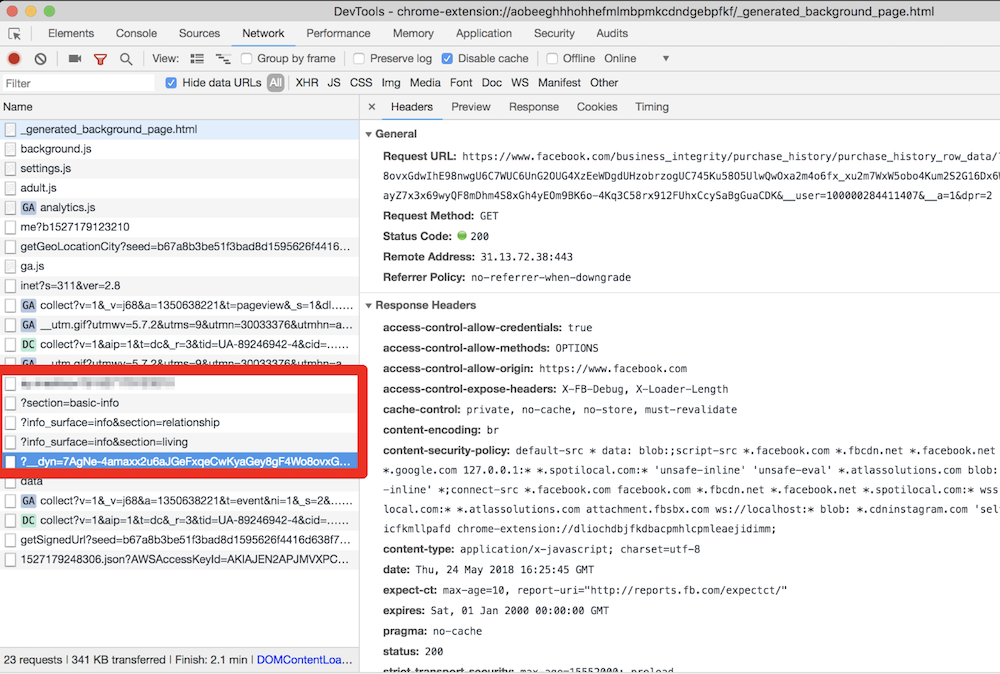
They even try to parse your purchase history! This alone is enough for these extensions to be booted from the Chrome Web Store.

All this data is then collected and sent to the um-public-panel-prod.s3.amazonaws.com domain, which is a named Amazon S3 instance rented by the spyware authors.
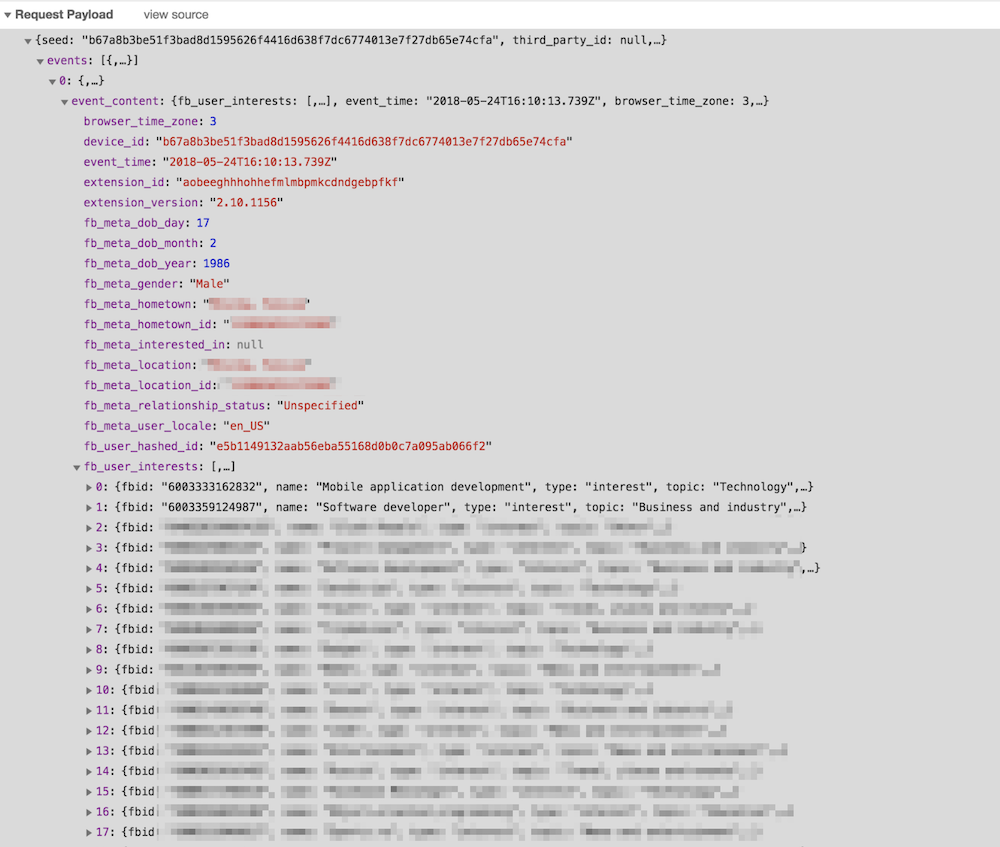
An alarming amount of data was being sent over to that server including all the Facebook "interests". In order to test this, I had to use my own account, so you can observe a piece of my own data, which I don't mind sharing with you.

As you can see on the screenshot, they do not send a plain FB identifier; instead, they send it in a hashed form. I imagine that they think that this practice allow the spyware group to say that this data has been made "anonymous."

“Dear spyware developers, come on! Do you really believe that hashing a numeric value with a static salt cannot be decoded?”

SHA1("sME9Azj8G28Y" + userId) = e5b1149132aab56eba55168d0b0c7a095ab066f2

By the way, dear reader, here is a contest for you: the first one to crack the hash and discover my FB ID gets a free AdGuard license. Write your answer in the comments. No cheating, please :)

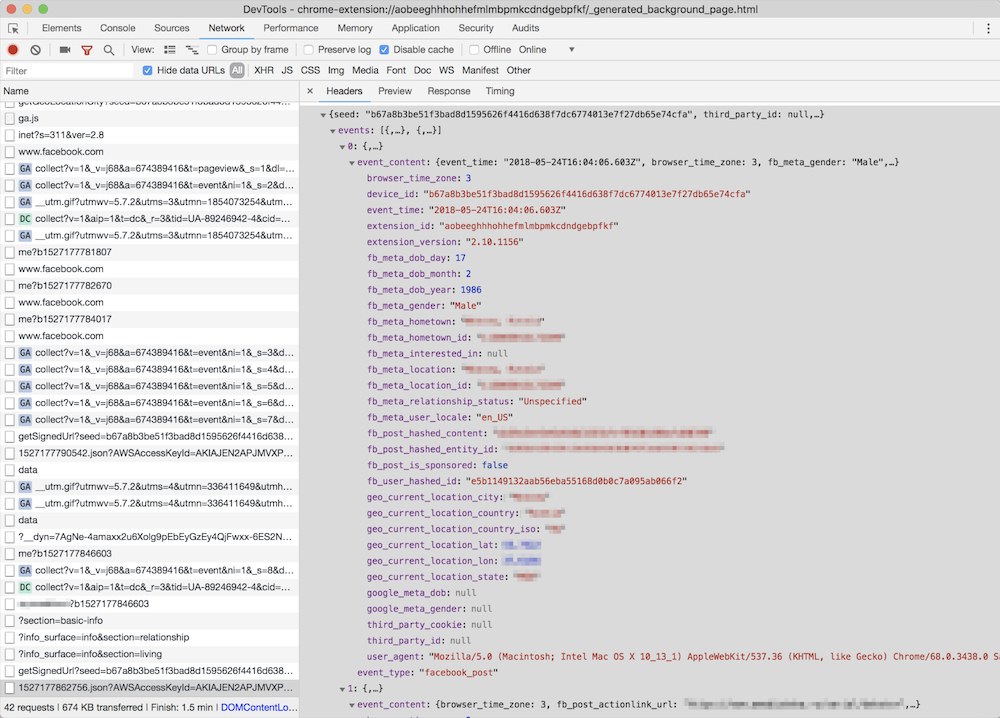
But hey, what is the good of having this data without the spyware company also knowing what exactly you do on the Internet? Wouldn't it be so much better if they knew what exact posts you read or what exact ads you see? Well, no worries, that's exactly what they do: they siphon information about all of the posts, sponsored posts, tweets, the YouTube videos and ads you see or interact with, along with a poorly hashed user ID and totally UN-hashed location data.
Meet Unimania Inc.

Who is behind this activity? The only thing I knew about the authors was the link to their extensions' privacy policy: here's a copy, just in case. As usual, there's a lot of confusing legalese about how you provide them with consent without doing anything, how seriously they care about your privacy, how strongly your data is made (or kept) anonymous and how it can in no way can be traced back to you as it is protected by a powerful mathematical "hash function."

Fortunately, it is also pretty transparent about what exact information about you is collected:

What Information We Collect and How We Collect It. In general, the Information we collect includes nonpersonally identifiable demographic and psychographic data as well as sponsored campaigns, advertisements or posts that target you directly or that have been shared with you.

Also, I found their EULA: here's the copy, from which I learned that the company name is "Unimania, Inc." and they claim to be located in Tel-Aviv, Israel. However, I could not find any information on this company in the Israeli company register.

My story might have ended here, but there was a sentence in the privacy policy that caught my attention:

Background. You have been directed to this Privacy Policy from a separate and independent third party Google Chrome Extension or Mobile Software Application (“Third Party Software”).

Mobile Software Application

"Mobile Software Application!" I said to myself.

So this was not just a matter limited to Chrome extensions, and I realized that I needed to continue my investigation. To this end, some good news was that we already had some data collected while preparing a study on mobile apps tracking and I could make use of it and query it right away.

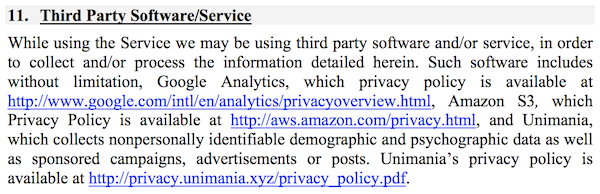
That's how I found one particular app that was connecting to the Unimania servers. This was an alternative Facebook client called "Fast — Social App" with a record of more than 10,000,000 installs according to Google Play. The app developer does not bother to hide that fact and mentions Unimania in the privacy policy:
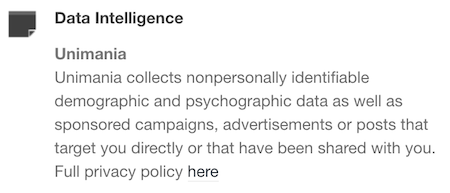
Scanning this developer apps' traffic confirmed that "Fast-Social App" transfers pretty much the same data as the Chrome extensions do, and to the same Unimania servers. I also found out that "Fast Lite - Social App + Twitter" (1,000,000+ installs) also does the same thing.

Besides that, I found a couple more apps that mention Unimania in their privacy policies. I cannot confirm that they are still leaking user data, but I can assume they were doing so in the past; otherwise, why would they mention it?

Finally, it seems that Unimania is about to launch their own "products":

  • OmniSocial — a mobile app
  • Who's following me? — a browser extension

Obviously, none of these apps describe this behavior in the app description; neither do they have an "in-app disclosure" as required by Google. I must admit that the Google Play Developer Policies look solid, and so they are likely not the reason of why the privacy of Android apps is in such a sad state. The problem is that these policies are not enforced, hence most of the app developers simply ignore them.

Summary

Congratulations for reading through such a long article (or for skipping all the boring technical details and jumping straight to the summary)!

Let's summarize what we discovered.

  1. A huge spyware campaign engaging some Mobile Apps and Chrome extensions in stealing users’ Facebook data and spying on their social network browsing history. The list of the information collected by these apps and extensions includes the user’s Facebook profile data including demographics and the list of user interests. Also, they were collecting the users' browsing history including all the Facebook regular and sponsored posts, tweets, YouTube videos and ads.
  2. Four spyware Chrome extensions with aggegrated users count of more than 400,000 users.
  3. Two Android apps with total installs count of more than 11,000,000 selling out their users data.
  4. The campaign is run by a supposed Israeli company named "Unimania, Inc." Unfortunately, I was not able to trace this further back to Unimania’s owners or affiliates and I can't say who is profiting from the data.

I've reported all the discovered apps and extensions to Google and I hope they take corrective measures soon.

How to protect yourself?

The answer to this question is both very simple and very difficult.

When installing anything on your device or browser, follow these rules:

  • Read the privacy policy. It is not useless - everything discovered in this case was mentioned in the privacy policies.
  • Never ever install anything made by a developer you don't trust. Do your homework, find out who the developer is and decide for yourself if they are trustworthy.

Also, all Unimania domains have now been added to the "AdGuard Spyware filter" and will be blocked automatically if you have it enabled in any of our AdGuard products, or if you use AdGuard DNS. Unfortunately, there is a browser limitation that prevents an extension from controlling requests made by other extensions so using the AdGuard Chrome extension or uBlock Origin may not be enough, even if you have the "AdGuard Spyware filter" enabled.

Alternatively, you can block these three domains by adding them to the "hosts" file:

  • um-public-panel-prod.s3.amazonaws.com
  • collection-endpoint-prod.herokuapp.com
  • collection-endpoint-staging.herokuapp.com

UPD (Jun 3): The Android apps mentioned in the article are no more available on Google Play.
UPD (Jun 5): The Chrome extensions are finally taken down from the Chrome Web Store.


Tetszett ez a bejegyzés?
AdGuard VPN AdGuard DNS AdGuard Mail AdGuard Wallet
Az AdGuard for Windows főképernyője
Az AdGuard for Windows Védelem képernyője, amely a védelem funkcióit és beállításait mutatja
Az AdGuard for Windows Statisztikák képernyője, amely a letiltott hirdetések és nyomkövetők statisztikáit mutatja
Az AdGuard for Windows Alkalmazáskezelés képernyője, amely az eszközre telepített alkalmazások védelemkezelési beállításait mutatja
20 409 20409 értékelések
Kiváló!

AdGuard: hirdetésblokkoló Windowshoz

Az AdGuard Windowsra több mint egy reklámblokkoló. Ez egy többcélú eszköz, amely blokkolja a hirdetéseket, szabályozza a hozzáférést a veszélyes webhelyekhez, felgyorsítja az oldalak betöltését, és megvédi a gyermekeket a nem megfelelő tartalmaktól
A program letöltésével elfogadja a licencszerződés feltételeit
Microsoft Store
A program letöltésével elfogadja a licencszerződés feltételeit
AdGuard Windowsra v8.0, 14-napos próbaidőszak
Az AdGuard for Mac főképernyője
Az AdGuard Mac-hez Lopakodó mód képernyője
20 409 20409 értékelések
Kiváló!

AdGuard: hirdetésblokkoló Mac-hez

Az AdGuard for Mac egy egyedi reklámblokkoló, amelyet kifejezetten a macOS-hez terveztek. Amellett, hogy megvéd a zavaró hirdetésektől a böngészőkben és az alkalmazásokban, védelmet nyújt a követés, az adathalászat és a csalás ellen
A program letöltésével elfogadja a licencszerződés feltételeit
Olvasson tovább
AdGuard Macre v2.19, 14-napos próbaidőszak
Az AdGuard for Android főképernyője
Az AdGuard for Android Követés elleni védelem képernyője
Az AdGuard for Android Alkalmazáskezelés képernyője, amely az eszközre telepített alkalmazások védelemkezelési beállításait mutatja
Az AdGuard for Android Statisztikák képernyője, amely a letiltott hirdetések és nyomkövetők statisztikáit mutatja
Az AdGuard privát böngészőjének főképernyője Androidon
QR-kód az AdGuard for Android letöltéséhez
20 409 20409 értékelések
Kiváló!

AdGuard: hirdetésblokkoló Androidra

Blokkolja a hirdetéseket és a nyomkövetőket minden böngészőben, játékban és egyéb alkalmazásban. Védi a magánszféráját, és lehetővé teszi, hogy szabályozza, hogyan használják az alkalmazásai az Internetet. APK-n keresztül telepítve
A program letöltésével elfogadja a licencszerződés feltételeit
Olvasson tovább
Letöltésre szolgáló szkennelés
Használjon a készüléken elérhető QR-kódolvasót
AdGuard Androidra v4.14, 14-napos próbaidőszak
Az AdGuard for iOS főképernyője
Az AdGuard for iOS Védelem képernyője, amely a védelem funkcióit és beállításait mutatja
Az AdGuard for iOS Statisztikák képernyője, amely a letiltott hirdetések és nyomkövetők statisztikáit mutatja
QR-kód az AdGuard for iOS letöltéséhez
20 409 20409 értékelések
Kiváló!

AdGuard: hirdetésblokkoló az iOS-hez

A legjobb iOS-es reklámblokkoló iPhone-hoz és iPadhez. Az AdGuard mindenféle hirdetést és követőt eltávolít a Safariban, és DNS-szinten védi az adatvédelmedet az összes alkalmazásban
A program letöltésével elfogadja a licencszerződés feltételeit
Olvasson tovább
Letöltésre szolgáló szkennelés
Használjon a készüléken elérhető QR-kódolvasót
AdGuard iOS-re v4.5
Az AdGuard Content Blocker főképernyője
Az AdGuard Content Blocker Szűrők képernyője
Az AdGuard Content Blocker Beállítások képernyője
20 409 20409 értékelések
Kiváló!

AdGuard Tartalomblokkoló

Az AdGuard Content Blocker kiküszöböli a mobilböngészők minden olyan hirdetését, amely támogatja a tartalomblokkoló technológiát — nevezetesen a Samsung Internet és a Yandex böngésző. Funkciói korlátozottak az AdGuard for Androidhoz képest, de ingyenes, könnyen telepíthető és hatékony
A program letöltésével elfogadja a licencszerződés feltételeit
Olvasson tovább
AdGuard Tartalomblokkoló v2.8
Az AdGuard Browser Extension főképernyője
Az AdGuard Browser Extension Követés elleni védelem képernyője
20 409 20409 értékelések
Kiváló!

AdGuard Böngészőkiegészítő

Az AdGuard a leggyorsabb és a legkönnyedebb hirdetésblokkoló bővítmény, amely hatékonyan blokkolja az összes hirdetéstípust az bármelyik weboldalon! Válassza az AdGuard lehetőséget az Ön által használt böngészőhöz, hogy hirdetésektől mentesen, gyorsan és biztonságosan böngészhessen.
Telepítés
A program letöltésével elfogadja a licencszerződés feltételeit
Telepítés
A program letöltésével elfogadja a licencszerződés feltételeit
Telepítés
A program letöltésével elfogadja a licencszerződés feltételeit
Telepítés
A program letöltésével elfogadja a licencszerződés feltételeit
Telepítés
A program letöltésével elfogadja a licencszerződés feltételeit
Olvasson tovább
AdGuard Böngészőkiegészítő v5.5
Az AdGuard Assistant főképernyője
20 409 20409 értékelések
Kiváló!

AdGuard Asszisztens

A [AdGuard asztali alkalmazások] böngészőbővítménye(https://adguard.com/products.html?_plc=hu). Lehetővé teszi a webhelyek egyéni elemeinek blokkolását, webhelyek hozzáadását az engedélyezési listához, és jelentések küldését közvetlenül a böngészőből
AdGuard Asszisztens v1.4
20 409 20409 értékelések
Kiváló!

AdGuard Home

Az AdGuard Home egy hálózati alapú megoldás a hirdetések és nyomkövetők blokkolására. Telepítse egyszer az útválasztóra, hogy lefedje az otthoni hálózat összes eszközét – nincs szükség további kliensszoftverre. Ez különösen fontos a különféle IoT-eszközök esetében, amelyek gyakran veszélyt jelentenek az Ön magánéletére

AdGuard Home v0.107
Az AdGuard Pro for iOS főképernyője
Az AdGuard Pro for iOS Védelem képernyője, amely a védelem funkcióit és beállításait mutatja
Az AdGuard Pro for iOS Statisztikák képernyője, amely a letiltott hirdetések és nyomkövetők statisztikáit mutatja
20 409 20409 értékelések
Kiváló!

AdGuard Pro iOS-re

Az AdGuard Pro iOS-hez verziója minden fejlett hirdetésblokkoló védelmi funkcióval rendelkezik. Ugyanazokat az eszközöket kínálja, mint az AdGuard iOS fizetős verziója. Kiválóan blokkolja a hirdetéseket a Safariban, és lehetővé teszi a DNS-beállítások testreszabását a védelem személyre szabásához. Blokkolja a hirdetéseket a böngészőkben és alkalmazásokban, megvédi gyermekeit a nem megfelelő tartalmaktól, és biztonságban tartja személyes adatait.
A program letöltésével elfogadja a licencszerződés feltételeit
Olvasson tovább
AdGuard Pro iOS-re v4.5
Az AdGuard Mini for Mac főképernyője
Az AdGuard Mini for Mac Safari védelem képernyője
Az AdGuard Mini for Mac Szabály létrehozása képernyője
20 409 20409 értékelések
Kiváló!

AdGuard Mini Mac-hez — Safari hirdetésblokkoló

Az AdGuard Mini Mac-re egy hatékony Safari hirdetésblokkoló. Ez a könnyű alkalmazás eltávolítja a hirdetéseket, blokkolja a nyomkövetőket, és felgyorsítja az oldalak betöltését. Segít zavaró tényezők nélkül böngészni a webet Safariban, és megőrzi az adataid privát jellegét
AdGuard Mini Mac-hez v2.3
Az AdGuard for Android TV főképernyője engedélyezett védelemmel
Az AdGuard for Android TV hirdetésblokkolás képernyője, amely a funkciókat és beállításokat mutatja
Az AdGuard for Android TV Beállítások képernyője
Az AdGuard for Android TV Alkalmazáskezelés képernyője, amely azokat az alkalmazásokat mutatja, ahol a hirdetések és nyomkövetők le vannak tiltva
20 409 20409 értékelések
Kiváló!

AdGuard Android TV-hez

Az Android TV-hez készült AdGuard az egyetlen alkalmazás, amely blokkolja a hirdetéseket, védi az Ön adatait, és tűzfalként működik a Smart TV-ben. Figyelmeztetéseket kaphat a webes fenyegetésekről, használjon biztonságos DNS-t, és élvezze a titkosított forgalom előnyeit. Pihenjen, és merüljön el kedvenc műsoraiban a csúcsminőségű biztonság és  zero  hirdetés!
AdGuard Android TV-hez v4.14, 14-napos próbaidőszak
Az AdGuard kabalája, Agnar, aki a Linux pingvint tartja
20 409 20409 értékelések
Kiváló!

AdGuard Linuxhoz

Az AdGuard for Linux a világ első rendszerszintű Linux-hirdetésblokkolója. Blokkolja a hirdetéseket és a nyomkövetőket eszközszinten, válasszon az előre telepített szűrők közül, vagy adja hozzá sajátját – mindezt a parancssori felületen keresztül
AdGuard Linuxhoz v1.4
20 409 20409 értékelések
Kiváló!

AdGuard Temp Mail

Ingyenes ideiglenes email címgenerátor, amely névtelenül tartja és védi magánéletét. Nincs spam a fő postaládájában!
20 409 20409 értékelések
Kiváló!

AdGuard VPN

75 végpont világszerte

Hozzáférés bármilyen tartalomhoz

Erős titkosítás

Nincs naplózás

Gyorsabb kapcsolódás

0-24 támogatás

20 409 20409 értékelések
Kiváló!

AdGuard DNS

Az AdGuard DNS egy bolondbiztos módszer az internetes hirdetések blokkolására, amely nem igényel alkalmazásokat. Könnyen használható, teljesen ingyenes, könnyen beállítható bármilyen eszközön, és csak minimálisan szükséges funkciókat biztosít a hirdetések, számlálók, rosszindulatú webhelyek és felnőtteknek szóló tartalmak blokkolásához.
20 409 20409 értékelések
Kiváló!

AdGuard Mail

Védje személyazonosságát, kerülje a kéretlen leveleket, és tartsa biztonságban postafiókját álneveinkkel és ideiglenes email címeinkkel. Élvezze ingyenes email továbbító szolgáltatásunk és alkalmazásaink előnyeit minden operációs rendszerre.

20 409 20409 értékelések
Kiváló!

AdGuard Wallet

Biztonságos és privát kriptopénztárca, amely teljes ellenőrzést biztosít eszközei felett. Kezeljen több pénztárcát, és fedezzen fel több ezer kriptovalutát tárolásra, küldésre és cserére

Az AdGuard letöltése megkezdődött Kattintson a nyíllal jelzett gombra a telepítés elindításához. Válassza a "Megnyitás" lehetőséget, és kattintson az "OK" gombra, majd várja meg a fájl letöltését. A megnyílt ablakban húzza az AdGuard ikont az "Alkalmazások" mappába. Köszönjük, hogy az AdGuardot választotta! Válassza a "Megnyitás" lehetőséget, és kattintson az "OK" gombra, majd várja meg a fájl letöltését. A megnyílt ablakban kattintson az "Telepítés" gombra. Köszönjük, hogy az AdGuardot választotta!
Telepítse az AdGuardot mobileszközökre is: