Why is AdGuard not on Google Play?

One of the most common questions we’ve been asked over the years is why AdGuard for Android is not on the Google Play Store. The short answer is — it was not our decision. Google is the one to blame. In March 2013, Google started purging ad-blocking apps from its Play Store, claiming that they had violated a loosely worded section of the developer agreement that forbade apps from interfering with “other properties or services” of third parties. The following year, this purge affected the newly-released AdGuard for Android. The app was taken down from the Google Play Store on November 25, 2014, but you can still download AdGuard for Android directly from our official website.

If you want to know more about how it came to that, how we adapted our app distribution model after the Play Store massacre, why you can still find an AdGuard content blocking app (but not AdGuard for Android) on Google Play, and what our hopes are for the future, read on.

Timeline of Google’s crackdown on ad blockers

Until 2013, Google tolerated ad-blocking apps in its Play Store. At the time, there were a number of apps on Google Play that offered content filtering functionality, such as AdAway, AdFree, Ad Blocker, and AdBlock Plus. Everything changed on March 13, 2013, when Google pulled several ad blocking apps from its store overnight. The apps’ developers received identical notices from Google informing them that they had violated section 4.4 of the Developer Distribution Agreement. This was a bolt from the blue for the ad blocking community, as the clause Google used to punish them was not new.
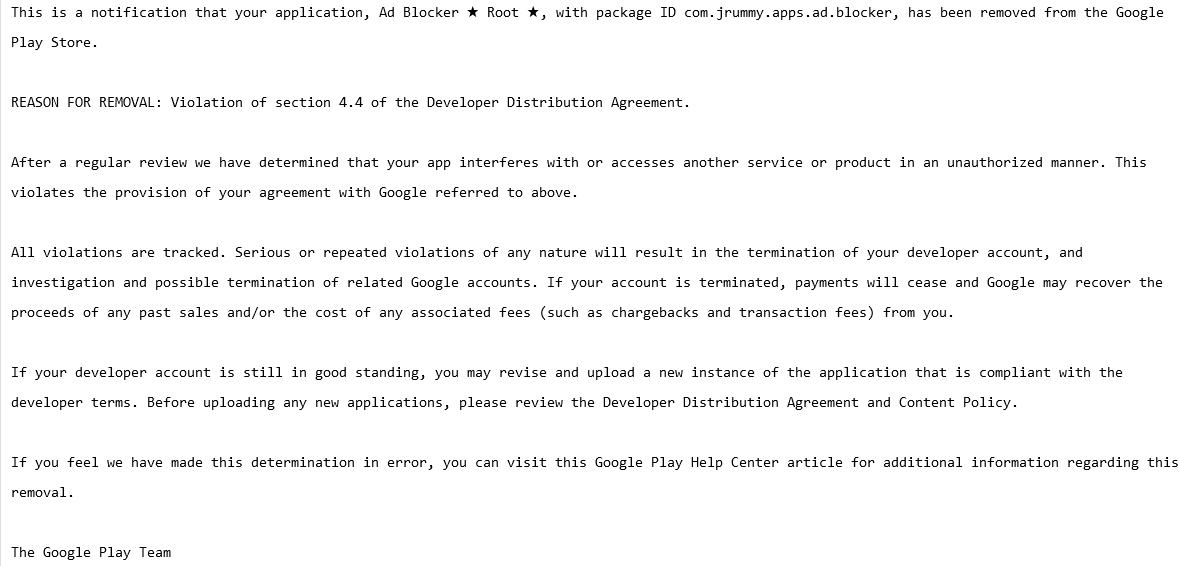
A screenshot of a notification that Ad Blocker received from Google
A notification that Ad Blocker received from Google. Source: Pastebin

In fact, section 4.4. “Prohibited Actions” was so vague that it could arguably be used to remove any app for almost any reason. Here is how the section was worded:

You agree that you will not engage in any activity with the Store, including the development or distribution of Products, that interferes with, disrupts, damages, or accesses in an unauthorized manner the devices, servers, networks, or other properties or services of any third party including, but not limited to, Android users, Google or any mobile network operator. You may not use customer information obtained from the Store to sell or distribute Products outside of the Store.

AdGuard for Android was not spared from the crackdown: on November 25, 2014, it was removed from the Play Store just two weeks after its official launch. The pretext was the same — violation of section 4.4. of the developer terms.

But it wasn’t the end of our story with the Google Play Store. In 2016, Google tweaked its developer policy to clarify what actions are prohibited, and for the first time directly named ad blockers as a target.
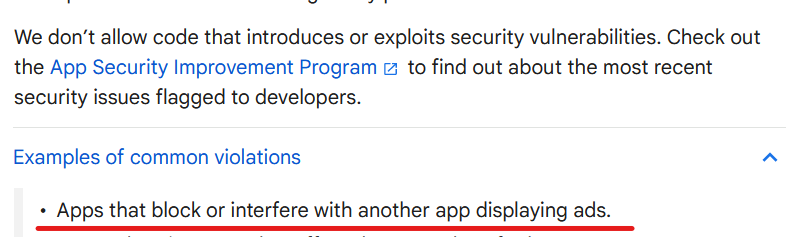
Google developer terms  are specifically directed against ad blockers
Source: Google’s developer policy

But there was a catch. The wording could be interpreted to leave some wiggle room for ad blocking applications that block ads within themselves, i.e. in-browser ad blockers. We can speculate as to why Google did not ban ad blocking outright, with one theory being that they did not want to incentivize side-loading and give Apple, which allows ad blocking in Safari, the upper hand. Whatever it was, ad blocking applications returned to the Google Play Store, but with severe limitations.

But I’ve found an AdGuard app on Google Play, what was that?

AdGuard Content Blocker, not to be confused with AdGuard for Android, is an example of such an app. It was launched in July 2016 and is the only AdGuard app available in the Google Play Store. Its scope is quite limited: it can only block ads in Yandex or Samsung Internet mobile browsers, the only ones that support the necessary content blocking API. If you want to use a different browser or filter traffic in other apps, AdGuard Content Blocker will not be able to help you.
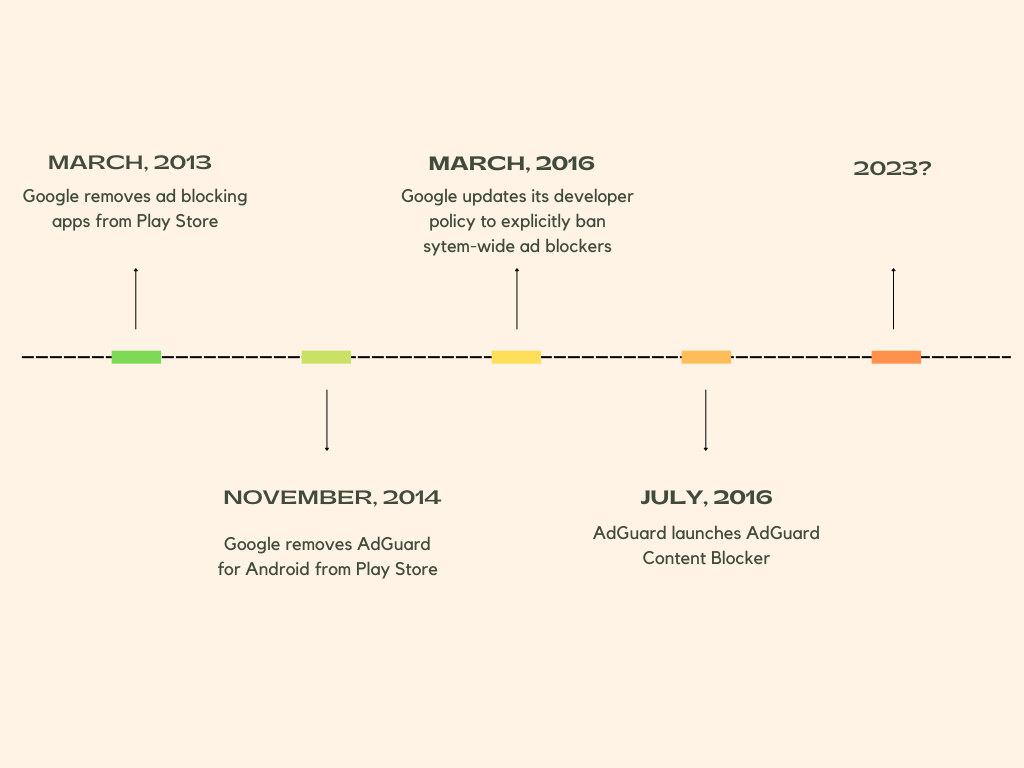
Timeline of AdGuard’s relationship with Google

Why did some apps survive Google’s ad blocking purge?

Still, there’s a lot of uncertainty when it comes to what ad blockers can and can’t do. Google has shown in the past that it can block ad blockers, even those designed specifically for mobile browsers that allow ad blockers, on a whim and unblock them, again, on a whim. Moreover, there are still apps on the Google Play Store that claim to block ads in other apps and work across all browsers, such as Blokada, and boast functionality that allows blocking trackers in apps, such as the DuckDuckGo Private Browser for Android.

Their developers can argue that they do not interfere with other apps and are therefore in compliance with Google’s policy. The thing is, with Google, you can never be sure. Google’s enforcement of its own rules has been inconsistent, and developers are left guessing whether their app will be found to have broken the rules. Not to mention, Google can tighten the screws on ad blockers by changing its policy at any time, so the threat of being pulled from the store hangs like a sword of Damocles over the ad blocking apps that are still available.

Is there life after Google Play Store?

After AdGuard for Android, which filters traffic for all apps on your device, could no longer be distributed through the Google Play Store, we had to find another way to reach our users and provide them with updates. We decided to distribute AdGuard for Android through our own website and some other channels. We also built our own self-sufficient update delivery system so you don’t have to worry about manually updating your app. All this time that we have been distributing AdGuard for Android from our official website we saw AdGuard for Android being installed nearly 30 million times, despite it not being on the Google Play Store.

Our other service, public AdGuard DNS, which doesn’t require installation to use, has now reached over 70 million daily users. So, in short, yes, there is life after and besides the Google Play Store, and overall we’re doing just fine despite the wrench Google has thrown in our works.

Will AdGuard for Android ever return to Google Play?

Of course, if we had the opportunity to return to the Google Play Store without sacrificing the app’s functionality, we would have taken it. The increased visibility this store provides would allow us to introduce the app to more people who can block ad-based tracking, thereby protecting their privacy. The reality is that most casual users install apps exclusively from the Google Play Store, and that means they are currently missing out on a chance to protect themselves from trackers and ads.
We believe that Google’s restrictions on ad blockers are unreasonable and anti-competitive. We hope that Google will change its stance and give people the choice and tools to protect themselves from pervasive tracking technology and invasive advertising.


Suka postingan ini?
AdGuard VPN DNS AdGuard AdGuard Mail AdGuard Wallet
Layar utama AdGuard untuk Windows
Layar Perlindungan AdGuard untuk Windows, menampilkan fitur dan pengaturan perlindungan
Layar Statistik AdGuard untuk Windows, menampilkan statistik untuk iklan dan pelacak yang terblokir
Layar Pengelolaan aplikasi AdGuard untuk Windows, menampilkan opsi pengelolaan perlindungan untuk aplikasi yang terinstal di perangkat
20.534 20534 ulasan pengguna
Sempurna!

AdGuard untuk Windows — pemblokir iklan untuk PC Anda

AdGuard untuk Windows lebih dari sekadar pemblokir iklan. Ini adalah alat serbaguna yang memblokir iklan, mengontrol akses ke situs berbahaya, mempercepat pemuatan halaman, dan melindungi anak-anak dari konten yang tidak pantas

Dengan mengunduhnya Anda menerima ketentuan Perjanjian lisensi
Microsoft Store
Dengan mengunduhnya Anda menerima ketentuan Perjanjian lisensi
AdGuard untuk Windows v8.0, masa percobaan 14 hari
Layar utama AdGuard untuk Mac
Layar Mode Siluman AdGuard untuk Mac
20.534 20534 ulasan pengguna
Sempurna!

AdGuard untuk Mac — pemblokir iklan seluruh sistem

AdGuard untuk Mac adalah pemblokir iklan unik yang dirancang khusus untuk macOS. Selain melindungi Anda dari iklan yang mengganggu di browser dan aplikasi, ini juga melindungi Anda dari pelacakan, phishing, dan penipuan
Dengan mengunduhnya Anda menerima ketentuan Perjanjian lisensi
Pelajari lainnya
AdGuard untuk Mac v2.19, masa percobaan 14 hari
Layar utama AdGuard untuk Android
Layar Perlindungan pelacakan AdGuard untuk Android
Layar Pengelolaan aplikasi AdGuard untuk Android, menampilkan opsi pengelolaan perlindungan untuk aplikasi yang terinstal di perangkat
Layar Statistik AdGuard untuk Android, menampilkan statistik untuk iklan dan pelacak yang terblokir
Layar utama peramban privat AdGuard untuk Android
Kode QR untuk unduh AdGuard untuk Android
20.534 20534 ulasan pengguna
Sempurna!

AdGuard untuk Android: pemblokir iklan semua aplikasi

Memblokir iklan dan pelacak di semua browser, game, dan aplikasi lainnya. Melindungi privasi Anda dan memungkinkan Anda mengontrol bagaimana aplikasi Anda menggunakan internet. Diinstal melalui APK
Dengan mengunduhnya Anda menerima ketentuan Perjanjian lisensi
Pelajari lainnya
Pindai untuk mengunduh
Gunakan pembaca kode QR yang tersedia di perangkat Anda
AdGuard untuk Android v4.14, masa percobaan 14 hari
Layar utama AdGuard untuk iOS
Layar Perlindungan AdGuard untuk iOS, menampilkan fitur dan pengaturan perlindungan
Layar Statistik AdGuard untuk iOS, menampilkan statistik untuk iklan dan pelacak yang terblokir
Kode QR untuk unduh AdGuard untuk iOS
20.534 20534 ulasan pengguna
Sempurna!

AdGuard untuk iOS — pemblokir iklan di luar Safari

Pemblokir iklan iOS terbaik untuk iPhone dan iPad. AdGuard menghilangkan semua jenis iklan dan pelacak di Safari serta melindungi privasi Anda di semua aplikasi pada tingkat DNS
Dengan mengunduhnya Anda menerima ketentuan Perjanjian lisensi
Pelajari lainnya
Pindai untuk mengunduh
Gunakan pembaca kode QR yang tersedia di perangkat Anda
AdGuard untuk iOS versi 4.5
Layar utama AdGuard Content Blocker
Layar filter AdGuard Content Blocker
Layar pengaturan AdGuard Content Blocker
20.534 20534 ulasan pengguna
Sempurna!

Pemblokir Konten AdGuard

AdGuard Content Blocker menghilangkan semua jenis iklan di browser seluler yang mendukung teknologi pemblokiran konten — yaitu, Samsung Internet dan Yandex Browser. Fitur-fiturnya terbatas dibandingkan dengan AdGuard untuk Android, tetapi gratis, mudah dipasang, dan efisien
Dengan mengunduhnya Anda menerima ketentuan Perjanjian lisensi
Pelajari lainnya
Pemblokir Konten AdGuard versi 2.8
Layar utama AdGuard Browser Extension
Layar Perlindungan pelacakan AdGuard Browser Extension
20.534 20534 ulasan pengguna
Sempurna!

Ekstensi peramban AdGuard

AdGuard adalah ekstensi pemblokiran iklan tercepat dan paling ringan yang secara efektif memblokir semua jenis iklan di semua halaman web! Pilih AdGuard untuk browser yang Anda gunakan dan dapatkan penjelajahan bebas iklan, cepat, dan aman.
Pasang
Dengan mengunduhnya Anda menerima ketentuan Perjanjian lisensi
Pasang
Dengan mengunduhnya Anda menerima ketentuan Perjanjian lisensi
Pasang
Dengan mengunduhnya Anda menerima ketentuan Perjanjian lisensi
Pasang
Dengan mengunduhnya Anda menerima ketentuan Perjanjian lisensi
Pasang
Dengan mengunduhnya Anda menerima ketentuan Perjanjian lisensi
Pelajari lainnya
Pasang
Dengan mengunduhnya Anda menerima ketentuan Perjanjian lisensi
Pelajari lainnya
Ekstensi peramban AdGuard versi 5.5
Layar utama Asisten Peramban
20.534 20534 ulasan pengguna
Sempurna!

Asisten AdGuard

Sebuah ekstensi peramban pendamping untuk aplikasi AdGuard desktop. Ini mengizinkan Anda memblokir item kustom di situs web, menambahkan situs web ke daftar izinkan, dan mengirim laporan langsung dari peramban Anda
Asisten AdGuard versi 1.4
20.534 20534 ulasan pengguna
Sempurna!

AdGuard Home

AdGuard Home adalah solusi berbasis jaringan untuk memblokir iklan dan pelacak. Instal sekali di router Anda untuk mencakup semua perangkat di jaringan rumah Anda — tidak diperlukan perangkat lunak klien tambahan. Ini sangat penting untuk berbagai perangkat IoT yang sering menimbulkan ancaman bagi privasi Anda
AdGuard Home versi 0.107
Layar utama AdGuard Pro untuk iOS
Layar Perlindungan AdGuard Pro untuk iOS, menampilkan fitur dan pengaturan perlindungan
Layar statistik AdGuard Pro untuk iOS, menampilkan statistik untuk iklan dan pelacak yang terblokir
20.534 20534 ulasan pengguna
Sempurna!

AdGuard Pro untuk iOS

AdGuard Pro untuk iOS dilengkapi dengan semua fitur perlindungan pemblokiran iklan canggih. Aplikasi ini menawarkan fitur yang sama dengan versi berbayar AdGuard untuk iOS. Aplikasi ini unggul dalam memblokir iklan di Safari dan memungkinkan Anda menyesuaikan pengaturan DNS untuk perlindungan yang lebih baik. Aplikasi ini memblokir iklan di browser dan aplikasi, melindungi anak-anak Anda dari konten yang tidak pantas, dan menjaga keamanan data pribadi Anda.
Dengan mengunduhnya Anda menerima ketentuan Perjanjian lisensi
Pelajari lainnya
AdGuard Pro untuk iOS versi 4.5
Layar utama AdGuard Mini untuk Mac
Layar perlindungan Safari AdGuard Mini untuk Mac
Layar Buat aturan AdGuard Mini untuk Mac
20.534 20534 ulasan pengguna
Sempurna!

AdGuard Mini untuk Mac — pemblokir iklan Safari

AdGuard Mini untuk Mac adalah pemblokir iklan Safari yang kuat. Aplikasi ringan ini menghapus iklan, memblokir pelacak, dan mempercepat pemuatan halaman. Ini membantu Anda menjelajah Web di Safari tanpa gangguan dan menjaga data Anda tetap pribadi
Pasang
Dengan mengunduhnya Anda menerima ketentuan Perjanjian lisensi
Pelajari lainnya
AdGuard Mini untuk Mac versi 2.3
Layar utama AdGuard untuk Android TV dengan perlindungan diaktifkan
Layar pemblokiran iklan AdGuard untuk Android TV, menampilkan fitur dan pengaturannya
Layar pengaturan AdGuard untuk Android TV
Layar Pengelolaan aplikasi AdGuard untuk Android TV, menampilkan aplikasi tempat iklan dan pelacak terblokir
20.534 20534 ulasan pengguna
Sempurna!

AdGuard untuk Android TV

AdGuard untuk Android TV adalah satu-satunya aplikasi yang memblokir iklan, menjaga privasi Anda, dan bertindak sebagai firewall untuk Smart TV Anda. Dapatkan peringatan tentang ancaman web, gunakan DNS yang aman, dan dapatkan manfaatkan lalu lintas yang terenkripsi. Bersantailah dan selami acara favorit Anda dengan keamanan terbaik dan tanpa iklan!
AdGuard untuk Android TV v4.14, masa percobaan 14 hari
Maskot AdGuard, Agnar, memegang penguin Linux
20.534 20534 ulasan pengguna
Sempurna!

AdGuard untuk Linux

AdGuard untuk Linux adalah pemblokir iklan sistem luas pertama di dunia untuk Linux. Blokir iklan dan pelacak di tingkat perangkat, pilih dari filter yang sudah terinstal sebelumnya, atau tambahkan milikmu sendiri — semuanya melalui antar muka baris perintah
AdGuard untuk Linux versi 1.4
20.534 20534 ulasan pengguna
Sempurna!

AdGuard Temp Mail

Generator alamat e-mail sementara gratis yang membuat Anda tetap anonim dan melindungi privasi Anda. Tidak ada spam di kotak masuk utama Anda!
20.534 20534 ulasan pengguna
Sempurna!

AdGuard VPN

75 Lokasi Di Seluruh Dunia

Akses ke konten apa pun

Enkripsi yang kuat

Tanpa kebijakan log

Koneksi paling cepat

dukungan 24/7

Coba gratis
Dengan mengunduhnya Anda menerima ketentuan Perjanjian lisensi
Pelajari lainnya
20.534 20534 ulasan pengguna
Sempurna!

DNS AdGuard

AdGuard DNS adalah cara yang sangat andal untuk memblokir iklan internet tanpa perlu menginstal aplikasi apapun. Mudah digunakan, sepenuhnya gratis, mudah dipasang di perangkat mana saja, dan menyediakan fungsi minimal yang diperlukan untuk memblokir iklan, penghitung, situs web berbahaya, dan konten dewasa.
20.534 20534 ulasan pengguna
Sempurna!

AdGuard Mail

Lindungi identitas Anda, hindari spam, dan jaga keamanan kotak masuk Anda dengan alias dan alamat e-mail sementara kami. Nikmati layanan penerusan e-mail gratis serta aplikasi untuk semua sistem operasi.
20.534 20534 ulasan pengguna
Sempurna!

AdGuard Wallet

Dompet kripto yang aman dan pribadi yang memberi Anda kendali penuh atas aset Anda. Kelola beberapa dompet dan temukan ribuan mata uang kripto untuk disimpan, dikirim, dan ditukar
Mengunduh AdGuard Klik tombol yang ditujukkan oleh panah untuk memulai instalasi. Pilih "Buka" dan klik "OK", lalu tunggu file diunduh. Di jendela yang terbuka, seret ikon AdGuard ke folder "Aplikasi". Terima kasih telah memilih AdGuard! Pilih "Buka" dan klik "OK", lalu tunggu file diunduh. Di jendela yang terbuka, klik "Install". Terima kasih telah memilih AdGuard!
Instal AdGuard untuk perangkat ponsel juga

















































