Getting to know AdGuard v4.0 for Android: the Statistics screen

We're back with more on the new features of AdGuard v4.0 for Android. This is the second in the series of articles designed to get you up to speed with the upgraded app. If you missed our first article comparing v4.0 with its predecessor v3.6, you can catch up here.

The latest version, AdGuard v4.0 for Android, comes with a brand new Statistics screen. It's like a control room, bringing together a wealth of data that was previously scattered across multiple screens, or not visible at all. So, let's dive in and explore this feature in detail.
Statistics *mobile_border

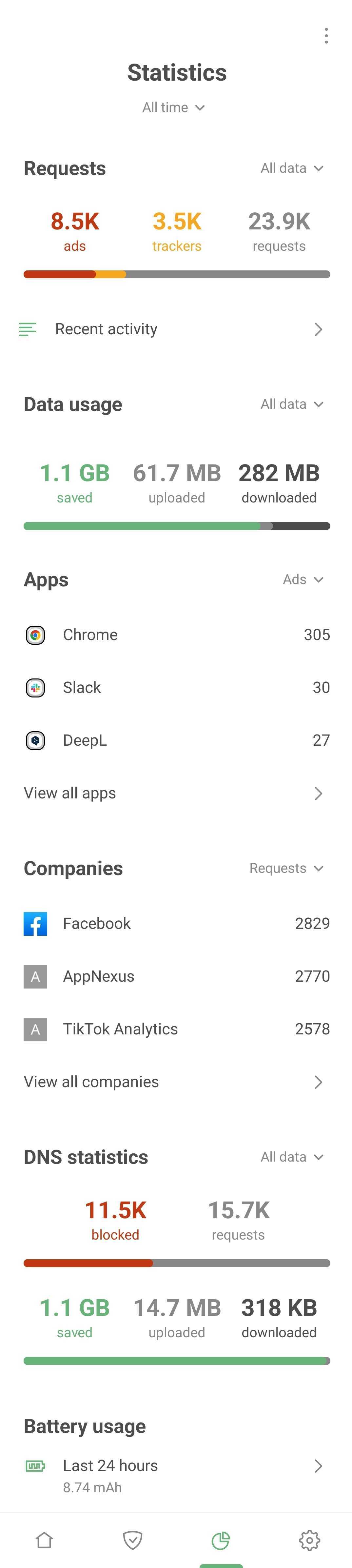
To get started with Statistics, simply tap the chart icon, located second from the right in the navigation bar at the bottom of the screen. The stats are neatly categorized into different sections for your convenience:

  • Requests
  • Data usage
  • Apps
  • Companies
  • DNS statistics
  • Battery usage

Requests

Here you can see the number of blocked ads, trackers, and the total number of requests. Select the time period for which you want to see these stats: 24 hours, 7 days, 30 days, or all time.

But here's where it gets interesting. You can tap any stat to open a graph that visually represents the request trends for the chosen time period. You can also filter requests by data type: mobile data, Wi-Fi, or all data combined.

You'll also notice a Recent activity feature, formerly known as Filter log. It shows the last 10,000 requests processed by AdGuard. And with a few quick taps, you can block or unblock any request.

For those who want to dive deeper, the Recent activity section is a goldmine. It's particularly useful for advanced users and those creating their own filtering rules.

Data usage

We're always talking about how AdGuard helps you save traffic by blocking ads and trackers. But with AdGuard v4.0 for Android, we've taken it a step further, providing a visual representation of your saved traffic right on the usage graph.

Not only does this chart show you the traffic saved, but it also reveals the amount of traffic downloaded and uploaded on your device. If you want to get more specific, you can filter these requests by data type.

Apps

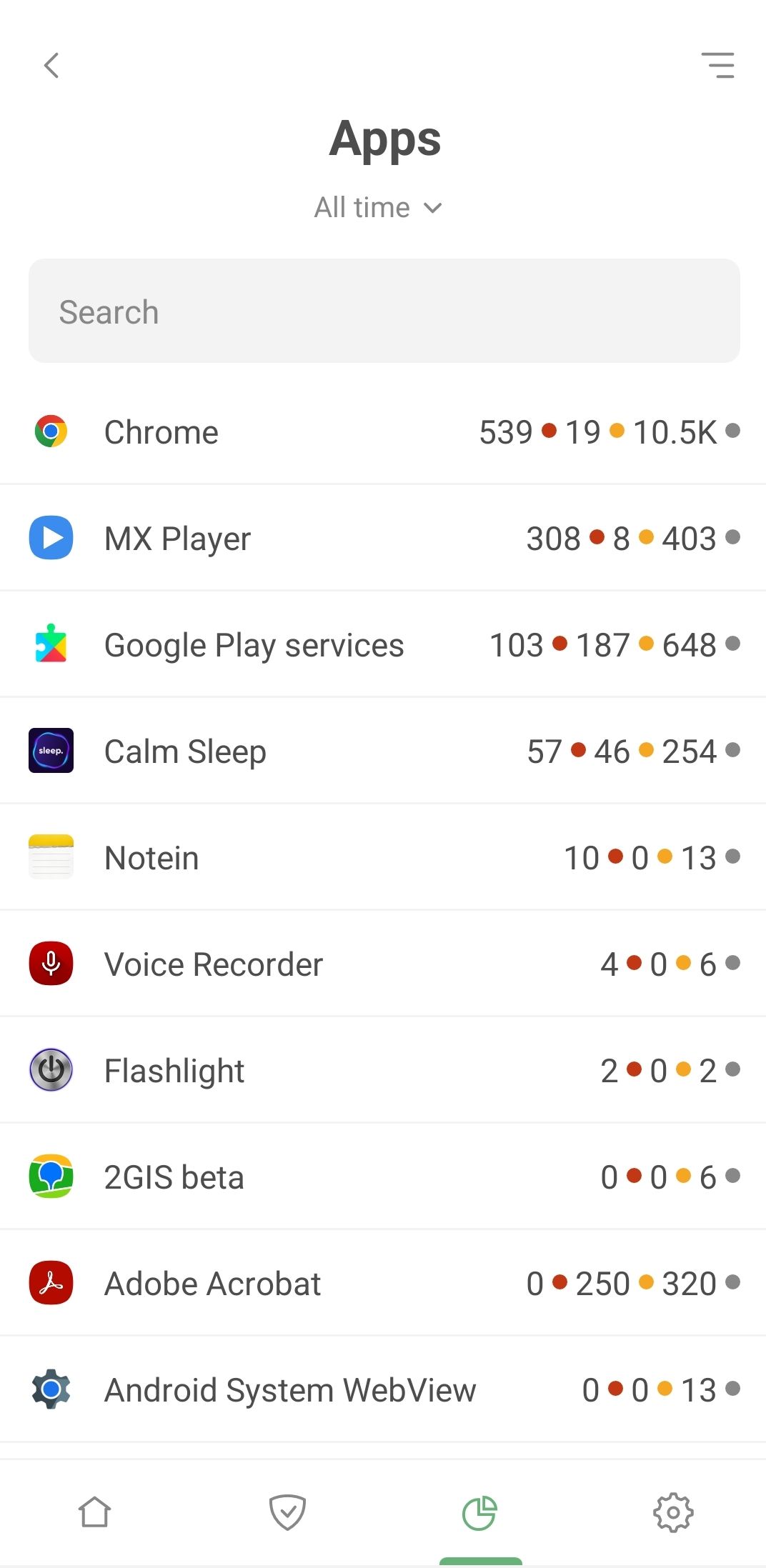
Now, let's move on to the fun stuff – the statistics for every single app installed on your Android device. Tap View all apps to find out which apps are the most eager to track your activity and bombard you with ads. Bet Chrome leads the pack.
List of apps *mobile_border

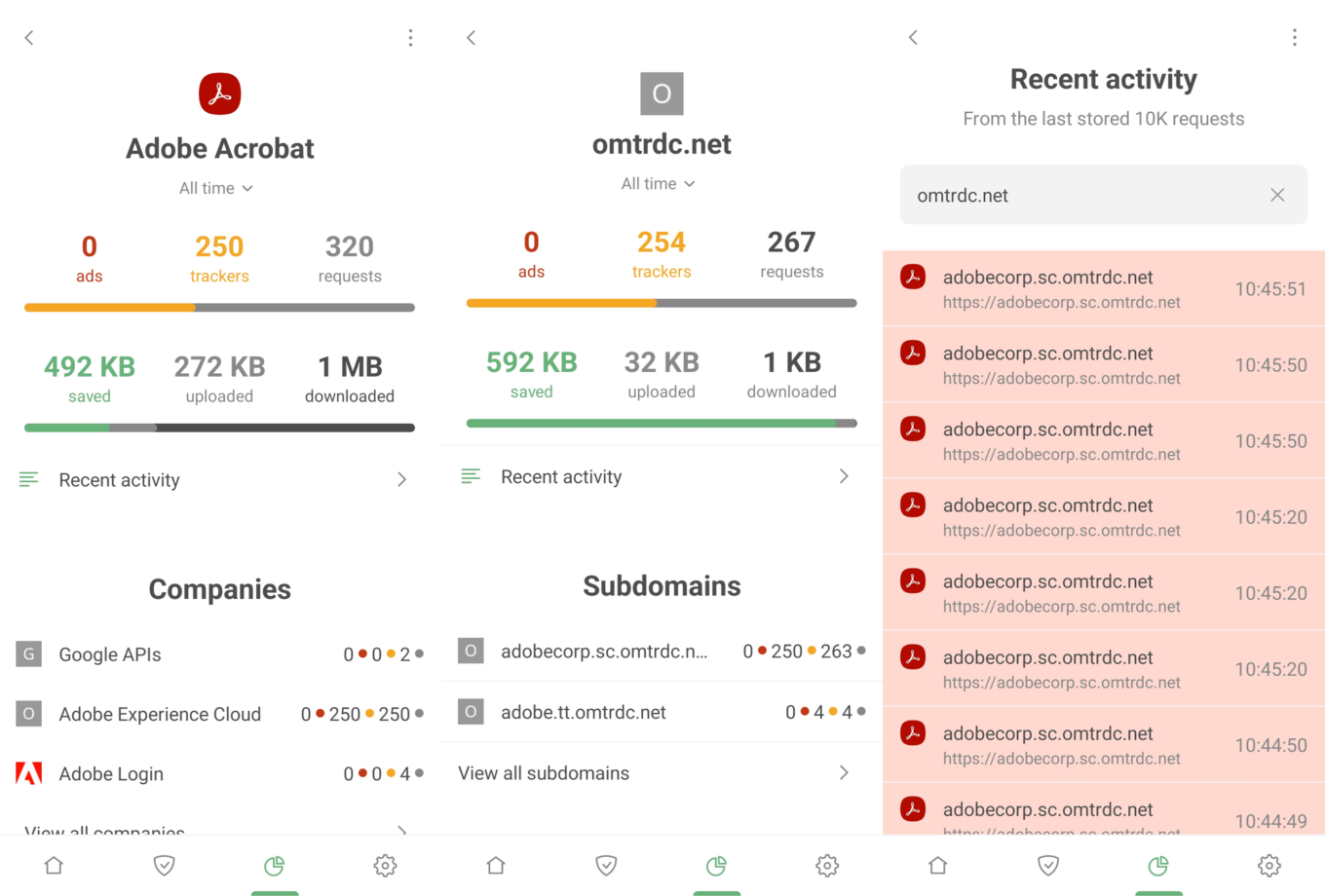
Select any app from the list and tap it to dive deeper. Here you'll see the full story – the companies and domains your apps are reaching out to.
Adobe Acrobat Statistics *border

Take Adobe Acrobat, a popular app for working with PDF files. What do we find? A significant number of blocked requests to the omtrdc.net domain used by Adobe to collect personal data.

AdGuard is more than capable of blocking numerous known trackers, just make sure Tracking protection is enabled. However, sometimes we have to let some "questionable" requests through to avoid disrupting your Internet experience. For instance, Google services are baked into almost every app. If we blocked all Google requests, we'd probably interfere with how these apps work.
MX Player Statistics *border

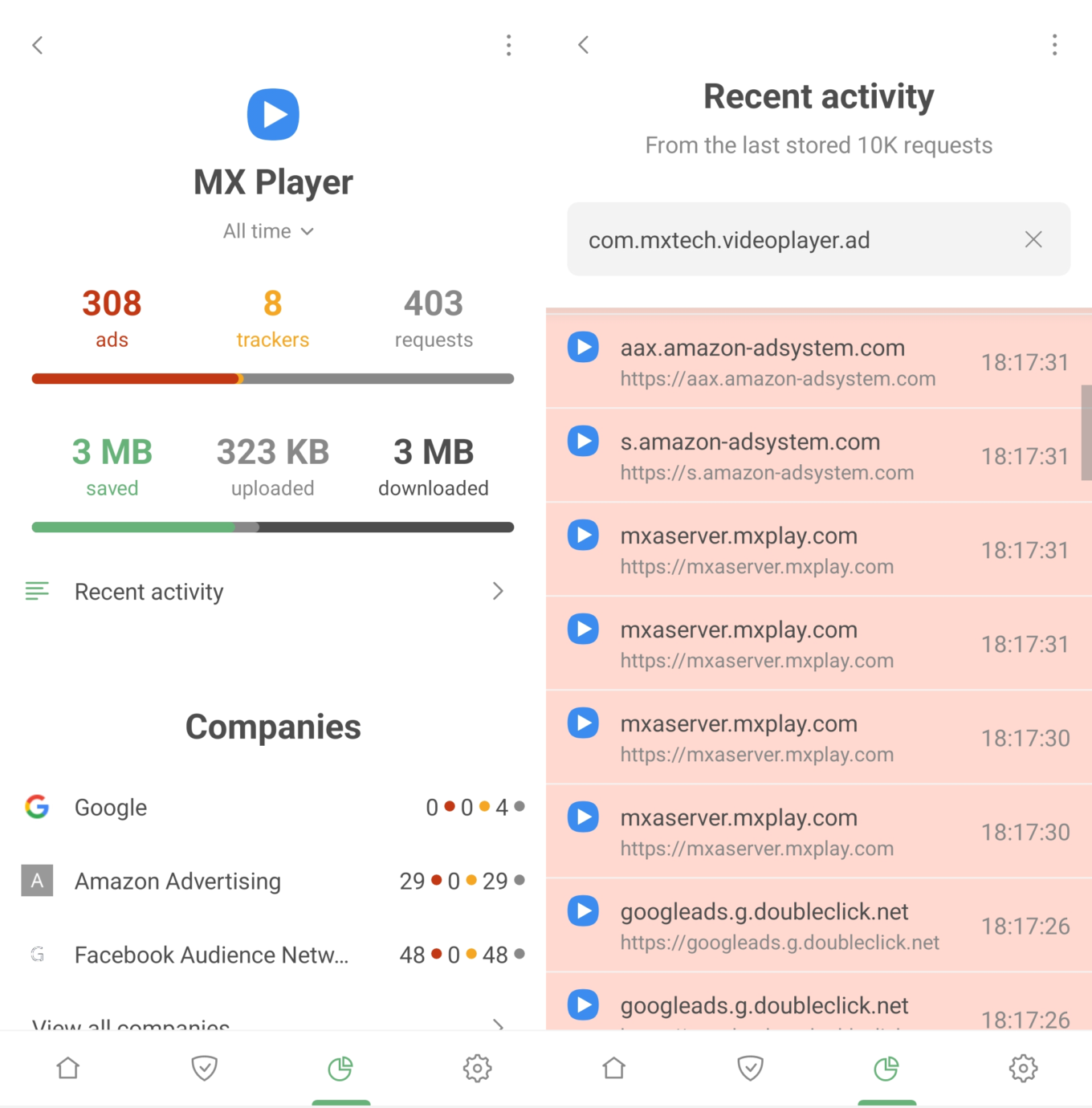
Or take the MX Player app, loved by many for its wide range of video and audio format support. Surprising number of ad server requests, don't you think?

Deciding what to do next is entirely in your hands. If you don’t like the amount of requests an app is making to a not-so-reputable company, you can uninstall it and find an alternative. Or you can navigate to Recent activity, identify a particularly suspicious request, and set up a blocking rule right on the spot.

Companies

The Companies section provides a unique perspective on your data. Here, you can see all the companies that your device has sent requests to. Simply tap View all companies to see the full list, including the number of ads and trackers blocked for each company, as well as the total number of requests.

But that's not all. Tap any company, and you'll find a wealth of information. Which domains the requests are going to, how many are blocked, which apps sent them – it's all there, giving you a complete picture of what's happening behind the scenes.

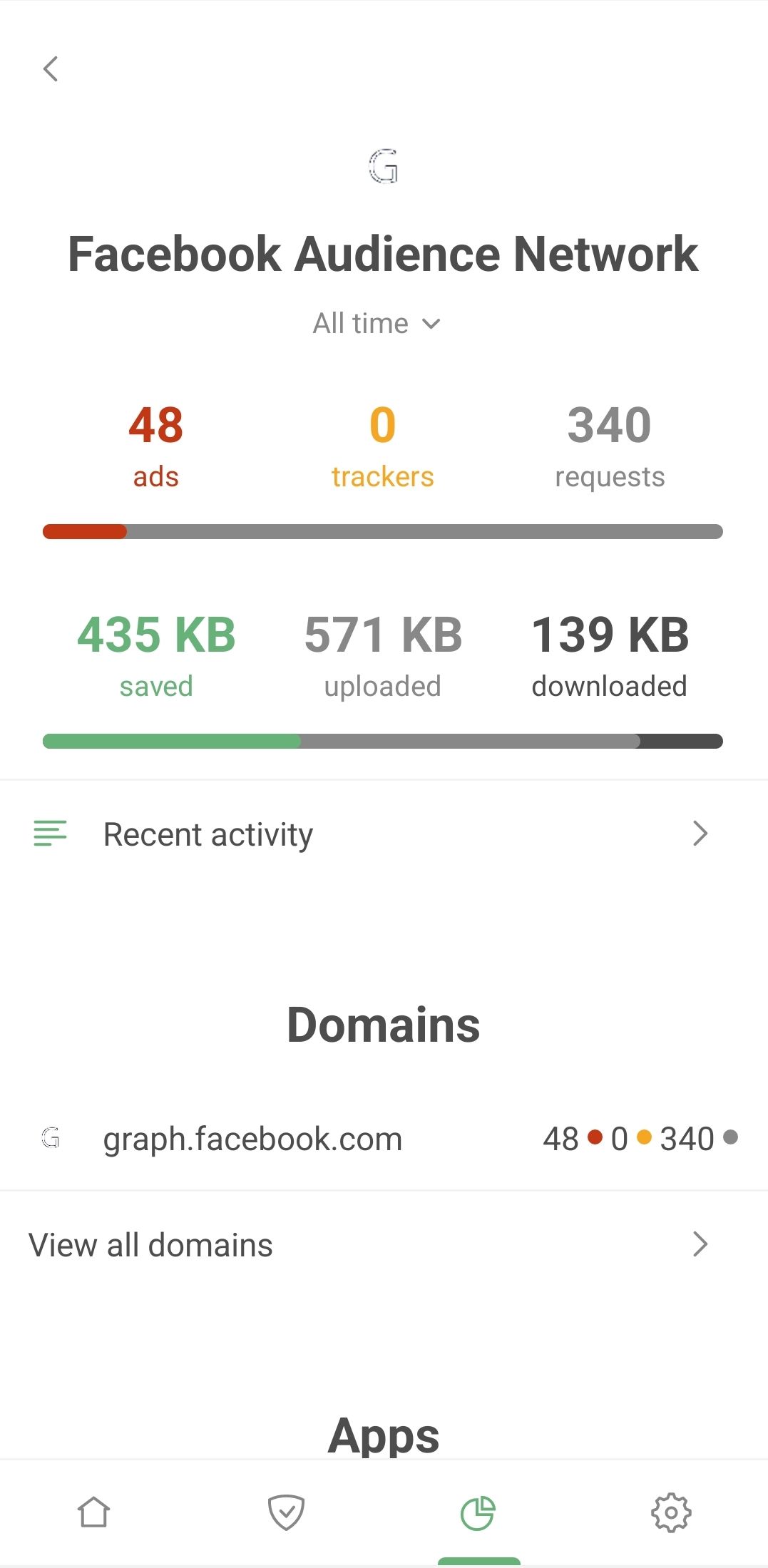
For an interesting example, go to Companies and search for Facebook Audience Network. This is an ad network and app audience analytics service run by none other than Facebook.
Facebook Audience Network in Statistics *mobile_border

Check out which apps have been sending requests to the Facebook Audience Network domain. Your phone's gallery and photo editor, your smartwatch, messaging apps, health, and shopping apps... they're all potentially sending your data to Facebook.

How does this happen? Developers often sign up to Audience Network to monetize their apps through ads and to study user behavior. In other words, it's Facebook studying your behavior. Even if you've never created a Facebook account, these apps could still be sharing your information with the platform. We first discussed this issue back in 2018, and it seems as relevant as ever.

DNS statistics

You'll need to have DNS protection enabled before the data in this section can be populated. You can see the total number of requests sent and how many were blocked by AdGuard in figures and graphs. You'll also find statistics on the amount of traffic saved, downloaded, and uploaded.

Battery usage

If you've noticed AdGuard topping power consumption charts on your smartphone, it may seem counterintuitive, especially since blocking ads should save battery power by preventing ad scripts from being downloaded and processed.

However, it's important to remember that AdGuard filters the traffic of all the apps on your device. As a result, Android attributes all this traffic usage to AdGuard, skewing the picture. To get a realistic understanding of the resources AdGuard is actually using, head over to the Battery usage tab.

Bottom line

In an age where companies are constantly on the prowl for user data and apps seem to be giving it away willy-nilly, we believe it's crucial to arm users with a comprehensive understanding of what's happening on their devices. The Statistics screen in AdGuard 4.0 for Android is our response to the audacity of tech giants who often overstep personal boundaries in their pursuit of profit.

We plan to continue refining Statistics. For instance, in the future, we intend to show not only the names of the companies your requests are going to but also their industry.

What else would you like to see in Statistics? AdGuard has always valued community input during development. If you have ideas, we invite you to suggest new features or vote on existing ones.

Start using AdGuard v4.0 for Android today and take back control of your data.

Suka postingan ini?
AdGuard VPN DNS AdGuard AdGuard Mail AdGuard Wallet
Layar utama AdGuard untuk Windows
Layar Perlindungan AdGuard untuk Windows, menampilkan fitur dan pengaturan perlindungan
Layar Statistik AdGuard untuk Windows, menampilkan statistik untuk iklan dan pelacak yang terblokir
Layar Pengelolaan aplikasi AdGuard untuk Windows, menampilkan opsi pengelolaan perlindungan untuk aplikasi yang terinstal di perangkat
20.534 20534 ulasan pengguna
Sempurna!

AdGuard untuk Windows — pemblokir iklan untuk PC Anda

AdGuard untuk Windows lebih dari sekadar pemblokir iklan. Ini adalah alat serbaguna yang memblokir iklan, mengontrol akses ke situs berbahaya, mempercepat pemuatan halaman, dan melindungi anak-anak dari konten yang tidak pantas
Dengan mengunduhnya Anda menerima ketentuan Perjanjian lisensi
Microsoft Store
Dengan mengunduhnya Anda menerima ketentuan Perjanjian lisensi
AdGuard untuk Windows v8.0, masa percobaan 14 hari
Layar utama AdGuard untuk Mac
Layar Mode Siluman AdGuard untuk Mac
20.534 20534 ulasan pengguna
Sempurna!

AdGuard untuk Mac — pemblokir iklan seluruh sistem

AdGuard untuk Mac adalah pemblokir iklan unik yang dirancang khusus untuk macOS. Selain melindungi Anda dari iklan yang mengganggu di browser dan aplikasi, ini juga melindungi Anda dari pelacakan, phishing, dan penipuan
Dengan mengunduhnya Anda menerima ketentuan Perjanjian lisensi
Pelajari lainnya
AdGuard untuk Mac v2.19, masa percobaan 14 hari
Layar utama AdGuard untuk Android
Layar Perlindungan pelacakan AdGuard untuk Android
Layar Pengelolaan aplikasi AdGuard untuk Android, menampilkan opsi pengelolaan perlindungan untuk aplikasi yang terinstal di perangkat
Layar Statistik AdGuard untuk Android, menampilkan statistik untuk iklan dan pelacak yang terblokir
Layar utama peramban privat AdGuard untuk Android
Kode QR untuk unduh AdGuard untuk Android
20.534 20534 ulasan pengguna
Sempurna!

AdGuard untuk Android: pemblokir iklan semua aplikasi

Memblokir iklan dan pelacak di semua browser, game, dan aplikasi lainnya. Melindungi privasi Anda dan memungkinkan Anda mengontrol bagaimana aplikasi Anda menggunakan internet. Diinstal melalui APK


Dengan mengunduhnya Anda menerima ketentuan Perjanjian lisensi
Pelajari lainnya
Pindai untuk mengunduh
Gunakan pembaca kode QR yang tersedia di perangkat Anda
AdGuard untuk Android v4.14, masa percobaan 14 hari
Layar utama AdGuard untuk iOS
Layar Perlindungan AdGuard untuk iOS, menampilkan fitur dan pengaturan perlindungan
Layar Statistik AdGuard untuk iOS, menampilkan statistik untuk iklan dan pelacak yang terblokir
Kode QR untuk unduh AdGuard untuk iOS
20.534 20534 ulasan pengguna
Sempurna!

AdGuard untuk iOS — pemblokir iklan di luar Safari

Pemblokir iklan iOS terbaik untuk iPhone dan iPad. AdGuard menghilangkan semua jenis iklan dan pelacak di Safari serta melindungi privasi Anda di semua aplikasi pada tingkat DNS
Dengan mengunduhnya Anda menerima ketentuan Perjanjian lisensi
Pelajari lainnya
Pindai untuk mengunduh
Gunakan pembaca kode QR yang tersedia di perangkat Anda
AdGuard untuk iOS versi 4.5
Layar utama AdGuard Content Blocker
Layar filter AdGuard Content Blocker
Layar pengaturan AdGuard Content Blocker
20.534 20534 ulasan pengguna
Sempurna!

Pemblokir Konten AdGuard

AdGuard Content Blocker menghilangkan semua jenis iklan di browser seluler yang mendukung teknologi pemblokiran konten — yaitu, Samsung Internet dan Yandex Browser. Fitur-fiturnya terbatas dibandingkan dengan AdGuard untuk Android, tetapi gratis, mudah dipasang, dan efisien
Dengan mengunduhnya Anda menerima ketentuan Perjanjian lisensi
Pelajari lainnya
Pemblokir Konten AdGuard versi 2.8
Layar utama AdGuard Browser Extension
Layar Perlindungan pelacakan AdGuard Browser Extension
20.534 20534 ulasan pengguna
Sempurna!

Ekstensi peramban AdGuard

AdGuard adalah ekstensi pemblokiran iklan tercepat dan paling ringan yang secara efektif memblokir semua jenis iklan di semua halaman web! Pilih AdGuard untuk browser yang Anda gunakan dan dapatkan penjelajahan bebas iklan, cepat, dan aman.
Pasang
Dengan mengunduhnya Anda menerima ketentuan Perjanjian lisensi
Pasang
Dengan mengunduhnya Anda menerima ketentuan Perjanjian lisensi
Pasang
Dengan mengunduhnya Anda menerima ketentuan Perjanjian lisensi
Pasang
Dengan mengunduhnya Anda menerima ketentuan Perjanjian lisensi
Pasang
Dengan mengunduhnya Anda menerima ketentuan Perjanjian lisensi
Pelajari lainnya
Pasang
Dengan mengunduhnya Anda menerima ketentuan Perjanjian lisensi
Pelajari lainnya
Ekstensi peramban AdGuard versi 5.5
Layar utama Asisten Peramban
20.534 20534 ulasan pengguna
Sempurna!

Asisten AdGuard

Sebuah ekstensi peramban pendamping untuk aplikasi AdGuard desktop. Ini mengizinkan Anda memblokir item kustom di situs web, menambahkan situs web ke daftar izinkan, dan mengirim laporan langsung dari peramban Anda
Asisten AdGuard versi 1.4
20.534 20534 ulasan pengguna
Sempurna!

AdGuard Home

AdGuard Home adalah solusi berbasis jaringan untuk memblokir iklan dan pelacak. Instal sekali di router Anda untuk mencakup semua perangkat di jaringan rumah Anda — tidak diperlukan perangkat lunak klien tambahan. Ini sangat penting untuk berbagai perangkat IoT yang sering menimbulkan ancaman bagi privasi Anda
AdGuard Home versi 0.107
Layar utama AdGuard Pro untuk iOS
Layar Perlindungan AdGuard Pro untuk iOS, menampilkan fitur dan pengaturan perlindungan
Layar statistik AdGuard Pro untuk iOS, menampilkan statistik untuk iklan dan pelacak yang terblokir
20.534 20534 ulasan pengguna
Sempurna!

AdGuard Pro untuk iOS

AdGuard Pro untuk iOS dilengkapi dengan semua fitur perlindungan pemblokiran iklan canggih. Aplikasi ini menawarkan fitur yang sama dengan versi berbayar AdGuard untuk iOS. Aplikasi ini unggul dalam memblokir iklan di Safari dan memungkinkan Anda menyesuaikan pengaturan DNS untuk perlindungan yang lebih baik. Aplikasi ini memblokir iklan di browser dan aplikasi, melindungi anak-anak Anda dari konten yang tidak pantas, dan menjaga keamanan data pribadi Anda.
Dengan mengunduhnya Anda menerima ketentuan Perjanjian lisensi
Pelajari lainnya
AdGuard Pro untuk iOS versi 4.5
Layar utama AdGuard Mini untuk Mac
Layar perlindungan Safari AdGuard Mini untuk Mac
Layar Buat aturan AdGuard Mini untuk Mac
20.534 20534 ulasan pengguna
Sempurna!

AdGuard Mini untuk Mac — pemblokir iklan Safari

AdGuard Mini untuk Mac adalah pemblokir iklan Safari yang kuat. Aplikasi ringan ini menghapus iklan, memblokir pelacak, dan mempercepat pemuatan halaman. Ini membantu Anda menjelajah Web di Safari tanpa gangguan dan menjaga data Anda tetap pribadi
Pasang
Dengan mengunduhnya Anda menerima ketentuan Perjanjian lisensi
Pelajari lainnya
AdGuard Mini untuk Mac versi 2.3
Layar utama AdGuard untuk Android TV dengan perlindungan diaktifkan
Layar pemblokiran iklan AdGuard untuk Android TV, menampilkan fitur dan pengaturannya
Layar pengaturan AdGuard untuk Android TV
Layar Pengelolaan aplikasi AdGuard untuk Android TV, menampilkan aplikasi tempat iklan dan pelacak terblokir
20.534 20534 ulasan pengguna
Sempurna!

AdGuard untuk Android TV

AdGuard untuk Android TV adalah satu-satunya aplikasi yang memblokir iklan, menjaga privasi Anda, dan bertindak sebagai firewall untuk Smart TV Anda. Dapatkan peringatan tentang ancaman web, gunakan DNS yang aman, dan dapatkan manfaatkan lalu lintas yang terenkripsi. Bersantailah dan selami acara favorit Anda dengan keamanan terbaik dan tanpa iklan!
AdGuard untuk Android TV v4.14, masa percobaan 14 hari
Maskot AdGuard, Agnar, memegang penguin Linux
20.534 20534 ulasan pengguna
Sempurna!

AdGuard untuk Linux

AdGuard untuk Linux adalah pemblokir iklan sistem luas pertama di dunia untuk Linux. Blokir iklan dan pelacak di tingkat perangkat, pilih dari filter yang sudah terinstal sebelumnya, atau tambahkan milikmu sendiri — semuanya melalui antar muka baris perintah
AdGuard untuk Linux versi 1.4
20.534 20534 ulasan pengguna
Sempurna!

AdGuard Temp Mail

Generator alamat e-mail sementara gratis yang membuat Anda tetap anonim dan melindungi privasi Anda. Tidak ada spam di kotak masuk utama Anda!
20.534 20534 ulasan pengguna
Sempurna!

AdGuard VPN

75 Lokasi Di Seluruh Dunia

Akses ke konten apa pun

Enkripsi yang kuat

Tanpa kebijakan log

Koneksi paling cepat

dukungan 24/7

Coba gratis
Dengan mengunduhnya Anda menerima ketentuan Perjanjian lisensi
Pelajari lainnya
20.534 20534 ulasan pengguna
Sempurna!

DNS AdGuard

AdGuard DNS adalah cara yang sangat andal untuk memblokir iklan internet tanpa perlu menginstal aplikasi apapun. Mudah digunakan, sepenuhnya gratis, mudah dipasang di perangkat mana saja, dan menyediakan fungsi minimal yang diperlukan untuk memblokir iklan, penghitung, situs web berbahaya, dan konten dewasa.
20.534 20534 ulasan pengguna
Sempurna!

AdGuard Mail

Lindungi identitas Anda, hindari spam, dan jaga keamanan kotak masuk Anda dengan alias dan alamat e-mail sementara kami. Nikmati layanan penerusan e-mail gratis serta aplikasi untuk semua sistem operasi.
20.534 20534 ulasan pengguna
Sempurna!

AdGuard Wallet

Dompet kripto yang aman dan pribadi yang memberi Anda kendali penuh atas aset Anda. Kelola beberapa dompet dan temukan ribuan mata uang kripto untuk disimpan, dikirim, dan ditukar
Mengunduh AdGuard Klik tombol yang ditujukkan oleh panah untuk memulai instalasi. Pilih "Buka" dan klik "OK", lalu tunggu file diunduh. Di jendela yang terbuka, seret ikon AdGuard ke folder "Aplikasi". Terima kasih telah memilih AdGuard! Pilih "Buka" dan klik "OK", lalu tunggu file diunduh. Di jendela yang terbuka, klik "Install". Terima kasih telah memilih AdGuard!
Instal AdGuard untuk perangkat ponsel juga

















































