AdGuard’s digest: WhatsApp and Brave boost privacy, hackers exploit Facebook ads, Toyota leaks again

In this edition of AdGuard’s digest: WhatsApp, Brave and Google offer new tools to help you take control over your data, Meta lets hackers impersonate itself and run scam ads, as Toyota exposes years of car location data.

WhatsApp lets you hide your chats from prying eyes

Many of us feel antsy when someone else takes our phone into their hands, even if we let them. One of the risks is that they might inadvertently see something you’d rather keep private. WhatsApp’s new feature is designed to prevent this. Called “Chat Lock,” it allows you to hide your “most personal” conversations in a separate folder that can only be opened with a password or biometric identifier, such as a fingerprint. What’s more, notifications about new messages from locked chats won’t include a preview, so both the sender and the content of the message will remain hidden.

Previously, you could lock your entire WhatsApp app with your fingerprint, Face ID, or Touch ID. However, some users may find this inconvenient as it requires you to authenticate every time you re-enter the app or after a short period of time. To protect your privacy in WhatsApp, you can also use disappearing messages, two-step verification, and hide sensitive chats from your chat list.

WhatsApp’s new feature gives users more control over who can see their messages, and may help prevent accidental or not-so-accidental snooping by friends, family, or strangers — anyone who have gained physical access to your device. However, keep in mind that WhatsApp is not the most secure and private messenger out there, as it can share metadata with both its parent company, Meta, and law enforcement.

Brave to prevent sites from re-identifying you

Privacy-focused browser Brave has unveiled a new feature that stops first-party tracking. Called “Forgetful Browsing,” it causes a site to delete all of your data when you close it, including cookies, local storage, and cache. You can turn this feature on for all sites in Brave’s browser settings, or you can turn it on for some sites by clicking Brave’s shield lion icon in the URL bar and selecting “Forget me when I close this site” when you’re on a site.
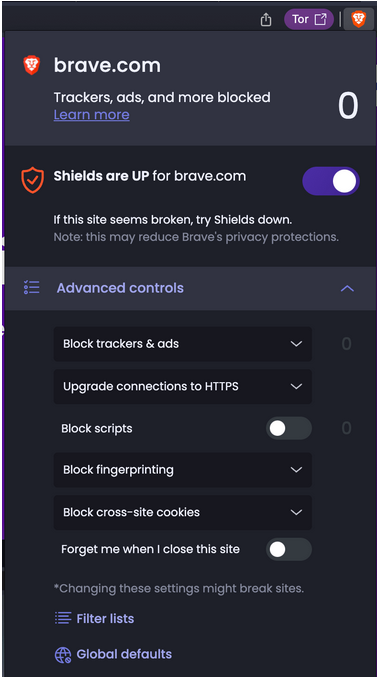
Brave will allow users to turn off first-party tracking for the sites they want

The downside of setting this as the default option is that you’ll be logged out of your accounts on all sites as soon as you close them. This can be inconvenient for sites you use frequently, such as online shopping sites, social media, and email. However, Brave says that sites where you might want to be remembered are “the exception, not the rule.”

This new feature of Brave, which has yet to be rolled out, can be a great tool for protecting your privacy (with the added benefit of helping you get past paywalls). It reduces your online footprint and therefore your risk of being tracked and profiled across the web. While many browsers, including Brave, already block third-party tracking, which is mostly done by advertisers, analytics platforms, and social media, blocking first-party tracking on top of that is a step toward a safer and less intrusive web experience.

Google will scan dark web for your email… if you want

Have you ever wondered if your email address has been exposed on the dark web? If you have, Google has good news for you: soon you’ll be able to ask it to scan the dark web for your Gmail address. If the scan finds that your email address is on the dark web, Google will give you advice on how to secure your account, such as by turning on two-step verification.
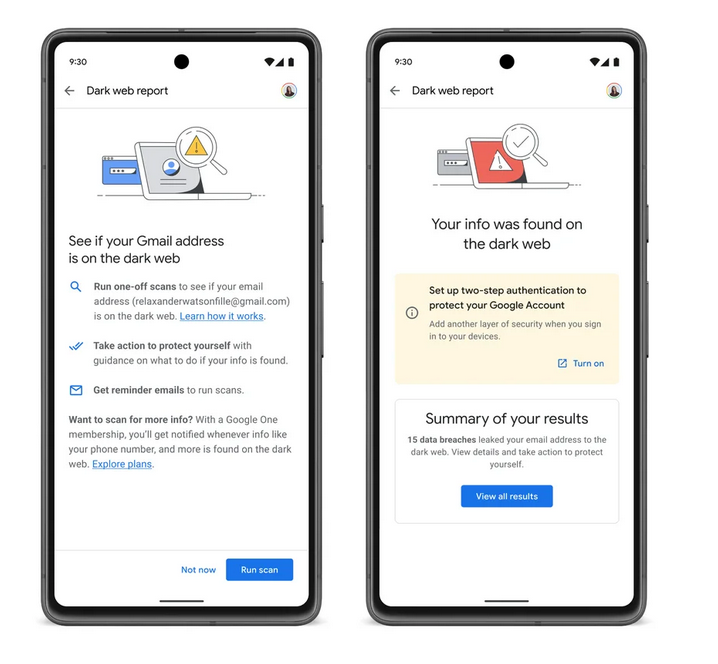
Google will scan dark web for your email address for free

The feature, known as ‘dark web report,’ was launched in March 2023 and was initially only available to Google One subscribers (plans start at $1.99 a month) in the US. In a blog post from May 10, Google announced that the feature would soon be extended to all US users, and then to “select international markets.” When it was first introduced to paid subscribers, the ‘dark web report’ feature offered more than just email monitoring. Google also said it would help scan the dark web for personal information, such as your name, address, email, phone number and Social Security number, and alert you if it could find any matches. It’s unclear if non-paid users will also get access to this extra monitoring over time.

If you already use Gmail, it might seem like a good idea to let Google notify you if your email address ends up on the dark web. However, we generally advise against giving personal data to Big Tech companies if you don’t absolutely need to. Therefore, we would not recommend giving, for example, your Social Security number to Google, or any other information that is not necessary to use the service. There is always a risk that Google may use this data for other purposes than security, such as tracking or even sharing this information with third parties.

Meta allows hijacked Facebook pages, including fake ‘Meta,’ to run ads

Meta allowed hackers who took over verified accounts on Facebook to run ads on its platforms. Some of the hacked accounts pretended to be Meta itself, but this, apparently, did not raise any alarm with Meta’s automated ads system. The rogue ads were spotted by social media security expert Matt Navarra, who shared screenshots of messages posted by fake “Meta Ads” accounts. He said that this was not an “isolated case” and that these shady ads were luring users into downloading possible malware.
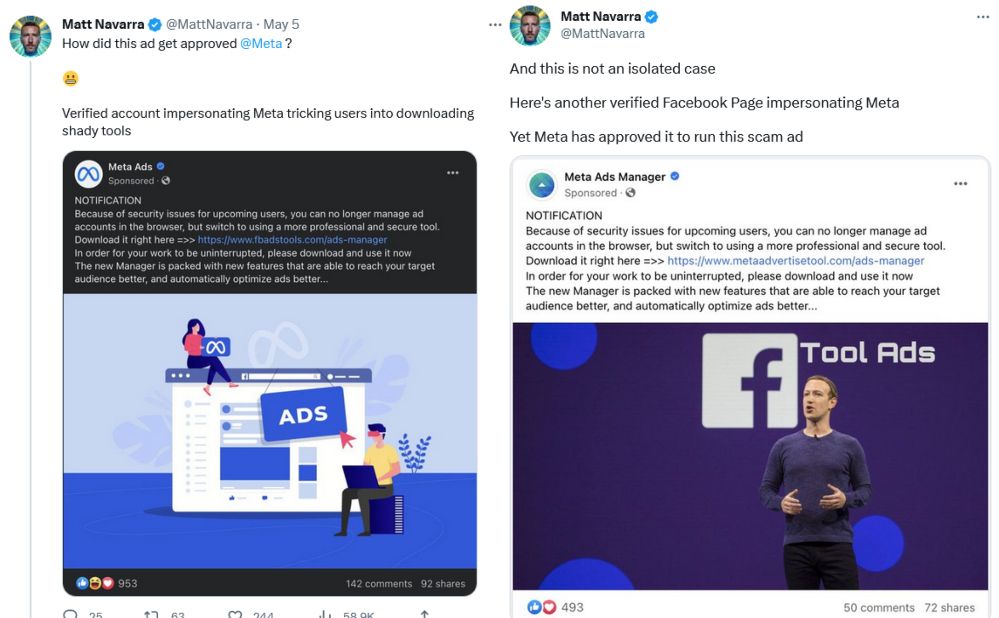
Meta allows fake pages posing as Meta to buy ads

What begs the question is how is it possible that Meta’s ad systems did not flag these ads before they were greenlit. And if Meta can’t catch these blatant and obvious cases of abuse of its advertising system, how many other harmful ads are slipping through unnoticed?

The problem of malware being spread through ads is not new, but it seems to be getting worse. We recently wrote about bad actors exploiting Google search ads to spread malware, and Google’s inability to cope with the ever-increasing volume of such ads. To avoid seeing malicious ads (actually, most ads), you can use ad blocking software such as AdGuard.

Toyota’s 10-year-long leak: 2.15 million car locations revealed

Toyota has revealed that the car location data of more than 2 million customers in Japan was exposed for 10 years due to a database misconfiguration. The Japanese carmaker said that vehicle records stored on a cloud-based platform were accessible to anyone without a password from November, 2013 to April, 2023. The breach affected Japanese customers who used Toyta’s T-Connect, an in-car service that offers various features, such as navigation, remote control, security, and entertainment.

The exposed data included GPS terminal ID numbers, vehicle location information with time data as well as videos recorded outside of vehicles. Toyota said it had not found any evidence that the exposed data was misused, and that no personal identifiable information was leaked.

This breach follows another one disclosed in October last year, when nearly 300,000 customer emails and management numbers were compromised. That breach lasted for five years and was caused by a subcontractor’s error. The repeated incidents of data breaches at Toyota put the company’s data protection practices in bad light. This is especially worrying when you take into account the increasing amount of data automobile companies collect about us for the sake of providing connected services.


Suka postingan ini?
AdGuard VPN DNS AdGuard AdGuard Mail AdGuard Wallet
Layar utama AdGuard untuk Windows
Layar Perlindungan AdGuard untuk Windows, menampilkan fitur dan pengaturan perlindungan
Layar Statistik AdGuard untuk Windows, menampilkan statistik untuk iklan dan pelacak yang terblokir
Layar Pengelolaan aplikasi AdGuard untuk Windows, menampilkan opsi pengelolaan perlindungan untuk aplikasi yang terinstal di perangkat
20.535 20535 ulasan pengguna
Sempurna!

AdGuard untuk Windows — pemblokir iklan untuk PC Anda

AdGuard untuk Windows lebih dari sekadar pemblokir iklan. Ini adalah alat serbaguna yang memblokir iklan, mengontrol akses ke situs berbahaya, mempercepat pemuatan halaman, dan melindungi anak-anak dari konten yang tidak pantas

Dengan mengunduhnya Anda menerima ketentuan Perjanjian lisensi
Microsoft Store
Dengan mengunduhnya Anda menerima ketentuan Perjanjian lisensi
AdGuard untuk Windows v8.0, masa percobaan 14 hari
Layar utama AdGuard untuk Mac
Layar Mode Siluman AdGuard untuk Mac
20.535 20535 ulasan pengguna
Sempurna!

AdGuard untuk Mac — pemblokir iklan seluruh sistem

AdGuard untuk Mac adalah pemblokir iklan unik yang dirancang khusus untuk macOS. Selain melindungi Anda dari iklan yang mengganggu di browser dan aplikasi, ini juga melindungi Anda dari pelacakan, phishing, dan penipuan
Dengan mengunduhnya Anda menerima ketentuan Perjanjian lisensi
Pelajari lainnya
AdGuard untuk Mac v2.19, masa percobaan 14 hari
Layar utama AdGuard untuk Android
Layar Perlindungan pelacakan AdGuard untuk Android
Layar Pengelolaan aplikasi AdGuard untuk Android, menampilkan opsi pengelolaan perlindungan untuk aplikasi yang terinstal di perangkat
Layar Statistik AdGuard untuk Android, menampilkan statistik untuk iklan dan pelacak yang terblokir
Layar utama peramban privat AdGuard untuk Android
Kode QR untuk unduh AdGuard untuk Android
20.535 20535 ulasan pengguna
Sempurna!

AdGuard untuk Android: pemblokir iklan semua aplikasi

Memblokir iklan dan pelacak di semua browser, game, dan aplikasi lainnya. Melindungi privasi Anda dan memungkinkan Anda mengontrol bagaimana aplikasi Anda menggunakan internet. Diinstal melalui APK
Dengan mengunduhnya Anda menerima ketentuan Perjanjian lisensi
Pelajari lainnya
Pindai untuk mengunduh
Gunakan pembaca kode QR yang tersedia di perangkat Anda
AdGuard untuk Android v4.14, masa percobaan 14 hari
Layar utama AdGuard untuk iOS
Layar Perlindungan AdGuard untuk iOS, menampilkan fitur dan pengaturan perlindungan
Layar Statistik AdGuard untuk iOS, menampilkan statistik untuk iklan dan pelacak yang terblokir
Kode QR untuk unduh AdGuard untuk iOS
20.535 20535 ulasan pengguna
Sempurna!

AdGuard untuk iOS — pemblokir iklan di luar Safari

Pemblokir iklan iOS terbaik untuk iPhone dan iPad. AdGuard menghilangkan semua jenis iklan dan pelacak di Safari serta melindungi privasi Anda di semua aplikasi pada tingkat DNS
Dengan mengunduhnya Anda menerima ketentuan Perjanjian lisensi
Pelajari lainnya
Pindai untuk mengunduh
Gunakan pembaca kode QR yang tersedia di perangkat Anda
AdGuard untuk iOS versi 4.5
Layar utama AdGuard Content Blocker
Layar filter AdGuard Content Blocker
Layar pengaturan AdGuard Content Blocker
20.535 20535 ulasan pengguna
Sempurna!

Pemblokir Konten AdGuard

AdGuard Content Blocker menghilangkan semua jenis iklan di browser seluler yang mendukung teknologi pemblokiran konten — yaitu, Samsung Internet dan Yandex Browser. Fitur-fiturnya terbatas dibandingkan dengan AdGuard untuk Android, tetapi gratis, mudah dipasang, dan efisien
Dengan mengunduhnya Anda menerima ketentuan Perjanjian lisensi
Pelajari lainnya
Pemblokir Konten AdGuard versi 2.8
Layar utama AdGuard Browser Extension
Layar Perlindungan pelacakan AdGuard Browser Extension
20.535 20535 ulasan pengguna
Sempurna!

Ekstensi peramban AdGuard

AdGuard adalah ekstensi pemblokiran iklan tercepat dan paling ringan yang secara efektif memblokir semua jenis iklan di semua halaman web! Pilih AdGuard untuk browser yang Anda gunakan dan dapatkan penjelajahan bebas iklan, cepat, dan aman.
Pasang
Dengan mengunduhnya Anda menerima ketentuan Perjanjian lisensi
Pasang
Dengan mengunduhnya Anda menerima ketentuan Perjanjian lisensi
Pasang
Dengan mengunduhnya Anda menerima ketentuan Perjanjian lisensi
Pasang
Dengan mengunduhnya Anda menerima ketentuan Perjanjian lisensi
Pasang
Dengan mengunduhnya Anda menerima ketentuan Perjanjian lisensi
Pelajari lainnya
Pasang
Dengan mengunduhnya Anda menerima ketentuan Perjanjian lisensi
Pelajari lainnya
Ekstensi peramban AdGuard versi 5.5
Layar utama Asisten Peramban
20.535 20535 ulasan pengguna
Sempurna!

Asisten AdGuard

Sebuah ekstensi peramban pendamping untuk aplikasi AdGuard desktop. Ini mengizinkan Anda memblokir item kustom di situs web, menambahkan situs web ke daftar izinkan, dan mengirim laporan langsung dari peramban Anda
Asisten AdGuard versi 1.4
20.535 20535 ulasan pengguna
Sempurna!

AdGuard Home

AdGuard Home adalah solusi berbasis jaringan untuk memblokir iklan dan pelacak. Instal sekali di router Anda untuk mencakup semua perangkat di jaringan rumah Anda — tidak diperlukan perangkat lunak klien tambahan. Ini sangat penting untuk berbagai perangkat IoT yang sering menimbulkan ancaman bagi privasi Anda
AdGuard Home versi 0.107
Layar utama AdGuard Pro untuk iOS
Layar Perlindungan AdGuard Pro untuk iOS, menampilkan fitur dan pengaturan perlindungan
Layar statistik AdGuard Pro untuk iOS, menampilkan statistik untuk iklan dan pelacak yang terblokir
20.535 20535 ulasan pengguna
Sempurna!

AdGuard Pro untuk iOS

AdGuard Pro untuk iOS dilengkapi dengan semua fitur perlindungan pemblokiran iklan canggih. Aplikasi ini menawarkan fitur yang sama dengan versi berbayar AdGuard untuk iOS. Aplikasi ini unggul dalam memblokir iklan di Safari dan memungkinkan Anda menyesuaikan pengaturan DNS untuk perlindungan yang lebih baik. Aplikasi ini memblokir iklan di browser dan aplikasi, melindungi anak-anak Anda dari konten yang tidak pantas, dan menjaga keamanan data pribadi Anda.
Dengan mengunduhnya Anda menerima ketentuan Perjanjian lisensi
Pelajari lainnya
AdGuard Pro untuk iOS versi 4.5
Layar utama AdGuard Mini untuk Mac
Layar perlindungan Safari AdGuard Mini untuk Mac
Layar Buat aturan AdGuard Mini untuk Mac
20.535 20535 ulasan pengguna
Sempurna!

AdGuard Mini untuk Mac — pemblokir iklan Safari

AdGuard Mini untuk Mac adalah pemblokir iklan Safari yang kuat. Aplikasi ringan ini menghapus iklan, memblokir pelacak, dan mempercepat pemuatan halaman. Ini membantu Anda menjelajah Web di Safari tanpa gangguan dan menjaga data Anda tetap pribadi
Pasang
Dengan mengunduhnya Anda menerima ketentuan Perjanjian lisensi
Pelajari lainnya
AdGuard Mini untuk Mac versi 2.3
Layar utama AdGuard untuk Android TV dengan perlindungan diaktifkan
Layar pemblokiran iklan AdGuard untuk Android TV, menampilkan fitur dan pengaturannya
Layar pengaturan AdGuard untuk Android TV
Layar Pengelolaan aplikasi AdGuard untuk Android TV, menampilkan aplikasi tempat iklan dan pelacak terblokir
20.535 20535 ulasan pengguna
Sempurna!

AdGuard untuk Android TV

AdGuard untuk Android TV adalah satu-satunya aplikasi yang memblokir iklan, menjaga privasi Anda, dan bertindak sebagai firewall untuk Smart TV Anda. Dapatkan peringatan tentang ancaman web, gunakan DNS yang aman, dan dapatkan manfaatkan lalu lintas yang terenkripsi. Bersantailah dan selami acara favorit Anda dengan keamanan terbaik dan tanpa iklan!
AdGuard untuk Android TV v4.14, masa percobaan 14 hari
Maskot AdGuard, Agnar, memegang penguin Linux
20.535 20535 ulasan pengguna
Sempurna!

AdGuard untuk Linux

AdGuard untuk Linux adalah pemblokir iklan sistem luas pertama di dunia untuk Linux. Blokir iklan dan pelacak di tingkat perangkat, pilih dari filter yang sudah terinstal sebelumnya, atau tambahkan milikmu sendiri — semuanya melalui antar muka baris perintah
AdGuard untuk Linux versi 1.4
20.535 20535 ulasan pengguna
Sempurna!

AdGuard Temp Mail

Generator alamat e-mail sementara gratis yang membuat Anda tetap anonim dan melindungi privasi Anda. Tidak ada spam di kotak masuk utama Anda!
20.535 20535 ulasan pengguna
Sempurna!

AdGuard VPN

75 Lokasi Di Seluruh Dunia

Akses ke konten apa pun

Enkripsi yang kuat

Tanpa kebijakan log

Koneksi paling cepat

dukungan 24/7

Coba gratis
Dengan mengunduhnya Anda menerima ketentuan Perjanjian lisensi
Pelajari lainnya
20.535 20535 ulasan pengguna
Sempurna!

DNS AdGuard

AdGuard DNS adalah cara yang sangat andal untuk memblokir iklan internet tanpa perlu menginstal aplikasi apapun. Mudah digunakan, sepenuhnya gratis, mudah dipasang di perangkat mana saja, dan menyediakan fungsi minimal yang diperlukan untuk memblokir iklan, penghitung, situs web berbahaya, dan konten dewasa.
20.535 20535 ulasan pengguna
Sempurna!

AdGuard Mail

Lindungi identitas Anda, hindari spam, dan jaga keamanan kotak masuk Anda dengan alias dan alamat e-mail sementara kami. Nikmati layanan penerusan e-mail gratis serta aplikasi untuk semua sistem operasi.
20.535 20535 ulasan pengguna
Sempurna!

AdGuard Wallet

Dompet kripto yang aman dan pribadi yang memberi Anda kendali penuh atas aset Anda. Kelola beberapa dompet dan temukan ribuan mata uang kripto untuk disimpan, dikirim, dan ditukar
Mengunduh AdGuard Klik tombol yang ditujukkan oleh panah untuk memulai instalasi. Pilih "Buka" dan klik "OK", lalu tunggu file diunduh. Di jendela yang terbuka, seret ikon AdGuard ke folder "Aplikasi". Terima kasih telah memilih AdGuard! Pilih "Buka" dan klik "OK", lalu tunggu file diunduh. Di jendela yang terbuka, klik "Install". Terima kasih telah memilih AdGuard!
Instal AdGuard untuk perangkat ponsel juga

















































