Firefox enables advertisers to track ad performance by default

Mozilla, a company that has always prided itself on putting privacy first, is facing a backlash from users over a Firefox data collection feature designed to help advertisers track ad performance. Adding insult to injury, the feature, called Privacy-Preserving Attribution (PPA), is enabled by default in the newest version of the browser.

In announcing the new feature, Mozilla described it as a “a non-invasive alternative to cross-site tracking.” “Tracking is terrible for privacy, because it gives companies detailed information about what you do online,” it went on. Cross-site tracking has been for the longest time associated with third-party cookies that Mozilla has been blocking in Firefox by default since 2019. However, now that the last abodes of third-party cookies, such as Microsoft Edge and Google Chrome, are finally phasing them out, browser makers are looking for a replacement.

The alternatives proposed by Google Chrome (Protected Audience API) and Microsoft Edge (Ad Selection API) seem sketchy or at least not foolproof when it comes to user privacy. That’s why AdGuard is now blocking both of them.

In light of this, Mozilla’s unveiling of a supposedly private tracking alternative might appear typical — just another browser maker catering to advertisers while also trying to sweeten the pill for users. The catch, however, lies in Mozilla’s own claim that it isn’t your run-of-the-mill tech company — implying it doesn’t shove your privacy aside in pursuit of profits like the others do.

“We’re not a normal tech company. The things we create prioritize people and their privacy over profits. We exist to make the internet a healthier, happier place for everyone,” asserts Mozilla’s mission statement, prominently displayed on its main page.

So, is Mozilla just like the others now? Without jumping the gun on this, let’s take a closer look at this new tracking alternative.

A product of cooperation with Meta

The new feature was rolled out less than a month after Mozilla’s acquisition of Anonym, an ad metrics company. This move raised eyebrows at the time, seen by some, including here at AdGuard, as a reason for concern and a potential step down a slippery slope. That is primarily because embracing technologies that facilitate data sharing for targeted advertising appears to contradict Mozilla’s mission to always prioritize privacy.

On its GitHub page, Mozilla says that it has been “working with Meta and other actors on defining an in-browser attribution API,” so the PPA seems to be the direct result of that work. It goes on to say that it will be conducting a trial of a “lightweight version of a proposal” which is what is happening now in Firefox.

Our hope is that if we develop a good attribution solution, it will offer a real alternative to more objectionable practices like tracking. We are currently testing this approach to see if it can provide advertisers with the information they’re looking for.

So what’s under the hood?

Mozilla provides a detailed technical description of the new API at this link. We will limit ourselves to a more general one.

In a nutshell, Firefox will track attributed conversions, that is where an ad displayed on one site leads to a conversion (like a purchase) on another. Traditionally, this process relies on cross-site tracking to link these events. However, Mozilla claims that its method, where the browser itself manages this, protects user privacy.

During impression registration — when a user views or clicks on an ad — Firefox will store basic information in a write-only repository. This includes the ad’s identifier and whether the user viewed or clicked the ad. When a conversion occurs, the system aggregates this data based on stored impressions. The website where the conversion happens can access related impressions using the ad’s identifier and interaction type (view or click). Mozilla claims that privacy of individual users is protected because the data is aggregated and the noise is added to prevent identifying specific user actions.

Mozilla: privacy loss is offset by the ‘enormous value’ to the advertiser

But not everyone agrees. Digital rights advocate Jonah Aragon points out that there are a “plethora of issues” with the new feature, most importantly that it reflects a misguided belief that advertisers are entitled to the collection of user data.

By baking in software that’s tailor-made for the advertising industry, Mozilla is wrongly asserting that the advertising industry has a legitimate interest in collecting your data and tracking you across the internet over all other parties, including over your own interests.

Even the mere fact that Mozilla is cooperating with Meta out of all companies on this, makes one a little suspicious of the privacy-preserving nature of the technique, but how does Mozilla itself justify it?

On their GitHub page, Mozilla acknowledges that implementing such a tracking scheme would mean users will take a hit on their privacy, with their info being used. However, the browser maker also argues that such loss is justifiable by the “enormous value” advertisers gain from attribution. Their big sell is that other funding models just won’t cut it.

We, however, disagree with the assumption that an advertising-driven model is the only viable option for sustaining online content and services. We believe there are more ethical or privacy-respecting approaches out there worth exploring. And as a self-professed champion of privacy, Mozilla should lead in exploring these alternatives, rather than seemingly trying to accommodate advertisers’ interests.

Why turn it on by default?

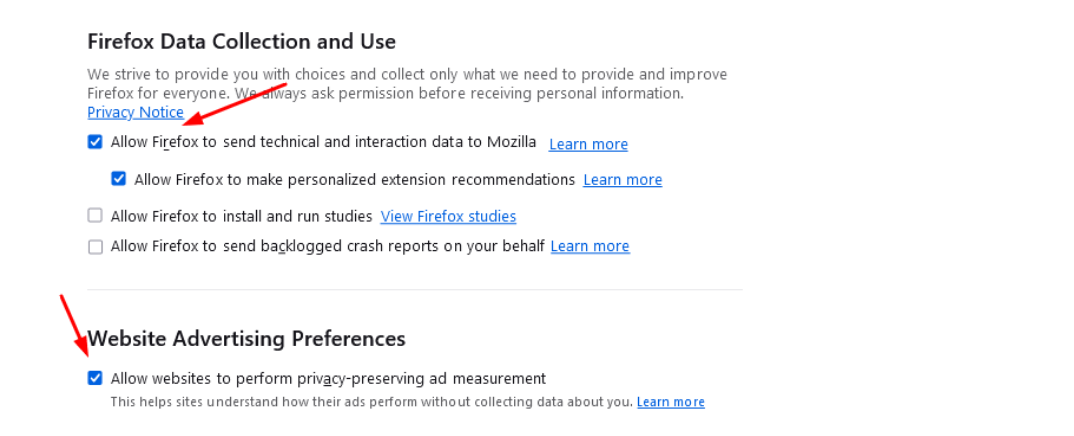
In the meantime, Mozilla’s user forums have been flooded with complaints about the feature. The criticism has focused on two things: first, that Mozilla implemented the feature at all, and second, that it decided to turn it on by default for those users who had telemetry enabled.
l98ppfirefox_1

“Integrating this feature in Firefox, and especially turning it on by default, starts with the assumption that companies have the right to track users online. I am unhappy that Firefox advertises itself as a privacy preserving alternative and then integrates this feature at all,”one of the many comments reads.

Despite the mounting criticism, Mozilla has stood its ground, and has expressed no plans to roll it back or make it opt-in.

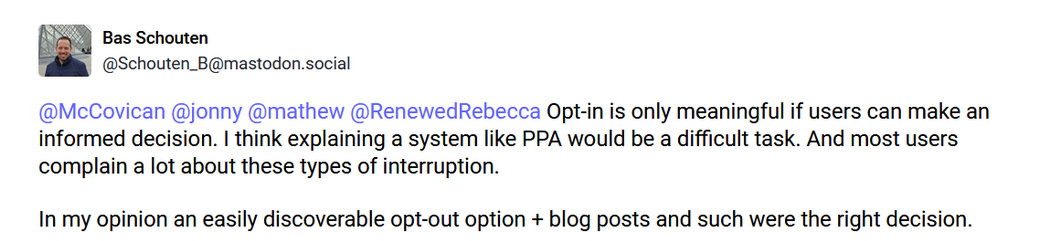
Mozilla engineer Bas Schouten argued that making this feature an opt-in would require explaining its value to the users, which he thinks would be too difficult. Schouten also argued that the opt-out option is easily discoverable.
2wffyscreen_mozilla

Whether the opt-out option is actually easy to find is debatable, but the argument that users are unlikely to grasp the information about the new API and that’s why it’s better to force it on them is not a good look.

For now, the feature can be disabled by going to Firefox’s browser menu. Once there, select Settings, and find the Website Advertising Preferences section in the Privacy & Security panel. Uncheck the box called “Allow websites to perform privacy-preserving ad measurement” and you should be good.

For its part, AdGuard is blocking this API for its app and extension users with the Tracking Protection Filter enabled as a precaution to ensure our users’ privacy remains protected.


Discuss this controversial move by Firefox in our social media

Suka postingan ini?
AdGuard VPN DNS AdGuard AdGuard Mail AdGuard Wallet
Layar utama AdGuard untuk Windows
Layar Perlindungan AdGuard untuk Windows, menampilkan fitur dan pengaturan perlindungan
Layar Statistik AdGuard untuk Windows, menampilkan statistik untuk iklan dan pelacak yang terblokir
Layar Pengelolaan aplikasi AdGuard untuk Windows, menampilkan opsi pengelolaan perlindungan untuk aplikasi yang terinstal di perangkat
20.534 20534 ulasan pengguna
Sempurna!

AdGuard untuk Windows — pemblokir iklan untuk PC Anda

AdGuard untuk Windows lebih dari sekadar pemblokir iklan. Ini adalah alat serbaguna yang memblokir iklan, mengontrol akses ke situs berbahaya, mempercepat pemuatan halaman, dan melindungi anak-anak dari konten yang tidak pantas
Dengan mengunduhnya Anda menerima ketentuan Perjanjian lisensi
Microsoft Store
Dengan mengunduhnya Anda menerima ketentuan Perjanjian lisensi
AdGuard untuk Windows v8.0, masa percobaan 14 hari
Layar utama AdGuard untuk Mac
Layar Mode Siluman AdGuard untuk Mac
20.534 20534 ulasan pengguna
Sempurna!

AdGuard untuk Mac — pemblokir iklan seluruh sistem

AdGuard untuk Mac adalah pemblokir iklan unik yang dirancang khusus untuk macOS. Selain melindungi Anda dari iklan yang mengganggu di browser dan aplikasi, ini juga melindungi Anda dari pelacakan, phishing, dan penipuan
Dengan mengunduhnya Anda menerima ketentuan Perjanjian lisensi
Pelajari lainnya
AdGuard untuk Mac v2.19, masa percobaan 14 hari
Layar utama AdGuard untuk Android
Layar Perlindungan pelacakan AdGuard untuk Android
Layar Pengelolaan aplikasi AdGuard untuk Android, menampilkan opsi pengelolaan perlindungan untuk aplikasi yang terinstal di perangkat
Layar Statistik AdGuard untuk Android, menampilkan statistik untuk iklan dan pelacak yang terblokir
Layar utama peramban privat AdGuard untuk Android
Kode QR untuk unduh AdGuard untuk Android
20.534 20534 ulasan pengguna
Sempurna!

AdGuard untuk Android: pemblokir iklan semua aplikasi

Memblokir iklan dan pelacak di semua browser, game, dan aplikasi lainnya. Melindungi privasi Anda dan memungkinkan Anda mengontrol bagaimana aplikasi Anda menggunakan internet. Diinstal melalui APK
Dengan mengunduhnya Anda menerima ketentuan Perjanjian lisensi
Pelajari lainnya
Pindai untuk mengunduh
Gunakan pembaca kode QR yang tersedia di perangkat Anda
AdGuard untuk Android v4.14, masa percobaan 14 hari
Layar utama AdGuard untuk iOS
Layar Perlindungan AdGuard untuk iOS, menampilkan fitur dan pengaturan perlindungan
Layar Statistik AdGuard untuk iOS, menampilkan statistik untuk iklan dan pelacak yang terblokir
Kode QR untuk unduh AdGuard untuk iOS
20.534 20534 ulasan pengguna
Sempurna!

AdGuard untuk iOS — pemblokir iklan di luar Safari

Pemblokir iklan iOS terbaik untuk iPhone dan iPad. AdGuard menghilangkan semua jenis iklan dan pelacak di Safari serta melindungi privasi Anda di semua aplikasi pada tingkat DNS

Dengan mengunduhnya Anda menerima ketentuan Perjanjian lisensi
Pelajari lainnya
Pindai untuk mengunduh
Gunakan pembaca kode QR yang tersedia di perangkat Anda
AdGuard untuk iOS versi 4.5
Layar utama AdGuard Content Blocker
Layar filter AdGuard Content Blocker
Layar pengaturan AdGuard Content Blocker
20.534 20534 ulasan pengguna
Sempurna!

Pemblokir Konten AdGuard

AdGuard Content Blocker menghilangkan semua jenis iklan di browser seluler yang mendukung teknologi pemblokiran konten — yaitu, Samsung Internet dan Yandex Browser. Fitur-fiturnya terbatas dibandingkan dengan AdGuard untuk Android, tetapi gratis, mudah dipasang, dan efisien

Dengan mengunduhnya Anda menerima ketentuan Perjanjian lisensi
Pelajari lainnya
Pemblokir Konten AdGuard versi 2.8
Layar utama AdGuard Browser Extension
Layar Perlindungan pelacakan AdGuard Browser Extension
20.534 20534 ulasan pengguna
Sempurna!

Ekstensi peramban AdGuard

AdGuard adalah ekstensi pemblokiran iklan tercepat dan paling ringan yang secara efektif memblokir semua jenis iklan di semua halaman web! Pilih AdGuard untuk browser yang Anda gunakan dan dapatkan penjelajahan bebas iklan, cepat, dan aman.
Pasang
Dengan mengunduhnya Anda menerima ketentuan Perjanjian lisensi
Pasang
Dengan mengunduhnya Anda menerima ketentuan Perjanjian lisensi
Pasang
Dengan mengunduhnya Anda menerima ketentuan Perjanjian lisensi
Pasang
Dengan mengunduhnya Anda menerima ketentuan Perjanjian lisensi
Pasang
Dengan mengunduhnya Anda menerima ketentuan Perjanjian lisensi
Pelajari lainnya
Pasang
Dengan mengunduhnya Anda menerima ketentuan Perjanjian lisensi
Pelajari lainnya
Ekstensi peramban AdGuard versi 5.5
Layar utama Asisten Peramban
20.534 20534 ulasan pengguna
Sempurna!

Asisten AdGuard

Sebuah ekstensi peramban pendamping untuk aplikasi AdGuard desktop. Ini mengizinkan Anda memblokir item kustom di situs web, menambahkan situs web ke daftar izinkan, dan mengirim laporan langsung dari peramban Anda
Asisten AdGuard versi 1.4
20.534 20534 ulasan pengguna
Sempurna!

AdGuard Home

AdGuard Home adalah solusi berbasis jaringan untuk memblokir iklan dan pelacak. Instal sekali di router Anda untuk mencakup semua perangkat di jaringan rumah Anda — tidak diperlukan perangkat lunak klien tambahan. Ini sangat penting untuk berbagai perangkat IoT yang sering menimbulkan ancaman bagi privasi Anda
AdGuard Home versi 0.107
Layar utama AdGuard Pro untuk iOS
Layar Perlindungan AdGuard Pro untuk iOS, menampilkan fitur dan pengaturan perlindungan
Layar statistik AdGuard Pro untuk iOS, menampilkan statistik untuk iklan dan pelacak yang terblokir
20.534 20534 ulasan pengguna
Sempurna!

AdGuard Pro untuk iOS

AdGuard Pro untuk iOS dilengkapi dengan semua fitur perlindungan pemblokiran iklan canggih. Aplikasi ini menawarkan fitur yang sama dengan versi berbayar AdGuard untuk iOS. Aplikasi ini unggul dalam memblokir iklan di Safari dan memungkinkan Anda menyesuaikan pengaturan DNS untuk perlindungan yang lebih baik. Aplikasi ini memblokir iklan di browser dan aplikasi, melindungi anak-anak Anda dari konten yang tidak pantas, dan menjaga keamanan data pribadi Anda.
Dengan mengunduhnya Anda menerima ketentuan Perjanjian lisensi
Pelajari lainnya
AdGuard Pro untuk iOS versi 4.5
Layar utama AdGuard Mini untuk Mac
Layar perlindungan Safari AdGuard Mini untuk Mac
Layar Buat aturan AdGuard Mini untuk Mac
20.534 20534 ulasan pengguna
Sempurna!

AdGuard Mini untuk Mac — pemblokir iklan Safari

AdGuard Mini untuk Mac adalah pemblokir iklan Safari yang kuat. Aplikasi ringan ini menghapus iklan, memblokir pelacak, dan mempercepat pemuatan halaman. Ini membantu Anda menjelajah Web di Safari tanpa gangguan dan menjaga data Anda tetap pribadi
Pasang
Dengan mengunduhnya Anda menerima ketentuan Perjanjian lisensi
Pelajari lainnya
AdGuard Mini untuk Mac versi 2.3
Layar utama AdGuard untuk Android TV dengan perlindungan diaktifkan
Layar pemblokiran iklan AdGuard untuk Android TV, menampilkan fitur dan pengaturannya
Layar pengaturan AdGuard untuk Android TV
Layar Pengelolaan aplikasi AdGuard untuk Android TV, menampilkan aplikasi tempat iklan dan pelacak terblokir
20.534 20534 ulasan pengguna
Sempurna!

AdGuard untuk Android TV

AdGuard untuk Android TV adalah satu-satunya aplikasi yang memblokir iklan, menjaga privasi Anda, dan bertindak sebagai firewall untuk Smart TV Anda. Dapatkan peringatan tentang ancaman web, gunakan DNS yang aman, dan dapatkan manfaatkan lalu lintas yang terenkripsi. Bersantailah dan selami acara favorit Anda dengan keamanan terbaik dan tanpa iklan!
AdGuard untuk Android TV v4.14, masa percobaan 14 hari
Maskot AdGuard, Agnar, memegang penguin Linux
20.534 20534 ulasan pengguna
Sempurna!

AdGuard untuk Linux

AdGuard untuk Linux adalah pemblokir iklan sistem luas pertama di dunia untuk Linux. Blokir iklan dan pelacak di tingkat perangkat, pilih dari filter yang sudah terinstal sebelumnya, atau tambahkan milikmu sendiri — semuanya melalui antar muka baris perintah
AdGuard untuk Linux versi 1.4
20.534 20534 ulasan pengguna
Sempurna!

AdGuard Temp Mail

Generator alamat e-mail sementara gratis yang membuat Anda tetap anonim dan melindungi privasi Anda. Tidak ada spam di kotak masuk utama Anda!
20.534 20534 ulasan pengguna
Sempurna!

AdGuard VPN

75 Lokasi Di Seluruh Dunia

Akses ke konten apa pun

Enkripsi yang kuat

Tanpa kebijakan log

Koneksi paling cepat

dukungan 24/7

Coba gratis
Dengan mengunduhnya Anda menerima ketentuan Perjanjian lisensi
Pelajari lainnya
20.534 20534 ulasan pengguna
Sempurna!

DNS AdGuard

AdGuard DNS adalah cara yang sangat andal untuk memblokir iklan internet tanpa perlu menginstal aplikasi apapun. Mudah digunakan, sepenuhnya gratis, mudah dipasang di perangkat mana saja, dan menyediakan fungsi minimal yang diperlukan untuk memblokir iklan, penghitung, situs web berbahaya, dan konten dewasa.
20.534 20534 ulasan pengguna
Sempurna!

AdGuard Mail

Lindungi identitas Anda, hindari spam, dan jaga keamanan kotak masuk Anda dengan alias dan alamat e-mail sementara kami. Nikmati layanan penerusan e-mail gratis serta aplikasi untuk semua sistem operasi.
20.534 20534 ulasan pengguna
Sempurna!

AdGuard Wallet

Dompet kripto yang aman dan pribadi yang memberi Anda kendali penuh atas aset Anda. Kelola beberapa dompet dan temukan ribuan mata uang kripto untuk disimpan, dikirim, dan ditukar
Mengunduh AdGuard Klik tombol yang ditujukkan oleh panah untuk memulai instalasi. Pilih "Buka" dan klik "OK", lalu tunggu file diunduh. Di jendela yang terbuka, seret ikon AdGuard ke folder "Aplikasi". Terima kasih telah memilih AdGuard! Pilih "Buka" dan klik "OK", lalu tunggu file diunduh. Di jendela yang terbuka, klik "Install". Terima kasih telah memilih AdGuard!
Instal AdGuard untuk perangkat ponsel juga
















































