Tech giants implement homomorphic encryption. A new era of user security or just smoke and mirrors again?

Alphabet, Facebook, Microsoft, and IBM are all testing a new encryption technology. Encryption equals privacy, right? Ironically, this technology will give companies even more access to user data and more options for analyzing it for ad targeting purposes.

What is homomorphic encryption?

It is a type of encryption that permits performing computations on encrypted data without decrypting it first. The computation results match those performed on non-encrypted data. For example, we can add up two encrypted numbers and then decrypt the sum without ever knowing what these numbers were.
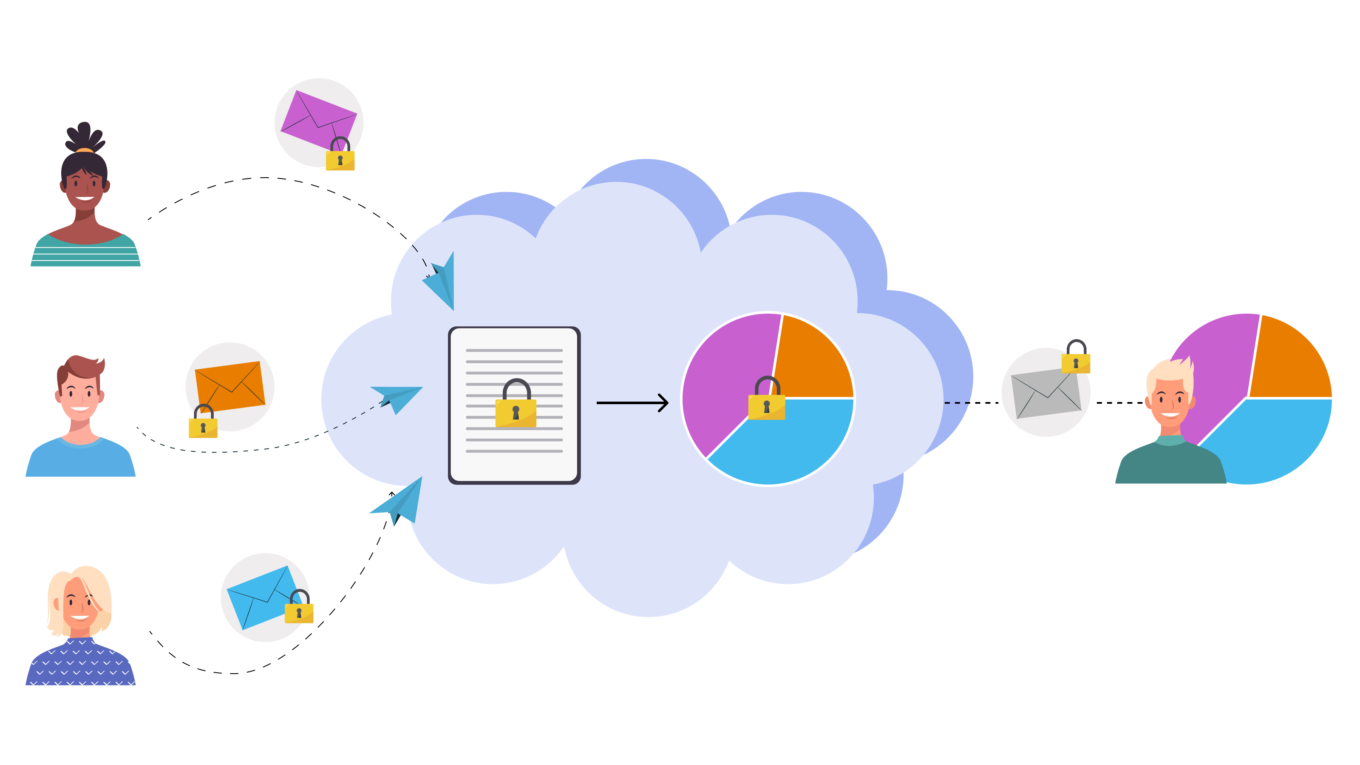
The data is never unencrypted while being processed in the Cloud


One of the application perspectives for this type of encryption is the processing of sensitive information in cloud services: the processed data is not disclosed to the owner of the cloud.

Several of the classical encryption methods had long before supported partial homomorphism and allowed to perform some operations with encrypted data. A lot changed back in 2009 when Craig Gentry introduced the first fully-homomorphic encryption scheme. A year later its first implementations emerged, but they required too much computing resources and time, and therefore could not be widely used at the time.

By now, the technologies evolved enough to provide the required resources, and the research of homomorphic encryption have become a very popular field.

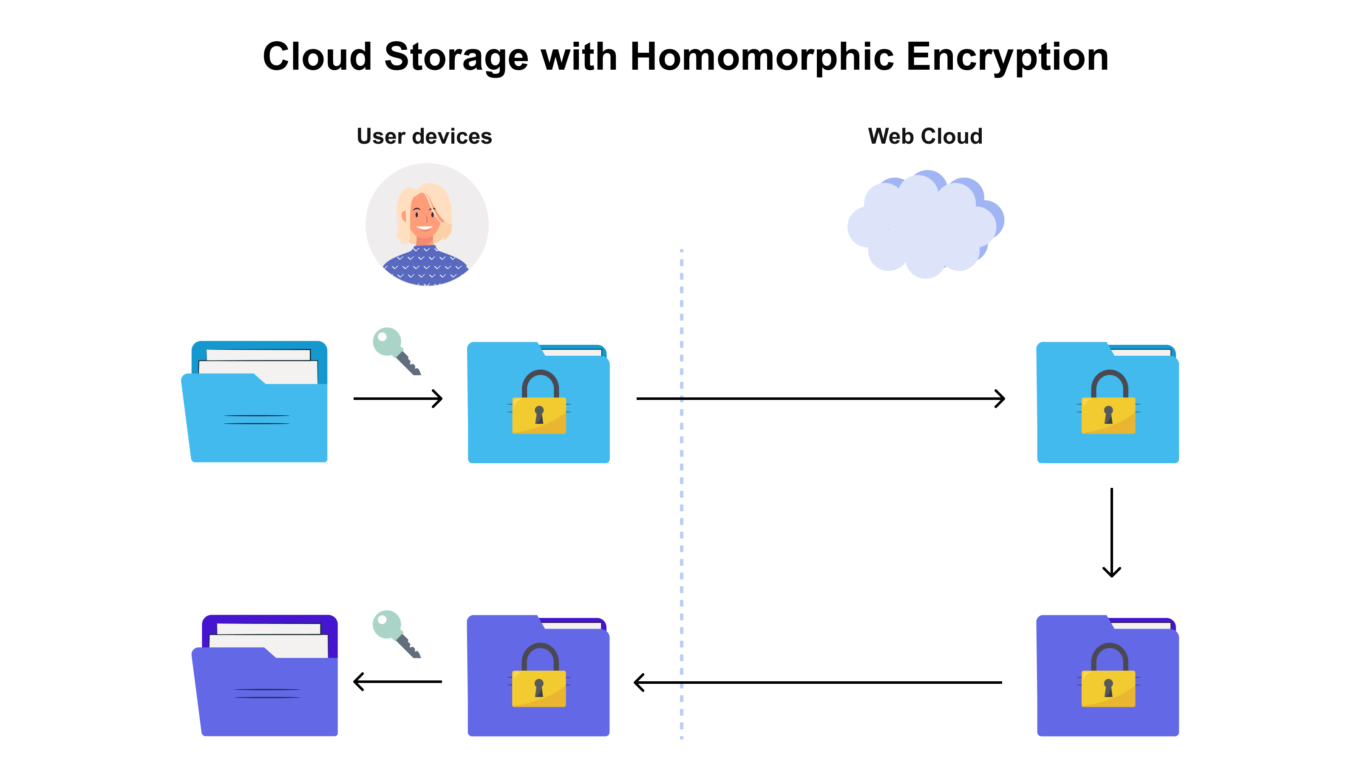
This technology is utilized in cloud data processing when information leaves the protected perimeter (i.e. your computer or smartphone) and is sent to cloud services for processing. For example, you can send requests to the Google search engine, and it will search the Web without understanding what exactly the request meant. Or it could be an email provider that detects spam messages without "reading" the emails. Today, in most cases the information is decrypted on the server before processing, and the result of processing is encrypted again and then sent to the user.
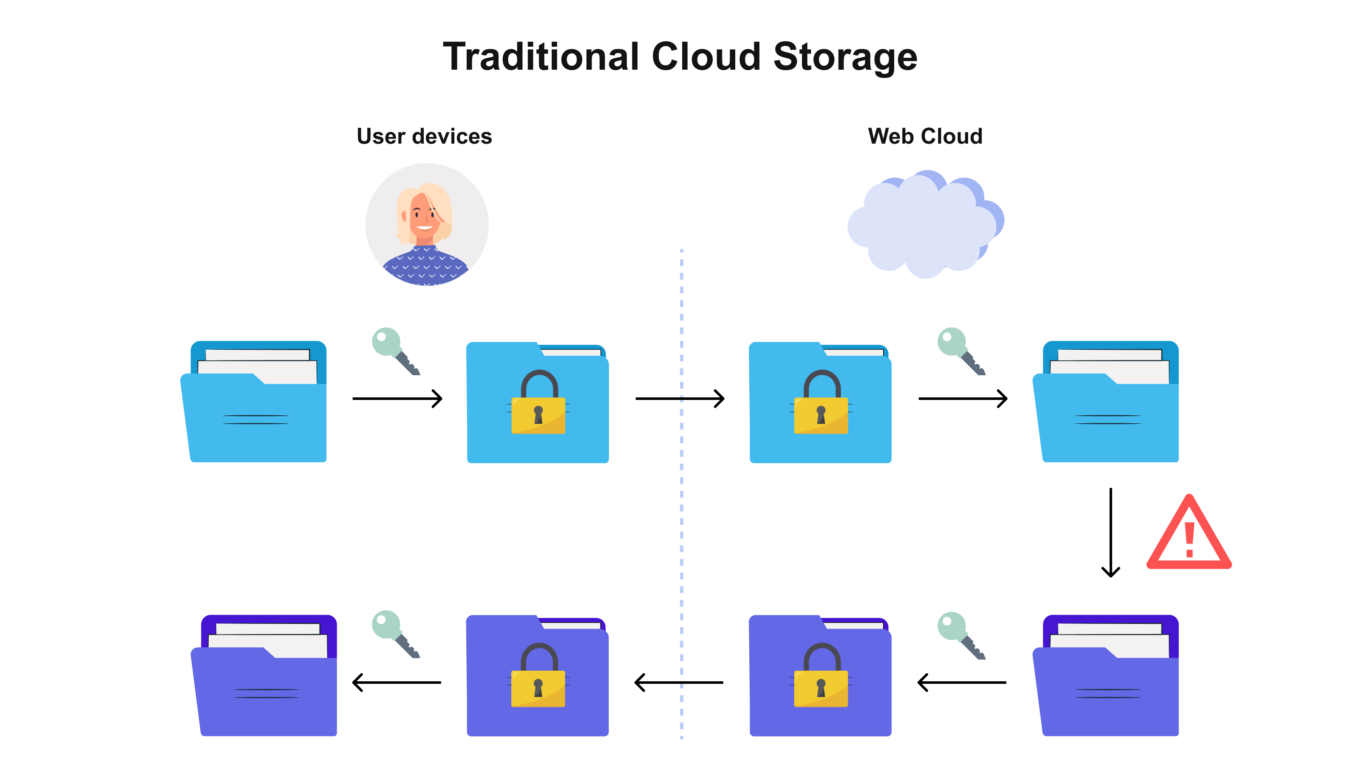
Your data is unencrypted beyond the "privacy barrier" of your device


With homomorphic encryption, your data is encrypted all the way through


Does this mean that homomorphic encryption safely protects data from being accessed by a cloud service operator? It would be great, but we've got bad news.

What could be wrong?

Facebook is deeply interested in homomorphic encryption and researches the potential of recognizing the nature of a text encrypted this way without decrypting it. Whether you are exchanging private messages, sending financial documents, discussing some goods and services — Facebook wants to analyze all that without decrypting data and getting full access to its contents.

It was suggested that WhatsApp would implement this technology later on, but this plan invoked great resentment among users. WhatsApp's CEO had to back up promptly and deny the interest in homomorphic encryption. This disclaimer sounded quite funny considering that Facebook (who owns WhatsApp, by the way) had by that time officially confirmed the interest in the technology. Moreover, several job openings had been found: Facebook is building a team of AI researchers to work on homomorphic encryption. One of the key employees has already been headhunted from Microsoft.

A number of other big tech companies are currently researching the applications of homomorphic encryption. The implementation of this technology will bring the new era of ad-tech and let the market leaders gain ground covering more sources of data about users and penetrating still deeper into their communications.

How actually is homomorphic encryption to be used in ad-tech?

Encrypted data is supposed to be analyzed in order to detect users' interests and preferences and to serve them more relevant ads, of course.

But the promise of useful ads disguises the actual problem. Instead of messages being protected by end-to-end encryption that WhatsApp cannot analyze, we will have homomorphic encryption. Artificial intelligence gets the ability to understand what people are talking about. Simultaneously, corporations employing this method would be able to claim that now they have no access to user content whatsoever. This paradox explains easily: corporation do not need to read your messages to find out what they are about.
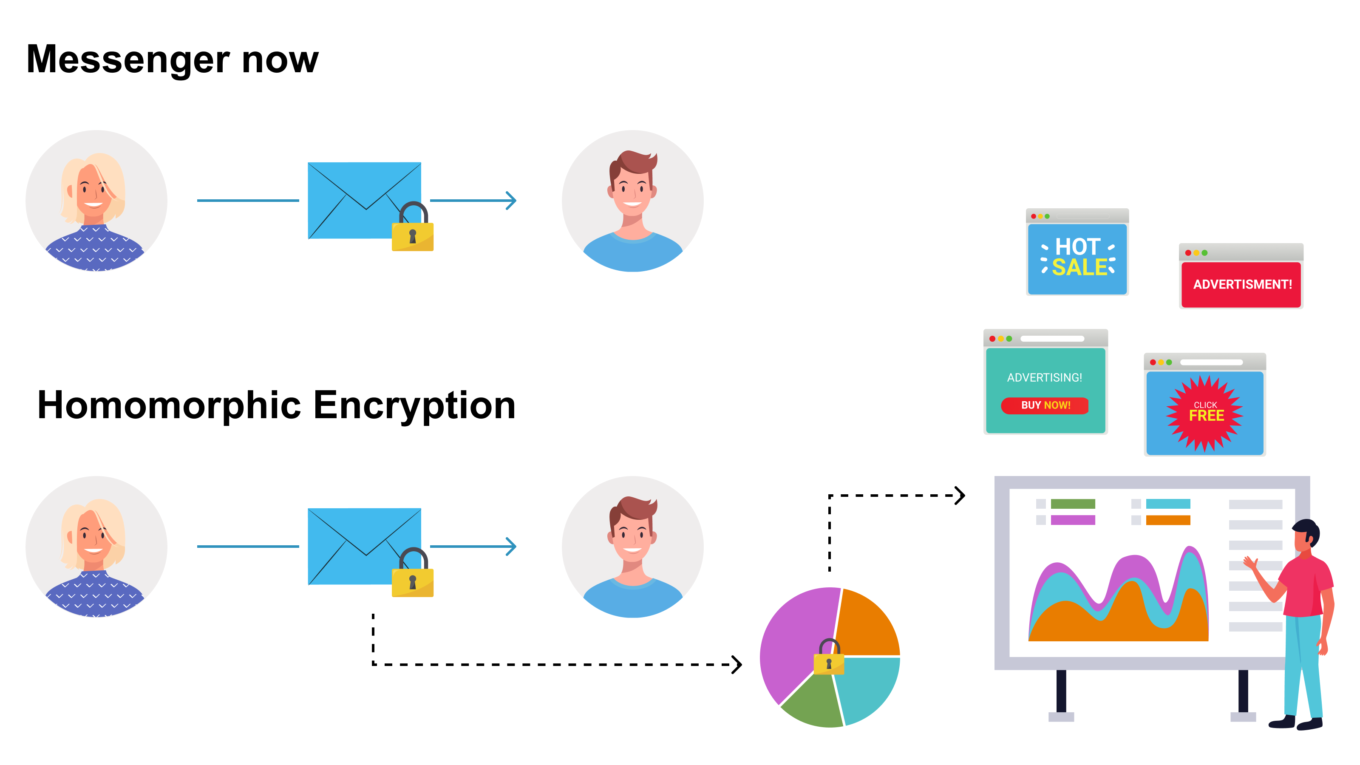
Messengers will be able to extract data without decrypting your texts


We at AdGuard see the claims that Facebook and WhatsApp can't read your messages with the implementation of homomorphic encryption as an attempt to distract users' attention from the fact that they become even more transparent for advertising platforms.

And we find it a little funny when even the CEO of WhatsApp tweets his doubts about the technology and is skeptical about its use solely for users' benefit.

So, bottom line is, homomorphic encryption is just yet another technology, an instrument like any other, and could be used for purposes both malignant and benign. Companies can make any claims about the correct and ethical use of data. But tech giants like Facebook who repeatedly had been caught abusing user data have their reputation undermined and now need to be extremely cautious — as are we, when dealing with their privacy-related initiatives.

Yes, the technology has its advantages, especially for cloud data processing, but WhatsApp messages are not processed in the cloud! They are visible only to the sending and the receiving sides. So it all looks like an attempt by the media giants to have their cake and eat it too. Users rest assured that the companies have no access to their data, and the companies can do what they want without technically getting this access: safely collect data and either sell it or use it for ad targeting. The day is not far off when, having discussed your desire to buy new headphones or sneakers in an encrypted messenger, you will be attacked by a scattering of relevant offers on every website and mobile app.

This is why big tech pours huge money into the new encryption type research. Even companies that currently have no need to process user data in the cloud. Even companies that thus risk their reputation yet again (or what's left of it).

So that's our job here — to state clear and loud that we do not want such implementation of homomorphic encryption. People's voice has an impact. A recent case with Apple giving up a controversial technology of photo scanning illustrates this well.

We at AdGuard are convinced that the key to the commercial success for a technological company should not be the desire to feed a user as many ads as possible, but rather it should be dictated by such things as technological superiority, revolutionary products, user convenience, and the security of confidential data.


Suka postingan ini?
AdGuard VPN DNS AdGuard AdGuard Mail AdGuard Wallet
Layar utama AdGuard untuk Windows
Layar Perlindungan AdGuard untuk Windows, menampilkan fitur dan pengaturan perlindungan
Layar Statistik AdGuard untuk Windows, menampilkan statistik untuk iklan dan pelacak yang terblokir
Layar Pengelolaan aplikasi AdGuard untuk Windows, menampilkan opsi pengelolaan perlindungan untuk aplikasi yang terinstal di perangkat
20.535 20535 ulasan pengguna
Sempurna!

AdGuard untuk Windows — pemblokir iklan untuk PC Anda

AdGuard untuk Windows lebih dari sekadar pemblokir iklan. Ini adalah alat serbaguna yang memblokir iklan, mengontrol akses ke situs berbahaya, mempercepat pemuatan halaman, dan melindungi anak-anak dari konten yang tidak pantas
Dengan mengunduhnya Anda menerima ketentuan Perjanjian lisensi
Microsoft Store
Dengan mengunduhnya Anda menerima ketentuan Perjanjian lisensi
AdGuard untuk Windows v8.0, masa percobaan 14 hari
Layar utama AdGuard untuk Mac
Layar Mode Siluman AdGuard untuk Mac
20.535 20535 ulasan pengguna
Sempurna!

AdGuard untuk Mac — pemblokir iklan seluruh sistem

AdGuard untuk Mac adalah pemblokir iklan unik yang dirancang khusus untuk macOS. Selain melindungi Anda dari iklan yang mengganggu di browser dan aplikasi, ini juga melindungi Anda dari pelacakan, phishing, dan penipuan
Dengan mengunduhnya Anda menerima ketentuan Perjanjian lisensi
Pelajari lainnya
AdGuard untuk Mac v2.19, masa percobaan 14 hari
Layar utama AdGuard untuk Android
Layar Perlindungan pelacakan AdGuard untuk Android
Layar Pengelolaan aplikasi AdGuard untuk Android, menampilkan opsi pengelolaan perlindungan untuk aplikasi yang terinstal di perangkat
Layar Statistik AdGuard untuk Android, menampilkan statistik untuk iklan dan pelacak yang terblokir
Layar utama peramban privat AdGuard untuk Android
Kode QR untuk unduh AdGuard untuk Android
20.535 20535 ulasan pengguna
Sempurna!

AdGuard untuk Android: pemblokir iklan semua aplikasi

Memblokir iklan dan pelacak di semua browser, game, dan aplikasi lainnya. Melindungi privasi Anda dan memungkinkan Anda mengontrol bagaimana aplikasi Anda menggunakan internet. Diinstal melalui APK


Dengan mengunduhnya Anda menerima ketentuan Perjanjian lisensi
Pelajari lainnya
Pindai untuk mengunduh
Gunakan pembaca kode QR yang tersedia di perangkat Anda
AdGuard untuk Android v4.14, masa percobaan 14 hari
Layar utama AdGuard untuk iOS
Layar Perlindungan AdGuard untuk iOS, menampilkan fitur dan pengaturan perlindungan
Layar Statistik AdGuard untuk iOS, menampilkan statistik untuk iklan dan pelacak yang terblokir
Kode QR untuk unduh AdGuard untuk iOS
20.535 20535 ulasan pengguna
Sempurna!

AdGuard untuk iOS — pemblokir iklan di luar Safari

Pemblokir iklan iOS terbaik untuk iPhone dan iPad. AdGuard menghilangkan semua jenis iklan dan pelacak di Safari serta melindungi privasi Anda di semua aplikasi pada tingkat DNS
Dengan mengunduhnya Anda menerima ketentuan Perjanjian lisensi
Pelajari lainnya
Pindai untuk mengunduh
Gunakan pembaca kode QR yang tersedia di perangkat Anda
AdGuard untuk iOS versi 4.5
Layar utama AdGuard Content Blocker
Layar filter AdGuard Content Blocker
Layar pengaturan AdGuard Content Blocker
20.535 20535 ulasan pengguna
Sempurna!

Pemblokir Konten AdGuard

AdGuard Content Blocker menghilangkan semua jenis iklan di browser seluler yang mendukung teknologi pemblokiran konten — yaitu, Samsung Internet dan Yandex Browser. Fitur-fiturnya terbatas dibandingkan dengan AdGuard untuk Android, tetapi gratis, mudah dipasang, dan efisien
Dengan mengunduhnya Anda menerima ketentuan Perjanjian lisensi
Pelajari lainnya
Pemblokir Konten AdGuard versi 2.8
Layar utama AdGuard Browser Extension
Layar Perlindungan pelacakan AdGuard Browser Extension
20.535 20535 ulasan pengguna
Sempurna!

Ekstensi peramban AdGuard

AdGuard adalah ekstensi pemblokiran iklan tercepat dan paling ringan yang secara efektif memblokir semua jenis iklan di semua halaman web! Pilih AdGuard untuk browser yang Anda gunakan dan dapatkan penjelajahan bebas iklan, cepat, dan aman.
Pasang
Dengan mengunduhnya Anda menerima ketentuan Perjanjian lisensi
Pasang
Dengan mengunduhnya Anda menerima ketentuan Perjanjian lisensi
Pasang
Dengan mengunduhnya Anda menerima ketentuan Perjanjian lisensi
Pasang
Dengan mengunduhnya Anda menerima ketentuan Perjanjian lisensi
Pasang
Dengan mengunduhnya Anda menerima ketentuan Perjanjian lisensi
Pelajari lainnya
Pasang
Dengan mengunduhnya Anda menerima ketentuan Perjanjian lisensi
Pelajari lainnya
Ekstensi peramban AdGuard versi 5.5
Layar utama Asisten Peramban
20.535 20535 ulasan pengguna
Sempurna!

Asisten AdGuard

Sebuah ekstensi peramban pendamping untuk aplikasi AdGuard desktop. Ini mengizinkan Anda memblokir item kustom di situs web, menambahkan situs web ke daftar izinkan, dan mengirim laporan langsung dari peramban Anda
Asisten AdGuard versi 1.4
20.535 20535 ulasan pengguna
Sempurna!

AdGuard Home

AdGuard Home adalah solusi berbasis jaringan untuk memblokir iklan dan pelacak. Instal sekali di router Anda untuk mencakup semua perangkat di jaringan rumah Anda — tidak diperlukan perangkat lunak klien tambahan. Ini sangat penting untuk berbagai perangkat IoT yang sering menimbulkan ancaman bagi privasi Anda
AdGuard Home versi 0.107
Layar utama AdGuard Pro untuk iOS
Layar Perlindungan AdGuard Pro untuk iOS, menampilkan fitur dan pengaturan perlindungan
Layar statistik AdGuard Pro untuk iOS, menampilkan statistik untuk iklan dan pelacak yang terblokir
20.535 20535 ulasan pengguna
Sempurna!

AdGuard Pro untuk iOS

AdGuard Pro untuk iOS dilengkapi dengan semua fitur perlindungan pemblokiran iklan canggih. Aplikasi ini menawarkan fitur yang sama dengan versi berbayar AdGuard untuk iOS. Aplikasi ini unggul dalam memblokir iklan di Safari dan memungkinkan Anda menyesuaikan pengaturan DNS untuk perlindungan yang lebih baik. Aplikasi ini memblokir iklan di browser dan aplikasi, melindungi anak-anak Anda dari konten yang tidak pantas, dan menjaga keamanan data pribadi Anda.
Dengan mengunduhnya Anda menerima ketentuan Perjanjian lisensi
Pelajari lainnya
AdGuard Pro untuk iOS versi 4.5
Layar utama AdGuard Mini untuk Mac
Layar perlindungan Safari AdGuard Mini untuk Mac
Layar Buat aturan AdGuard Mini untuk Mac
20.535 20535 ulasan pengguna
Sempurna!

AdGuard Mini untuk Mac — pemblokir iklan Safari

AdGuard Mini untuk Mac adalah pemblokir iklan Safari yang kuat. Aplikasi ringan ini menghapus iklan, memblokir pelacak, dan mempercepat pemuatan halaman. Ini membantu Anda menjelajah Web di Safari tanpa gangguan dan menjaga data Anda tetap pribadi
Pasang
Dengan mengunduhnya Anda menerima ketentuan Perjanjian lisensi
Pelajari lainnya
AdGuard Mini untuk Mac versi 2.3
Layar utama AdGuard untuk Android TV dengan perlindungan diaktifkan
Layar pemblokiran iklan AdGuard untuk Android TV, menampilkan fitur dan pengaturannya
Layar pengaturan AdGuard untuk Android TV
Layar Pengelolaan aplikasi AdGuard untuk Android TV, menampilkan aplikasi tempat iklan dan pelacak terblokir
20.535 20535 ulasan pengguna
Sempurna!

AdGuard untuk Android TV

AdGuard untuk Android TV adalah satu-satunya aplikasi yang memblokir iklan, menjaga privasi Anda, dan bertindak sebagai firewall untuk Smart TV Anda. Dapatkan peringatan tentang ancaman web, gunakan DNS yang aman, dan dapatkan manfaatkan lalu lintas yang terenkripsi. Bersantailah dan selami acara favorit Anda dengan keamanan terbaik dan tanpa iklan!
AdGuard untuk Android TV v4.14, masa percobaan 14 hari
Maskot AdGuard, Agnar, memegang penguin Linux
20.535 20535 ulasan pengguna
Sempurna!

AdGuard untuk Linux

AdGuard untuk Linux adalah pemblokir iklan sistem luas pertama di dunia untuk Linux. Blokir iklan dan pelacak di tingkat perangkat, pilih dari filter yang sudah terinstal sebelumnya, atau tambahkan milikmu sendiri — semuanya melalui antar muka baris perintah
AdGuard untuk Linux versi 1.4
20.535 20535 ulasan pengguna
Sempurna!

AdGuard Temp Mail

Generator alamat e-mail sementara gratis yang membuat Anda tetap anonim dan melindungi privasi Anda. Tidak ada spam di kotak masuk utama Anda!
20.535 20535 ulasan pengguna
Sempurna!

AdGuard VPN

75 Lokasi Di Seluruh Dunia

Akses ke konten apa pun

Enkripsi yang kuat

Tanpa kebijakan log

Koneksi paling cepat

dukungan 24/7

Coba gratis
Dengan mengunduhnya Anda menerima ketentuan Perjanjian lisensi
Pelajari lainnya
20.535 20535 ulasan pengguna
Sempurna!

DNS AdGuard

AdGuard DNS adalah cara yang sangat andal untuk memblokir iklan internet tanpa perlu menginstal aplikasi apapun. Mudah digunakan, sepenuhnya gratis, mudah dipasang di perangkat mana saja, dan menyediakan fungsi minimal yang diperlukan untuk memblokir iklan, penghitung, situs web berbahaya, dan konten dewasa.
20.535 20535 ulasan pengguna
Sempurna!

AdGuard Mail

Lindungi identitas Anda, hindari spam, dan jaga keamanan kotak masuk Anda dengan alias dan alamat e-mail sementara kami. Nikmati layanan penerusan e-mail gratis serta aplikasi untuk semua sistem operasi.
20.535 20535 ulasan pengguna
Sempurna!

AdGuard Wallet

Dompet kripto yang aman dan pribadi yang memberi Anda kendali penuh atas aset Anda. Kelola beberapa dompet dan temukan ribuan mata uang kripto untuk disimpan, dikirim, dan ditukar
Mengunduh AdGuard Klik tombol yang ditujukkan oleh panah untuk memulai instalasi. Pilih "Buka" dan klik "OK", lalu tunggu file diunduh. Di jendela yang terbuka, seret ikon AdGuard ke folder "Aplikasi". Terima kasih telah memilih AdGuard! Pilih "Buka" dan klik "OK", lalu tunggu file diunduh. Di jendela yang terbuka, klik "Install". Terima kasih telah memilih AdGuard!
Instal AdGuard untuk perangkat ponsel juga
















































