Welcome to the Adpocalypse: Even your fridge isn’t safe anymore

First, it was cheap smart TVs that came with ads — a compromise we sort of tolerated because the price was low. If you didn’t want the ads, you shelled out more money for a “premium” model. But over the years, the terms of that reluctant deal we all made started to shift, and not in our favor.

Ads started creeping into places they had no business being in. Not just on bargain TVs, but on high-end, flagship screens too. And then — as if that wasn’t enough — they showed up in the infotainment panels of cars. Some were in the form pop-up ads, hitting you in the face every time you stop at a light, as Jeep drivers could attest, although the company has later dismissed it as a glitch.

The trajectory’s been all downhill since. It's like we’re being slowly dragged into a nightmare where no screen, no product, no inch of space is safe from ads.

Over the past few years, we’ve been losing more and more control over our physical products. First came devices that brick themselves if you're behind on payments — yes, we’re talking about Ford’s self-repossessing cars (still just a concept… for now). The gradual loss of control has come together with the steady push into subscription models. That could’ve been fine if those subscriptions actually added something meaningful like new features, better service, more value. But instead, what we’re getting is manufacturers locking basic features behind a paywall, or worse, actively degrading the user experience unless you pay up.

A perfect example of this? Samsung’s latest move to push ads onto its Family Hub fridges, which start at $1,800 in the US.

This is not cool

The update rolled out quietly, almost sneakily. In mid-September, a Reddit user spotted a changelog flash on their fridge screen, and that’s when alarm bells started ringing.
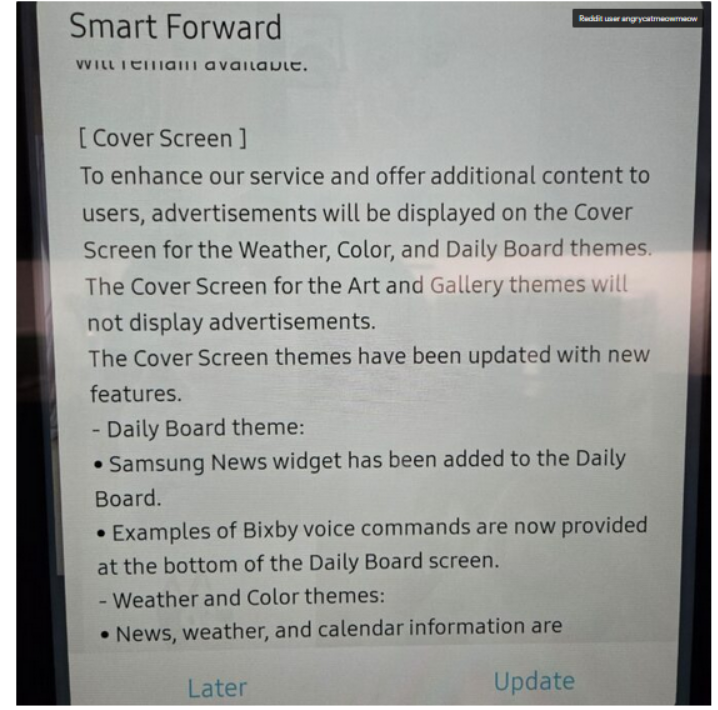
Fridge screen message

Source: Android Authority

The notice that popped up on the poster’s Samsung fridge said that ads would be shown on the door display when it’s idle and set to Weather, Color, or Daily Board themes. If it’s set to Art and Gallery themes like showing photos or pictures the ads won’t appear.

At first, people weren’t even sure it was real. Even Android Authority questioned it, wondering if the changelog was meant for some other product entirely: “There were some doubts that the changelog wasn’t real or that it belonged to a different product.”

But no, it wasn’t a mistake. It wasn’t a glitch. And it definitely wasn’t an April Fool’s joke, no matter how badly we all wished it was.

According to the Fortune, Samsung for now says it will only display ads, and not collect data about how users interact with them, like whether you dismiss an ad or engage with it. But it’s hard not to see that as just step one. More data collection is likely right around the corner.

In a statement shared with Android Authority, Samsung justified the move by saying it’s part of a “pilot program” aimed at offering “promotions and curated advertisements” to increase “everyday value.” The company said this would be done through an over-the-network (OTN) software update, and that ads will only appear when the fridge screen is idle.

Is the Fridge+ subscription on its way?

Currently, there’s no way to turn these ads off — not even a paid, ad-free option. So it seems that people who already shelled out thousands for a fridge are now stuck with ads on its door display, and can do exactly… nothing about it.

Reddit had a field day once Samsung officially confirmed the ads weren’t there by accident.“Imagine paying thousands of dollars for a fridge just to get ads on it?” one Redditor wrote. Others joked — or maybe predicted — that the fridge might soon start showing 30-second pre-roll ads before it lets you open the door, in true YouTube fashion.

And since Samsung has officially announced that it wants to put screens on everything — from ovens to washers and dryers — we can probably expect ads coming to those too.

“Of course you know this is going to end in some f*ckery where the ice maker won’t work unless you have a paid subscription,” another user posted. And honestly, that indeed feels like exactly where we’re headed. It’s not at all beyond the scope of imagination that, at some point, in order to “improve” the very user experience they just degraded, Samsung might roll out a Fridge+ subscription — so you can pay to make your $1,800 fridge feel like it did before the ads showed up.

One of the Reddit comments on the matter

Source: Reddit

Blocking Samsung Fridge ads

One of the first questions that springs to an ad blocking user’s mind is whether the Samsung Fridge ads can be blocked. And while there’s no magical “off” switch or built-in setting to kill them, there are ways to get around them. They’re not the easiest, and definitely not bulletproof, but if you’re a bit tech-savvy, there’s hope.

AdGuard Home: The best (but nerdier) way to block the ads

If you’re comfortable setting up a bit of home network infrastructure,AdGuard Home is likely the most promising method available right now.

It works as a local DNS server running on your network — for example, on a Raspberry Pi or a low-power PC — and lets you filter and block domains (including those used for ads or telemetry) before the traffic ever reaches the internet.

AdGuard Home’s dashboard gives you detailed logs of DNS requests, so if the fridge is making calls to specific ad domains, you can identify and block them manually. Once installed, AdGuard Home will cover all devices on your home network, no additional client software is required. This is especially important for various IoT devices that could pose a threat to your privacy (a smart fridge included).

That said, this approach works best when the fridge fetches ad content through standard domain name lookups, which, in most cases, it likely does. As far as we know, Samsung isn’t using more advanced methods like hardcoded IP addresses or encrypted DNS in its refrigerators, which would make DNS-level blocking much harder. While technically possible, it’s unlikely that a fridge — even a high-end one — would go to those lengths just to serve ads.

AdGuard DNS: The easier to configure but less flexible option

If AdGuard Home sounds like a bit much, there’s also AdGuard DNS that doesn’t need any hardware or installation. You just change your router’s DNS settings to point to AdGuard’s servers, and that’s it.

Most smart fridges (and smart devices in general) automatically get their DNS settings from the router via DHCP, which means they’ll use whichever DNS server the router is configured to use. So, if you set your router’s DNS to AdGuard’s public ad-blocking DNS servers, your fridge will likely start using AdGuard DNS as well — and known ad domains could be blocked at the DNS level. Just like in AdGuard Home, the AdGuard DNS paid plan lets you create custom rules and inspect traffic logs to see exactly what’s happening under the hood.


Suka postingan ini?
AdGuard VPN DNS AdGuard AdGuard Mail AdGuard Wallet
Layar utama AdGuard untuk Windows
Layar Perlindungan AdGuard untuk Windows, menampilkan fitur dan pengaturan perlindungan
Layar Statistik AdGuard untuk Windows, menampilkan statistik untuk iklan dan pelacak yang terblokir
Layar Pengelolaan aplikasi AdGuard untuk Windows, menampilkan opsi pengelolaan perlindungan untuk aplikasi yang terinstal di perangkat
20.533 20533 ulasan pengguna
Sempurna!

AdGuard untuk Windows — pemblokir iklan untuk PC Anda

AdGuard untuk Windows lebih dari sekadar pemblokir iklan. Ini adalah alat serbaguna yang memblokir iklan, mengontrol akses ke situs berbahaya, mempercepat pemuatan halaman, dan melindungi anak-anak dari konten yang tidak pantas
Dengan mengunduhnya Anda menerima ketentuan Perjanjian lisensi
Microsoft Store
Dengan mengunduhnya Anda menerima ketentuan Perjanjian lisensi
AdGuard untuk Windows v8.0, masa percobaan 14 hari
Layar utama AdGuard untuk Mac
Layar Mode Siluman AdGuard untuk Mac
20.533 20533 ulasan pengguna
Sempurna!

AdGuard untuk Mac — pemblokir iklan seluruh sistem

AdGuard untuk Mac adalah pemblokir iklan unik yang dirancang khusus untuk macOS. Selain melindungi Anda dari iklan yang mengganggu di browser dan aplikasi, ini juga melindungi Anda dari pelacakan, phishing, dan penipuan
Dengan mengunduhnya Anda menerima ketentuan Perjanjian lisensi
Pelajari lainnya
AdGuard untuk Mac v2.19, masa percobaan 14 hari
Layar utama AdGuard untuk Android
Layar Perlindungan pelacakan AdGuard untuk Android
Layar Pengelolaan aplikasi AdGuard untuk Android, menampilkan opsi pengelolaan perlindungan untuk aplikasi yang terinstal di perangkat
Layar Statistik AdGuard untuk Android, menampilkan statistik untuk iklan dan pelacak yang terblokir
Layar utama peramban privat AdGuard untuk Android
Kode QR untuk unduh AdGuard untuk Android
20.533 20533 ulasan pengguna
Sempurna!

AdGuard untuk Android: pemblokir iklan semua aplikasi

Memblokir iklan dan pelacak di semua browser, game, dan aplikasi lainnya. Melindungi privasi Anda dan memungkinkan Anda mengontrol bagaimana aplikasi Anda menggunakan internet. Diinstal melalui APK
Dengan mengunduhnya Anda menerima ketentuan Perjanjian lisensi
Pelajari lainnya
Pindai untuk mengunduh
Gunakan pembaca kode QR yang tersedia di perangkat Anda
AdGuard untuk Android v4.14, masa percobaan 14 hari
Layar utama AdGuard untuk iOS
Layar Perlindungan AdGuard untuk iOS, menampilkan fitur dan pengaturan perlindungan
Layar Statistik AdGuard untuk iOS, menampilkan statistik untuk iklan dan pelacak yang terblokir
Kode QR untuk unduh AdGuard untuk iOS
20.533 20533 ulasan pengguna
Sempurna!

AdGuard untuk iOS — pemblokir iklan di luar Safari

Pemblokir iklan iOS terbaik untuk iPhone dan iPad. AdGuard menghilangkan semua jenis iklan dan pelacak di Safari serta melindungi privasi Anda di semua aplikasi pada tingkat DNS

Dengan mengunduhnya Anda menerima ketentuan Perjanjian lisensi
Pelajari lainnya
Pindai untuk mengunduh
Gunakan pembaca kode QR yang tersedia di perangkat Anda
AdGuard untuk iOS versi 4.5
Layar utama AdGuard Content Blocker
Layar filter AdGuard Content Blocker
Layar pengaturan AdGuard Content Blocker
20.533 20533 ulasan pengguna
Sempurna!

Pemblokir Konten AdGuard

AdGuard Content Blocker menghilangkan semua jenis iklan di browser seluler yang mendukung teknologi pemblokiran konten — yaitu, Samsung Internet dan Yandex Browser. Fitur-fiturnya terbatas dibandingkan dengan AdGuard untuk Android, tetapi gratis, mudah dipasang, dan efisien

Dengan mengunduhnya Anda menerima ketentuan Perjanjian lisensi
Pelajari lainnya
Pemblokir Konten AdGuard versi 2.8
Layar utama AdGuard Browser Extension
Layar Perlindungan pelacakan AdGuard Browser Extension
20.533 20533 ulasan pengguna
Sempurna!

Ekstensi peramban AdGuard

AdGuard adalah ekstensi pemblokiran iklan tercepat dan paling ringan yang secara efektif memblokir semua jenis iklan di semua halaman web! Pilih AdGuard untuk browser yang Anda gunakan dan dapatkan penjelajahan bebas iklan, cepat, dan aman.
Pasang
Dengan mengunduhnya Anda menerima ketentuan Perjanjian lisensi
Pasang
Dengan mengunduhnya Anda menerima ketentuan Perjanjian lisensi
Pasang
Dengan mengunduhnya Anda menerima ketentuan Perjanjian lisensi
Pasang
Dengan mengunduhnya Anda menerima ketentuan Perjanjian lisensi
Pasang
Dengan mengunduhnya Anda menerima ketentuan Perjanjian lisensi
Pelajari lainnya
Pasang
Dengan mengunduhnya Anda menerima ketentuan Perjanjian lisensi
Pelajari lainnya
Ekstensi peramban AdGuard versi 5.5
Layar utama Asisten Peramban
20.533 20533 ulasan pengguna
Sempurna!

Asisten AdGuard

Sebuah ekstensi peramban pendamping untuk aplikasi AdGuard desktop. Ini mengizinkan Anda memblokir item kustom di situs web, menambahkan situs web ke daftar izinkan, dan mengirim laporan langsung dari peramban Anda
Asisten AdGuard versi 1.4
20.533 20533 ulasan pengguna
Sempurna!

AdGuard Home

AdGuard Home adalah solusi berbasis jaringan untuk memblokir iklan dan pelacak. Instal sekali di router Anda untuk mencakup semua perangkat di jaringan rumah Anda — tidak diperlukan perangkat lunak klien tambahan. Ini sangat penting untuk berbagai perangkat IoT yang sering menimbulkan ancaman bagi privasi Anda
AdGuard Home versi 0.107
Layar utama AdGuard Pro untuk iOS
Layar Perlindungan AdGuard Pro untuk iOS, menampilkan fitur dan pengaturan perlindungan
Layar statistik AdGuard Pro untuk iOS, menampilkan statistik untuk iklan dan pelacak yang terblokir
20.533 20533 ulasan pengguna
Sempurna!

AdGuard Pro untuk iOS

AdGuard Pro untuk iOS dilengkapi dengan semua fitur perlindungan pemblokiran iklan canggih. Aplikasi ini menawarkan fitur yang sama dengan versi berbayar AdGuard untuk iOS. Aplikasi ini unggul dalam memblokir iklan di Safari dan memungkinkan Anda menyesuaikan pengaturan DNS untuk perlindungan yang lebih baik. Aplikasi ini memblokir iklan di browser dan aplikasi, melindungi anak-anak Anda dari konten yang tidak pantas, dan menjaga keamanan data pribadi Anda.
Dengan mengunduhnya Anda menerima ketentuan Perjanjian lisensi
Pelajari lainnya
AdGuard Pro untuk iOS versi 4.5
Layar utama AdGuard Mini untuk Mac
Layar perlindungan Safari AdGuard Mini untuk Mac
Layar Buat aturan AdGuard Mini untuk Mac
20.533 20533 ulasan pengguna
Sempurna!

AdGuard Mini untuk Mac — pemblokir iklan Safari

AdGuard Mini untuk Mac adalah pemblokir iklan Safari yang kuat. Aplikasi ringan ini menghapus iklan, memblokir pelacak, dan mempercepat pemuatan halaman. Ini membantu Anda menjelajah Web di Safari tanpa gangguan dan menjaga data Anda tetap pribadi
Pasang
Dengan mengunduhnya Anda menerima ketentuan Perjanjian lisensi
Pelajari lainnya
AdGuard Mini untuk Mac versi 2.3
Layar utama AdGuard untuk Android TV dengan perlindungan diaktifkan
Layar pemblokiran iklan AdGuard untuk Android TV, menampilkan fitur dan pengaturannya
Layar pengaturan AdGuard untuk Android TV
Layar Pengelolaan aplikasi AdGuard untuk Android TV, menampilkan aplikasi tempat iklan dan pelacak terblokir
20.533 20533 ulasan pengguna
Sempurna!

AdGuard untuk Android TV

AdGuard untuk Android TV adalah satu-satunya aplikasi yang memblokir iklan, menjaga privasi Anda, dan bertindak sebagai firewall untuk Smart TV Anda. Dapatkan peringatan tentang ancaman web, gunakan DNS yang aman, dan dapatkan manfaatkan lalu lintas yang terenkripsi. Bersantailah dan selami acara favorit Anda dengan keamanan terbaik dan tanpa iklan!
AdGuard untuk Android TV v4.14, masa percobaan 14 hari
Maskot AdGuard, Agnar, memegang penguin Linux
20.533 20533 ulasan pengguna
Sempurna!

AdGuard untuk Linux

AdGuard untuk Linux adalah pemblokir iklan sistem luas pertama di dunia untuk Linux. Blokir iklan dan pelacak di tingkat perangkat, pilih dari filter yang sudah terinstal sebelumnya, atau tambahkan milikmu sendiri — semuanya melalui antar muka baris perintah
AdGuard untuk Linux versi 1.4
20.533 20533 ulasan pengguna
Sempurna!

AdGuard Temp Mail

Generator alamat e-mail sementara gratis yang membuat Anda tetap anonim dan melindungi privasi Anda. Tidak ada spam di kotak masuk utama Anda!
20.533 20533 ulasan pengguna
Sempurna!

AdGuard VPN

75 Lokasi Di Seluruh Dunia

Akses ke konten apa pun

Enkripsi yang kuat

Tanpa kebijakan log

Koneksi paling cepat

dukungan 24/7

Coba gratis
Dengan mengunduhnya Anda menerima ketentuan Perjanjian lisensi
Pelajari lainnya
20.533 20533 ulasan pengguna
Sempurna!

DNS AdGuard

AdGuard DNS adalah cara yang sangat andal untuk memblokir iklan internet tanpa perlu menginstal aplikasi apapun. Mudah digunakan, sepenuhnya gratis, mudah dipasang di perangkat mana saja, dan menyediakan fungsi minimal yang diperlukan untuk memblokir iklan, penghitung, situs web berbahaya, dan konten dewasa.
20.533 20533 ulasan pengguna
Sempurna!

AdGuard Mail

Lindungi identitas Anda, hindari spam, dan jaga keamanan kotak masuk Anda dengan alias dan alamat e-mail sementara kami. Nikmati layanan penerusan e-mail gratis serta aplikasi untuk semua sistem operasi.
20.533 20533 ulasan pengguna
Sempurna!

AdGuard Wallet

Dompet kripto yang aman dan pribadi yang memberi Anda kendali penuh atas aset Anda. Kelola beberapa dompet dan temukan ribuan mata uang kripto untuk disimpan, dikirim, dan ditukar
Mengunduh AdGuard Klik tombol yang ditujukkan oleh panah untuk memulai instalasi. Pilih "Buka" dan klik "OK", lalu tunggu file diunduh. Di jendela yang terbuka, seret ikon AdGuard ke folder "Aplikasi". Terima kasih telah memilih AdGuard! Pilih "Buka" dan klik "OK", lalu tunggu file diunduh. Di jendela yang terbuka, klik "Install". Terima kasih telah memilih AdGuard!
Instal AdGuard untuk perangkat ponsel juga
















































