Unimania: I Need Your Facebook Data, Location, And Your Browsing History

Privacy protection is basically what we do, so I never get tired of stories about how unpredictable the ways of getting Facebook user data are. Cambridge Analytica might be dead, but the business of stealing users’ data lives on, and this article demonstrates one more example of that.

The story begins with the recent research I conducted about fake ad blockers in the Chrome Web Store. The outcome of that research was that I received dozens of questions about whether this or that extension is safe to use. This made me take a deeper look into the most popular Chrome extensions, but even so, I had no idea at that time where this investigation was going to lead me. In fact, it exposed to me a huge spyware campaign that utilizes popular Android apps and Chrome extensions to steal Facebook data and the browsing histories of millions of users.

Suspicious Chrome extensions

I conducted an automated scan of all publicly available Chrome extensions. This scan flagged quite a few different privacy issues, which I will address in more specific detail in a forthcoming post.

One of the issues that immediately caught my attention, as I noticed suspicious requests made to various Facebook domains.

Meet these nasty Chrome extensions, currently in use by an estimated 420,000 users:

  • Album & Photo Manager For Facebook (92K+ users)
  • PDF Merge — PDF Files Merger (125K+ users)
  • Pixcam — Webcam Effects (31K+ users)

So, what is wrong with them? Let's dive into the details.

The inscrutable ways of your Facebook data

If you are logged into Facebook, these spyware extensions will scrape all your data immediately after the browser startup:
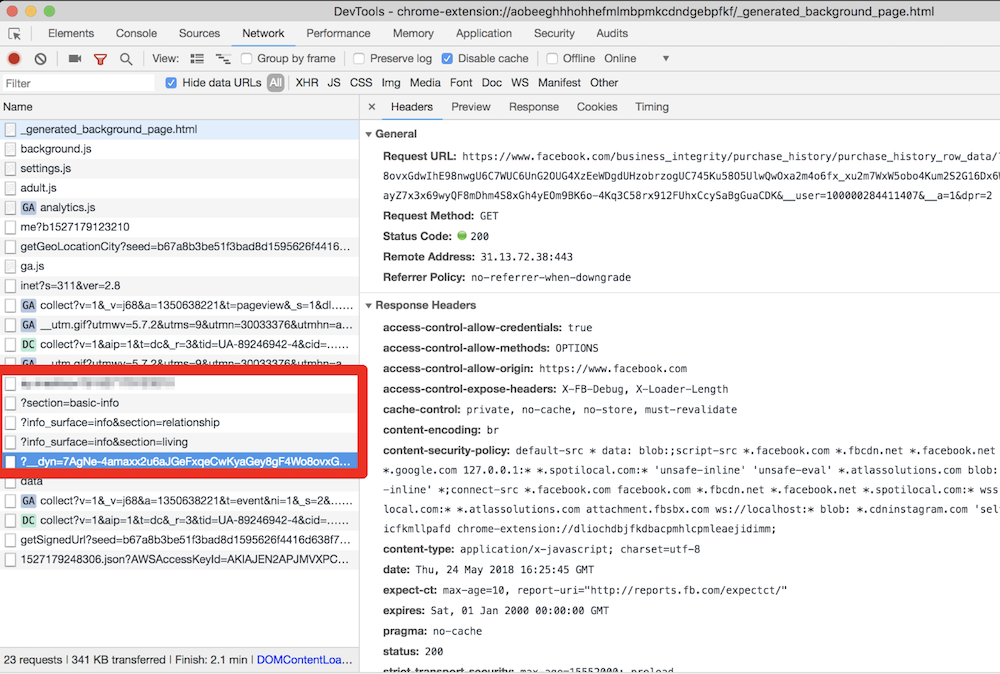
They even try to parse your purchase history! This alone is enough for these extensions to be booted from the Chrome Web Store.

All this data is then collected and sent to the um-public-panel-prod.s3.amazonaws.com domain, which is a named Amazon S3 instance rented by the spyware authors.
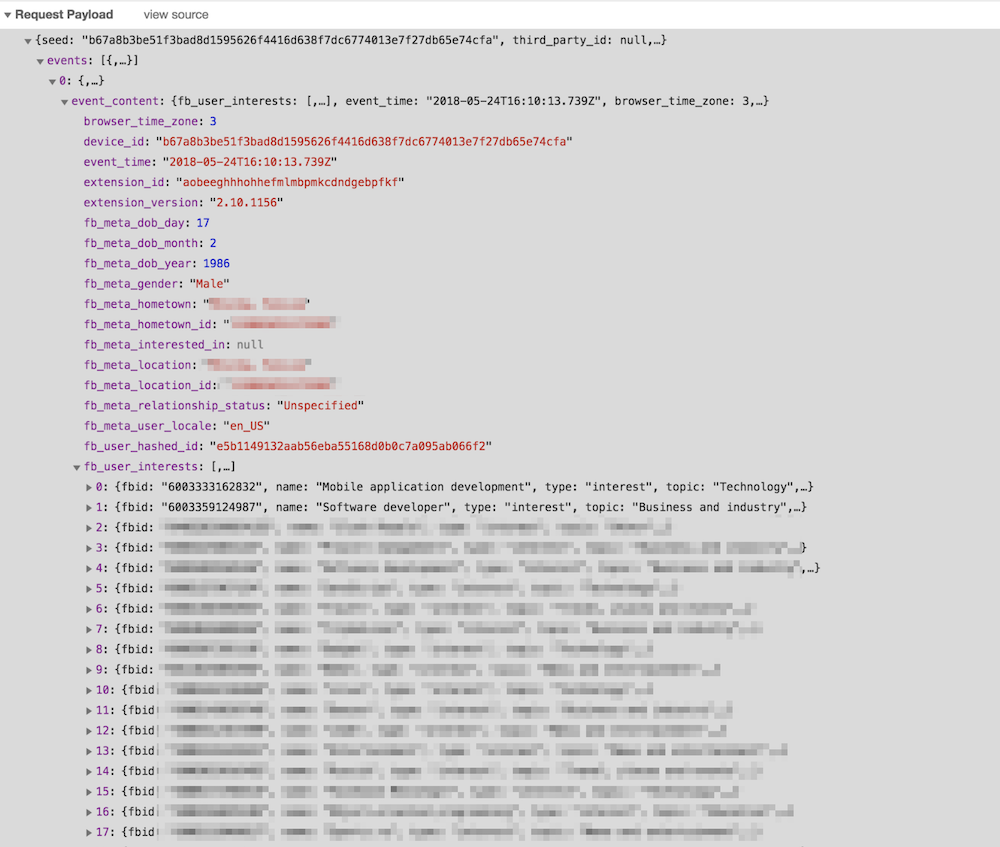
An alarming amount of data was being sent over to that server including all the Facebook "interests". In order to test this, I had to use my own account, so you can observe a piece of my own data, which I don't mind sharing with you.

As you can see on the screenshot, they do not send a plain FB identifier; instead, they send it in a hashed form. I imagine that they think that this practice allow the spyware group to say that this data has been made "anonymous."

“Dear spyware developers, come on! Do you really believe that hashing a numeric value with a static salt cannot be decoded?”

SHA1("sME9Azj8G28Y" + userId) = e5b1149132aab56eba55168d0b0c7a095ab066f2

By the way, dear reader, here is a contest for you: the first one to crack the hash and discover my FB ID gets a free AdGuard license. Write your answer in the comments. No cheating, please :)

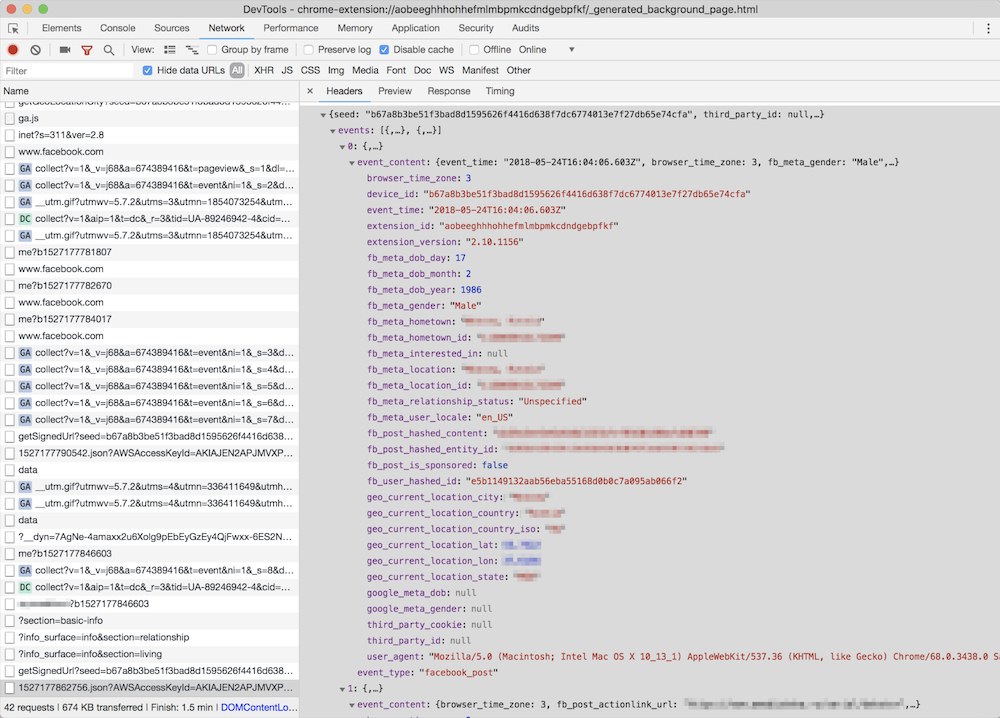
But hey, what is the good of having this data without the spyware company also knowing what exactly you do on the Internet? Wouldn't it be so much better if they knew what exact posts you read or what exact ads you see? Well, no worries, that's exactly what they do: they siphon information about all of the posts, sponsored posts, tweets, the YouTube videos and ads you see or interact with, along with a poorly hashed user ID and totally UN-hashed location data.
Meet Unimania Inc.

Who is behind this activity? The only thing I knew about the authors was the link to their extensions' privacy policy: here's a copy, just in case. As usual, there's a lot of confusing legalese about how you provide them with consent without doing anything, how seriously they care about your privacy, how strongly your data is made (or kept) anonymous and how it can in no way can be traced back to you as it is protected by a powerful mathematical "hash function."

Fortunately, it is also pretty transparent about what exact information about you is collected:

What Information We Collect and How We Collect It. In general, the Information we collect includes nonpersonally identifiable demographic and psychographic data as well as sponsored campaigns, advertisements or posts that target you directly or that have been shared with you.

Also, I found their EULA: here's the copy, from which I learned that the company name is "Unimania, Inc." and they claim to be located in Tel-Aviv, Israel. However, I could not find any information on this company in the Israeli company register.

My story might have ended here, but there was a sentence in the privacy policy that caught my attention:

Background. You have been directed to this Privacy Policy from a separate and independent third party Google Chrome Extension or Mobile Software Application (“Third Party Software”).

Mobile Software Application

"Mobile Software Application!" I said to myself.

So this was not just a matter limited to Chrome extensions, and I realized that I needed to continue my investigation. To this end, some good news was that we already had some data collected while preparing a study on mobile apps tracking and I could make use of it and query it right away.

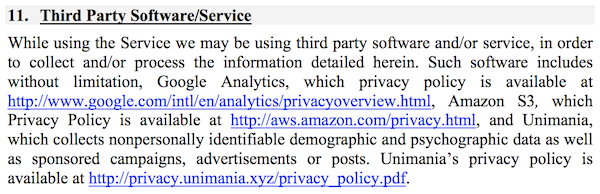
That's how I found one particular app that was connecting to the Unimania servers. This was an alternative Facebook client called "Fast — Social App" with a record of more than 10,000,000 installs according to Google Play. The app developer does not bother to hide that fact and mentions Unimania in the privacy policy:
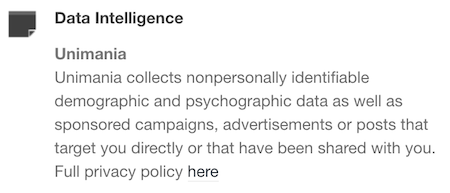
Scanning this developer apps' traffic confirmed that "Fast-Social App" transfers pretty much the same data as the Chrome extensions do, and to the same Unimania servers. I also found out that "Fast Lite - Social App + Twitter" (1,000,000+ installs) also does the same thing.

Besides that, I found a couple more apps that mention Unimania in their privacy policies. I cannot confirm that they are still leaking user data, but I can assume they were doing so in the past; otherwise, why would they mention it?

Finally, it seems that Unimania is about to launch their own "products":

  • OmniSocial — a mobile app
  • Who's following me? — a browser extension

Obviously, none of these apps describe this behavior in the app description; neither do they have an "in-app disclosure" as required by Google. I must admit that the Google Play Developer Policies look solid, and so they are likely not the reason of why the privacy of Android apps is in such a sad state. The problem is that these policies are not enforced, hence most of the app developers simply ignore them.

Summary

Congratulations for reading through such a long article (or for skipping all the boring technical details and jumping straight to the summary)!

Let's summarize what we discovered.

  1. A huge spyware campaign engaging some Mobile Apps and Chrome extensions in stealing users’ Facebook data and spying on their social network browsing history. The list of the information collected by these apps and extensions includes the user’s Facebook profile data including demographics and the list of user interests. Also, they were collecting the users' browsing history including all the Facebook regular and sponsored posts, tweets, YouTube videos and ads.
  2. Four spyware Chrome extensions with aggegrated users count of more than 400,000 users.
  3. Two Android apps with total installs count of more than 11,000,000 selling out their users data.
  4. The campaign is run by a supposed Israeli company named "Unimania, Inc." Unfortunately, I was not able to trace this further back to Unimania’s owners or affiliates and I can't say who is profiting from the data.

I've reported all the discovered apps and extensions to Google and I hope they take corrective measures soon.

How to protect yourself?

The answer to this question is both very simple and very difficult.

When installing anything on your device or browser, follow these rules:

  • Read the privacy policy. It is not useless - everything discovered in this case was mentioned in the privacy policies.
  • Never ever install anything made by a developer you don't trust. Do your homework, find out who the developer is and decide for yourself if they are trustworthy.

Also, all Unimania domains have now been added to the "AdGuard Spyware filter" and will be blocked automatically if you have it enabled in any of our AdGuard products, or if you use AdGuard DNS. Unfortunately, there is a browser limitation that prevents an extension from controlling requests made by other extensions so using the AdGuard Chrome extension or uBlock Origin may not be enough, even if you have the "AdGuard Spyware filter" enabled.

Alternatively, you can block these three domains by adding them to the "hosts" file:

  • um-public-panel-prod.s3.amazonaws.com
  • collection-endpoint-prod.herokuapp.com
  • collection-endpoint-staging.herokuapp.com

UPD (Jun 3): The Android apps mentioned in the article are no more available on Google Play.
UPD (Jun 5): The Chrome extensions are finally taken down from the Chrome Web Store.


Suka postingan ini?
AdGuard VPN DNS AdGuard AdGuard Mail AdGuard Wallet
Layar utama AdGuard untuk Windows
Layar Perlindungan AdGuard untuk Windows, menampilkan fitur dan pengaturan perlindungan
Layar Statistik AdGuard untuk Windows, menampilkan statistik untuk iklan dan pelacak yang terblokir
Layar Pengelolaan aplikasi AdGuard untuk Windows, menampilkan opsi pengelolaan perlindungan untuk aplikasi yang terinstal di perangkat
20.534 20534 ulasan pengguna
Sempurna!

AdGuard untuk Windows — pemblokir iklan untuk PC Anda

AdGuard untuk Windows lebih dari sekadar pemblokir iklan. Ini adalah alat serbaguna yang memblokir iklan, mengontrol akses ke situs berbahaya, mempercepat pemuatan halaman, dan melindungi anak-anak dari konten yang tidak pantas

Dengan mengunduhnya Anda menerima ketentuan Perjanjian lisensi
Microsoft Store
Dengan mengunduhnya Anda menerima ketentuan Perjanjian lisensi
AdGuard untuk Windows v8.0, masa percobaan 14 hari
Layar utama AdGuard untuk Mac
Layar Mode Siluman AdGuard untuk Mac
20.534 20534 ulasan pengguna
Sempurna!

AdGuard untuk Mac — pemblokir iklan seluruh sistem

AdGuard untuk Mac adalah pemblokir iklan unik yang dirancang khusus untuk macOS. Selain melindungi Anda dari iklan yang mengganggu di browser dan aplikasi, ini juga melindungi Anda dari pelacakan, phishing, dan penipuan
Dengan mengunduhnya Anda menerima ketentuan Perjanjian lisensi
Pelajari lainnya
AdGuard untuk Mac v2.19, masa percobaan 14 hari
Layar utama AdGuard untuk Android
Layar Perlindungan pelacakan AdGuard untuk Android
Layar Pengelolaan aplikasi AdGuard untuk Android, menampilkan opsi pengelolaan perlindungan untuk aplikasi yang terinstal di perangkat
Layar Statistik AdGuard untuk Android, menampilkan statistik untuk iklan dan pelacak yang terblokir
Layar utama peramban privat AdGuard untuk Android
Kode QR untuk unduh AdGuard untuk Android
20.534 20534 ulasan pengguna
Sempurna!

AdGuard untuk Android: pemblokir iklan semua aplikasi

Memblokir iklan dan pelacak di semua browser, game, dan aplikasi lainnya. Melindungi privasi Anda dan memungkinkan Anda mengontrol bagaimana aplikasi Anda menggunakan internet. Diinstal melalui APK
Dengan mengunduhnya Anda menerima ketentuan Perjanjian lisensi
Pelajari lainnya
Pindai untuk mengunduh
Gunakan pembaca kode QR yang tersedia di perangkat Anda
AdGuard untuk Android v4.14, masa percobaan 14 hari
Layar utama AdGuard untuk iOS
Layar Perlindungan AdGuard untuk iOS, menampilkan fitur dan pengaturan perlindungan
Layar Statistik AdGuard untuk iOS, menampilkan statistik untuk iklan dan pelacak yang terblokir
Kode QR untuk unduh AdGuard untuk iOS
20.534 20534 ulasan pengguna
Sempurna!

AdGuard untuk iOS — pemblokir iklan di luar Safari

Pemblokir iklan iOS terbaik untuk iPhone dan iPad. AdGuard menghilangkan semua jenis iklan dan pelacak di Safari serta melindungi privasi Anda di semua aplikasi pada tingkat DNS
Dengan mengunduhnya Anda menerima ketentuan Perjanjian lisensi
Pelajari lainnya
Pindai untuk mengunduh
Gunakan pembaca kode QR yang tersedia di perangkat Anda
AdGuard untuk iOS versi 4.5
Layar utama AdGuard Content Blocker
Layar filter AdGuard Content Blocker
Layar pengaturan AdGuard Content Blocker
20.534 20534 ulasan pengguna
Sempurna!

Pemblokir Konten AdGuard

AdGuard Content Blocker menghilangkan semua jenis iklan di browser seluler yang mendukung teknologi pemblokiran konten — yaitu, Samsung Internet dan Yandex Browser. Fitur-fiturnya terbatas dibandingkan dengan AdGuard untuk Android, tetapi gratis, mudah dipasang, dan efisien
Dengan mengunduhnya Anda menerima ketentuan Perjanjian lisensi
Pelajari lainnya
Pemblokir Konten AdGuard versi 2.8
Layar utama AdGuard Browser Extension
Layar Perlindungan pelacakan AdGuard Browser Extension
20.534 20534 ulasan pengguna
Sempurna!

Ekstensi peramban AdGuard

AdGuard adalah ekstensi pemblokiran iklan tercepat dan paling ringan yang secara efektif memblokir semua jenis iklan di semua halaman web! Pilih AdGuard untuk browser yang Anda gunakan dan dapatkan penjelajahan bebas iklan, cepat, dan aman.
Pasang
Dengan mengunduhnya Anda menerima ketentuan Perjanjian lisensi
Pasang
Dengan mengunduhnya Anda menerima ketentuan Perjanjian lisensi
Pasang
Dengan mengunduhnya Anda menerima ketentuan Perjanjian lisensi
Pasang
Dengan mengunduhnya Anda menerima ketentuan Perjanjian lisensi
Pasang
Dengan mengunduhnya Anda menerima ketentuan Perjanjian lisensi
Pelajari lainnya
Pasang
Dengan mengunduhnya Anda menerima ketentuan Perjanjian lisensi
Pelajari lainnya
Ekstensi peramban AdGuard versi 5.5
Layar utama Asisten Peramban
20.534 20534 ulasan pengguna
Sempurna!

Asisten AdGuard

Sebuah ekstensi peramban pendamping untuk aplikasi AdGuard desktop. Ini mengizinkan Anda memblokir item kustom di situs web, menambahkan situs web ke daftar izinkan, dan mengirim laporan langsung dari peramban Anda
Asisten AdGuard versi 1.4
20.534 20534 ulasan pengguna
Sempurna!

AdGuard Home

AdGuard Home adalah solusi berbasis jaringan untuk memblokir iklan dan pelacak. Instal sekali di router Anda untuk mencakup semua perangkat di jaringan rumah Anda — tidak diperlukan perangkat lunak klien tambahan. Ini sangat penting untuk berbagai perangkat IoT yang sering menimbulkan ancaman bagi privasi Anda
AdGuard Home versi 0.107
Layar utama AdGuard Pro untuk iOS
Layar Perlindungan AdGuard Pro untuk iOS, menampilkan fitur dan pengaturan perlindungan
Layar statistik AdGuard Pro untuk iOS, menampilkan statistik untuk iklan dan pelacak yang terblokir
20.534 20534 ulasan pengguna
Sempurna!

AdGuard Pro untuk iOS

AdGuard Pro untuk iOS dilengkapi dengan semua fitur perlindungan pemblokiran iklan canggih. Aplikasi ini menawarkan fitur yang sama dengan versi berbayar AdGuard untuk iOS. Aplikasi ini unggul dalam memblokir iklan di Safari dan memungkinkan Anda menyesuaikan pengaturan DNS untuk perlindungan yang lebih baik. Aplikasi ini memblokir iklan di browser dan aplikasi, melindungi anak-anak Anda dari konten yang tidak pantas, dan menjaga keamanan data pribadi Anda.
Dengan mengunduhnya Anda menerima ketentuan Perjanjian lisensi
Pelajari lainnya
AdGuard Pro untuk iOS versi 4.5
Layar utama AdGuard Mini untuk Mac
Layar perlindungan Safari AdGuard Mini untuk Mac
Layar Buat aturan AdGuard Mini untuk Mac
20.534 20534 ulasan pengguna
Sempurna!

AdGuard Mini untuk Mac — pemblokir iklan Safari

AdGuard Mini untuk Mac adalah pemblokir iklan Safari yang kuat. Aplikasi ringan ini menghapus iklan, memblokir pelacak, dan mempercepat pemuatan halaman. Ini membantu Anda menjelajah Web di Safari tanpa gangguan dan menjaga data Anda tetap pribadi
Pasang
Dengan mengunduhnya Anda menerima ketentuan Perjanjian lisensi
Pelajari lainnya
AdGuard Mini untuk Mac versi 2.3
Layar utama AdGuard untuk Android TV dengan perlindungan diaktifkan
Layar pemblokiran iklan AdGuard untuk Android TV, menampilkan fitur dan pengaturannya
Layar pengaturan AdGuard untuk Android TV
Layar Pengelolaan aplikasi AdGuard untuk Android TV, menampilkan aplikasi tempat iklan dan pelacak terblokir
20.534 20534 ulasan pengguna
Sempurna!

AdGuard untuk Android TV

AdGuard untuk Android TV adalah satu-satunya aplikasi yang memblokir iklan, menjaga privasi Anda, dan bertindak sebagai firewall untuk Smart TV Anda. Dapatkan peringatan tentang ancaman web, gunakan DNS yang aman, dan dapatkan manfaatkan lalu lintas yang terenkripsi. Bersantailah dan selami acara favorit Anda dengan keamanan terbaik dan tanpa iklan!
AdGuard untuk Android TV v4.14, masa percobaan 14 hari
Maskot AdGuard, Agnar, memegang penguin Linux
20.534 20534 ulasan pengguna
Sempurna!

AdGuard untuk Linux

AdGuard untuk Linux adalah pemblokir iklan sistem luas pertama di dunia untuk Linux. Blokir iklan dan pelacak di tingkat perangkat, pilih dari filter yang sudah terinstal sebelumnya, atau tambahkan milikmu sendiri — semuanya melalui antar muka baris perintah
AdGuard untuk Linux versi 1.4
20.534 20534 ulasan pengguna
Sempurna!

AdGuard Temp Mail

Generator alamat e-mail sementara gratis yang membuat Anda tetap anonim dan melindungi privasi Anda. Tidak ada spam di kotak masuk utama Anda!
20.534 20534 ulasan pengguna
Sempurna!

AdGuard VPN

75 Lokasi Di Seluruh Dunia

Akses ke konten apa pun

Enkripsi yang kuat

Tanpa kebijakan log

Koneksi paling cepat

dukungan 24/7

Coba gratis
Dengan mengunduhnya Anda menerima ketentuan Perjanjian lisensi
Pelajari lainnya
20.534 20534 ulasan pengguna
Sempurna!

DNS AdGuard

AdGuard DNS adalah cara yang sangat andal untuk memblokir iklan internet tanpa perlu menginstal aplikasi apapun. Mudah digunakan, sepenuhnya gratis, mudah dipasang di perangkat mana saja, dan menyediakan fungsi minimal yang diperlukan untuk memblokir iklan, penghitung, situs web berbahaya, dan konten dewasa.
20.534 20534 ulasan pengguna
Sempurna!

AdGuard Mail

Lindungi identitas Anda, hindari spam, dan jaga keamanan kotak masuk Anda dengan alias dan alamat e-mail sementara kami. Nikmati layanan penerusan e-mail gratis serta aplikasi untuk semua sistem operasi.
20.534 20534 ulasan pengguna
Sempurna!

AdGuard Wallet

Dompet kripto yang aman dan pribadi yang memberi Anda kendali penuh atas aset Anda. Kelola beberapa dompet dan temukan ribuan mata uang kripto untuk disimpan, dikirim, dan ditukar
Mengunduh AdGuard Klik tombol yang ditujukkan oleh panah untuk memulai instalasi. Pilih "Buka" dan klik "OK", lalu tunggu file diunduh. Di jendela yang terbuka, seret ikon AdGuard ke folder "Aplikasi". Terima kasih telah memilih AdGuard! Pilih "Buka" dan klik "OK", lalu tunggu file diunduh. Di jendela yang terbuka, klik "Install". Terima kasih telah memilih AdGuard!
Instal AdGuard untuk perangkat ponsel juga