Firefox enables advertisers to track ad performance by default

Mozilla, a company that has always prided itself on putting privacy first, is facing a backlash from users over a Firefox data collection feature designed to help advertisers track ad performance. Adding insult to injury, the feature, called Privacy-Preserving Attribution (PPA), is enabled by default in the newest version of the browser.

In announcing the new feature, Mozilla described it as a “a non-invasive alternative to cross-site tracking.” “Tracking is terrible for privacy, because it gives companies detailed information about what you do online,” it went on. Cross-site tracking has been for the longest time associated with third-party cookies that Mozilla has been blocking in Firefox by default since 2019. However, now that the last abodes of third-party cookies, such as Microsoft Edge and Google Chrome, are finally phasing them out, browser makers are looking for a replacement.

The alternatives proposed by Google Chrome (Protected Audience API) and Microsoft Edge (Ad Selection API) seem sketchy or at least not foolproof when it comes to user privacy. That’s why AdGuard is now blocking both of them.

In light of this, Mozilla’s unveiling of a supposedly private tracking alternative might appear typical — just another browser maker catering to advertisers while also trying to sweeten the pill for users. The catch, however, lies in Mozilla’s own claim that it isn’t your run-of-the-mill tech company — implying it doesn’t shove your privacy aside in pursuit of profits like the others do.

“We’re not a normal tech company. The things we create prioritize people and their privacy over profits. We exist to make the internet a healthier, happier place for everyone,” asserts Mozilla’s mission statement, prominently displayed on its main page.

So, is Mozilla just like the others now? Without jumping the gun on this, let’s take a closer look at this new tracking alternative.

A product of cooperation with Meta

The new feature was rolled out less than a month after Mozilla’s acquisition of Anonym, an ad metrics company. This move raised eyebrows at the time, seen by some, including here at AdGuard, as a reason for concern and a potential step down a slippery slope. That is primarily because embracing technologies that facilitate data sharing for targeted advertising appears to contradict Mozilla’s mission to always prioritize privacy.

On its GitHub page, Mozilla says that it has been “working with Meta and other actors on defining an in-browser attribution API,” so the PPA seems to be the direct result of that work. It goes on to say that it will be conducting a trial of a “lightweight version of a proposal” which is what is happening now in Firefox.

Our hope is that if we develop a good attribution solution, it will offer a real alternative to more objectionable practices like tracking. We are currently testing this approach to see if it can provide advertisers with the information they’re looking for.

So what’s under the hood?

Mozilla provides a detailed technical description of the new API at this link. We will limit ourselves to a more general one.

In a nutshell, Firefox will track attributed conversions, that is where an ad displayed on one site leads to a conversion (like a purchase) on another. Traditionally, this process relies on cross-site tracking to link these events. However, Mozilla claims that its method, where the browser itself manages this, protects user privacy.

During impression registration — when a user views or clicks on an ad — Firefox will store basic information in a write-only repository. This includes the ad’s identifier and whether the user viewed or clicked the ad. When a conversion occurs, the system aggregates this data based on stored impressions. The website where the conversion happens can access related impressions using the ad’s identifier and interaction type (view or click). Mozilla claims that privacy of individual users is protected because the data is aggregated and the noise is added to prevent identifying specific user actions.

Mozilla: privacy loss is offset by the ‘enormous value’ to the advertiser

But not everyone agrees. Digital rights advocate Jonah Aragon points out that there are a “plethora of issues” with the new feature, most importantly that it reflects a misguided belief that advertisers are entitled to the collection of user data.

By baking in software that’s tailor-made for the advertising industry, Mozilla is wrongly asserting that the advertising industry has a legitimate interest in collecting your data and tracking you across the internet over all other parties, including over your own interests.

Even the mere fact that Mozilla is cooperating with Meta out of all companies on this, makes one a little suspicious of the privacy-preserving nature of the technique, but how does Mozilla itself justify it?

On their GitHub page, Mozilla acknowledges that implementing such a tracking scheme would mean users will take a hit on their privacy, with their info being used. However, the browser maker also argues that such loss is justifiable by the “enormous value” advertisers gain from attribution. Their big sell is that other funding models just won’t cut it.

We, however, disagree with the assumption that an advertising-driven model is the only viable option for sustaining online content and services. We believe there are more ethical or privacy-respecting approaches out there worth exploring. And as a self-professed champion of privacy, Mozilla should lead in exploring these alternatives, rather than seemingly trying to accommodate advertisers’ interests.

Why turn it on by default?

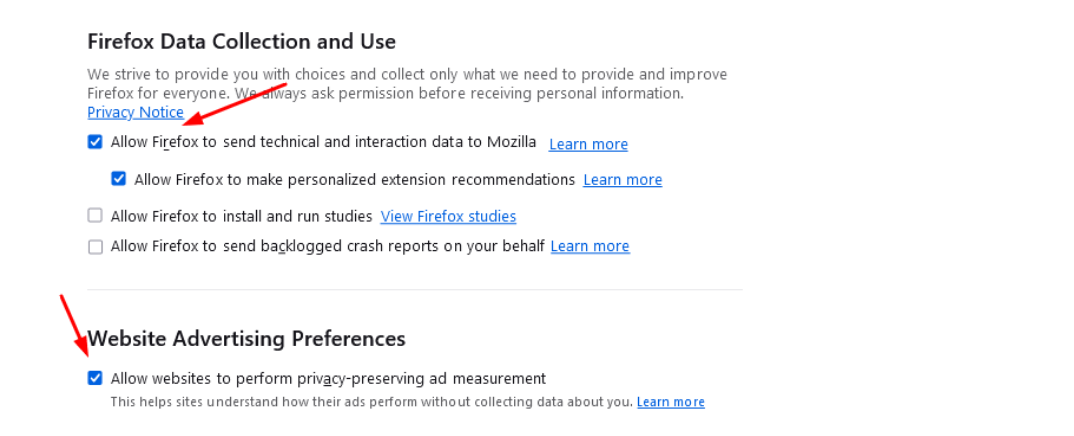
In the meantime, Mozilla’s user forums have been flooded with complaints about the feature. The criticism has focused on two things: first, that Mozilla implemented the feature at all, and second, that it decided to turn it on by default for those users who had telemetry enabled.
l98ppfirefox_1

“Integrating this feature in Firefox, and especially turning it on by default, starts with the assumption that companies have the right to track users online. I am unhappy that Firefox advertises itself as a privacy preserving alternative and then integrates this feature at all,”one of the many comments reads.

Despite the mounting criticism, Mozilla has stood its ground, and has expressed no plans to roll it back or make it opt-in.

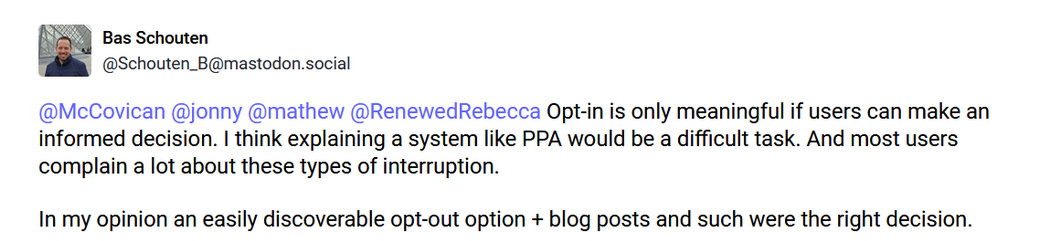
Mozilla engineer Bas Schouten argued that making this feature an opt-in would require explaining its value to the users, which he thinks would be too difficult. Schouten also argued that the opt-out option is easily discoverable.
2wffyscreen_mozilla

Whether the opt-out option is actually easy to find is debatable, but the argument that users are unlikely to grasp the information about the new API and that’s why it’s better to force it on them is not a good look.

For now, the feature can be disabled by going to Firefox’s browser menu. Once there, select Settings, and find the Website Advertising Preferences section in the Privacy & Security panel. Uncheck the box called “Allow websites to perform privacy-preserving ad measurement” and you should be good.

For its part, AdGuard is blocking this API for its app and extension users with the Tracking Protection Filter enabled as a precaution to ensure our users’ privacy remains protected.


Discuss this controversial move by Firefox in our social media

Vond je dit bericht leuk?
AdGuard VPN AdGuard DNS AdGuard Mail AdGuard Wallet
Het hoofdscherm van AdGuard voor Windows
Het beschermingsscherm van AdGuard voor Windows, met de beschermingsfuncties en -instellingen
Het statistiekenscherm van AdGuard voor Windows, met statistieken over geblokkeerde advertenties en volgers
Het appbeheerscherm van AdGuard voor Windows, met de opties voor beschermingsbeheer van apps die op het apparaat zijn geïnstalleerd
20.557 20557 gebruikersbeoordelingen
Uitstekend!

AdGuard voor Windows: advertentieblokker voor pc

AdGuard voor Windows is meer dan een advertentieblokker. Het is een multifunctioneel hulpmiddel dat advertenties blokkeert, de toegang tot gevaarlijke sites regelt, het laden van pagina's versnelt en kinderen beschermt tegen ongepaste inhoud
Door het programma te downloaden accepteer je de licentievoorwaarden
Microsoft Store
Door het programma te downloaden accepteer je de licentievoorwaarden
AdGuard voor Windows v8.0, 14 dagen proefperiode
Het hoofdscherm van AdGuard voor Mac
Het Incognitomodus-scherm van AdGuard voor Mac
20.557 20557 gebruikersbeoordelingen
Uitstekend!

AdGuard voor Mac: systeembrede advertentieblokker

AdGuard voor Mac is een unieke advertentieblokker die is ontworpen met macOS in gedachten. Het beschermt je niet alleen tegen vervelende advertenties in browsers en apps, maar beschermt je ook tegen volgen, phishing en fraude
Door het programma te downloaden accepteer je de licentievoorwaarden
Meer lezen
AdGuard voor Mac v2.19, 14 dagen proefperiode
Het hoofdscherm van AdGuard voor Android
Het scherm 'Bescherming tegen volgers' van AdGuard voor Android
Het appbeheerscherm van AdGuard voor Android, met de opties voor beschermingsbeheer voor apps die op het apparaat zijn geïnstalleerd
Het statistiekenscherm van AdGuard voor Android, met statistieken over geblokkeerde advertenties en volgers
Het hoofdscherm van de privébrowser van AdGuard voor Android
De QR-code om AdGuard voor Android te downloaden
20.557 20557 gebruikersbeoordelingen
Uitstekend!

AdGuard voor Android: advertentieblokker voor alle apps

Blokkeert advertenties en volgers in alle browsers, spellen en andere apps. Beschermt je privacy en geeft je controle over hoe jouw apps internet gebruiken. Geïnstalleerd via APK
Door het programma te downloaden accepteer je de licentievoorwaarden
Meer lezen
Scannen om te downloaden
Gebruik een QR-codelezer die beschikbaar is op je apparaat
AdGuard voor Android v4.14, 14 dagen proefperiode
Het hoofdscherm van AdGuard voor iOS
Het beschermingsscherm van AdGuard voor iOS, dat de beschermingsfuncties en -instellingen toont.
Het statistiekenscherm van AdGuard voor iOS, met statistieken over geblokkeerde advertenties en volgers
De QR-code om AdGuard voor iOS te downloaden
20.557 20557 gebruikersbeoordelingen
Uitstekend!

AdGuard: advertentieblokker voor iOS

De beste advertentieblokker voor iOS op iPhone en iPad. AdGuard verwijdert alle soorten advertenties en volgers in Safari en beschermt je privacy in alle apps op DNS-niveau

Door het programma te downloaden accepteer je de licentievoorwaarden
Meer lezen
Scannen om te downloaden
Gebruik een QR-codelezer die beschikbaar is op je apparaat
AdGuard voor iOS v4.5
Het hoofdscherm van AdGuard Inhoudsblokker
Het filterscherm van AdGuard Inhoudsblokker
Het instellingenscherm van AdGuard Inhoudsblokker
20.557 20557 gebruikersbeoordelingen
Uitstekend!

AdGuard Content Blocker

AdGuard Content Blocker elimineert allerlei soorten advertenties in mobiele browsers die technologie voor het blokkeren van inhoud ondersteunen, namelijk Samsung Internet en Yandex Browser. De functies zijn beperkt in vergelijking met AdGuard voor Android, maar het is gratis, eenvoudig te installeren en efficiënt

Door het programma te downloaden accepteer je de licentievoorwaarden
Meer lezen
AdGuard Content Blocker v2.8
Het hoofdscherm van de AdGuard-browseruitbreiding
Het scherm 'Bescherming tegen volgers' van AdGuard-browseruitbreiding
20.557 20557 gebruikersbeoordelingen
Uitstekend!

AdGuard Browserextensie

AdGuard is de snelste en lichtste advertentieblokkering uitbreiding die alle soorten advertenties op alle webpagina's effectief blokkeert! Kies AdGuard voor uw browser om advertentievrij, snel en veilig te surfen.
Installeren
Door het programma te downloaden accepteer je de licentievoorwaarden
Installeren
Door het programma te downloaden accepteer je de licentievoorwaarden
Installeren
Door het programma te downloaden accepteer je de licentievoorwaarden
Installeren
Door het programma te downloaden accepteer je de licentievoorwaarden
Installeren
Door het programma te downloaden accepteer je de licentievoorwaarden
Meer lezen
Installeren
Door het programma te downloaden accepteer je de licentievoorwaarden
Meer lezen
AdGuard Browserextensie v5.5
Het hoofdscherm van AdGuard Assistant
20.557 20557 gebruikersbeoordelingen
Uitstekend!

AdGuard Assistant

Een bijbehorende browseruitbreiding voor AdGuard desktop-apps. Het stelt je in staat om aangepaste items op websites te blokkeren, websites toe te voegen aan de toelatingslijst en rapporten rechtstreeks vanuit je browser te versturen
AdGuard Assistant v1.4
20.557 20557 gebruikersbeoordelingen
Uitstekend!

AdGuard Home

AdGuard Home is een netwerkgebaseerde oplossing voor het blokkeren van advertenties en volgers. Installeer het één keer op je router om alle apparaten in je thuisnetwerk te beschermen — geen extra clientsoftware vereist. Dit is vooral belangrijk voor verschillende IoT-apparaten die vaak een bedreiging vormen voor je privacy
AdGuard Home v0.107
Het hoofdscherm van AdGuard Pro voor iOS
Het beschermingsscherm van AdGuard Pro voor iOS, met de beschermingsfuncties en instellingen
Het statistiekenscherm van AdGuard Pro voor iOS, met statistieken over geblokkeerde advertenties en trackers
20.557 20557 gebruikersbeoordelingen
Uitstekend!

AdGuard Pro voor iOS

AdGuard Pro voor iOS wordt geleverd met alle geavanceerde beschermingsfuncties voor het blokkeren van advertenties. Het biedt dezelfde tools als de betaalde versie van AdGuard voor iOS. Het blinkt uit in het blokkeren van advertenties in Safari en laat je DNS-instellingen aanpassen om je bescherming aan te passen. Het blokkeert advertenties in browsers en apps, beschermt je kinderen tegen ongepaste inhoud en houdt je persoonlijke gegevens veilig
Door het programma te downloaden accepteer je de licentievoorwaarden
Meer lezen
AdGuard Pro voor iOS v4.5
Het hoofdscherm van AdGuard Mini voor Mac
Het Safari-beschermingsscherm van AdGuard Mini voor Mac
Het 'Regel aanmaken'-scherm van AdGuard Mini voor Mac
20.557 20557 gebruikersbeoordelingen
Uitstekend!

AdGuard Mini voor Mac — Safari-advertentieblokker

AdGuard Mini voor Mac is een krachtige Safari-advertentieblokker. Deze lichtgewicht app verwijdert advertenties, blokkeert volgers en versnelt het laden van pagina's. Het helpt je om in Safari zonder afleiding op het web te surfen en je gegevens privé te houden
Installeren
Door het programma te downloaden accepteer je de licentievoorwaarden
Meer lezen
AdGuard Mini voor Mac v2.3
Het hoofdscherm van AdGuard voor Android TV met ingeschakelde bescherming
Het advertentieblokkeringsscherm van AdGuard voor Android TV, met zijn functies en instellingen
Het instellingenscherm van AdGuard voor Android TV
Het appbeheer-scherm van AdGuard voor Android TV, waarop de apps worden getoond waar advertenties en volgers worden geblokkeerd
20.557 20557 gebruikersbeoordelingen
Uitstekend!

AdGuard voor Android TV

AdGuard voor Android TV is de enige app die advertenties blokkeert, jouw privacy bewaakt en fungeert als firewall voor je Smart TV. Ontvang waarschuwingen over webbedreigingen, gebruik veilige DNS en profiteer van gecodeerd verkeer. Ontspan en duik in je favoriete programma's met eersteklas beveiliging en zonder advertenties!
AdGuard voor Android TV v4.14, 14 dagen proefperiode
De AdGuard-mascotte, Agnar, houdt de Linux-pinguïn vast
20.557 20557 gebruikersbeoordelingen
Uitstekend!

AdGuard voor Linux

AdGuard voor Linux is 's werelds eerste systeem-brede AdGuard Advertentieblokker. Blokkeer advertenties en volgers op apparaatsniveau, kies uit vooraf geïnstalleerde filters, of voeg je eigen toe - allemaal via de interface
AdGuard voor Linux v1.4
20.557 20557 gebruikersbeoordelingen
Uitstekend!

AdGuard Temp Mail

Een gratis tijdelijke e-mailadresgenerator die je anoniem houdt en jouw privacy beschermt. Geen spam in je hoofdinbox!
20.557 20557 gebruikersbeoordelingen
Uitstekend!

AdGuard VPN

75 locaties wereldwijd

Toegang tot alle inhoud

Sterke versleuteling

Geen logboekregistratie

Snelste verbinding

24/7 ondersteuning

Gratis proberen
Door het programma te downloaden accepteer je de licentievoorwaarden
Meer lezen
20.557 20557 gebruikersbeoordelingen
Uitstekend!

AdGuard DNS

AdGuard DNS is een alternatieve oplossing voor advertentieblokkering, privacybescherming en ouderlijk toezicht. Het is eenvoudig in te stellen en gratis te gebruiken, biedt een minimum aan optimale bescherming tegen online advertenties, volgers en phishing, ongeacht welk platform en welk apparaat je gebruikt.
20.557 20557 gebruikersbeoordelingen
Uitstekend!

AdGuard Mail

Bescherm je identiteit, vermijd spam en houd je Postvak IN veilig met onze aliassen en tijdelijke e-mailadressen. Geniet van onze gratis service voor het doorsturen van e-mail en apps voor alle besturingssystemen
20.557 20557 gebruikersbeoordelingen
Uitstekend!

AdGuard Wallet

Een veilige en privé crypto-wallet die je volledige controle geeft over jouw activa. Beheer meerdere wallets en ontdek duizenden cryptocurrencies om op te slaan, te verzenden en te ruilen
Downloaden AdGuard Klik op het door de pijl aangegeven bestand om AdGuard te installeren. Selecteer "Open" en klik op "OK" - wacht even tot het bestand gedownload is. Sleep dan in het geopende venster het AdGuard icoontje naar de "Applications" map. Dank u dat u voor AdGuard gekozen heeft. Selecteer "Open" en klik op "OK" - wacht even tot het bestand gedownload is. Klik dan in het geopende venster op "Installeren". Dank u dat u voor AdGuard gekozen heeft.
AdGuard op je mobiele apparaat installeren
















































