Google’s new AI feature: a search for answers or a search for ads?

Google says its new generative AI feature will start a “new era of search” by “unlocking new types of questions” and “transforming the way information is organized.” But a closer look at Google’s own promotional materials reveals a downside: you may have to face a barrage of ads every time you use it. But how many ads is too many? For Google, it seems, the more, the better.

Google offered a sneak peek at ad placements in its brand new Search Generative Experience (SGE) at an event for advertisers on May 23. There, Google revealed that ads would not only appear before and after the AI-powered snapshot, as originally announced, but would also infiltrate the AI-generated responses. And if the example Google gave is anything to go by, it’s not a pretty sight.

In the presentation showed by Google, an SGE user searched for “outdoor activities in Maui” and was greeted by two Google ads at the top of the search results before he could even see the AI’s suggestions. After scrolling down, the user could see some tips on outdoor activities to enjoy in Maui, framed in green to indicate that they were generated by AI.
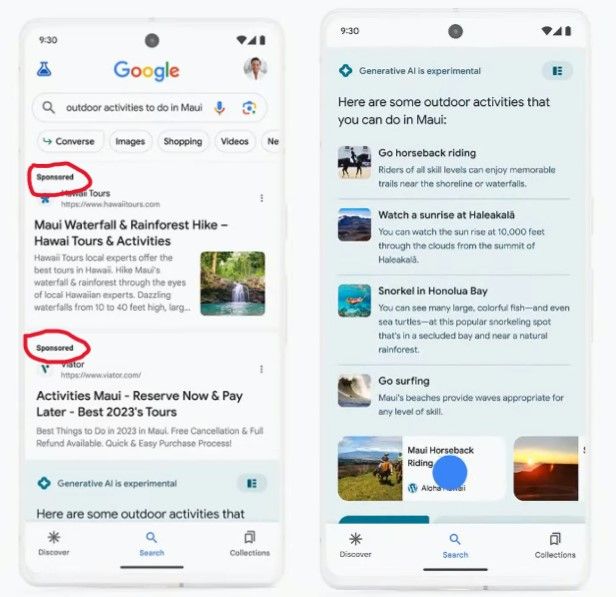
Ads are showing at the top search results in SGE

The first AI-generated response was ad-free, but the first follow-up question to the AI chatbot — “hiking backpacks for kids” — triggered an answer that already included ads. A sponsored result came first, followed by organic results.
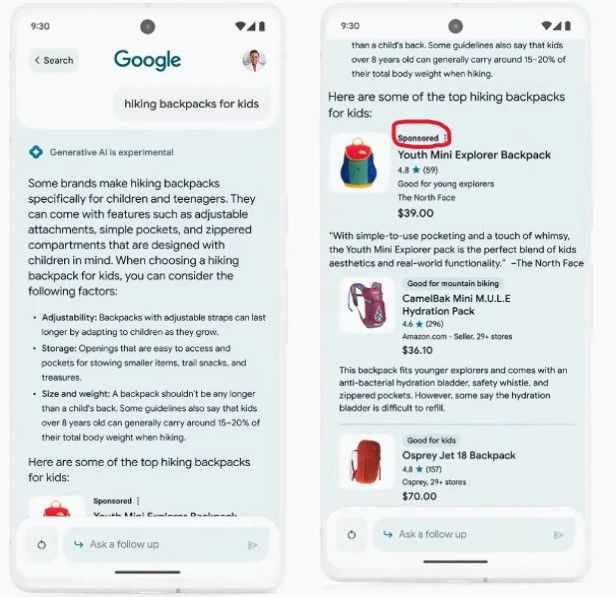
Ads are showing within the SGE experience

‘Industry-leading’ ad labels that hide in plain sight

Touting the “new ad experience”, Google’s VP of Ads Jerry Dischler claimed that search ads within SGE would be hard to confuse with organic results. The former would “feature our industry-leading clear and transparent labels with the ‘Sponsored’ label in bold black text,” he said.

However, if you look at the backpacks in the screenshot above, without peering too intently, you may not be able to tell which one is the advertised one (or if they all are). That’s partly because, in Google’s example, other products also have labels: “good for mountain biking” and “good for kids,” which make the “sponsored” label less noticeable. Besides, what catches the user’s attention first is arguably the product image, the description and the price, and not a line of text in fineprint at the top.

When describing the new ad placements and how they can help advertisers reach users with highly-relevant ads, VP of Google Ads Vidhya Srinivasan called it a “beautiful moment.” We thought she was being sarcastic, but she wasn’t. They say, beauty is in the eye of the beholder, but in our opinion, there is nothing beautiful about ads populating your chatbot’s answers.
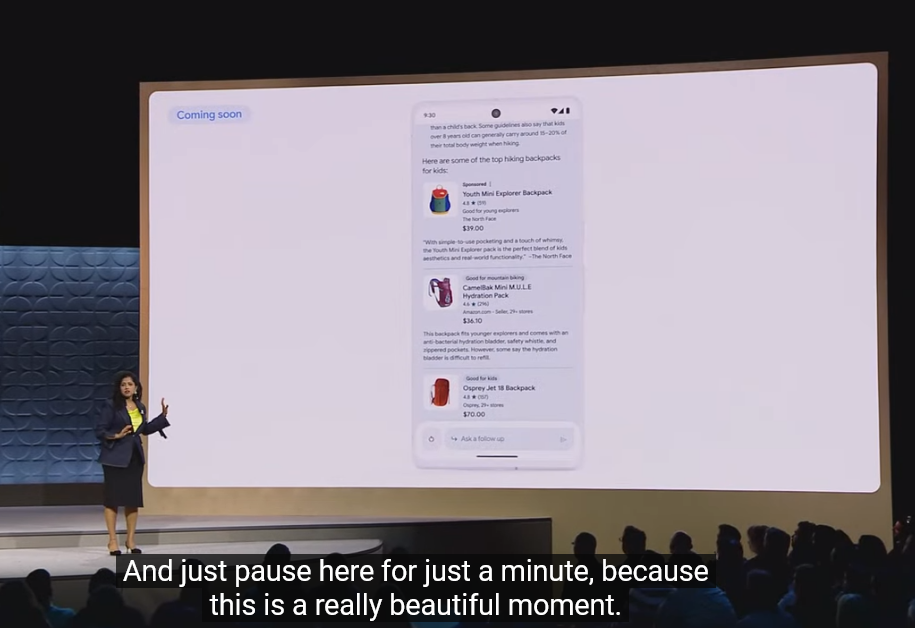
Google described the opportunities that new ad placements would bring to advertisers ‘a beautiful moment’

Anyone familiar with Google’s history of ad labeling knows that over the years, Google has made ads in search more and more indistinguishable from organic search results. First, by removing background shading in 2013, and then by doing away with colored ad labels in 2019. Google’s claim that its ad labels are industry-leading is questionable, but even if we assume it’s true, it is not a compliment to Google, but rather a criticism of the industry’s poor standards for marking ads clearly.

As for “clear and transparent,” well, judging by the direction Google’s ad design is going, it seems that at some point the labels may become so “transparent” that we will barely be able to see them at all. Truth be told, it’s already hard to tell apart paid and genuine results in the SGE.

The never-ending ads galore

But let’s go back to ads in the SGE. Yes, we’re still not done with them. If the user scrolls to the bottom of the SGE experience, they’ll see another row of ads.
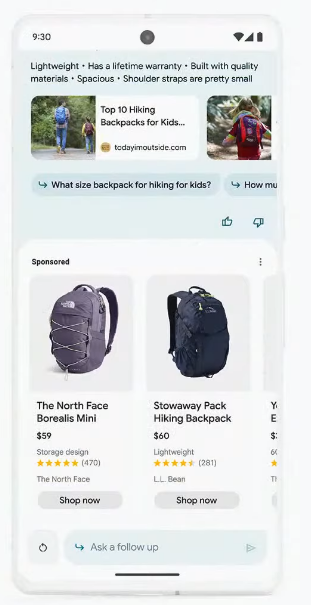
A row of ads after the SGE

And if the user, assuming they are still not deterred by the amount of ads at this point, decides to ask more follow-up questions (“is it easy for them to learn surfing” in Google’s example), they should be ready to see more ads in replies.
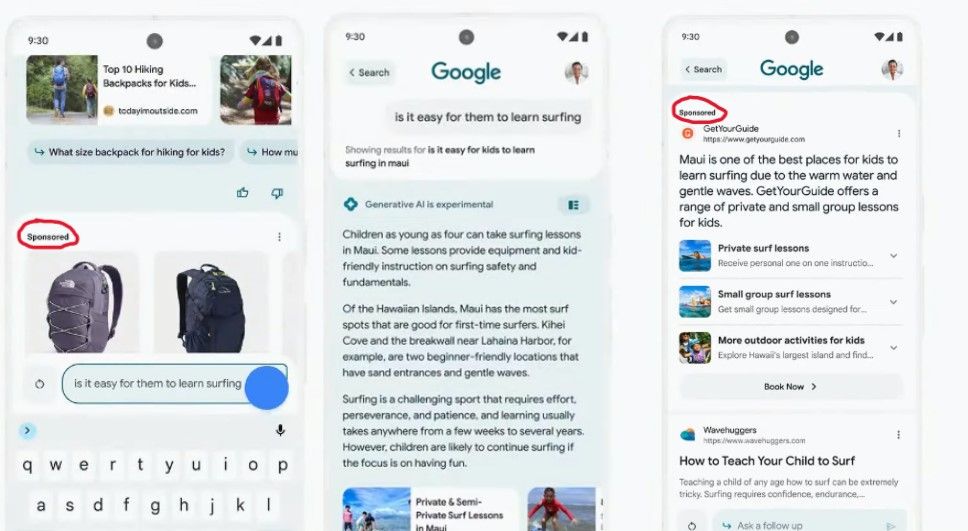
Ads appear below the AI-powered snapshot

The fact that Google is filling its Generative Search Experience with ads from day one is not surprising. After all, Google makes most of its money from advertising, and search ads account for a lion’s share of its ad revenue. To some extent, Google follows in the footsteps of Microsoft, which introduced ads into Bing AI, its own AI-supercharged search experience, back in April.

Blocking ads in Google’s SGE

Based on our initial observations, it seems that ads in Google’s SGE are similar to the ones in regular Google Search results, and can be blocked with conventional ad blocking methods. The way the ads appear, as seen in the videos and screenshots Google has provided, does not require us to come up with new, out-of-the-box solutions.

However, there’s a risk that Google could take a page from Bing’s playbook and integrate ads more closely or “natively” with AI-generated responses, making them an integral part of the message itself. In that case, simply removing the ads could render the entire response unhelpful, meaning we would have to explore innovative ways to block ads, perhaps using AI ourselves. We have discussed some of these possible new methods in more detail in our article about the challenges of blocking ads in Bing AI’s chat mode.

We may update this article once we get access to Google’s SGE and see the situation with ads firsthand. For now, we are cautiously optimistic that we will be able to block ads in SGE, which the most quick-witted have already nicknamed Google’s “Generative Ads Experience.”

It’s not OK, Google

At the risk of sounding too obvious, the excess of ads that Google might impose on users with its AI experience will ruin the otherwise cool idea of integrating AI with search. While we wouldn’t expect Google to refrain from including ads into its AI-powered search — after all Bing is doing that as well — oversaturating it with ads can backfire. If it does, Google will see it in the number of users who stick with or, rather, not stick with its SGE.

If you don’t want to see most ads in search results, use an ad blocker, such as AdGuard. As Google and Microsoft keep inventing new ways to sneak ads into their conversational AI’s answers, we will also be working on finding new ways to block them.

Another option is to use a completely ad-free paid search engine, such as Brave Search Premium. Sadly, another ad-free subscriptions-based search engine, Neeva, has just shut down. They had a noble vision of offering users personalization and privacy without ads — a vision that we share. But they faced a huge obstacle: getting users to switch from their default search settings. This shows how Google has entrenched itself as a dominant force on the search engine market, making it hard for users to choose alternatives. But by botching the introduction of AI with ads, Google may risk losing some of its loyal users and opening up opportunities for new competitors. We know it’s a long shot, but we would like to see that happen.


Vond je dit bericht leuk?
AdGuard VPN AdGuard DNS AdGuard Mail AdGuard Wallet
Het hoofdscherm van AdGuard voor Windows
Het beschermingsscherm van AdGuard voor Windows, met de beschermingsfuncties en -instellingen
Het statistiekenscherm van AdGuard voor Windows, met statistieken over geblokkeerde advertenties en volgers
Het appbeheerscherm van AdGuard voor Windows, met de opties voor beschermingsbeheer van apps die op het apparaat zijn geïnstalleerd
20.557 20557 gebruikersbeoordelingen
Uitstekend!

AdGuard voor Windows: advertentieblokker voor pc

AdGuard voor Windows is meer dan een advertentieblokker. Het is een multifunctioneel hulpmiddel dat advertenties blokkeert, de toegang tot gevaarlijke sites regelt, het laden van pagina's versnelt en kinderen beschermt tegen ongepaste inhoud
Door het programma te downloaden accepteer je de licentievoorwaarden
Microsoft Store
Door het programma te downloaden accepteer je de licentievoorwaarden
AdGuard voor Windows v8.0, 14 dagen proefperiode
Het hoofdscherm van AdGuard voor Mac
Het Incognitomodus-scherm van AdGuard voor Mac
20.557 20557 gebruikersbeoordelingen
Uitstekend!

AdGuard voor Mac: systeembrede advertentieblokker

AdGuard voor Mac is een unieke advertentieblokker die is ontworpen met macOS in gedachten. Het beschermt je niet alleen tegen vervelende advertenties in browsers en apps, maar beschermt je ook tegen volgen, phishing en fraude

Door het programma te downloaden accepteer je de licentievoorwaarden
Meer lezen
AdGuard voor Mac v2.19, 14 dagen proefperiode
Het hoofdscherm van AdGuard voor Android
Het scherm 'Bescherming tegen volgers' van AdGuard voor Android
Het appbeheerscherm van AdGuard voor Android, met de opties voor beschermingsbeheer voor apps die op het apparaat zijn geïnstalleerd
Het statistiekenscherm van AdGuard voor Android, met statistieken over geblokkeerde advertenties en volgers
Het hoofdscherm van de privébrowser van AdGuard voor Android
De QR-code om AdGuard voor Android te downloaden
20.557 20557 gebruikersbeoordelingen
Uitstekend!

AdGuard voor Android: advertentieblokker voor alle apps

Blokkeert advertenties en volgers in alle browsers, spellen en andere apps. Beschermt je privacy en geeft je controle over hoe jouw apps internet gebruiken. Geïnstalleerd via APK

Door het programma te downloaden accepteer je de licentievoorwaarden
Meer lezen
Scannen om te downloaden
Gebruik een QR-codelezer die beschikbaar is op je apparaat
AdGuard voor Android v4.14, 14 dagen proefperiode
Het hoofdscherm van AdGuard voor iOS
Het beschermingsscherm van AdGuard voor iOS, dat de beschermingsfuncties en -instellingen toont.

Het statistiekenscherm van AdGuard voor iOS, met statistieken over geblokkeerde advertenties en volgers
De QR-code om AdGuard voor iOS te downloaden
20.557 20557 gebruikersbeoordelingen
Uitstekend!

AdGuard: advertentieblokker voor iOS

De beste advertentieblokker voor iOS op iPhone en iPad. AdGuard verwijdert alle soorten advertenties en volgers in Safari en beschermt je privacy in alle apps op DNS-niveau
Door het programma te downloaden accepteer je de licentievoorwaarden
Meer lezen
Scannen om te downloaden
Gebruik een QR-codelezer die beschikbaar is op je apparaat
AdGuard voor iOS v4.5
Het hoofdscherm van AdGuard Inhoudsblokker
Het filterscherm van AdGuard Inhoudsblokker
Het instellingenscherm van AdGuard Inhoudsblokker
20.557 20557 gebruikersbeoordelingen
Uitstekend!

AdGuard Content Blocker

AdGuard Content Blocker elimineert allerlei soorten advertenties in mobiele browsers die technologie voor het blokkeren van inhoud ondersteunen, namelijk Samsung Internet en Yandex Browser. De functies zijn beperkt in vergelijking met AdGuard voor Android, maar het is gratis, eenvoudig te installeren en efficiënt
Door het programma te downloaden accepteer je de licentievoorwaarden
Meer lezen
AdGuard Content Blocker v2.8
Het hoofdscherm van de AdGuard-browseruitbreiding
Het scherm 'Bescherming tegen volgers' van AdGuard-browseruitbreiding
20.557 20557 gebruikersbeoordelingen
Uitstekend!

AdGuard Browserextensie

AdGuard is de snelste en lichtste advertentieblokkering uitbreiding die alle soorten advertenties op alle webpagina's effectief blokkeert! Kies AdGuard voor uw browser om advertentievrij, snel en veilig te surfen.
Installeren
Door het programma te downloaden accepteer je de licentievoorwaarden
Installeren
Door het programma te downloaden accepteer je de licentievoorwaarden
Installeren
Door het programma te downloaden accepteer je de licentievoorwaarden
Installeren
Door het programma te downloaden accepteer je de licentievoorwaarden
Installeren
Door het programma te downloaden accepteer je de licentievoorwaarden
Meer lezen
Installeren
Door het programma te downloaden accepteer je de licentievoorwaarden
Meer lezen
AdGuard Browserextensie v5.5
Het hoofdscherm van AdGuard Assistant
20.557 20557 gebruikersbeoordelingen
Uitstekend!

AdGuard Assistant

Een bijbehorende browseruitbreiding voor AdGuard desktop-apps. Het stelt je in staat om aangepaste items op websites te blokkeren, websites toe te voegen aan de toelatingslijst en rapporten rechtstreeks vanuit je browser te versturen
AdGuard Assistant v1.4
20.557 20557 gebruikersbeoordelingen
Uitstekend!

AdGuard Home

AdGuard Home is een netwerkgebaseerde oplossing voor het blokkeren van advertenties en volgers. Installeer het één keer op je router om alle apparaten in je thuisnetwerk te beschermen — geen extra clientsoftware vereist. Dit is vooral belangrijk voor verschillende IoT-apparaten die vaak een bedreiging vormen voor je privacy
AdGuard Home v0.107
Het hoofdscherm van AdGuard Pro voor iOS
Het beschermingsscherm van AdGuard Pro voor iOS, met de beschermingsfuncties en instellingen
Het statistiekenscherm van AdGuard Pro voor iOS, met statistieken over geblokkeerde advertenties en trackers
20.557 20557 gebruikersbeoordelingen
Uitstekend!

AdGuard Pro voor iOS

AdGuard Pro voor iOS wordt geleverd met alle geavanceerde beschermingsfuncties voor het blokkeren van advertenties. Het biedt dezelfde tools als de betaalde versie van AdGuard voor iOS. Het blinkt uit in het blokkeren van advertenties in Safari en laat je DNS-instellingen aanpassen om je bescherming aan te passen. Het blokkeert advertenties in browsers en apps, beschermt je kinderen tegen ongepaste inhoud en houdt je persoonlijke gegevens veilig
Door het programma te downloaden accepteer je de licentievoorwaarden
Meer lezen
AdGuard Pro voor iOS v4.5
Het hoofdscherm van AdGuard Mini voor Mac
Het Safari-beschermingsscherm van AdGuard Mini voor Mac
Het 'Regel aanmaken'-scherm van AdGuard Mini voor Mac
20.557 20557 gebruikersbeoordelingen
Uitstekend!

AdGuard Mini voor Mac — Safari-advertentieblokker

AdGuard Mini voor Mac is een krachtige Safari-advertentieblokker. Deze lichtgewicht app verwijdert advertenties, blokkeert volgers en versnelt het laden van pagina's. Het helpt je om in Safari zonder afleiding op het web te surfen en je gegevens privé te houden
Installeren
Door het programma te downloaden accepteer je de licentievoorwaarden
Meer lezen
AdGuard Mini voor Mac v2.3
Het hoofdscherm van AdGuard voor Android TV met ingeschakelde bescherming
Het advertentieblokkeringsscherm van AdGuard voor Android TV, met zijn functies en instellingen
Het instellingenscherm van AdGuard voor Android TV
Het appbeheer-scherm van AdGuard voor Android TV, waarop de apps worden getoond waar advertenties en volgers worden geblokkeerd
20.557 20557 gebruikersbeoordelingen
Uitstekend!

AdGuard voor Android TV

AdGuard voor Android TV is de enige app die advertenties blokkeert, jouw privacy bewaakt en fungeert als firewall voor je Smart TV. Ontvang waarschuwingen over webbedreigingen, gebruik veilige DNS en profiteer van gecodeerd verkeer. Ontspan en duik in je favoriete programma's met eersteklas beveiliging en zonder advertenties!
AdGuard voor Android TV v4.14, 14 dagen proefperiode
De AdGuard-mascotte, Agnar, houdt de Linux-pinguïn vast
20.557 20557 gebruikersbeoordelingen
Uitstekend!

AdGuard voor Linux

AdGuard voor Linux is 's werelds eerste systeem-brede AdGuard Advertentieblokker. Blokkeer advertenties en volgers op apparaatsniveau, kies uit vooraf geïnstalleerde filters, of voeg je eigen toe - allemaal via de interface
AdGuard voor Linux v1.4
20.557 20557 gebruikersbeoordelingen
Uitstekend!

AdGuard Temp Mail

Een gratis tijdelijke e-mailadresgenerator die je anoniem houdt en jouw privacy beschermt. Geen spam in je hoofdinbox!
20.557 20557 gebruikersbeoordelingen
Uitstekend!

AdGuard VPN

75 locaties wereldwijd

Toegang tot alle inhoud

Sterke versleuteling

Geen logboekregistratie

Snelste verbinding

24/7 ondersteuning

Gratis proberen
Door het programma te downloaden accepteer je de licentievoorwaarden
Meer lezen
20.557 20557 gebruikersbeoordelingen
Uitstekend!

AdGuard DNS

AdGuard DNS is een alternatieve oplossing voor advertentieblokkering, privacybescherming en ouderlijk toezicht. Het is eenvoudig in te stellen en gratis te gebruiken, biedt een minimum aan optimale bescherming tegen online advertenties, volgers en phishing, ongeacht welk platform en welk apparaat je gebruikt.
20.557 20557 gebruikersbeoordelingen
Uitstekend!

AdGuard Mail

Bescherm je identiteit, vermijd spam en houd je Postvak IN veilig met onze aliassen en tijdelijke e-mailadressen. Geniet van onze gratis service voor het doorsturen van e-mail en apps voor alle besturingssystemen
20.557 20557 gebruikersbeoordelingen
Uitstekend!

AdGuard Wallet

Een veilige en privé crypto-wallet die je volledige controle geeft over jouw activa. Beheer meerdere wallets en ontdek duizenden cryptocurrencies om op te slaan, te verzenden en te ruilen
Downloaden AdGuard Klik op het door de pijl aangegeven bestand om AdGuard te installeren. Selecteer "Open" en klik op "OK" - wacht even tot het bestand gedownload is. Sleep dan in het geopende venster het AdGuard icoontje naar de "Applications" map. Dank u dat u voor AdGuard gekozen heeft. Selecteer "Open" en klik op "OK" - wacht even tot het bestand gedownload is. Klik dan in het geopende venster op "Installeren". Dank u dat u voor AdGuard gekozen heeft.
AdGuard op je mobiele apparaat installeren















































