Microsoft Edge is getting rid of third-party cookies. What about their replacement?

Following in the footsteps of Google Chrome, Microsoft Edge has announced that it would be phasing out third-party cookies. In the upcoming months, Microsoft said it plans to begin trials with discontinuing Edge’s use of third-party cookies, starting with 1% of users. These cookies, once the linchpin of targeted advertising, have been instrumental in crafting intricate user profiles.

Historically, third-party cookies — tiny data files placed on your browser by sites other than the one you’re visiting — have enabled advertisers to track your visits across all the platforms where they advertise. That’s why the role of the “tracking” cookie in spawning a surveillance economy where user data is treated as a commodity they have no control over can hardly be overestimated.

But as users have become more privacy-conscious, and regulators — primarily in the EU and California — began scrutinizing the handling of personal data, the third-party cookie has been on a steady retreat. Google Chrome’s move earlier this year to finally, after multiple delays, embark on phasing out third-party cookies was a significant blow, effectively sounding the death knell for this tracking technology. Given Chrome’s dominance in the browser market, it’s unsurprising that Microsoft Edge has followed suit. Meanwhile, browsers like Apple Safari and Mozilla Firefox, along with privacy-centric browsers such as Brave, have already been proactively blocking third-party cookies by default.

What is coming in place of cookies

In lieu of cookies, Google proposed the Protected Audience API, a part of its Privacy Sandbox initiative. The stated goal of the Privacy Sandbox is to keep ad targeting as effective as before but make it more privacy-respecting. In other words: Google wants to appease regulators and not throw advertisers under the bus either, since ad revenues are its bread and butter. To cater to both sides is a tall order, and our analysis of the proposed API shows that despite what Google says about it, it is far from being a private solution. If anything, it turns the browser itself into an ad auction tool. Our Protected Audience API demo illustrates the shortcomings of the new mechanism, which we believe can still be misused to achieve functionality similar to that provided by third-party cookies.

Unlike Google, Microsoft is not dependent on advertising profits. The lion’s share of its total revenues (about 60%) comes from Office and cloud computing. So, in theory, Microsoft’s hands should be free to come up with something really private.

As Microsoft announced the gradual deprecation of third-party cookies, it also unveiled a new technology, called Ad Selection API, that is meant to replace them. There are uncanny parallels between this API and the one proposed by Google as you can see from the table below.
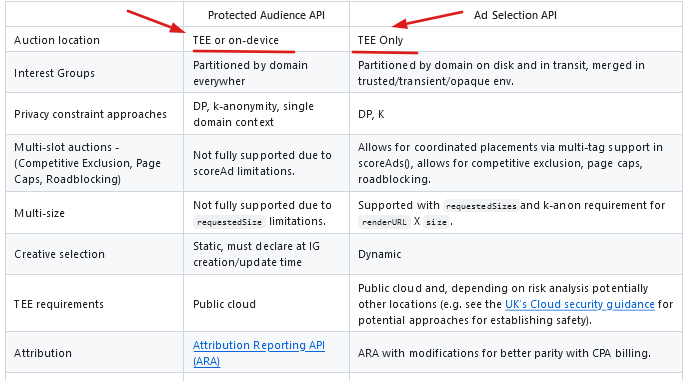
table

Our concerns about Microsoft’s new API

While the APIs are not identical, and there are many minor differences between them, we believe that most of them are negligible. But one difference that stands out is that while Google leaves two options for the location of the ad auction, either in the TEE or on the device, Microsoft wants to run it only in a Trusted Execution Environment (TEE).

So, what is TEE?

A Trusted Execution Environment (TEE) is a secure area within a server’s central processing unit (CPU) and memory. It’s designed to keep sensitive code and data safe from unauthorized access, including from those with high-level privileges or direct access to the hardware. Essentially, it’s a protected space where private computations are performed, ensuring they can’t be tampered with or spied upon.

Microsoft’s rationale for conducting ad auctions exclusively within a Trusted Execution Environment (TEE) stems from concerns about the current scalability of on-device auctions and potential operational hurdles. At the same time they say that on-device auctions “provide a lot of value in enabling effective enforcement of privacy constraints.”

Whatever the reasoning behind Microsoft’s decision, we believe that its refusal to effectively turn the browser into an ad network is a step in the right direction. However, the robustness of this system hinges on a critical assumption: that the TEEs will remain bulletproof against unauthorized access and that no one will be able to take a “sneak peek” inside.

The server-side auctions will be run by individual ad tech companies. In Microsoft’s view, these companies can “leverage well-worn patterns for scaling, deployment, and management.” And while that’s true — indeed, these ad tech behemoths have enough resources to run these auctions efficiently — we can’t trust them by default. By designing the system this way, we will always run the risk of these companies potentially accessing users’ confidential data.

Finally, perhaps the biggest problem we have with Microsoft’s cookie replacement is that a lot of things in the specification are taken for granted. We are supposed to believe that the mere fact that user data is encrypted eliminates the possibility of unauthorized access, that the TEEs are secure environments that no one can penetrate. And if even one of those assumptions turns out to be not entirely true, or riddled with holes, then that shiny, grand vision will come crashing down. As much as we’d like to, it’s hard to believe that Microsoft, or anyone for that matter, will manage to implement such a complex mechanism with so many variables and have it work like a charm on the first attempt.

Final thoughts

Microsoft’s plan to phase out third-party cookies in favor of a novel ad targeting mechanism is quite ambitious. But there are just too many pieces of the puzzle that need to fall into place for it to work smoothly. Finding an adequate replacement for a system that has been entrenched for years is undeniably a formidable challenge, but is it insurmountable? Time will tell.

On the other hand, browsers like Safari and Firefox have long since gotten rid of third-party cookies without causing the ad tech companies to go under. Which begs an important question: How vital were these third-party cookies for the ad tech businesses, and is it truly necessary to find a replacement, or could they simply be discarded?

The answers to these questions will largely depend on Microsoft’s implementation of the new API. However, the fact that its Ad Selection API resembles Protected Audience API to such an extent raises concerns about the potential implications for user privacy.

Since we believe that Protected Audience API is not as private as Google claims it to be, AdGuard has already blocked this API for users who have AdGuard’s Tracking Protection filter enabled. In the meantime, we are working on more advanced ways to disable it. As for Microsoft’s Ad Selection API, which we believe bears uncanny resemblance to Google’s API, our approach will be the same — as soon as Microsoft implements it in Edge, we will start blocking it as well.


Vond je dit bericht leuk?
AdGuard VPN AdGuard DNS AdGuard Mail AdGuard Wallet
Het hoofdscherm van AdGuard voor Windows
Het beschermingsscherm van AdGuard voor Windows, met de beschermingsfuncties en -instellingen
Het statistiekenscherm van AdGuard voor Windows, met statistieken over geblokkeerde advertenties en volgers
Het appbeheerscherm van AdGuard voor Windows, met de opties voor beschermingsbeheer van apps die op het apparaat zijn geïnstalleerd
20.557 20557 gebruikersbeoordelingen
Uitstekend!

AdGuard voor Windows: advertentieblokker voor pc

AdGuard voor Windows is meer dan een advertentieblokker. Het is een multifunctioneel hulpmiddel dat advertenties blokkeert, de toegang tot gevaarlijke sites regelt, het laden van pagina's versnelt en kinderen beschermt tegen ongepaste inhoud

Door het programma te downloaden accepteer je de licentievoorwaarden
Microsoft Store
Door het programma te downloaden accepteer je de licentievoorwaarden
AdGuard voor Windows v8.0, 14 dagen proefperiode
Het hoofdscherm van AdGuard voor Mac
Het Incognitomodus-scherm van AdGuard voor Mac
20.557 20557 gebruikersbeoordelingen
Uitstekend!

AdGuard voor Mac: systeembrede advertentieblokker

AdGuard voor Mac is een unieke advertentieblokker die is ontworpen met macOS in gedachten. Het beschermt je niet alleen tegen vervelende advertenties in browsers en apps, maar beschermt je ook tegen volgen, phishing en fraude
Door het programma te downloaden accepteer je de licentievoorwaarden
Meer lezen
AdGuard voor Mac v2.19, 14 dagen proefperiode
Het hoofdscherm van AdGuard voor Android
Het scherm 'Bescherming tegen volgers' van AdGuard voor Android
Het appbeheerscherm van AdGuard voor Android, met de opties voor beschermingsbeheer voor apps die op het apparaat zijn geïnstalleerd
Het statistiekenscherm van AdGuard voor Android, met statistieken over geblokkeerde advertenties en volgers
Het hoofdscherm van de privébrowser van AdGuard voor Android
De QR-code om AdGuard voor Android te downloaden
20.557 20557 gebruikersbeoordelingen
Uitstekend!

AdGuard voor Android: advertentieblokker voor alle apps

Blokkeert advertenties en volgers in alle browsers, spellen en andere apps. Beschermt je privacy en geeft je controle over hoe jouw apps internet gebruiken. Geïnstalleerd via APK
Door het programma te downloaden accepteer je de licentievoorwaarden
Meer lezen
Scannen om te downloaden
Gebruik een QR-codelezer die beschikbaar is op je apparaat
AdGuard voor Android v4.14, 14 dagen proefperiode
Het hoofdscherm van AdGuard voor iOS
Het beschermingsscherm van AdGuard voor iOS, dat de beschermingsfuncties en -instellingen toont.
Het statistiekenscherm van AdGuard voor iOS, met statistieken over geblokkeerde advertenties en volgers
De QR-code om AdGuard voor iOS te downloaden
20.557 20557 gebruikersbeoordelingen
Uitstekend!

AdGuard: advertentieblokker voor iOS

De beste advertentieblokker voor iOS op iPhone en iPad. AdGuard verwijdert alle soorten advertenties en volgers in Safari en beschermt je privacy in alle apps op DNS-niveau
Door het programma te downloaden accepteer je de licentievoorwaarden
Meer lezen
Scannen om te downloaden
Gebruik een QR-codelezer die beschikbaar is op je apparaat
AdGuard voor iOS v4.5
Het hoofdscherm van AdGuard Inhoudsblokker
Het filterscherm van AdGuard Inhoudsblokker
Het instellingenscherm van AdGuard Inhoudsblokker
20.557 20557 gebruikersbeoordelingen
Uitstekend!

AdGuard Content Blocker

AdGuard Content Blocker elimineert allerlei soorten advertenties in mobiele browsers die technologie voor het blokkeren van inhoud ondersteunen, namelijk Samsung Internet en Yandex Browser. De functies zijn beperkt in vergelijking met AdGuard voor Android, maar het is gratis, eenvoudig te installeren en efficiënt
Door het programma te downloaden accepteer je de licentievoorwaarden
Meer lezen
AdGuard Content Blocker v2.8
Het hoofdscherm van de AdGuard-browseruitbreiding
Het scherm 'Bescherming tegen volgers' van AdGuard-browseruitbreiding
20.557 20557 gebruikersbeoordelingen
Uitstekend!

AdGuard Browserextensie

AdGuard is de snelste en lichtste advertentieblokkering uitbreiding die alle soorten advertenties op alle webpagina's effectief blokkeert! Kies AdGuard voor uw browser om advertentievrij, snel en veilig te surfen.
Installeren
Door het programma te downloaden accepteer je de licentievoorwaarden
Installeren
Door het programma te downloaden accepteer je de licentievoorwaarden
Installeren
Door het programma te downloaden accepteer je de licentievoorwaarden
Installeren
Door het programma te downloaden accepteer je de licentievoorwaarden
Installeren
Door het programma te downloaden accepteer je de licentievoorwaarden
Meer lezen
Installeren
Door het programma te downloaden accepteer je de licentievoorwaarden
Meer lezen
AdGuard Browserextensie v5.5
Het hoofdscherm van AdGuard Assistant
20.557 20557 gebruikersbeoordelingen
Uitstekend!

AdGuard Assistant

Een bijbehorende browseruitbreiding voor AdGuard desktop-apps. Het stelt je in staat om aangepaste items op websites te blokkeren, websites toe te voegen aan de toelatingslijst en rapporten rechtstreeks vanuit je browser te versturen
AdGuard Assistant v1.4
20.557 20557 gebruikersbeoordelingen
Uitstekend!

AdGuard Home

AdGuard Home is een netwerkgebaseerde oplossing voor het blokkeren van advertenties en volgers. Installeer het één keer op je router om alle apparaten in je thuisnetwerk te beschermen — geen extra clientsoftware vereist. Dit is vooral belangrijk voor verschillende IoT-apparaten die vaak een bedreiging vormen voor je privacy
AdGuard Home v0.107
Het hoofdscherm van AdGuard Pro voor iOS
Het beschermingsscherm van AdGuard Pro voor iOS, met de beschermingsfuncties en instellingen
Het statistiekenscherm van AdGuard Pro voor iOS, met statistieken over geblokkeerde advertenties en trackers
20.557 20557 gebruikersbeoordelingen
Uitstekend!

AdGuard Pro voor iOS

AdGuard Pro voor iOS wordt geleverd met alle geavanceerde beschermingsfuncties voor het blokkeren van advertenties. Het biedt dezelfde tools als de betaalde versie van AdGuard voor iOS. Het blinkt uit in het blokkeren van advertenties in Safari en laat je DNS-instellingen aanpassen om je bescherming aan te passen. Het blokkeert advertenties in browsers en apps, beschermt je kinderen tegen ongepaste inhoud en houdt je persoonlijke gegevens veilig
Door het programma te downloaden accepteer je de licentievoorwaarden
Meer lezen
AdGuard Pro voor iOS v4.5
Het hoofdscherm van AdGuard Mini voor Mac
Het Safari-beschermingsscherm van AdGuard Mini voor Mac
Het 'Regel aanmaken'-scherm van AdGuard Mini voor Mac
20.557 20557 gebruikersbeoordelingen
Uitstekend!

AdGuard Mini voor Mac — Safari-advertentieblokker

AdGuard Mini voor Mac is een krachtige Safari-advertentieblokker. Deze lichtgewicht app verwijdert advertenties, blokkeert volgers en versnelt het laden van pagina's. Het helpt je om in Safari zonder afleiding op het web te surfen en je gegevens privé te houden
Installeren
Door het programma te downloaden accepteer je de licentievoorwaarden
Meer lezen
AdGuard Mini voor Mac v2.3
Het hoofdscherm van AdGuard voor Android TV met ingeschakelde bescherming
Het advertentieblokkeringsscherm van AdGuard voor Android TV, met zijn functies en instellingen
Het instellingenscherm van AdGuard voor Android TV
Het appbeheer-scherm van AdGuard voor Android TV, waarop de apps worden getoond waar advertenties en volgers worden geblokkeerd
20.557 20557 gebruikersbeoordelingen
Uitstekend!

AdGuard voor Android TV

AdGuard voor Android TV is de enige app die advertenties blokkeert, jouw privacy bewaakt en fungeert als firewall voor je Smart TV. Ontvang waarschuwingen over webbedreigingen, gebruik veilige DNS en profiteer van gecodeerd verkeer. Ontspan en duik in je favoriete programma's met eersteklas beveiliging en zonder advertenties!
AdGuard voor Android TV v4.14, 14 dagen proefperiode
De AdGuard-mascotte, Agnar, houdt de Linux-pinguïn vast
20.557 20557 gebruikersbeoordelingen
Uitstekend!

AdGuard voor Linux

AdGuard voor Linux is 's werelds eerste systeem-brede AdGuard Advertentieblokker. Blokkeer advertenties en volgers op apparaatsniveau, kies uit vooraf geïnstalleerde filters, of voeg je eigen toe - allemaal via de interface
AdGuard voor Linux v1.4
20.557 20557 gebruikersbeoordelingen
Uitstekend!

AdGuard Temp Mail

Een gratis tijdelijke e-mailadresgenerator die je anoniem houdt en jouw privacy beschermt. Geen spam in je hoofdinbox!
20.557 20557 gebruikersbeoordelingen
Uitstekend!

AdGuard VPN

75 locaties wereldwijd

Toegang tot alle inhoud

Sterke versleuteling

Geen logboekregistratie

Snelste verbinding

24/7 ondersteuning

Gratis proberen
Door het programma te downloaden accepteer je de licentievoorwaarden
Meer lezen
20.557 20557 gebruikersbeoordelingen
Uitstekend!

AdGuard DNS

AdGuard DNS is een alternatieve oplossing voor advertentieblokkering, privacybescherming en ouderlijk toezicht. Het is eenvoudig in te stellen en gratis te gebruiken, biedt een minimum aan optimale bescherming tegen online advertenties, volgers en phishing, ongeacht welk platform en welk apparaat je gebruikt.
20.557 20557 gebruikersbeoordelingen
Uitstekend!

AdGuard Mail

Bescherm je identiteit, vermijd spam en houd je Postvak IN veilig met onze aliassen en tijdelijke e-mailadressen. Geniet van onze gratis service voor het doorsturen van e-mail en apps voor alle besturingssystemen
20.557 20557 gebruikersbeoordelingen
Uitstekend!

AdGuard Wallet

Een veilige en privé crypto-wallet die je volledige controle geeft over jouw activa. Beheer meerdere wallets en ontdek duizenden cryptocurrencies om op te slaan, te verzenden en te ruilen
Downloaden AdGuard Klik op het door de pijl aangegeven bestand om AdGuard te installeren. Selecteer "Open" en klik op "OK" - wacht even tot het bestand gedownload is. Sleep dan in het geopende venster het AdGuard icoontje naar de "Applications" map. Dank u dat u voor AdGuard gekozen heeft. Selecteer "Open" en klik op "OK" - wacht even tot het bestand gedownload is. Klik dan in het geopende venster op "Installeren". Dank u dat u voor AdGuard gekozen heeft.
AdGuard op je mobiele apparaat installeren

















































