Unimania: I Need Your Facebook Data, Location, And Your Browsing History

Privacy protection is basically what we do, so I never get tired of stories about how unpredictable the ways of getting Facebook user data are. Cambridge Analytica might be dead, but the business of stealing users’ data lives on, and this article demonstrates one more example of that.

The story begins with the recent research I conducted about fake ad blockers in the Chrome Web Store. The outcome of that research was that I received dozens of questions about whether this or that extension is safe to use. This made me take a deeper look into the most popular Chrome extensions, but even so, I had no idea at that time where this investigation was going to lead me. In fact, it exposed to me a huge spyware campaign that utilizes popular Android apps and Chrome extensions to steal Facebook data and the browsing histories of millions of users.

Suspicious Chrome extensions

I conducted an automated scan of all publicly available Chrome extensions. This scan flagged quite a few different privacy issues, which I will address in more specific detail in a forthcoming post.

One of the issues that immediately caught my attention, as I noticed suspicious requests made to various Facebook domains.

Meet these nasty Chrome extensions, currently in use by an estimated 420,000 users:

  • Album & Photo Manager For Facebook (92K+ users)
  • PDF Merge — PDF Files Merger (125K+ users)
  • Pixcam — Webcam Effects (31K+ users)

So, what is wrong with them? Let's dive into the details.

The inscrutable ways of your Facebook data

If you are logged into Facebook, these spyware extensions will scrape all your data immediately after the browser startup:
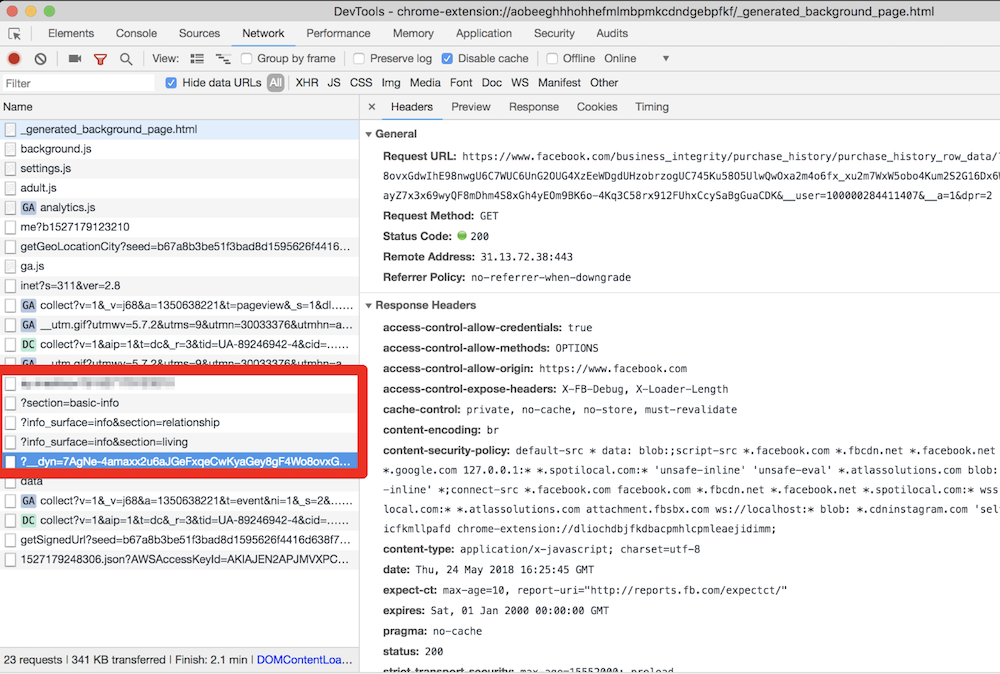
They even try to parse your purchase history! This alone is enough for these extensions to be booted from the Chrome Web Store.

All this data is then collected and sent to the um-public-panel-prod.s3.amazonaws.com domain, which is a named Amazon S3 instance rented by the spyware authors.
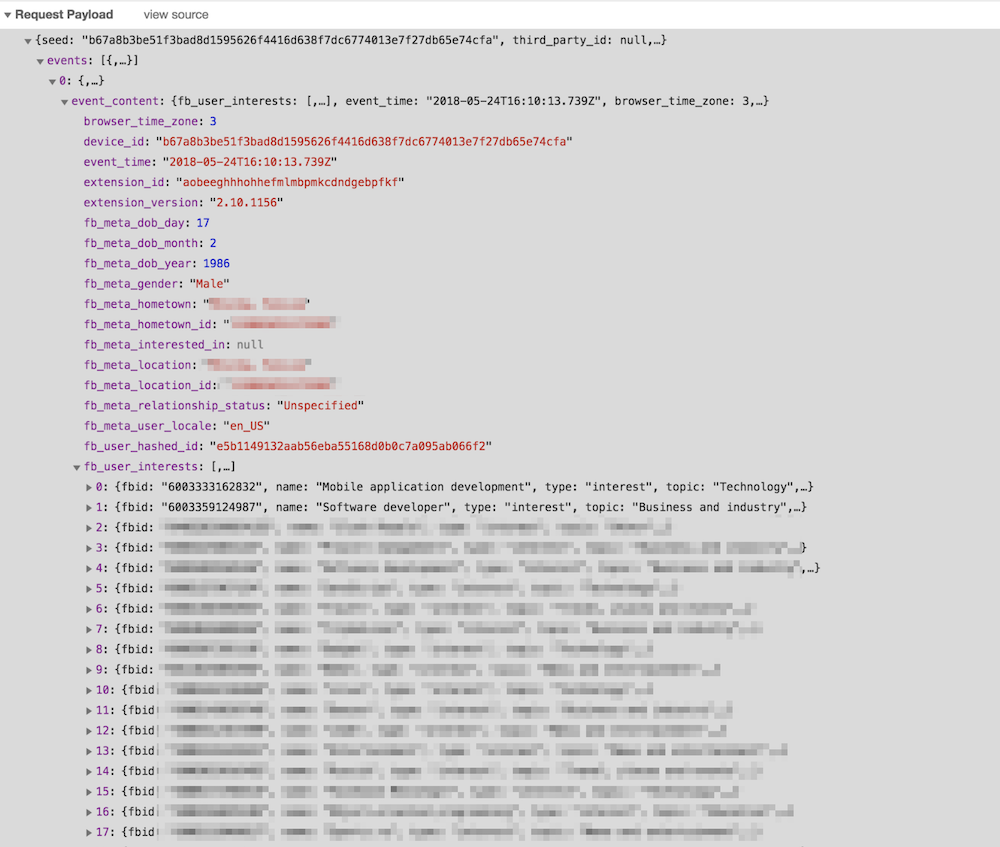
An alarming amount of data was being sent over to that server including all the Facebook "interests". In order to test this, I had to use my own account, so you can observe a piece of my own data, which I don't mind sharing with you.

As you can see on the screenshot, they do not send a plain FB identifier; instead, they send it in a hashed form. I imagine that they think that this practice allow the spyware group to say that this data has been made "anonymous."

“Dear spyware developers, come on! Do you really believe that hashing a numeric value with a static salt cannot be decoded?”

SHA1("sME9Azj8G28Y" + userId) = e5b1149132aab56eba55168d0b0c7a095ab066f2

By the way, dear reader, here is a contest for you: the first one to crack the hash and discover my FB ID gets a free AdGuard license. Write your answer in the comments. No cheating, please :)

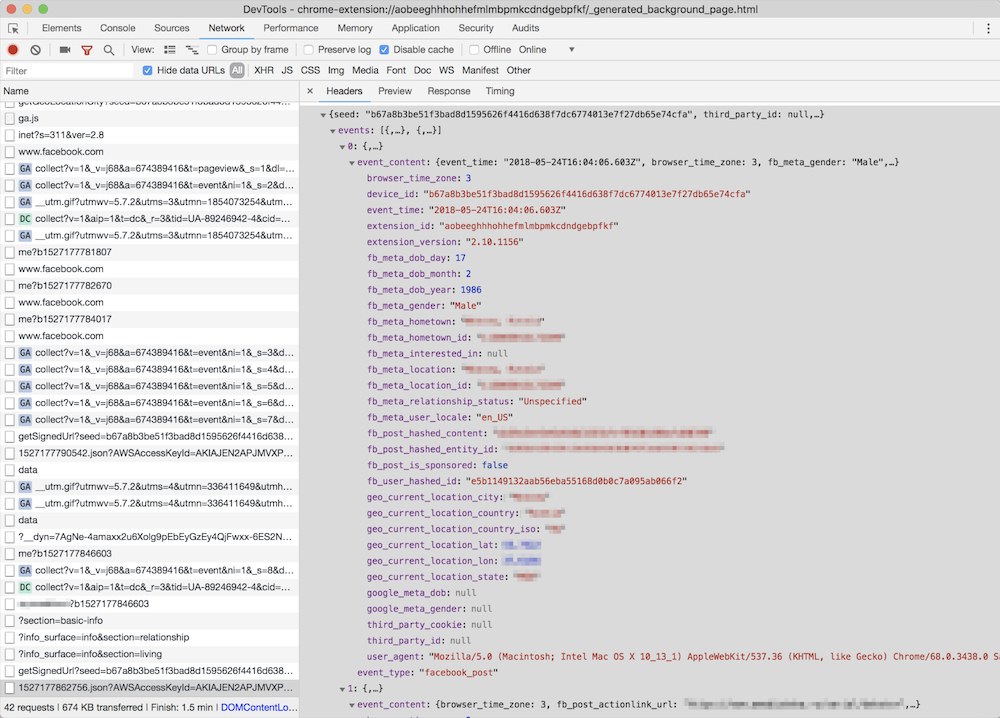
But hey, what is the good of having this data without the spyware company also knowing what exactly you do on the Internet? Wouldn't it be so much better if they knew what exact posts you read or what exact ads you see? Well, no worries, that's exactly what they do: they siphon information about all of the posts, sponsored posts, tweets, the YouTube videos and ads you see or interact with, along with a poorly hashed user ID and totally UN-hashed location data.
Meet Unimania Inc.

Who is behind this activity? The only thing I knew about the authors was the link to their extensions' privacy policy: here's a copy, just in case. As usual, there's a lot of confusing legalese about how you provide them with consent without doing anything, how seriously they care about your privacy, how strongly your data is made (or kept) anonymous and how it can in no way can be traced back to you as it is protected by a powerful mathematical "hash function."

Fortunately, it is also pretty transparent about what exact information about you is collected:

What Information We Collect and How We Collect It. In general, the Information we collect includes nonpersonally identifiable demographic and psychographic data as well as sponsored campaigns, advertisements or posts that target you directly or that have been shared with you.

Also, I found their EULA: here's the copy, from which I learned that the company name is "Unimania, Inc." and they claim to be located in Tel-Aviv, Israel. However, I could not find any information on this company in the Israeli company register.

My story might have ended here, but there was a sentence in the privacy policy that caught my attention:

Background. You have been directed to this Privacy Policy from a separate and independent third party Google Chrome Extension or Mobile Software Application (“Third Party Software”).

Mobile Software Application

"Mobile Software Application!" I said to myself.

So this was not just a matter limited to Chrome extensions, and I realized that I needed to continue my investigation. To this end, some good news was that we already had some data collected while preparing a study on mobile apps tracking and I could make use of it and query it right away.

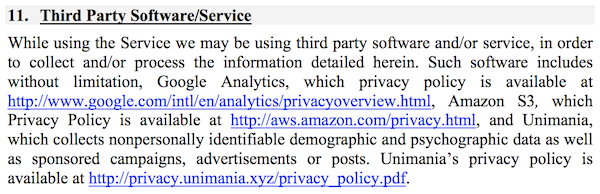
That's how I found one particular app that was connecting to the Unimania servers. This was an alternative Facebook client called "Fast — Social App" with a record of more than 10,000,000 installs according to Google Play. The app developer does not bother to hide that fact and mentions Unimania in the privacy policy:
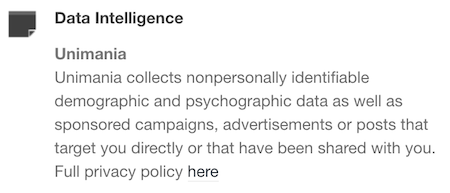
Scanning this developer apps' traffic confirmed that "Fast-Social App" transfers pretty much the same data as the Chrome extensions do, and to the same Unimania servers. I also found out that "Fast Lite - Social App + Twitter" (1,000,000+ installs) also does the same thing.

Besides that, I found a couple more apps that mention Unimania in their privacy policies. I cannot confirm that they are still leaking user data, but I can assume they were doing so in the past; otherwise, why would they mention it?

Finally, it seems that Unimania is about to launch their own "products":

  • OmniSocial — a mobile app
  • Who's following me? — a browser extension

Obviously, none of these apps describe this behavior in the app description; neither do they have an "in-app disclosure" as required by Google. I must admit that the Google Play Developer Policies look solid, and so they are likely not the reason of why the privacy of Android apps is in such a sad state. The problem is that these policies are not enforced, hence most of the app developers simply ignore them.

Summary

Congratulations for reading through such a long article (or for skipping all the boring technical details and jumping straight to the summary)!

Let's summarize what we discovered.

  1. A huge spyware campaign engaging some Mobile Apps and Chrome extensions in stealing users’ Facebook data and spying on their social network browsing history. The list of the information collected by these apps and extensions includes the user’s Facebook profile data including demographics and the list of user interests. Also, they were collecting the users' browsing history including all the Facebook regular and sponsored posts, tweets, YouTube videos and ads.
  2. Four spyware Chrome extensions with aggegrated users count of more than 400,000 users.
  3. Two Android apps with total installs count of more than 11,000,000 selling out their users data.
  4. The campaign is run by a supposed Israeli company named "Unimania, Inc." Unfortunately, I was not able to trace this further back to Unimania’s owners or affiliates and I can't say who is profiting from the data.

I've reported all the discovered apps and extensions to Google and I hope they take corrective measures soon.

How to protect yourself?

The answer to this question is both very simple and very difficult.

When installing anything on your device or browser, follow these rules:

  • Read the privacy policy. It is not useless - everything discovered in this case was mentioned in the privacy policies.
  • Never ever install anything made by a developer you don't trust. Do your homework, find out who the developer is and decide for yourself if they are trustworthy.

Also, all Unimania domains have now been added to the "AdGuard Spyware filter" and will be blocked automatically if you have it enabled in any of our AdGuard products, or if you use AdGuard DNS. Unfortunately, there is a browser limitation that prevents an extension from controlling requests made by other extensions so using the AdGuard Chrome extension or uBlock Origin may not be enough, even if you have the "AdGuard Spyware filter" enabled.

Alternatively, you can block these three domains by adding them to the "hosts" file:

  • um-public-panel-prod.s3.amazonaws.com
  • collection-endpoint-prod.herokuapp.com
  • collection-endpoint-staging.herokuapp.com

UPD (Jun 3): The Android apps mentioned in the article are no more available on Google Play.
UPD (Jun 5): The Chrome extensions are finally taken down from the Chrome Web Store.


Vond je dit bericht leuk?
AdGuard VPN AdGuard DNS AdGuard Mail AdGuard Wallet
Het hoofdscherm van AdGuard voor Windows
Het beschermingsscherm van AdGuard voor Windows, met de beschermingsfuncties en -instellingen
Het statistiekenscherm van AdGuard voor Windows, met statistieken over geblokkeerde advertenties en volgers
Het appbeheerscherm van AdGuard voor Windows, met de opties voor beschermingsbeheer van apps die op het apparaat zijn geïnstalleerd
20.557 20557 gebruikersbeoordelingen
Uitstekend!

AdGuard voor Windows: advertentieblokker voor pc

AdGuard voor Windows is meer dan een advertentieblokker. Het is een multifunctioneel hulpmiddel dat advertenties blokkeert, de toegang tot gevaarlijke sites regelt, het laden van pagina's versnelt en kinderen beschermt tegen ongepaste inhoud

Door het programma te downloaden accepteer je de licentievoorwaarden
Microsoft Store
Door het programma te downloaden accepteer je de licentievoorwaarden
AdGuard voor Windows v8.0, 14 dagen proefperiode
Het hoofdscherm van AdGuard voor Mac
Het Incognitomodus-scherm van AdGuard voor Mac
20.557 20557 gebruikersbeoordelingen
Uitstekend!

AdGuard voor Mac: systeembrede advertentieblokker

AdGuard voor Mac is een unieke advertentieblokker die is ontworpen met macOS in gedachten. Het beschermt je niet alleen tegen vervelende advertenties in browsers en apps, maar beschermt je ook tegen volgen, phishing en fraude
Door het programma te downloaden accepteer je de licentievoorwaarden
Meer lezen
AdGuard voor Mac v2.19, 14 dagen proefperiode
Het hoofdscherm van AdGuard voor Android
Het scherm 'Bescherming tegen volgers' van AdGuard voor Android
Het appbeheerscherm van AdGuard voor Android, met de opties voor beschermingsbeheer voor apps die op het apparaat zijn geïnstalleerd
Het statistiekenscherm van AdGuard voor Android, met statistieken over geblokkeerde advertenties en volgers
Het hoofdscherm van de privébrowser van AdGuard voor Android
De QR-code om AdGuard voor Android te downloaden
20.557 20557 gebruikersbeoordelingen
Uitstekend!

AdGuard voor Android: advertentieblokker voor alle apps

Blokkeert advertenties en volgers in alle browsers, spellen en andere apps. Beschermt je privacy en geeft je controle over hoe jouw apps internet gebruiken. Geïnstalleerd via APK
Door het programma te downloaden accepteer je de licentievoorwaarden
Meer lezen
Scannen om te downloaden
Gebruik een QR-codelezer die beschikbaar is op je apparaat
AdGuard voor Android v4.14, 14 dagen proefperiode
Het hoofdscherm van AdGuard voor iOS
Het beschermingsscherm van AdGuard voor iOS, dat de beschermingsfuncties en -instellingen toont.
Het statistiekenscherm van AdGuard voor iOS, met statistieken over geblokkeerde advertenties en volgers
De QR-code om AdGuard voor iOS te downloaden
20.557 20557 gebruikersbeoordelingen
Uitstekend!

AdGuard: advertentieblokker voor iOS

De beste advertentieblokker voor iOS op iPhone en iPad. AdGuard verwijdert alle soorten advertenties en volgers in Safari en beschermt je privacy in alle apps op DNS-niveau
Door het programma te downloaden accepteer je de licentievoorwaarden
Meer lezen
Scannen om te downloaden
Gebruik een QR-codelezer die beschikbaar is op je apparaat
AdGuard voor iOS v4.5
Het hoofdscherm van AdGuard Inhoudsblokker
Het filterscherm van AdGuard Inhoudsblokker
Het instellingenscherm van AdGuard Inhoudsblokker
20.557 20557 gebruikersbeoordelingen
Uitstekend!

AdGuard Content Blocker

AdGuard Content Blocker elimineert allerlei soorten advertenties in mobiele browsers die technologie voor het blokkeren van inhoud ondersteunen, namelijk Samsung Internet en Yandex Browser. De functies zijn beperkt in vergelijking met AdGuard voor Android, maar het is gratis, eenvoudig te installeren en efficiënt
Door het programma te downloaden accepteer je de licentievoorwaarden
Meer lezen
AdGuard Content Blocker v2.8
Het hoofdscherm van de AdGuard-browseruitbreiding
Het scherm 'Bescherming tegen volgers' van AdGuard-browseruitbreiding
20.557 20557 gebruikersbeoordelingen
Uitstekend!

AdGuard Browserextensie

AdGuard is de snelste en lichtste advertentieblokkering uitbreiding die alle soorten advertenties op alle webpagina's effectief blokkeert! Kies AdGuard voor uw browser om advertentievrij, snel en veilig te surfen.
Installeren
Door het programma te downloaden accepteer je de licentievoorwaarden
Installeren
Door het programma te downloaden accepteer je de licentievoorwaarden
Installeren
Door het programma te downloaden accepteer je de licentievoorwaarden
Installeren
Door het programma te downloaden accepteer je de licentievoorwaarden
Installeren
Door het programma te downloaden accepteer je de licentievoorwaarden
Meer lezen
Installeren
Door het programma te downloaden accepteer je de licentievoorwaarden
Meer lezen
AdGuard Browserextensie v5.5
Het hoofdscherm van AdGuard Assistant
20.557 20557 gebruikersbeoordelingen
Uitstekend!

AdGuard Assistant

Een bijbehorende browseruitbreiding voor AdGuard desktop-apps. Het stelt je in staat om aangepaste items op websites te blokkeren, websites toe te voegen aan de toelatingslijst en rapporten rechtstreeks vanuit je browser te versturen
AdGuard Assistant v1.4
20.557 20557 gebruikersbeoordelingen
Uitstekend!

AdGuard Home

AdGuard Home is een netwerkgebaseerde oplossing voor het blokkeren van advertenties en volgers. Installeer het één keer op je router om alle apparaten in je thuisnetwerk te beschermen — geen extra clientsoftware vereist. Dit is vooral belangrijk voor verschillende IoT-apparaten die vaak een bedreiging vormen voor je privacy
AdGuard Home v0.107
Het hoofdscherm van AdGuard Pro voor iOS
Het beschermingsscherm van AdGuard Pro voor iOS, met de beschermingsfuncties en instellingen
Het statistiekenscherm van AdGuard Pro voor iOS, met statistieken over geblokkeerde advertenties en trackers
20.557 20557 gebruikersbeoordelingen
Uitstekend!

AdGuard Pro voor iOS

AdGuard Pro voor iOS wordt geleverd met alle geavanceerde beschermingsfuncties voor het blokkeren van advertenties. Het biedt dezelfde tools als de betaalde versie van AdGuard voor iOS. Het blinkt uit in het blokkeren van advertenties in Safari en laat je DNS-instellingen aanpassen om je bescherming aan te passen. Het blokkeert advertenties in browsers en apps, beschermt je kinderen tegen ongepaste inhoud en houdt je persoonlijke gegevens veilig
Door het programma te downloaden accepteer je de licentievoorwaarden
Meer lezen
AdGuard Pro voor iOS v4.5
Het hoofdscherm van AdGuard Mini voor Mac
Het Safari-beschermingsscherm van AdGuard Mini voor Mac
Het 'Regel aanmaken'-scherm van AdGuard Mini voor Mac
20.557 20557 gebruikersbeoordelingen
Uitstekend!

AdGuard Mini voor Mac — Safari-advertentieblokker

AdGuard Mini voor Mac is een krachtige Safari-advertentieblokker. Deze lichtgewicht app verwijdert advertenties, blokkeert volgers en versnelt het laden van pagina's. Het helpt je om in Safari zonder afleiding op het web te surfen en je gegevens privé te houden
Installeren
Door het programma te downloaden accepteer je de licentievoorwaarden
Meer lezen
AdGuard Mini voor Mac v2.3
Het hoofdscherm van AdGuard voor Android TV met ingeschakelde bescherming
Het advertentieblokkeringsscherm van AdGuard voor Android TV, met zijn functies en instellingen
Het instellingenscherm van AdGuard voor Android TV
Het appbeheer-scherm van AdGuard voor Android TV, waarop de apps worden getoond waar advertenties en volgers worden geblokkeerd
20.557 20557 gebruikersbeoordelingen
Uitstekend!

AdGuard voor Android TV

AdGuard voor Android TV is de enige app die advertenties blokkeert, jouw privacy bewaakt en fungeert als firewall voor je Smart TV. Ontvang waarschuwingen over webbedreigingen, gebruik veilige DNS en profiteer van gecodeerd verkeer. Ontspan en duik in je favoriete programma's met eersteklas beveiliging en zonder advertenties!
AdGuard voor Android TV v4.14, 14 dagen proefperiode
De AdGuard-mascotte, Agnar, houdt de Linux-pinguïn vast
20.557 20557 gebruikersbeoordelingen
Uitstekend!

AdGuard voor Linux

AdGuard voor Linux is 's werelds eerste systeem-brede AdGuard Advertentieblokker. Blokkeer advertenties en volgers op apparaatsniveau, kies uit vooraf geïnstalleerde filters, of voeg je eigen toe - allemaal via de interface
AdGuard voor Linux v1.4
20.557 20557 gebruikersbeoordelingen
Uitstekend!

AdGuard Temp Mail

Een gratis tijdelijke e-mailadresgenerator die je anoniem houdt en jouw privacy beschermt. Geen spam in je hoofdinbox!
20.557 20557 gebruikersbeoordelingen
Uitstekend!

AdGuard VPN

75 locaties wereldwijd

Toegang tot alle inhoud

Sterke versleuteling

Geen logboekregistratie

Snelste verbinding

24/7 ondersteuning

Gratis proberen
Door het programma te downloaden accepteer je de licentievoorwaarden
Meer lezen
20.557 20557 gebruikersbeoordelingen
Uitstekend!

AdGuard DNS

AdGuard DNS is een alternatieve oplossing voor advertentieblokkering, privacybescherming en ouderlijk toezicht. Het is eenvoudig in te stellen en gratis te gebruiken, biedt een minimum aan optimale bescherming tegen online advertenties, volgers en phishing, ongeacht welk platform en welk apparaat je gebruikt.
20.557 20557 gebruikersbeoordelingen
Uitstekend!

AdGuard Mail

Bescherm je identiteit, vermijd spam en houd je Postvak IN veilig met onze aliassen en tijdelijke e-mailadressen. Geniet van onze gratis service voor het doorsturen van e-mail en apps voor alle besturingssystemen
20.557 20557 gebruikersbeoordelingen
Uitstekend!

AdGuard Wallet

Een veilige en privé crypto-wallet die je volledige controle geeft over jouw activa. Beheer meerdere wallets en ontdek duizenden cryptocurrencies om op te slaan, te verzenden en te ruilen
Downloaden AdGuard Klik op het door de pijl aangegeven bestand om AdGuard te installeren. Selecteer "Open" en klik op "OK" - wacht even tot het bestand gedownload is. Sleep dan in het geopende venster het AdGuard icoontje naar de "Applications" map. Dank u dat u voor AdGuard gekozen heeft. Selecteer "Open" en klik op "OK" - wacht even tot het bestand gedownload is. Klik dan in het geopende venster op "Installeren". Dank u dat u voor AdGuard gekozen heeft.
AdGuard op je mobiele apparaat installeren