WhatsApp takes a dig at Apple, Durov — at WhatsApp, Toyota suffers a breach, and more. AdGuard’s digest

In this edition of AdGuard’s digest: Meta goes after iMessage in the new WhatsApp ad, Germany fines Telegram, DuckDuckGo brings its privacy-focused browser to desktop (Mac for now), Google relabels ads, and Toyota’s carelessness backfires.

Meta dumps on Apple in a PR stunt for WhatsApp

Meta came out swinging at Apple’s iMessage as part of its large-scale promotional campaign for WhatsApp in the US. The PR effort is spearheaded by none other than Meta CEO Mark Zuckerberg. In an Instagram post, Zuckerberg argued that WhatsApp was “far more private and secure than iMessage” due to a number of features Apple’s own instant messaging service does not have.
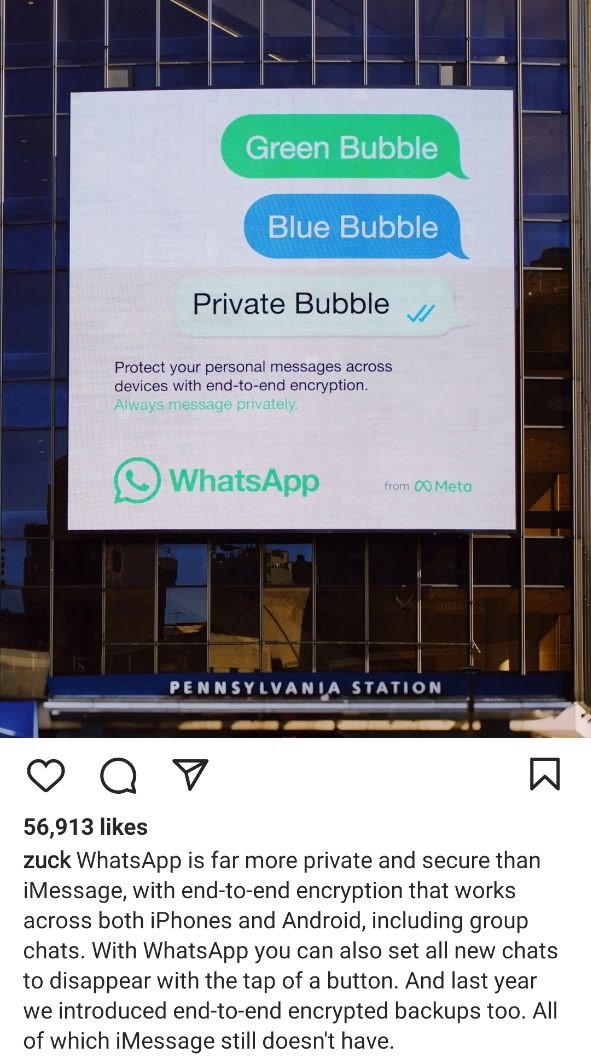
Meta promotes WhatsApp as a an alternative to iMessage

For instance, Zuckeberg noted that end-to-end encryption on WhatsApp works both on iOS and Android, while iMessage is tailor-made for Apple devices. Apple turns texts between iPhones and Android devices into SMS/MMS messages that are not encrypted. They appear in green text bubbles as opposed to blue for iPhone to iPhone texts. While iMessage’s criticism might be warranted, Meta has picked a relatively easy target. There are more secure options than WhatsApp, such as Signal.

Meta has faced privacy-related criticism over the years, including over employing an army of human “content reviewers” who can read messages from reported threads. WhatsApp also shares users’ detailed metadata with law enforcement in response to official requests, and does so almost in real time unlike other services.

Google will make ads more (or less) obvious

Google has announced a new design change that should help users better distinguish between paid and organic search results. Paid results, which were previously marked with a tiny “Ad” label, will now carry a longer “Sponsored” tag in bold black text. This change, according to Google, should “make information about paid content clear.” The company has already started rolling out the new design on mobile, and plans to begin testing it on desktop as well.
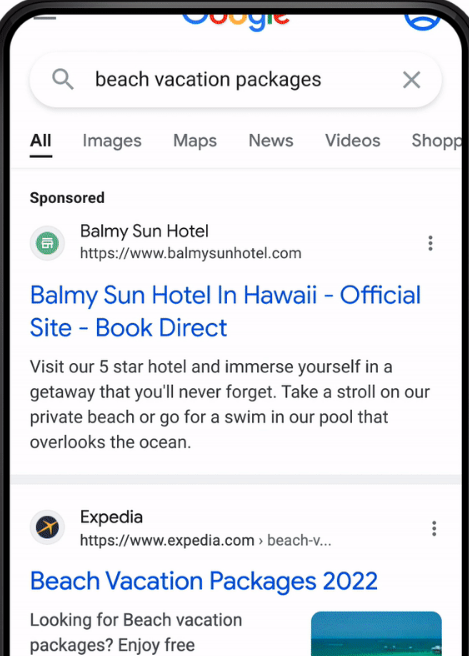
Google showcases the new look of its search ads and organic search results

In addition, Google will be adding site names and favicons on top of each search result on mobile — that should, presumably, make it easier to identify the source of the content.

It remains to be seen whether the design update will actually help distinguish ads from organic results or confuse users even more, especially when it comes to desktop. Favicons, as shown in Google’s preview, appear big enough to draw all the attention to themselves. Google has a long history of tweaking the design of its search ads to make them look less eye-catching and more like genuine search results. Back in the day Google used to shade its search ads blue, yellow, green, and even red before removing any shading in 2013. Since then and up until now, ad labeling has only gotten more subtle. AdGuard users, however, will not even notice the change because they are spared from seeing any ads, irrespective of design.

Germany fines Telegram for failure to follow its laws

In the latest back-and-forth between Berlin and Telegram, the German government has slapped a 5,1 million euro ($5 million) fine on the messaging service. The country’s justice ministry said that Telegram refused to create “a legally compliant” reporting channel where users could report “criminal content”. Telegram was also accused of failing to appoint a representative to the country.

Telegram can now appeal the fine. The move by the German government indicates that, contrary to some reports, there has been little if any rapprochement between the privacy-oriented tech company and Berlin. In August this year, Telegram surprised its German users by asking them directly if they want the company to relax rules around sharing data with law enforcement, leave them as they are or stop sharing data altogether. Currently, Telegram turns over IP addresses and phone numbers of terrorist suspects to the German police, but only if there’s a court order. The majority of users voted to keep the status quo.

Apparently, Telegram has taken feedback from users into account, and is refusing to budge. Telegram users have shown that they are not ready to compromise their privacy for the sake of potentially catching “bad guys”, which is an encouraging trend.

No love lost: Telegram CEO calls WhatsApp ‘surveillance tool’

Telegram CEO Pavel Durov did not mince words criticizing rival app WhatsApp. In a lenthy blog post, Durov cited a recently discovered vulnerability reported by WhatsApp, and noted that it could have allowed hackers to gain “full access” to everything on the potential victim’s phone.

The Telegram founder then listed other instances in which WhatsApp has encountered similar issues. He suggested that it was a vicious circle the Meta-owned messaging service was unlikely to ever break. “Every year, we learn about some issue in WhatsApp that puts everything on their users’ devices at risk. Which means it’s almost certain that a new security flaw already exists there.” Durov went on to say that he was not highlighting WhatsApp’s security issues to get users switch to Telegram, but rather to keep them away from WhatsApp, which he called a surveillance tool.”

Telegram has always been WhatsApp’s bitter rival
Photo: Adem AY/Unsplash

There is no love lost between WhatsApp and Telegram. Last year, tens of millions new users joined Telegram amid the fallout from WhatsApp’s new privacy policy. The policy revealed that the messenger in some cases shares user data with its parent company Facebook without the right to opt out. We, too, have serious concerns about WhatsApp and its past privacy record, so we don’t recommend using it, especially in the presence of other, more secure alternatives. But the final choice is yours, just be aware of the risks.

DuckDuckGo’s privacy-focused browser arrives to Mac

DuckDuckGo, a company mostly known for its privacy-first search engine, has started rolling out a web browser for Mac. The browser has been available through a waitlist since April, and has now moved into open beta. The developers also announced that they have included several new built-in privacy features in the release.

One of these features — called “Duck Player” — promises to protect users from targeted ads and cookies on YouTube. YouTube would still be able to register your views, but none of the content you view would contribute to creating your advertising profile on YouTube. This means that users won’t see personalized ads unless they want to. Other features include instant access to DDG email service that removes trackers and integrattion with open-source password manager Bitwarden. Apart from that, the developers said that they have improved the ad-blocking functionality by removing white space that used to be in place of blocked ads.

DuckDuckGo has confirmed they are working on a similar solution for Windows, and expect to release the web browser as a closed beta in the coming months. We can only salute DuckDuckGo for helping users to eschew trackers and ads. After suffering a public backlash due to its deal with Microsoft earlier this year, DDG seems to be working hard to redeem itself in the eyes of the privacy-conscious public.

Oops! Toyota says 300,000 customers’ data might have leaked due to security blunder

Japanese automaker Toyota has reported that email addresses and customer numbers of 269,019 people using its T-Connect service were exposed as a result of a data breach. T-Connect is a service that allows Toyota clients to check various types of data about their vehicles.

The breach has affected Toyota owners who registered with the T-Connect website between July 2017 and September this year, which was when Toyota discovered the security hole. According to the automaker itself, the website development subcontractor “mistakenly uploaded part of the source code to their GitHub account while it was set to be public” five years ago. The source code contained an access key to the data server where client data was stored. After discovering the vulnerability on September 15, Toyota made the code private. The company assured that other sensitive data, such as customer names, phone numbers, and credit card information, had not been leaked.

Toyota noted that while they could not confirm that any third party had actually accessed the exposed server, they could not rule that out. Toyota’s blunder shows once again that even big corporations that supposedly have all the resources and best practices to protect customer data are not immune from rather trivial security oversights.


Vond je dit bericht leuk?
AdGuard VPN AdGuard DNS AdGuard Mail AdGuard Wallet
Het hoofdscherm van AdGuard voor Windows
Het beschermingsscherm van AdGuard voor Windows, met de beschermingsfuncties en -instellingen
Het statistiekenscherm van AdGuard voor Windows, met statistieken over geblokkeerde advertenties en volgers
Het appbeheerscherm van AdGuard voor Windows, met de opties voor beschermingsbeheer van apps die op het apparaat zijn geïnstalleerd
20.558 20558 gebruikersbeoordelingen
Uitstekend!

AdGuard voor Windows: advertentieblokker voor pc

AdGuard voor Windows is meer dan een advertentieblokker. Het is een multifunctioneel hulpmiddel dat advertenties blokkeert, de toegang tot gevaarlijke sites regelt, het laden van pagina's versnelt en kinderen beschermt tegen ongepaste inhoud
Door het programma te downloaden accepteer je de licentievoorwaarden
Microsoft Store
Door het programma te downloaden accepteer je de licentievoorwaarden
AdGuard voor Windows v8.0, 14 dagen proefperiode
Het hoofdscherm van AdGuard voor Mac
Het Incognitomodus-scherm van AdGuard voor Mac
20.558 20558 gebruikersbeoordelingen
Uitstekend!

AdGuard voor Mac: systeembrede advertentieblokker

AdGuard voor Mac is een unieke advertentieblokker die is ontworpen met macOS in gedachten. Het beschermt je niet alleen tegen vervelende advertenties in browsers en apps, maar beschermt je ook tegen volgen, phishing en fraude
Door het programma te downloaden accepteer je de licentievoorwaarden
Meer lezen
AdGuard voor Mac v2.19, 14 dagen proefperiode
Het hoofdscherm van AdGuard voor Android
Het scherm 'Bescherming tegen volgers' van AdGuard voor Android
Het appbeheerscherm van AdGuard voor Android, met de opties voor beschermingsbeheer voor apps die op het apparaat zijn geïnstalleerd
Het statistiekenscherm van AdGuard voor Android, met statistieken over geblokkeerde advertenties en volgers
Het hoofdscherm van de privébrowser van AdGuard voor Android
De QR-code om AdGuard voor Android te downloaden
20.558 20558 gebruikersbeoordelingen
Uitstekend!

AdGuard voor Android: advertentieblokker voor alle apps

Blokkeert advertenties en volgers in alle browsers, spellen en andere apps. Beschermt je privacy en geeft je controle over hoe jouw apps internet gebruiken. Geïnstalleerd via APK


Door het programma te downloaden accepteer je de licentievoorwaarden
Meer lezen
Scannen om te downloaden
Gebruik een QR-codelezer die beschikbaar is op je apparaat
AdGuard voor Android v4.14, 14 dagen proefperiode
Het hoofdscherm van AdGuard voor iOS
Het beschermingsscherm van AdGuard voor iOS, dat de beschermingsfuncties en -instellingen toont.
Het statistiekenscherm van AdGuard voor iOS, met statistieken over geblokkeerde advertenties en volgers
De QR-code om AdGuard voor iOS te downloaden
20.558 20558 gebruikersbeoordelingen
Uitstekend!

AdGuard: advertentieblokker voor iOS

De beste advertentieblokker voor iOS op iPhone en iPad. AdGuard verwijdert alle soorten advertenties en volgers in Safari en beschermt je privacy in alle apps op DNS-niveau
Door het programma te downloaden accepteer je de licentievoorwaarden
Meer lezen
Scannen om te downloaden
Gebruik een QR-codelezer die beschikbaar is op je apparaat
AdGuard voor iOS v4.5
Het hoofdscherm van AdGuard Inhoudsblokker
Het filterscherm van AdGuard Inhoudsblokker
Het instellingenscherm van AdGuard Inhoudsblokker
20.558 20558 gebruikersbeoordelingen
Uitstekend!

AdGuard Content Blocker

AdGuard Content Blocker elimineert allerlei soorten advertenties in mobiele browsers die technologie voor het blokkeren van inhoud ondersteunen, namelijk Samsung Internet en Yandex Browser. De functies zijn beperkt in vergelijking met AdGuard voor Android, maar het is gratis, eenvoudig te installeren en efficiënt
Door het programma te downloaden accepteer je de licentievoorwaarden
Meer lezen
AdGuard Content Blocker v2.8
Het hoofdscherm van de AdGuard-browseruitbreiding
Het scherm 'Bescherming tegen volgers' van AdGuard-browseruitbreiding
20.558 20558 gebruikersbeoordelingen
Uitstekend!

AdGuard Browserextensie

AdGuard is de snelste en lichtste advertentieblokkering uitbreiding die alle soorten advertenties op alle webpagina's effectief blokkeert! Kies AdGuard voor uw browser om advertentievrij, snel en veilig te surfen.
Installeren
Door het programma te downloaden accepteer je de licentievoorwaarden
Installeren
Door het programma te downloaden accepteer je de licentievoorwaarden
Installeren
Door het programma te downloaden accepteer je de licentievoorwaarden
Installeren
Door het programma te downloaden accepteer je de licentievoorwaarden
Installeren
Door het programma te downloaden accepteer je de licentievoorwaarden
Meer lezen
Installeren
Door het programma te downloaden accepteer je de licentievoorwaarden
Meer lezen
AdGuard Browserextensie v5.5
Het hoofdscherm van AdGuard Assistant
20.558 20558 gebruikersbeoordelingen
Uitstekend!

AdGuard Assistant

Een bijbehorende browseruitbreiding voor AdGuard desktop-apps. Het stelt je in staat om aangepaste items op websites te blokkeren, websites toe te voegen aan de toelatingslijst en rapporten rechtstreeks vanuit je browser te versturen
AdGuard Assistant v1.4
20.558 20558 gebruikersbeoordelingen
Uitstekend!

AdGuard Home

AdGuard Home is een netwerkgebaseerde oplossing voor het blokkeren van advertenties en volgers. Installeer het één keer op je router om alle apparaten in je thuisnetwerk te beschermen — geen extra clientsoftware vereist. Dit is vooral belangrijk voor verschillende IoT-apparaten die vaak een bedreiging vormen voor je privacy
AdGuard Home v0.107
Het hoofdscherm van AdGuard Pro voor iOS
Het beschermingsscherm van AdGuard Pro voor iOS, met de beschermingsfuncties en instellingen
Het statistiekenscherm van AdGuard Pro voor iOS, met statistieken over geblokkeerde advertenties en trackers
20.558 20558 gebruikersbeoordelingen
Uitstekend!

AdGuard Pro voor iOS

AdGuard Pro voor iOS wordt geleverd met alle geavanceerde beschermingsfuncties voor het blokkeren van advertenties. Het biedt dezelfde tools als de betaalde versie van AdGuard voor iOS. Het blinkt uit in het blokkeren van advertenties in Safari en laat je DNS-instellingen aanpassen om je bescherming aan te passen. Het blokkeert advertenties in browsers en apps, beschermt je kinderen tegen ongepaste inhoud en houdt je persoonlijke gegevens veilig
Door het programma te downloaden accepteer je de licentievoorwaarden
Meer lezen
AdGuard Pro voor iOS v4.5
Het hoofdscherm van AdGuard Mini voor Mac
Het Safari-beschermingsscherm van AdGuard Mini voor Mac
Het 'Regel aanmaken'-scherm van AdGuard Mini voor Mac
20.558 20558 gebruikersbeoordelingen
Uitstekend!

AdGuard Mini voor Mac — Safari-advertentieblokker

AdGuard Mini voor Mac is een krachtige Safari-advertentieblokker. Deze lichtgewicht app verwijdert advertenties, blokkeert volgers en versnelt het laden van pagina's. Het helpt je om in Safari zonder afleiding op het web te surfen en je gegevens privé te houden
Installeren
Door het programma te downloaden accepteer je de licentievoorwaarden
Meer lezen
AdGuard Mini voor Mac v2.3
Het hoofdscherm van AdGuard voor Android TV met ingeschakelde bescherming
Het advertentieblokkeringsscherm van AdGuard voor Android TV, met zijn functies en instellingen
Het instellingenscherm van AdGuard voor Android TV
Het appbeheer-scherm van AdGuard voor Android TV, waarop de apps worden getoond waar advertenties en volgers worden geblokkeerd
20.558 20558 gebruikersbeoordelingen
Uitstekend!

AdGuard voor Android TV

AdGuard voor Android TV is de enige app die advertenties blokkeert, jouw privacy bewaakt en fungeert als firewall voor je Smart TV. Ontvang waarschuwingen over webbedreigingen, gebruik veilige DNS en profiteer van gecodeerd verkeer. Ontspan en duik in je favoriete programma's met eersteklas beveiliging en zonder advertenties!
AdGuard voor Android TV v4.14, 14 dagen proefperiode
De AdGuard-mascotte, Agnar, houdt de Linux-pinguïn vast
20.558 20558 gebruikersbeoordelingen
Uitstekend!

AdGuard voor Linux

AdGuard voor Linux is 's werelds eerste systeem-brede AdGuard Advertentieblokker. Blokkeer advertenties en volgers op apparaatsniveau, kies uit vooraf geïnstalleerde filters, of voeg je eigen toe - allemaal via de interface
AdGuard voor Linux v1.4
20.558 20558 gebruikersbeoordelingen
Uitstekend!

AdGuard Temp Mail

Een gratis tijdelijke e-mailadresgenerator die je anoniem houdt en jouw privacy beschermt. Geen spam in je hoofdinbox!
20.558 20558 gebruikersbeoordelingen
Uitstekend!

AdGuard VPN

75 locaties wereldwijd

Toegang tot alle inhoud

Sterke versleuteling

Geen logboekregistratie

Snelste verbinding

24/7 ondersteuning

Gratis proberen
Door het programma te downloaden accepteer je de licentievoorwaarden
Meer lezen
20.558 20558 gebruikersbeoordelingen
Uitstekend!

AdGuard DNS

AdGuard DNS is een alternatieve oplossing voor advertentieblokkering, privacybescherming en ouderlijk toezicht. Het is eenvoudig in te stellen en gratis te gebruiken, biedt een minimum aan optimale bescherming tegen online advertenties, volgers en phishing, ongeacht welk platform en welk apparaat je gebruikt.
20.558 20558 gebruikersbeoordelingen
Uitstekend!

AdGuard Mail

Bescherm je identiteit, vermijd spam en houd je Postvak IN veilig met onze aliassen en tijdelijke e-mailadressen. Geniet van onze gratis service voor het doorsturen van e-mail en apps voor alle besturingssystemen
20.558 20558 gebruikersbeoordelingen
Uitstekend!

AdGuard Wallet

Een veilige en privé crypto-wallet die je volledige controle geeft over jouw activa. Beheer meerdere wallets en ontdek duizenden cryptocurrencies om op te slaan, te verzenden en te ruilen
Downloaden AdGuard Klik op het door de pijl aangegeven bestand om AdGuard te installeren. Selecteer "Open" en klik op "OK" - wacht even tot het bestand gedownload is. Sleep dan in het geopende venster het AdGuard icoontje naar de "Applications" map. Dank u dat u voor AdGuard gekozen heeft. Selecteer "Open" en klik op "OK" - wacht even tot het bestand gedownload is. Klik dan in het geopende venster op "Installeren". Dank u dat u voor AdGuard gekozen heeft.
AdGuard op je mobiele apparaat installeren
















































