"Big Star Labs" spyware campaign affects over 11,000,000 people
In the previous article about the Unimania spyware campaign I promised to tell you more about the privacy issues discovered during our automated scan of many Google Chrome extensions. This took me a while, and I apologize for the delay.
The reason for the delay is that the investigation did not end with merely looking into a few Chrome extensions. In fact, the spyware campaign appears to be even bigger than what I anticipated.
Brief summary
This time, we discovered multiple browser extensions and mobile apps invisibly collecting users' browsing history, with a total user count of over 11,000,000.
Generally, I was not, and am not, surprised about what we found regarding browser extensions; the sad state of the extensions stores is a known issue. However, I was surprised to see the tricks used in order to grab the browsing history of Android and iOS users.
The apps and extensions we discovered doing this belong to a newly registered Delaware company named "Big Star Labs", so it is difficult to track them down to the real beneficiaries. This also makes it almost impossible to track whom they share your data with.
Here's the full list of suspicious apps and extensions that belong to "Big Star Labs":
- Android app with 100,000+ installs.
- Chrome extension with 1,440,000+ users.
- Firefox extension with 119,000+ users.
An ad blocker for iOS. It's hard to estimate the users count as it is not distributed via App Store.
Mobile health club apps. Privacy policy.
Several popular Android utilities.
- Speed BOOSTER - an Android app with 5,000,000+ installs.
- Battery Saver - an Android app with 1,000,000+ installs.
- Clean Droid - an Android app with 500,000+ installs.
Poper Blocker. Privacy policy.
- Chrome extension with 2,280,000+ users.
- Firefox extension with 50,000+ users.
- Chrome extension with 410,000+ users.
Understanding the problem
Let me start with explaining why this is an issue in the first place. The common trait of spyware apps and extensions, regardless of who their owners are, is that they claim to collect "non-personal" or "anonymized" data. This does not sound too bad unless you learn what exact data they defined as "non-personal.”
Take browsing history, for instance. One might well think that a page address is not personal data, but in fact this is not quite true.
There are numerous ways of discovering your real identity from observing your browsing history. It can be straightforward, for instance, there is no ambiguity in who can visit this page: https://analytics.twitter.com/user/ay_meshkov/tweets. Even if you do not happen to visit such pages, there is still a high chance of exposing your real identity.
Researchers from Princeton and Stanford universities released a study showing that a specific person’s online behavior can be identified by linking anonymous web browsing histories with social media profiles:
"Given a history with 30 links originating from Twitter, we can deduce the corresponding Twitter profile more than 50 percent of the time."
But the real problem is not just that this one company learns who you are. The data which is collected about you then can be shared, sold, and combined with data from other sources. In the end, the final product is your complete profile.
One might say, "Well, what's the problem with that? They just want to demonstrate some relevant advertising to me. This is a good thing, right?"
Generally, they all do. However, you now need to be sure that all such companies are actually trustworthy and care about data security more than Equifax. Another problem is that you have absolutely no idea who now has your data and you have no control over it. For instance, I bet you have never heard about a marketing company named Exactis, but if you are an American citizen, your profile is likely to be included in the 340 million record database they accidentally leaked.
Our investigation
Periodically, I conduct an automated scan of the Chrome extensions traffic, and I look for suspicious requests in the results. The scanner code is published on Github so you can do the same if you so desire. This time my attention was caught by several extensions sending almost identical requests every time one opens a new web page. These extensions are quite popular and used by millions of people: Poper Blocker, Block Site, CrxMouse.
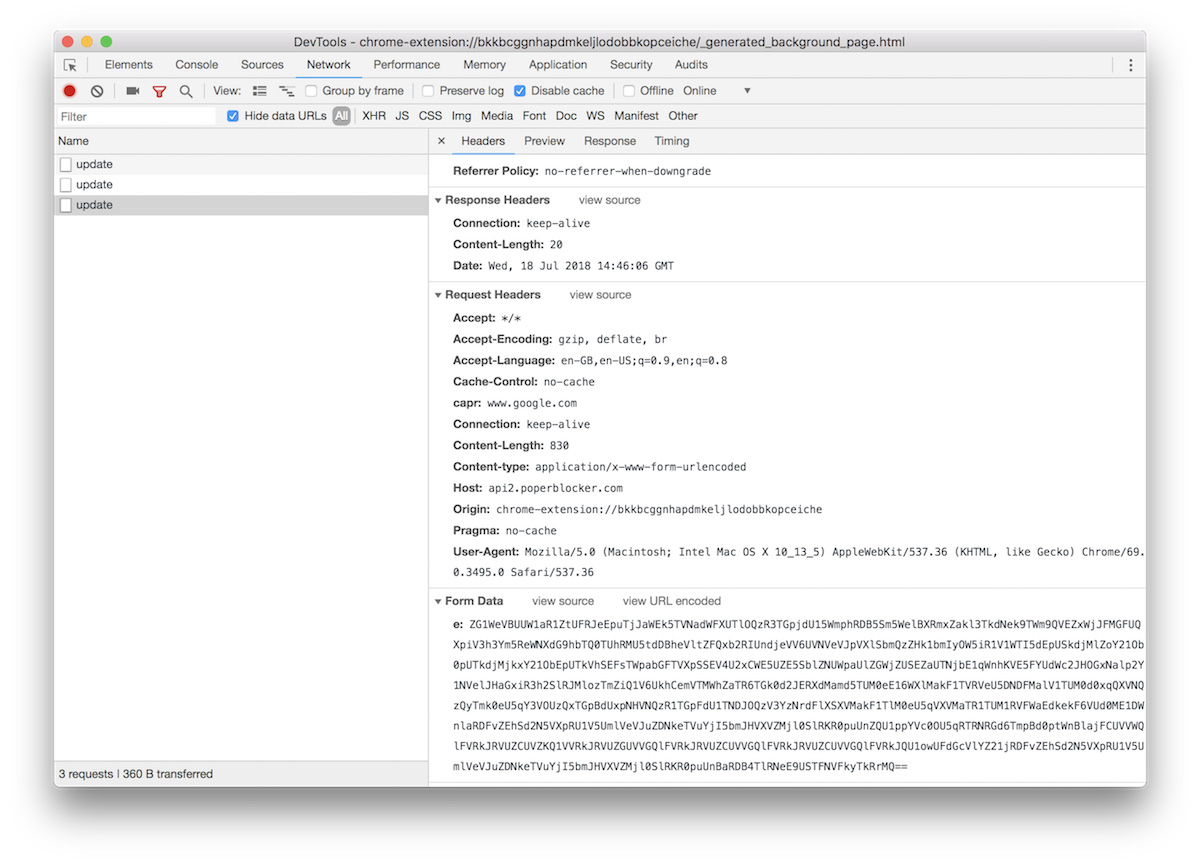
Decoded:ver=4&def=21&sver=1&nid=4.0.7.3&ch=2&us=aeb204c39&h=1jga4i03mlpnt2qkhjn80t56ktk&&u=https%3A%2F%2Fwww.google.com%2Fsearch%3Fsource%3Dhp%26ei%3Dq1JPW57MFuLB6QTVzLqYCw%26q%3Dhello%26oq%3Dhello%26gs_l%3Dpsy-ab.3..0l10.820.1362.0.1524.5.5.0.0.0.0.66.267.5.5.0....0...1.1.64.psy-ab..0.5.265....0.DAXFw03Pkt0&rd=https%3A%2F%2Fwww.google.com%2F&to=&bin=618083600&fiz=AAEAAAAAAAARBQAAAAEAAAAAAAAAAAAAAAAAAAAAAAA=&t=ajax&p=https%3A%2F%2Fwww.google.com%2F&tid=1531925166495
An exact address of every page you visit is sent to a remote server. Strictly speaking, this behavior is not tolerated by Google and it is explicitly mentioned in Google’s developer policies:
Collection and use of web browsing activity is prohibited except to the extent required for a user-facing feature described prominently in the Product’s Chrome Web Store page and in the Product’s user interface.
The interesting nuance here is that all these extensions are trying to not blatantly violate this rule and to find a justification for the said behavior. For instance, here is how it described on the "Poper Blocker" extension page:
Our users help Poper Blocker map all websites that show popups, overlays and popunders. In order to identify the necessary blocking solution that must be accessed from the Poper Blocker database, we collect anonymous browsing data. We care greatly about your privacy. For more information, please see our Privacy Policy at: http://poperblocker.com/privacy.html
Personally, I find this explanation to be weak at best:
- It is absolutely unclear why they actually need to send every visited page address.
- Calling one’s complete browsing history "anonymous browsing data" is a big stretch.
Privacy policy analysis
Let's try to figure how exactly these enterprises use the data they collected. These companies are trying to at least tacitly follow the rules so I assumed that they would have their reasoning specifically outlined in their privacy policies. And with this I faced the first minor difficulty - the privacy policy was in a form of an "image". The only reason for this is to make a researcher's life more difficult. I can't use a search engine to look for their other products, and I even had to re-type parts of it in order to insert into this article.
When you install or use the Poper Blocker Product, we collect from you: the type of device, operating system and browsers you are using; the date and time stamp; the browsing usage, including visited URLs, clickstream data or web address accessed; TabID; the browser identifier; and your Internet Protocol address (trimmed and hashed so that it cannot be used to identify you).
The last part of this clause is not quite true. I am not sure what they mean by this non-identifying "trimming and hashing", but I observed the full-page addresses being transmitted to their server.
For example, here is a sample of the data being sent to their server (after decoding it from the base64 encoding):
ver=4&def=21&sver=1&nid=4.0.7.3&ch=2&us=aeb204c39&h=1jga4i03mlpnt2qkhjn80t56ktk&&u=https%3A%2F%2Ftwitter.com%2Flogin%3Fredirect_after_login%3Dhttps%253A%252F%252Fanalytics.twitter.com%252Fuser%252Fay_meshkov%252Ftweets&to=&bin=618083532&fiz=AAEAAAAAAAARBQAAAAEAAAAAAAAAAAAAAAAAAAAAAAA=&t=ajax&p=https%3A%2F%2Ftwitter.com%2Flogin%3Fredirect_after_login%3Dhttps%253A%252F%252Fanalytics.twitter.com%252Fuser%252Fay_meshkov%252Ftweets&tid=1531838746835
us=aeb204c39- this appears to be my own user identifier, generated when the extension was installed. This identifier is sent in every request.- Also, as you can see, the data sample contains some Twitter URLs I visited, which can be used to easily identify me.
How is the Data Shared?
We do not share any Personal Information collected from you with third parties or any of our partners.
...
We may share your Non-Personal information with our parent company, any subsidiaries, joint ventures, or other companies under common control (collectively "Affiliated Companies") solely if and when applicable or necessary for the purposes described in this Primary Policy.
...
Note that we may also appoint third-party service providers (operating under our instructions), who may need to access to your information in connection with their servers on our behalf. Transfers of your Personal Information will be made in accordance with applicable data protection laws.
For some unknown reason, every spyware company I have ever seen puts the "we do not share" statement at the very beginning of this section. The nuance, here, is that this statement is usually followed by others that directly contradict it.
This should come as no surprise; the information can be shared with anybody they want, while giving the user no information at all as to who the destination(s) could actually be. Unnamed "affiliated companies" and "third-party service providers" provide zero confidence about how secure anybody’s personal information is with them.
Big Star Labs on Mobile devices
The investigation might have ended here, as Big Star Labs is pretty good at hiding their affiliated apps and websites. Every document that contains the company name is an image (in other words, you cannot simply Google their name), they use different accounts in extension stores, and the domain owners aren't publicized. It made me use some serious Google-fu to find a bunch of Android apps which belong to the same "Big Star Labs" company: Speed BOOSTER, Battery Saver, AppLock | Privacy Protector, Clean Droid, Block Site.
Fortunately, however, I remembered that I heard their name before. We warned you about a suspicious iOS ad blocker some while ago, and it appears that this blocker was from the same company!
Technically speaking, the mobile user’s browsing history is much harder to acquire, and this makes it more valuable. It is logical to assume that a company whose business model is based on collecting user data would at least make an attempt to do so, and it is interesting to see exactly how they extract the information they need.
Big Star Labs on iOS
This "Adblock Prime" blocker is not a regular mobile app. Instead, the website "adblockprime.co" worked directly from the Safari browser, and it offered to install a Mobile Device Management (MDM) profile.
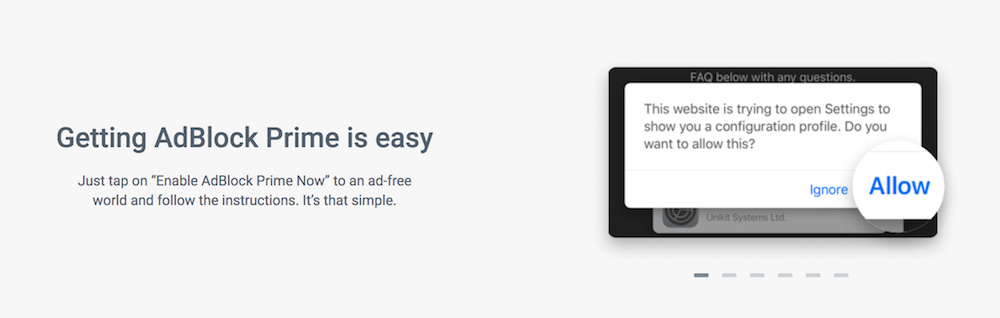
[Technical note] MDM is the administrative area of mobile devices (smartphones, tablets, and laptops). MDM deals with everything including deployment, security, monitoring, and management of mobile devices in the workplace. That makes it vulnerable to social engineering methods for intruding into users’ personal devices, or to giving someone else administrative rights.
This MDM profile allows Big Star Labs to:
• Explore the full list of apps present on the device (which is forbidden for regular iOS apps);
• Explore a browser’s history;
• Potentially, Big Star can even install third-party apps!
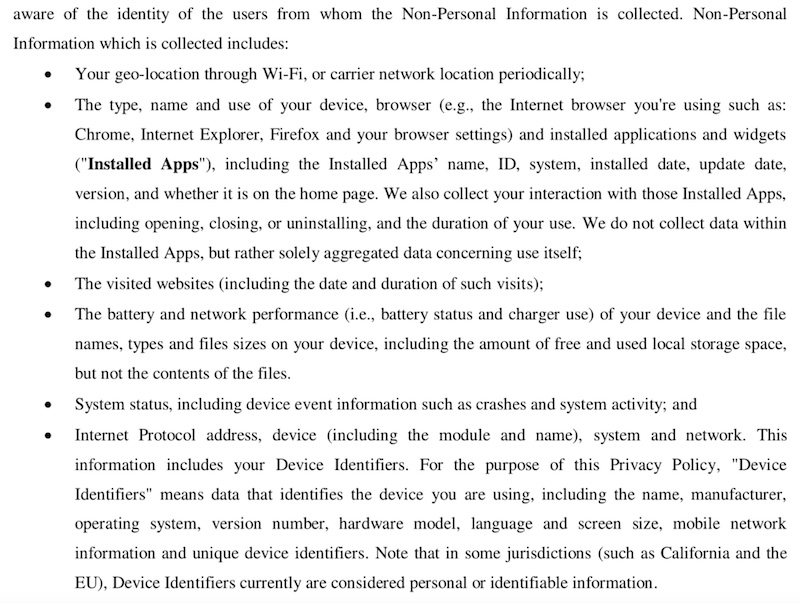
Its Privacy Policy hints at the variety of information collected by this service (for example, browser history, apps list, etc.):
Big Star Labs on Android
Each of the discovered Android apps requests access to the "Accessibility Services" and this alone is suspicious. The "Accessibility services" is a very powerful Android API that "should only be used to assist users with disabilities in using Android devices and apps".
Accessibility Services allows apps to autonomously do what in normal circumstances requires user physical interaction. For instance, it can mimic taps and swipes, or access text field contents.
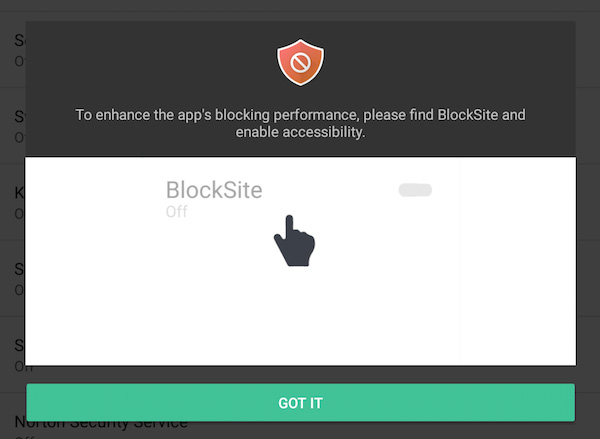
At the end of 2017, Google declared a crackdown on the apps’ misuse of Accessibility services. However, one month later they backed off, and stopped prosecuting this crackdown.
The Accessibility API can be used to extract page URLs right from the browser's address bar. For example, the "Block Site" app does it in order to detect whether the website needs to be blocked or not, which is its main purpose. If you enable the "block adult websites" feature, it starts sending over to the server the full address of every page you visit, just like its extension counterpart.
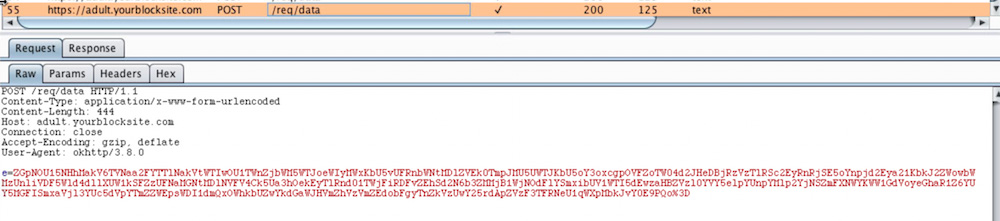
Decoded data from the screenshot:
v3=3.1.131&dis=21&cm=1&org=chrome&ch=8&rm=a28625566&cas=k55a2o0lltpnl54lkampsao70ki&&poz=&strm=reload&tul=&trm=1515917065801&ul=https://m.gsmarena.com/xiaomi_sets_foot_in_bangladesh_three_phones_are_now_available_in_the_country-amp-32263.php
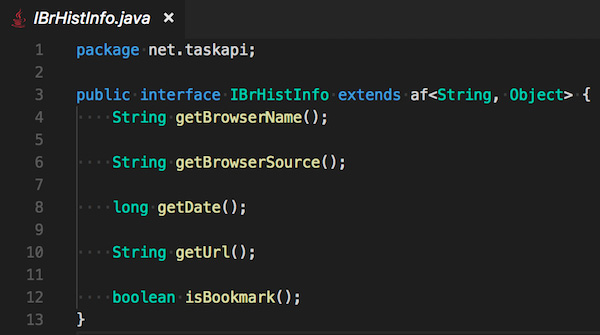
Unlike the browser extensions case, it is harder to understand what exactly is going on with the data inside these mobile apps. The source code is heavily obfuscated, but it hints that the data is stored in an encrypted form and periodically sent over to an Amazon S3 server. For instance, the "Speed BOOSTER" app collects the browsing history:
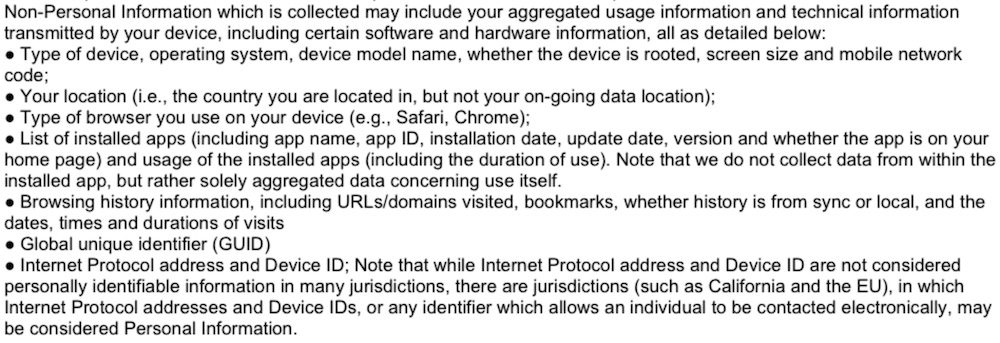
The privacy policy is only slightly more open about what data is being collected. The policy gives the same old story about the so-called “non-personal” information:
Is this allowed by Google and Apple rules?
In Apple's case, they don't have much leverage with "AdblockPrime" as it is not present in the AppStore.
In Google's case, though, the situation is intricate. The apps and extensions claim that they really need the information that is being collected and that it is related to the apps' primary functions. This claim just looks to me like an attempt to justify personal data collection, but this could just be my own bias coming through.
Is this legal?
The apps and extensions do not ask users for explicit consent as is required by GDPR, and there is no special processing for EU users, so I wonder if their behavior is legal? I am not a lawyer so I reached for a specialist to help me.
Alexey Muntyan,
Lawyer and expert with ten years of experience in Data Protection field.
The territorial scope of the GDPR applies to the processing of personal data of data subjects who are in EU/EEA where the processing activities are related to the monitoring of their behaviour as far as their behaviour takes place within the European Union (EU) and the European Economic Area (EEA) (GDPR, Art. 3(2)). The monitoring of data subjects behaviour is exercise by tracking of natural persons on the internet including potential subsequent use of personal data processing techniques which consist of profiling a natural person (GDPR, Rec. 24). Natural persons may be associated with online identifiers provided by their devices, applications, tools and protocols, such as internet protocol addresses, cookie identifiers or other identifiers (GDPR, Rec. 30). Consent of the data subject means any freely given, specific, informed and unambiguous indication of the data subject's wishes by which he or she signifies agreement to the processing of personal data relating to him or her (GDPR, Art. 4(11)).
Thus, taking into account the findings of this article, it seems possible to draw the following conclusions:
- Some activities of browser extensions providers may be considered in the context of the GDPR requirements, if these extensions are installed and used on the browsers of data subjects in EU/EEA.
- The qualification of user data – location data, IP address, cookie ID – as "non-personal" or "anonymized" can be seriously criticized from the GDPR perspective, which automatically casts doubt on compliance with applicable GDPR requirements regarding the subject's consent to the processing of his or her personal data.
Who is behind this activity
Unfortunately, right now one can only assume, as the real affiliated companies aren't made publicly known. The format of the data looks awfully similar to what the Stylish extension was sending so there might be a link to SimilarWeb, an Israeli-based web analytics company. However, this may be not the only consumer.
Conclusion
It is no “new” news that our personal data is valuable. Those who want to profit from acquiring it will always surround us. With this in mind, I will never tire of repeating two simple rules one needs to follow if they care about preserving their privacy and security:
- Read the privacy policy before installing anything.
- Never install anything made by a developer you don't trust.
These two guidelines will help you protect yourself in most cases, but they may be not enough in the case of a “silent acquisition” as happened with Stylish, for instance.
However, all the domains we discover as destinations for personal data are now added to the "AdGuard Spyware filter" and will be blocked by our AdGuard desktop and mobile apps and by AdGuard DNS.
Just in case you are wondering, here is a list of domains the data is sent to:
api.taskapi.netapi2.poperblocker.comyourblocksite.comben.crxmouse.com
Also, Android apps were connecting to these two Amazon S3 buckets:
s3.amazonaws.com/hcluster4s3.amazonaws.com/hcluster5
UPDATE (25.07): All the apps and extensions mentioned in the article are no more available on Google Play and Chrome WebStore.
UPDATE (20.08): Most apps and extensions were reinstated, with seemingly little to no change. You can help report abuse with a link to this article.




















































