Firefox enables advertisers to track ad performance by default

Mozilla, a company that has always prided itself on putting privacy first, is facing a backlash from users over a Firefox data collection feature designed to help advertisers track ad performance. Adding insult to injury, the feature, called Privacy-Preserving Attribution (PPA), is enabled by default in the newest version of the browser.

In announcing the new feature, Mozilla described it as a “a non-invasive alternative to cross-site tracking.” “Tracking is terrible for privacy, because it gives companies detailed information about what you do online,” it went on. Cross-site tracking has been for the longest time associated with third-party cookies that Mozilla has been blocking in Firefox by default since 2019. However, now that the last abodes of third-party cookies, such as Microsoft Edge and Google Chrome, are finally phasing them out, browser makers are looking for a replacement.

The alternatives proposed by Google Chrome (Protected Audience API) and Microsoft Edge (Ad Selection API) seem sketchy or at least not foolproof when it comes to user privacy. That’s why AdGuard is now blocking both of them.

In light of this, Mozilla’s unveiling of a supposedly private tracking alternative might appear typical — just another browser maker catering to advertisers while also trying to sweeten the pill for users. The catch, however, lies in Mozilla’s own claim that it isn’t your run-of-the-mill tech company — implying it doesn’t shove your privacy aside in pursuit of profits like the others do.

“We’re not a normal tech company. The things we create prioritize people and their privacy over profits. We exist to make the internet a healthier, happier place for everyone,” asserts Mozilla’s mission statement, prominently displayed on its main page.

So, is Mozilla just like the others now? Without jumping the gun on this, let’s take a closer look at this new tracking alternative.

A product of cooperation with Meta

The new feature was rolled out less than a month after Mozilla’s acquisition of Anonym, an ad metrics company. This move raised eyebrows at the time, seen by some, including here at AdGuard, as a reason for concern and a potential step down a slippery slope. That is primarily because embracing technologies that facilitate data sharing for targeted advertising appears to contradict Mozilla’s mission to always prioritize privacy.

On its GitHub page, Mozilla says that it has been “working with Meta and other actors on defining an in-browser attribution API,” so the PPA seems to be the direct result of that work. It goes on to say that it will be conducting a trial of a “lightweight version of a proposal” which is what is happening now in Firefox.

Our hope is that if we develop a good attribution solution, it will offer a real alternative to more objectionable practices like tracking. We are currently testing this approach to see if it can provide advertisers with the information they’re looking for.

So what’s under the hood?

Mozilla provides a detailed technical description of the new API at this link. We will limit ourselves to a more general one.

In a nutshell, Firefox will track attributed conversions, that is where an ad displayed on one site leads to a conversion (like a purchase) on another. Traditionally, this process relies on cross-site tracking to link these events. However, Mozilla claims that its method, where the browser itself manages this, protects user privacy.

During impression registration — when a user views or clicks on an ad — Firefox will store basic information in a write-only repository. This includes the ad’s identifier and whether the user viewed or clicked the ad. When a conversion occurs, the system aggregates this data based on stored impressions. The website where the conversion happens can access related impressions using the ad’s identifier and interaction type (view or click). Mozilla claims that privacy of individual users is protected because the data is aggregated and the noise is added to prevent identifying specific user actions.

Mozilla: privacy loss is offset by the ‘enormous value’ to the advertiser

But not everyone agrees. Digital rights advocate Jonah Aragon points out that there are a “plethora of issues” with the new feature, most importantly that it reflects a misguided belief that advertisers are entitled to the collection of user data.

By baking in software that’s tailor-made for the advertising industry, Mozilla is wrongly asserting that the advertising industry has a legitimate interest in collecting your data and tracking you across the internet over all other parties, including over your own interests.

Even the mere fact that Mozilla is cooperating with Meta out of all companies on this, makes one a little suspicious of the privacy-preserving nature of the technique, but how does Mozilla itself justify it?

On their GitHub page, Mozilla acknowledges that implementing such a tracking scheme would mean users will take a hit on their privacy, with their info being used. However, the browser maker also argues that such loss is justifiable by the “enormous value” advertisers gain from attribution. Their big sell is that other funding models just won’t cut it.

We, however, disagree with the assumption that an advertising-driven model is the only viable option for sustaining online content and services. We believe there are more ethical or privacy-respecting approaches out there worth exploring. And as a self-professed champion of privacy, Mozilla should lead in exploring these alternatives, rather than seemingly trying to accommodate advertisers’ interests.

Why turn it on by default?

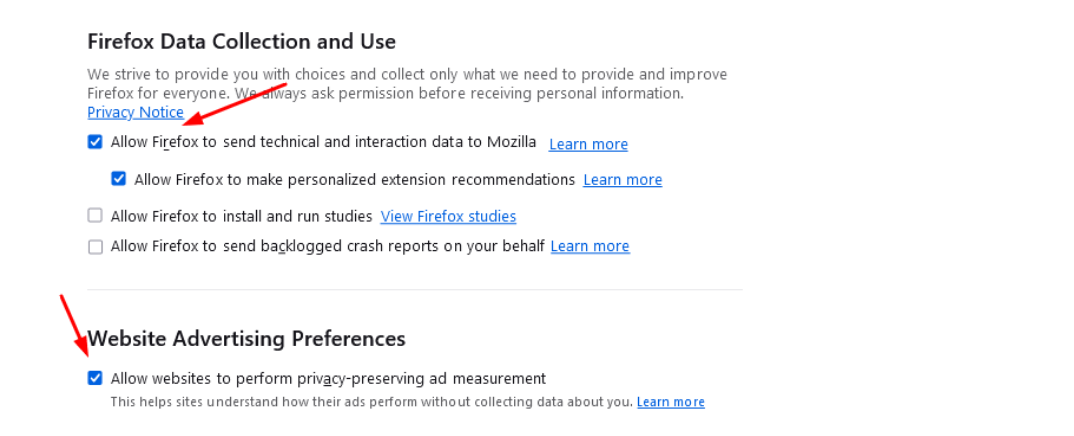
In the meantime, Mozilla’s user forums have been flooded with complaints about the feature. The criticism has focused on two things: first, that Mozilla implemented the feature at all, and second, that it decided to turn it on by default for those users who had telemetry enabled.
l98ppfirefox_1

“Integrating this feature in Firefox, and especially turning it on by default, starts with the assumption that companies have the right to track users online. I am unhappy that Firefox advertises itself as a privacy preserving alternative and then integrates this feature at all,”one of the many comments reads.

Despite the mounting criticism, Mozilla has stood its ground, and has expressed no plans to roll it back or make it opt-in.

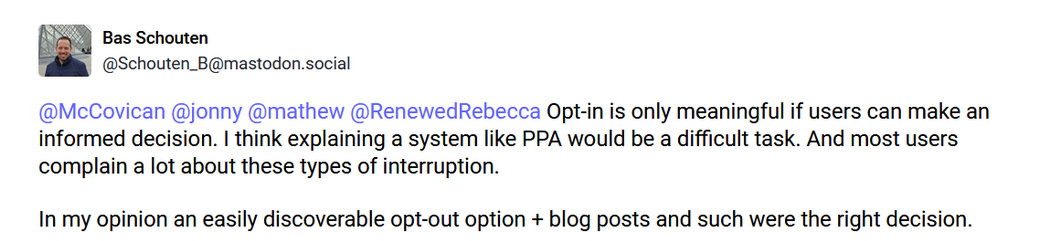
Mozilla engineer Bas Schouten argued that making this feature an opt-in would require explaining its value to the users, which he thinks would be too difficult. Schouten also argued that the opt-out option is easily discoverable.
2wffyscreen_mozilla

Whether the opt-out option is actually easy to find is debatable, but the argument that users are unlikely to grasp the information about the new API and that’s why it’s better to force it on them is not a good look.

For now, the feature can be disabled by going to Firefox’s browser menu. Once there, select Settings, and find the Website Advertising Preferences section in the Privacy & Security panel. Uncheck the box called “Allow websites to perform privacy-preserving ad measurement” and you should be good.

For its part, AdGuard is blocking this API for its app and extension users with the Tracking Protection Filter enabled as a precaution to ensure our users’ privacy remains protected.


Discuss this controversial move by Firefox in our social media

Podobał Ci się ten post?
AdGuard VPN AdGuard DNS AdGuard Mail AdGuard Wallet
Ekran główny AdGuard dla Windows
Ekran ochrony AdGuard dla Windows, pokazujący funkcje ochrony i ustawienia
Ekran statystyki AdGuard dla Windows, pokazujący statystyki zablokowanych reklam i trackery
Ekran Zarządzanie aplikacjami w AdGuard dla Windows, pokazujący opcje zarządzania ochroną dla aplikacji zainstalowanych na urządzeniu
20 751 20751 recenzji
Doskonały!

AdGuard dla Windows: bloker reklam na PC

AdGuard dla systemu Windows to coś więcej niż bloker reklam. To wielofunkcyjne narzędzie, które blokuje reklamy, kontroluje dostęp do niebezpiecznych stron, przyspiesza ładowanie stron i chroni dzieci przed nieodpowiednimi treściami
Pobierając program, akceptujesz warunki Umowy licencyjnej
Microsoft Store
Pobierając program, akceptujesz warunki Umowy licencyjnej
AdGuard na Windows v8.0, 14-dniowa wersja próbna
Ekran główny AdGuard dla Mac
Ekran Trybu ukrytego w AdGuard dla Mac
20 751 20751 recenzji
Doskonały!

AdGuard: bloker reklam na Maca

AdGuard dla Mac to wyjątkowy bloker reklam zaprojektowany z myślą o macOS. Oprócz ochrony przed uciążliwymi reklamami w przeglądarkach i aplikacjach chroni Cię przed śledzeniem, phishingiem i oszustwami
Pobierając program, akceptujesz warunki Umowy licencyjnej
Przeczytaj więcej
AdGuard na Mac v2.19, 14-dniowa wersja próbna
Ekran główny AdGuard dla Android
Ekran Ochrona przed śledzeniem w AdGuard dla Android
Ekran Zarządzanie aplikacjami w AdGuard dla Android, pokazujący opcje zarządzania ochroną dla aplikacji zainstalowanych na urządzeniu
Ekran statystyki AdGuard dla Android, pokazujący statystyki zablokowanych reklam i trackery
Ekran główny prywatnej przeglądarki AdGuard dla Android
Kod QR, aby pobierz AdGuard dla Android
20 751 20751 recenzji
Doskonały!

AdGuard: bloker reklam na Androida

Blokuje reklamy i moduły śledzące we wszystkich przeglądarkach, grach i innych aplikacjach. Chroni Twoją prywatność i pozwala kontrolować, w jaki sposób aplikacje korzystają z Internetu. Instalowane za pomocą pliku APK
Pobierając program, akceptujesz warunki Umowy licencyjnej
Przeczytaj więcej
Skanuj, aby pobrać
Użyj dowolnego czytnika kodów QR dostępnego w Twoim urządzeniu
AdGuard na Android v4.14, 14-dniowa wersja próbna
Ekran główny AdGuard dla iOS
Ekran ochrony AdGuard dla iOS, pokazujący funkcje ochrony i ustawienia
Ekran statystyki AdGuard dla iOS, pokazujący statystyki zablokowanych reklam i trackery
Kod QR, aby pobierz AdGuard dla iOS
20 751 20751 recenzji
Doskonały!

AdGuard na iOS: bloker reklam poza Safari

Najlepszy bloker reklam na iOS dla iPhone’a i iPada. AdGuard usuwa wszelkiego rodzaju reklamy i elementy śledzące w Safari oraz chroni Twoją prywatność we wszystkich aplikacjach na poziomie DNS
Pobierając program, akceptujesz warunki Umowy licencyjnej
Przeczytaj więcej
Skanuj, aby pobrać
Użyj dowolnego czytnika kodów QR dostępnego w Twoim urządzeniu
AdGuard na iOS v4.5
Ekran główny AdGuard Content Blocker
Ekran Filtry w AdGuard Content Blocker
Ekran ustawienia w AdGuard Content Blocker
20 751 20751 recenzji
Doskonały!

Blokada treści AdGuard

AdGuard Content Blocker eliminuje wszelkiego rodzaju reklamy w przeglądarkach mobilnych, które obsługują technologię blokowania treści — a mianowicie Samsung Internet i Yandex Browser. Jego funkcje są ograniczone w porównaniu z AdGuard na Androida, ale jest darmowy, łatwy w instalacji i wydajny
Pobierając program, akceptujesz warunki Umowy licencyjnej
Przeczytaj więcej
Blokada treści AdGuard v2.8
Ekran główny AdGuard Browser Extension
Ekran Ochrona przed śledzeniem w AdGuard Browser Extension
20 751 20751 recenzji
Doskonały!

Rozszerzenie przeglądarki AdGuard

AdGuard to najszybsze i najlżejsze rozszerzenie blokowania reklam, które skutecznie blokuje wszystkie typy reklam na wszystkich stronach internetowych! Wybierz AdGuard dla swojej przeglądarki i uzyskaj szybkie i bezpieczne przeglądanie Internetu pozbawione reklam.
Instalacja
Pobierając program, akceptujesz warunki Umowy licencyjnej
Instalacja
Pobierając program, akceptujesz warunki Umowy licencyjnej
Instalacja
Pobierając program, akceptujesz warunki Umowy licencyjnej
Instalacja
Pobierając program, akceptujesz warunki Umowy licencyjnej
Instalacja
Pobierając program, akceptujesz warunki Umowy licencyjnej
Przeczytaj więcej
Instalacja
Pobierając program, akceptujesz warunki Umowy licencyjnej
Przeczytaj więcej
Rozszerzenie przeglądarki AdGuard v5.5
Ekran główny Asystenta przeglądarki
20 751 20751 recenzji
Doskonały!

Asystent AdGuard

Towarzyszące rozszerzenie przeglądarki dla aplikacji desktopowych AdGuard. Umożliwia blokowanie niestandardowych elementów na stronach internetowych, dodawanie stron internetowych do listy dozwolonych i wysyłanie raportów bezpośrednio z przeglądarki

Asystent AdGuard v1.4
20 751 20751 recenzji
Doskonały!

AdGuard Home

AdGuard Home to sieciowe rozwiązanie do blokowania reklam i modułów śledzących. Zainstaluj go raz na routerze, aby objąć nim wszystkie urządzenia w sieci domowej — nie jest wymagane żadne dodatkowe oprogramowanie klienckie. Jest to szczególnie ważne w przypadku różnych urządzeń IoT, które często stanowią zagrożenie dla Twojej prywatności

AdGuard Home v0.107
Ekran główny AdGuard Pro dla iOS
Ekran Ochrona w AdGuard Pro dla iOS, pokazujący funkcje i ustawienia ochrony
Ekran statystyki w AdGuard Pro dla iOS, pokazujący statystyki zablokowanych reklam i trackerów
20 751 20751 recenzji
Doskonały!

AdGuard Pro dla iOS

AdGuard Pro na iOS oferuje wszystkie zaawansowane funkcje blokowania reklam. Oferuje te same narzędzia, co płatna wersja AdGuard na iOS. Doskonale blokuje reklamy w Safari i pozwala dostosować ustawienia DNS, aby dostosować poziom ochrony. Blokuje reklamy w przeglądarkach i aplikacjach, chroni dzieci przed nieodpowiednimi treściami i dba o bezpieczeństwo danych osobowych.
Pobierając program, akceptujesz warunki Umowy licencyjnej
Przeczytaj więcej
AdGuard Pro dla iOS v4.5
Ekran główny AdGuard Mini dla Mac
Ekran ochrony Safari w AdGuard Mini dla Mac
Ekran tworzenia reguły w AdGuard Mini dla Mac
20 751 20751 recenzji
Doskonały!

AdGuard Mini dla Mac — bloker reklam Safari

AdGuard Mini dla komputerów Mac to potężny bloker reklam w Safari. Ta lekka aplikacja usuwa reklamy, blokuje moduły śledzące i przyspiesza ładowanie stron. Umożliwia przeglądanie internetu w Safari bez rozpraszania uwagi i chroni prywatność danych
Instalacja
Pobierając program, akceptujesz warunki Umowy licencyjnej
Przeczytaj więcej
AdGuard Mini dla Mac v2.3
Ekran główny AdGuard dla Android TV z włączoną ochroną
Ekran blokowanie reklama AdGuard dla Android TV, pokazujący jego funkcje i ustawienia
Ekran ustawienia AdGuard dla Android TV
Ekran Zarządzanie aplikacjami AdGuard dla Android TV, pokazujący aplikacje, w których reklamy i trackery są zablokowane
20 751 20751 recenzji
Doskonały!

AdGuard dla Android TV

AdGuard dla Android TV to jedyna aplikacja, która blokuje reklamy, chroni prywatność i działa jak zapora sieciowa dla Smart TV. Otrzymuj ostrzeżenia o zagrożeniach internetowych, używaj bezpiecznego DNS i korzystaj z szyfrowanego ruchu. Zrelaksuj się i zanurz się w swoich ulubionych programach z najwyższej klasy zabezpieczeniami bez reklam!
AdGuard dla Android TV v4.14, 14-dniowa wersja próbna
Maskotka AdGuard, Agnar, trzymający pingwina Linux
20 751 20751 recenzji
Doskonały!

AdGuard dla Linux

AdGuard for Linux to pierwszy na świecie systemowy bloker reklam dla systemu Linux. Blokuj reklamy i elementy śledzące na poziomie urządzenia, wybieraj spośród wstępnie zainstalowanych filtrów lub dodawaj własne — wszystko za pośrednictwem interfejsu wiersza poleceń
AdGuard dla Linux v1.4
20 751 20751 recenzji
Doskonały!

AdGuard Temp Mail

Darmowy generator tymczasowych adresów e-mail, który zapewnia anonimowość i chroni prywatność. Brak spamu w głównej skrzynce odbiorczej!
20 751 20751 recenzji
Doskonały!

AdGuard VPN

75 lokalizacji na świecie

Dostęp do wszelkich treści

Silne szyfrowanie

Polityka braku logów

Najszybsze połączenie

Wsparcie 24/7

Wypróbuj za darmo
Pobierając program, akceptujesz warunki Umowy licencyjnej
Przeczytaj więcej
20 751 20751 recenzji
Doskonały!

AdGuard DNS

AdGuard DNS to alternatywne rozwiązanie do blokowania reklam, ochrony prywatności i kontroli rodzicielskiej. Łatwy w konfiguracji i darmowy, zapewnia niezbędną minimalną ochronę przed reklamami, śledzeniem i phishingiem, bez względu na platformę i urządzenie, z którego korzystasz.
20 751 20751 recenzji
Doskonały!

AdGuard Mail

Chroń swoją tożsamość, unikaj spamu i zabezpiecz swoją skrzynkę odbiorczą dzięki naszym aliasom i tymczasowym adresom e-mail. Skorzystaj z naszej bezpłatnej usługi przekazywania e-maili oraz aplikacji na wszystkie systemy operacyjne
20 751 20751 recenzji
Doskonały!

AdGuard Wallet

Bezpieczny i prywatny portfel kryptowalutowy, który daje Ci pełną kontrolę nad Twoimi aktywami. Zarządzaj wieloma portfelami i odkrywaj tysiące kryptowalut, aby je przechowywać, wysyłać i wymieniać
Rozpoczęto pobieranie AdGuard Kliknij przycisk wskazany strzałką, aby rozpocząć instalację Wybierz „Otwórz” i kliknij „OK”. Poczekaj aż plik zostanie pobrany. W otwartym oknie, przeciągnij ikonę AdGuard do folderu „Aplikacje”. Dziękujemy za wybrania AdGuard! Wybierz „Otrwórz” i kliknij „OK”. Poczekaj aż plik zostanie pobrany. W otwartym kliknij „Instaluj”. Dziękujemy za wybrania AdGuard!
Zainstaluj również AdGuard dla urządzeń mobilnych
















































