Google’s new AI feature: a search for answers or a search for ads?

Google says its new generative AI feature will start a “new era of search” by “unlocking new types of questions” and “transforming the way information is organized.” But a closer look at Google’s own promotional materials reveals a downside: you may have to face a barrage of ads every time you use it. But how many ads is too many? For Google, it seems, the more, the better.

Google offered a sneak peek at ad placements in its brand new Search Generative Experience (SGE) at an event for advertisers on May 23. There, Google revealed that ads would not only appear before and after the AI-powered snapshot, as originally announced, but would also infiltrate the AI-generated responses. And if the example Google gave is anything to go by, it’s not a pretty sight.

In the presentation showed by Google, an SGE user searched for “outdoor activities in Maui” and was greeted by two Google ads at the top of the search results before he could even see the AI’s suggestions. After scrolling down, the user could see some tips on outdoor activities to enjoy in Maui, framed in green to indicate that they were generated by AI.
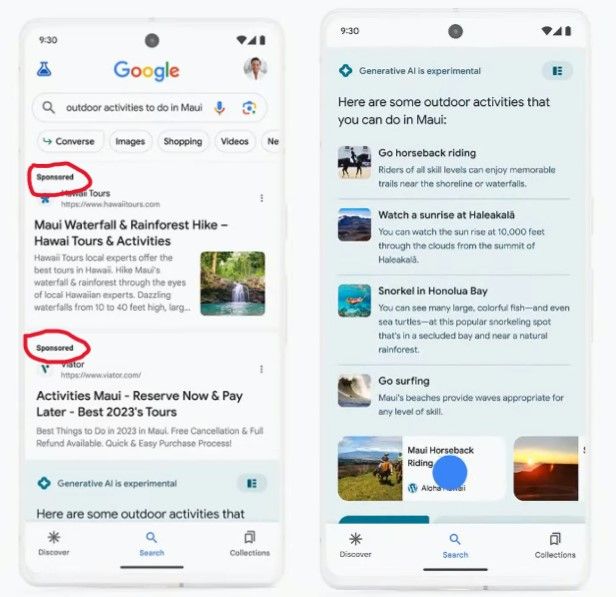
Ads are showing at the top search results in SGE

The first AI-generated response was ad-free, but the first follow-up question to the AI chatbot — “hiking backpacks for kids” — triggered an answer that already included ads. A sponsored result came first, followed by organic results.
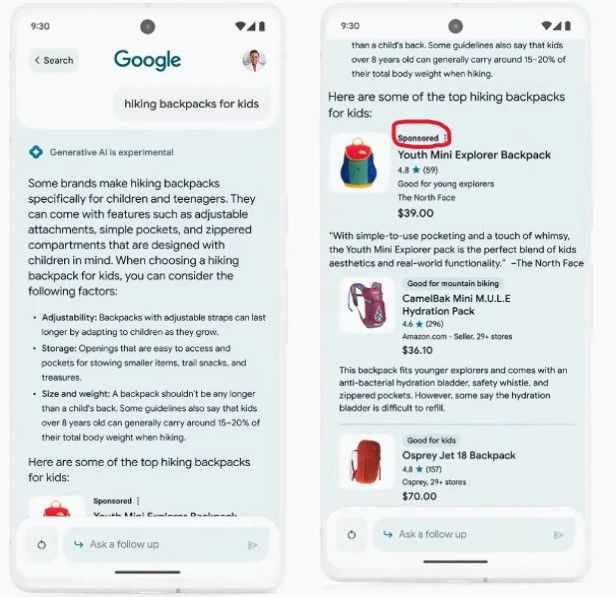
Ads are showing within the SGE experience

‘Industry-leading’ ad labels that hide in plain sight

Touting the “new ad experience”, Google’s VP of Ads Jerry Dischler claimed that search ads within SGE would be hard to confuse with organic results. The former would “feature our industry-leading clear and transparent labels with the ‘Sponsored’ label in bold black text,” he said.

However, if you look at the backpacks in the screenshot above, without peering too intently, you may not be able to tell which one is the advertised one (or if they all are). That’s partly because, in Google’s example, other products also have labels: “good for mountain biking” and “good for kids,” which make the “sponsored” label less noticeable. Besides, what catches the user’s attention first is arguably the product image, the description and the price, and not a line of text in fineprint at the top.

When describing the new ad placements and how they can help advertisers reach users with highly-relevant ads, VP of Google Ads Vidhya Srinivasan called it a “beautiful moment.” We thought she was being sarcastic, but she wasn’t. They say, beauty is in the eye of the beholder, but in our opinion, there is nothing beautiful about ads populating your chatbot’s answers.
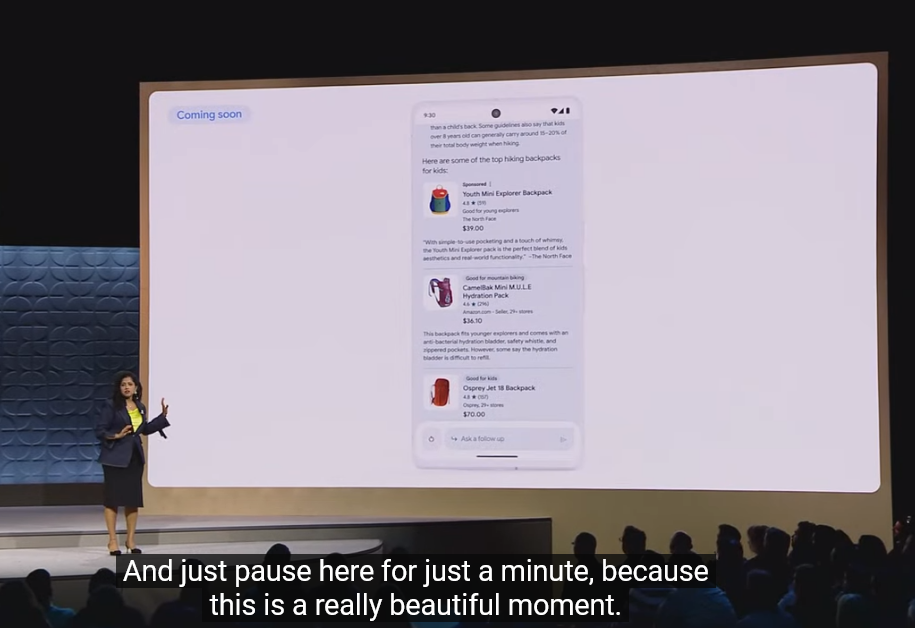
Google described the opportunities that new ad placements would bring to advertisers ‘a beautiful moment’

Anyone familiar with Google’s history of ad labeling knows that over the years, Google has made ads in search more and more indistinguishable from organic search results. First, by removing background shading in 2013, and then by doing away with colored ad labels in 2019. Google’s claim that its ad labels are industry-leading is questionable, but even if we assume it’s true, it is not a compliment to Google, but rather a criticism of the industry’s poor standards for marking ads clearly.

As for “clear and transparent,” well, judging by the direction Google’s ad design is going, it seems that at some point the labels may become so “transparent” that we will barely be able to see them at all. Truth be told, it’s already hard to tell apart paid and genuine results in the SGE.

The never-ending ads galore

But let’s go back to ads in the SGE. Yes, we’re still not done with them. If the user scrolls to the bottom of the SGE experience, they’ll see another row of ads.
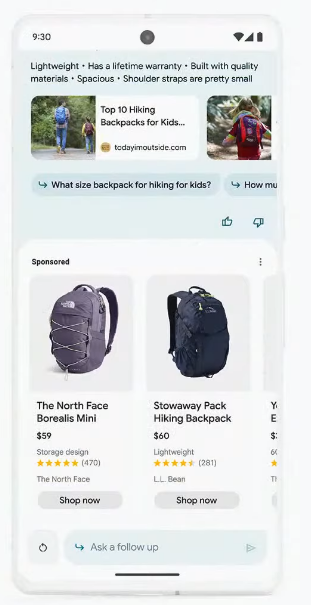
A row of ads after the SGE

And if the user, assuming they are still not deterred by the amount of ads at this point, decides to ask more follow-up questions (“is it easy for them to learn surfing” in Google’s example), they should be ready to see more ads in replies.
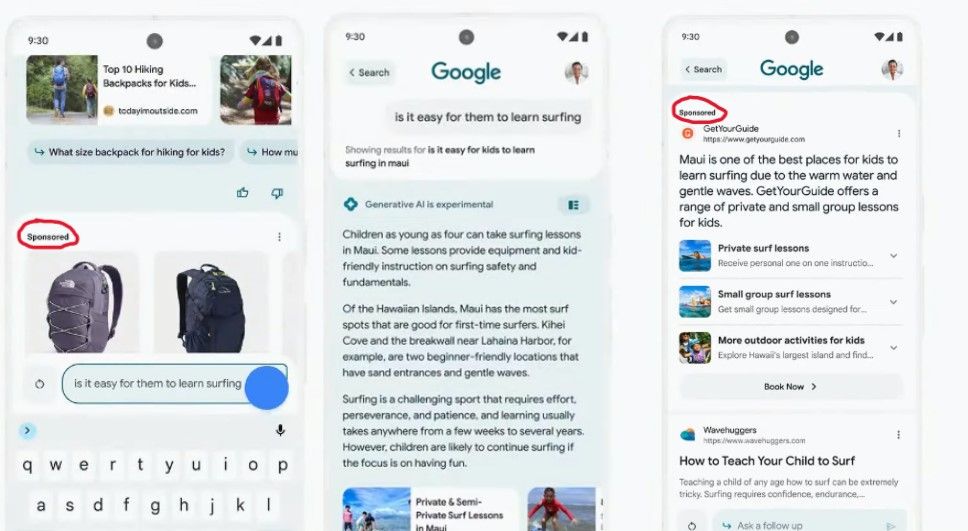
Ads appear below the AI-powered snapshot

The fact that Google is filling its Generative Search Experience with ads from day one is not surprising. After all, Google makes most of its money from advertising, and search ads account for a lion’s share of its ad revenue. To some extent, Google follows in the footsteps of Microsoft, which introduced ads into Bing AI, its own AI-supercharged search experience, back in April.

Blocking ads in Google’s SGE

Based on our initial observations, it seems that ads in Google’s SGE are similar to the ones in regular Google Search results, and can be blocked with conventional ad blocking methods. The way the ads appear, as seen in the videos and screenshots Google has provided, does not require us to come up with new, out-of-the-box solutions.

However, there’s a risk that Google could take a page from Bing’s playbook and integrate ads more closely or “natively” with AI-generated responses, making them an integral part of the message itself. In that case, simply removing the ads could render the entire response unhelpful, meaning we would have to explore innovative ways to block ads, perhaps using AI ourselves. We have discussed some of these possible new methods in more detail in our article about the challenges of blocking ads in Bing AI’s chat mode.

We may update this article once we get access to Google’s SGE and see the situation with ads firsthand. For now, we are cautiously optimistic that we will be able to block ads in SGE, which the most quick-witted have already nicknamed Google’s “Generative Ads Experience.”

It’s not OK, Google

At the risk of sounding too obvious, the excess of ads that Google might impose on users with its AI experience will ruin the otherwise cool idea of integrating AI with search. While we wouldn’t expect Google to refrain from including ads into its AI-powered search — after all Bing is doing that as well — oversaturating it with ads can backfire. If it does, Google will see it in the number of users who stick with or, rather, not stick with its SGE.

If you don’t want to see most ads in search results, use an ad blocker, such as AdGuard. As Google and Microsoft keep inventing new ways to sneak ads into their conversational AI’s answers, we will also be working on finding new ways to block them.

Another option is to use a completely ad-free paid search engine, such as Brave Search Premium. Sadly, another ad-free subscriptions-based search engine, Neeva, has just shut down. They had a noble vision of offering users personalization and privacy without ads — a vision that we share. But they faced a huge obstacle: getting users to switch from their default search settings. This shows how Google has entrenched itself as a dominant force on the search engine market, making it hard for users to choose alternatives. But by botching the introduction of AI with ads, Google may risk losing some of its loyal users and opening up opportunities for new competitors. We know it’s a long shot, but we would like to see that happen.


Podobał Ci się ten post?
AdGuard VPN AdGuard DNS AdGuard Mail AdGuard Wallet
Ekran główny AdGuard dla Windows
Ekran ochrony AdGuard dla Windows, pokazujący funkcje ochrony i ustawienia
Ekran statystyki AdGuard dla Windows, pokazujący statystyki zablokowanych reklam i trackery
Ekran Zarządzanie aplikacjami w AdGuard dla Windows, pokazujący opcje zarządzania ochroną dla aplikacji zainstalowanych na urządzeniu
20 752 20752 recenzje
Doskonały!

AdGuard dla Windows: bloker reklam na PC

AdGuard dla systemu Windows to coś więcej niż bloker reklam. To wielofunkcyjne narzędzie, które blokuje reklamy, kontroluje dostęp do niebezpiecznych stron, przyspiesza ładowanie stron i chroni dzieci przed nieodpowiednimi treściami
Pobierając program, akceptujesz warunki Umowy licencyjnej
Microsoft Store
Pobierając program, akceptujesz warunki Umowy licencyjnej
AdGuard na Windows v8.0, 14-dniowa wersja próbna
Ekran główny AdGuard dla Mac
Ekran Trybu ukrytego w AdGuard dla Mac
20 752 20752 recenzje
Doskonały!

AdGuard: bloker reklam na Maca

AdGuard dla Mac to wyjątkowy bloker reklam zaprojektowany z myślą o macOS. Oprócz ochrony przed uciążliwymi reklamami w przeglądarkach i aplikacjach chroni Cię przed śledzeniem, phishingiem i oszustwami
Pobierając program, akceptujesz warunki Umowy licencyjnej
Przeczytaj więcej
AdGuard na Mac v2.19, 14-dniowa wersja próbna
Ekran główny AdGuard dla Android
Ekran Ochrona przed śledzeniem w AdGuard dla Android
Ekran Zarządzanie aplikacjami w AdGuard dla Android, pokazujący opcje zarządzania ochroną dla aplikacji zainstalowanych na urządzeniu
Ekran statystyki AdGuard dla Android, pokazujący statystyki zablokowanych reklam i trackery
Ekran główny prywatnej przeglądarki AdGuard dla Android
Kod QR, aby pobierz AdGuard dla Android
20 752 20752 recenzje
Doskonały!

AdGuard: bloker reklam na Androida

Blokuje reklamy i moduły śledzące we wszystkich przeglądarkach, grach i innych aplikacjach. Chroni Twoją prywatność i pozwala kontrolować, w jaki sposób aplikacje korzystają z Internetu. Instalowane za pomocą pliku APK
Pobierając program, akceptujesz warunki Umowy licencyjnej
Przeczytaj więcej
Skanuj, aby pobrać
Użyj dowolnego czytnika kodów QR dostępnego w Twoim urządzeniu
AdGuard na Android v4.14, 14-dniowa wersja próbna
Ekran główny AdGuard dla iOS
Ekran ochrony AdGuard dla iOS, pokazujący funkcje ochrony i ustawienia
Ekran statystyki AdGuard dla iOS, pokazujący statystyki zablokowanych reklam i trackery
Kod QR, aby pobierz AdGuard dla iOS
20 752 20752 recenzje
Doskonały!

AdGuard na iOS: bloker reklam poza Safari

Najlepszy bloker reklam na iOS dla iPhone’a i iPada. AdGuard usuwa wszelkiego rodzaju reklamy i elementy śledzące w Safari oraz chroni Twoją prywatność we wszystkich aplikacjach na poziomie DNS
Pobierając program, akceptujesz warunki Umowy licencyjnej
Przeczytaj więcej
Skanuj, aby pobrać
Użyj dowolnego czytnika kodów QR dostępnego w Twoim urządzeniu
AdGuard na iOS v4.5
Ekran główny AdGuard Content Blocker
Ekran Filtry w AdGuard Content Blocker
Ekran ustawienia w AdGuard Content Blocker
20 752 20752 recenzje
Doskonały!

Blokada treści AdGuard

AdGuard Content Blocker eliminuje wszelkiego rodzaju reklamy w przeglądarkach mobilnych, które obsługują technologię blokowania treści — a mianowicie Samsung Internet i Yandex Browser. Jego funkcje są ograniczone w porównaniu z AdGuard na Androida, ale jest darmowy, łatwy w instalacji i wydajny
Pobierając program, akceptujesz warunki Umowy licencyjnej
Przeczytaj więcej
Blokada treści AdGuard v2.8
Ekran główny AdGuard Browser Extension
Ekran Ochrona przed śledzeniem w AdGuard Browser Extension
20 752 20752 recenzje
Doskonały!

Rozszerzenie przeglądarki AdGuard

AdGuard to najszybsze i najlżejsze rozszerzenie blokowania reklam, które skutecznie blokuje wszystkie typy reklam na wszystkich stronach internetowych! Wybierz AdGuard dla swojej przeglądarki i uzyskaj szybkie i bezpieczne przeglądanie Internetu pozbawione reklam.
Instalacja
Pobierając program, akceptujesz warunki Umowy licencyjnej
Instalacja
Pobierając program, akceptujesz warunki Umowy licencyjnej
Instalacja
Pobierając program, akceptujesz warunki Umowy licencyjnej
Instalacja
Pobierając program, akceptujesz warunki Umowy licencyjnej
Instalacja
Pobierając program, akceptujesz warunki Umowy licencyjnej
Przeczytaj więcej
Instalacja
Pobierając program, akceptujesz warunki Umowy licencyjnej
Przeczytaj więcej
Rozszerzenie przeglądarki AdGuard v5.5
Ekran główny Asystenta przeglądarki
20 752 20752 recenzje
Doskonały!

Asystent AdGuard

Towarzyszące rozszerzenie przeglądarki dla aplikacji desktopowych AdGuard. Umożliwia blokowanie niestandardowych elementów na stronach internetowych, dodawanie stron internetowych do listy dozwolonych i wysyłanie raportów bezpośrednio z przeglądarki
Asystent AdGuard v1.4
20 752 20752 recenzje
Doskonały!

AdGuard Home

AdGuard Home to sieciowe rozwiązanie do blokowania reklam i modułów śledzących. Zainstaluj go raz na routerze, aby objąć nim wszystkie urządzenia w sieci domowej — nie jest wymagane żadne dodatkowe oprogramowanie klienckie. Jest to szczególnie ważne w przypadku różnych urządzeń IoT, które często stanowią zagrożenie dla Twojej prywatności
AdGuard Home v0.107
Ekran główny AdGuard Pro dla iOS
Ekran Ochrona w AdGuard Pro dla iOS, pokazujący funkcje i ustawienia ochrony
Ekran statystyki w AdGuard Pro dla iOS, pokazujący statystyki zablokowanych reklam i trackerów
20 752 20752 recenzje
Doskonały!

AdGuard Pro dla iOS

AdGuard Pro na iOS oferuje wszystkie zaawansowane funkcje blokowania reklam. Oferuje te same narzędzia, co płatna wersja AdGuard na iOS. Doskonale blokuje reklamy w Safari i pozwala dostosować ustawienia DNS, aby dostosować poziom ochrony. Blokuje reklamy w przeglądarkach i aplikacjach, chroni dzieci przed nieodpowiednimi treściami i dba o bezpieczeństwo danych osobowych.
Pobierając program, akceptujesz warunki Umowy licencyjnej
Przeczytaj więcej
AdGuard Pro dla iOS v4.5
Ekran główny AdGuard Mini dla Mac
Ekran ochrony Safari w AdGuard Mini dla Mac
Ekran tworzenia reguły w AdGuard Mini dla Mac
20 752 20752 recenzje
Doskonały!

AdGuard Mini dla Mac — bloker reklam Safari

AdGuard Mini dla komputerów Mac to potężny bloker reklam w Safari. Ta lekka aplikacja usuwa reklamy, blokuje moduły śledzące i przyspiesza ładowanie stron. Umożliwia przeglądanie internetu w Safari bez rozpraszania uwagi i chroni prywatność danych

Instalacja
Pobierając program, akceptujesz warunki Umowy licencyjnej
Przeczytaj więcej
AdGuard Mini dla Mac v2.3
Ekran główny AdGuard dla Android TV z włączoną ochroną
Ekran blokowanie reklama AdGuard dla Android TV, pokazujący jego funkcje i ustawienia
Ekran ustawienia AdGuard dla Android TV
Ekran Zarządzanie aplikacjami AdGuard dla Android TV, pokazujący aplikacje, w których reklamy i trackery są zablokowane
20 752 20752 recenzje
Doskonały!

AdGuard dla Android TV

AdGuard dla Android TV to jedyna aplikacja, która blokuje reklamy, chroni prywatność i działa jak zapora sieciowa dla Smart TV. Otrzymuj ostrzeżenia o zagrożeniach internetowych, używaj bezpiecznego DNS i korzystaj z szyfrowanego ruchu. Zrelaksuj się i zanurz się w swoich ulubionych programach z najwyższej klasy zabezpieczeniami bez reklam!

AdGuard dla Android TV v4.14, 14-dniowa wersja próbna
Maskotka AdGuard, Agnar, trzymający pingwina Linux
20 752 20752 recenzje
Doskonały!

AdGuard dla Linux

AdGuard for Linux to pierwszy na świecie systemowy bloker reklam dla systemu Linux. Blokuj reklamy i elementy śledzące na poziomie urządzenia, wybieraj spośród wstępnie zainstalowanych filtrów lub dodawaj własne — wszystko za pośrednictwem interfejsu wiersza poleceń
AdGuard dla Linux v1.4
20 752 20752 recenzje
Doskonały!

AdGuard Temp Mail

Darmowy generator tymczasowych adresów e-mail, który zapewnia anonimowość i chroni prywatność. Brak spamu w głównej skrzynce odbiorczej!
20 752 20752 recenzje
Doskonały!

AdGuard VPN

75 lokalizacji na świecie

Dostęp do wszelkich treści

Silne szyfrowanie

Polityka braku logów

Najszybsze połączenie

Wsparcie 24/7

Wypróbuj za darmo
Pobierając program, akceptujesz warunki Umowy licencyjnej
Przeczytaj więcej
20 752 20752 recenzje
Doskonały!

AdGuard DNS

AdGuard DNS to alternatywne rozwiązanie do blokowania reklam, ochrony prywatności i kontroli rodzicielskiej. Łatwy w konfiguracji i darmowy, zapewnia niezbędną minimalną ochronę przed reklamami, śledzeniem i phishingiem, bez względu na platformę i urządzenie, z którego korzystasz.
20 752 20752 recenzje
Doskonały!

AdGuard Mail

Chroń swoją tożsamość, unikaj spamu i zabezpiecz swoją skrzynkę odbiorczą dzięki naszym aliasom i tymczasowym adresom e-mail. Skorzystaj z naszej bezpłatnej usługi przekazywania e-maili oraz aplikacji na wszystkie systemy operacyjne
20 752 20752 recenzje
Doskonały!

AdGuard Wallet

Bezpieczny i prywatny portfel kryptowalutowy, który daje Ci pełną kontrolę nad Twoimi aktywami. Zarządzaj wieloma portfelami i odkrywaj tysiące kryptowalut, aby je przechowywać, wysyłać i wymieniać
Rozpoczęto pobieranie AdGuard Kliknij przycisk wskazany strzałką, aby rozpocząć instalację Wybierz „Otwórz” i kliknij „OK”. Poczekaj aż plik zostanie pobrany. W otwartym oknie, przeciągnij ikonę AdGuard do folderu „Aplikacje”. Dziękujemy za wybrania AdGuard! Wybierz „Otrwórz” i kliknij „OK”. Poczekaj aż plik zostanie pobrany. W otwartym kliknij „Instaluj”. Dziękujemy za wybrania AdGuard!
Zainstaluj również AdGuard dla urządzeń mobilnych
















































