AdGuard’s digest: Google pays Apple, X wants to replace your bank, YouTube’s ad blocking detection faces a privacy challenge

In this edition of AdGuard’s Digest: report reveals how much Google pays Apple, a controversial ‘anti-encryption’ bill becomes law, X wants to be your bank, YouTube faces a surprise challenge, OpenAI is preoccupied with doomsday thoughts.

Google paid Apple $18 bn to remain iPhone’s default search engine

Apple and Google are bitter rivals, competing at many battlegrounds, ranging from mobile operating systems and app stores to advertising. However, they are also close partners. It has never been much of a secret that Google pays Apple huge sums of money to be the default search engine in Safari across all Apple’s devices. The only question was: how much? And now The New York Times has it answered.

The Times reported, citing people with the knowledge of the deal, that Google paid Apple a whopping $18 billion in 2021. To put this into perspective, in 2022 Apple generated “just” around $4.7 billion with its own global advertising business. According to the report, Google also actively worked to nip Apple’s aspirations to build its own search engine that could compete with Google Search. After Apple’s built-in Spotlight search feature started to perform exceptionally well, Google concocted a plan to introduce a similar feature in Chrome. Google is also planning to use the new anti-competition laws in the EU to its advantage. The laws should force Apple to open its closed ecosystem to other companies, including Google. Google believes that once it happens, a number of European iPhone users with Chrome would triple, according to the internal documents cited by the Times.

The report reveals that While Apple and Google compete fiercely in many domains, they also cooperate to maintain their dominance and influence. These deals behind the scenes lead to centralization and stifle innovation and diversity in the tech industry. Moreover, Google’s desire to exploit the EU regulation to make the browser market even more centralized is worrying, as it could undermine user choice, privacy, and security.

UK’s ‘anti-encryption’ bill becomes law

A controversial piece of legislation, which can potentially undermine online privacy and security, has become law in the UK. The so-called ‘Online Safety Bill’ received royal assent on Thursday, and will now be enacted in several stages.

One of the law’s stated goals is to stop the spread of child sexual abuse material (SCAM) both when it communicated “publicly or privately,” the latter meaning in private messages. Earlier this year, heads of the most popular end-to-end encrypted messengers, including WhatsApp, Viber, and Signal, argued that this clause effectively means that they will have to scan private chats, and this is impossible to implement without undermining end-to-end encryption (E2EE). They threatened to leave the country if this part of the law is not removed. Later (we wrote about it here), the UK regulator said that it won’t use the law to force service providers to scan messages because there was no safe and secure way to do so at the moment.

However, this does not mean that the British government won’t enforce the so-called “spy clause” in the future. As for us, we are not at all sure that the UK will keep its promise. In any case, now that the ‘Online Safety Bill’ has become law, it will be interesting to see how the situation unfolds. Specifically, whether service providers will back down or buckle up under the threat of fines of up to 10 percent of their annual global turnover. For one thing, Signal president Meredith Whittaker has already stated that Signal would rather leave the country than be “forced to build a backdoor.”
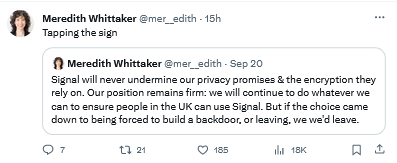
Signal President says that the messenger will rather leave the UK than compromise encryption

Musk wants you to ditch your bank in favor of X

Would you trust a social network with your finances? If you ask us, the answer is a resounding “no.” First of all, banks may not be without their shortcomings, but they have perfected the craft of safeguarding our money over the years through trial and error. On the other hand, social networks have proven not to be as trustworthy, just by the way they handle (or rather mishandle) our personal data. And X (formerly Twitter) is no exception. Regardless, the platform’s current owner, Elon Musk, wants the app to become the center of people’s financial lives.

According to The Verge, Musk told a recent staff meeting that he wants X to handle payments, adding: “When I say payments, I actually mean someone’s entire financial life.” Musk further clarified, sounding increasingly ominous: “If it involves money. It’ll be on our platform… like you won’t need a bank account.” Musk’s vision of turning the microblogging service into a bank replacement is consistent with his idea of X as an “everything app,” similar to China’s WeChat. But the idea, however grand, has been met with skepticism.

Musk has said he wants the financial features to launch by the end of 2024. Whatever form they take, we strongly advise against trusting X (or Facebook, or Snapchat, or YouTube…) with your finances, and especially from transferring your entire financial life to a platform with a poor privacy and security record.

YouTube, in war with ad blockers, faces an unexpected privacy challenge

YouTube has always been hostile to ad blockers, but lately it has stepped up its war against them. The Google-owned platform now displays annoying pop-ups to some users with ad blocking tools and blocks their video playback if they don’t disable them. YouTube claims that it has the right to do so, citing a violation of its terms of service, but a privacy advocate is now challenging this claim.

Alexander Hanff, a privacy advocate, filed a complaint with the Irish Data Protection Commission (DPC) against YouTube’s use of JavaScript code to detect ad blockers. He told The Register that this code violates the EU privacy laws, specifically the ePrivacy Directive. This directive requires explicit consent from users for any access to or storage of information on their devices that is not strictly necessary for providing the requested service. Hanff argues that YouTube’s ad block detection script (which is now updated daily) is not necessary for its service and, consequently, should not be allowed to interfere with users’ browsers without their consent. YouTube, at present, does not ask for this consent.

YouTube’s terms of service do not explicitly prohibit ad-blocking extensions, but they do say that users should not “interfere with any part of the service” — which presumably includes ads. It’s a murky legal issue, so it will be interesting to see what the Irish regulator says in response to the complaint. For his part, Hanff has mentioned that the European Commission told him as far back as in 2016 that the use of such ad-blocking scripts should require consent.

OpenAI will investigate chemical, biological, and nuclear threats posed by AI

OpenAI is plagued by a growing number of legal challenges, including copyright infringement and privacy claims. However, the issue that seems to have the company’s leadership in its thrall is the threat of extinction posed by AI.

The company has set up a special team, called Preparedness to assess “catastrophic risks from frontier AI will.” The team will evaluate various scenarios, such as AI deceiving humans, cybersecurity breaches, chemical, biological, radiological, and nuclear attacks, and “autonomous replication and adaptation” — or, in other words, AI going rogue.

The team’s mission is commendable, but it may also distract from more immediate and realistic risks posed by AI, such as privacy, authorship, and ethics. We have written extensively about these issues here and here.


Podobał Ci się ten post?
AdGuard VPN AdGuard DNS AdGuard Mail AdGuard Wallet
Ekran główny AdGuard dla Windows
Ekran ochrony AdGuard dla Windows, pokazujący funkcje ochrony i ustawienia
Ekran statystyki AdGuard dla Windows, pokazujący statystyki zablokowanych reklam i trackery
Ekran Zarządzanie aplikacjami w AdGuard dla Windows, pokazujący opcje zarządzania ochroną dla aplikacji zainstalowanych na urządzeniu
20 752 20752 recenzje
Doskonały!

AdGuard dla Windows: bloker reklam na PC

AdGuard dla systemu Windows to coś więcej niż bloker reklam. To wielofunkcyjne narzędzie, które blokuje reklamy, kontroluje dostęp do niebezpiecznych stron, przyspiesza ładowanie stron i chroni dzieci przed nieodpowiednimi treściami
Pobierając program, akceptujesz warunki Umowy licencyjnej
Microsoft Store
Pobierając program, akceptujesz warunki Umowy licencyjnej
AdGuard na Windows v8.0, 14-dniowa wersja próbna
Ekran główny AdGuard dla Mac
Ekran Trybu ukrytego w AdGuard dla Mac
20 752 20752 recenzje
Doskonały!

AdGuard: bloker reklam na Maca

AdGuard dla Mac to wyjątkowy bloker reklam zaprojektowany z myślą o macOS. Oprócz ochrony przed uciążliwymi reklamami w przeglądarkach i aplikacjach chroni Cię przed śledzeniem, phishingiem i oszustwami
Pobierając program, akceptujesz warunki Umowy licencyjnej
Przeczytaj więcej
AdGuard na Mac v2.19, 14-dniowa wersja próbna
Ekran główny AdGuard dla Android
Ekran Ochrona przed śledzeniem w AdGuard dla Android
Ekran Zarządzanie aplikacjami w AdGuard dla Android, pokazujący opcje zarządzania ochroną dla aplikacji zainstalowanych na urządzeniu
Ekran statystyki AdGuard dla Android, pokazujący statystyki zablokowanych reklam i trackery
Ekran główny prywatnej przeglądarki AdGuard dla Android
Kod QR, aby pobierz AdGuard dla Android
20 752 20752 recenzje
Doskonały!

AdGuard: bloker reklam na Androida

Blokuje reklamy i moduły śledzące we wszystkich przeglądarkach, grach i innych aplikacjach. Chroni Twoją prywatność i pozwala kontrolować, w jaki sposób aplikacje korzystają z Internetu. Instalowane za pomocą pliku APK
Pobierając program, akceptujesz warunki Umowy licencyjnej
Przeczytaj więcej
Skanuj, aby pobrać
Użyj dowolnego czytnika kodów QR dostępnego w Twoim urządzeniu
AdGuard na Android v4.14, 14-dniowa wersja próbna
Ekran główny AdGuard dla iOS
Ekran ochrony AdGuard dla iOS, pokazujący funkcje ochrony i ustawienia
Ekran statystyki AdGuard dla iOS, pokazujący statystyki zablokowanych reklam i trackery
Kod QR, aby pobierz AdGuard dla iOS
20 752 20752 recenzje
Doskonały!

AdGuard na iOS: bloker reklam poza Safari

Najlepszy bloker reklam na iOS dla iPhone’a i iPada. AdGuard usuwa wszelkiego rodzaju reklamy i elementy śledzące w Safari oraz chroni Twoją prywatność we wszystkich aplikacjach na poziomie DNS
Pobierając program, akceptujesz warunki Umowy licencyjnej
Przeczytaj więcej
Skanuj, aby pobrać
Użyj dowolnego czytnika kodów QR dostępnego w Twoim urządzeniu
AdGuard na iOS v4.5
Ekran główny AdGuard Content Blocker
Ekran Filtry w AdGuard Content Blocker
Ekran ustawienia w AdGuard Content Blocker
20 752 20752 recenzje
Doskonały!

Blokada treści AdGuard

AdGuard Content Blocker eliminuje wszelkiego rodzaju reklamy w przeglądarkach mobilnych, które obsługują technologię blokowania treści — a mianowicie Samsung Internet i Yandex Browser. Jego funkcje są ograniczone w porównaniu z AdGuard na Androida, ale jest darmowy, łatwy w instalacji i wydajny
Pobierając program, akceptujesz warunki Umowy licencyjnej
Przeczytaj więcej
Blokada treści AdGuard v2.8
Ekran główny AdGuard Browser Extension
Ekran Ochrona przed śledzeniem w AdGuard Browser Extension
20 752 20752 recenzje
Doskonały!

Rozszerzenie przeglądarki AdGuard

AdGuard to najszybsze i najlżejsze rozszerzenie blokowania reklam, które skutecznie blokuje wszystkie typy reklam na wszystkich stronach internetowych! Wybierz AdGuard dla swojej przeglądarki i uzyskaj szybkie i bezpieczne przeglądanie Internetu pozbawione reklam.
Instalacja
Pobierając program, akceptujesz warunki Umowy licencyjnej
Instalacja
Pobierając program, akceptujesz warunki Umowy licencyjnej
Instalacja
Pobierając program, akceptujesz warunki Umowy licencyjnej
Instalacja
Pobierając program, akceptujesz warunki Umowy licencyjnej
Instalacja
Pobierając program, akceptujesz warunki Umowy licencyjnej
Przeczytaj więcej
Instalacja
Pobierając program, akceptujesz warunki Umowy licencyjnej
Przeczytaj więcej
Rozszerzenie przeglądarki AdGuard v5.5
Ekran główny Asystenta przeglądarki
20 752 20752 recenzje
Doskonały!

Asystent AdGuard

Towarzyszące rozszerzenie przeglądarki dla aplikacji desktopowych AdGuard. Umożliwia blokowanie niestandardowych elementów na stronach internetowych, dodawanie stron internetowych do listy dozwolonych i wysyłanie raportów bezpośrednio z przeglądarki
Asystent AdGuard v1.4
20 752 20752 recenzje
Doskonały!

AdGuard Home

AdGuard Home to sieciowe rozwiązanie do blokowania reklam i modułów śledzących. Zainstaluj go raz na routerze, aby objąć nim wszystkie urządzenia w sieci domowej — nie jest wymagane żadne dodatkowe oprogramowanie klienckie. Jest to szczególnie ważne w przypadku różnych urządzeń IoT, które często stanowią zagrożenie dla Twojej prywatności

AdGuard Home v0.107
Ekran główny AdGuard Pro dla iOS
Ekran Ochrona w AdGuard Pro dla iOS, pokazujący funkcje i ustawienia ochrony
Ekran statystyki w AdGuard Pro dla iOS, pokazujący statystyki zablokowanych reklam i trackerów
20 752 20752 recenzje
Doskonały!

AdGuard Pro dla iOS

AdGuard Pro na iOS oferuje wszystkie zaawansowane funkcje blokowania reklam. Oferuje te same narzędzia, co płatna wersja AdGuard na iOS. Doskonale blokuje reklamy w Safari i pozwala dostosować ustawienia DNS, aby dostosować poziom ochrony. Blokuje reklamy w przeglądarkach i aplikacjach, chroni dzieci przed nieodpowiednimi treściami i dba o bezpieczeństwo danych osobowych.

Pobierając program, akceptujesz warunki Umowy licencyjnej
Przeczytaj więcej
AdGuard Pro dla iOS v4.5
Ekran główny AdGuard Mini dla Mac
Ekran ochrony Safari w AdGuard Mini dla Mac
Ekran tworzenia reguły w AdGuard Mini dla Mac
20 752 20752 recenzje
Doskonały!

AdGuard Mini dla Mac — bloker reklam Safari

AdGuard Mini dla komputerów Mac to potężny bloker reklam w Safari. Ta lekka aplikacja usuwa reklamy, blokuje moduły śledzące i przyspiesza ładowanie stron. Umożliwia przeglądanie internetu w Safari bez rozpraszania uwagi i chroni prywatność danych
Instalacja
Pobierając program, akceptujesz warunki Umowy licencyjnej
Przeczytaj więcej
AdGuard Mini dla Mac v2.3
Ekran główny AdGuard dla Android TV z włączoną ochroną
Ekran blokowanie reklama AdGuard dla Android TV, pokazujący jego funkcje i ustawienia
Ekran ustawienia AdGuard dla Android TV
Ekran Zarządzanie aplikacjami AdGuard dla Android TV, pokazujący aplikacje, w których reklamy i trackery są zablokowane
20 752 20752 recenzje
Doskonały!

AdGuard dla Android TV

AdGuard dla Android TV to jedyna aplikacja, która blokuje reklamy, chroni prywatność i działa jak zapora sieciowa dla Smart TV. Otrzymuj ostrzeżenia o zagrożeniach internetowych, używaj bezpiecznego DNS i korzystaj z szyfrowanego ruchu. Zrelaksuj się i zanurz się w swoich ulubionych programach z najwyższej klasy zabezpieczeniami bez reklam!
AdGuard dla Android TV v4.14, 14-dniowa wersja próbna
Maskotka AdGuard, Agnar, trzymający pingwina Linux
20 752 20752 recenzje
Doskonały!

AdGuard dla Linux

AdGuard for Linux to pierwszy na świecie systemowy bloker reklam dla systemu Linux. Blokuj reklamy i elementy śledzące na poziomie urządzenia, wybieraj spośród wstępnie zainstalowanych filtrów lub dodawaj własne — wszystko za pośrednictwem interfejsu wiersza poleceń
AdGuard dla Linux v1.4
20 752 20752 recenzje
Doskonały!

AdGuard Temp Mail

Darmowy generator tymczasowych adresów e-mail, który zapewnia anonimowość i chroni prywatność. Brak spamu w głównej skrzynce odbiorczej!
20 752 20752 recenzje
Doskonały!

AdGuard VPN

75 lokalizacji na świecie

Dostęp do wszelkich treści

Silne szyfrowanie

Polityka braku logów

Najszybsze połączenie

Wsparcie 24/7

Wypróbuj za darmo
Pobierając program, akceptujesz warunki Umowy licencyjnej
Przeczytaj więcej
20 752 20752 recenzje
Doskonały!

AdGuard DNS

AdGuard DNS to alternatywne rozwiązanie do blokowania reklam, ochrony prywatności i kontroli rodzicielskiej. Łatwy w konfiguracji i darmowy, zapewnia niezbędną minimalną ochronę przed reklamami, śledzeniem i phishingiem, bez względu na platformę i urządzenie, z którego korzystasz.
20 752 20752 recenzje
Doskonały!

AdGuard Mail

Chroń swoją tożsamość, unikaj spamu i zabezpiecz swoją skrzynkę odbiorczą dzięki naszym aliasom i tymczasowym adresom e-mail. Skorzystaj z naszej bezpłatnej usługi przekazywania e-maili oraz aplikacji na wszystkie systemy operacyjne
20 752 20752 recenzje
Doskonały!

AdGuard Wallet

Bezpieczny i prywatny portfel kryptowalutowy, który daje Ci pełną kontrolę nad Twoimi aktywami. Zarządzaj wieloma portfelami i odkrywaj tysiące kryptowalut, aby je przechowywać, wysyłać i wymieniać
Rozpoczęto pobieranie AdGuard Kliknij przycisk wskazany strzałką, aby rozpocząć instalację Wybierz „Otwórz” i kliknij „OK”. Poczekaj aż plik zostanie pobrany. W otwartym oknie, przeciągnij ikonę AdGuard do folderu „Aplikacje”. Dziękujemy za wybrania AdGuard! Wybierz „Otrwórz” i kliknij „OK”. Poczekaj aż plik zostanie pobrany. W otwartym kliknij „Instaluj”. Dziękujemy za wybrania AdGuard!
Zainstaluj również AdGuard dla urządzeń mobilnych
















































