How ad blocking is done: a look inside filter developing and why Manifest v3 is a threat

How do ad blockers work? At the very core of any ad blocker lie filter lists (also called 'filters') — literally lists of rules written in a special syntax. If we were to compress ad blockers' job into a few words, we'd say "ad blockers interpret filtering rules". They understand this complex syntax and perform actions with web traffic based on what these rules tell them to do: block specific elements, change web pages in certain ways, etc.

There is a rich variety of filter lists. Thousands of volunteers continuously work on keeping them up-to-date, making sure they block ads and don't break anything important.

You may have heard of the upcoming changes in Chrome browser, also known as Manifest v3. And these changes threaten to end the filters ecosystem as we know it. This article is aimed at Google Chrome developers: we want to believe that they don't have a goal of hurting this ecosystem, but rather simply lack a proper understanding of it. That's why we find it absolutely necessary to describe in detail how it functions and what's wrong with the current implementation of Manifest v3.

And perhaps some of our readers would like to know how it all works, too.

How ad blockers work

As it's been mentioned before, ad blockers are 'translators' that interpret filtering rules. First, an ad blocker download filter lists. It can be any filter lists, downloaded from multiple different places, it doesn't really matter. What matters is that now the ad blocker will start checking web pages' code against all these filtering rules.
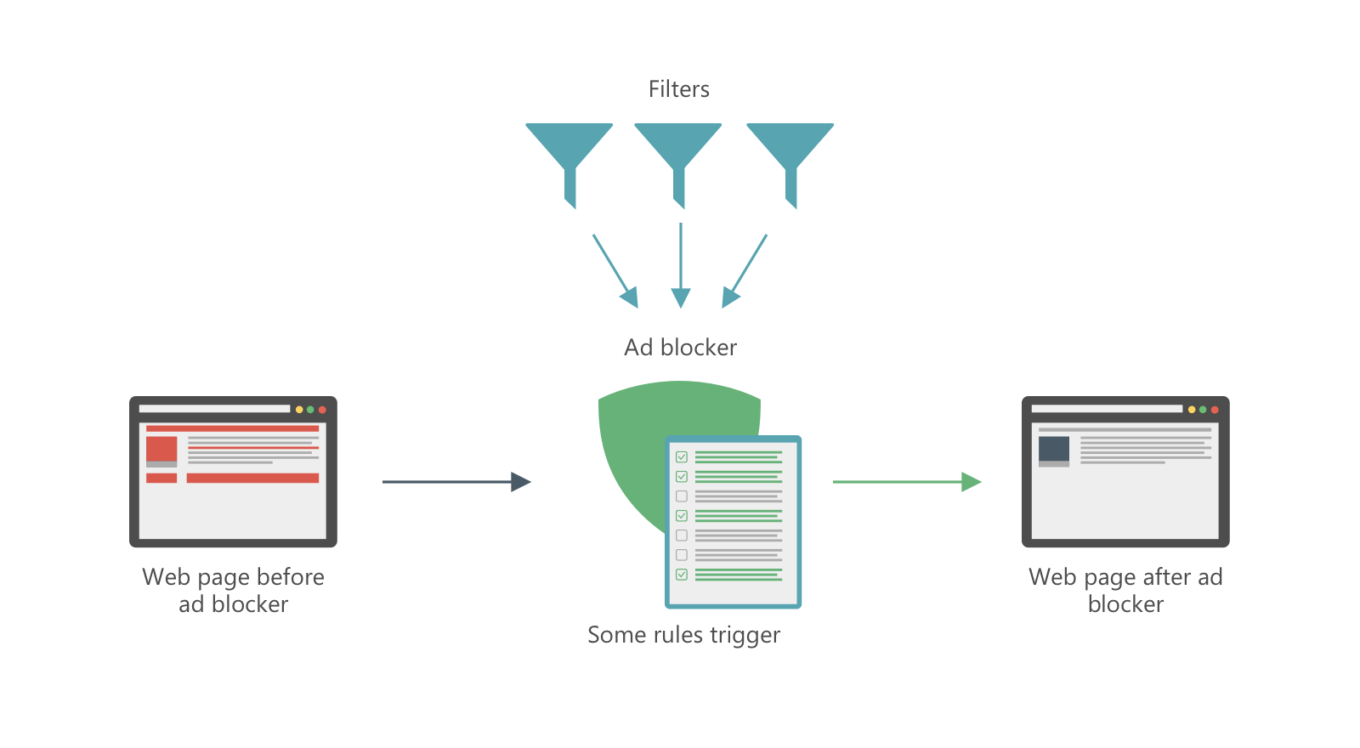
This is how ad blocking works

Let's dive a tiny little bit into technicalities, since there are probably some people who'd like to know how things work on a deeper level. There are several different ways:

Network filtering

Ads on web pages don't appear magically out of thin air. They have to be fetched somehow, i.e. downloaded from a server. To do so, browser needs to send a web request. Filtering rules tell ad blockers which requests are trying to fetch an ad and not useful content and should be blocked.

Cosmetic filtering

Every web page has a DOM ("document object model"), basically an HTML document that contains the page's structure and all its elements. Of course, ads on the page are also elements and are reflected in the DOM. Ad blockers can remove parts of the DOM, and filtering rules help them understand which parts are ads and should be removed, and which shouldn't be messed with.

Of course, in reality it's much more complicated than that, but you can see the general picture. If you'd like to know more about the technical side, check out our ad blocking syntax guide.

Filter lists

There are hundreds, if not thousands of filter lists: AdGuard Filters, EasyList, etc. It takes daily work of thousands of volunteers and professionals to keep these filters updated, so that they are always relevant and don't mess up anything.

Filters can do more than just block ads, and different people choose different combinations of filters to match their personal preferences. Here are some examples of popular filter lists that illustrate just how diverse they can be:

  • EasyList — a base filter for many users, oriented solely to block ads,
  • EasyPrivacy — another popular choice, serves to block online trackers,
  • Fanboy's SocialList — a filter that blocks social widgets, 'Like' buttons etc.,
  • AdGuard Annoyances — AdGuard's filter to block, well, annoyances. I.e. things like cookie notices, online assistants and so on,
  • A plethora of language-specific filter lists: EasyList Germany, RUAdlist, AdGuard Turkish filter, and many, many more.

Feel free to check out this website that has a huge filter lists database.

And here's the problem: the planned Google Chrome changes imply that there will be only one default filter list (so-called 'static' rules). You'd be able to modify it with a set of 'dynamic' rules, but the limit on those is ridiculously small, only 5,000. Many filter lists we mentioned above don't fit this limit alone, imagine if you want to add multiple filter lists.

How filter lists are developed

As we said, filter lists have to be constantly updated. There are two main reasons for that:

  1. To block new ads and
  2. To fix what's broken (with the amount of rules in filter lists something's bound to break at some point).

Of course, filter lists' maintainers can't monitor millions of websites themselves. They rely heavily on user feedback. To put it in perspective:

  • AdGuard Filters repository has over 40,000 closed tasks at the moment. Every week about 500 new tasks appear and approximately the same amount gets resolved.
  • EasyList and its regional filters subscriptions mostly get their feedback from the forum and it has tens of thousands of threads.

Many ad blockers have tools to help users easily report any filter-related issues they face. For example, AdGuard users have access to a special web reporting tool. Based on such complaints, filter developers correct their filter lists. Ad blockers update the filters, and — boom! — the ad is gone.
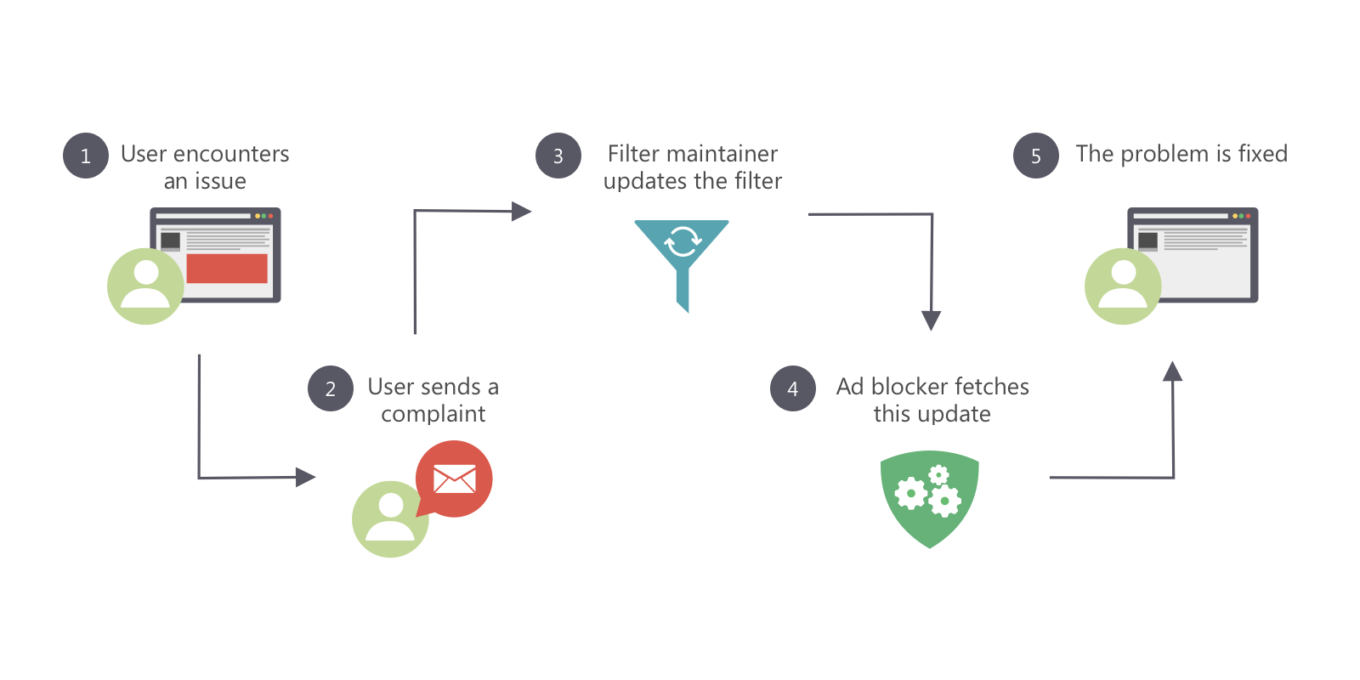
Filters are constantly being updated

This gets us to another problem: dynamic rules in Chrome are going to have a different priority compared to static ones. It only brings more chaos and makes filter lists maintainers' work so much harder.

Where do people get new filter lists?

One of the cornerstones of today's ad blocking is the users' ability to add any custom filter lists by URL (as opposed to choosing from the default list, however large it can be). This is vital for health of the filter lists ecosystem.

  • Users have an option to try new filter lists,
  • Developers can directly share their creations with users, without any third-parties.

Another face of the same problem is that under the existing dynamic rules limitation it would be impossible for all of this to happen. This would lead to slow but sure decline of the filter development community.

What awaits us in the future?

If nothing is done and all changes planned for Chrome become reality, the future will be grim for all of us:

  1. The filters ecosystem is going to receive a very painful blow.
  2. Instead of the familiar filter variety and a large, active community there will be only a handful ad blocker developers left, who'll maintain a few filter lists to the best of their ability.
  3. From users' perspective, instead of flexible approach and the ability to customize ad blocking to their preference they'll get "unified" filter lists that do more or less the same.
  4. The community will shift towards other ad blocking methods and focus its efforts on those.

At the time, we have spoken a lot of harsh words about Safari content blocking, and rightfully so. At least, thanks to countless tricks and 'duct taping' we managed to arrive at a satisfactory solution. With Google Chrome's case, there's honestly no light at the end of the tunnel.

Are there any solution?

Yes, in fact, all these problems can be addressed and solved, and even without deviating too much from the general direction Google wants to take with Chrome. What we think should be done for that:

  • A term 'Filter list' should be introduced for both static and dynamic rules,
  • The limit for dynamic rules should be drastically increased,
  • Filter rules priorities should be rethought. Dynamic rules should have the same priority as static rules.

From the developers' point of view, it would be much simpler to have only dynamic rules. To developer community dividing rules into static and dynamic categories seems not necessary and even chaos-inducing. At the same time, we are ready to have a dialogue with Google Chrome devs and find a compromise that will satisfy everyone, and most importantly — Chrome users.

PS:
If you feel like you have what it takes to become a filter maintainer, we always welcome any help! Check out this page to learn how you can help us improve AdGuard Filters and what you'll get in return for your efforts.


Podobał Ci się ten post?
AdGuard VPN AdGuard DNS AdGuard Mail AdGuard Wallet
Ekran główny AdGuard dla Windows
Ekran ochrony AdGuard dla Windows, pokazujący funkcje ochrony i ustawienia
Ekran statystyki AdGuard dla Windows, pokazujący statystyki zablokowanych reklam i trackery
Ekran Zarządzanie aplikacjami w AdGuard dla Windows, pokazujący opcje zarządzania ochroną dla aplikacji zainstalowanych na urządzeniu
20 752 20752 recenzje
Doskonały!

AdGuard dla Windows: bloker reklam na PC

AdGuard dla systemu Windows to coś więcej niż bloker reklam. To wielofunkcyjne narzędzie, które blokuje reklamy, kontroluje dostęp do niebezpiecznych stron, przyspiesza ładowanie stron i chroni dzieci przed nieodpowiednimi treściami

Pobierając program, akceptujesz warunki Umowy licencyjnej
Microsoft Store
Pobierając program, akceptujesz warunki Umowy licencyjnej
AdGuard na Windows v8.0, 14-dniowa wersja próbna
Ekran główny AdGuard dla Mac
Ekran Trybu ukrytego w AdGuard dla Mac
20 752 20752 recenzje
Doskonały!

AdGuard: bloker reklam na Maca

AdGuard dla Mac to wyjątkowy bloker reklam zaprojektowany z myślą o macOS. Oprócz ochrony przed uciążliwymi reklamami w przeglądarkach i aplikacjach chroni Cię przed śledzeniem, phishingiem i oszustwami
Pobierając program, akceptujesz warunki Umowy licencyjnej
Przeczytaj więcej
AdGuard na Mac v2.19, 14-dniowa wersja próbna
Ekran główny AdGuard dla Android
Ekran Ochrona przed śledzeniem w AdGuard dla Android
Ekran Zarządzanie aplikacjami w AdGuard dla Android, pokazujący opcje zarządzania ochroną dla aplikacji zainstalowanych na urządzeniu
Ekran statystyki AdGuard dla Android, pokazujący statystyki zablokowanych reklam i trackery
Ekran główny prywatnej przeglądarki AdGuard dla Android
Kod QR, aby pobierz AdGuard dla Android
20 752 20752 recenzje
Doskonały!

AdGuard: bloker reklam na Androida

Blokuje reklamy i moduły śledzące we wszystkich przeglądarkach, grach i innych aplikacjach. Chroni Twoją prywatność i pozwala kontrolować, w jaki sposób aplikacje korzystają z Internetu. Instalowane za pomocą pliku APK
Pobierając program, akceptujesz warunki Umowy licencyjnej
Przeczytaj więcej
Skanuj, aby pobrać
Użyj dowolnego czytnika kodów QR dostępnego w Twoim urządzeniu
AdGuard na Android v4.14, 14-dniowa wersja próbna
Ekran główny AdGuard dla iOS
Ekran ochrony AdGuard dla iOS, pokazujący funkcje ochrony i ustawienia
Ekran statystyki AdGuard dla iOS, pokazujący statystyki zablokowanych reklam i trackery
Kod QR, aby pobierz AdGuard dla iOS
20 752 20752 recenzje
Doskonały!

AdGuard na iOS: bloker reklam poza Safari

Najlepszy bloker reklam na iOS dla iPhone’a i iPada. AdGuard usuwa wszelkiego rodzaju reklamy i elementy śledzące w Safari oraz chroni Twoją prywatność we wszystkich aplikacjach na poziomie DNS
Pobierając program, akceptujesz warunki Umowy licencyjnej
Przeczytaj więcej
Skanuj, aby pobrać
Użyj dowolnego czytnika kodów QR dostępnego w Twoim urządzeniu
AdGuard na iOS v4.5
Ekran główny AdGuard Content Blocker
Ekran Filtry w AdGuard Content Blocker
Ekran ustawienia w AdGuard Content Blocker
20 752 20752 recenzje
Doskonały!

Blokada treści AdGuard

AdGuard Content Blocker eliminuje wszelkiego rodzaju reklamy w przeglądarkach mobilnych, które obsługują technologię blokowania treści — a mianowicie Samsung Internet i Yandex Browser. Jego funkcje są ograniczone w porównaniu z AdGuard na Androida, ale jest darmowy, łatwy w instalacji i wydajny
Pobierając program, akceptujesz warunki Umowy licencyjnej
Przeczytaj więcej
Blokada treści AdGuard v2.8
Ekran główny AdGuard Browser Extension
Ekran Ochrona przed śledzeniem w AdGuard Browser Extension
20 752 20752 recenzje
Doskonały!

Rozszerzenie przeglądarki AdGuard

AdGuard to najszybsze i najlżejsze rozszerzenie blokowania reklam, które skutecznie blokuje wszystkie typy reklam na wszystkich stronach internetowych! Wybierz AdGuard dla swojej przeglądarki i uzyskaj szybkie i bezpieczne przeglądanie Internetu pozbawione reklam.
Instalacja
Pobierając program, akceptujesz warunki Umowy licencyjnej
Instalacja
Pobierając program, akceptujesz warunki Umowy licencyjnej
Instalacja
Pobierając program, akceptujesz warunki Umowy licencyjnej
Instalacja
Pobierając program, akceptujesz warunki Umowy licencyjnej
Instalacja
Pobierając program, akceptujesz warunki Umowy licencyjnej
Przeczytaj więcej
Instalacja
Pobierając program, akceptujesz warunki Umowy licencyjnej
Przeczytaj więcej
Rozszerzenie przeglądarki AdGuard v5.5
Ekran główny Asystenta przeglądarki
20 752 20752 recenzje
Doskonały!

Asystent AdGuard

Towarzyszące rozszerzenie przeglądarki dla aplikacji desktopowych AdGuard. Umożliwia blokowanie niestandardowych elementów na stronach internetowych, dodawanie stron internetowych do listy dozwolonych i wysyłanie raportów bezpośrednio z przeglądarki
Asystent AdGuard v1.4
20 752 20752 recenzje
Doskonały!

AdGuard Home

AdGuard Home to sieciowe rozwiązanie do blokowania reklam i modułów śledzących. Zainstaluj go raz na routerze, aby objąć nim wszystkie urządzenia w sieci domowej — nie jest wymagane żadne dodatkowe oprogramowanie klienckie. Jest to szczególnie ważne w przypadku różnych urządzeń IoT, które często stanowią zagrożenie dla Twojej prywatności
AdGuard Home v0.107
Ekran główny AdGuard Pro dla iOS
Ekran Ochrona w AdGuard Pro dla iOS, pokazujący funkcje i ustawienia ochrony
Ekran statystyki w AdGuard Pro dla iOS, pokazujący statystyki zablokowanych reklam i trackerów
20 752 20752 recenzje
Doskonały!

AdGuard Pro dla iOS

AdGuard Pro na iOS oferuje wszystkie zaawansowane funkcje blokowania reklam. Oferuje te same narzędzia, co płatna wersja AdGuard na iOS. Doskonale blokuje reklamy w Safari i pozwala dostosować ustawienia DNS, aby dostosować poziom ochrony. Blokuje reklamy w przeglądarkach i aplikacjach, chroni dzieci przed nieodpowiednimi treściami i dba o bezpieczeństwo danych osobowych.
Pobierając program, akceptujesz warunki Umowy licencyjnej
Przeczytaj więcej
AdGuard Pro dla iOS v4.5
Ekran główny AdGuard Mini dla Mac
Ekran ochrony Safari w AdGuard Mini dla Mac
Ekran tworzenia reguły w AdGuard Mini dla Mac
20 752 20752 recenzje
Doskonały!

AdGuard Mini dla Mac — bloker reklam Safari

AdGuard Mini dla komputerów Mac to potężny bloker reklam w Safari. Ta lekka aplikacja usuwa reklamy, blokuje moduły śledzące i przyspiesza ładowanie stron. Umożliwia przeglądanie internetu w Safari bez rozpraszania uwagi i chroni prywatność danych
Instalacja
Pobierając program, akceptujesz warunki Umowy licencyjnej
Przeczytaj więcej
AdGuard Mini dla Mac v2.3
Ekran główny AdGuard dla Android TV z włączoną ochroną
Ekran blokowanie reklama AdGuard dla Android TV, pokazujący jego funkcje i ustawienia
Ekran ustawienia AdGuard dla Android TV
Ekran Zarządzanie aplikacjami AdGuard dla Android TV, pokazujący aplikacje, w których reklamy i trackery są zablokowane
20 752 20752 recenzje
Doskonały!

AdGuard dla Android TV

AdGuard dla Android TV to jedyna aplikacja, która blokuje reklamy, chroni prywatność i działa jak zapora sieciowa dla Smart TV. Otrzymuj ostrzeżenia o zagrożeniach internetowych, używaj bezpiecznego DNS i korzystaj z szyfrowanego ruchu. Zrelaksuj się i zanurz się w swoich ulubionych programach z najwyższej klasy zabezpieczeniami bez reklam!
AdGuard dla Android TV v4.14, 14-dniowa wersja próbna
Maskotka AdGuard, Agnar, trzymający pingwina Linux
20 752 20752 recenzje
Doskonały!

AdGuard dla Linux

AdGuard for Linux to pierwszy na świecie systemowy bloker reklam dla systemu Linux. Blokuj reklamy i elementy śledzące na poziomie urządzenia, wybieraj spośród wstępnie zainstalowanych filtrów lub dodawaj własne — wszystko za pośrednictwem interfejsu wiersza poleceń
AdGuard dla Linux v1.4
20 752 20752 recenzje
Doskonały!

AdGuard Temp Mail

Darmowy generator tymczasowych adresów e-mail, który zapewnia anonimowość i chroni prywatność. Brak spamu w głównej skrzynce odbiorczej!
20 752 20752 recenzje
Doskonały!

AdGuard VPN

75 lokalizacji na świecie

Dostęp do wszelkich treści

Silne szyfrowanie

Polityka braku logów

Najszybsze połączenie

Wsparcie 24/7

Wypróbuj za darmo
Pobierając program, akceptujesz warunki Umowy licencyjnej
Przeczytaj więcej
20 752 20752 recenzje
Doskonały!

AdGuard DNS

AdGuard DNS to alternatywne rozwiązanie do blokowania reklam, ochrony prywatności i kontroli rodzicielskiej. Łatwy w konfiguracji i darmowy, zapewnia niezbędną minimalną ochronę przed reklamami, śledzeniem i phishingiem, bez względu na platformę i urządzenie, z którego korzystasz.
20 752 20752 recenzje
Doskonały!

AdGuard Mail

Chroń swoją tożsamość, unikaj spamu i zabezpiecz swoją skrzynkę odbiorczą dzięki naszym aliasom i tymczasowym adresom e-mail. Skorzystaj z naszej bezpłatnej usługi przekazywania e-maili oraz aplikacji na wszystkie systemy operacyjne
20 752 20752 recenzje
Doskonały!

AdGuard Wallet

Bezpieczny i prywatny portfel kryptowalutowy, który daje Ci pełną kontrolę nad Twoimi aktywami. Zarządzaj wieloma portfelami i odkrywaj tysiące kryptowalut, aby je przechowywać, wysyłać i wymieniać
Rozpoczęto pobieranie AdGuard Kliknij przycisk wskazany strzałką, aby rozpocząć instalację Wybierz „Otwórz” i kliknij „OK”. Poczekaj aż plik zostanie pobrany. W otwartym oknie, przeciągnij ikonę AdGuard do folderu „Aplikacje”. Dziękujemy za wybrania AdGuard! Wybierz „Otrwórz” i kliknij „OK”. Poczekaj aż plik zostanie pobrany. W otwartym kliknij „Instaluj”. Dziękujemy za wybrania AdGuard!
Zainstaluj również AdGuard dla urządzeń mobilnych

















































