Google's new feature, ad-free Instagram app and Meta's tracking issue. AdGuard’s Digest

In this edition of AdGuard’s digest: Google helps remove personal data from its own search, an ad-free Instagram clone feels the wrath of Big Tech, Meta works to outfox privacy protections, Amazon attempts to make surveillance family-friendly, as Chrome delays the transition to Manifest V3.

Google makes it easier to hide personal info from search

A new feature that Google started rolling out in late September makes it much easier for users to request the removal of their personal information from the search results.

While before you had to jump through hoops to file a removal request for information such as home address, phone number or email from the Google search, now you will only need to tap a three-dot menu that appears alongside each search result.

Once you open the tab, you’ll see the new option called “Remove result.” From there, Google will guide you through the submission process.
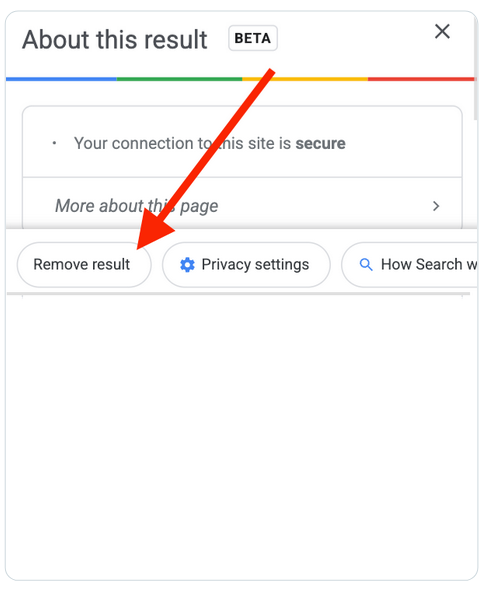
Google’s new feature simplifies the process of removing personal information from search

To monitor the progress of your removal requests, you can tap the new “Results about you” menu item under the profile avatar in your Google app. There you’ll see the complete list of requests and their statuses. The new feature has become available for some Android users in the US and Europe.

Starting next year, Google users will also be able to opt into alerts that the tech giant will send if their personal contact information pops up in the search results.
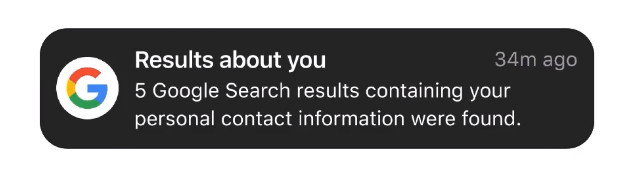
Google will let you know if your personal information turns up in search results

You should keep in mind, though, that Google erases information only from the search, meaning that it still might store it somewhere else. Google remembers everything. Besides, while your personal information will be harder to find, it will still remain on the web.

App that promised ad-free Instagram faces crackdown from Apple & Meta

Barely a day after the ad-free Instagram client OG app launched in the App Store, Apple yanked it over violation of Meta’s policy.
The app offered Instagram home feed without ads, suggested posts and made reels an opt-out feature.

Apple said that the app was pulled for accessing the Instagram content without permission, which may be true — developers acknowledged they reverse-engineered the Instagram API. They also apparently awoke a beast in Meta, which took personal revenge on the OG app team. The developers said that Meta not only banned them from Instagram, but also removed their personal Facebook profiles (not linked to the OG app).
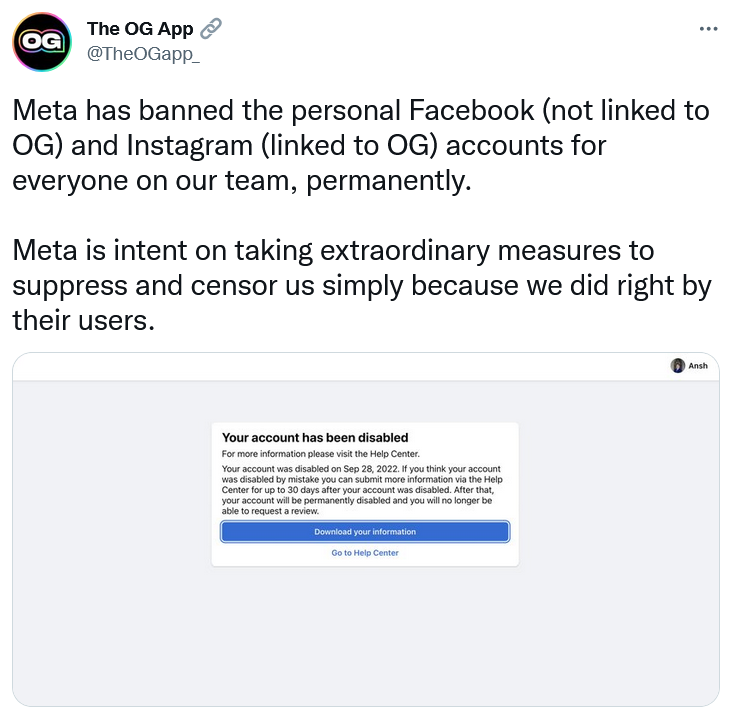
The OG app developers claim that Meta closed their personal Facebook profiles

Such a vindictive move on Meta’s part is made possible due its dominant position on the market. At their core, Facebook and Instagram are two separate services, and Meta’s decision to punish individuals that wronged one service by denying them access to the other is a worrying precedent.

Data-grabbing exercise? Google account will be a must to use its fitness tracker

For users of the popular fitness tracker Fitbit logging into the app with a Google account will soon become the default option. Google bought the company for $2.1 billion in 2019, but Fitbit currently provides its products separately from the tech giant. You must have a Fitbit account to use the Fitbit app, though it’s possible to sign in with Google.

Fitbit has announced that it would launch Google accounts on Fitbit “sometime in 2023.” From then on, users will need a Google account to access new features and set up newly-released devices. Google plans to sunset support of Fitbit accounts in 2025, which automatically would make a Google account a must to use the fitness tracker.

Google promises “not to use Fitbit health and wellness data for Google Ads” — an acquisition requirement set by the European Commision. However, this data can be used for other Google services (e.g., Google Maps) if the user consents to it. Given that Google has repeatedly been caught tracking user data, such as location, without consent, there are doubts that Google makes good on its promise. After all, Google has to come up with new ways to keep tabs on users after Apple made it easy for them to opt out of third-party tracking and personalized adveritisng.

Apple’s privacy feature, Anti-Tracking Transparency (ATT), has brought losses on a bunch of big tech companies greedy for user data, including Meta. Speaking of which…

Facebook accused of skirting Apple’s anti-tracking protection

A pair of Facebook users have filed a lawsuit against Meta in California, accusing the company of continuing to track iOS users even after they specifically opted out of tracking. Instagram and Facebook apps for iOS open all third-party links and ads in a custom web browser as opposed to the default Safari browser. Research has shown that Meta injects code into each website users visit while in the in-app browser. This potentially allows Meta to track users’ online activity, making Apple’s privacy feature effectively pointless.

Meta is accused of attempting to dodge anti-tracking protections

Photo: Joshua Hoehne/Unsplash

Meta says that it’s in compliance with Apple’s App Tracking Transparency (ATT), and that its in-app browser was designed to “respect users’ privacy choices”. Even if it turns out that Meta obeys the letter of ATT, it does not seem to obey it in spirit. On the other hand, it would be naive to think that big companies will give up their data-collecting aspirations at the first or even second sign of trouble, so we are likely to see more attempts from Big Tech to work around anti-tracking features in the future.

Amazon: Surveillance is cool! (it is not)

Amazon has caught flak for repurposing videos captured by its Ring doorbell and home security cameras for a family-friendly TV show. The show, called “Ring Nation,” premiered late September despite protests from privacy advocates. A petition to cancel the show earned support from dozens of rights groups and has racked up over 69,000 signatures.

The activists argue that the show is a deliberate attempt by Amazon to “normalize surveillance”. Amazon has defended “Ring Nation”, noting that it asks for permission to use the footage from anyone caught on camera before airing it.

Privacy advocates’ anger is understandable given that Amazon is known as a de-facto enabler of the surveillance state. We previously wrote about how Amazon-owned Ring allows police to access private user videodata without consent or a warrant in case of an “emergency.” Under US law, companies may comply with warrantless requests for video footage, but they don’t have to. The fact that Ring chose to do so at its own volition is worrying, since it means that the interpretation of what constitutes an “emergency” rests with Amazon — a private company.

Delaying the inevitable: Google lets Manifest V2 extension live a bit longer

Chrome has extended by six months the deadline for ending support of the extensions built on the Manifest V2 platform. Since its launch two years ago, the new platform, Manifest V3, has courted criticism primarily for severely restricting the functionality of ad-blocking extensions.

Since January 2022, it became impossible to add new extensions based on Manifest V2 to the Chrome Web Store. Chrome previously said that it would discontinue support for Manifest 2 extensions for most users in January 2023. Now, Chrome has announced that it will extend the deadline to June 2023. For those using the Manifest V2 enterprise policy the old extensions would stop working in January 2024.

Chrome’s new timeline for phasing out Manifest V2 is not a sea change of its plans and AdGuard had never intended to wait till the last minute anyway. In a world first, we have already released an experimental ad blocking extension compatible with Manifest V3. It may have its limitations, but it will still protect you against trackers and adds rather well. We’ve discussed in detail what we did to comply with the new rules and how Manifest V3 will impact ad-blocking in our new article.


Podobał Ci się ten post?
AdGuard VPN AdGuard DNS AdGuard Mail AdGuard Wallet
Ekran główny AdGuard dla Windows
Ekran ochrony AdGuard dla Windows, pokazujący funkcje ochrony i ustawienia
Ekran statystyki AdGuard dla Windows, pokazujący statystyki zablokowanych reklam i trackery
Ekran Zarządzanie aplikacjami w AdGuard dla Windows, pokazujący opcje zarządzania ochroną dla aplikacji zainstalowanych na urządzeniu
20 753 20753 recenzje
Doskonały!

AdGuard dla Windows: bloker reklam na PC

AdGuard dla systemu Windows to coś więcej niż bloker reklam. To wielofunkcyjne narzędzie, które blokuje reklamy, kontroluje dostęp do niebezpiecznych stron, przyspiesza ładowanie stron i chroni dzieci przed nieodpowiednimi treściami
Pobierając program, akceptujesz warunki Umowy licencyjnej
Microsoft Store
Pobierając program, akceptujesz warunki Umowy licencyjnej
AdGuard na Windows v8.0, 14-dniowa wersja próbna
Ekran główny AdGuard dla Mac
Ekran Trybu ukrytego w AdGuard dla Mac
20 753 20753 recenzje
Doskonały!

AdGuard: bloker reklam na Maca

AdGuard dla Mac to wyjątkowy bloker reklam zaprojektowany z myślą o macOS. Oprócz ochrony przed uciążliwymi reklamami w przeglądarkach i aplikacjach chroni Cię przed śledzeniem, phishingiem i oszustwami
Pobierając program, akceptujesz warunki Umowy licencyjnej
Przeczytaj więcej
AdGuard na Mac v2.19, 14-dniowa wersja próbna
Ekran główny AdGuard dla Android
Ekran Ochrona przed śledzeniem w AdGuard dla Android
Ekran Zarządzanie aplikacjami w AdGuard dla Android, pokazujący opcje zarządzania ochroną dla aplikacji zainstalowanych na urządzeniu
Ekran statystyki AdGuard dla Android, pokazujący statystyki zablokowanych reklam i trackery
Ekran główny prywatnej przeglądarki AdGuard dla Android
Kod QR, aby pobierz AdGuard dla Android
20 753 20753 recenzje
Doskonały!

AdGuard: bloker reklam na Androida

Blokuje reklamy i moduły śledzące we wszystkich przeglądarkach, grach i innych aplikacjach. Chroni Twoją prywatność i pozwala kontrolować, w jaki sposób aplikacje korzystają z Internetu. Instalowane za pomocą pliku APK
Pobierając program, akceptujesz warunki Umowy licencyjnej
Przeczytaj więcej
Skanuj, aby pobrać
Użyj dowolnego czytnika kodów QR dostępnego w Twoim urządzeniu
AdGuard na Android v4.14, 14-dniowa wersja próbna
Ekran główny AdGuard dla iOS
Ekran ochrony AdGuard dla iOS, pokazujący funkcje ochrony i ustawienia
Ekran statystyki AdGuard dla iOS, pokazujący statystyki zablokowanych reklam i trackery
Kod QR, aby pobierz AdGuard dla iOS
20 753 20753 recenzje
Doskonały!

AdGuard na iOS: bloker reklam poza Safari

Najlepszy bloker reklam na iOS dla iPhone’a i iPada. AdGuard usuwa wszelkiego rodzaju reklamy i elementy śledzące w Safari oraz chroni Twoją prywatność we wszystkich aplikacjach na poziomie DNS
Pobierając program, akceptujesz warunki Umowy licencyjnej
Przeczytaj więcej
Skanuj, aby pobrać
Użyj dowolnego czytnika kodów QR dostępnego w Twoim urządzeniu
AdGuard na iOS v4.5
Ekran główny AdGuard Content Blocker
Ekran Filtry w AdGuard Content Blocker
Ekran ustawienia w AdGuard Content Blocker
20 753 20753 recenzje
Doskonały!

Blokada treści AdGuard

AdGuard Content Blocker eliminuje wszelkiego rodzaju reklamy w przeglądarkach mobilnych, które obsługują technologię blokowania treści — a mianowicie Samsung Internet i Yandex Browser. Jego funkcje są ograniczone w porównaniu z AdGuard na Androida, ale jest darmowy, łatwy w instalacji i wydajny
Pobierając program, akceptujesz warunki Umowy licencyjnej
Przeczytaj więcej
Blokada treści AdGuard v2.8
Ekran główny AdGuard Browser Extension
Ekran Ochrona przed śledzeniem w AdGuard Browser Extension
20 753 20753 recenzje
Doskonały!

Rozszerzenie przeglądarki AdGuard

AdGuard to najszybsze i najlżejsze rozszerzenie blokowania reklam, które skutecznie blokuje wszystkie typy reklam na wszystkich stronach internetowych! Wybierz AdGuard dla swojej przeglądarki i uzyskaj szybkie i bezpieczne przeglądanie Internetu pozbawione reklam.
Instalacja
Pobierając program, akceptujesz warunki Umowy licencyjnej
Instalacja
Pobierając program, akceptujesz warunki Umowy licencyjnej
Instalacja
Pobierając program, akceptujesz warunki Umowy licencyjnej
Instalacja
Pobierając program, akceptujesz warunki Umowy licencyjnej
Instalacja
Pobierając program, akceptujesz warunki Umowy licencyjnej
Przeczytaj więcej
Instalacja
Pobierając program, akceptujesz warunki Umowy licencyjnej
Przeczytaj więcej
Rozszerzenie przeglądarki AdGuard v5.5
Ekran główny Asystenta przeglądarki
20 753 20753 recenzje
Doskonały!

Asystent AdGuard

Towarzyszące rozszerzenie przeglądarki dla aplikacji desktopowych AdGuard. Umożliwia blokowanie niestandardowych elementów na stronach internetowych, dodawanie stron internetowych do listy dozwolonych i wysyłanie raportów bezpośrednio z przeglądarki
Asystent AdGuard v1.4
20 753 20753 recenzje
Doskonały!

AdGuard Home

AdGuard Home to sieciowe rozwiązanie do blokowania reklam i modułów śledzących. Zainstaluj go raz na routerze, aby objąć nim wszystkie urządzenia w sieci domowej — nie jest wymagane żadne dodatkowe oprogramowanie klienckie. Jest to szczególnie ważne w przypadku różnych urządzeń IoT, które często stanowią zagrożenie dla Twojej prywatności

AdGuard Home v0.107
Ekran główny AdGuard Pro dla iOS
Ekran Ochrona w AdGuard Pro dla iOS, pokazujący funkcje i ustawienia ochrony
Ekran statystyki w AdGuard Pro dla iOS, pokazujący statystyki zablokowanych reklam i trackerów
20 753 20753 recenzje
Doskonały!

AdGuard Pro dla iOS

AdGuard Pro na iOS oferuje wszystkie zaawansowane funkcje blokowania reklam. Oferuje te same narzędzia, co płatna wersja AdGuard na iOS. Doskonale blokuje reklamy w Safari i pozwala dostosować ustawienia DNS, aby dostosować poziom ochrony. Blokuje reklamy w przeglądarkach i aplikacjach, chroni dzieci przed nieodpowiednimi treściami i dba o bezpieczeństwo danych osobowych.

Pobierając program, akceptujesz warunki Umowy licencyjnej
Przeczytaj więcej
AdGuard Pro dla iOS v4.5
Ekran główny AdGuard Mini dla Mac
Ekran ochrony Safari w AdGuard Mini dla Mac
Ekran tworzenia reguły w AdGuard Mini dla Mac
20 753 20753 recenzje
Doskonały!

AdGuard Mini dla Mac — bloker reklam Safari

AdGuard Mini dla komputerów Mac to potężny bloker reklam w Safari. Ta lekka aplikacja usuwa reklamy, blokuje moduły śledzące i przyspiesza ładowanie stron. Umożliwia przeglądanie internetu w Safari bez rozpraszania uwagi i chroni prywatność danych
Instalacja
Pobierając program, akceptujesz warunki Umowy licencyjnej
Przeczytaj więcej
AdGuard Mini dla Mac v2.3
Ekran główny AdGuard dla Android TV z włączoną ochroną
Ekran blokowanie reklama AdGuard dla Android TV, pokazujący jego funkcje i ustawienia
Ekran ustawienia AdGuard dla Android TV
Ekran Zarządzanie aplikacjami AdGuard dla Android TV, pokazujący aplikacje, w których reklamy i trackery są zablokowane
20 753 20753 recenzje
Doskonały!

AdGuard dla Android TV

AdGuard dla Android TV to jedyna aplikacja, która blokuje reklamy, chroni prywatność i działa jak zapora sieciowa dla Smart TV. Otrzymuj ostrzeżenia o zagrożeniach internetowych, używaj bezpiecznego DNS i korzystaj z szyfrowanego ruchu. Zrelaksuj się i zanurz się w swoich ulubionych programach z najwyższej klasy zabezpieczeniami bez reklam!
AdGuard dla Android TV v4.14, 14-dniowa wersja próbna
Maskotka AdGuard, Agnar, trzymający pingwina Linux
20 753 20753 recenzje
Doskonały!

AdGuard dla Linux

AdGuard for Linux to pierwszy na świecie systemowy bloker reklam dla systemu Linux. Blokuj reklamy i elementy śledzące na poziomie urządzenia, wybieraj spośród wstępnie zainstalowanych filtrów lub dodawaj własne — wszystko za pośrednictwem interfejsu wiersza poleceń
AdGuard dla Linux v1.4
20 753 20753 recenzje
Doskonały!

AdGuard Temp Mail

Darmowy generator tymczasowych adresów e-mail, który zapewnia anonimowość i chroni prywatność. Brak spamu w głównej skrzynce odbiorczej!
20 753 20753 recenzje
Doskonały!

AdGuard VPN

75 lokalizacji na świecie

Dostęp do wszelkich treści

Silne szyfrowanie

Polityka braku logów

Najszybsze połączenie

Wsparcie 24/7

Wypróbuj za darmo
Pobierając program, akceptujesz warunki Umowy licencyjnej
Przeczytaj więcej
20 753 20753 recenzje
Doskonały!

AdGuard DNS

AdGuard DNS to alternatywne rozwiązanie do blokowania reklam, ochrony prywatności i kontroli rodzicielskiej. Łatwy w konfiguracji i darmowy, zapewnia niezbędną minimalną ochronę przed reklamami, śledzeniem i phishingiem, bez względu na platformę i urządzenie, z którego korzystasz.
20 753 20753 recenzje
Doskonały!

AdGuard Mail

Chroń swoją tożsamość, unikaj spamu i zabezpiecz swoją skrzynkę odbiorczą dzięki naszym aliasom i tymczasowym adresom e-mail. Skorzystaj z naszej bezpłatnej usługi przekazywania e-maili oraz aplikacji na wszystkie systemy operacyjne
20 753 20753 recenzje
Doskonały!

AdGuard Wallet

Bezpieczny i prywatny portfel kryptowalutowy, który daje Ci pełną kontrolę nad Twoimi aktywami. Zarządzaj wieloma portfelami i odkrywaj tysiące kryptowalut, aby je przechowywać, wysyłać i wymieniać
Rozpoczęto pobieranie AdGuard Kliknij przycisk wskazany strzałką, aby rozpocząć instalację Wybierz „Otwórz” i kliknij „OK”. Poczekaj aż plik zostanie pobrany. W otwartym oknie, przeciągnij ikonę AdGuard do folderu „Aplikacje”. Dziękujemy za wybrania AdGuard! Wybierz „Otrwórz” i kliknij „OK”. Poczekaj aż plik zostanie pobrany. W otwartym kliknij „Instaluj”. Dziękujemy za wybrania AdGuard!
Zainstaluj również AdGuard dla urządzeń mobilnych
















































