Welcome to the Adpocalypse: Even your fridge isn’t safe anymore

First, it was cheap smart TVs that came with ads — a compromise we sort of tolerated because the price was low. If you didn’t want the ads, you shelled out more money for a “premium” model. But over the years, the terms of that reluctant deal we all made started to shift, and not in our favor.

Ads started creeping into places they had no business being in. Not just on bargain TVs, but on high-end, flagship screens too. And then — as if that wasn’t enough — they showed up in the infotainment panels of cars. Some were in the form pop-up ads, hitting you in the face every time you stop at a light, as Jeep drivers could attest, although the company has later dismissed it as a glitch.

The trajectory’s been all downhill since. It's like we’re being slowly dragged into a nightmare where no screen, no product, no inch of space is safe from ads.

Over the past few years, we’ve been losing more and more control over our physical products. First came devices that brick themselves if you're behind on payments — yes, we’re talking about Ford’s self-repossessing cars (still just a concept… for now). The gradual loss of control has come together with the steady push into subscription models. That could’ve been fine if those subscriptions actually added something meaningful like new features, better service, more value. But instead, what we’re getting is manufacturers locking basic features behind a paywall, or worse, actively degrading the user experience unless you pay up.

A perfect example of this? Samsung’s latest move to push ads onto its Family Hub fridges, which start at $1,800 in the US.

This is not cool

The update rolled out quietly, almost sneakily. In mid-September, a Reddit user spotted a changelog flash on their fridge screen, and that’s when alarm bells started ringing.
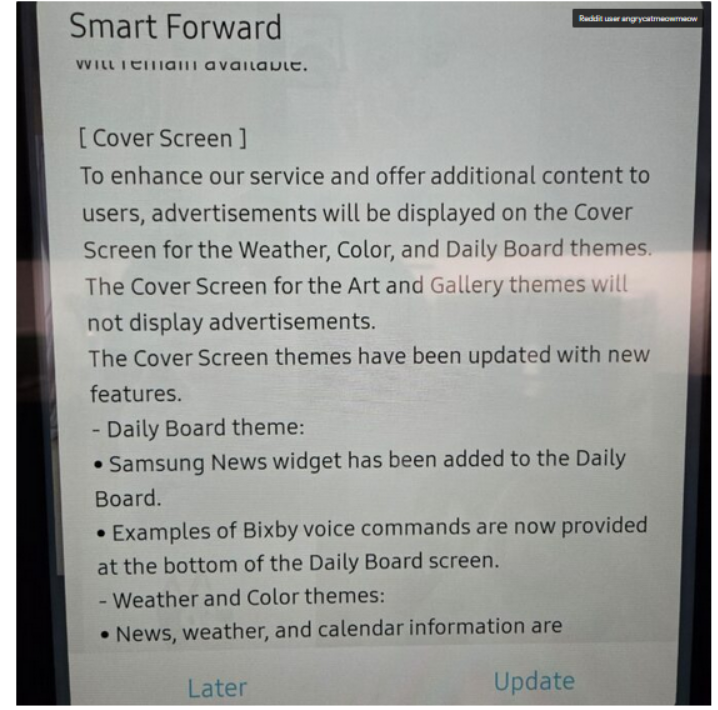
Fridge screen message

Source: Android Authority

The notice that popped up on the poster’s Samsung fridge said that ads would be shown on the door display when it’s idle and set to Weather, Color, or Daily Board themes. If it’s set to Art and Gallery themes like showing photos or pictures the ads won’t appear.

At first, people weren’t even sure it was real. Even Android Authority questioned it, wondering if the changelog was meant for some other product entirely: “There were some doubts that the changelog wasn’t real or that it belonged to a different product.”

But no, it wasn’t a mistake. It wasn’t a glitch. And it definitely wasn’t an April Fool’s joke, no matter how badly we all wished it was.

According to the Fortune, Samsung for now says it will only display ads, and not collect data about how users interact with them, like whether you dismiss an ad or engage with it. But it’s hard not to see that as just step one. More data collection is likely right around the corner.

In a statement shared with Android Authority, Samsung justified the move by saying it’s part of a “pilot program” aimed at offering “promotions and curated advertisements” to increase “everyday value.” The company said this would be done through an over-the-network (OTN) software update, and that ads will only appear when the fridge screen is idle.

Is the Fridge+ subscription on its way?

Currently, there’s no way to turn these ads off — not even a paid, ad-free option. So it seems that people who already shelled out thousands for a fridge are now stuck with ads on its door display, and can do exactly… nothing about it.

Reddit had a field day once Samsung officially confirmed the ads weren’t there by accident.“Imagine paying thousands of dollars for a fridge just to get ads on it?” one Redditor wrote. Others joked — or maybe predicted — that the fridge might soon start showing 30-second pre-roll ads before it lets you open the door, in true YouTube fashion.

And since Samsung has officially announced that it wants to put screens on everything — from ovens to washers and dryers — we can probably expect ads coming to those too.

“Of course you know this is going to end in some f*ckery where the ice maker won’t work unless you have a paid subscription,” another user posted. And honestly, that indeed feels like exactly where we’re headed. It’s not at all beyond the scope of imagination that, at some point, in order to “improve” the very user experience they just degraded, Samsung might roll out a Fridge+ subscription — so you can pay to make your $1,800 fridge feel like it did before the ads showed up.

One of the Reddit comments on the matter

Source: Reddit

Blocking Samsung Fridge ads

One of the first questions that springs to an ad blocking user’s mind is whether the Samsung Fridge ads can be blocked. And while there’s no magical “off” switch or built-in setting to kill them, there are ways to get around them. They’re not the easiest, and definitely not bulletproof, but if you’re a bit tech-savvy, there’s hope.

AdGuard Home: The best (but nerdier) way to block the ads

If you’re comfortable setting up a bit of home network infrastructure,AdGuard Home is likely the most promising method available right now.

It works as a local DNS server running on your network — for example, on a Raspberry Pi or a low-power PC — and lets you filter and block domains (including those used for ads or telemetry) before the traffic ever reaches the internet.

AdGuard Home’s dashboard gives you detailed logs of DNS requests, so if the fridge is making calls to specific ad domains, you can identify and block them manually. Once installed, AdGuard Home will cover all devices on your home network, no additional client software is required. This is especially important for various IoT devices that could pose a threat to your privacy (a smart fridge included).

That said, this approach works best when the fridge fetches ad content through standard domain name lookups, which, in most cases, it likely does. As far as we know, Samsung isn’t using more advanced methods like hardcoded IP addresses or encrypted DNS in its refrigerators, which would make DNS-level blocking much harder. While technically possible, it’s unlikely that a fridge — even a high-end one — would go to those lengths just to serve ads.

AdGuard DNS: The easier to configure but less flexible option

If AdGuard Home sounds like a bit much, there’s also AdGuard DNS that doesn’t need any hardware or installation. You just change your router’s DNS settings to point to AdGuard’s servers, and that’s it.

Most smart fridges (and smart devices in general) automatically get their DNS settings from the router via DHCP, which means they’ll use whichever DNS server the router is configured to use. So, if you set your router’s DNS to AdGuard’s public ad-blocking DNS servers, your fridge will likely start using AdGuard DNS as well — and known ad domains could be blocked at the DNS level. Just like in AdGuard Home, the AdGuard DNS paid plan lets you create custom rules and inspect traffic logs to see exactly what’s happening under the hood.


Podobał Ci się ten post?
AdGuard VPN AdGuard DNS AdGuard Mail AdGuard Wallet
Ekran główny AdGuard dla Windows
Ekran ochrony AdGuard dla Windows, pokazujący funkcje ochrony i ustawienia
Ekran statystyki AdGuard dla Windows, pokazujący statystyki zablokowanych reklam i trackery
Ekran Zarządzanie aplikacjami w AdGuard dla Windows, pokazujący opcje zarządzania ochroną dla aplikacji zainstalowanych na urządzeniu
20 751 20751 recenzji
Doskonały!

AdGuard dla Windows: bloker reklam na PC

AdGuard dla systemu Windows to coś więcej niż bloker reklam. To wielofunkcyjne narzędzie, które blokuje reklamy, kontroluje dostęp do niebezpiecznych stron, przyspiesza ładowanie stron i chroni dzieci przed nieodpowiednimi treściami
Pobierając program, akceptujesz warunki Umowy licencyjnej
Microsoft Store
Pobierając program, akceptujesz warunki Umowy licencyjnej
AdGuard na Windows v8.0, 14-dniowa wersja próbna
Ekran główny AdGuard dla Mac
Ekran Trybu ukrytego w AdGuard dla Mac
20 751 20751 recenzji
Doskonały!

AdGuard: bloker reklam na Maca

AdGuard dla Mac to wyjątkowy bloker reklam zaprojektowany z myślą o macOS. Oprócz ochrony przed uciążliwymi reklamami w przeglądarkach i aplikacjach chroni Cię przed śledzeniem, phishingiem i oszustwami
Pobierając program, akceptujesz warunki Umowy licencyjnej
Przeczytaj więcej
AdGuard na Mac v2.19, 14-dniowa wersja próbna
Ekran główny AdGuard dla Android
Ekran Ochrona przed śledzeniem w AdGuard dla Android
Ekran Zarządzanie aplikacjami w AdGuard dla Android, pokazujący opcje zarządzania ochroną dla aplikacji zainstalowanych na urządzeniu
Ekran statystyki AdGuard dla Android, pokazujący statystyki zablokowanych reklam i trackery
Ekran główny prywatnej przeglądarki AdGuard dla Android
Kod QR, aby pobierz AdGuard dla Android
20 751 20751 recenzji
Doskonały!

AdGuard: bloker reklam na Androida

Blokuje reklamy i moduły śledzące we wszystkich przeglądarkach, grach i innych aplikacjach. Chroni Twoją prywatność i pozwala kontrolować, w jaki sposób aplikacje korzystają z Internetu. Instalowane za pomocą pliku APK
Pobierając program, akceptujesz warunki Umowy licencyjnej
Przeczytaj więcej
Skanuj, aby pobrać
Użyj dowolnego czytnika kodów QR dostępnego w Twoim urządzeniu
AdGuard na Android v4.14, 14-dniowa wersja próbna
Ekran główny AdGuard dla iOS
Ekran ochrony AdGuard dla iOS, pokazujący funkcje ochrony i ustawienia
Ekran statystyki AdGuard dla iOS, pokazujący statystyki zablokowanych reklam i trackery
Kod QR, aby pobierz AdGuard dla iOS
20 751 20751 recenzji
Doskonały!

AdGuard na iOS: bloker reklam poza Safari

Najlepszy bloker reklam na iOS dla iPhone’a i iPada. AdGuard usuwa wszelkiego rodzaju reklamy i elementy śledzące w Safari oraz chroni Twoją prywatność we wszystkich aplikacjach na poziomie DNS
Pobierając program, akceptujesz warunki Umowy licencyjnej
Przeczytaj więcej
Skanuj, aby pobrać
Użyj dowolnego czytnika kodów QR dostępnego w Twoim urządzeniu
AdGuard na iOS v4.5
Ekran główny AdGuard Content Blocker
Ekran Filtry w AdGuard Content Blocker
Ekran ustawienia w AdGuard Content Blocker
20 751 20751 recenzji
Doskonały!

Blokada treści AdGuard

AdGuard Content Blocker eliminuje wszelkiego rodzaju reklamy w przeglądarkach mobilnych, które obsługują technologię blokowania treści — a mianowicie Samsung Internet i Yandex Browser. Jego funkcje są ograniczone w porównaniu z AdGuard na Androida, ale jest darmowy, łatwy w instalacji i wydajny
Pobierając program, akceptujesz warunki Umowy licencyjnej
Przeczytaj więcej
Blokada treści AdGuard v2.8
Ekran główny AdGuard Browser Extension
Ekran Ochrona przed śledzeniem w AdGuard Browser Extension
20 751 20751 recenzji
Doskonały!

Rozszerzenie przeglądarki AdGuard

AdGuard to najszybsze i najlżejsze rozszerzenie blokowania reklam, które skutecznie blokuje wszystkie typy reklam na wszystkich stronach internetowych! Wybierz AdGuard dla swojej przeglądarki i uzyskaj szybkie i bezpieczne przeglądanie Internetu pozbawione reklam.
Instalacja
Pobierając program, akceptujesz warunki Umowy licencyjnej
Instalacja
Pobierając program, akceptujesz warunki Umowy licencyjnej
Instalacja
Pobierając program, akceptujesz warunki Umowy licencyjnej
Instalacja
Pobierając program, akceptujesz warunki Umowy licencyjnej
Instalacja
Pobierając program, akceptujesz warunki Umowy licencyjnej
Przeczytaj więcej
Instalacja
Pobierając program, akceptujesz warunki Umowy licencyjnej
Przeczytaj więcej
Rozszerzenie przeglądarki AdGuard v5.5
Ekran główny Asystenta przeglądarki
20 751 20751 recenzji
Doskonały!

Asystent AdGuard

Towarzyszące rozszerzenie przeglądarki dla aplikacji desktopowych AdGuard. Umożliwia blokowanie niestandardowych elementów na stronach internetowych, dodawanie stron internetowych do listy dozwolonych i wysyłanie raportów bezpośrednio z przeglądarki

Asystent AdGuard v1.4
20 751 20751 recenzji
Doskonały!

AdGuard Home

AdGuard Home to sieciowe rozwiązanie do blokowania reklam i modułów śledzących. Zainstaluj go raz na routerze, aby objąć nim wszystkie urządzenia w sieci domowej — nie jest wymagane żadne dodatkowe oprogramowanie klienckie. Jest to szczególnie ważne w przypadku różnych urządzeń IoT, które często stanowią zagrożenie dla Twojej prywatności

AdGuard Home v0.107
Ekran główny AdGuard Pro dla iOS
Ekran Ochrona w AdGuard Pro dla iOS, pokazujący funkcje i ustawienia ochrony
Ekran statystyki w AdGuard Pro dla iOS, pokazujący statystyki zablokowanych reklam i trackerów
20 751 20751 recenzji
Doskonały!

AdGuard Pro dla iOS

AdGuard Pro na iOS oferuje wszystkie zaawansowane funkcje blokowania reklam. Oferuje te same narzędzia, co płatna wersja AdGuard na iOS. Doskonale blokuje reklamy w Safari i pozwala dostosować ustawienia DNS, aby dostosować poziom ochrony. Blokuje reklamy w przeglądarkach i aplikacjach, chroni dzieci przed nieodpowiednimi treściami i dba o bezpieczeństwo danych osobowych.
Pobierając program, akceptujesz warunki Umowy licencyjnej
Przeczytaj więcej
AdGuard Pro dla iOS v4.5
Ekran główny AdGuard Mini dla Mac
Ekran ochrony Safari w AdGuard Mini dla Mac
Ekran tworzenia reguły w AdGuard Mini dla Mac
20 751 20751 recenzji
Doskonały!

AdGuard Mini dla Mac — bloker reklam Safari

AdGuard Mini dla komputerów Mac to potężny bloker reklam w Safari. Ta lekka aplikacja usuwa reklamy, blokuje moduły śledzące i przyspiesza ładowanie stron. Umożliwia przeglądanie internetu w Safari bez rozpraszania uwagi i chroni prywatność danych
Instalacja
Pobierając program, akceptujesz warunki Umowy licencyjnej
Przeczytaj więcej
AdGuard Mini dla Mac v2.3
Ekran główny AdGuard dla Android TV z włączoną ochroną
Ekran blokowanie reklama AdGuard dla Android TV, pokazujący jego funkcje i ustawienia
Ekran ustawienia AdGuard dla Android TV
Ekran Zarządzanie aplikacjami AdGuard dla Android TV, pokazujący aplikacje, w których reklamy i trackery są zablokowane
20 751 20751 recenzji
Doskonały!

AdGuard dla Android TV

AdGuard dla Android TV to jedyna aplikacja, która blokuje reklamy, chroni prywatność i działa jak zapora sieciowa dla Smart TV. Otrzymuj ostrzeżenia o zagrożeniach internetowych, używaj bezpiecznego DNS i korzystaj z szyfrowanego ruchu. Zrelaksuj się i zanurz się w swoich ulubionych programach z najwyższej klasy zabezpieczeniami bez reklam!
AdGuard dla Android TV v4.14, 14-dniowa wersja próbna
Maskotka AdGuard, Agnar, trzymający pingwina Linux
20 751 20751 recenzji
Doskonały!

AdGuard dla Linux

AdGuard for Linux to pierwszy na świecie systemowy bloker reklam dla systemu Linux. Blokuj reklamy i elementy śledzące na poziomie urządzenia, wybieraj spośród wstępnie zainstalowanych filtrów lub dodawaj własne — wszystko za pośrednictwem interfejsu wiersza poleceń
AdGuard dla Linux v1.4
20 751 20751 recenzji
Doskonały!

AdGuard Temp Mail

Darmowy generator tymczasowych adresów e-mail, który zapewnia anonimowość i chroni prywatność. Brak spamu w głównej skrzynce odbiorczej!
20 751 20751 recenzji
Doskonały!

AdGuard VPN

75 lokalizacji na świecie

Dostęp do wszelkich treści

Silne szyfrowanie

Polityka braku logów

Najszybsze połączenie

Wsparcie 24/7

Wypróbuj za darmo
Pobierając program, akceptujesz warunki Umowy licencyjnej
Przeczytaj więcej
20 751 20751 recenzji
Doskonały!

AdGuard DNS

AdGuard DNS to alternatywne rozwiązanie do blokowania reklam, ochrony prywatności i kontroli rodzicielskiej. Łatwy w konfiguracji i darmowy, zapewnia niezbędną minimalną ochronę przed reklamami, śledzeniem i phishingiem, bez względu na platformę i urządzenie, z którego korzystasz.
20 751 20751 recenzji
Doskonały!

AdGuard Mail

Chroń swoją tożsamość, unikaj spamu i zabezpiecz swoją skrzynkę odbiorczą dzięki naszym aliasom i tymczasowym adresom e-mail. Skorzystaj z naszej bezpłatnej usługi przekazywania e-maili oraz aplikacji na wszystkie systemy operacyjne
20 751 20751 recenzji
Doskonały!

AdGuard Wallet

Bezpieczny i prywatny portfel kryptowalutowy, który daje Ci pełną kontrolę nad Twoimi aktywami. Zarządzaj wieloma portfelami i odkrywaj tysiące kryptowalut, aby je przechowywać, wysyłać i wymieniać
Rozpoczęto pobieranie AdGuard Kliknij przycisk wskazany strzałką, aby rozpocząć instalację Wybierz „Otwórz” i kliknij „OK”. Poczekaj aż plik zostanie pobrany. W otwartym oknie, przeciągnij ikonę AdGuard do folderu „Aplikacje”. Dziękujemy za wybrania AdGuard! Wybierz „Otrwórz” i kliknij „OK”. Poczekaj aż plik zostanie pobrany. W otwartym kliknij „Instaluj”. Dziękujemy za wybrania AdGuard!
Zainstaluj również AdGuard dla urządzeń mobilnych
















































