Unimania: I Need Your Facebook Data, Location, And Your Browsing History

Privacy protection is basically what we do, so I never get tired of stories about how unpredictable the ways of getting Facebook user data are. Cambridge Analytica might be dead, but the business of stealing users’ data lives on, and this article demonstrates one more example of that.

The story begins with the recent research I conducted about fake ad blockers in the Chrome Web Store. The outcome of that research was that I received dozens of questions about whether this or that extension is safe to use. This made me take a deeper look into the most popular Chrome extensions, but even so, I had no idea at that time where this investigation was going to lead me. In fact, it exposed to me a huge spyware campaign that utilizes popular Android apps and Chrome extensions to steal Facebook data and the browsing histories of millions of users.

Suspicious Chrome extensions

I conducted an automated scan of all publicly available Chrome extensions. This scan flagged quite a few different privacy issues, which I will address in more specific detail in a forthcoming post.

One of the issues that immediately caught my attention, as I noticed suspicious requests made to various Facebook domains.

Meet these nasty Chrome extensions, currently in use by an estimated 420,000 users:

  • Album & Photo Manager For Facebook (92K+ users)
  • PDF Merge — PDF Files Merger (125K+ users)
  • Pixcam — Webcam Effects (31K+ users)

So, what is wrong with them? Let's dive into the details.

The inscrutable ways of your Facebook data

If you are logged into Facebook, these spyware extensions will scrape all your data immediately after the browser startup:
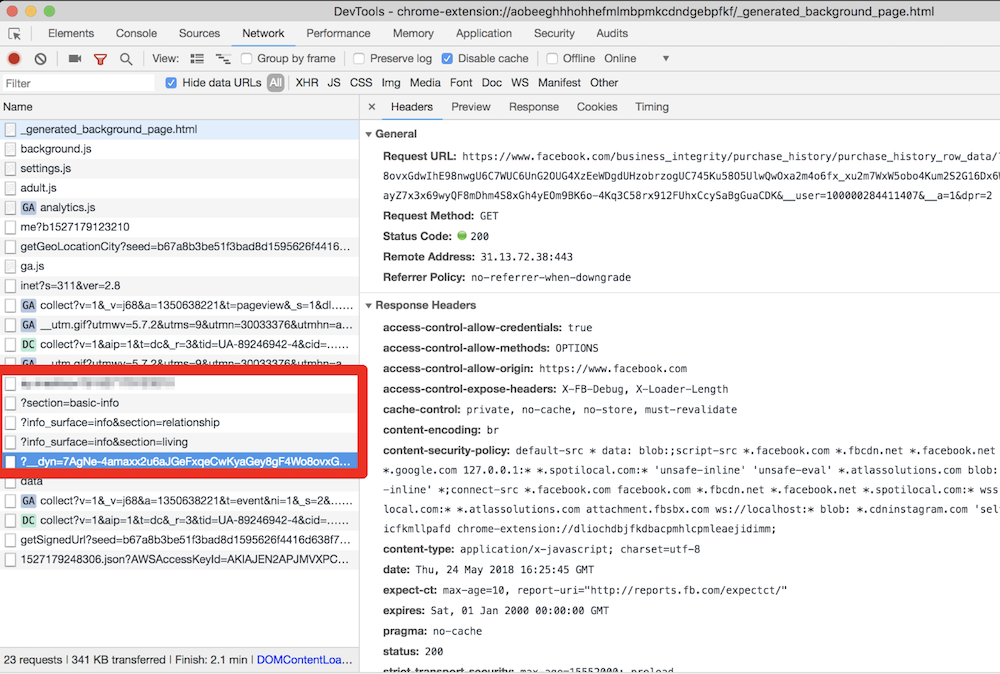
They even try to parse your purchase history! This alone is enough for these extensions to be booted from the Chrome Web Store.

All this data is then collected and sent to the um-public-panel-prod.s3.amazonaws.com domain, which is a named Amazon S3 instance rented by the spyware authors.
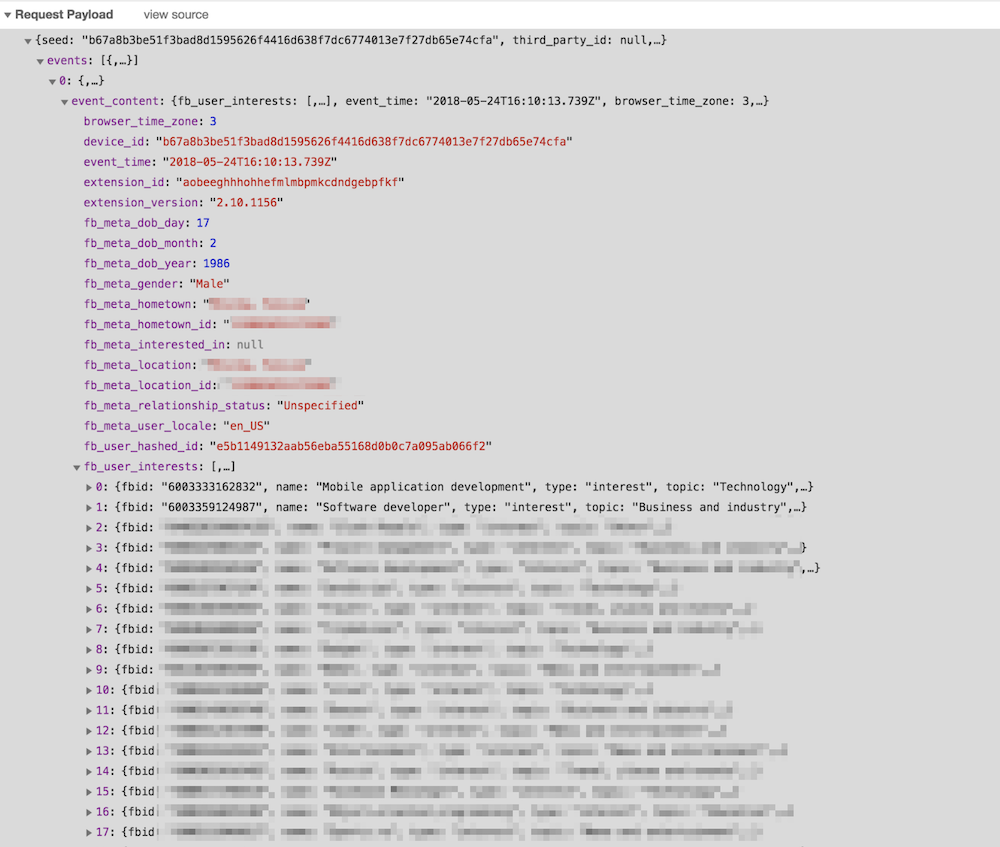
An alarming amount of data was being sent over to that server including all the Facebook "interests". In order to test this, I had to use my own account, so you can observe a piece of my own data, which I don't mind sharing with you.

As you can see on the screenshot, they do not send a plain FB identifier; instead, they send it in a hashed form. I imagine that they think that this practice allow the spyware group to say that this data has been made "anonymous."

“Dear spyware developers, come on! Do you really believe that hashing a numeric value with a static salt cannot be decoded?”

SHA1("sME9Azj8G28Y" + userId) = e5b1149132aab56eba55168d0b0c7a095ab066f2

By the way, dear reader, here is a contest for you: the first one to crack the hash and discover my FB ID gets a free AdGuard license. Write your answer in the comments. No cheating, please :)

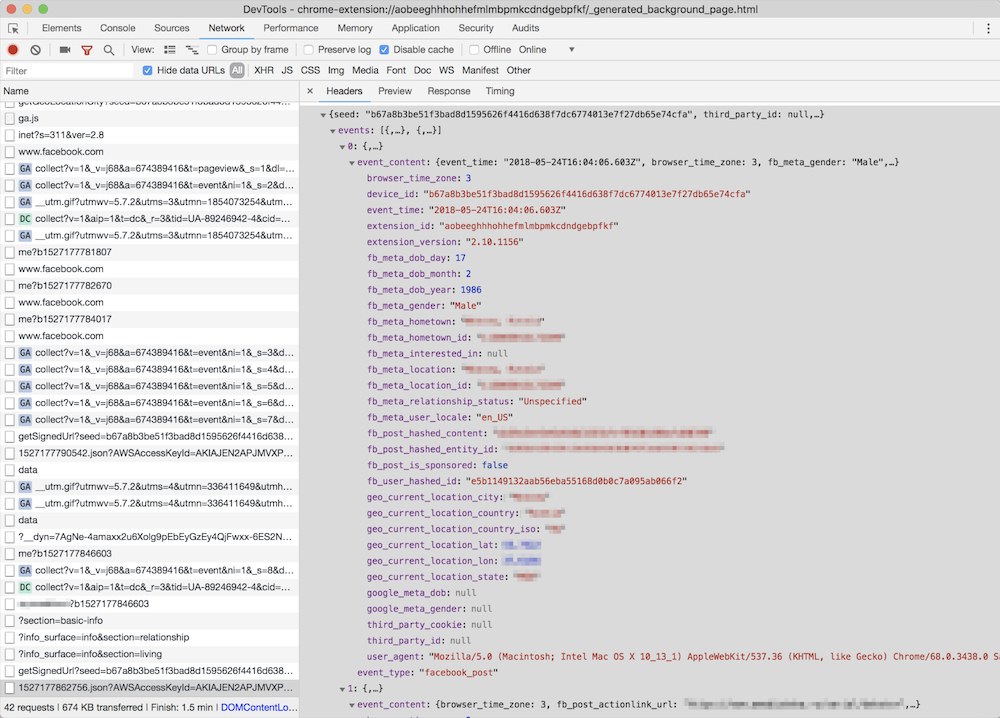
But hey, what is the good of having this data without the spyware company also knowing what exactly you do on the Internet? Wouldn't it be so much better if they knew what exact posts you read or what exact ads you see? Well, no worries, that's exactly what they do: they siphon information about all of the posts, sponsored posts, tweets, the YouTube videos and ads you see or interact with, along with a poorly hashed user ID and totally UN-hashed location data.
Meet Unimania Inc.

Who is behind this activity? The only thing I knew about the authors was the link to their extensions' privacy policy: here's a copy, just in case. As usual, there's a lot of confusing legalese about how you provide them with consent without doing anything, how seriously they care about your privacy, how strongly your data is made (or kept) anonymous and how it can in no way can be traced back to you as it is protected by a powerful mathematical "hash function."

Fortunately, it is also pretty transparent about what exact information about you is collected:

What Information We Collect and How We Collect It. In general, the Information we collect includes nonpersonally identifiable demographic and psychographic data as well as sponsored campaigns, advertisements or posts that target you directly or that have been shared with you.

Also, I found their EULA: here's the copy, from which I learned that the company name is "Unimania, Inc." and they claim to be located in Tel-Aviv, Israel. However, I could not find any information on this company in the Israeli company register.

My story might have ended here, but there was a sentence in the privacy policy that caught my attention:

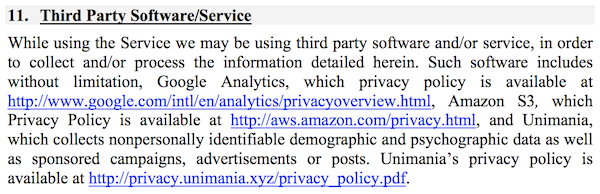
Background. You have been directed to this Privacy Policy from a separate and independent third party Google Chrome Extension or Mobile Software Application (“Third Party Software”).

Mobile Software Application

"Mobile Software Application!" I said to myself.

So this was not just a matter limited to Chrome extensions, and I realized that I needed to continue my investigation. To this end, some good news was that we already had some data collected while preparing a study on mobile apps tracking and I could make use of it and query it right away.

That's how I found one particular app that was connecting to the Unimania servers. This was an alternative Facebook client called "Fast — Social App" with a record of more than 10,000,000 installs according to Google Play. The app developer does not bother to hide that fact and mentions Unimania in the privacy policy:
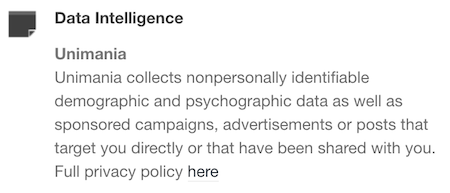
Scanning this developer apps' traffic confirmed that "Fast-Social App" transfers pretty much the same data as the Chrome extensions do, and to the same Unimania servers. I also found out that "Fast Lite - Social App + Twitter" (1,000,000+ installs) also does the same thing.

Besides that, I found a couple more apps that mention Unimania in their privacy policies. I cannot confirm that they are still leaking user data, but I can assume they were doing so in the past; otherwise, why would they mention it?

Finally, it seems that Unimania is about to launch their own "products":

  • OmniSocial — a mobile app
  • Who's following me? — a browser extension

Obviously, none of these apps describe this behavior in the app description; neither do they have an "in-app disclosure" as required by Google. I must admit that the Google Play Developer Policies look solid, and so they are likely not the reason of why the privacy of Android apps is in such a sad state. The problem is that these policies are not enforced, hence most of the app developers simply ignore them.

Summary

Congratulations for reading through such a long article (or for skipping all the boring technical details and jumping straight to the summary)!

Let's summarize what we discovered.

  1. A huge spyware campaign engaging some Mobile Apps and Chrome extensions in stealing users’ Facebook data and spying on their social network browsing history. The list of the information collected by these apps and extensions includes the user’s Facebook profile data including demographics and the list of user interests. Also, they were collecting the users' browsing history including all the Facebook regular and sponsored posts, tweets, YouTube videos and ads.
  2. Four spyware Chrome extensions with aggegrated users count of more than 400,000 users.
  3. Two Android apps with total installs count of more than 11,000,000 selling out their users data.
  4. The campaign is run by a supposed Israeli company named "Unimania, Inc." Unfortunately, I was not able to trace this further back to Unimania’s owners or affiliates and I can't say who is profiting from the data.

I've reported all the discovered apps and extensions to Google and I hope they take corrective measures soon.

How to protect yourself?

The answer to this question is both very simple and very difficult.

When installing anything on your device or browser, follow these rules:

  • Read the privacy policy. It is not useless - everything discovered in this case was mentioned in the privacy policies.
  • Never ever install anything made by a developer you don't trust. Do your homework, find out who the developer is and decide for yourself if they are trustworthy.

Also, all Unimania domains have now been added to the "AdGuard Spyware filter" and will be blocked automatically if you have it enabled in any of our AdGuard products, or if you use AdGuard DNS. Unfortunately, there is a browser limitation that prevents an extension from controlling requests made by other extensions so using the AdGuard Chrome extension or uBlock Origin may not be enough, even if you have the "AdGuard Spyware filter" enabled.

Alternatively, you can block these three domains by adding them to the "hosts" file:

  • um-public-panel-prod.s3.amazonaws.com
  • collection-endpoint-prod.herokuapp.com
  • collection-endpoint-staging.herokuapp.com

UPD (Jun 3): The Android apps mentioned in the article are no more available on Google Play.
UPD (Jun 5): The Chrome extensions are finally taken down from the Chrome Web Store.


Podobał Ci się ten post?
AdGuard VPN AdGuard DNS AdGuard Mail AdGuard Wallet
Ekran główny AdGuard dla Windows
Ekran ochrony AdGuard dla Windows, pokazujący funkcje ochrony i ustawienia
Ekran statystyki AdGuard dla Windows, pokazujący statystyki zablokowanych reklam i trackery
Ekran Zarządzanie aplikacjami w AdGuard dla Windows, pokazujący opcje zarządzania ochroną dla aplikacji zainstalowanych na urządzeniu
20 751 20751 recenzji
Doskonały!

AdGuard dla Windows: bloker reklam na PC

AdGuard dla systemu Windows to coś więcej niż bloker reklam. To wielofunkcyjne narzędzie, które blokuje reklamy, kontroluje dostęp do niebezpiecznych stron, przyspiesza ładowanie stron i chroni dzieci przed nieodpowiednimi treściami
Pobierając program, akceptujesz warunki Umowy licencyjnej
Microsoft Store
Pobierając program, akceptujesz warunki Umowy licencyjnej
AdGuard na Windows v8.0, 14-dniowa wersja próbna
Ekran główny AdGuard dla Mac
Ekran Trybu ukrytego w AdGuard dla Mac
20 751 20751 recenzji
Doskonały!

AdGuard: bloker reklam na Maca

AdGuard dla Mac to wyjątkowy bloker reklam zaprojektowany z myślą o macOS. Oprócz ochrony przed uciążliwymi reklamami w przeglądarkach i aplikacjach chroni Cię przed śledzeniem, phishingiem i oszustwami
Pobierając program, akceptujesz warunki Umowy licencyjnej
Przeczytaj więcej
AdGuard na Mac v2.19, 14-dniowa wersja próbna
Ekran główny AdGuard dla Android
Ekran Ochrona przed śledzeniem w AdGuard dla Android
Ekran Zarządzanie aplikacjami w AdGuard dla Android, pokazujący opcje zarządzania ochroną dla aplikacji zainstalowanych na urządzeniu
Ekran statystyki AdGuard dla Android, pokazujący statystyki zablokowanych reklam i trackery
Ekran główny prywatnej przeglądarki AdGuard dla Android
Kod QR, aby pobierz AdGuard dla Android
20 751 20751 recenzji
Doskonały!

AdGuard: bloker reklam na Androida

Blokuje reklamy i moduły śledzące we wszystkich przeglądarkach, grach i innych aplikacjach. Chroni Twoją prywatność i pozwala kontrolować, w jaki sposób aplikacje korzystają z Internetu. Instalowane za pomocą pliku APK
Pobierając program, akceptujesz warunki Umowy licencyjnej
Przeczytaj więcej
Skanuj, aby pobrać
Użyj dowolnego czytnika kodów QR dostępnego w Twoim urządzeniu
AdGuard na Android v4.14, 14-dniowa wersja próbna
Ekran główny AdGuard dla iOS
Ekran ochrony AdGuard dla iOS, pokazujący funkcje ochrony i ustawienia
Ekran statystyki AdGuard dla iOS, pokazujący statystyki zablokowanych reklam i trackery
Kod QR, aby pobierz AdGuard dla iOS
20 751 20751 recenzji
Doskonały!

AdGuard na iOS: bloker reklam poza Safari

Najlepszy bloker reklam na iOS dla iPhone’a i iPada. AdGuard usuwa wszelkiego rodzaju reklamy i elementy śledzące w Safari oraz chroni Twoją prywatność we wszystkich aplikacjach na poziomie DNS
Pobierając program, akceptujesz warunki Umowy licencyjnej
Przeczytaj więcej
Skanuj, aby pobrać
Użyj dowolnego czytnika kodów QR dostępnego w Twoim urządzeniu
AdGuard na iOS v4.5
Ekran główny AdGuard Content Blocker
Ekran Filtry w AdGuard Content Blocker
Ekran ustawienia w AdGuard Content Blocker
20 751 20751 recenzji
Doskonały!

Blokada treści AdGuard

AdGuard Content Blocker eliminuje wszelkiego rodzaju reklamy w przeglądarkach mobilnych, które obsługują technologię blokowania treści — a mianowicie Samsung Internet i Yandex Browser. Jego funkcje są ograniczone w porównaniu z AdGuard na Androida, ale jest darmowy, łatwy w instalacji i wydajny
Pobierając program, akceptujesz warunki Umowy licencyjnej
Przeczytaj więcej
Blokada treści AdGuard v2.8
Ekran główny AdGuard Browser Extension
Ekran Ochrona przed śledzeniem w AdGuard Browser Extension
20 751 20751 recenzji
Doskonały!

Rozszerzenie przeglądarki AdGuard

AdGuard to najszybsze i najlżejsze rozszerzenie blokowania reklam, które skutecznie blokuje wszystkie typy reklam na wszystkich stronach internetowych! Wybierz AdGuard dla swojej przeglądarki i uzyskaj szybkie i bezpieczne przeglądanie Internetu pozbawione reklam.
Instalacja
Pobierając program, akceptujesz warunki Umowy licencyjnej
Instalacja
Pobierając program, akceptujesz warunki Umowy licencyjnej
Instalacja
Pobierając program, akceptujesz warunki Umowy licencyjnej
Instalacja
Pobierając program, akceptujesz warunki Umowy licencyjnej
Instalacja
Pobierając program, akceptujesz warunki Umowy licencyjnej
Przeczytaj więcej
Instalacja
Pobierając program, akceptujesz warunki Umowy licencyjnej
Przeczytaj więcej
Rozszerzenie przeglądarki AdGuard v5.5
Ekran główny Asystenta przeglądarki
20 751 20751 recenzji
Doskonały!

Asystent AdGuard

Towarzyszące rozszerzenie przeglądarki dla aplikacji desktopowych AdGuard. Umożliwia blokowanie niestandardowych elementów na stronach internetowych, dodawanie stron internetowych do listy dozwolonych i wysyłanie raportów bezpośrednio z przeglądarki
Asystent AdGuard v1.4
20 751 20751 recenzji
Doskonały!

AdGuard Home

AdGuard Home to sieciowe rozwiązanie do blokowania reklam i modułów śledzących. Zainstaluj go raz na routerze, aby objąć nim wszystkie urządzenia w sieci domowej — nie jest wymagane żadne dodatkowe oprogramowanie klienckie. Jest to szczególnie ważne w przypadku różnych urządzeń IoT, które często stanowią zagrożenie dla Twojej prywatności

AdGuard Home v0.107
Ekran główny AdGuard Pro dla iOS
Ekran Ochrona w AdGuard Pro dla iOS, pokazujący funkcje i ustawienia ochrony
Ekran statystyki w AdGuard Pro dla iOS, pokazujący statystyki zablokowanych reklam i trackerów
20 751 20751 recenzji
Doskonały!

AdGuard Pro dla iOS

AdGuard Pro na iOS oferuje wszystkie zaawansowane funkcje blokowania reklam. Oferuje te same narzędzia, co płatna wersja AdGuard na iOS. Doskonale blokuje reklamy w Safari i pozwala dostosować ustawienia DNS, aby dostosować poziom ochrony. Blokuje reklamy w przeglądarkach i aplikacjach, chroni dzieci przed nieodpowiednimi treściami i dba o bezpieczeństwo danych osobowych.

Pobierając program, akceptujesz warunki Umowy licencyjnej
Przeczytaj więcej
AdGuard Pro dla iOS v4.5
Ekran główny AdGuard Mini dla Mac
Ekran ochrony Safari w AdGuard Mini dla Mac
Ekran tworzenia reguły w AdGuard Mini dla Mac
20 751 20751 recenzji
Doskonały!

AdGuard Mini dla Mac — bloker reklam Safari

AdGuard Mini dla komputerów Mac to potężny bloker reklam w Safari. Ta lekka aplikacja usuwa reklamy, blokuje moduły śledzące i przyspiesza ładowanie stron. Umożliwia przeglądanie internetu w Safari bez rozpraszania uwagi i chroni prywatność danych
Instalacja
Pobierając program, akceptujesz warunki Umowy licencyjnej
Przeczytaj więcej
AdGuard Mini dla Mac v2.3
Ekran główny AdGuard dla Android TV z włączoną ochroną
Ekran blokowanie reklama AdGuard dla Android TV, pokazujący jego funkcje i ustawienia
Ekran ustawienia AdGuard dla Android TV
Ekran Zarządzanie aplikacjami AdGuard dla Android TV, pokazujący aplikacje, w których reklamy i trackery są zablokowane
20 751 20751 recenzji
Doskonały!

AdGuard dla Android TV

AdGuard dla Android TV to jedyna aplikacja, która blokuje reklamy, chroni prywatność i działa jak zapora sieciowa dla Smart TV. Otrzymuj ostrzeżenia o zagrożeniach internetowych, używaj bezpiecznego DNS i korzystaj z szyfrowanego ruchu. Zrelaksuj się i zanurz się w swoich ulubionych programach z najwyższej klasy zabezpieczeniami bez reklam!
AdGuard dla Android TV v4.14, 14-dniowa wersja próbna
Maskotka AdGuard, Agnar, trzymający pingwina Linux
20 751 20751 recenzji
Doskonały!

AdGuard dla Linux

AdGuard for Linux to pierwszy na świecie systemowy bloker reklam dla systemu Linux. Blokuj reklamy i elementy śledzące na poziomie urządzenia, wybieraj spośród wstępnie zainstalowanych filtrów lub dodawaj własne — wszystko za pośrednictwem interfejsu wiersza poleceń
AdGuard dla Linux v1.4
20 751 20751 recenzji
Doskonały!

AdGuard Temp Mail

Darmowy generator tymczasowych adresów e-mail, który zapewnia anonimowość i chroni prywatność. Brak spamu w głównej skrzynce odbiorczej!
20 751 20751 recenzji
Doskonały!

AdGuard VPN

75 lokalizacji na świecie

Dostęp do wszelkich treści

Silne szyfrowanie

Polityka braku logów

Najszybsze połączenie

Wsparcie 24/7

Wypróbuj za darmo
Pobierając program, akceptujesz warunki Umowy licencyjnej
Przeczytaj więcej
20 751 20751 recenzji
Doskonały!

AdGuard DNS

AdGuard DNS to alternatywne rozwiązanie do blokowania reklam, ochrony prywatności i kontroli rodzicielskiej. Łatwy w konfiguracji i darmowy, zapewnia niezbędną minimalną ochronę przed reklamami, śledzeniem i phishingiem, bez względu na platformę i urządzenie, z którego korzystasz.
20 751 20751 recenzji
Doskonały!

AdGuard Mail

Chroń swoją tożsamość, unikaj spamu i zabezpiecz swoją skrzynkę odbiorczą dzięki naszym aliasom i tymczasowym adresom e-mail. Skorzystaj z naszej bezpłatnej usługi przekazywania e-maili oraz aplikacji na wszystkie systemy operacyjne
20 751 20751 recenzji
Doskonały!

AdGuard Wallet

Bezpieczny i prywatny portfel kryptowalutowy, który daje Ci pełną kontrolę nad Twoimi aktywami. Zarządzaj wieloma portfelami i odkrywaj tysiące kryptowalut, aby je przechowywać, wysyłać i wymieniać
Rozpoczęto pobieranie AdGuard Kliknij przycisk wskazany strzałką, aby rozpocząć instalację Wybierz „Otwórz” i kliknij „OK”. Poczekaj aż plik zostanie pobrany. W otwartym oknie, przeciągnij ikonę AdGuard do folderu „Aplikacje”. Dziękujemy za wybrania AdGuard! Wybierz „Otrwórz” i kliknij „OK”. Poczekaj aż plik zostanie pobrany. W otwartym kliknij „Instaluj”. Dziękujemy za wybrania AdGuard!
Zainstaluj również AdGuard dla urządzeń mobilnych