WhatsApp takes a dig at Apple, Durov — at WhatsApp, Toyota suffers a breach, and more. AdGuard’s digest

In this edition of AdGuard’s digest: Meta goes after iMessage in the new WhatsApp ad, Germany fines Telegram, DuckDuckGo brings its privacy-focused browser to desktop (Mac for now), Google relabels ads, and Toyota’s carelessness backfires.

Meta dumps on Apple in a PR stunt for WhatsApp

Meta came out swinging at Apple’s iMessage as part of its large-scale promotional campaign for WhatsApp in the US. The PR effort is spearheaded by none other than Meta CEO Mark Zuckerberg. In an Instagram post, Zuckerberg argued that WhatsApp was “far more private and secure than iMessage” due to a number of features Apple’s own instant messaging service does not have.
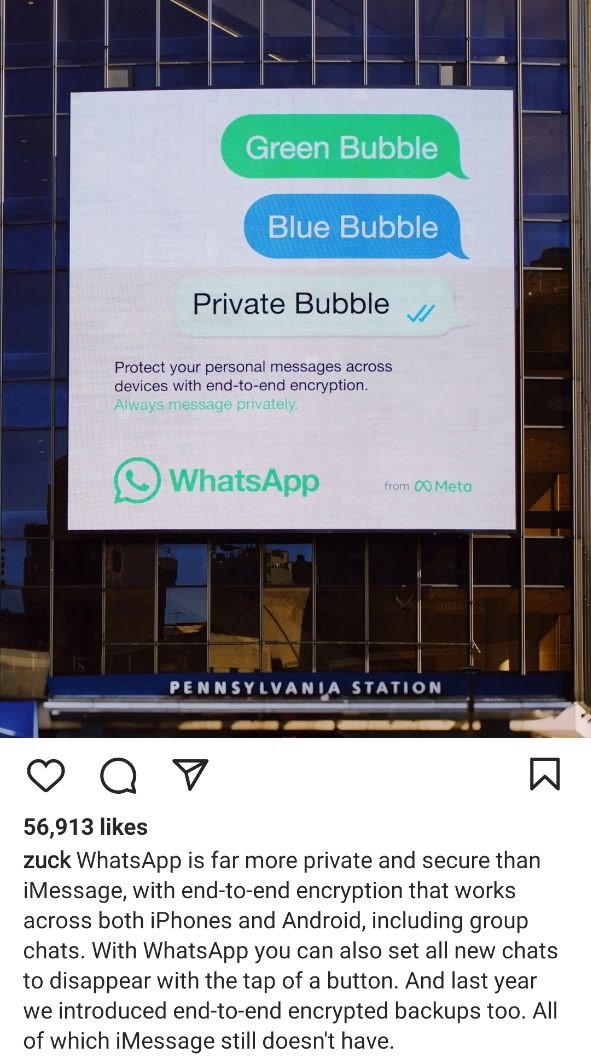
Meta promotes WhatsApp as a an alternative to iMessage

For instance, Zuckeberg noted that end-to-end encryption on WhatsApp works both on iOS and Android, while iMessage is tailor-made for Apple devices. Apple turns texts between iPhones and Android devices into SMS/MMS messages that are not encrypted. They appear in green text bubbles as opposed to blue for iPhone to iPhone texts. While iMessage’s criticism might be warranted, Meta has picked a relatively easy target. There are more secure options than WhatsApp, such as Signal.

Meta has faced privacy-related criticism over the years, including over employing an army of human “content reviewers” who can read messages from reported threads. WhatsApp also shares users’ detailed metadata with law enforcement in response to official requests, and does so almost in real time unlike other services.

Google will make ads more (or less) obvious

Google has announced a new design change that should help users better distinguish between paid and organic search results. Paid results, which were previously marked with a tiny “Ad” label, will now carry a longer “Sponsored” tag in bold black text. This change, according to Google, should “make information about paid content clear.” The company has already started rolling out the new design on mobile, and plans to begin testing it on desktop as well.
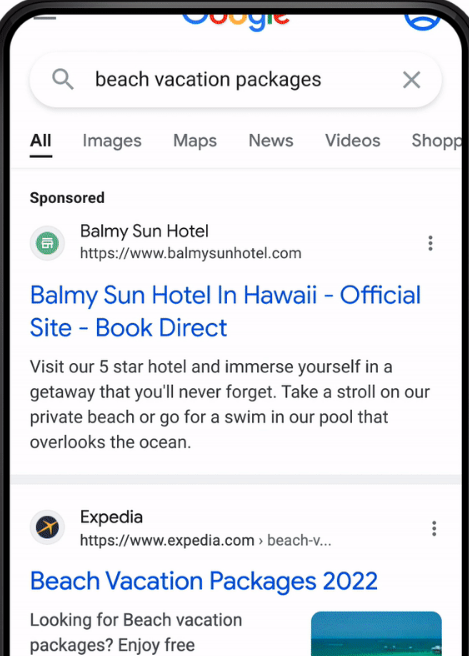
Google showcases the new look of its search ads and organic search results

In addition, Google will be adding site names and favicons on top of each search result on mobile — that should, presumably, make it easier to identify the source of the content.

It remains to be seen whether the design update will actually help distinguish ads from organic results or confuse users even more, especially when it comes to desktop. Favicons, as shown in Google’s preview, appear big enough to draw all the attention to themselves. Google has a long history of tweaking the design of its search ads to make them look less eye-catching and more like genuine search results. Back in the day Google used to shade its search ads blue, yellow, green, and even red before removing any shading in 2013. Since then and up until now, ad labeling has only gotten more subtle. AdGuard users, however, will not even notice the change because they are spared from seeing any ads, irrespective of design.

Germany fines Telegram for failure to follow its laws

In the latest back-and-forth between Berlin and Telegram, the German government has slapped a 5,1 million euro ($5 million) fine on the messaging service. The country’s justice ministry said that Telegram refused to create “a legally compliant” reporting channel where users could report “criminal content”. Telegram was also accused of failing to appoint a representative to the country.

Telegram can now appeal the fine. The move by the German government indicates that, contrary to some reports, there has been little if any rapprochement between the privacy-oriented tech company and Berlin. In August this year, Telegram surprised its German users by asking them directly if they want the company to relax rules around sharing data with law enforcement, leave them as they are or stop sharing data altogether. Currently, Telegram turns over IP addresses and phone numbers of terrorist suspects to the German police, but only if there’s a court order. The majority of users voted to keep the status quo.

Apparently, Telegram has taken feedback from users into account, and is refusing to budge. Telegram users have shown that they are not ready to compromise their privacy for the sake of potentially catching “bad guys”, which is an encouraging trend.

No love lost: Telegram CEO calls WhatsApp ‘surveillance tool’

Telegram CEO Pavel Durov did not mince words criticizing rival app WhatsApp. In a lenthy blog post, Durov cited a recently discovered vulnerability reported by WhatsApp, and noted that it could have allowed hackers to gain “full access” to everything on the potential victim’s phone.

The Telegram founder then listed other instances in which WhatsApp has encountered similar issues. He suggested that it was a vicious circle the Meta-owned messaging service was unlikely to ever break. “Every year, we learn about some issue in WhatsApp that puts everything on their users’ devices at risk. Which means it’s almost certain that a new security flaw already exists there.” Durov went on to say that he was not highlighting WhatsApp’s security issues to get users switch to Telegram, but rather to keep them away from WhatsApp, which he called a surveillance tool.”

Telegram has always been WhatsApp’s bitter rival
Photo: Adem AY/Unsplash

There is no love lost between WhatsApp and Telegram. Last year, tens of millions new users joined Telegram amid the fallout from WhatsApp’s new privacy policy. The policy revealed that the messenger in some cases shares user data with its parent company Facebook without the right to opt out. We, too, have serious concerns about WhatsApp and its past privacy record, so we don’t recommend using it, especially in the presence of other, more secure alternatives. But the final choice is yours, just be aware of the risks.

DuckDuckGo’s privacy-focused browser arrives to Mac

DuckDuckGo, a company mostly known for its privacy-first search engine, has started rolling out a web browser for Mac. The browser has been available through a waitlist since April, and has now moved into open beta. The developers also announced that they have included several new built-in privacy features in the release.

One of these features — called “Duck Player” — promises to protect users from targeted ads and cookies on YouTube. YouTube would still be able to register your views, but none of the content you view would contribute to creating your advertising profile on YouTube. This means that users won’t see personalized ads unless they want to. Other features include instant access to DDG email service that removes trackers and integrattion with open-source password manager Bitwarden. Apart from that, the developers said that they have improved the ad-blocking functionality by removing white space that used to be in place of blocked ads.

DuckDuckGo has confirmed they are working on a similar solution for Windows, and expect to release the web browser as a closed beta in the coming months. We can only salute DuckDuckGo for helping users to eschew trackers and ads. After suffering a public backlash due to its deal with Microsoft earlier this year, DDG seems to be working hard to redeem itself in the eyes of the privacy-conscious public.

Oops! Toyota says 300,000 customers’ data might have leaked due to security blunder

Japanese automaker Toyota has reported that email addresses and customer numbers of 269,019 people using its T-Connect service were exposed as a result of a data breach. T-Connect is a service that allows Toyota clients to check various types of data about their vehicles.

The breach has affected Toyota owners who registered with the T-Connect website between July 2017 and September this year, which was when Toyota discovered the security hole. According to the automaker itself, the website development subcontractor “mistakenly uploaded part of the source code to their GitHub account while it was set to be public” five years ago. The source code contained an access key to the data server where client data was stored. After discovering the vulnerability on September 15, Toyota made the code private. The company assured that other sensitive data, such as customer names, phone numbers, and credit card information, had not been leaked.

Toyota noted that while they could not confirm that any third party had actually accessed the exposed server, they could not rule that out. Toyota’s blunder shows once again that even big corporations that supposedly have all the resources and best practices to protect customer data are not immune from rather trivial security oversights.


Podobał Ci się ten post?
AdGuard VPN AdGuard DNS AdGuard Mail AdGuard Wallet
Ekran główny AdGuard dla Windows
Ekran ochrony AdGuard dla Windows, pokazujący funkcje ochrony i ustawienia
Ekran statystyki AdGuard dla Windows, pokazujący statystyki zablokowanych reklam i trackery
Ekran Zarządzanie aplikacjami w AdGuard dla Windows, pokazujący opcje zarządzania ochroną dla aplikacji zainstalowanych na urządzeniu
20 753 20753 recenzje
Doskonały!

AdGuard dla Windows: bloker reklam na PC

AdGuard dla systemu Windows to coś więcej niż bloker reklam. To wielofunkcyjne narzędzie, które blokuje reklamy, kontroluje dostęp do niebezpiecznych stron, przyspiesza ładowanie stron i chroni dzieci przed nieodpowiednimi treściami

Pobierając program, akceptujesz warunki Umowy licencyjnej
Microsoft Store
Pobierając program, akceptujesz warunki Umowy licencyjnej
AdGuard na Windows v8.0, 14-dniowa wersja próbna
Ekran główny AdGuard dla Mac
Ekran Trybu ukrytego w AdGuard dla Mac
20 753 20753 recenzje
Doskonały!

AdGuard: bloker reklam na Maca

AdGuard dla Mac to wyjątkowy bloker reklam zaprojektowany z myślą o macOS. Oprócz ochrony przed uciążliwymi reklamami w przeglądarkach i aplikacjach chroni Cię przed śledzeniem, phishingiem i oszustwami
Pobierając program, akceptujesz warunki Umowy licencyjnej
Przeczytaj więcej
AdGuard na Mac v2.19, 14-dniowa wersja próbna
Ekran główny AdGuard dla Android
Ekran Ochrona przed śledzeniem w AdGuard dla Android
Ekran Zarządzanie aplikacjami w AdGuard dla Android, pokazujący opcje zarządzania ochroną dla aplikacji zainstalowanych na urządzeniu
Ekran statystyki AdGuard dla Android, pokazujący statystyki zablokowanych reklam i trackery
Ekran główny prywatnej przeglądarki AdGuard dla Android
Kod QR, aby pobierz AdGuard dla Android
20 753 20753 recenzje
Doskonały!

AdGuard: bloker reklam na Androida

Blokuje reklamy i moduły śledzące we wszystkich przeglądarkach, grach i innych aplikacjach. Chroni Twoją prywatność i pozwala kontrolować, w jaki sposób aplikacje korzystają z Internetu. Instalowane za pomocą pliku APK
Pobierając program, akceptujesz warunki Umowy licencyjnej
Przeczytaj więcej
Skanuj, aby pobrać
Użyj dowolnego czytnika kodów QR dostępnego w Twoim urządzeniu
AdGuard na Android v4.14, 14-dniowa wersja próbna
Ekran główny AdGuard dla iOS
Ekran ochrony AdGuard dla iOS, pokazujący funkcje ochrony i ustawienia
Ekran statystyki AdGuard dla iOS, pokazujący statystyki zablokowanych reklam i trackery
Kod QR, aby pobierz AdGuard dla iOS
20 753 20753 recenzje
Doskonały!

AdGuard na iOS: bloker reklam poza Safari

Najlepszy bloker reklam na iOS dla iPhone’a i iPada. AdGuard usuwa wszelkiego rodzaju reklamy i elementy śledzące w Safari oraz chroni Twoją prywatność we wszystkich aplikacjach na poziomie DNS
Pobierając program, akceptujesz warunki Umowy licencyjnej
Przeczytaj więcej
Skanuj, aby pobrać
Użyj dowolnego czytnika kodów QR dostępnego w Twoim urządzeniu
AdGuard na iOS v4.5
Ekran główny AdGuard Content Blocker
Ekran Filtry w AdGuard Content Blocker
Ekran ustawienia w AdGuard Content Blocker
20 753 20753 recenzje
Doskonały!

Blokada treści AdGuard

AdGuard Content Blocker eliminuje wszelkiego rodzaju reklamy w przeglądarkach mobilnych, które obsługują technologię blokowania treści — a mianowicie Samsung Internet i Yandex Browser. Jego funkcje są ograniczone w porównaniu z AdGuard na Androida, ale jest darmowy, łatwy w instalacji i wydajny
Pobierając program, akceptujesz warunki Umowy licencyjnej
Przeczytaj więcej
Blokada treści AdGuard v2.8
Ekran główny AdGuard Browser Extension
Ekran Ochrona przed śledzeniem w AdGuard Browser Extension
20 753 20753 recenzje
Doskonały!

Rozszerzenie przeglądarki AdGuard

AdGuard to najszybsze i najlżejsze rozszerzenie blokowania reklam, które skutecznie blokuje wszystkie typy reklam na wszystkich stronach internetowych! Wybierz AdGuard dla swojej przeglądarki i uzyskaj szybkie i bezpieczne przeglądanie Internetu pozbawione reklam.
Instalacja
Pobierając program, akceptujesz warunki Umowy licencyjnej
Instalacja
Pobierając program, akceptujesz warunki Umowy licencyjnej
Instalacja
Pobierając program, akceptujesz warunki Umowy licencyjnej
Instalacja
Pobierając program, akceptujesz warunki Umowy licencyjnej
Instalacja
Pobierając program, akceptujesz warunki Umowy licencyjnej
Przeczytaj więcej
Instalacja
Pobierając program, akceptujesz warunki Umowy licencyjnej
Przeczytaj więcej
Rozszerzenie przeglądarki AdGuard v5.5
Ekran główny Asystenta przeglądarki
20 753 20753 recenzje
Doskonały!

Asystent AdGuard

Towarzyszące rozszerzenie przeglądarki dla aplikacji desktopowych AdGuard. Umożliwia blokowanie niestandardowych elementów na stronach internetowych, dodawanie stron internetowych do listy dozwolonych i wysyłanie raportów bezpośrednio z przeglądarki
Asystent AdGuard v1.4
20 753 20753 recenzje
Doskonały!

AdGuard Home

AdGuard Home to sieciowe rozwiązanie do blokowania reklam i modułów śledzących. Zainstaluj go raz na routerze, aby objąć nim wszystkie urządzenia w sieci domowej — nie jest wymagane żadne dodatkowe oprogramowanie klienckie. Jest to szczególnie ważne w przypadku różnych urządzeń IoT, które często stanowią zagrożenie dla Twojej prywatności
AdGuard Home v0.107
Ekran główny AdGuard Pro dla iOS
Ekran Ochrona w AdGuard Pro dla iOS, pokazujący funkcje i ustawienia ochrony
Ekran statystyki w AdGuard Pro dla iOS, pokazujący statystyki zablokowanych reklam i trackerów
20 753 20753 recenzje
Doskonały!

AdGuard Pro dla iOS

AdGuard Pro na iOS oferuje wszystkie zaawansowane funkcje blokowania reklam. Oferuje te same narzędzia, co płatna wersja AdGuard na iOS. Doskonale blokuje reklamy w Safari i pozwala dostosować ustawienia DNS, aby dostosować poziom ochrony. Blokuje reklamy w przeglądarkach i aplikacjach, chroni dzieci przed nieodpowiednimi treściami i dba o bezpieczeństwo danych osobowych.
Pobierając program, akceptujesz warunki Umowy licencyjnej
Przeczytaj więcej
AdGuard Pro dla iOS v4.5
Ekran główny AdGuard Mini dla Mac
Ekran ochrony Safari w AdGuard Mini dla Mac
Ekran tworzenia reguły w AdGuard Mini dla Mac
20 753 20753 recenzje
Doskonały!

AdGuard Mini dla Mac — bloker reklam Safari

AdGuard Mini dla komputerów Mac to potężny bloker reklam w Safari. Ta lekka aplikacja usuwa reklamy, blokuje moduły śledzące i przyspiesza ładowanie stron. Umożliwia przeglądanie internetu w Safari bez rozpraszania uwagi i chroni prywatność danych
Instalacja
Pobierając program, akceptujesz warunki Umowy licencyjnej
Przeczytaj więcej
AdGuard Mini dla Mac v2.3
Ekran główny AdGuard dla Android TV z włączoną ochroną
Ekran blokowanie reklama AdGuard dla Android TV, pokazujący jego funkcje i ustawienia
Ekran ustawienia AdGuard dla Android TV
Ekran Zarządzanie aplikacjami AdGuard dla Android TV, pokazujący aplikacje, w których reklamy i trackery są zablokowane
20 753 20753 recenzje
Doskonały!

AdGuard dla Android TV

AdGuard dla Android TV to jedyna aplikacja, która blokuje reklamy, chroni prywatność i działa jak zapora sieciowa dla Smart TV. Otrzymuj ostrzeżenia o zagrożeniach internetowych, używaj bezpiecznego DNS i korzystaj z szyfrowanego ruchu. Zrelaksuj się i zanurz się w swoich ulubionych programach z najwyższej klasy zabezpieczeniami bez reklam!
AdGuard dla Android TV v4.14, 14-dniowa wersja próbna
Maskotka AdGuard, Agnar, trzymający pingwina Linux
20 753 20753 recenzje
Doskonały!

AdGuard dla Linux

AdGuard for Linux to pierwszy na świecie systemowy bloker reklam dla systemu Linux. Blokuj reklamy i elementy śledzące na poziomie urządzenia, wybieraj spośród wstępnie zainstalowanych filtrów lub dodawaj własne — wszystko za pośrednictwem interfejsu wiersza poleceń
AdGuard dla Linux v1.4
20 753 20753 recenzje
Doskonały!

AdGuard Temp Mail

Darmowy generator tymczasowych adresów e-mail, który zapewnia anonimowość i chroni prywatność. Brak spamu w głównej skrzynce odbiorczej!
20 753 20753 recenzje
Doskonały!

AdGuard VPN

75 lokalizacji na świecie

Dostęp do wszelkich treści

Silne szyfrowanie

Polityka braku logów

Najszybsze połączenie

Wsparcie 24/7

Wypróbuj za darmo
Pobierając program, akceptujesz warunki Umowy licencyjnej
Przeczytaj więcej
20 753 20753 recenzje
Doskonały!

AdGuard DNS

AdGuard DNS to alternatywne rozwiązanie do blokowania reklam, ochrony prywatności i kontroli rodzicielskiej. Łatwy w konfiguracji i darmowy, zapewnia niezbędną minimalną ochronę przed reklamami, śledzeniem i phishingiem, bez względu na platformę i urządzenie, z którego korzystasz.
20 753 20753 recenzje
Doskonały!

AdGuard Mail

Chroń swoją tożsamość, unikaj spamu i zabezpiecz swoją skrzynkę odbiorczą dzięki naszym aliasom i tymczasowym adresom e-mail. Skorzystaj z naszej bezpłatnej usługi przekazywania e-maili oraz aplikacji na wszystkie systemy operacyjne
20 753 20753 recenzje
Doskonały!

AdGuard Wallet

Bezpieczny i prywatny portfel kryptowalutowy, który daje Ci pełną kontrolę nad Twoimi aktywami. Zarządzaj wieloma portfelami i odkrywaj tysiące kryptowalut, aby je przechowywać, wysyłać i wymieniać
Rozpoczęto pobieranie AdGuard Kliknij przycisk wskazany strzałką, aby rozpocząć instalację Wybierz „Otwórz” i kliknij „OK”. Poczekaj aż plik zostanie pobrany. W otwartym oknie, przeciągnij ikonę AdGuard do folderu „Aplikacje”. Dziękujemy za wybrania AdGuard! Wybierz „Otrwórz” i kliknij „OK”. Poczekaj aż plik zostanie pobrany. W otwartym kliknij „Instaluj”. Dziękujemy za wybrania AdGuard!
Zainstaluj również AdGuard dla urządzeń mobilnych

















































