Why is AdGuard not on Google Play?

One of the most common questions we’ve been asked over the years is why AdGuard for Android is not on the Google Play Store. The short answer is — it was not our decision. Google is the one to blame. In March 2013, Google started purging ad-blocking apps from its Play Store, claiming that they had violated a loosely worded section of the developer agreement that forbade apps from interfering with “other properties or services” of third parties. The following year, this purge affected the newly-released AdGuard for Android. The app was taken down from the Google Play Store on November 25, 2014, but you can still download AdGuard for Android directly from our official website.

If you want to know more about how it came to that, how we adapted our app distribution model after the Play Store massacre, why you can still find an AdGuard content blocking app (but not AdGuard for Android) on Google Play, and what our hopes are for the future, read on.

Timeline of Google’s crackdown on ad blockers

Until 2013, Google tolerated ad-blocking apps in its Play Store. At the time, there were a number of apps on Google Play that offered content filtering functionality, such as AdAway, AdFree, Ad Blocker, and AdBlock Plus. Everything changed on March 13, 2013, when Google pulled several ad blocking apps from its store overnight. The apps’ developers received identical notices from Google informing them that they had violated section 4.4 of the Developer Distribution Agreement. This was a bolt from the blue for the ad blocking community, as the clause Google used to punish them was not new.
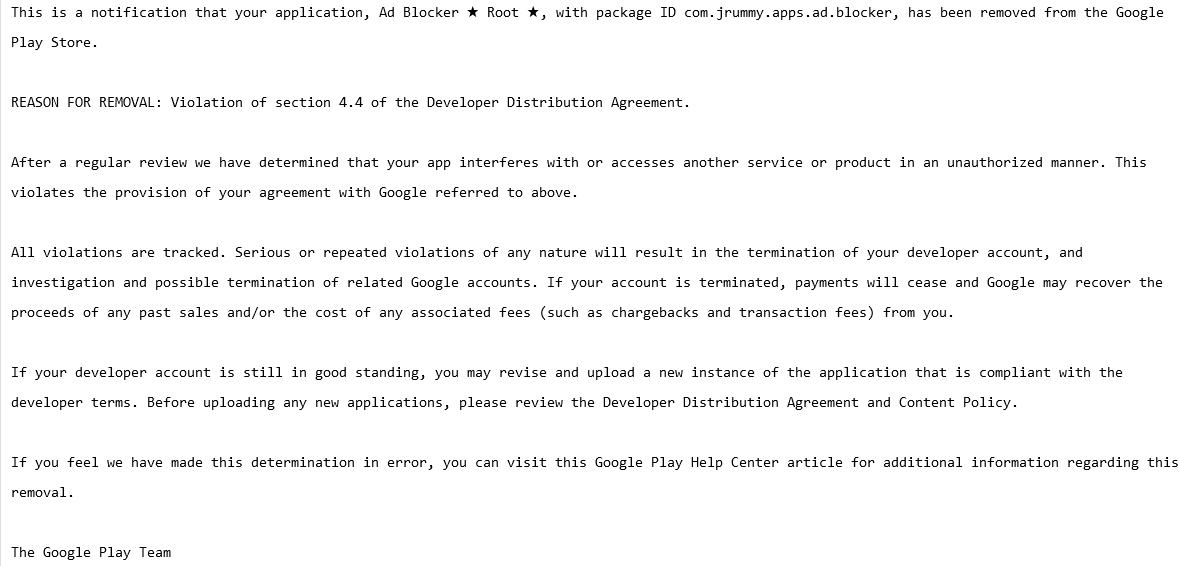
A screenshot of a notification that Ad Blocker received from Google
A notification that Ad Blocker received from Google. Source: Pastebin

In fact, section 4.4. “Prohibited Actions” was so vague that it could arguably be used to remove any app for almost any reason. Here is how the section was worded:

You agree that you will not engage in any activity with the Store, including the development or distribution of Products, that interferes with, disrupts, damages, or accesses in an unauthorized manner the devices, servers, networks, or other properties or services of any third party including, but not limited to, Android users, Google or any mobile network operator. You may not use customer information obtained from the Store to sell or distribute Products outside of the Store.

AdGuard for Android was not spared from the crackdown: on November 25, 2014, it was removed from the Play Store just two weeks after its official launch. The pretext was the same — violation of section 4.4. of the developer terms.

But it wasn’t the end of our story with the Google Play Store. In 2016, Google tweaked its developer policy to clarify what actions are prohibited, and for the first time directly named ad blockers as a target.
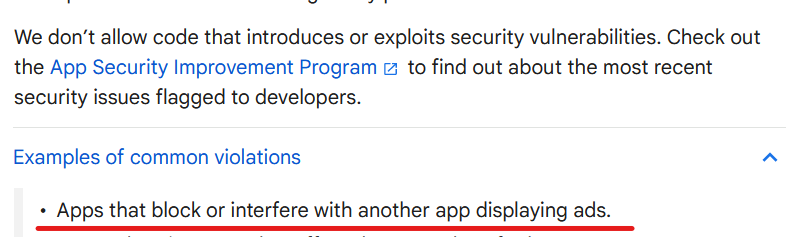
Google developer terms  are specifically directed against ad blockers
Source: Google’s developer policy

But there was a catch. The wording could be interpreted to leave some wiggle room for ad blocking applications that block ads within themselves, i.e. in-browser ad blockers. We can speculate as to why Google did not ban ad blocking outright, with one theory being that they did not want to incentivize side-loading and give Apple, which allows ad blocking in Safari, the upper hand. Whatever it was, ad blocking applications returned to the Google Play Store, but with severe limitations.

But I’ve found an AdGuard app on Google Play, what was that?

AdGuard Content Blocker, not to be confused with AdGuard for Android, is an example of such an app. It was launched in July 2016 and is the only AdGuard app available in the Google Play Store. Its scope is quite limited: it can only block ads in Yandex or Samsung Internet mobile browsers, the only ones that support the necessary content blocking API. If you want to use a different browser or filter traffic in other apps, AdGuard Content Blocker will not be able to help you.
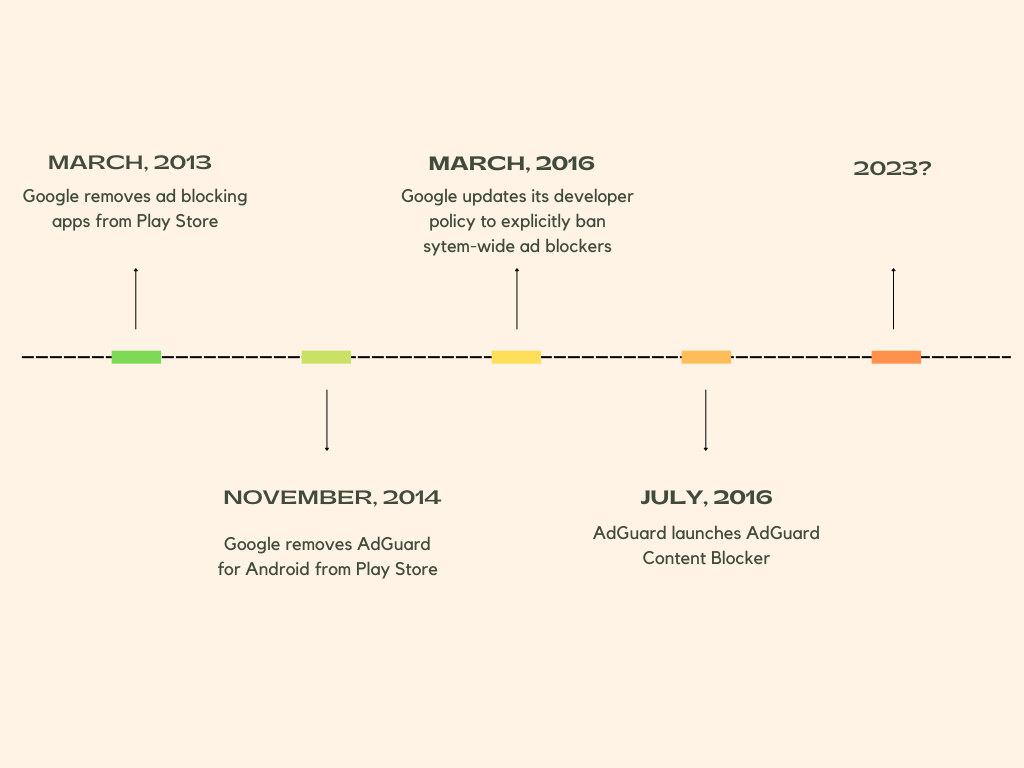
Timeline of AdGuard’s relationship with Google

Why did some apps survive Google’s ad blocking purge?

Still, there’s a lot of uncertainty when it comes to what ad blockers can and can’t do. Google has shown in the past that it can block ad blockers, even those designed specifically for mobile browsers that allow ad blockers, on a whim and unblock them, again, on a whim. Moreover, there are still apps on the Google Play Store that claim to block ads in other apps and work across all browsers, such as Blokada, and boast functionality that allows blocking trackers in apps, such as the DuckDuckGo Private Browser for Android.

Their developers can argue that they do not interfere with other apps and are therefore in compliance with Google’s policy. The thing is, with Google, you can never be sure. Google’s enforcement of its own rules has been inconsistent, and developers are left guessing whether their app will be found to have broken the rules. Not to mention, Google can tighten the screws on ad blockers by changing its policy at any time, so the threat of being pulled from the store hangs like a sword of Damocles over the ad blocking apps that are still available.

Is there life after Google Play Store?

After AdGuard for Android, which filters traffic for all apps on your device, could no longer be distributed through the Google Play Store, we had to find another way to reach our users and provide them with updates. We decided to distribute AdGuard for Android through our own website and some other channels. We also built our own self-sufficient update delivery system so you don’t have to worry about manually updating your app. All this time that we have been distributing AdGuard for Android from our official website we saw AdGuard for Android being installed nearly 30 million times, despite it not being on the Google Play Store.

Our other service, public AdGuard DNS, which doesn’t require installation to use, has now reached over 70 million daily users. So, in short, yes, there is life after and besides the Google Play Store, and overall we’re doing just fine despite the wrench Google has thrown in our works.

Will AdGuard for Android ever return to Google Play?

Of course, if we had the opportunity to return to the Google Play Store without sacrificing the app’s functionality, we would have taken it. The increased visibility this store provides would allow us to introduce the app to more people who can block ad-based tracking, thereby protecting their privacy. The reality is that most casual users install apps exclusively from the Google Play Store, and that means they are currently missing out on a chance to protect themselves from trackers and ads.
We believe that Google’s restrictions on ad blockers are unreasonable and anti-competitive. We hope that Google will change its stance and give people the choice and tools to protect themselves from pervasive tracking technology and invasive advertising.


Vam je bila objava všeč?
AdGuard VPN AdGuard DNS AdGuard Mail AdGuard Wallet
Glavni zaslon AdGuard za Windows
Zaslon zaščite AdGuard za Windows, ki prikazuje funkcije zaščite in nastavitve
Zaslon statistike AdGuard za Windows, ki prikazuje statistiko blokiranih oglasov in sledilcev
Zaslon Upravljanje aplikacij AdGuard za Windows, ki prikazuje možnosti upravljanja zaščite za aplikacije, nameščene v napravi
20.368 20368 ocen uporabnikov
Odlično!

AdGuard: blokator oglasov za Windows

AdGuard za Windows je več kot blokator oglasov. Je večnamensko orodje, ki blokira oglase, nadzoruje dostop do nevarnih spletnih mest, pospeši nalaganje strani in ščiti otroke pred neprimerno vsebino

S prenosom programa sprejemate pogoje Licenčne pogodbe
Microsoft Trgovina
S prenosom programa sprejemate pogoje Licenčne pogodbe
AdGuard za Windows v8.0, 14-dnevno preizkusno obdobje
Glavni zaslon AdGuard za Mac
Zaslon Prikritega načina AdGuard for Mac
20.368 20368 ocen uporabnikov
Odlično!

AdGuard: blokator oglasov za Mac

AdGuard za Mac je edinstven blokator oglasov, zasnovan z mislijo na macOS. Poleg zaščite pred nadležnimi oglasi v brskalnikih in aplikacijah vas ščiti pred sledenjem, lažnim predstavljanjem in goljufijami
S prenosom programa sprejemate pogoje Licenčne pogodbe
Več o tem
AdGuard za macOS v2.19, 14-dnevno preizkusno obdobje
Glavni zaslon AdGuard za Android
Zaslon Zaščita pred sledenjem AdGuard za Android
Zaslon Upravljanje aplikacij AdGuard za Android, ki prikazuje možnosti upravljanja zaščite za aplikacije, nameščene v napravi
Zaslon statistike AdGuard za Android, ki prikazuje statistiko blokiranih oglasov in sledilcev
Glavni zaslon zasebnega brskalnika AdGuard za Android
QR koda za prenos AdGuard za Android
20.368 20368 ocen uporabnikov
Odlično!

AdGuard: blokator oglasov za Android

Blokira oglase in sledilnike v vseh brskalnikih, igrah in drugih aplikacijah. Ščiti vašo zasebnost in vam omogoča nadzor nad tem, kako vaše aplikacije uporabljajo internet. Nameščeno prek APK-ja
S prenosom programa sprejemate pogoje Licenčne pogodbe
Več o tem
Preglejte za prenos
Uporabite kateri koli razpoložljivi bralnik QR kod v vaši napravi
AdGuard za Android v4.14, 14-dnevno preizkusno obdobje
Glavni zaslon AdGuard za iOS
Zaslon zaščite AdGuard za iOS, ki prikazuje funkcije zaščite in nastavitve
Zaslon statistike AdGuard za iOS, ki prikazuje statistiko blokiranih oglasov in sledilcev
QR koda za prenos AdGuard za iOS
20.368 20368 ocen uporabnikov
Odlično!

AdGuard: blokator oglasov za iOS

Najboljši blokator oglasov za iOS za iPhone in iPad. AdGuard odstrani vse vrste oglasov in sledilnikov v Safariju ter ščiti vašo zasebnost v vseh aplikacijah na ravni DNS
S prenosom programa sprejemate pogoje Licenčne pogodbe
Več o tem
Preglejte za prenos
Uporabite kateri koli razpoložljivi bralnik QR kod v vaši napravi
AdGuard za iOS v4.5
Glavni zaslon AdGuard Content Blocker
Zaslon filtri AdGuard Content Blocker
Zaslon nastavitve AdGuard Content Blocker
20.368 20368 ocen uporabnikov
Odlično!

AdGuard Zaviralec vsebine

AdGuard Content Blocker odpravlja vse vrste oglasov v mobilnih brskalnikih, ki podpirajo tehnologijo blokiranja vsebine — in sicer Samsung Internet in Yandex Browser. Njegove funkcije so omejene v primerjavi z AdGuardom za Android, vendar je brezplačen, enostaven za namestitev in učinkovit
S prenosom programa sprejemate pogoje Licenčne pogodbe
Več o tem
AdGuard Zaviralec vsebine v2.8
Glavni zaslon razširitev brskalnika AdGuard
Zaslon Zaščita pred sledenjem razširitve brskalnika AdGuard
20.368 20368 ocen uporabnikov
Odlično!

AdGuard Razširitev brskalnika

AdGuard je najhitrejša in najlažja razširitev za zaviranje oglasov, ki učinkovito onemogoča vse vrste oglasov na vseh spletnih straneh! Za brskalnik, ki ga uporabljate, izberite AdGuard in hitro ter varno brskajte brez oglasov.
Namesti
S prenosom programa sprejemate pogoje Licenčne pogodbe
Namesti
S prenosom programa sprejemate pogoje Licenčne pogodbe
Namesti
S prenosom programa sprejemate pogoje Licenčne pogodbe
Namesti
S prenosom programa sprejemate pogoje Licenčne pogodbe
Namesti
S prenosom programa sprejemate pogoje Licenčne pogodbe
Več o tem
Namesti
S prenosom programa sprejemate pogoje Licenčne pogodbe
Več o tem
AdGuard Razširitev brskalnika v5.5
Glavni zaslon Pomočnik brskalnika
20.368 20368 ocen uporabnikov
Odlično!

AdGuard Pomočnik

Sopodajalna razširitev za brskalnik za AdGuard namizne aplikacije. Dovoli vam, da blokirate po meri nastavljene elemente na spletnih straneh, dodajate spletne strani na seznam dovoljenih in pošiljate poročila neposredno iz vašega brskalnika
AdGuard Pomočnik v1.4
20.368 20368 ocen uporabnikov
Odlično!

AdGuard Home

AdGuard Home je omrežna rešitev za blokiranje oglasov in sledilcev. Namestite ga enkrat na usmerjevalnik, da pokrijete vse naprave v domačem omrežju — dodatna programska oprema odjemalca ni potrebna. To je še posebej pomembno za različne naprave IoT, ki pogosto ogrožajo vašo zasebnost
AdGuard Home v0.107
Glavni zaslon AdGuard Pro za iOS
Zaslon zaščite AdGuard Pro za iOS, ki prikazuje funkcije zaščite in nastavitve
Zaslon statistike AdGuard Pro za iOS, ki prikazuje statistiko za blokirane oglase in sledilce
20.368 20368 ocen uporabnikov
Odlično!

AdGuard Pro za iOS

AdGuard Pro za iOS vključuje vse napredne funkcije zaščite pred oglasi z omogočeno blokado. Ponuja ista orodja kot plačljiva različica AdGuard za iOS. Odličen je pri blokiranju oglasov v Safari in omogoča prilagajanje DNS nastavitev za prilagojeno zaščito. Oglase blokira v brskalnikih in aplikacijah, vaše otroke ščiti pred neprimerno vsebino ter ohranja vaše osebne podatke varne.
S prenosom programa sprejemate pogoje Licenčne pogodbe
Več o tem
AdGuard Pro za iOS v4.5
Glavni zaslon AdGuard Mini za Mac
Zaslon zaščite Safari v AdGuard Mini za Mac
Zaslon ustvarjanja pravila AdGuard Mini za Mac
20.368 20368 ocen uporabnikov
Odlično!

AdGuard Mini za Mac — zaviralec oglasov Safari

AdGuard Mini za Mac je zmogljiv Safari blokator oglasov. Ta lahka aplikacija odstranjuje oglase, blokira sledilce in pospešuje nalaganje strani. Pomaga vam brskati po spletu v Safariju brez motenj in varuje vaše podatke
Namesti
S prenosom programa sprejemate pogoje Licenčne pogodbe
Več o tem
AdGuard Mini za Mac v2.3
Glavni zaslon AdGuard za Android TV z omogočeno zaščito
Zaslon blokiranja oglasov AdGuard za Android TV, ki prikazuje njegove funkcije in nastavitve
Zaslon nastavitev AdGuard za Android TV
Zaslon Upravljanje aplikacij AdGuard za Android TV, ki prikazuje aplikacije, kjer so oglasi in sledilci blokirani
20.368 20368 ocen uporabnikov
Odlično!

AdGuard za Android TV

AdGuard za Android TV je edina aplikacija, ki zavira oglase, varuje vašo zasebnost in deluje kot požarni zid za vaš Smart TV. Prejmite opozorila o spletnih grožnjah, uporabite varen DNS in izkoristite šifriran promet. Sprostite se in se potopite v svoje najljubše oddaje z vrhunsko varnostjo in brez oglasov!
AdGuard za Android TV v4.14, 14-dnevno preizkusno obdobje
Maskota AdGuard, Agnar, ki drži Linux pingvina
20.368 20368 ocen uporabnikov
Odlično!

AdGuard za Linux

AdGuard za Linux je prvi sistemski zaviralec oglasov za Linux na svetu. Onemogočite oglase in sledilce na ravni naprave, izberite med vnaprej nameščenimi filtri ali dodajte svoje — vse preko ukazne lupine vmesnika
AdGuard za Linux v1.4
20.368 20368 ocen uporabnikov
Odlično!

AdGuard Temp Mail

Brezplačen ustvarjalec začasnih elektronskih naslovov, ki vas ohranja anonimne in ščiti vašo zasebnost. Brez neželene pošte v vašem glavnem predalu!
20.368 20368 ocen uporabnikov
Odlično!

AdGuard VPN

75 lokacij svetovnega spleta

Dostop do katere koli vsebine

Močno šifriranje

Politika 'Brez dnevnikov'

Najhitrejša povezava

stalna podpora

Poskusite brezplačno
S prenosom programa sprejemate pogoje Licenčne pogodbe
Več o tem
20.368 20368 ocen uporabnikov
Odlično!

AdGuard DNS

AdGuard DNS je brezhiben način zaviranja internetnih oglasov, ki ne zahteva nameščanja nobenih aplikacij. Je preprost za uporabo, popolnoma brezplačen, enostavno nastavljiv na kateri koli napravi in vam zagotavlja minimalne potrebne funkcije za zaviranje oglasov, števcev, zlonamernih spletnih strani in vsebine za odrasle.
20.368 20368 ocen uporabnikov
Odlično!

AdGuard Mail

Ščitite svoj identitet, izogibajte se neželeni pošti in ohranite svoj nabiralnik varno z našimi vzdevki in začasnimi e-poštnimi naslovi. Uživajte v naši brezplačni storitvi posredovanja e-pošte in aplikacijah za vse operacijske sisteme
20.368 20368 ocen uporabnikov
Odlično!

AdGuard Wallet

Varna in zasebna kripto denarnica, ki vam omogoča popoln nadzor nad vašimi sredstvi. Upravljaj več denarnic in odkrij tisoče kriptovalut za shranjevanje, pošiljanje in zamenjavo
Prenos AdGuarda Za namestitev AdGuarda kliknite gumb, označen s puščico Izberite 'Odpri' in kliknite na 'Vredu', nato pa počakajte, da se datoteka prenese. V odprtem oknu povlecite ikono AdGuarda in jo spustite v mapo 'Aplikacije'. Hvala, ker ste izbrali AdGuard! Izberite 'Odpri' in kliknite na 'Vredu', nato pa počakajte, da se datoteka prenese. V odprtem oknu kliknite na 'Namesti'. Hvala, ker ste izbrali AdGuard!
Namestite AdGuard na svojo mobilno napravo

















































