Bing AI’s ads can trick you into downloading malware

In February 2023, Microsoft beat Google to the punch when it became the first tech giant to integrate a search engine with an AI-powered chatbot. The result of this daring experiment, GPT-4 based Bing AI, immediately attracted a massive user base, reaching 100 million active users in no time, and instantly boosting Microsoft’s profile as a worthy challenger to Google Search’s dominance.

Google Search has long been the cash cow of Alphabet, its parent company. In the second quarter of 2023, Alphabet made $74.6 billion in total revenue, and out of that, $42.6 billion came from ads on Google Search. Google Search also has a commanding lead over Bing and other rivals in terms of search ad revenue share, capturing 58% of the global market compared to Bing’s meager 6% as of 2022.

Perhaps hoping to shake up this status quo, Microsoft rolled out ads in Bing AI in March 2023. Since then, users have occasionally noticed ads sneaking into Bing AI’s human-like responses, mostly in the form of clickable annotations marked with a small, unassuming “Ad” label next to the link. These ad links would typically appear just below or above a link that led to an organic search result (in the screenshot below, the ad link is placed above the genuine search result).
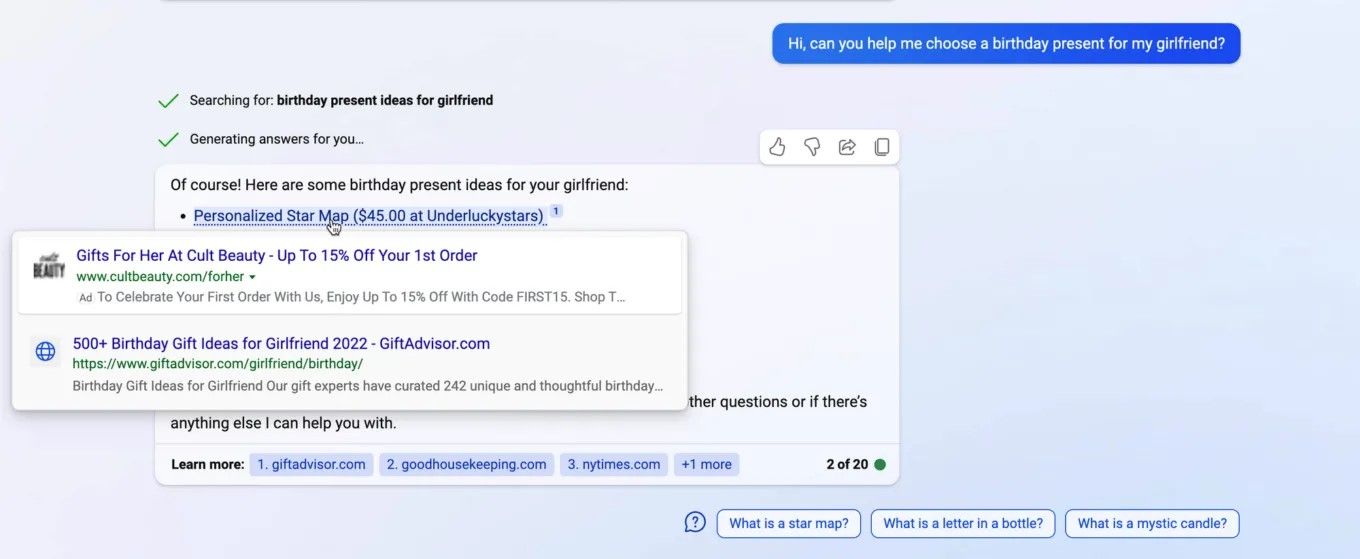
Example of ads in Bing Chat!

Most recently third-party ads also came to Windows Copilot, a Bing Chat-powered feature built directly into the Windows 11 operating system. Ads for Amazon Prime were spotted in the Bing AI sidebar by Windows Latest.

Example of ads in Windows Copilot
Source: Windows Latest

There’s no option to disable ads in Windows Copilot (or Bing AI), and the only way you can get rid of them as of now is by turning the feature off. Microsoft started rolling out Windows Copilot as an optional update in late September, and it should be fully released by the end of the year. After it is fully rolled out, the feature will be turned on by default.

A magnet for cybercriminals

At first glance, there’s not much difference between ads in AI-powered search engines and traditional ones, but there is, and it’s a big one. Studies have shown that people subconsciously trust chat agents more when they sound and act like humans (which is what “friendly” AI-powered bots like Bing AI are pre-trained and fine-tuned to do). As a result, people may be much more easily swayed by the recommendations that AI-powered chat agents give them, as opposed to the recommendations of a depersonalized search engine. Naturally, this makes such chatbots a highly attractive target for cybercriminals, who have been exploiting the Google and Bing ad networks for years to deliver malware through ads.

But it’s one thing to know, or at least strongly suspect, that it’s only a matter of time before cybercriminals turn their attention to Bing Chat, and it’s another to actually see proof that it’s already happening.

In its latest investigation, Malwerbytes uncovered just such a malvertising campaign running on the Bing AI.
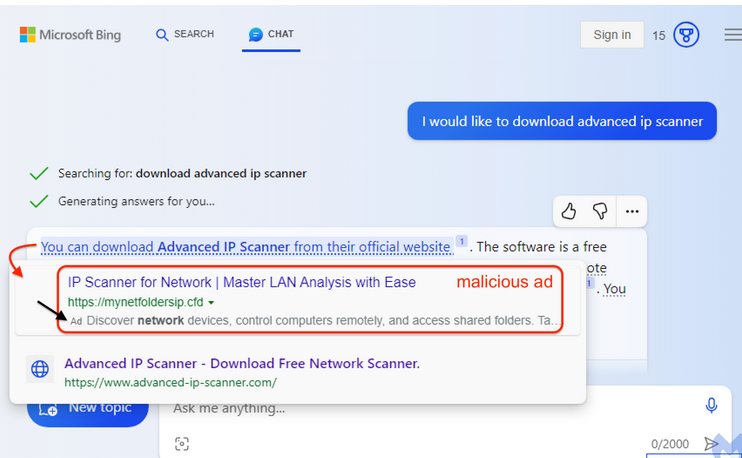
A malicious ad in Bing AI

Source: Malwarebytes

The malicious link appeared as an advertisement for a program called Advanced IP Scanner, a tool typically used by system administrators to locate all network devices. The ad link was placed above the link to the vendor’s official website. Although the ad link is accompanied with an ad label, it’s so tiny and inconspicuous, that it’s very easy to miss. So, what happens if the user, misled into thinking that the first link is the organic search result, clicks on it?

If you click on the link, you will go through a series of redirects that will check your system settings and determine if you are a suitable target. First, you would be redirected to a site called mynetfoldersip[.]cfd, which will scan your IP address and other information to see whether you are a regular user, a bot or, potentially, a security researcher. If you ‘pass’ this test and are determined likely to be an ordinary human, you will be sent to a site called advenced-ip-scanner[.]com with an intentionally misspelled “e” in “advanced” — another filter to weed out security-savvy users. This site pretends to be the official website of the Advanced IP Scanner, but is actually an impostor. If you haven’t smelled the fish by this point, you will be prompted to download a fake installer for the ‘Advanced IP Scanner,’ which contains three files. One of these files is poisoned, and will connect to an external server to download a payload when you run the program.

The researchers failed to identify what kind of a payload it was, but it could be anything from a virus to ransomware to information-stealing malware.

We have written before about how seemingly easy it is for bad actors to place malicious ads in search. The issue of malvertising, which stems from the inadequate and insufficient screening of ads and advertisers, has plagued the search industry for a long time. And as more and more digital advertisers enter the market, it becomes more and more difficult for search engines companies to get a handle on it.

This time, Malwarebytes reported that the source of the attack was a legitimate Australian business, which was apparently hacked and forced to seed malicious ads. In addition to the fake Advanced IP Scanner program, the company’s advertising account was also spotted spreading a malicious ad tailored specifically for lawyers.
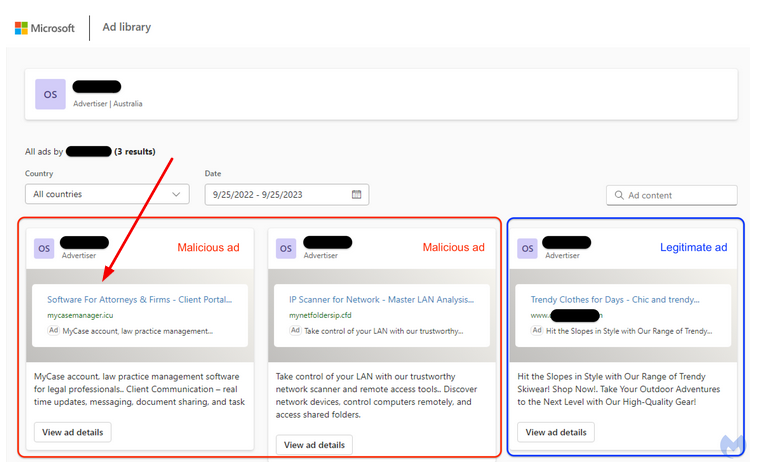
A malicious ad in Bing AI targeting lawyers

Source: Malwarebytes

What makes the problem worse

As we’ve mentioned before, the problem of malvertising is well-documented, it’s not limited only to Bing or Google either, and, in fact, it dates back over a decade. However, with the rise of AI-powered search engines (first and foremost, Bing AI) the problem risks getting dramatically worse.

One reason is that everything suggests that we are more likely to trust conversational chatbots than an impersonal search engine. Another is that, unlike a standard search engine interface with dozens of links on the same page, we are exposed to a limited set of answers within chatbot windows, which arguably makes these answers ever more persuasive.

If we speak about ad blocking, here we encounter yet another problem. Ad blockers are good at blocking search ads (in the AdGuard extension you can do this in one click by toggling Block search ads and website’s self-promotion), but when it comes to blocking ads in the AI-powered chatbots, this is largely an uncharted territory. In our previous articles, we have outlined our thoughts on blocking ads in Bing Chat specifically, and in AI-powered chatbots in general. Without going too far down the rabbit hole, let’s just say that it’s possible, even for ads that are an integral part of the chatbot’s response, but developing an actual solution to this problem will take some time.

However, what ad blockers can do right now is block these malicious domains so that even if you see the bad ad in Bing AI, you will be warned against actually navigating to the site. We’re constantly updating the list of “bad” domains to keep up with emerging threats like this, but there’s always a chance that something will slip through the cracks. So here are our general recommendations on how to avoid falling victim to these ads.

General recommendations

  • Do not click on ads, because why would you? To make sure you don’t accidentally click on an ad, pay attention to those tiny ‘ad’ and ‘sponsored’ labels that all advertising links are supposed to have

  • Before following a link, check its URL for obvious typos. They are usually a tell-tale sign that something’s fishy. In other words, “advenced” is not “advanced”

  • Use antivirus software — well, this advice is pretty self-explanatory

  • Use ad blocking software. Yes, ad blockers have yet to get up to speed as far as blocking ads in AI-powered chatbots is concerned, but we will get there eventually. In the meantime, some ad-blocking solutions can also protect you from malware and phishing sites thanks to special filters. The database used by AdGuard’s anti-malware module, for example, currently contains about 1.5 million phishing and malware sites and is constantly updated.


Vam je bila objava všeč?
AdGuard VPN AdGuard DNS AdGuard Mail AdGuard Wallet
Glavni zaslon AdGuard za Windows
Zaslon zaščite AdGuard za Windows, ki prikazuje funkcije zaščite in nastavitve
Zaslon statistike AdGuard za Windows, ki prikazuje statistiko blokiranih oglasov in sledilcev
Zaslon Upravljanje aplikacij AdGuard za Windows, ki prikazuje možnosti upravljanja zaščite za aplikacije, nameščene v napravi
20.368 20368 ocen uporabnikov
Odlično!

AdGuard: blokator oglasov za Windows

AdGuard za Windows je več kot blokator oglasov. Je večnamensko orodje, ki blokira oglase, nadzoruje dostop do nevarnih spletnih mest, pospeši nalaganje strani in ščiti otroke pred neprimerno vsebino
S prenosom programa sprejemate pogoje Licenčne pogodbe
Microsoft Trgovina
S prenosom programa sprejemate pogoje Licenčne pogodbe
AdGuard za Windows v8.0, 14-dnevno preizkusno obdobje
Glavni zaslon AdGuard za Mac
Zaslon Prikritega načina AdGuard for Mac
20.368 20368 ocen uporabnikov
Odlično!

AdGuard: blokator oglasov za Mac

AdGuard za Mac je edinstven blokator oglasov, zasnovan z mislijo na macOS. Poleg zaščite pred nadležnimi oglasi v brskalnikih in aplikacijah vas ščiti pred sledenjem, lažnim predstavljanjem in goljufijami
S prenosom programa sprejemate pogoje Licenčne pogodbe
Več o tem
AdGuard za macOS v2.19, 14-dnevno preizkusno obdobje
Glavni zaslon AdGuard za Android
Zaslon Zaščita pred sledenjem AdGuard za Android
Zaslon Upravljanje aplikacij AdGuard za Android, ki prikazuje možnosti upravljanja zaščite za aplikacije, nameščene v napravi
Zaslon statistike AdGuard za Android, ki prikazuje statistiko blokiranih oglasov in sledilcev
Glavni zaslon zasebnega brskalnika AdGuard za Android
QR koda za prenos AdGuard za Android
20.368 20368 ocen uporabnikov
Odlično!

AdGuard: blokator oglasov za Android

Blokira oglase in sledilnike v vseh brskalnikih, igrah in drugih aplikacijah. Ščiti vašo zasebnost in vam omogoča nadzor nad tem, kako vaše aplikacije uporabljajo internet. Nameščeno prek APK-ja
S prenosom programa sprejemate pogoje Licenčne pogodbe
Več o tem
Preglejte za prenos
Uporabite kateri koli razpoložljivi bralnik QR kod v vaši napravi
AdGuard za Android v4.14, 14-dnevno preizkusno obdobje
Glavni zaslon AdGuard za iOS
Zaslon zaščite AdGuard za iOS, ki prikazuje funkcije zaščite in nastavitve
Zaslon statistike AdGuard za iOS, ki prikazuje statistiko blokiranih oglasov in sledilcev
QR koda za prenos AdGuard za iOS
20.368 20368 ocen uporabnikov
Odlično!

AdGuard: blokator oglasov za iOS

Najboljši blokator oglasov za iOS za iPhone in iPad. AdGuard odstrani vse vrste oglasov in sledilnikov v Safariju ter ščiti vašo zasebnost v vseh aplikacijah na ravni DNS

S prenosom programa sprejemate pogoje Licenčne pogodbe
Več o tem
Preglejte za prenos
Uporabite kateri koli razpoložljivi bralnik QR kod v vaši napravi
AdGuard za iOS v4.5
Glavni zaslon AdGuard Content Blocker
Zaslon filtri AdGuard Content Blocker
Zaslon nastavitve AdGuard Content Blocker
20.368 20368 ocen uporabnikov
Odlično!

AdGuard Zaviralec vsebine

AdGuard Content Blocker odpravlja vse vrste oglasov v mobilnih brskalnikih, ki podpirajo tehnologijo blokiranja vsebine — in sicer Samsung Internet in Yandex Browser. Njegove funkcije so omejene v primerjavi z AdGuardom za Android, vendar je brezplačen, enostaven za namestitev in učinkovit

S prenosom programa sprejemate pogoje Licenčne pogodbe
Več o tem
AdGuard Zaviralec vsebine v2.8
Glavni zaslon razširitev brskalnika AdGuard
Zaslon Zaščita pred sledenjem razširitve brskalnika AdGuard
20.368 20368 ocen uporabnikov
Odlično!

AdGuard Razširitev brskalnika

AdGuard je najhitrejša in najlažja razširitev za zaviranje oglasov, ki učinkovito onemogoča vse vrste oglasov na vseh spletnih straneh! Za brskalnik, ki ga uporabljate, izberite AdGuard in hitro ter varno brskajte brez oglasov.
Namesti
S prenosom programa sprejemate pogoje Licenčne pogodbe
Namesti
S prenosom programa sprejemate pogoje Licenčne pogodbe
Namesti
S prenosom programa sprejemate pogoje Licenčne pogodbe
Namesti
S prenosom programa sprejemate pogoje Licenčne pogodbe
Namesti
S prenosom programa sprejemate pogoje Licenčne pogodbe
Več o tem
Namesti
S prenosom programa sprejemate pogoje Licenčne pogodbe
Več o tem
AdGuard Razširitev brskalnika v5.5
Glavni zaslon Pomočnik brskalnika
20.368 20368 ocen uporabnikov
Odlično!

AdGuard Pomočnik

Sopodajalna razširitev za brskalnik za AdGuard namizne aplikacije. Dovoli vam, da blokirate po meri nastavljene elemente na spletnih straneh, dodajate spletne strani na seznam dovoljenih in pošiljate poročila neposredno iz vašega brskalnika
AdGuard Pomočnik v1.4
20.368 20368 ocen uporabnikov
Odlično!

AdGuard Home

AdGuard Home je omrežna rešitev za blokiranje oglasov in sledilcev. Namestite ga enkrat na usmerjevalnik, da pokrijete vse naprave v domačem omrežju — dodatna programska oprema odjemalca ni potrebna. To je še posebej pomembno za različne naprave IoT, ki pogosto ogrožajo vašo zasebnost
AdGuard Home v0.107
Glavni zaslon AdGuard Pro za iOS
Zaslon zaščite AdGuard Pro za iOS, ki prikazuje funkcije zaščite in nastavitve
Zaslon statistike AdGuard Pro za iOS, ki prikazuje statistiko za blokirane oglase in sledilce
20.368 20368 ocen uporabnikov
Odlično!

AdGuard Pro za iOS

AdGuard Pro za iOS vključuje vse napredne funkcije zaščite pred oglasi z omogočeno blokado. Ponuja ista orodja kot plačljiva različica AdGuard za iOS. Odličen je pri blokiranju oglasov v Safari in omogoča prilagajanje DNS nastavitev za prilagojeno zaščito. Oglase blokira v brskalnikih in aplikacijah, vaše otroke ščiti pred neprimerno vsebino ter ohranja vaše osebne podatke varne.
S prenosom programa sprejemate pogoje Licenčne pogodbe
Več o tem
AdGuard Pro za iOS v4.5
Glavni zaslon AdGuard Mini za Mac
Zaslon zaščite Safari v AdGuard Mini za Mac
Zaslon ustvarjanja pravila AdGuard Mini za Mac
20.368 20368 ocen uporabnikov
Odlično!

AdGuard Mini za Mac — zaviralec oglasov Safari

AdGuard Mini za Mac je zmogljiv Safari blokator oglasov. Ta lahka aplikacija odstranjuje oglase, blokira sledilce in pospešuje nalaganje strani. Pomaga vam brskati po spletu v Safariju brez motenj in varuje vaše podatke
Namesti
S prenosom programa sprejemate pogoje Licenčne pogodbe
Več o tem
AdGuard Mini za Mac v2.3
Glavni zaslon AdGuard za Android TV z omogočeno zaščito
Zaslon blokiranja oglasov AdGuard za Android TV, ki prikazuje njegove funkcije in nastavitve
Zaslon nastavitev AdGuard za Android TV
Zaslon Upravljanje aplikacij AdGuard za Android TV, ki prikazuje aplikacije, kjer so oglasi in sledilci blokirani
20.368 20368 ocen uporabnikov
Odlično!

AdGuard za Android TV

AdGuard za Android TV je edina aplikacija, ki zavira oglase, varuje vašo zasebnost in deluje kot požarni zid za vaš Smart TV. Prejmite opozorila o spletnih grožnjah, uporabite varen DNS in izkoristite šifriran promet. Sprostite se in se potopite v svoje najljubše oddaje z vrhunsko varnostjo in brez oglasov!
AdGuard za Android TV v4.14, 14-dnevno preizkusno obdobje
Maskota AdGuard, Agnar, ki drži Linux pingvina
20.368 20368 ocen uporabnikov
Odlično!

AdGuard za Linux

AdGuard za Linux je prvi sistemski zaviralec oglasov za Linux na svetu. Onemogočite oglase in sledilce na ravni naprave, izberite med vnaprej nameščenimi filtri ali dodajte svoje — vse preko ukazne lupine vmesnika
AdGuard za Linux v1.4
20.368 20368 ocen uporabnikov
Odlično!

AdGuard Temp Mail

Brezplačen ustvarjalec začasnih elektronskih naslovov, ki vas ohranja anonimne in ščiti vašo zasebnost. Brez neželene pošte v vašem glavnem predalu!
20.368 20368 ocen uporabnikov
Odlično!

AdGuard VPN

75 lokacij svetovnega spleta

Dostop do katere koli vsebine

Močno šifriranje

Politika 'Brez dnevnikov'

Najhitrejša povezava

stalna podpora

Poskusite brezplačno
S prenosom programa sprejemate pogoje Licenčne pogodbe
Več o tem
20.368 20368 ocen uporabnikov
Odlično!

AdGuard DNS

AdGuard DNS je brezhiben način zaviranja internetnih oglasov, ki ne zahteva nameščanja nobenih aplikacij. Je preprost za uporabo, popolnoma brezplačen, enostavno nastavljiv na kateri koli napravi in vam zagotavlja minimalne potrebne funkcije za zaviranje oglasov, števcev, zlonamernih spletnih strani in vsebine za odrasle.
20.368 20368 ocen uporabnikov
Odlično!

AdGuard Mail

Ščitite svoj identitet, izogibajte se neželeni pošti in ohranite svoj nabiralnik varno z našimi vzdevki in začasnimi e-poštnimi naslovi. Uživajte v naši brezplačni storitvi posredovanja e-pošte in aplikacijah za vse operacijske sisteme
20.368 20368 ocen uporabnikov
Odlično!

AdGuard Wallet

Varna in zasebna kripto denarnica, ki vam omogoča popoln nadzor nad vašimi sredstvi. Upravljaj več denarnic in odkrij tisoče kriptovalut za shranjevanje, pošiljanje in zamenjavo
Prenos AdGuarda Za namestitev AdGuarda kliknite gumb, označen s puščico Izberite 'Odpri' in kliknite na 'Vredu', nato pa počakajte, da se datoteka prenese. V odprtem oknu povlecite ikono AdGuarda in jo spustite v mapo 'Aplikacije'. Hvala, ker ste izbrali AdGuard! Izberite 'Odpri' in kliknite na 'Vredu', nato pa počakajte, da se datoteka prenese. V odprtem oknu kliknite na 'Namesti'. Hvala, ker ste izbrali AdGuard!
Namestite AdGuard na svojo mobilno napravo
















































