Welcome to the Adpocalypse: Even your fridge isn’t safe anymore

First, it was cheap smart TVs that came with ads — a compromise we sort of tolerated because the price was low. If you didn’t want the ads, you shelled out more money for a “premium” model. But over the years, the terms of that reluctant deal we all made started to shift, and not in our favor.

Ads started creeping into places they had no business being in. Not just on bargain TVs, but on high-end, flagship screens too. And then — as if that wasn’t enough — they showed up in the infotainment panels of cars. Some were in the form pop-up ads, hitting you in the face every time you stop at a light, as Jeep drivers could attest, although the company has later dismissed it as a glitch.

The trajectory’s been all downhill since. It's like we’re being slowly dragged into a nightmare where no screen, no product, no inch of space is safe from ads.

Over the past few years, we’ve been losing more and more control over our physical products. First came devices that brick themselves if you're behind on payments — yes, we’re talking about Ford’s self-repossessing cars (still just a concept… for now). The gradual loss of control has come together with the steady push into subscription models. That could’ve been fine if those subscriptions actually added something meaningful like new features, better service, more value. But instead, what we’re getting is manufacturers locking basic features behind a paywall, or worse, actively degrading the user experience unless you pay up.

A perfect example of this? Samsung’s latest move to push ads onto its Family Hub fridges, which start at $1,800 in the US.

This is not cool

The update rolled out quietly, almost sneakily. In mid-September, a Reddit user spotted a changelog flash on their fridge screen, and that’s when alarm bells started ringing.
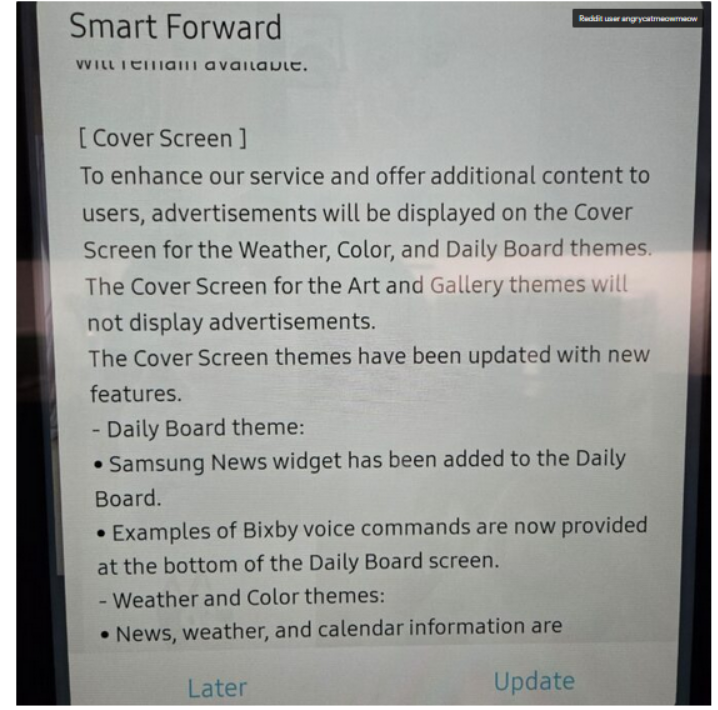
Fridge screen message

Source: Android Authority

The notice that popped up on the poster’s Samsung fridge said that ads would be shown on the door display when it’s idle and set to Weather, Color, or Daily Board themes. If it’s set to Art and Gallery themes like showing photos or pictures the ads won’t appear.

At first, people weren’t even sure it was real. Even Android Authority questioned it, wondering if the changelog was meant for some other product entirely: “There were some doubts that the changelog wasn’t real or that it belonged to a different product.”

But no, it wasn’t a mistake. It wasn’t a glitch. And it definitely wasn’t an April Fool’s joke, no matter how badly we all wished it was.

According to the Fortune, Samsung for now says it will only display ads, and not collect data about how users interact with them, like whether you dismiss an ad or engage with it. But it’s hard not to see that as just step one. More data collection is likely right around the corner.

In a statement shared with Android Authority, Samsung justified the move by saying it’s part of a “pilot program” aimed at offering “promotions and curated advertisements” to increase “everyday value.” The company said this would be done through an over-the-network (OTN) software update, and that ads will only appear when the fridge screen is idle.

Is the Fridge+ subscription on its way?

Currently, there’s no way to turn these ads off — not even a paid, ad-free option. So it seems that people who already shelled out thousands for a fridge are now stuck with ads on its door display, and can do exactly… nothing about it.

Reddit had a field day once Samsung officially confirmed the ads weren’t there by accident.“Imagine paying thousands of dollars for a fridge just to get ads on it?” one Redditor wrote. Others joked — or maybe predicted — that the fridge might soon start showing 30-second pre-roll ads before it lets you open the door, in true YouTube fashion.

And since Samsung has officially announced that it wants to put screens on everything — from ovens to washers and dryers — we can probably expect ads coming to those too.

“Of course you know this is going to end in some f*ckery where the ice maker won’t work unless you have a paid subscription,” another user posted. And honestly, that indeed feels like exactly where we’re headed. It’s not at all beyond the scope of imagination that, at some point, in order to “improve” the very user experience they just degraded, Samsung might roll out a Fridge+ subscription — so you can pay to make your $1,800 fridge feel like it did before the ads showed up.

One of the Reddit comments on the matter

Source: Reddit

Blocking Samsung Fridge ads

One of the first questions that springs to an ad blocking user’s mind is whether the Samsung Fridge ads can be blocked. And while there’s no magical “off” switch or built-in setting to kill them, there are ways to get around them. They’re not the easiest, and definitely not bulletproof, but if you’re a bit tech-savvy, there’s hope.

AdGuard Home: The best (but nerdier) way to block the ads

If you’re comfortable setting up a bit of home network infrastructure,AdGuard Home is likely the most promising method available right now.

It works as a local DNS server running on your network — for example, on a Raspberry Pi or a low-power PC — and lets you filter and block domains (including those used for ads or telemetry) before the traffic ever reaches the internet.

AdGuard Home’s dashboard gives you detailed logs of DNS requests, so if the fridge is making calls to specific ad domains, you can identify and block them manually. Once installed, AdGuard Home will cover all devices on your home network, no additional client software is required. This is especially important for various IoT devices that could pose a threat to your privacy (a smart fridge included).

That said, this approach works best when the fridge fetches ad content through standard domain name lookups, which, in most cases, it likely does. As far as we know, Samsung isn’t using more advanced methods like hardcoded IP addresses or encrypted DNS in its refrigerators, which would make DNS-level blocking much harder. While technically possible, it’s unlikely that a fridge — even a high-end one — would go to those lengths just to serve ads.

AdGuard DNS: The easier to configure but less flexible option

If AdGuard Home sounds like a bit much, there’s also AdGuard DNS that doesn’t need any hardware or installation. You just change your router’s DNS settings to point to AdGuard’s servers, and that’s it.

Most smart fridges (and smart devices in general) automatically get their DNS settings from the router via DHCP, which means they’ll use whichever DNS server the router is configured to use. So, if you set your router’s DNS to AdGuard’s public ad-blocking DNS servers, your fridge will likely start using AdGuard DNS as well — and known ad domains could be blocked at the DNS level. Just like in AdGuard Home, the AdGuard DNS paid plan lets you create custom rules and inspect traffic logs to see exactly what’s happening under the hood.


Vam je bila objava všeč?
AdGuard VPN AdGuard DNS AdGuard Mail AdGuard Wallet
Glavni zaslon AdGuard za Windows
Zaslon zaščite AdGuard za Windows, ki prikazuje funkcije zaščite in nastavitve
Zaslon statistike AdGuard za Windows, ki prikazuje statistiko blokiranih oglasov in sledilcev
Zaslon Upravljanje aplikacij AdGuard za Windows, ki prikazuje možnosti upravljanja zaščite za aplikacije, nameščene v napravi
20.367 20367 ocen uporabnikov
Odlično!

AdGuard: blokator oglasov za Windows

AdGuard za Windows je več kot blokator oglasov. Je večnamensko orodje, ki blokira oglase, nadzoruje dostop do nevarnih spletnih mest, pospeši nalaganje strani in ščiti otroke pred neprimerno vsebino
S prenosom programa sprejemate pogoje Licenčne pogodbe
Microsoft Trgovina
S prenosom programa sprejemate pogoje Licenčne pogodbe
AdGuard za Windows v8.0, 14-dnevno preizkusno obdobje
Glavni zaslon AdGuard za Mac
Zaslon Prikritega načina AdGuard for Mac
20.367 20367 ocen uporabnikov
Odlično!

AdGuard: blokator oglasov za Mac

AdGuard za Mac je edinstven blokator oglasov, zasnovan z mislijo na macOS. Poleg zaščite pred nadležnimi oglasi v brskalnikih in aplikacijah vas ščiti pred sledenjem, lažnim predstavljanjem in goljufijami
S prenosom programa sprejemate pogoje Licenčne pogodbe
Več o tem
AdGuard za macOS v2.19, 14-dnevno preizkusno obdobje
Glavni zaslon AdGuard za Android
Zaslon Zaščita pred sledenjem AdGuard za Android
Zaslon Upravljanje aplikacij AdGuard za Android, ki prikazuje možnosti upravljanja zaščite za aplikacije, nameščene v napravi
Zaslon statistike AdGuard za Android, ki prikazuje statistiko blokiranih oglasov in sledilcev
Glavni zaslon zasebnega brskalnika AdGuard za Android
QR koda za prenos AdGuard za Android
20.367 20367 ocen uporabnikov
Odlično!

AdGuard: blokator oglasov za Android

Blokira oglase in sledilnike v vseh brskalnikih, igrah in drugih aplikacijah. Ščiti vašo zasebnost in vam omogoča nadzor nad tem, kako vaše aplikacije uporabljajo internet. Nameščeno prek APK-ja
S prenosom programa sprejemate pogoje Licenčne pogodbe
Več o tem
Preglejte za prenos
Uporabite kateri koli razpoložljivi bralnik QR kod v vaši napravi
AdGuard za Android v4.14, 14-dnevno preizkusno obdobje
Glavni zaslon AdGuard za iOS
Zaslon zaščite AdGuard za iOS, ki prikazuje funkcije zaščite in nastavitve
Zaslon statistike AdGuard za iOS, ki prikazuje statistiko blokiranih oglasov in sledilcev
QR koda za prenos AdGuard za iOS
20.367 20367 ocen uporabnikov
Odlično!

AdGuard: blokator oglasov za iOS

Najboljši blokator oglasov za iOS za iPhone in iPad. AdGuard odstrani vse vrste oglasov in sledilnikov v Safariju ter ščiti vašo zasebnost v vseh aplikacijah na ravni DNS

S prenosom programa sprejemate pogoje Licenčne pogodbe
Več o tem
Preglejte za prenos
Uporabite kateri koli razpoložljivi bralnik QR kod v vaši napravi
AdGuard za iOS v4.5
Glavni zaslon AdGuard Content Blocker
Zaslon filtri AdGuard Content Blocker
Zaslon nastavitve AdGuard Content Blocker
20.367 20367 ocen uporabnikov
Odlično!

AdGuard Zaviralec vsebine

AdGuard Content Blocker odpravlja vse vrste oglasov v mobilnih brskalnikih, ki podpirajo tehnologijo blokiranja vsebine — in sicer Samsung Internet in Yandex Browser. Njegove funkcije so omejene v primerjavi z AdGuardom za Android, vendar je brezplačen, enostaven za namestitev in učinkovit

S prenosom programa sprejemate pogoje Licenčne pogodbe
Več o tem
AdGuard Zaviralec vsebine v2.8
Glavni zaslon razširitev brskalnika AdGuard
Zaslon Zaščita pred sledenjem razširitve brskalnika AdGuard
20.367 20367 ocen uporabnikov
Odlično!

AdGuard Razširitev brskalnika

AdGuard je najhitrejša in najlažja razširitev za zaviranje oglasov, ki učinkovito onemogoča vse vrste oglasov na vseh spletnih straneh! Za brskalnik, ki ga uporabljate, izberite AdGuard in hitro ter varno brskajte brez oglasov.
Namesti
S prenosom programa sprejemate pogoje Licenčne pogodbe
Namesti
S prenosom programa sprejemate pogoje Licenčne pogodbe
Namesti
S prenosom programa sprejemate pogoje Licenčne pogodbe
Namesti
S prenosom programa sprejemate pogoje Licenčne pogodbe
Namesti
S prenosom programa sprejemate pogoje Licenčne pogodbe
Več o tem
Namesti
S prenosom programa sprejemate pogoje Licenčne pogodbe
Več o tem
AdGuard Razširitev brskalnika v5.5
Glavni zaslon Pomočnik brskalnika
20.367 20367 ocen uporabnikov
Odlično!

AdGuard Pomočnik

Sopodajalna razširitev za brskalnik za AdGuard namizne aplikacije. Dovoli vam, da blokirate po meri nastavljene elemente na spletnih straneh, dodajate spletne strani na seznam dovoljenih in pošiljate poročila neposredno iz vašega brskalnika
AdGuard Pomočnik v1.4
20.367 20367 ocen uporabnikov
Odlično!

AdGuard Home

AdGuard Home je omrežna rešitev za blokiranje oglasov in sledilcev. Namestite ga enkrat na usmerjevalnik, da pokrijete vse naprave v domačem omrežju — dodatna programska oprema odjemalca ni potrebna. To je še posebej pomembno za različne naprave IoT, ki pogosto ogrožajo vašo zasebnost
AdGuard Home v0.107
Glavni zaslon AdGuard Pro za iOS
Zaslon zaščite AdGuard Pro za iOS, ki prikazuje funkcije zaščite in nastavitve
Zaslon statistike AdGuard Pro za iOS, ki prikazuje statistiko za blokirane oglase in sledilce
20.367 20367 ocen uporabnikov
Odlično!

AdGuard Pro za iOS

AdGuard Pro za iOS vključuje vse napredne funkcije zaščite pred oglasi z omogočeno blokado. Ponuja ista orodja kot plačljiva različica AdGuard za iOS. Odličen je pri blokiranju oglasov v Safari in omogoča prilagajanje DNS nastavitev za prilagojeno zaščito. Oglase blokira v brskalnikih in aplikacijah, vaše otroke ščiti pred neprimerno vsebino ter ohranja vaše osebne podatke varne.
S prenosom programa sprejemate pogoje Licenčne pogodbe
Več o tem
AdGuard Pro za iOS v4.5
Glavni zaslon AdGuard Mini za Mac
Zaslon zaščite Safari v AdGuard Mini za Mac
Zaslon ustvarjanja pravila AdGuard Mini za Mac
20.367 20367 ocen uporabnikov
Odlično!

AdGuard Mini za Mac — zaviralec oglasov Safari

AdGuard Mini za Mac je zmogljiv Safari blokator oglasov. Ta lahka aplikacija odstranjuje oglase, blokira sledilce in pospešuje nalaganje strani. Pomaga vam brskati po spletu v Safariju brez motenj in varuje vaše podatke
Namesti
S prenosom programa sprejemate pogoje Licenčne pogodbe
Več o tem
AdGuard Mini za Mac v2.3
Glavni zaslon AdGuard za Android TV z omogočeno zaščito
Zaslon blokiranja oglasov AdGuard za Android TV, ki prikazuje njegove funkcije in nastavitve
Zaslon nastavitev AdGuard za Android TV
Zaslon Upravljanje aplikacij AdGuard za Android TV, ki prikazuje aplikacije, kjer so oglasi in sledilci blokirani
20.367 20367 ocen uporabnikov
Odlično!

AdGuard za Android TV

AdGuard za Android TV je edina aplikacija, ki zavira oglase, varuje vašo zasebnost in deluje kot požarni zid za vaš Smart TV. Prejmite opozorila o spletnih grožnjah, uporabite varen DNS in izkoristite šifriran promet. Sprostite se in se potopite v svoje najljubše oddaje z vrhunsko varnostjo in brez oglasov!
AdGuard za Android TV v4.14, 14-dnevno preizkusno obdobje
Maskota AdGuard, Agnar, ki drži Linux pingvina
20.367 20367 ocen uporabnikov
Odlično!

AdGuard za Linux

AdGuard za Linux je prvi sistemski zaviralec oglasov za Linux na svetu. Onemogočite oglase in sledilce na ravni naprave, izberite med vnaprej nameščenimi filtri ali dodajte svoje — vse preko ukazne lupine vmesnika
AdGuard za Linux v1.4
20.367 20367 ocen uporabnikov
Odlično!

AdGuard Temp Mail

Brezplačen ustvarjalec začasnih elektronskih naslovov, ki vas ohranja anonimne in ščiti vašo zasebnost. Brez neželene pošte v vašem glavnem predalu!
20.367 20367 ocen uporabnikov
Odlično!

AdGuard VPN

75 lokacij svetovnega spleta

Dostop do katere koli vsebine

Močno šifriranje

Politika 'Brez dnevnikov'

Najhitrejša povezava

stalna podpora

Poskusite brezplačno
S prenosom programa sprejemate pogoje Licenčne pogodbe
Več o tem
20.367 20367 ocen uporabnikov
Odlično!

AdGuard DNS

AdGuard DNS je brezhiben način zaviranja internetnih oglasov, ki ne zahteva nameščanja nobenih aplikacij. Je preprost za uporabo, popolnoma brezplačen, enostavno nastavljiv na kateri koli napravi in vam zagotavlja minimalne potrebne funkcije za zaviranje oglasov, števcev, zlonamernih spletnih strani in vsebine za odrasle.
20.367 20367 ocen uporabnikov
Odlično!

AdGuard Mail

Ščitite svoj identitet, izogibajte se neželeni pošti in ohranite svoj nabiralnik varno z našimi vzdevki in začasnimi e-poštnimi naslovi. Uživajte v naši brezplačni storitvi posredovanja e-pošte in aplikacijah za vse operacijske sisteme
20.367 20367 ocen uporabnikov
Odlično!

AdGuard Wallet

Varna in zasebna kripto denarnica, ki vam omogoča popoln nadzor nad vašimi sredstvi. Upravljaj več denarnic in odkrij tisoče kriptovalut za shranjevanje, pošiljanje in zamenjavo
Prenos AdGuarda Za namestitev AdGuarda kliknite gumb, označen s puščico Izberite 'Odpri' in kliknite na 'Vredu', nato pa počakajte, da se datoteka prenese. V odprtem oknu povlecite ikono AdGuarda in jo spustite v mapo 'Aplikacije'. Hvala, ker ste izbrali AdGuard! Izberite 'Odpri' in kliknite na 'Vredu', nato pa počakajte, da se datoteka prenese. V odprtem oknu kliknite na 'Namesti'. Hvala, ker ste izbrali AdGuard!
Namestite AdGuard na svojo mobilno napravo
















































