AdGuard for Android: an updated in-depth overview

AdGuard for Android is always on the move. In tune with our user's needs, we are constantly striving to upgrade and refine our products. Recently, the app underwent a substantial update in version 4.0, where we introduced new AdGuard for Android features, revamped existing settings, and streamlined or removed some. That's why we felt it was high time to refresh our guide to the app.

This article won't dissect every AdGuard setting — you can find an in-depth, technical exposition in our Knowledge base. Instead, we'll spotlight key features beneficial to a wide range of users and provide a walkthrough to optimize their use.

A swift overview on the main screen
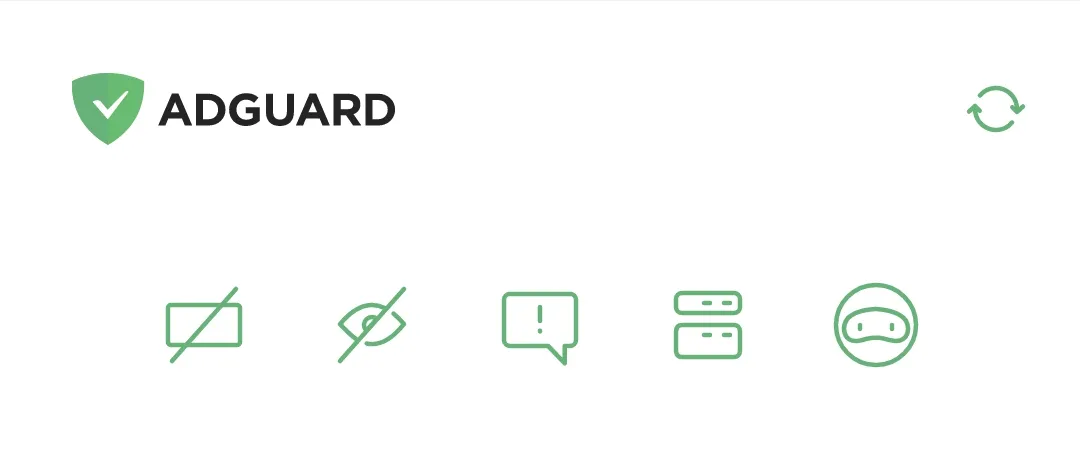
Main screen *mobile_border

When we dreamt up the main screen for AdGuard v4.0 for Android, our goal was to push core features to the front and center. So, there you have it, five icons topping the screen, symbolizing Ad blocking, Tracking protection, Annoyance blocking, DNS protection, and AdGuard VPN from left to right. Tap any of these icons to toggle the corresponding protective layer.

Protection at your fingertips
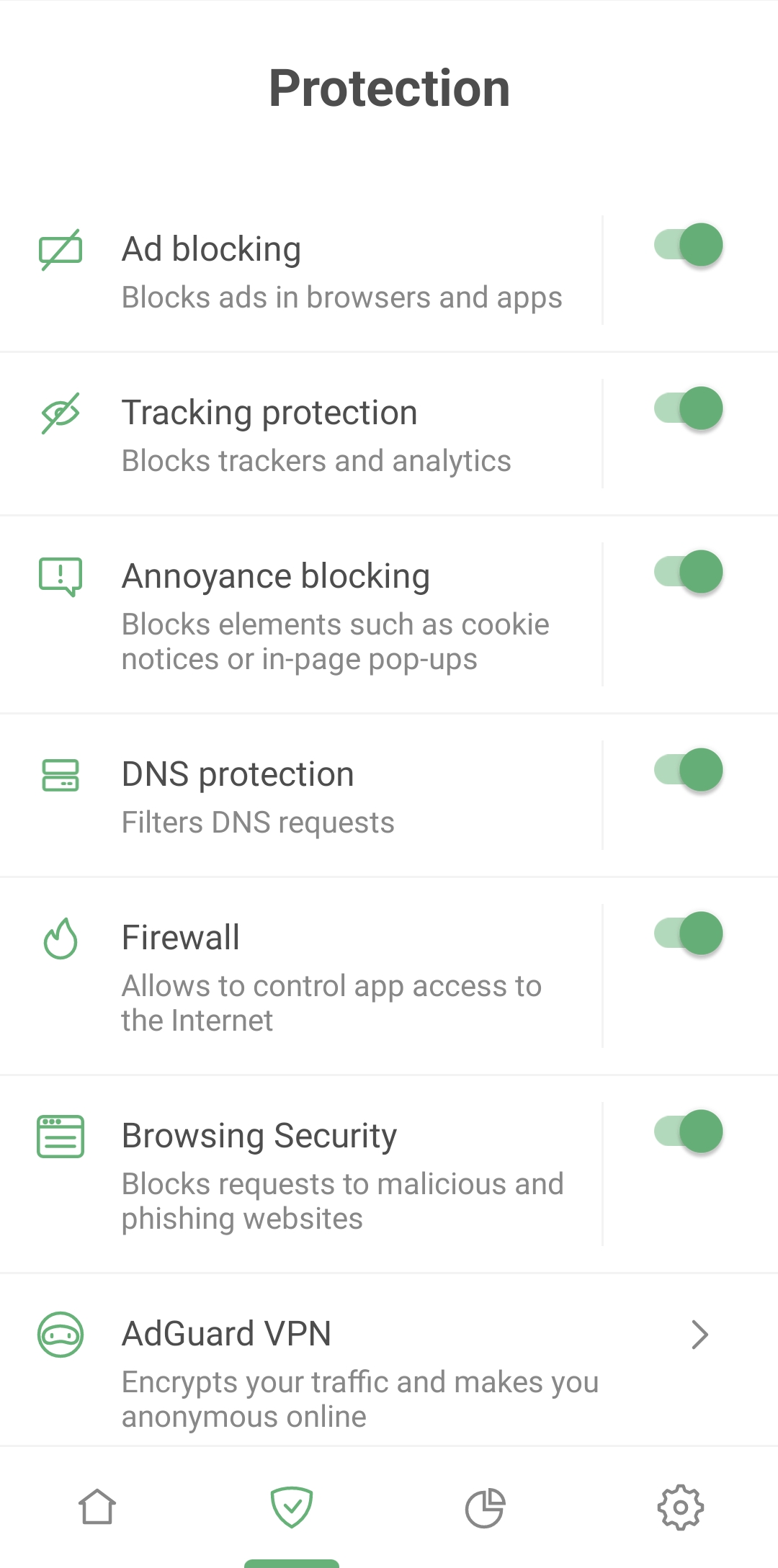
Protection *mobile_border

AdGuard for Android goes far beyond ad blocking. Besides erasing pesky banners and video ads, it shields you from being tracked by websites and apps, blocks pop-ups and cookie notifications, and alerts you when you're about to enter a phishing or malware website. In short, it ensures your browsing remains safe.

Control all major protective functions from a single Protection screen. We've made feature names and descriptions crystal clear and simple to manage. Enabling a feature is a mere two taps away and configuring it requires only one extra tap.
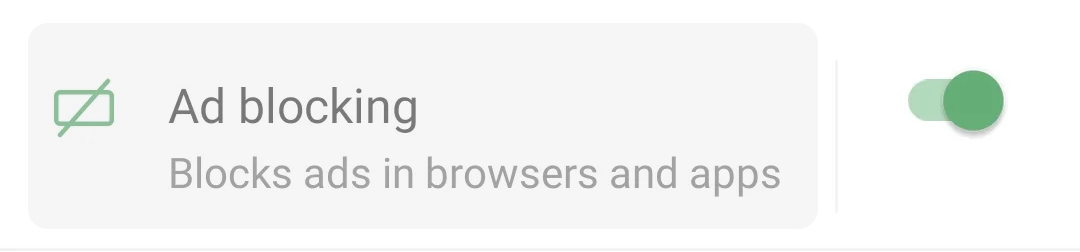
Protection *mobile_border
Tap the area around a feature name to open its settings

Ad blocking
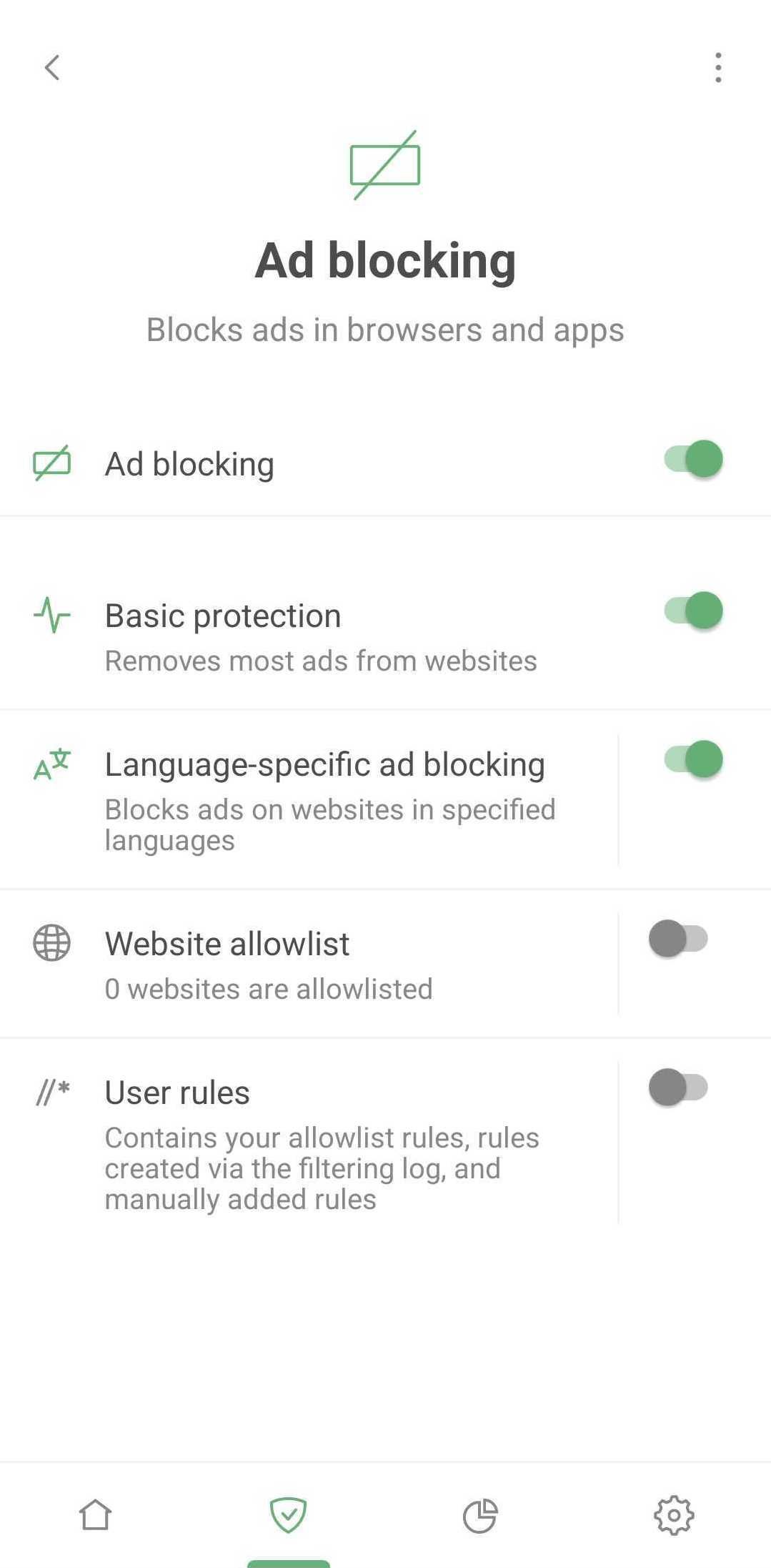
Ad blocking *mobile_border

AdGuard serves as a comprehensive filter, sifting through your apps traffic and deciding how to handle each web request. These decisions are based on sets of special rules called filters. According to those rules AdGuard performs actions on web traffic: blocks specific elements, alters web pages in certain ways, etc. However, you won't find any mention of filters on the Protection screen – we purposely kept it simple to avoid overwhelming new AdGuard users with unfamiliar terms.

Simply activate Basic protection to remove ads from most websites. If you prefer a custom approach, adjust the filtering process to your liking:

  • Enable appropriate language-specific filter which will block ads on websites in selected language
  • Add your favorite websites to allowlist – sites on this list will bypass AdGuard's ad filter
  • Create your own user rules. AdGuard will apply these rules on specified websites. If you're unsure how to go about this, here's a helpful guide on how to create user rules. Your custom, ad-free online experience begins here!

Tracking protection
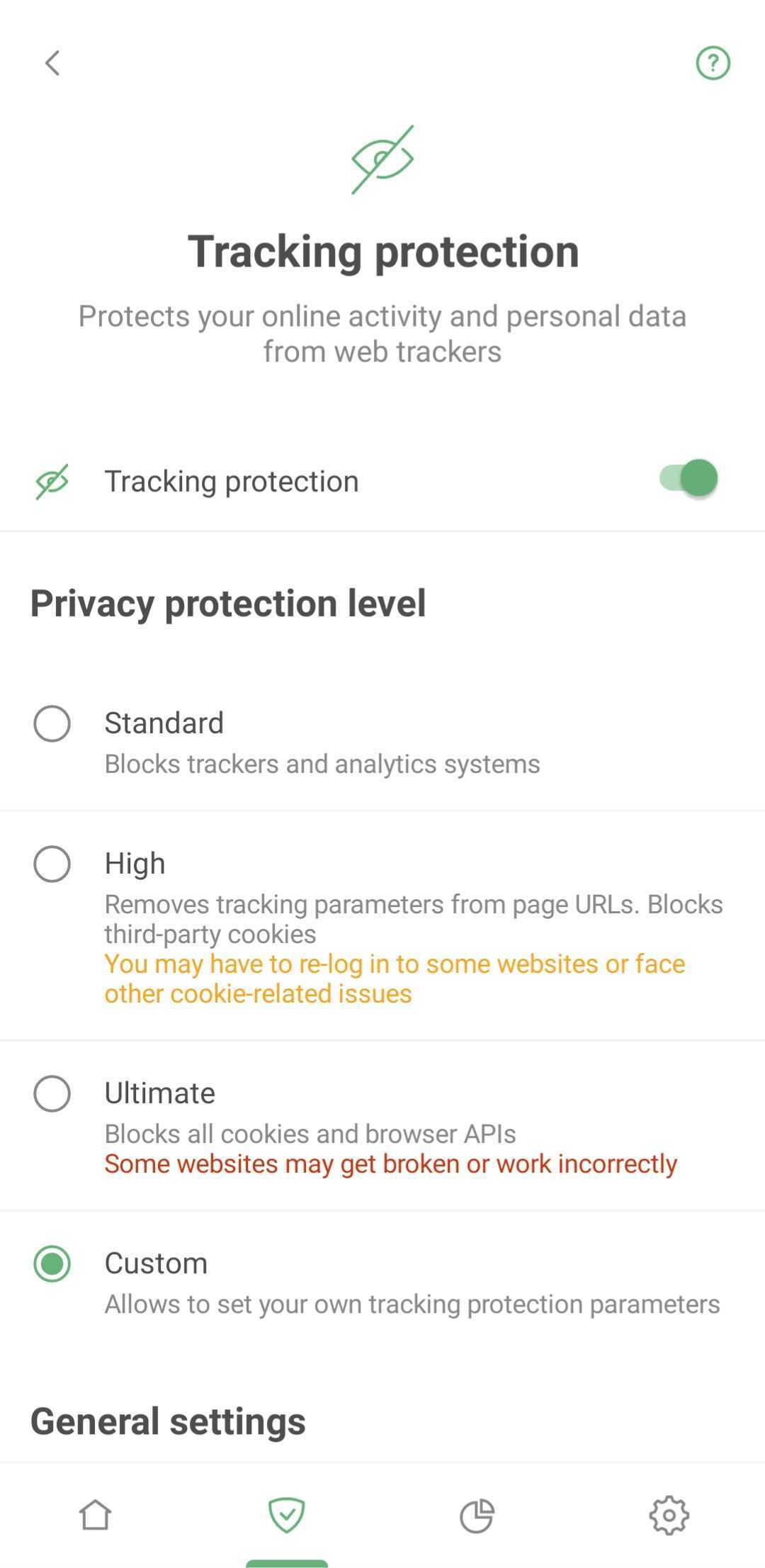
Tracking protection *mobile_border

Tracking protection thwarts websites from gathering your details, like your IP addresses, browser information, operating system, screen resolution, and the page you came to the website from. It can also block cookies that websites use to mark your browser, save your personal settings, user preferences, and recognize you upon your next visit.

Annoyance blocking
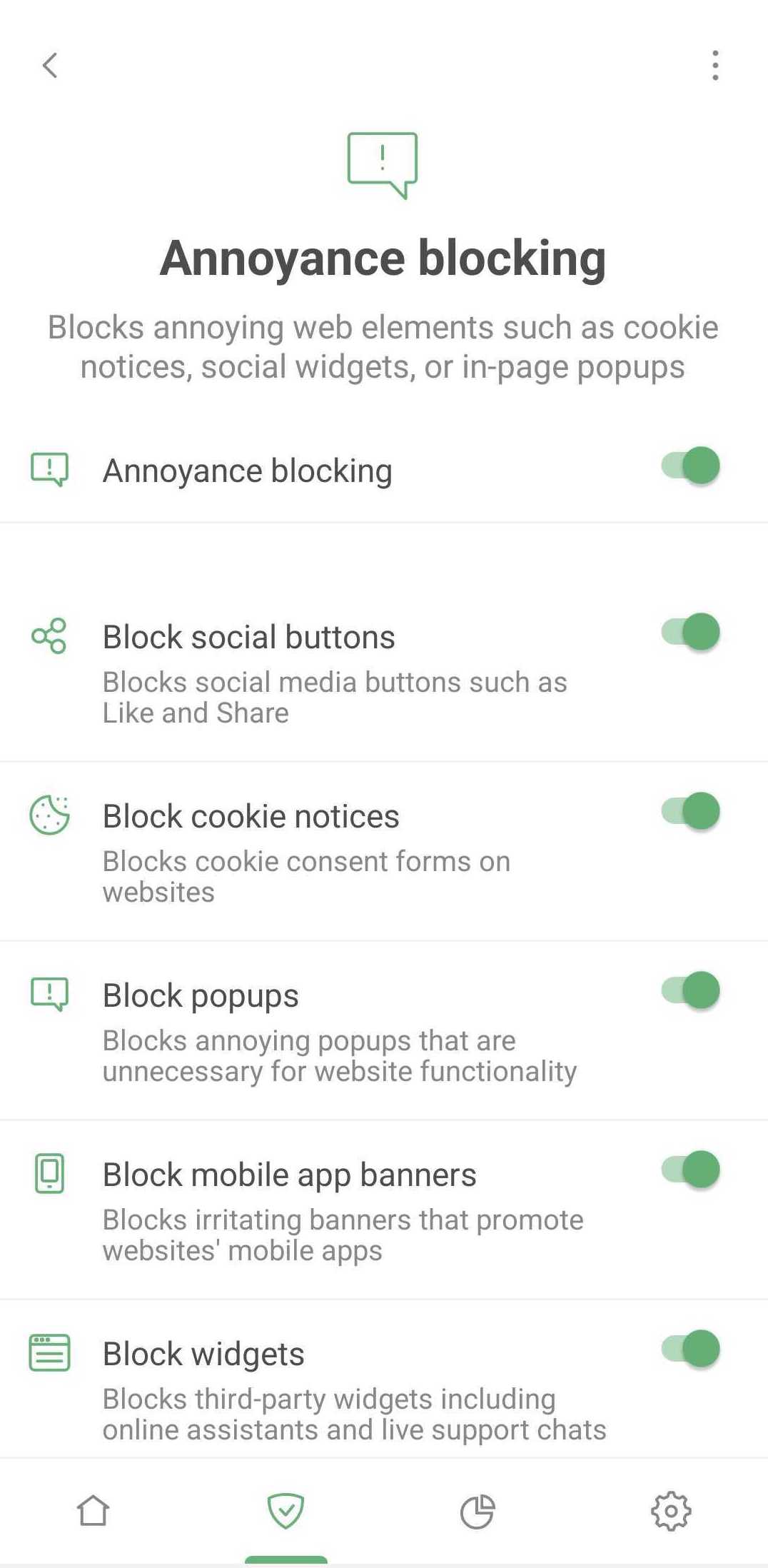
Annoyances *mobile_border

This feature lets you block pop-ups, online assistant windows, cookie notifications, prompts to download mobile apps, and similar annoyances. Nothing complex here: just tick what you want to block and enjoy a cleaner Internet.

DNS protection
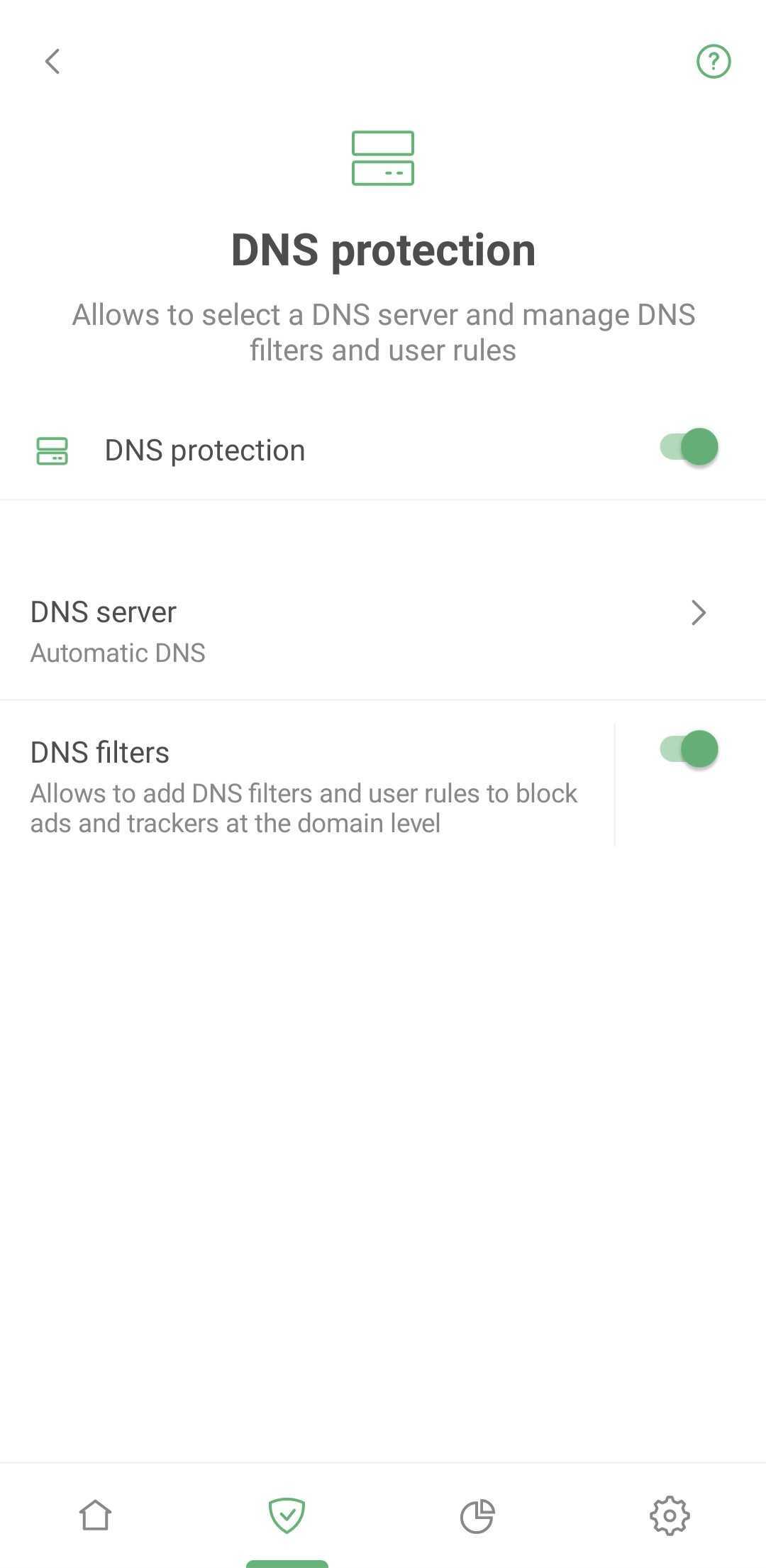
DNS protection *mobile_border

Here you can set up an extra protective layer by choosing a custom DNS server instead of your ISP's default offering. This stops your ISP from tracking your online activity as they won't have access to your DNS request history.

There are more reasons to set up a custom DNS server: some servers are faster, some offer ad blocking, malware protection, traffic encryption, or parental control solutions, etc. Choosing a DNS server from a reputable provider is essential to safeguard your DNS traffic. Protected DNS traffic enhances your privacy and security, making it harder for eavesdropping and manipulation of DNS data via man-in-the-middle attacks (MITMs).

In addition to DNS servers, AdGuard uses a DNS filter. If your device sends a request to a dangerous or ad domain, the filter will block it. Rest assured you're protected even if you're using a system DNS server.

Firewall
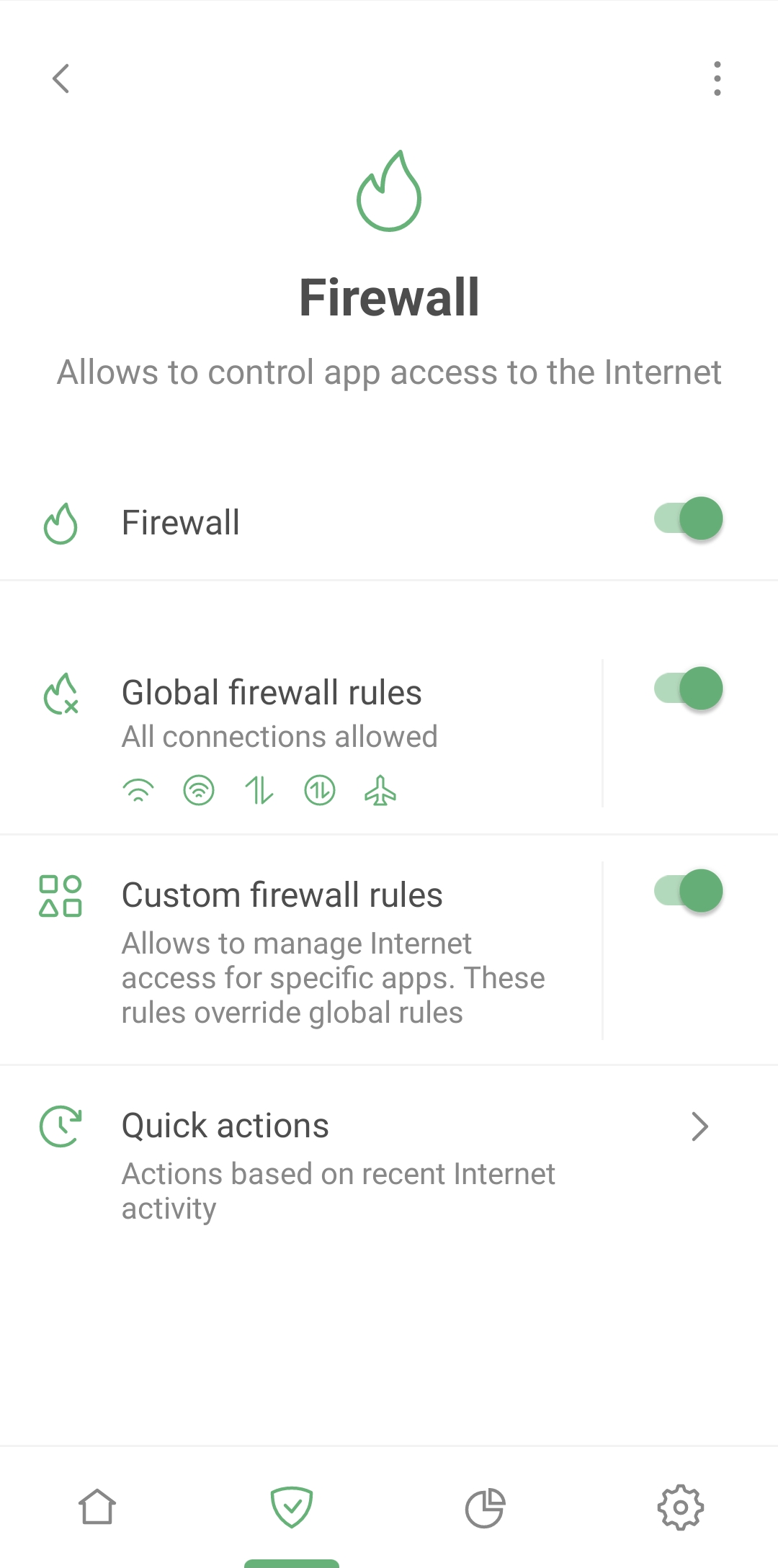
Firewall *mobile_border

One of the most captivating features on the Protection screen is Firewall – a tool to oversee your apps’ Internet access. Why is this useful? It can happen that a flood of spam calls and targeted ads can rain down on you because apps installed on your smartphone are leaking your data. That's where the Firewall comes into play.

Navigate to Protection → Firewall → Quick actions to check which apps recently connected to the Internet. If you spot an app that shouldn't be using the Internet at all or an app you haven't used lately – block its access on the fly.

Go to Protection → Firewall → Custom firewall rules to set up permissions for each app separately. You can prohibit the suspicious app from using Wi-Fi, mobile or roaming data. Or control the entire device's Internet access via Protection → Firewall → Global firewall rules.

Browsing Security

The Internet can be a perilous place where your device can be attacked by viruses and your personal or financial information can be stolen. Luckily, AdGuard's Browsing Security prevents you from visiting phishing and malicious websites.
At the same time, your personal data is never transferred anywhere, and AdGuard does not know which websites you visit, because the security check is performed not against the open web address (URL) but through hash prefixes (hash is a certain data structure that yields a unique result for each address added to the base).

You can learn more about AdGuard's phishing and malware protection in the dedicated article.

Tracking the trackers: AdGuard's Statistics
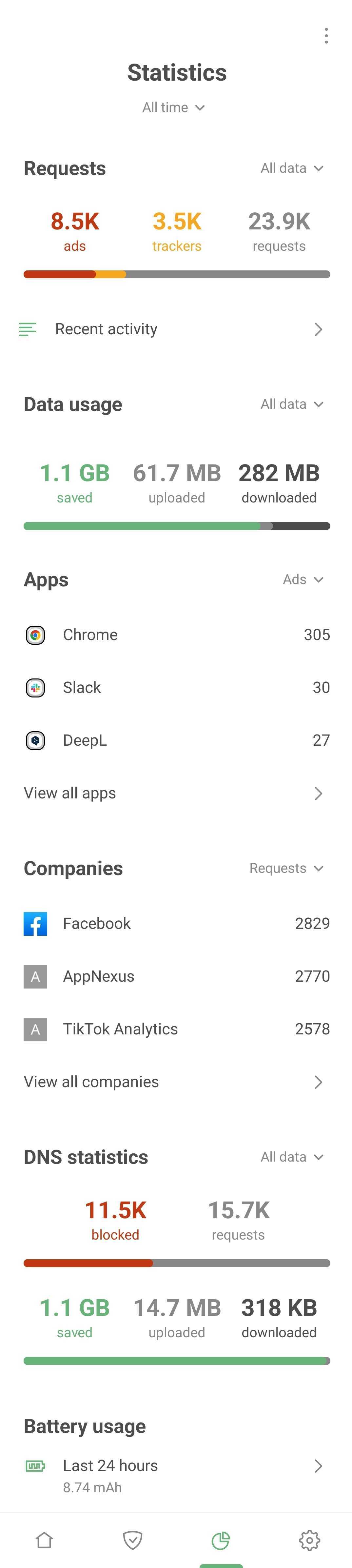
Statistics *mobile_border

In the Statistics tab, you'll find detailed insights on all apps, companies, and domains. Curious about which company's requests are blocked most often? Which apps are trying to send your data, and where is it going? This is your one-stop-shop to identify and block anything suspicious.

Dive into individual app insights

Now let's take a detailed look at every app installed on your Android device. Hit View all apps to uncover which ones are most keen to track your activity and barrage you with ads. Spoiler alert: Chrome might top that list.

Tap any app from the list for a deep dive. This is where the plot thickens – revealing the companies and domains your apps are connecting to.
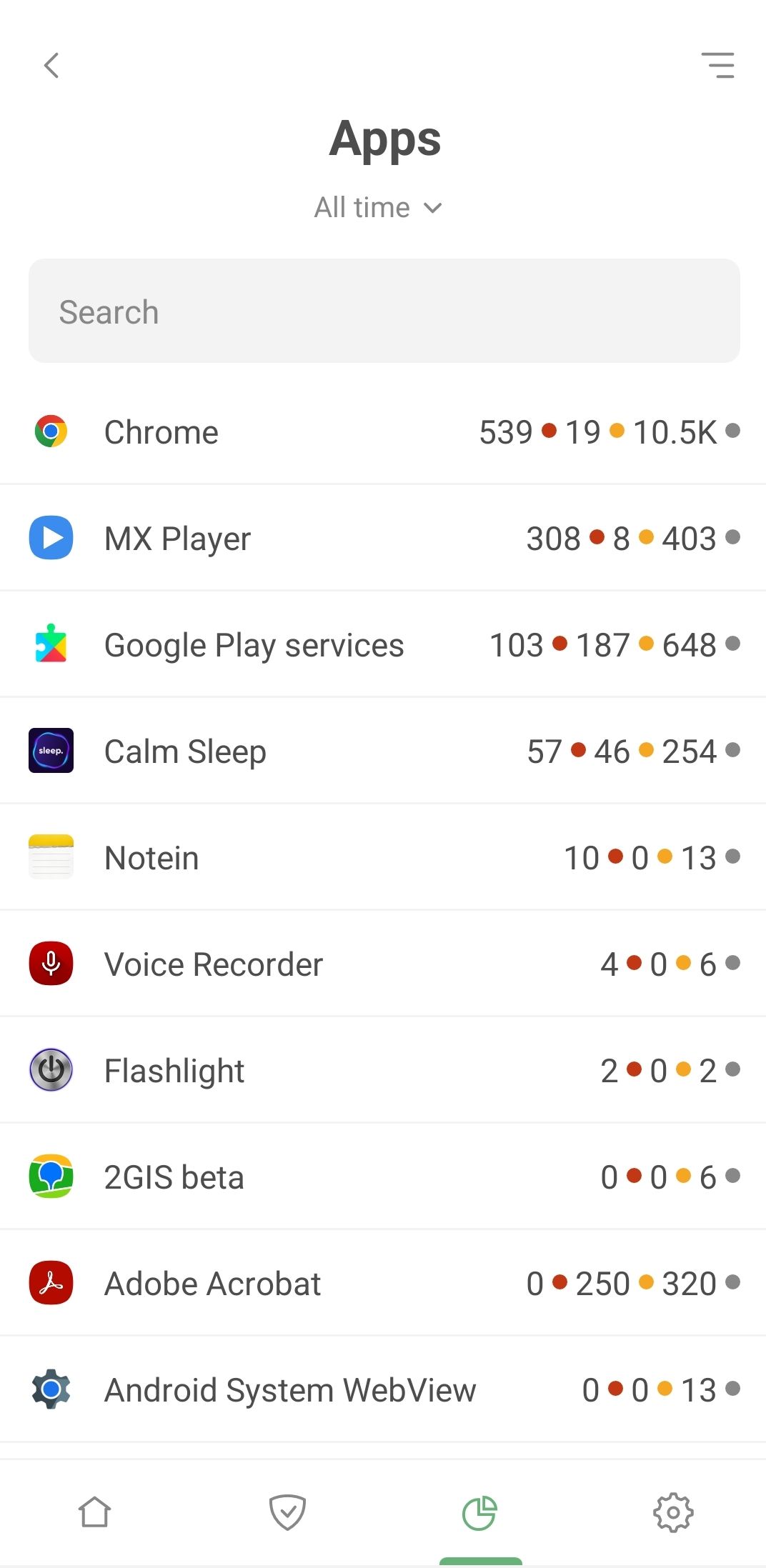
List of apps *mobile_border

Consider Adobe Acrobat, a widely-used app for managing PDF files. What do we find? A significant number of blocked requests to the omtrdc.net domain, where Adobe collects personal data.
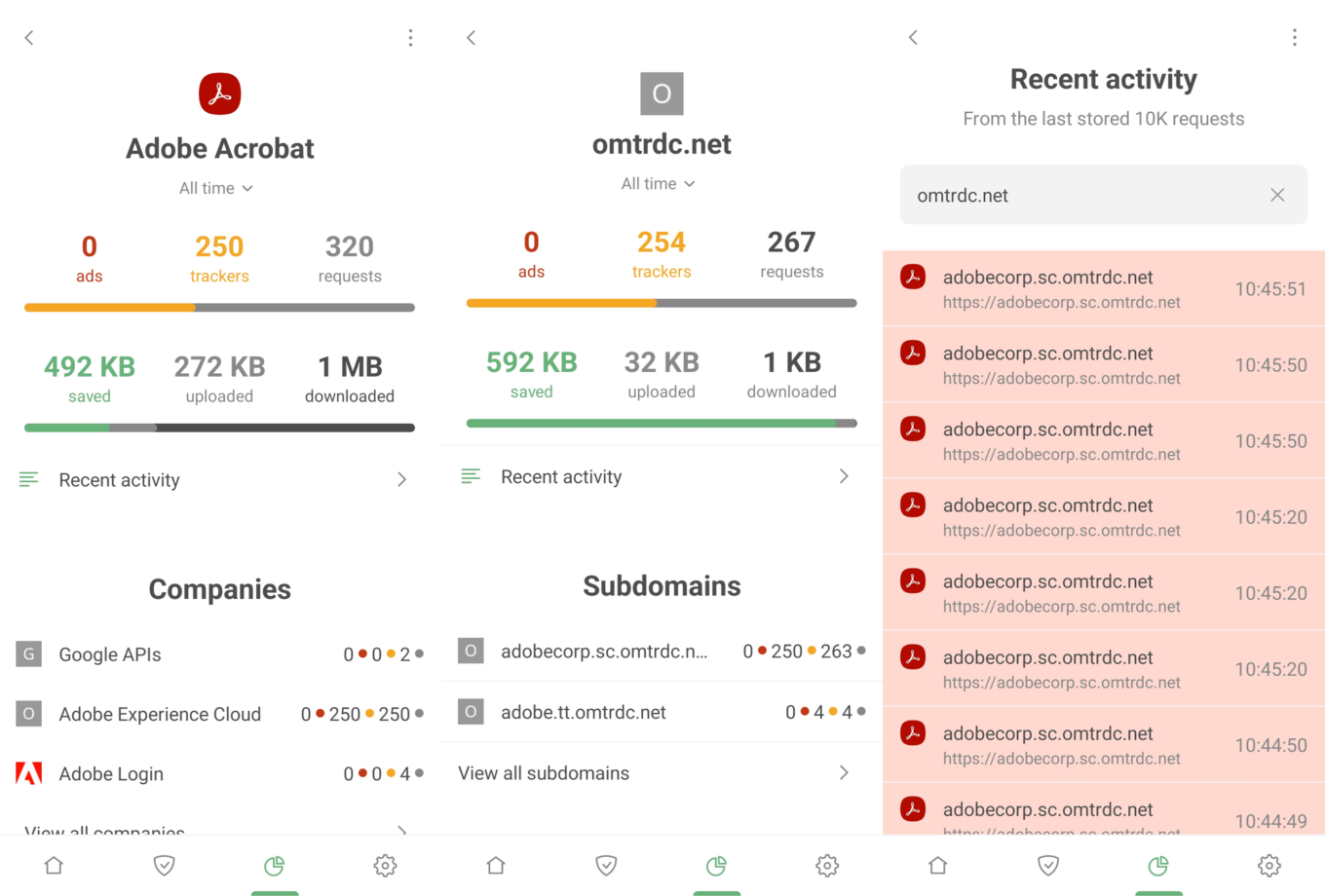
Adobe Acrobat Statistics *border

Next steps are up to you. If you're uncomfortable with the volume of requests an app is making to dubious companies, consider uninstalling it and seeking alternatives. Or head to Recent activity, spot a particularly shady request, and establish a blocking rule instantly.

A peek into corporate connections
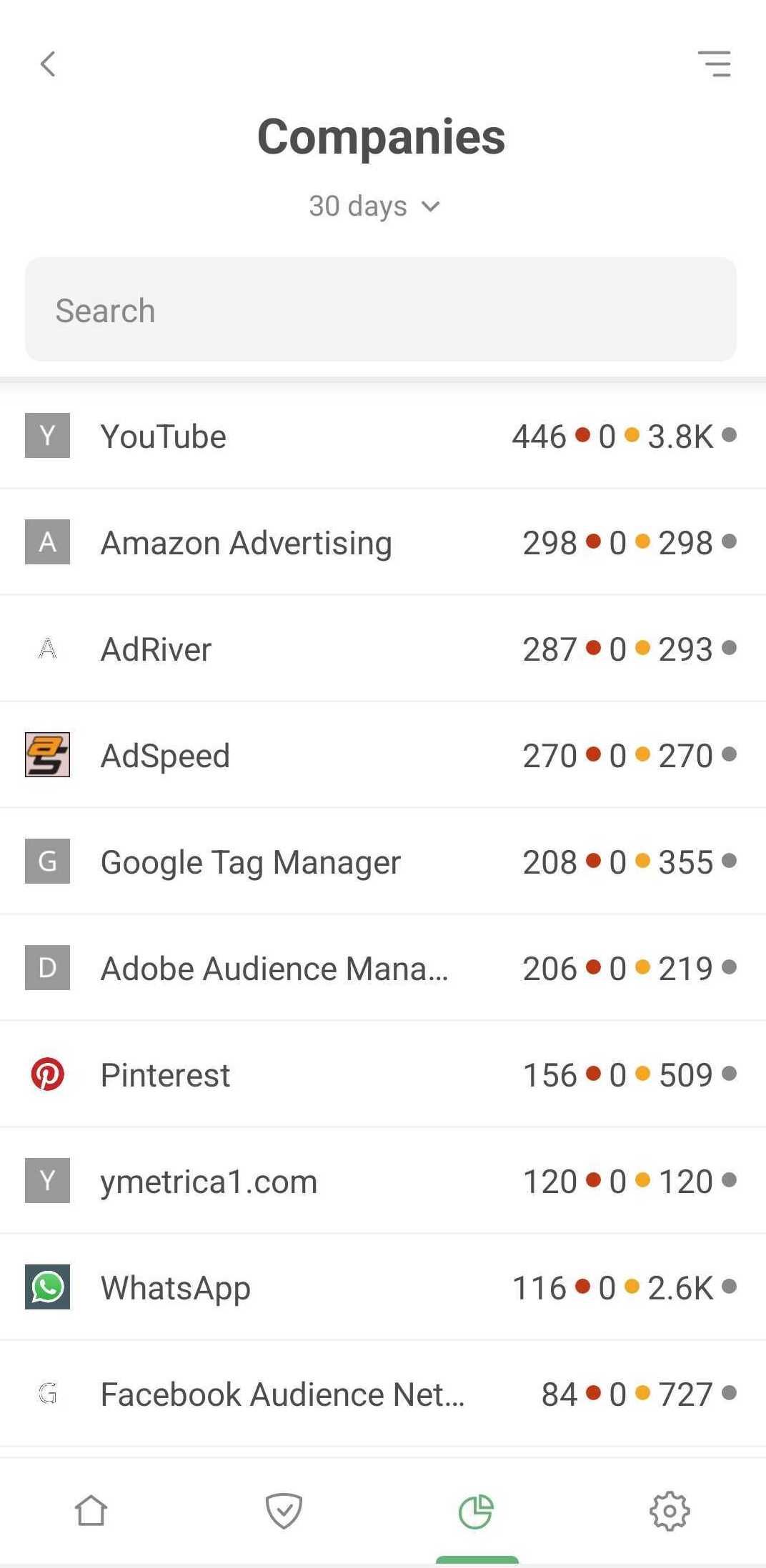
Companies *mobile_border

The Companies section delivers a unique view of your data. Here, you'll see all companies that received requests from your device. Simply tap View all companies to explore the full list, complete with the number of ads and trackers blocked per company, and total request counts.

But there's more. Tap any company for a wealth of information. Discover which domains requests are headed to, how many are blocked, and which apps sent them – all contributing to a comprehensive overview of your device's backstage activity.

Get more control over each app
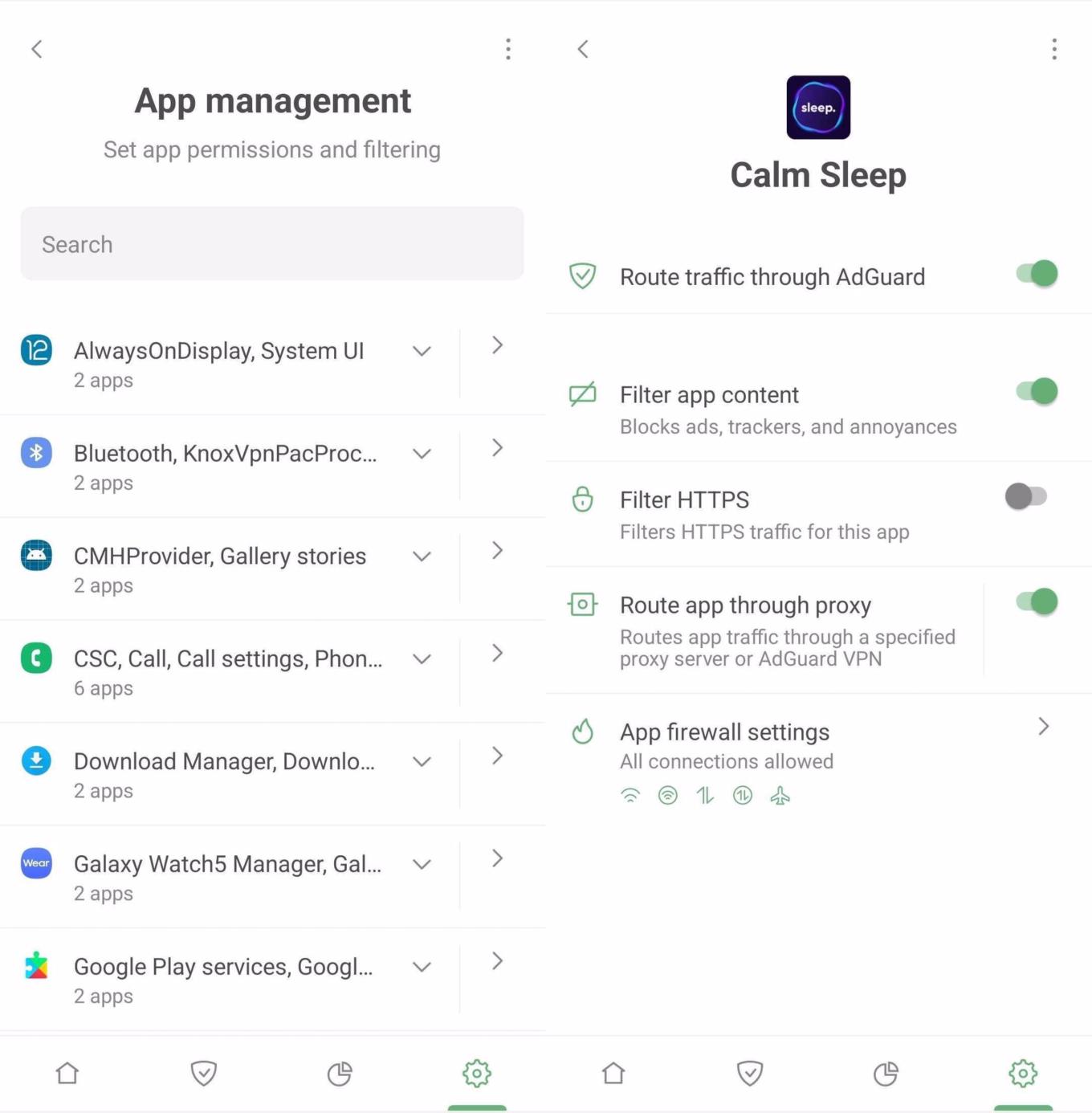
App management *mobile_border

The dedicated App management section is your control hub for each and every app on your device. Here, on an app-by-app basis, you can activate or deactivate traffic routing through AdGuard, content filtering, HTTPS filtering, or even direct traffic through a proxy server or AdGuard VPN. Plus, you can swiftly jump to the Firewall settings. For global actions, options like Route all through AdGuard or Stop routing for all are readily available.

Wrapping up

We've touched on just a fraction of AdGuard for Android's capabilities – the basic features that are easily accessible. They're enough to ensure a clean, ad-free, and secure online experience. However, if you're eager to delve into more sophisticated settings, check out the Knowledge base for additional insights.

Want new features?

Well, there are some options you can try!

  • You can file bug reports or feature requests to our open bug tracker on Github. You can also leave your reactions on feature requests. That’ll help us find out what most people are interested in. To leave your reaction, select the feature request you like and use an emoji to support its implementation.
  • Check out our public Telegram group where you can discuss AdGuard with developers in real time.
Svidela vam se ova objava?
AdGuard VPN AdGuard DNS AdGuard Mail AdGuard Wallet
Glavni ekran AdGuard za Windows
Ekran Zaštita u AdGuard za Windows, prikazuje funkcije zaštite i podešavanja
Ekran Statistika u AdGuard za Windows, prikazuje statistiku za blokirane oglase i trackere
Ekran Upravljanje aplikacijama u AdGuard za Windows, koji prikazuje opcije upravljanja zaštitom za aplikacije instalirane na uređaju
20.385 20385 recenzija
Odlično!

AdGuard — blokator reklama za Windows

AdGuard za Windows je više od blokatora oglasa. To je višenamenski alat koji blokira oglase, kontroliše pristup opasnim sajtovima, ubrzava učitavanje stranica i štiti decu od neprimerenog sadržaja
Preuzimanjem programa prihvate uslove licenčnog ugovora
Microsoft prodavnica
Preuzimanjem programa prihvate uslove licenčnog ugovora
AdGuard za Windows v.8.0, 14-dnevni probni period
Glavni ekran AdGuard za Mac
Ekran Stealth režima u AdGuard za Mac
20.385 20385 recenzija
Odlično!

AdGuard — blokator reklama za Mac

AdGuard za Mac je jedinstveni blokator oglasa dizajniran imajući u vidu macOS. Pored zaštite od dosadnih oglasa u pregledačima i aplikacijama, štiti vas od praćenja, fišinga i prevara
Preuzimanjem programa prihvate uslove licenčnog ugovora
Saznajte više
AdGuard za Mac v.2.19, 14-dnevni probni period
Glavni ekran AdGuard za Android
Ekran Zaštita od praćenja u AdGuard za Android
Ekran Upravljanje aplikacijama u AdGuard za Android, koji prikazuje opcije upravljanja zaštitom za aplikacije instalirane na uređaju
Ekran Statistika u AdGuard za Android, prikazuje statistiku za blokirane oglase i trackere
Glavni ekran privatnog pregledača AdGuard za Android
QR kod za preuzimanje AdGuard za Android
20.385 20385 recenzija
Odlično!

AdGuard — blokator reklama za Android

Blokira oglase i trackere u svim pregledačima, igrama i drugim aplikacijama. Štiti vašu privatnost i omogućava vam da kontrolišete kako vaše aplikacije koriste Internet. Instalira se putem APK-a
Preuzimanjem programa prihvate uslove licenčnog ugovora
Saznajte više
Skeniranje za preuzimanje
Korišćenje bilo kog QR-kod čitača dostupnog na uređaju
AdGuard za Android v.4.14, 14-dnevni probni period
Glavni ekran AdGuard za iOS
Ekran Zaštita u AdGuard za iOS, prikazuje funkcije zaštite i podešavanja
Ekran Statistika u AdGuard za iOS, prikazuje statistiku za blokirane oglase i trackere
QR kod za preuzimanje AdGuard za iOS
20.385 20385 recenzija
Odlično!

AdGuard — blokator reklama za iOS

Najbolji iOS blokator oglasa za iPhone i iPad. AdGuard uklanja sve vrste oglasa i trackera u Safariju i štiti vašu privatnost u svim aplikacijama na DNS nivou
Preuzimanjem programa prihvate uslove licenčnog ugovora
Saznajte više
Skeniranje za preuzimanje
Korišćenje bilo kog QR-kod čitača dostupnog na uređaju
AdGuard za iOS v.4.5
Glavni ekran AdGuard Content Blocker
Ekran filtera u AdGuard Content Blocker
Ekran podešavanja u AdGuard Content Blocker
20.385 20385 recenzija
Odlično!

AdGuard blokator sadržaja

AdGuard Content Blocker eliminiše sve vrste reklama u mobilnim pregledačima koji podržavaju tehnologiju blokiranja sadržaja – kao što su Samsung Internet i Yandex Browser. Njegove funkcije su ograničene u odnosu na AdGuard za Android, ali je besplatan, lako se instalira i efikasan je
Preuzimanjem programa prihvate uslove licenčnog ugovora
Saznajte više
AdGuard blokator sadržaja v.2.8
Glavni ekran AdGuard Browser Extension
Ekran Zaštita od praćenja u AdGuard Browser Extension
20.385 20385 recenzija
Odlično!

AdGuard proširenje za preglednike

AdGuard je najbrže i najlakše proširenje za blokiranje reklama koje uspešno blokira sve vrste reklama na svim veb stranicama! Izaberite AdGuard za preglednik koji koristite i uživajte u surfovanju bez reklama, koje će postati sigurno i brzo.
Instaliraj
Preuzimanjem programa prihvate uslove licenčnog ugovora
Instaliraj
Preuzimanjem programa prihvate uslove licenčnog ugovora
Instaliraj
Preuzimanjem programa prihvate uslove licenčnog ugovora
Instaliraj
Preuzimanjem programa prihvate uslove licenčnog ugovora
Instaliraj
Preuzimanjem programa prihvate uslove licenčnog ugovora
Saznajte više
Instaliraj
Preuzimanjem programa prihvate uslove licenčnog ugovora
Saznajte više
AdGuard proširenje za preglednike v.5.5
Glavni ekran AdGuard Assistant
20.385 20385 recenzija
Odlično!

AdGuard pomoćnik

Dodatak pregledača za prateće AdGuard desktop aplikacije. Omogućava vam da blokirate prilagođene stavke na vebsajtovima, dodate vebsajtove na listu dozvoljenih i šaljete izveštaje direktno iz pregledača
AdGuard pomoćnik v.1.4
20.385 20385 recenzija
Odlično!

AdGuard Home

AdGuard Home je mrežno rešenje za blokiranje oglasa i tragača. Instalirajte ga jednom na ruteru da biste pokrili sve uređaje na vašoj kućnoj mreži — nije potreban dodatni klijentski softver. Ovo je posebno važno za različite IoT uređaje koji često predstavljaju pretnju vašoj privatnosti
AdGuard Home v.0.107
Glavni ekran AdGuard Pro za iOS
Ekran zaštite u AdGuard Pro za iOS, koji prikazuje funkcije zaštite i podešavanja
Ekran statistike u AdGuard Pro za iOS, koji prikazuje statistiku za blokirane oglase i tragače
20.385 20385 recenzija
Odlično!

AdGuard Pro za iOS

AdGuard Pro za iOS dolazi sa svim naprednim funkcijama zaštite od blokiranja oglasa. Nudi iste alate kao i plaćena verzija AdGuard-a za iOS. Ističe se u blokiranju oglasa u Safariju i omogućava vam da prilagodite DNS postavke kako biste prilagodili svoju zaštitu. Blokira oglase u pretraživačima i aplikacijama, štiti vašu decu od neprikladnog sadržaja i čuva vaše lične podatke na sigurnom
Preuzimanjem programa prihvate uslove licenčnog ugovora
Saznajte više
AdGuard Pro za iOS v.4.5
Glavni ekran AdGuard Mini za Mac
Ekran zaštite za Safari u AdGuard Mini za Mac
Ekran Kreiranje pravila u AdGuard Mini za Mac
20.385 20385 recenzija
Odlično!

AdGuard Mini za Mac — Safari blokator oglasa

AdGuard Mini za Mac je moćan Safari blokator adova. Ova lagana aplikacija uklanja reklame, blokira praćenike i ubrzava učitavanje stranica. Pomaže vam da pretražujete veb u Safariju bez ometanja i da sačuvate svoje podatke privatnim
Instaliraj
Preuzimanjem programa prihvate uslove licenčnog ugovora
Saznajte više
AdGuard Mini za Mac v.2.3
Glavni ekran AdGuard za Android TV sa uključenom zaštitom
Ekran Blokiranje oglasa u AdGuard za Android TV, prikazuje njegove funkcije i podešavanja
Ekran Podešavanja u AdGuard za Android TV
Ekran Upravljanje aplikacijama u AdGuard za Android TV, prikazuje aplikacije gde su oglasi i trackeri blokirani
20.385 20385 recenzija
Odlično!

AdGuard za Android TV

AdGuard za Android TV je jedina aplikacija koja blokira oglase, čuva vašu privatnost i deluje kao zaštitni zid za vaš Smart TV. Dobijajte upozorenja o Veb pretnjama, koristite bezbedni DNS i koristite šifrovani saobraćaj. Opustite se i zaronite u omiljene serije sa vrhunskim obezbeđenjem i nula oglasa!
AdGuard za Android TV v.4.14, 14-dnevni probni period
Maskota AdGuard, Agnar, drži Linux pingvina
20.385 20385 recenzija
Odlično!

AdGuard za Linux

AdGuard za Linuk je prvi sistemski bloker oglasa na svetu. Blokirajte oglase i tragače na nivou uređaja, izaberite unapred instalirane filtere ili dodajte sopstvene — sve kroz interfejs komandne linije
AdGuard za Linux v.1.4
20.385 20385 recenzija
Odlično!

AdGuard Temp Mail

Besplatan generator privremenih email adresa koji vas čuva anonimnim i štiti vašu privatnost. Nema spama u vašem glavnom sandučetu!
20.385 20385 recenzija
Odlično!

AdGuard VPN

75 lokacija širom sveta

Pristup bilo kom sadržaju

Jako šifrovanje

Nema prikupljanja dnevnika

Najbrža veza

24/7 podrška

Probajte besplatno
Preuzimanjem programa prihvate uslove licenčnog ugovora
Saznajte više
20.385 20385 recenzija
Odlično!

AdGuard DNS

AdGuard DNS je alternativno rešenje za blokiranje reklama, zaštitu privatnosti i roditeljsku kontrolu. Lako se postavlja i besplatan je za korišćenje. On obezbeđuje neophodni minimum zaštite od reklama na mreži, praćenja i fišinga, bez obzira koju platformu i uređaj koristite.
20.385 20385 recenzija
Odlično!

AdGuard Mail

Zaštitite svoj identitet, izbegnite spam i održite bezbednost svog sandučeta uz naše alias-e i privremene e-adrese. Uživajte u našoj besplatnoj usluzi prosleđivanja emaila i aplikacijama za sve operativne sisteme.

20.385 20385 recenzija
Odlično!

AdGuard Wallet

Bezbedan i privatan kripto novčanik koji vam daje potpunu kontrolu nad vašom imovinom. Upravljajte više novčanika i otkrijte hiljade kriptovaluta za čuvanje, slanje i razmenu
Preuzimanje AdGuard Da biste instalirali AdGuard, kliknite na datoteku označenu strelicom Izaberite „Otvori“ i kliknite na „U redu“, a zatim sačekajte da se datoteka preuzme. U otvorenom prozoru prevucite ikonu AdGuard u fasciklu „Aplikacije“. Hvala vam što ste izabrali AdGuard! Izaberite „Otvori“ i kliknite na „U redu“, a zatim sačekajte da se datoteka preuzme. U otvorenom prozoru kliknite na „Instaliraj“. Hvala vam što ste izabrali AdGuard!


Instalirajte AdGuard na svoj mobilni uređaj
















































