Why is AdGuard not on Google Play?

One of the most common questions we’ve been asked over the years is why AdGuard for Android is not on the Google Play Store. The short answer is — it was not our decision. Google is the one to blame. In March 2013, Google started purging ad-blocking apps from its Play Store, claiming that they had violated a loosely worded section of the developer agreement that forbade apps from interfering with “other properties or services” of third parties. The following year, this purge affected the newly-released AdGuard for Android. The app was taken down from the Google Play Store on November 25, 2014, but you can still download AdGuard for Android directly from our official website.

If you want to know more about how it came to that, how we adapted our app distribution model after the Play Store massacre, why you can still find an AdGuard content blocking app (but not AdGuard for Android) on Google Play, and what our hopes are for the future, read on.

Timeline of Google’s crackdown on ad blockers

Until 2013, Google tolerated ad-blocking apps in its Play Store. At the time, there were a number of apps on Google Play that offered content filtering functionality, such as AdAway, AdFree, Ad Blocker, and AdBlock Plus. Everything changed on March 13, 2013, when Google pulled several ad blocking apps from its store overnight. The apps’ developers received identical notices from Google informing them that they had violated section 4.4 of the Developer Distribution Agreement. This was a bolt from the blue for the ad blocking community, as the clause Google used to punish them was not new.
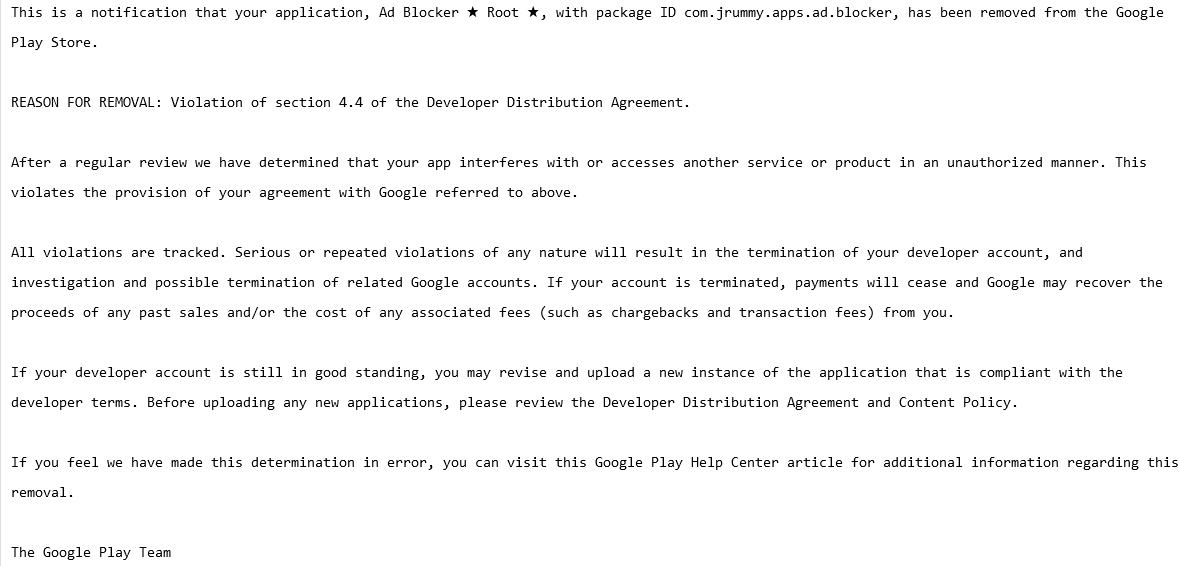
A screenshot of a notification that Ad Blocker received from Google
A notification that Ad Blocker received from Google. Source: Pastebin

In fact, section 4.4. “Prohibited Actions” was so vague that it could arguably be used to remove any app for almost any reason. Here is how the section was worded:

You agree that you will not engage in any activity with the Store, including the development or distribution of Products, that interferes with, disrupts, damages, or accesses in an unauthorized manner the devices, servers, networks, or other properties or services of any third party including, but not limited to, Android users, Google or any mobile network operator. You may not use customer information obtained from the Store to sell or distribute Products outside of the Store.

AdGuard for Android was not spared from the crackdown: on November 25, 2014, it was removed from the Play Store just two weeks after its official launch. The pretext was the same — violation of section 4.4. of the developer terms.

But it wasn’t the end of our story with the Google Play Store. In 2016, Google tweaked its developer policy to clarify what actions are prohibited, and for the first time directly named ad blockers as a target.
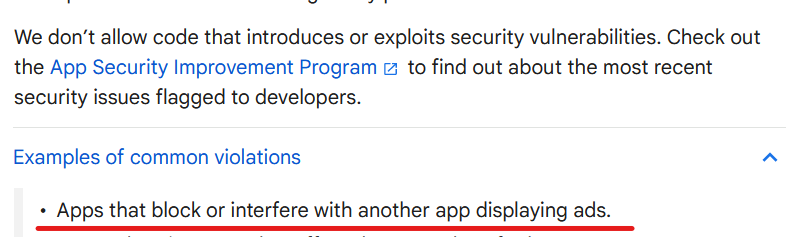
Google developer terms  are specifically directed against ad blockers
Source: Google’s developer policy

But there was a catch. The wording could be interpreted to leave some wiggle room for ad blocking applications that block ads within themselves, i.e. in-browser ad blockers. We can speculate as to why Google did not ban ad blocking outright, with one theory being that they did not want to incentivize side-loading and give Apple, which allows ad blocking in Safari, the upper hand. Whatever it was, ad blocking applications returned to the Google Play Store, but with severe limitations.

But I’ve found an AdGuard app on Google Play, what was that?

AdGuard Content Blocker, not to be confused with AdGuard for Android, is an example of such an app. It was launched in July 2016 and is the only AdGuard app available in the Google Play Store. Its scope is quite limited: it can only block ads in Yandex or Samsung Internet mobile browsers, the only ones that support the necessary content blocking API. If you want to use a different browser or filter traffic in other apps, AdGuard Content Blocker will not be able to help you.
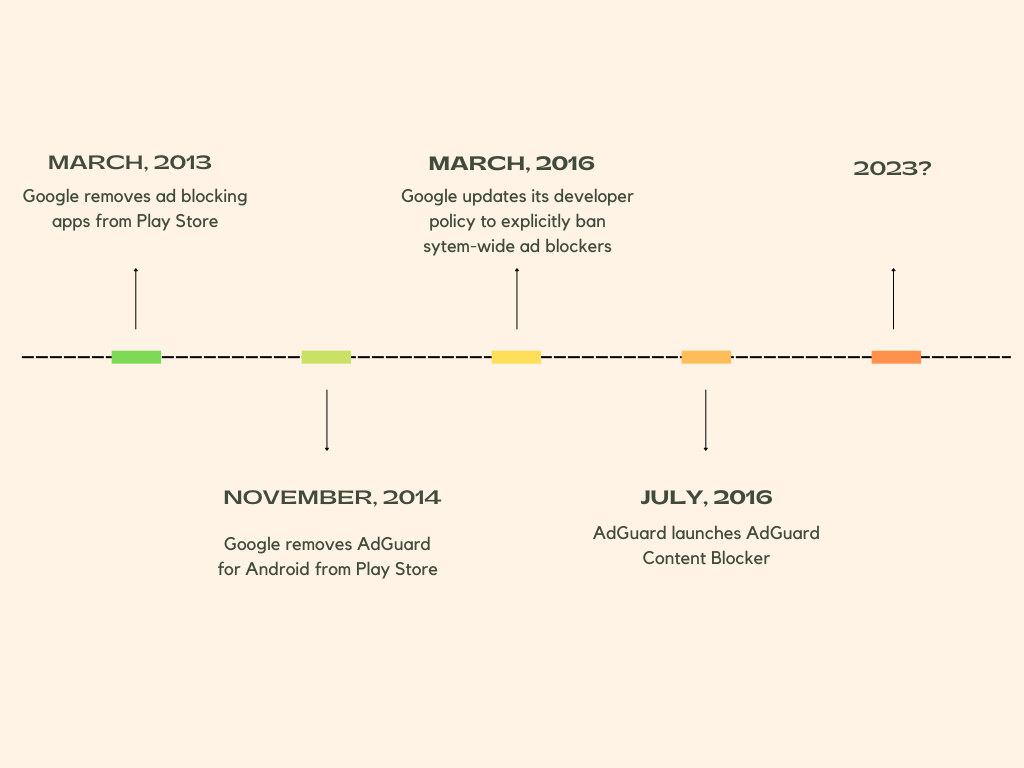
Timeline of AdGuard’s relationship with Google

Why did some apps survive Google’s ad blocking purge?

Still, there’s a lot of uncertainty when it comes to what ad blockers can and can’t do. Google has shown in the past that it can block ad blockers, even those designed specifically for mobile browsers that allow ad blockers, on a whim and unblock them, again, on a whim. Moreover, there are still apps on the Google Play Store that claim to block ads in other apps and work across all browsers, such as Blokada, and boast functionality that allows blocking trackers in apps, such as the DuckDuckGo Private Browser for Android.

Their developers can argue that they do not interfere with other apps and are therefore in compliance with Google’s policy. The thing is, with Google, you can never be sure. Google’s enforcement of its own rules has been inconsistent, and developers are left guessing whether their app will be found to have broken the rules. Not to mention, Google can tighten the screws on ad blockers by changing its policy at any time, so the threat of being pulled from the store hangs like a sword of Damocles over the ad blocking apps that are still available.

Is there life after Google Play Store?

After AdGuard for Android, which filters traffic for all apps on your device, could no longer be distributed through the Google Play Store, we had to find another way to reach our users and provide them with updates. We decided to distribute AdGuard for Android through our own website and some other channels. We also built our own self-sufficient update delivery system so you don’t have to worry about manually updating your app. All this time that we have been distributing AdGuard for Android from our official website we saw AdGuard for Android being installed nearly 30 million times, despite it not being on the Google Play Store.

Our other service, public AdGuard DNS, which doesn’t require installation to use, has now reached over 70 million daily users. So, in short, yes, there is life after and besides the Google Play Store, and overall we’re doing just fine despite the wrench Google has thrown in our works.

Will AdGuard for Android ever return to Google Play?

Of course, if we had the opportunity to return to the Google Play Store without sacrificing the app’s functionality, we would have taken it. The increased visibility this store provides would allow us to introduce the app to more people who can block ad-based tracking, thereby protecting their privacy. The reality is that most casual users install apps exclusively from the Google Play Store, and that means they are currently missing out on a chance to protect themselves from trackers and ads.
We believe that Google’s restrictions on ad blockers are unreasonable and anti-competitive. We hope that Google will change its stance and give people the choice and tools to protect themselves from pervasive tracking technology and invasive advertising.


Svidela vam se ova objava?
AdGuard VPN AdGuard DNS AdGuard Mail AdGuard Wallet
Glavni ekran AdGuard za Windows
Ekran Zaštita u AdGuard za Windows, prikazuje funkcije zaštite i podešavanja
Ekran Statistika u AdGuard za Windows, prikazuje statistiku za blokirane oglase i trackere
Ekran Upravljanje aplikacijama u AdGuard za Windows, koji prikazuje opcije upravljanja zaštitom za aplikacije instalirane na uređaju
20.385 20385 recenzija
Odlično!

AdGuard — blokator reklama za Windows

AdGuard za Windows je više od blokatora oglasa. To je višenamenski alat koji blokira oglase, kontroliše pristup opasnim sajtovima, ubrzava učitavanje stranica i štiti decu od neprimerenog sadržaja

Preuzimanjem programa prihvate uslove licenčnog ugovora
Microsoft prodavnica
Preuzimanjem programa prihvate uslove licenčnog ugovora
AdGuard za Windows v.8.0, 14-dnevni probni period
Glavni ekran AdGuard za Mac
Ekran Stealth režima u AdGuard za Mac
20.385 20385 recenzija
Odlično!

AdGuard — blokator reklama za Mac

AdGuard za Mac je jedinstveni blokator oglasa dizajniran imajući u vidu macOS. Pored zaštite od dosadnih oglasa u pregledačima i aplikacijama, štiti vas od praćenja, fišinga i prevara
Preuzimanjem programa prihvate uslove licenčnog ugovora
Saznajte više
AdGuard za Mac v.2.19, 14-dnevni probni period
Glavni ekran AdGuard za Android
Ekran Zaštita od praćenja u AdGuard za Android
Ekran Upravljanje aplikacijama u AdGuard za Android, koji prikazuje opcije upravljanja zaštitom za aplikacije instalirane na uređaju
Ekran Statistika u AdGuard za Android, prikazuje statistiku za blokirane oglase i trackere
Glavni ekran privatnog pregledača AdGuard za Android
QR kod za preuzimanje AdGuard za Android
20.385 20385 recenzija
Odlično!

AdGuard — blokator reklama za Android

Blokira oglase i trackere u svim pregledačima, igrama i drugim aplikacijama. Štiti vašu privatnost i omogućava vam da kontrolišete kako vaše aplikacije koriste Internet. Instalira se putem APK-a
Preuzimanjem programa prihvate uslove licenčnog ugovora
Saznajte više
Skeniranje za preuzimanje
Korišćenje bilo kog QR-kod čitača dostupnog na uređaju
AdGuard za Android v.4.14, 14-dnevni probni period
Glavni ekran AdGuard za iOS
Ekran Zaštita u AdGuard za iOS, prikazuje funkcije zaštite i podešavanja
Ekran Statistika u AdGuard za iOS, prikazuje statistiku za blokirane oglase i trackere
QR kod za preuzimanje AdGuard za iOS
20.385 20385 recenzija
Odlično!

AdGuard — blokator reklama za iOS

Najbolji iOS blokator oglasa za iPhone i iPad. AdGuard uklanja sve vrste oglasa i trackera u Safariju i štiti vašu privatnost u svim aplikacijama na DNS nivou
Preuzimanjem programa prihvate uslove licenčnog ugovora
Saznajte više
Skeniranje za preuzimanje
Korišćenje bilo kog QR-kod čitača dostupnog na uređaju
AdGuard za iOS v.4.5
Glavni ekran AdGuard Content Blocker
Ekran filtera u AdGuard Content Blocker
Ekran podešavanja u AdGuard Content Blocker
20.385 20385 recenzija
Odlično!

AdGuard blokator sadržaja

AdGuard Content Blocker eliminiše sve vrste reklama u mobilnim pregledačima koji podržavaju tehnologiju blokiranja sadržaja – kao što su Samsung Internet i Yandex Browser. Njegove funkcije su ograničene u odnosu na AdGuard za Android, ali je besplatan, lako se instalira i efikasan je
Preuzimanjem programa prihvate uslove licenčnog ugovora
Saznajte više
AdGuard blokator sadržaja v.2.8
Glavni ekran AdGuard Browser Extension
Ekran Zaštita od praćenja u AdGuard Browser Extension
20.385 20385 recenzija
Odlično!

AdGuard proširenje za preglednike

AdGuard je najbrže i najlakše proširenje za blokiranje reklama koje uspešno blokira sve vrste reklama na svim veb stranicama! Izaberite AdGuard za preglednik koji koristite i uživajte u surfovanju bez reklama, koje će postati sigurno i brzo.
Instaliraj
Preuzimanjem programa prihvate uslove licenčnog ugovora
Instaliraj
Preuzimanjem programa prihvate uslove licenčnog ugovora
Instaliraj
Preuzimanjem programa prihvate uslove licenčnog ugovora
Instaliraj
Preuzimanjem programa prihvate uslove licenčnog ugovora
Instaliraj
Preuzimanjem programa prihvate uslove licenčnog ugovora
Saznajte više
Instaliraj
Preuzimanjem programa prihvate uslove licenčnog ugovora
Saznajte više
AdGuard proširenje za preglednike v.5.5
Glavni ekran AdGuard Assistant
20.385 20385 recenzija
Odlično!

AdGuard pomoćnik

Dodatak pregledača za prateće AdGuard desktop aplikacije. Omogućava vam da blokirate prilagođene stavke na vebsajtovima, dodate vebsajtove na listu dozvoljenih i šaljete izveštaje direktno iz pregledača
AdGuard pomoćnik v.1.4
20.385 20385 recenzija
Odlično!

AdGuard Home

AdGuard Home je mrežno rešenje za blokiranje oglasa i tragača. Instalirajte ga jednom na ruteru da biste pokrili sve uređaje na vašoj kućnoj mreži — nije potreban dodatni klijentski softver. Ovo je posebno važno za različite IoT uređaje koji često predstavljaju pretnju vašoj privatnosti
AdGuard Home v.0.107
Glavni ekran AdGuard Pro za iOS
Ekran zaštite u AdGuard Pro za iOS, koji prikazuje funkcije zaštite i podešavanja
Ekran statistike u AdGuard Pro za iOS, koji prikazuje statistiku za blokirane oglase i tragače
20.385 20385 recenzija
Odlično!

AdGuard Pro za iOS

AdGuard Pro za iOS dolazi sa svim naprednim funkcijama zaštite od blokiranja oglasa. Nudi iste alate kao i plaćena verzija AdGuard-a za iOS. Ističe se u blokiranju oglasa u Safariju i omogućava vam da prilagodite DNS postavke kako biste prilagodili svoju zaštitu. Blokira oglase u pretraživačima i aplikacijama, štiti vašu decu od neprikladnog sadržaja i čuva vaše lične podatke na sigurnom
Preuzimanjem programa prihvate uslove licenčnog ugovora
Saznajte više
AdGuard Pro za iOS v.4.5
Glavni ekran AdGuard Mini za Mac
Ekran zaštite za Safari u AdGuard Mini za Mac
Ekran Kreiranje pravila u AdGuard Mini za Mac
20.385 20385 recenzija
Odlično!

AdGuard Mini za Mac — Safari blokator oglasa

AdGuard Mini za Mac je moćan Safari blokator adova. Ova lagana aplikacija uklanja reklame, blokira praćenike i ubrzava učitavanje stranica. Pomaže vam da pretražujete veb u Safariju bez ometanja i da sačuvate svoje podatke privatnim
Instaliraj
Preuzimanjem programa prihvate uslove licenčnog ugovora
Saznajte više
AdGuard Mini za Mac v.2.3
Glavni ekran AdGuard za Android TV sa uključenom zaštitom
Ekran Blokiranje oglasa u AdGuard za Android TV, prikazuje njegove funkcije i podešavanja
Ekran Podešavanja u AdGuard za Android TV
Ekran Upravljanje aplikacijama u AdGuard za Android TV, prikazuje aplikacije gde su oglasi i trackeri blokirani
20.385 20385 recenzija
Odlično!

AdGuard za Android TV

AdGuard za Android TV je jedina aplikacija koja blokira oglase, čuva vašu privatnost i deluje kao zaštitni zid za vaš Smart TV. Dobijajte upozorenja o Veb pretnjama, koristite bezbedni DNS i koristite šifrovani saobraćaj. Opustite se i zaronite u omiljene serije sa vrhunskim obezbeđenjem i nula oglasa!
AdGuard za Android TV v.4.14, 14-dnevni probni period
Maskota AdGuard, Agnar, drži Linux pingvina
20.385 20385 recenzija
Odlično!

AdGuard za Linux

AdGuard za Linuk je prvi sistemski bloker oglasa na svetu. Blokirajte oglase i tragače na nivou uređaja, izaberite unapred instalirane filtere ili dodajte sopstvene — sve kroz interfejs komandne linije
AdGuard za Linux v.1.4
20.385 20385 recenzija
Odlično!

AdGuard Temp Mail

Besplatan generator privremenih email adresa koji vas čuva anonimnim i štiti vašu privatnost. Nema spama u vašem glavnom sandučetu!
20.385 20385 recenzija
Odlično!

AdGuard VPN

75 lokacija širom sveta

Pristup bilo kom sadržaju

Jako šifrovanje

Nema prikupljanja dnevnika

Najbrža veza

24/7 podrška

Probajte besplatno
Preuzimanjem programa prihvate uslove licenčnog ugovora
Saznajte više
20.385 20385 recenzija
Odlično!

AdGuard DNS

AdGuard DNS je alternativno rešenje za blokiranje reklama, zaštitu privatnosti i roditeljsku kontrolu. Lako se postavlja i besplatan je za korišćenje. On obezbeđuje neophodni minimum zaštite od reklama na mreži, praćenja i fišinga, bez obzira koju platformu i uređaj koristite.
20.385 20385 recenzija
Odlično!

AdGuard Mail

Zaštitite svoj identitet, izbegnite spam i održite bezbednost svog sandučeta uz naše alias-e i privremene e-adrese. Uživajte u našoj besplatnoj usluzi prosleđivanja emaila i aplikacijama za sve operativne sisteme.
20.385 20385 recenzija
Odlično!

AdGuard Wallet

Bezbedan i privatan kripto novčanik koji vam daje potpunu kontrolu nad vašom imovinom. Upravljajte više novčanika i otkrijte hiljade kriptovaluta za čuvanje, slanje i razmenu
Preuzimanje AdGuard Da biste instalirali AdGuard, kliknite na datoteku označenu strelicom Izaberite „Otvori“ i kliknite na „U redu“, a zatim sačekajte da se datoteka preuzme. U otvorenom prozoru prevucite ikonu AdGuard u fasciklu „Aplikacije“. Hvala vam što ste izabrali AdGuard! Izaberite „Otvori“ i kliknite na „U redu“, a zatim sačekajte da se datoteka preuzme. U otvorenom prozoru kliknite na „Instaliraj“. Hvala vam što ste izabrali AdGuard!
Instalirajte AdGuard na svoj mobilni uređaj

















































