Meta’s rumored astronomical fee for Instagram and Facebook in EU: greedy much or just not serious?

When reports first surfaced that Meta was launching paid ad-free tiers for Instagram and Facebook in the EU, we were skeptical, to say the least. As much as we wanted to, it was impossible to take the news of Meta’s paid offering at face value, given that ad tracking has always been at the heart of the company’s business model. At the time, we were still waiting for details on how much Meta would charge for the great privilege of watching user-generated content without interruptions. And while we were happy to be proven wrong, we also had a nagging feeling that Meta was not serious about giving users a real choice between seeing ads and paying a reasonable fee. Rather, we felt it was more of a token gesture to placate the increasingly aggressive (and rightly so) EU privacy regulators challenging its data-hungry practices.

With the new Wall Street Journal report revealing how much these ad-free subscription tiers could actually cost, we had far fewer doubts about whether Meta’s offer was genuine or not: it wasn’t. The prices are not cheap, in fact they are so high that it seems pretty obvious to us that Meta never intended to offer a fair deal to its users.

So let’s cut to the chase, and dive right into the numbers.

Something does not add up

According to the report, Meta has informed the EU’s privacy watchdog in Ireland and digital competition regulators in Brussels that it wants to charge EU users a $10.5 (€10) monthly fee for using a single Facebook or Instagram account on desktop without ads. And if you want to use both Facebook and Instagram on your desktop (which would mean you’re in the absolute minority since only about 1.5% of people use Facebook on their desktop or laptop, while 98.5% use it on mobile devices), you’ll have to shell out extra $6.30 (€6) for an additional account. That means $17 to use both Instagram and Facebook on the desktop. However, if you’re more like the other 98.5% of people who prefer to use phones or tablets to access social media, you’ll have to fork over even more. On mobile, Meta reportedly plans to charge €13 per month ($13.6) for the ad-free access to one account, either Facebook or Instagram. And if we factor in an additional $6.30 (€6) for the remaining Instagram or Facebook account, the total comes to about $20 a month.
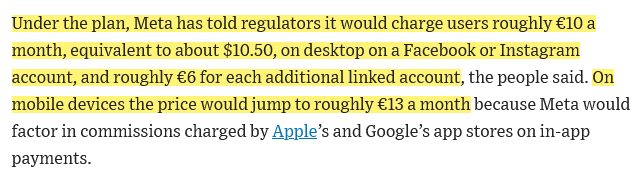
Screenshot from the WSJ report

Source: Wall Street Journal

Now, imagine you’re one of those people who occasionally uses Facebook and Instagram on both desktop and mobile. Apparently, if you want to enjoy an ad-free experience across all your devices in the EU, you’re going to have to tighten your belt, because the total amount you’ll have to pay is going to be… €10 + €6 + €13 + €6 = €35 ($36.7).

Of course, whether a certain fee is high or not is subjective. Some may argue that the price is not exorbitantly expensive, and that it is even a good value. So, let’s put things into perspective. For that, we’ll look at Netflix prices in the EU — depending on the particular EU country, the price can be lower or higher, so we choose Germany, one of the wealthiest countries in the EU per capita among the bigger states. The cheapest ad-free tier in Germany is Basic, it costs €7.99/month (compare to Meta’s €10 for one ad-free account) and allows watching movies on one device. The next cheapest tier is Standard, which costs €12.99/month. It allows you to stream on two devices and allows you to add extra member slots for €4.99 each a month (compare to Meta’s €6 for extra account).

Now, consider this: Netflix has a vast library of shows and movies, licensed content that it pays for and produces. It gives arguably much more value than Instagram or Facebook, which simply provide you access to user-generated content that Meta does not need to buy rights to (at least, not in the EU).

It doesn’t seem fair to pay more to see your friends’ and family’s posts without ads than to watch quality entertainment ad-free. Especially considering that, unlike with Netflix or any other streaming service where you are forced to sit through multiple ad breaks, with Facebook and Instagram you can at least scroll past ads in most cases.

And if you are suspicious of any attempts to compare incomparable, here’s another example — TikTok. The social media app is also reportedly considering an ad-free paid option, only that it is said to cost $4.99 a month.

But what if Meta simply wants to offset the per-user revenue it gets from showing targeted ads to Instagram and Facebook users? That wouldn’t make the fee more realistic, but it would at least explain its rationale.

Well, the issue is extremely tricky, and we can’t say for sure whether this is the case.
Screenshot from the Wall Street Journal report

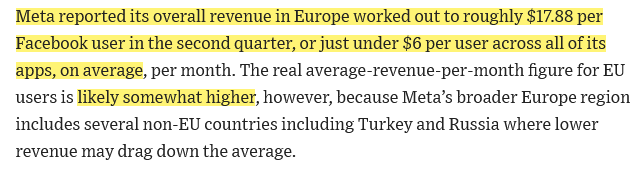
In its earnings report for Q2 2023 Meta says that it makes about $17.88 from each person who uses Facebook and Messenger in three months. That means it makes about $6 from each person who uses Facebook in one month. However, these numbers are not very reliable, because while they include “all sources of revenue, the number of MAUs used in this calculation only includes users of Facebook and Messenger” and not the users of Instagram or WhatsApp. But they are the best estimate we have of how much Meta earns from an individual user. The Journal also points out that Meta reports an average revenue per user for a broader Europe region, which also includes non-EU countries that could bring the average down. For example, in Russia, which is also part of broader Europe region in Meta’s report, all advertising on Meta platforms has been paused since March 2022.
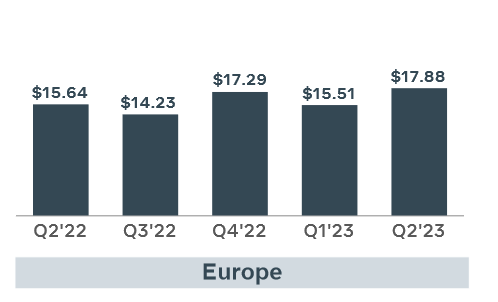
Average revenue per user reported by Meta in Europe

Source: Meta’s quarterly earnings report for Q2 2023

Why is Meta doing this?

Regardless of whether the rumored fees are comparable to what Meta is actually making by milking users’ data through targeted ads, it seems extremely unlikely that Meta really believes that its EU users are willing to shell out nearly $20 just to use ad-free versions of Instagram and Facebook on their phones.

The only conclusion that makes sense to us is that Meta is making a clumsy and very unconvincing attempt to persuade EU regulators that users actually have a choice about whether or not to trade their data for the access to the services.

The EU regulators have already forced Meta to seek consent from EU users for targeted ads. Under EU laws, this consent must be meaningful, but guess what would happen if Meta simply asked its users whether or not they want to be targeted by ads? Look no further than Apple and its App Tracking Transparency feature for the answer — only about 25% of Apple users opted into app tracking when they were faced with a choice. But since Meta does not want to lose the EU market, which generates between 21% and 25% of its global ad revenue, it had to give users some options, even despite its own volition. It seems like Meta’s latest cunning plan is to present users with a false dilemma: either accept ad targeting as usual or pay a ridiculously hefty fee for ad-free access. Besides, we cannot rule out the possibility that Meta will continue collecting your behavioral data and share it with third parties, even though it will no longer serve you ads based on that data on Facebook/Instagram.

It will be interesting to see how the EU regulators will react to this plan, and how much compromise they will accept. Will they allow Meta to get away with this, or will they demand more fairness (and perhaps lower fees) from the company? On our part, we hope they don't budge and will stand up for the rights and interests of the users.


Svidela vam se ova objava?
AdGuard VPN AdGuard DNS AdGuard Mail AdGuard Wallet
Glavni ekran AdGuard za Windows
Ekran Zaštita u AdGuard za Windows, prikazuje funkcije zaštite i podešavanja
Ekran Statistika u AdGuard za Windows, prikazuje statistiku za blokirane oglase i trackere
Ekran Upravljanje aplikacijama u AdGuard za Windows, koji prikazuje opcije upravljanja zaštitom za aplikacije instalirane na uređaju
20.385 20385 recenzija
Odlično!

AdGuard — blokator reklama za Windows

AdGuard za Windows je više od blokatora oglasa. To je višenamenski alat koji blokira oglase, kontroliše pristup opasnim sajtovima, ubrzava učitavanje stranica i štiti decu od neprimerenog sadržaja

Preuzimanjem programa prihvate uslove licenčnog ugovora
Microsoft prodavnica
Preuzimanjem programa prihvate uslove licenčnog ugovora
AdGuard za Windows v.8.0, 14-dnevni probni period
Glavni ekran AdGuard za Mac
Ekran Stealth režima u AdGuard za Mac
20.385 20385 recenzija
Odlično!

AdGuard — blokator reklama za Mac

AdGuard za Mac je jedinstveni blokator oglasa dizajniran imajući u vidu macOS. Pored zaštite od dosadnih oglasa u pregledačima i aplikacijama, štiti vas od praćenja, fišinga i prevara
Preuzimanjem programa prihvate uslove licenčnog ugovora
Saznajte više
AdGuard za Mac v.2.19, 14-dnevni probni period
Glavni ekran AdGuard za Android
Ekran Zaštita od praćenja u AdGuard za Android
Ekran Upravljanje aplikacijama u AdGuard za Android, koji prikazuje opcije upravljanja zaštitom za aplikacije instalirane na uređaju
Ekran Statistika u AdGuard za Android, prikazuje statistiku za blokirane oglase i trackere
Glavni ekran privatnog pregledača AdGuard za Android
QR kod za preuzimanje AdGuard za Android
20.385 20385 recenzija
Odlično!

AdGuard — blokator reklama za Android

Blokira oglase i trackere u svim pregledačima, igrama i drugim aplikacijama. Štiti vašu privatnost i omogućava vam da kontrolišete kako vaše aplikacije koriste Internet. Instalira se putem APK-a
Preuzimanjem programa prihvate uslove licenčnog ugovora
Saznajte više
Skeniranje za preuzimanje
Korišćenje bilo kog QR-kod čitača dostupnog na uređaju
AdGuard za Android v.4.14, 14-dnevni probni period
Glavni ekran AdGuard za iOS
Ekran Zaštita u AdGuard za iOS, prikazuje funkcije zaštite i podešavanja
Ekran Statistika u AdGuard za iOS, prikazuje statistiku za blokirane oglase i trackere
QR kod za preuzimanje AdGuard za iOS
20.385 20385 recenzija
Odlično!

AdGuard — blokator reklama za iOS

Najbolji iOS blokator oglasa za iPhone i iPad. AdGuard uklanja sve vrste oglasa i trackera u Safariju i štiti vašu privatnost u svim aplikacijama na DNS nivou
Preuzimanjem programa prihvate uslove licenčnog ugovora
Saznajte više
Skeniranje za preuzimanje
Korišćenje bilo kog QR-kod čitača dostupnog na uređaju
AdGuard za iOS v.4.5
Glavni ekran AdGuard Content Blocker
Ekran filtera u AdGuard Content Blocker
Ekran podešavanja u AdGuard Content Blocker
20.385 20385 recenzija
Odlično!

AdGuard blokator sadržaja

AdGuard Content Blocker eliminiše sve vrste reklama u mobilnim pregledačima koji podržavaju tehnologiju blokiranja sadržaja – kao što su Samsung Internet i Yandex Browser. Njegove funkcije su ograničene u odnosu na AdGuard za Android, ali je besplatan, lako se instalira i efikasan je
Preuzimanjem programa prihvate uslove licenčnog ugovora
Saznajte više
AdGuard blokator sadržaja v.2.8
Glavni ekran AdGuard Browser Extension
Ekran Zaštita od praćenja u AdGuard Browser Extension
20.385 20385 recenzija
Odlično!

AdGuard proširenje za preglednike

AdGuard je najbrže i najlakše proširenje za blokiranje reklama koje uspešno blokira sve vrste reklama na svim veb stranicama! Izaberite AdGuard za preglednik koji koristite i uživajte u surfovanju bez reklama, koje će postati sigurno i brzo.
Instaliraj
Preuzimanjem programa prihvate uslove licenčnog ugovora
Instaliraj
Preuzimanjem programa prihvate uslove licenčnog ugovora
Instaliraj
Preuzimanjem programa prihvate uslove licenčnog ugovora
Instaliraj
Preuzimanjem programa prihvate uslove licenčnog ugovora
Instaliraj
Preuzimanjem programa prihvate uslove licenčnog ugovora
Saznajte više
Instaliraj
Preuzimanjem programa prihvate uslove licenčnog ugovora
Saznajte više
AdGuard proširenje za preglednike v.5.5
Glavni ekran AdGuard Assistant
20.385 20385 recenzija
Odlično!

AdGuard pomoćnik

Dodatak pregledača za prateće AdGuard desktop aplikacije. Omogućava vam da blokirate prilagođene stavke na vebsajtovima, dodate vebsajtove na listu dozvoljenih i šaljete izveštaje direktno iz pregledača
AdGuard pomoćnik v.1.4
20.385 20385 recenzija
Odlično!

AdGuard Home

AdGuard Home je mrežno rešenje za blokiranje oglasa i tragača. Instalirajte ga jednom na ruteru da biste pokrili sve uređaje na vašoj kućnoj mreži — nije potreban dodatni klijentski softver. Ovo je posebno važno za različite IoT uređaje koji često predstavljaju pretnju vašoj privatnosti
AdGuard Home v.0.107
Glavni ekran AdGuard Pro za iOS
Ekran zaštite u AdGuard Pro za iOS, koji prikazuje funkcije zaštite i podešavanja
Ekran statistike u AdGuard Pro za iOS, koji prikazuje statistiku za blokirane oglase i tragače
20.385 20385 recenzija
Odlično!

AdGuard Pro za iOS

AdGuard Pro za iOS dolazi sa svim naprednim funkcijama zaštite od blokiranja oglasa. Nudi iste alate kao i plaćena verzija AdGuard-a za iOS. Ističe se u blokiranju oglasa u Safariju i omogućava vam da prilagodite DNS postavke kako biste prilagodili svoju zaštitu. Blokira oglase u pretraživačima i aplikacijama, štiti vašu decu od neprikladnog sadržaja i čuva vaše lične podatke na sigurnom
Preuzimanjem programa prihvate uslove licenčnog ugovora
Saznajte više
AdGuard Pro za iOS v.4.5
Glavni ekran AdGuard Mini za Mac
Ekran zaštite za Safari u AdGuard Mini za Mac
Ekran Kreiranje pravila u AdGuard Mini za Mac
20.385 20385 recenzija
Odlično!

AdGuard Mini za Mac — Safari blokator oglasa

AdGuard Mini za Mac je moćan Safari blokator adova. Ova lagana aplikacija uklanja reklame, blokira praćenike i ubrzava učitavanje stranica. Pomaže vam da pretražujete veb u Safariju bez ometanja i da sačuvate svoje podatke privatnim
Instaliraj
Preuzimanjem programa prihvate uslove licenčnog ugovora
Saznajte više
AdGuard Mini za Mac v.2.3
Glavni ekran AdGuard za Android TV sa uključenom zaštitom
Ekran Blokiranje oglasa u AdGuard za Android TV, prikazuje njegove funkcije i podešavanja
Ekran Podešavanja u AdGuard za Android TV
Ekran Upravljanje aplikacijama u AdGuard za Android TV, prikazuje aplikacije gde su oglasi i trackeri blokirani
20.385 20385 recenzija
Odlično!

AdGuard za Android TV

AdGuard za Android TV je jedina aplikacija koja blokira oglase, čuva vašu privatnost i deluje kao zaštitni zid za vaš Smart TV. Dobijajte upozorenja o Veb pretnjama, koristite bezbedni DNS i koristite šifrovani saobraćaj. Opustite se i zaronite u omiljene serije sa vrhunskim obezbeđenjem i nula oglasa!
AdGuard za Android TV v.4.14, 14-dnevni probni period
Maskota AdGuard, Agnar, drži Linux pingvina
20.385 20385 recenzija
Odlično!

AdGuard za Linux

AdGuard za Linuk je prvi sistemski bloker oglasa na svetu. Blokirajte oglase i tragače na nivou uređaja, izaberite unapred instalirane filtere ili dodajte sopstvene — sve kroz interfejs komandne linije
AdGuard za Linux v.1.4
20.385 20385 recenzija
Odlično!

AdGuard Temp Mail

Besplatan generator privremenih email adresa koji vas čuva anonimnim i štiti vašu privatnost. Nema spama u vašem glavnom sandučetu!
20.385 20385 recenzija
Odlično!

AdGuard VPN

75 lokacija širom sveta

Pristup bilo kom sadržaju

Jako šifrovanje

Nema prikupljanja dnevnika

Najbrža veza

24/7 podrška

Probajte besplatno
Preuzimanjem programa prihvate uslove licenčnog ugovora
Saznajte više
20.385 20385 recenzija
Odlično!

AdGuard DNS

AdGuard DNS je alternativno rešenje za blokiranje reklama, zaštitu privatnosti i roditeljsku kontrolu. Lako se postavlja i besplatan je za korišćenje. On obezbeđuje neophodni minimum zaštite od reklama na mreži, praćenja i fišinga, bez obzira koju platformu i uređaj koristite.
20.385 20385 recenzija
Odlično!

AdGuard Mail

Zaštitite svoj identitet, izbegnite spam i održite bezbednost svog sandučeta uz naše alias-e i privremene e-adrese. Uživajte u našoj besplatnoj usluzi prosleđivanja emaila i aplikacijama za sve operativne sisteme.
20.385 20385 recenzija
Odlično!

AdGuard Wallet

Bezbedan i privatan kripto novčanik koji vam daje potpunu kontrolu nad vašom imovinom. Upravljajte više novčanika i otkrijte hiljade kriptovaluta za čuvanje, slanje i razmenu
Preuzimanje AdGuard Da biste instalirali AdGuard, kliknite na datoteku označenu strelicom Izaberite „Otvori“ i kliknite na „U redu“, a zatim sačekajte da se datoteka preuzme. U otvorenom prozoru prevucite ikonu AdGuard u fasciklu „Aplikacije“. Hvala vam što ste izabrali AdGuard! Izaberite „Otvori“ i kliknite na „U redu“, a zatim sačekajte da se datoteka preuzme. U otvorenom prozoru kliknite na „Instaliraj“. Hvala vam što ste izabrali AdGuard!
Instalirajte AdGuard na svoj mobilni uređaj

















































