Perplexity AI introduces ads — could this be the end of unbiased AI search?

It’s been roughly two years since AI-powered search engines first made their mark on the tech scene, and not long after, they began to introduce ads in their outputs. Bing AI (now Copilot) was the first to experiment with ads, and Microsoft is still refining its various ad formats in its AI-powered search engine. Recently, ads have started appearing in Google Overview, the AI-generated summaries of Google Search results, and they might eventually make their way to ChatGPT. OpenAI has stated that while they have no immediate plans to incorporate ads, they’re not ruling out the possibility in the future.

So, it’s not all that surprising that Perplexity AI, the first search engine built from the ground up with artificial intelligence, has also followed suit by introducing ads alongside its AI-generated answers. Founded in August 2022 by a former OpenAI employee, Perplexity AI has quickly become a buzz word in the sphere of technology, enamoured by AI, and an investor darling. With big names like Jeff Bezos backing the company, Perplexity is now seeking a valuation of $9 billion and hopes to raise $500 million in its latest fundraising round.

Ads in Perplexity AI now appear in two distinct spots: as follow-up questions to the main query, and as video ads shown separately on the right-hand sidebar.

Sponsored ads in Perplexity

The company says that any and all advertising will be labeled as “sponsored,” and that answers to these Sponsored Questions will still be generated by the technology, not influenced or written by the brands sponsoring them.

How much does an AI-powered engine cost?

When the era of AI-powered search engines first began, none of them featured ads. For a brief moment, some of us might have entertained the idea that this could be the way forward — that we’d have a clean, ad-free search experience. But that could have been nothing more than a pipe dream. The subscription model, or the freemium model where certain features are locked behind a paywall, has so far proven to be largely unsustainable, at least when it comes to search engines. We’ve seen ad-free, subscription-based search engines like Neeva shut down, (though, it’s up for a debate whether it would, have not the market been monopolized by Google), and privacy champions like Mozilla (the maker of Firefox) entrenching themselves deeper into the advertising industry.

The reality is, companies behind search engine products have not found any other way to monetize them on a large scale. Running ads seem to be the most straightforward and surefire way of doing so. One crucial factor that makes AI-powered search engines even less sustainable is that the companies behind them need to cover the hefty costs associated with the large language models (LLMs) that power them.

Running these models doesn’t come cheap — pricing for inference, which is the process of generating responses from an AI model, can vary significantly. For example, GPT-4 can cost up to $4 per 1,000 queries, while GPT-4 mini is cheaper at $0.24 per 1,000 queries, and Gemini costs around $0.12 per 1,000 queries. With models like Claude 3.5 Sonnet, the price rises to about $6 per 1,000 queries. This means that every search query and AI-generated response is draining company budgets, particularly when you scale up to millions of daily users. For instance, running ChatGPT incurs an estimated $700,000 per day in hardware inference costs.
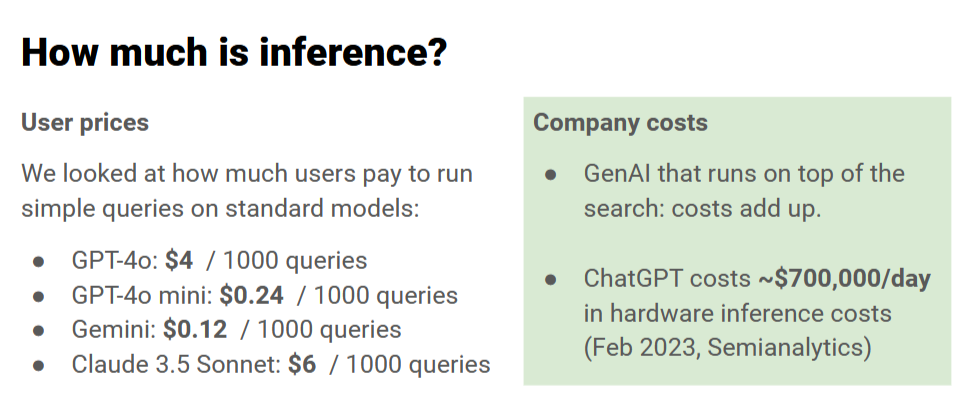
Chatbot inference costs

Perplexity, which operates on a freemium model, uses a standalone LLM based on GPT-3.5 for the free version, while the premium Perplexity Pro unlocks more advanced models like GPT-4, Claude 3.5, and proprietary in-house LLMs.
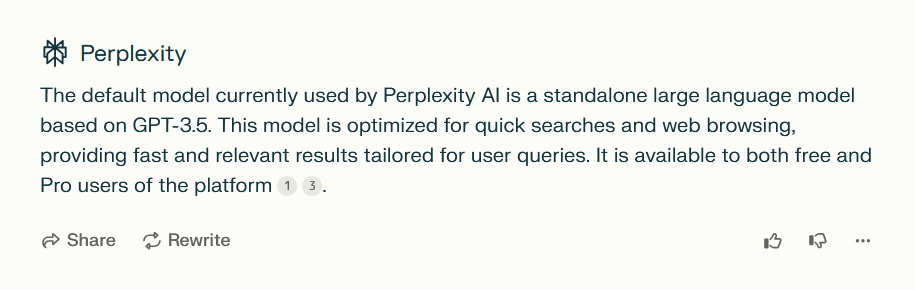
Perplexity LLM description

With costs adding up quickly, it’s clear that maintaining an AI-powered search experience is far from cheap, and finding a sustainable financial model is a significant challenge. Perplexity itself says that subscriptions alone just don’t cut it. But while it says that the ad formats may evolve over time, it insists that two principles will remain at the heart of their approach:

  1. The ads will not affect their commitment to providing “direct unbiased answers”.
  2. They will never share your personal information with advertisers.

Of course, these are Perplexity’s own claims, and while they claim their ad strategy is designed to complement the user experience, it remains to be seen how this plays out in practice.

If it looks like a duck and quacks like a duck...

In addition to the ads clearly labeled as “sponsored,” Perplexity has launched a new AI-powered “shopping assistant” that shows you product cards after you ask a shopping-related question, like “What are the best Christmas presents to buy?” For Perplexity Pro users in the US, there’s also the added convenience of a feature called “Buy with Pro,” which lets you check out directly on the Perplexity site or app. If “Buy with Pro” isn’t available for a particular product, you’re redirected to the merchant’s website to finish the transaction.

Perplexity is adamant that these are no ads although they eerily resemble such. According to the company, “When you ask Perplexity a shopping question, you’ll still get the precise, objective answers you expect, plus easy-to-read product cards.” They insist these cards are not sponsored, but rather “unbiased recommendations, tailored to your search by our AI.” This new feature is the result of a collaboration with platform integrations, including Shopify.

The product cards appear after the AI-generated answer, nestled below the ‘related questions’ section. When asking for the best Christmas presents, we were shown as many as five product cards — massive ones that take up a huge portion of the screen, requiring a fair bit of scrolling to move past them.
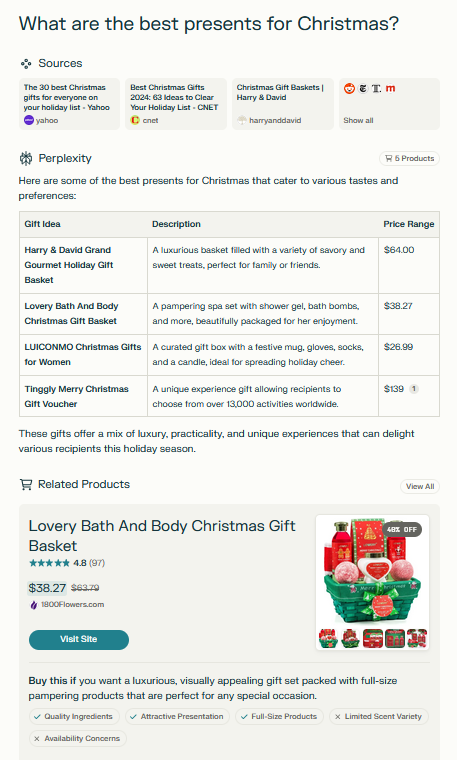
Search results product cards *mobile

Search results product cards *mobile

While Perplexity mentions that the product recommendations are “unbiased” and not sponsored, the reality is that AI algorithms often rely on data from merchants, reviews, and other third-party platforms. If the algorithm is influenced by sales trends, top-rated products, or specific partnerships (like Shopify), those influences might skew the recommendations, even if the AI itself isn’t directly “biased.” If a merchant pays to be featured more prominently on the platform or offers incentives to get listed more often, it could introduce subtle biases in what the AI surfaces.

Blocking the ads: does it require any new approaches?

You might assume that the rise of more sophisticated search engines would lead to even more advanced ads, and to some extent, that’s true. We’ve already seen examples of ads blending seamlessly into search results — becoming part of the response itself. Blocking those types of ads would require a more sophisticated approach, like hijacking user queries or processing chatbot responses with an ad-blocking LLM. It may sound too complex, and it really is. Click here to try the demo that showcases how blended ads work and how they can be blocked.

However, with Perplexity AI, things aren’t quite as complicated — at least not yet. The ads you encounter here can still be blocked using more traditional methods, like setting up filtering rules specifically targeting the sponsored sections.

As for the shopping cards that pop up after you ask a question, they can definitely be a bit much, especially when they take over the screen. Luckily, these can also be dealt with. Taking into account user feedback to that Perplexity feature and the fact that there’s no option to disable or hide the product cards, we’ve decided to introduce a rule in our Other Annoyances Filter to hide the product cards within the body of the answer. However, since we recognize that this feature might still be useful to some, those who wish to view the products can simply click “All Products” at the bottom of the response, which will open the product cards in a separate window.

All in all, it’s not about reinventing the wheel — just applying some conventional techniques to clear out the clutter. So, for now, at least, blocking ads on Perplexity doesn’t require breaking out any advanced tricks, but we cannot rule out that at some point it might.

Conclusion

The arrival of ads in AI-powered search engines seems inevitable. Google, originally launched without ads, incorporated them in 2000 and has never looked back. Similarly, as the costs of running AI models increase, search engines like Perplexity AI are turning to ads as a means of monetization. As for whether ads undermine the unbiased nature of a search engine, it’s a complex issue. While sponsored questions are clearly labeled, the answers themselves can be influenced by the sponsorship. For example, if a sponsored question mentions a brand like Whole Foods, the answer will prioritize that brand, even though the response isn’t labeled as sponsored.

The introduction of shopping cards adds another layer of controversy, as it’s difficult to reconcile claims of “unbiased” recommendations with the involvement of partnerships and data from merchants. Despite these claims, it’s hard to see how such features could be entirely free of bias. Ultimately, as AI-powered search engines evolve, the balance between monetization and maintaining trust with users will remain a challenging issue.


Bu gönderiyi beğendiniz mi?
AdGuard VPN AdGuard DNS AdGuard Mail AdGuard Wallet
Windows için AdGuard'ın ana ekranı
Windows için AdGuard'ın koruma özelliklerini ve ayarlarını gösteren koruma ekranı
Windows için AdGuard'ın engellenen reklamların ve izleyicilerin istatistiklerini gösteren İstatistik ekranı
Windows için AdGuard'ın uygulama yönetimi ekranı, cihazda yüklü uygulamalar için koruma yönetimi seçeneklerini göstermektedir
21.371 21371 kullanıcı incelemesi
Mükemmel!

AdGuard: Windows için reklam engelleyici

Windows için AdGuard, bir reklam engelleyiciden daha fazlasıdır. Reklamları engelleyen, tehlikeli sitelere erişimi kontrol eden, sayfanın açılışını hızlandıran ve çocukları uygunsuz içerikten koruyan çok amaçlı bir araçtır

Programı indirerek Lisans sözleşmesi şartlarını kabul etmiş olursunuz
Microsoft Mağazası
Programı indirerek Lisans sözleşmesi şartlarını kabul etmiş olursunuz
Windows için AdGuard v8.0, 14 gün deneme süresi
Mac için AdGuard'ın ana ekranı
Mac için AdGuard'ın Gizlilik Modu ekranı
21.371 21371 kullanıcı incelemesi
Mükemmel!

AdGuard: Mac için reklam engelleyici

Mac için AdGuard, macOS düşünülerek tasarlanmış benzersiz bir reklam engelleyicidir. Sizi tarayıcılar ve uygulamalardaki rahatsız edici reklamlardan korumanın yanı sıra, izleme, kimlik avı ve dolandırıcılıktan da korur
Programı indirerek Lisans sözleşmesi şartlarını kabul etmiş olursunuz
Devamını oku
Mac için AdGuard v2.19, 14 gün deneme süresi
Android için AdGuard'ın ana ekranı
Android için AdGuard'ın İzleme koruması ekranı
Android için AdGuard'ın uygulama yönetimi ekranı, cihazda yüklü uygulamalar için koruma yönetimi seçeneklerini göstermektedir
Android için AdGuard'ın engellenen reklamların ve izleyicilerin istatistiklerini gösteren İstatistik ekranı
Android için AdGuard'ın özel tarayıcısının ana ekranı
Android için AdGuard'ı indirme QR kodu
21.371 21371 kullanıcı incelemesi
Mükemmel!

AdGuard: Android için reklam engelleyici

Tüm tarayıcılarda, oyunlarda ve diğer uygulamalarda reklamları ve izleyicileri engeller. Gizliliğinizi korur ve uygulamalarınızın interneti nasıl kullandığını kontrol etmenizi sağlar. APK aracılığıyla yüklenir
Programı indirerek Lisans sözleşmesi şartlarını kabul etmiş olursunuz
Devamını oku
İndirmek için tara
Cihazınızda bulunan herhangi bir QR kod okuyucuyu kullanın
Android için AdGuard v4.14, 14 gün deneme süresi
iOS için AdGuard'ın ana ekranı
iOS için AdGuard'ın koruma özelliklerini ve ayarlarını gösteren koruma ekranı
iOS için AdGuard'ın engellenen reklamların ve izleyicilerin istatistiklerini gösteren İstatistik ekranı
iOS için AdGuard'ı indirme QR kodu
21.371 21371 kullanıcı incelemesi
Mükemmel!

AdGuard: iOS için reklam engelleyici

iPhone ve iPad için en iyi iOS reklam engelleyici. AdGuard, Safari'de her türlü reklamı ve izleyiciyi ortadan kaldırır ve DNS düzeyinde tüm uygulamalarda gizliliğinizi korur
Programı indirerek Lisans sözleşmesi şartlarını kabul etmiş olursunuz
Devamını oku
İndirmek için tara
Cihazınızda bulunan herhangi bir QR kod okuyucuyu kullanın
iOS için AdGuard v4.5
AdGuard İçerik Engelleyicinin ana ekranı
AdGuard İçerik Engelleyicinin Filtreler ekranı
AdGuard İçerik Engelleyicinin Ayarlar ekranı
21.371 21371 kullanıcı incelemesi
Mükemmel!

AdGuard İçerik Engelleyici

AdGuard Content Blocker, içerik engelleme teknolojisini destekleyen mobil tarayıcılarda her türlü reklamı ortadan kaldırır — örneğin, Samsung Internet ve Yandex Browser. Android için AdGuard'a kıyasla özellikleri sınırlıdır, ancak ücretsiz, yüklemesi kolay ve etkilidir
Programı indirerek Lisans sözleşmesi şartlarını kabul etmiş olursunuz
Devamını oku
AdGuard İçerik Engelleyici v2.8
AdGuard Tarayıcı Uzantısı'nın ana ekranı
AdGuard Tarayıcı Uzantısı'nın İzleme koruması ekranı
21.371 21371 kullanıcı incelemesi
Mükemmel!

AdGuard Tarayıcı Uzantısı

AdGuard, tüm web sayfalarındaki tüm reklam türlerini etkili bir şekilde engelleyen en hızlı ve en hafif reklam engelleme uzantısıdır! Kullandığınız tarayıcı için AdGuard'ı seçin ve reklamsız, hızlı ve güvenli gezinmenin tadını çıkarın.
Yükle
Programı indirerek Lisans sözleşmesi şartlarını kabul etmiş olursunuz
Yükle
Programı indirerek Lisans sözleşmesi şartlarını kabul etmiş olursunuz
Yükle
Programı indirerek Lisans sözleşmesi şartlarını kabul etmiş olursunuz
Yükle
Programı indirerek Lisans sözleşmesi şartlarını kabul etmiş olursunuz
Yükle
Programı indirerek Lisans sözleşmesi şartlarını kabul etmiş olursunuz
Devamını oku
Yükle
Programı indirerek Lisans sözleşmesi şartlarını kabul etmiş olursunuz
Devamını oku
AdGuard Tarayıcı Uzantısı v5.5
AdGuard Asistanın ana ekranı
21.371 21371 kullanıcı incelemesi
Mükemmel!

AdGuard Asistanı

AdGuard masaüstü uygulamaları için bir yardımcı tarayıcı uzantısıdır. Bu uzantı, sitelerde özel öğeleri engellemenize, siteleri izin listesine eklemenize ve tarayıcınızdan doğrudan bildirimler göndermenize izin verir
AdGuard Asistanı v1.4
21.371 21371 kullanıcı incelemesi
Mükemmel!

AdGuard Home

AdGuard Home, reklamları ve izleyicileri engellemek için ağ tabanlı bir çözümdür. Ev ağınızdaki tüm cihazları kapsaması için yönlendiricinize bir kez kurun — ek istemci yazılımı gerekmez. Bu özellikle gizliliğinize tehdit oluşturan çeşitli IoT cihazları için önemlidir
AdGuard Home v0.107
iOS için AdGuard Pro'nun ana ekranı
iOS için AdGuard Pro'nun koruma özelliklerini ve ayarlarını gösteren Koruma ekranı
iOS için AdGuard Pro'nun İstatistikler ekranı, engellenen reklamlar ve izleyicilere ilişkin istatistikleri gösterir
21.371 21371 kullanıcı incelemesi
Mükemmel!

iOS için AdGuard Pro

AdGuard Pro for iOS, tüm gelişmiş reklam engelleme koruma özellikleri etkin olarak gelir. iOS için ücretli AdGuard sürümüyle aynı araçları sunar. Safari'de reklamları engellemede mükemmeldir ve korumanızı özelleştirmeniz için DNS ayarlarını kişiselleştirmenize olanak tanır. Tarayıcılar ve uygulamalarda reklamları engeller, çocuklarınızı uygunsuz içeriklerden korur ve kişisel verilerinizi güvenli tutar
Programı indirerek Lisans sözleşmesi şartlarını kabul etmiş olursunuz
Devamını oku
iOS için AdGuard Pro v4.5
Mac için AdGuard Mini'nin ana ekranı
Mac için AdGuard Mini'nin Safari koruma ekranı
Mac için AdGuard Mini'nin kural oluşturma ekranı
21.371 21371 kullanıcı incelemesi
Mükemmel!

AdGuard Mini for Mac — Safari reklam engelleyici

Mac için AdGuard Mini, güçlü bir Safari reklam engelleyicisidir. Bu hafif uygulama reklamları kaldırır, izleyicileri engeller ve sayfa yüklemeyi hızlandırır. Safari'de Web'de dikkatiniz dağılmadan gezinmenize ve verilerinizi gizli tutmanıza yardımcı olur
Yükle
Programı indirerek Lisans sözleşmesi şartlarını kabul etmiş olursunuz
Devamını oku
Mac için AdGuard Mini v2.3
Android TV için AdGuard'ın korumanın etkin olduğu ana ekranı
Android TV için AdGuard'ın özelliklerini ve ayarlarını gösteren Reklam Engelleme ekranı
Android TV için AdGuard'ın ayarlar ekranı
Android TV için AdGuard'ın reklamların ve izleyicilerin engellendiği uygulamaları gösteren Uygulama Yönetimi ekranı
21.371 21371 kullanıcı incelemesi
Mükemmel!

Android TV için AdGuard

Android TV için AdGuard, reklamları engelleyen, gizliliğinizi koruyan ve Akıllı TV'niz için bir güvenlik duvarı görevi gören tek uygulamadır. Web tehditleri hakkında uyarılar alın, güvenli DNS kullanın ve şifrelenmiş trafikten yararlanın. Birinci sınıf güvenlik; sıfır reklam ile rahatlayın ve en sevdiğiniz programlara dalın!
Android TV için AdGuard v4.14, 14 gün deneme süresi
Linux penguenini tutan AdGuard maskotu Agnar
21.371 21371 kullanıcı incelemesi
Mükemmel!

Linux için AdGuard

Linux için AdGuard, dünyanın ilk sistem genelinde Linux reklam engelleyicisidir. Reklamları ve izleyicileri cihaz düzeyinde engelleyin, önceden yüklenmiş filtrelerden seçim yapın veya kendi filtrenizi ekleyin — tüm bunları komut satırı arayüzü aracılığıyla gerçekleştirin
Linux için AdGuard v1.4
21.371 21371 kullanıcı incelemesi
Mükemmel!

AdGuard Temp Mail

Sizi anonim tutan ve gizliliğinizi koruyan ücretsiz bir geçici e-posta adresi oluşturucu. Ana gelen kutunuzda istenmeyen posta olmaz!
21.371 21371 kullanıcı incelemesi
Mükemmel!

AdGuard VPN

Dünya çapında 75 konum

Herhangi bir içeriğe erişim

Güçlü şifreleme

Günlük tutmama politikası

En hızlı bağlantı

7/24 destek

Ücretsiz dene
Programı indirerek Lisans sözleşmesi şartlarını kabul etmiş olursunuz
Devamını oku
21.371 21371 kullanıcı incelemesi
Mükemmel!

AdGuard DNS

AdGuard DNS, herhangi bir uygulamanın yüklenmesini gerektirmeyen internet reklamlarını engellemenin kusursuz bir yoludur. Kullanımı kolay, tamamen ücretsizdir, herhangi bir cihazda kolayca ayarlanır ve reklamları, sayaçları, kötü amaçlı siteleri ve yetişkinlere yönelik içeriği engellemek için gerekli minimum işlevleri sağlar.
21.371 21371 kullanıcı incelemesi
Mükemmel!

AdGuard Mail

Kimliğinizi koruyun, istenmeyen postadan kaçının; gelen kutunuzu takma adlarımız ve geçici e-posta adreslerimizle güvende tutun. Tüm işletim sistemleri için ücretsiz e-posta yönlendirme hizmetimizin ve uygulamalarımızın keyfini çıkarın
21.371 21371 kullanıcı incelemesi
Mükemmel!

AdGuard Wallet

Varlıklarınız üzerinde tam kontrol sağlayan güvenli ve özel bir kripto cüzdanı. Birden fazla cüzdanı yönetin ve saklamak, göndermek ve takas etmek için binlerce kripto para birimini keşfedin
AdGuard indiriliyor AdGuard'ı kurmak için okla gösterilen dosyaya tıklayın "Aç" öğesini seçin ve "Tamam" öğesine tıklayın, ardından dosyanın indirilmesini bekleyin. Açılan pencerede AdGuard simgesini "Uygulamalar" klasörüne sürükleyin. AdGuard'ı seçtiğiniz için teşekkür ederiz! "Aç" öğesini seçin ve "Tamam" öğesine tıklayın, ardından dosyanın indirilmesini bekleyin. Açılan pencerede "Kur" öğesine tıklayın. AdGuard'ı seçtiğiniz için teşekkür ederiz!
AdGuard'ı mobil cihazınıza yükleyin

















































