Are ad blockers doomed or have we already won? A history lesson
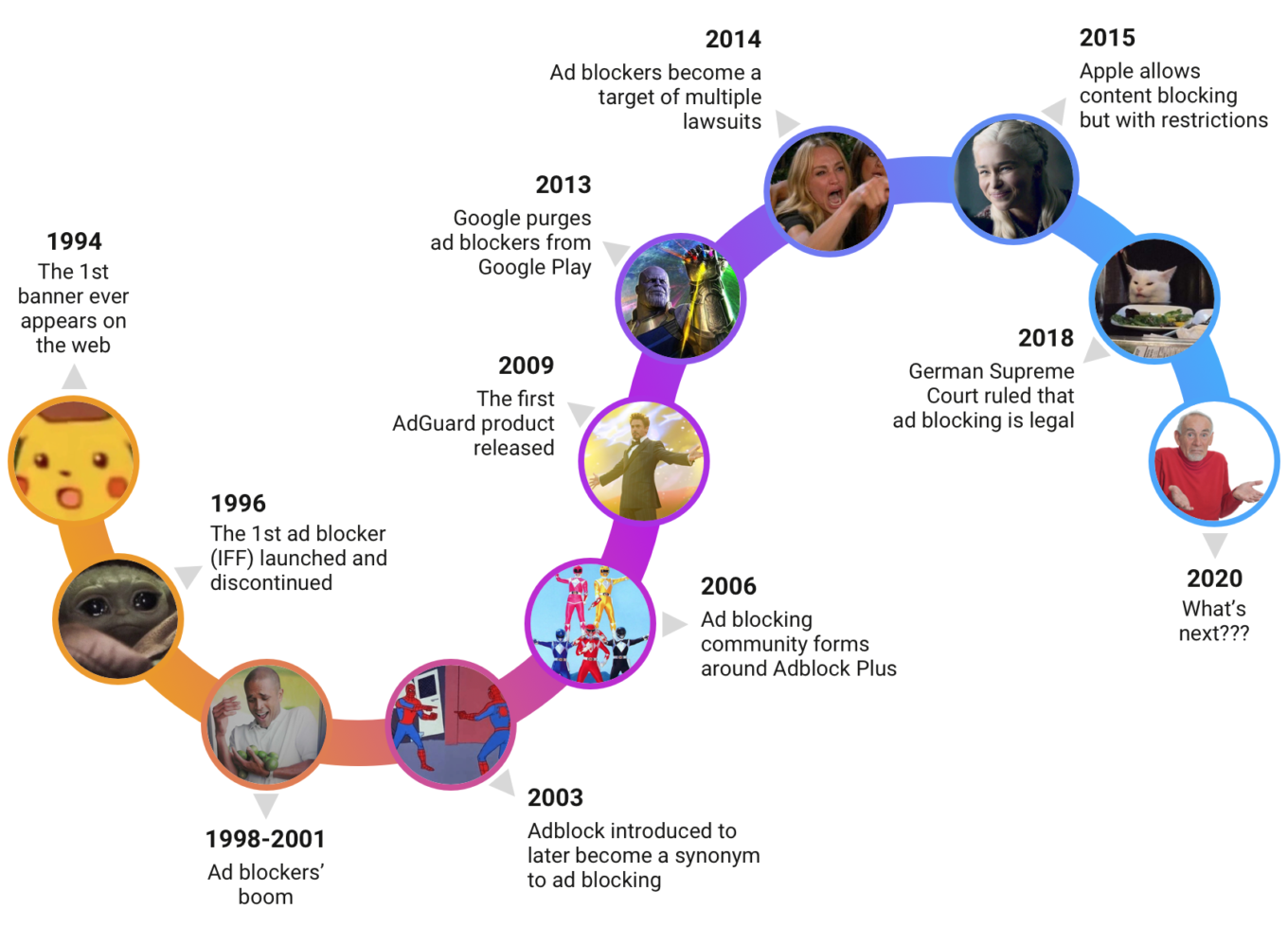
Majestic timeline of the ad blocking
1996-2002 — The dawn of ad blocking
Some of you might think that ad blocking has started with AdBlock and Adblock Plus, as those are some of the most popular names on the market. But this is not where it all began.
The very beginning of ad blocking is the 90s, just when the ads appeared. In 1993, GNN, the very first web advertising service, was launched. Then in 1994, the first-ever banner was sold. In the blink of an eye, the online ad industry was worth billions of dollars. Double Click emerged, Yahoo started to sell ads. And that's when the very first ad blocker was created.
It was developed by a small company — PrivNet, and it was called Internet Fast Forward. PrivNet’s Internet Fast Forward was a plug-in for Netscape browser. It was a $10 program created by James Howard that was able to block ads and cookies, and they even featured it on TV. There were a lot of comments on whether this will change the industry. Will it kill the free Internet? How will it change it?
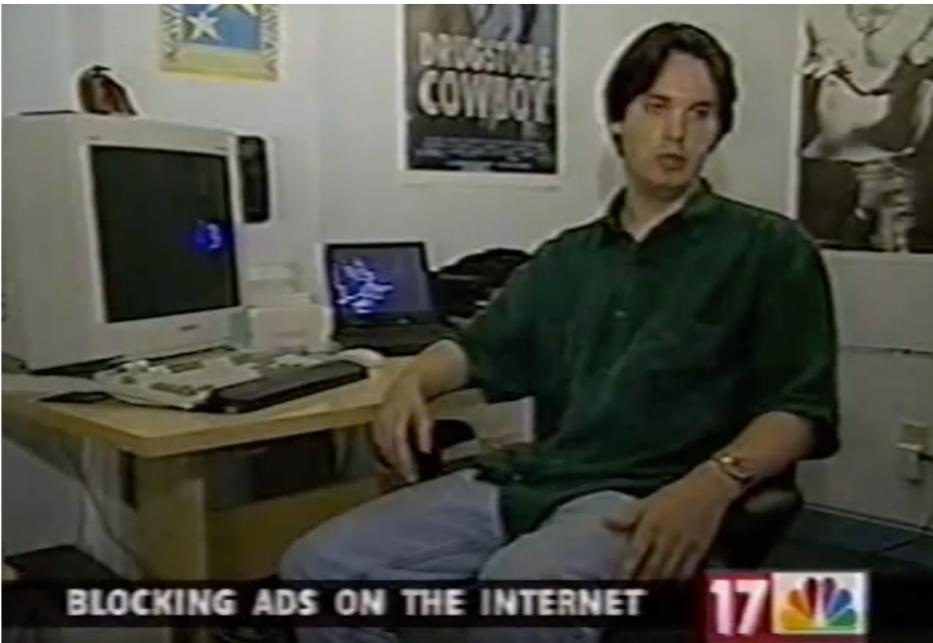
James Howard, the creator of Internet Fast Forward
And it's interesting to read some of the comments now that were given back then. Some people were saying:
"Why do browsers even allow this? Netscape can and perhaps will make certain that ad blockers don't exist".
To put things in perspective, Netscape was the biggest browser at the time and it seemed like it was nearly omnipotent.
In fact, there were some more interesting comments coming from people with advertising-related backgrounds. Their stance was that actually ads were good for people, and people LOVED ads. And if ads are targeted well enough, they are a good thing. For example, analyst Margie Wiley said that the people at PrivNet were in for a tough battle:
"It's like a little skirmish in a bigger war and for every incursion in one direction there's going to be a defense, so if someone decides that they can block ads on the Internet, there's a lot of financial incentive for someone like Netscape to make certain that they don't do that".
And it didn’t end well for IFF. The software James Howard produced was discontinued due to liability problems after he sold his company to Pretty Good Privacy in November 1996. PGP decided that the risk of potential lawsuits was too great and stopped the development of the ad filtering program. And that's how it ended with the very first ad blocker.
But the Genie has been out of the bottle.
The embarrassment of ad blocking riches
As you can see, it didn't help. More new ad blockers started to appear quickly:
• 1998 – Ad blocking in Cybersitter
• 1998 – Web Washer
• 1999 – AtGuard
• 1999 – Internet Junkbuster Proxy
• 1999 – InterMute
• 2000 – Ad Muncher
• 2001 – SAB (Serenity Ad Blocker)
In just a couple of years there were 5 of them, then more and more. This list is far from being complete. It was starting to become obvious that ad blockers were here for real and for long.
2003 — Adblock add-on is created
2003 was the very first introduction of AdBlock. Henrik, the creator of the add-on, basically just posted on Mozilla Forum: "Hey, I made AdBlock".
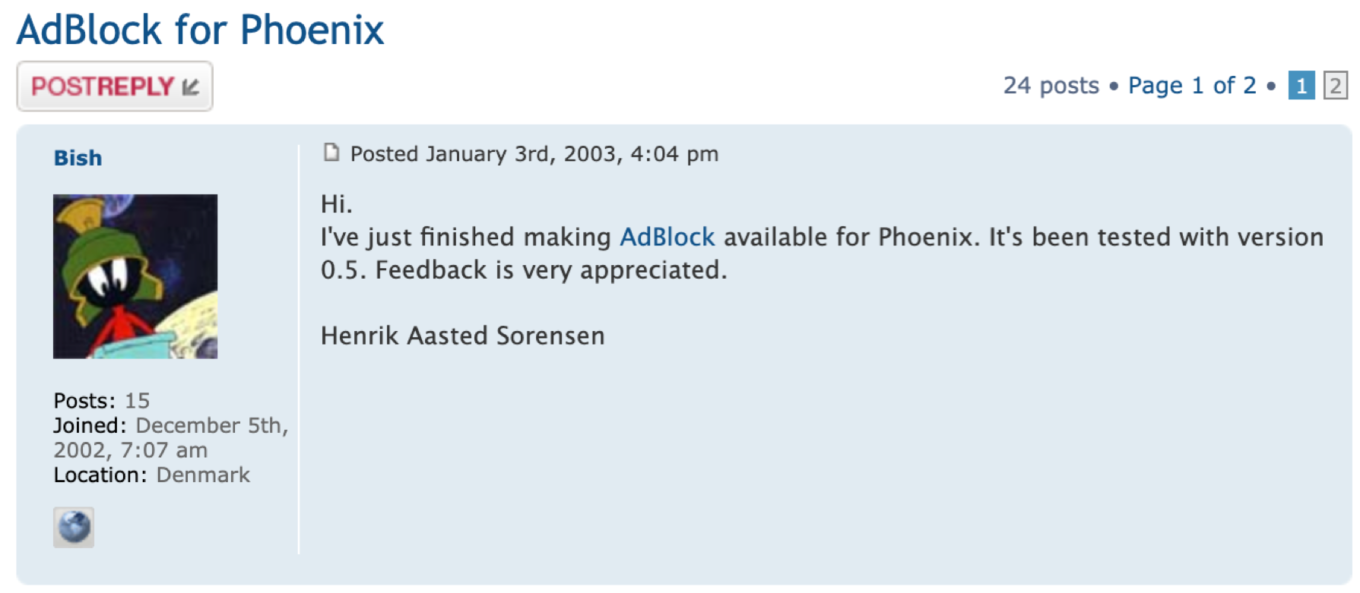
As simple as that
But not everyone liked this. Not everyone understood its purpose at first, even.
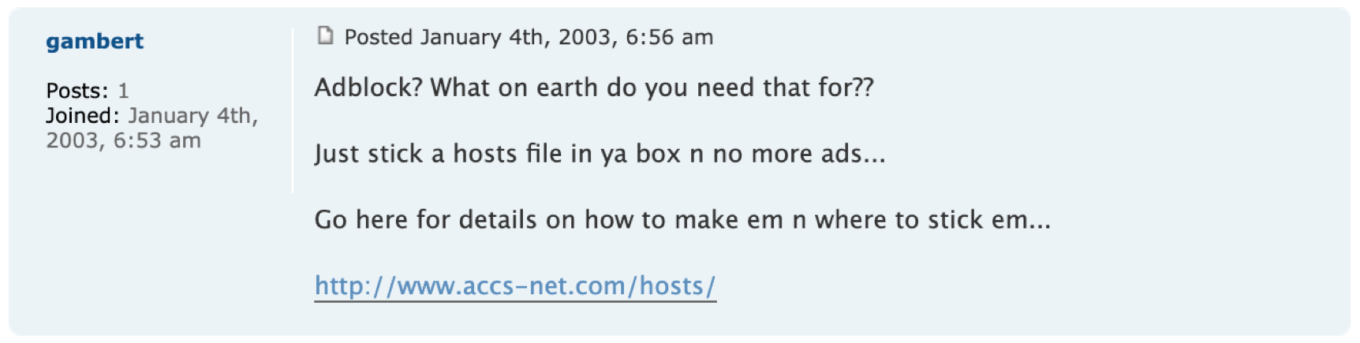
For some people, it took some convincing
Now it’s surprising to see a lot of comments like: "Why do you need an ad blocker? Just use the hosts files".
Nevertheless, with a name like that, no wonder it will soon become the synonym for ad blocking. Later, the author of the extension had to give up on his project, and in 2006 it was taken on by Wladimir Palant. He almost completely changed the program code, taught the extension to block web requests, and called it Adblock Plus. And this is a very important milestone because Adblock Plus has changed the ad blocking world.
2006 — The birth of the ad blocking community
Wladimir Palant is an extremely talented developer, one of the best in his field. His involvement with Adblock, that he eventually transposed into Adblock Plus, quickly made it the most popular ad blocker in the world.
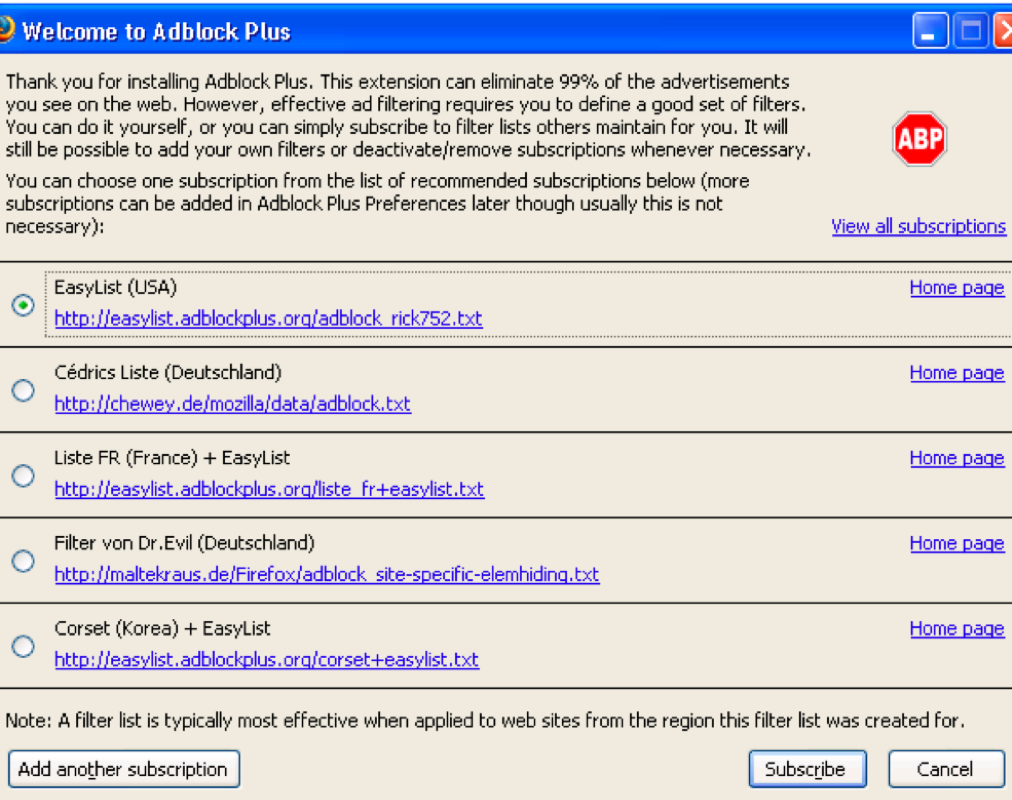
Oh, the noughties... You'll always stay in our hearts
But equally important, Adblock Plus gave birth to the ad blocking community. Adblock Plus is an extension that takes filter lists which then tell what exactly it should block. And filter lists are created by filter maintainers. These people do an outstanding and very important job, often for no monetary compensation, and we all should be very thankful to them.

You get a filter list! And you get a filter list! Everyone gets a filter list!
One of the most prominent filters was named EasyList and you all know it, of course. Amusing fact: Rick752, the original creator of EasyList, was working as a machinist in upstate New York and maintained EasyList in his den. Today, hundreds of enthusiasts and professionals maintain over a thousand filter lists, and thousands of volunteers help by reporting issues. Sadly, Rick has passed away in 2009, but he layed down the foundation for a successful, self-sustaining community of filter developers, and will always be remembered as the grandfather of EasyList and one of the pioneers of ad blocking.

Rick752, the original creator of EasyList
A little story to illustrate how powerful and influential a filter maintainer can be. In one of the countries there’s a filter list that’s clearly far more popular than any other local filter. And the maintainer of this filter list has a very peculiar way to deal with websites that show what this developer considers to be bad, shady or malicious ads. Instead of blocking such ads, the developer simply blocks the entire website. And then they send an email to the website owner with an ultimatum: "I blocked your website. You better take down these and these ads if you want to be unblocked". We don't approve of such practices, but they work! Such behavior even proved effective with a huge regional publisher. This shows just how much power filter developers can have in the age of ad blockers.
2013 — Google VS ad blockers
That’s when things started to change a bit. Out of nowhere, on March 13th 2013, Google decided to purge all ad blocking apps from the Google Play Store. And this move basically stopped ad blockers from expanding to mobile. AdGuard wasn't an exception, it got removed less than two weeks after getting uploaded to the Play Store. And despite the fact that there are some ad blocking apps for Android today (like AdGuard), the ad blocking community took a serious hit. This move still doesn't allow ad blockers to grow quickly enough on Android as they do on desktops.
2014 — The legal battle begins
But things could be much worse. In the December 2014, Axel Springer and Die Zeit tried to sue Adblock Plus for interfering with the display of ads on their websites. It was 1996 all over again, when the entire idea of ad blocking was put on the line from a legal standpoint. But unlike with Internet Fast Forward, Adblock Plus decided not to back off and continued to develop ABP. They started preparing to defend themselves in court and, as you can see, they’ve been successful so far. The legal battle went on for years, until finally in April 2018 German Supreme Court ruled the case in favor of Adblock Plus: ad blocking is legal, Axel Springer loses final appeal.
As an ad blocking company, we are very grateful to them. They showed everyone that ad blocking is not something shady and illegal, that users can and should control what they see on the Internet. We can say with confidence that without these victories in legal battles, ad blocking wouldn't be as successful as it is right now. For example, some browsers that support our cause today, might have decided otherwise. They don't need to think twice now. They know it's legal. You can block ads. And this is probably the biggest achievement in the entire ad blocking history.
2015 — Content blocking comes to Safari and iOS
Eventually, content blocking came to Safari and iOS. This was another crucial milestone. It allowed ad blockers to make the headlines of mainstream media. Ad blocking became known to the wider audience. And what’s worth noting, Apple showed their support, they made it clear that they wanted content blocking to exist on their platforms. But there were some caveats. Here’s some of the most limiting factors:
• 50,000 rules per content blocker max
• Severely limited regular expressions support
• Incompatible with existing filter lists
• No debugging tools
The API they provided was very different from what other browsers had. The maximum number of rules limitation is a huge problem, the transferring of existing filter lists to Apple platforms is another problem. Filter maintainers used to maintain filter lists that were equally well suited for Chrome, for Firefox, for other browsers. It was disproportionately hard to maintain a completely different filter list for Safari alone.
2020 — What has changed in these 20+ years
Ad blocking today is very different from what it was at its dawn. The ad blockers themselves have changed drastically. The most important, and at the same time the most confusing part is, ad blocking is no more just about blocking ads. Ads are not just ads anymore, they almost always track you and your actions. And nobody likes that. Moreover, many people can make peace with seeing an occasional ad, but they have a gut response against any tracking of any kind. Unlike their predecessors, ad blockers of the future have to adapt and take on a new role of privacy protection tool.
Luckily, the public image of ad blockers has changed as well. It’s almost impossible to find someone who is actively against ad blocking and isn’t a CEO of some big data company at the same time. Regular users almost unanimously perceive ad blocking as a ‘good thing’. And, as a consequence, advertisers had to adapt, too. They can’t afford to make blatantly annoying ads and expect people to put up with them. They are yet to realize that people don’t want to see creepy ads as well. We all have these stories about seeing an ad for a dentist a minute after complaining to our friend about the toothache on Facebook.
Another big win for ad blockers (and for all Internet users!) is that privacy protection and ad blocking are now mainstream. Many browsers have built-in content blockers, even such media giants as Google make nods towards privacy, in their own, distorted way. That’s a big win, right?
So... Does it mean that we have finally emerged victorious in this war against ads and advertisers?..
Well, yes, but also no. Advertisers realize that the current trends are not in their favor, and employ such tactics as ad blocking contamination. If you can't stop people from blocking ads, you can at least control what they block. Big companies implement their own built-in content blockers. This way yes, you block ads, but they are largely at control of what is blocked and what is not.
At the same time, they desperately oppose widening the scope of ad blocking. You all know that both Google and Apple either fully prohibit or severely limit system-wide ad blocking in their mobile app stores.
But all that doesn't stop advertisers from also frantically searching for new ways to collect data and show ads by circumventing ad blockers. And they aren’t completely unsuccessful. The more digitized our lifestyles become, the more opportunities there are for companies to push their ads in your face and to collect data about you, your habits and interests. Mobile phones, computers, laptops — but also smart home devices, TV sets, smart cars — all of them are fully capable of tracking you everywhere you go. And you can’t really use an ad blocker to prevent your lightbulb tracking you. Or can you?
Our guess is that to stay competitive, ad blockers will have to move to a network-level approach. It means that an ad blocker of the future will have to monitor traffic of the entire network. When you can scan all traffic of your home WiFi for tracking and ad requests, it doesn’t make any difference if such requests belong to your vacuum cleaner or tablet or smart TV, they will be blocked equally ruthlessly. We already have first examples of such ad blockers: AdGuard DNS, AdGuard Home, but also solutions by other developers, e.g. Pi-Hole or NextDNS.
There are other hypothetical ways to fight ads and tracking on this new front; we could write another article just on that topic, but it’s not our goal today. The main message we wanted to bring across is: we’re about to witness a new round in the war between advertisers and ad blockers, and this war is going to go on for as long as people use the Internet.
UPD by 28 Feb 2020:
As we said in this very post, the best thing about ad blocking is the community that has formed around it, and we have a great example of why it's so. In the very first hours after we posted this article, several people (including the actual heroes of this post, too) pointed out that we forgot about this or that nuance. We're happy to complement the article with the information they provided.
- AdBlock 0.5 for Phoenix we mentioned above was merely the first announcement for Phoenix. Before Phoenix it was running on Mozilla Suite and AdBlock 0.1 first appeared in 2002. //thanks to @WPalant
- The first truly widespread filter list was Filterset.G. It was an important milestone in the formation of filter developing community. Unfortunately, they refused to allow downloads via Adblock Plus, only via their own browser extension, and it eventually lead to their downfall and eventual irrelevance. //thanks to @fanboynz and @WPalant
- GNN (Global Network Navigator) was not an advertising service. It was the first commercial online magazine. O’Reilly & Associates, the publisher of GNN, wanted to see if a website like GNN could be supported through commercial sponsorship. But GNN’s ads were informational — much more like whitepapers than a display ads. The 'banner ad' was probably invented by Wired’s HotWired site, which launched at almost exactly the same time as GNN in the fall of 1993/ //thanks to @jslabovitz
- It's being pointed out that we didn't mention throughout the article some of the most prominent and popular ad blockers. We didn't do that not because we forgot or in spite, but simply because we were writing an article about the history of ad blocking and not the history of ad blockers. Nonetheless, we'll try to list at least some of them: uBlock Origin, Ghostery, AdBlock, Brave Browser, Adaway, Disconnect, Blokada. We'd like to thank their developers for that awesome work that they're doing!




















































