The history of ad blocking, part 2: Diplomacy and maneuvers
We continue to tell the story of ad blocking. The first part was about first apps, anti-trackers, and the technology behind ad blocking. Now you can read about the fight against ad blockers, the attempts of self-regulation by the advertising market, and the birth of an ad blocker that sells ads.
2. The story of alternatives
In April of 2009, major search engine providers (SEPs) have suddenly joined the cohort of services that limit marketing specialists in their creative self-expression. These providers outwardly appeared to be interested in helping their users avoid websites with “bad” advertisements, because people evaluate the quality of a web search engine by the quality of the results it provides. Because of this, ad blocking and tracking prevention are now included by those SEPs whose companies see a competitive advantage in protecting their users’ privacy and comfort.
Yandex, the largest search engine on the Russian web, also declared a war on intrusive ads in 2009. It announced that sites with pop-unders would rank lower, therefore losing potential visitors. Two months later the number of web pages with pop-unders in Runet had decreased by one-third, and the overall number of sites with pop-unders had fallen by 50%
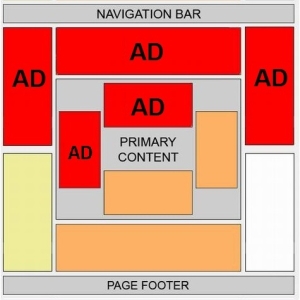
In January of 2012, Google made a commitment to lower the rank of web pages that have too many ads at the top of a page, because this forces their visitors to scroll a lot in order to find the content they were seeking.
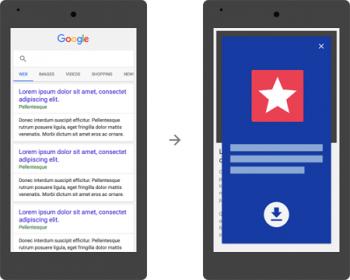
And in September of 2015, Google threatened to lower page rankings for mobile sites with too many app-install “interstitials.” (An interstitial is an advertisement for an app that is shown up as the user’s selected application is running). The search engine giant declared that ads of this type should not hide a significant amount of content on any given page. Google now places great emphasis on the friendliness of pages that appear in search results on mobile devices.
By August 2016, even more penalties in the name of mobile friendliness had been announced. In this case, intrusive interstitials were the target. These are interstitials that close the main content the user wanted, and instead, put a screen-wide advertisement that the user must manually close in order to gain access to the desired content. As probably all of us have experienced these, we know they are most "unfriendly".
The matter of unwanted advertising is important for mobile Internet providers. The wireless networks have become very data-heavy over the last several years, and advertisements are actually a considerable waste of limited network resources.
So, in May of 2015, European mobile operators revealed their plans to start blocking advertisements in the mobile Internet. One such carrier, named Three, partnered with the Israeli startup Shine, which provided such blocking technology.
In that same year, Firefox added the option to switch ad tracking off in its private browsing mode.
In February of 2017, less than two years later, Shine has drastically changed its niche and product, and renamed the company to Rainbow. It’s on the side of advertisers from then on. Rather than block advertising to mobile Internet users, the company now checks incoming advertisements for unobtrusiveness, relevance, and safety, with the intent of "improving" them. It still is a service for mobile operators. Their subscribers are supposed to opt in if they want to see ads "improved" by Rainbow.

In 2016, Opera released a new version of its desktop browser as well as a mobile browser for Android. Both products included an integrated blocker that fights advertisement and data mining services. By default, this option is turned off, but the user can enable it.
Apple also improved its Limit Ad Tracking feature in iOS 10 in the autumn of 2016. Now a user can completely avoid receiving a unique identifier for advertising instead of just resetting it from time to time. This setting is presently used by 18 million iPhone and iPad users, approximately 20% of their active user count. This Limit Ad Tracking feature prevents advertisers from using users’ behavioral data for targeting ads.
In September of 2016, the Coalition for Better Ads was formed. The sixteen largest advertisers, agencies, publishers, and web properties gathered, under the auspices of Google, in order to develop advertising standards of their own. Among them were Procter & Gamble, Unilever, Facebook, The Washington Post, and the Interactive Advertising Bureau along with its national branches.
The Coalition performed research during the next six months on ad perception. The research attempted to define the most irritating and the most acceptable ad formats.
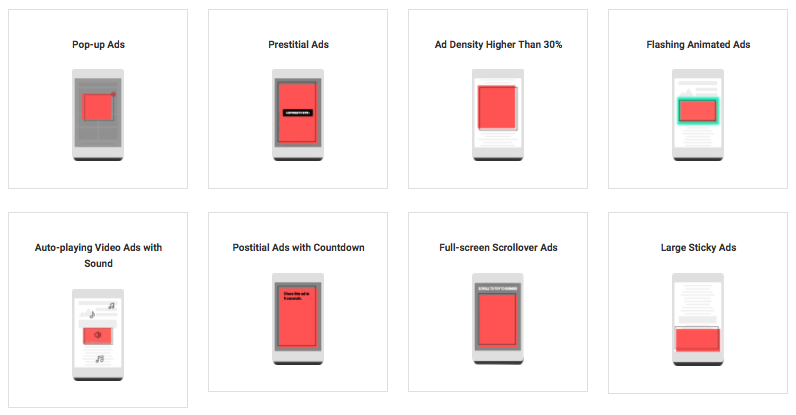 Examples of bad ads on betterads.org
In a month, Google’s plan to add an illusion of ad blocking to the Chrome browser leaked to the press. The scheme was to allow only the ads that met the Better Ads’ standards. This is a brilliant move if the task is to protect the business and income from ad blocker usage growth and from competitors. But this is a very dubious decision if we think of the right of the user to control what he sees on the web — the very right that has been the basic principle of ad blocking ideology. We have offered our own speculation on this matter in a blog post.
In June of 2017, the full outline of Google’s strategy of ad blocking and control emerged. The search giant gave a new tool to webmasters, called the Ad Experience Report. If a site owner finds in the report a warning about unacceptable ads and does nothing about them, all advertisement on the site will be blocked in Google Chrome, even ads owned or served by Google itself. This function will become live in early 2018.
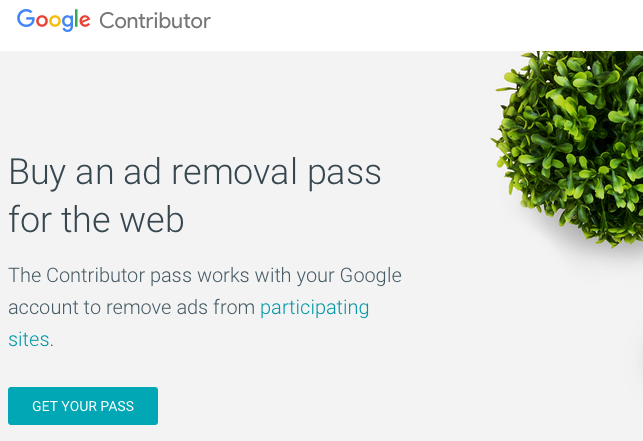
The second part of the strategy is Google Contributor. Through this service, users will pay for the ability to browse web pages without seeing ads. These payments will be disbursed to the site owners, for profit, and Google will take a commission from these payments as well. For each page of the participating site that blocks advertising, a certain monetary amount will be debited from the user’s account.
3. The story of countermeasures
By the beginning of the 2000’s, advertisements were nearly the only way of monetization for free Internet services. Advertisers liked the Internet for its targeting possibilities, web analytics, and the lower costs compared with other media, such as TV, radio, or print. For these reasons, Internet advertisement beneficiaries had no intention of being passive observers as their audience shrank.
But before the fights between ad pushers and ad-blockers had even started, the effort toward user-level self-regulation began.
In 2011, Adblock Plus announced the Acceptable Ads program. Advertisers and platforms that were ready to adapt their ads to satisfy acceptability criteria were to be whitelisted. Adblock users would be able to see these ads. However, they could completely turn them off in the application settings. Besides matching Acceptable Ads criteria, big businesses needed to pay a fee to be whitelisted.
Of course, Acceptable Ads alone couldn’t solve the problem of ad blocking. In 2012 a startup company named PageFair was founded. This company considers itself one of the pioneers in the fight against ad blocking.
They offer analytical reports about the website audience that uses ad blocking software and ways of communication with these users. The site can show them a message that asks to turn off the blocker or to make a donation.
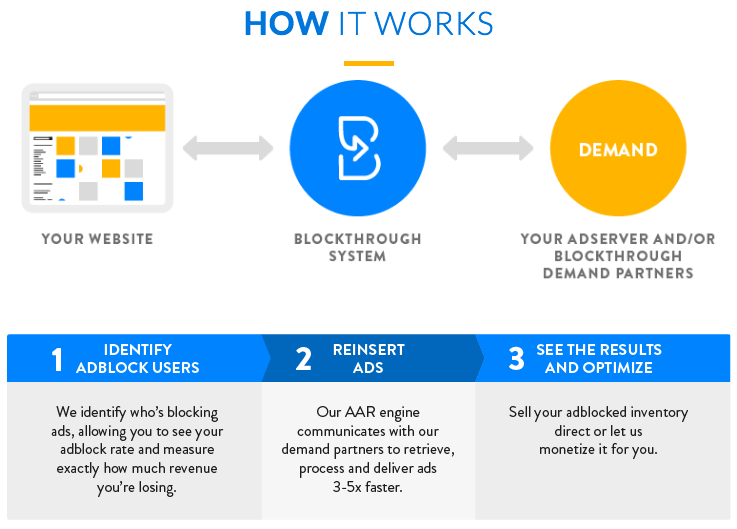
Another product is a technology that shows ads to the users that have blockers. Actually, this is a group of approaches called ad reinsertion. There are two subtypes: ad recovery and ad replacement.
Ad recovery happens when an ad blocker is prevented from removing an ad. Ad reinsertion happens when a user of a blocker sees something instead of an ad that was to be blocked. It could be another ad (less intrusive, for example), a message, or something else.
In March 2013, Google suddenly banned ad blockers for smartphones in its Play Store. Adblock Plus and its analogs disappeared from the store, not to return until 2015. When Adblock Plus did return to the Play Store, its functionality was quite different. Google allowed its Play Store to offer ad blockers only as browser extensions or as browsers that show web pages without any advertisements. But such blockers couldn’t eliminate ads from the apps themselves.
About that time, Google’s CEO, Larry Page, had to reassure those of his stockholders who had been alarmed by the popularity growth of blockers and their influence on Google’s business. He assured them that blockers were not a serious threat; rather, they are simply a barometer of advertisement quality that shows the quality of advertisements needs to be upgraded.
A number of companies, that promised to bring platforms back the income they’d lost because of blocking activity, have entered the market in 2014-2015. In 2014, PageFair launched an advertising platform. Now advertisers could buy ad impressions for users with ad blockers if their banners suited Acceptable Ads criteria.
In 2015, advertisers faced the fact that fighting against ad blockers carried its own risks, which were connected with installing third-party services on their sites. PageFair itself came under cyber attack. As a result of this attack, out of 3000 sites that had PageFair scripts installed on them, 500 served malware to their visitors; this malware appeared as an upgrade to Adobe.
In 2014 SourcePoint, whose founder once worked for Google as the General Manager of Marketplace Development, and SecretMedia appeared. They are among the best known anti-blocker companies. This list also includes Blockthrough and Admiral, both of which were launched in 2015.
SourcePoint helps a platform explain to its audience that content creation needs to be compensated in some way. A user can choose from a list of options how to do so, such as viewing a targeted or non-targeted ad, or some sort of payment, ranging from a micropayment to a large block payment.
SecretMedia hides ads from blockers. Blockthrough promises not only to hide ads but also to improve them so that they will not annoy visitors and violate their privacy. Admiral works to automatically refund a platform its lost income. In fact, these services utilize the same Ad Reinsertion techniques that PageFair uses. Other noteworthy Ad Reinsertion startups are Instarlogic.com and Uponit.com.
In August 2016, Facebook announced that it would show ads to ad blocker users. The company insisted that its ads are useful, secure and highly customizable, so there is no problem that needs to be solved by ad blockers.
However, the corporate blog of Facebook rather evasively reported that some companies that are able to show ads to ad-blocker users actually offered the social media giant their services. However, Facebook remained confident that it could manage this task by itself.
Two days after this statement, Adblock Plus came up with a filter against "forced" advertisement on Facebook. This filter was created not by salaried developers, but by the Adblock Plus community.
In September of 2016, Adblock Plus launched the Acceptable Ads Platform. This is a tool that allows the site to quickly host already-approved and whitelisted ads that fall under acceptable criteria. Adblock Plus also offered a tool that tests ad compliance. Advertisers received the access to ABP users that hadn’t opted out of seeing acceptable ads. From then on we are observing an ad blocker that sells ads (using RTB SSP technology).
June 2017: at its annual conference for developers Apple announces some upcoming updates for Safari desktop browser that relate to restricting ads. The most important is the Intelligent Tracking Prevention based on machine learning (a detailed scrutiny can be found on our blog). Besides, the autoplay of videos and audios will be off by default in the updated browser, and articles will be opened automatically in the Reading Mode (in which ads and navigation elements are removed from the page).
Here ends part 2. Part 3 will be devoted to the legislative regulation of ad blocking and the protection of personal data in different regions. Besides, we shall review alternative ways of making money that web properties use instead of traditional ads.




















































