Why is AdGuard not on Google Play?
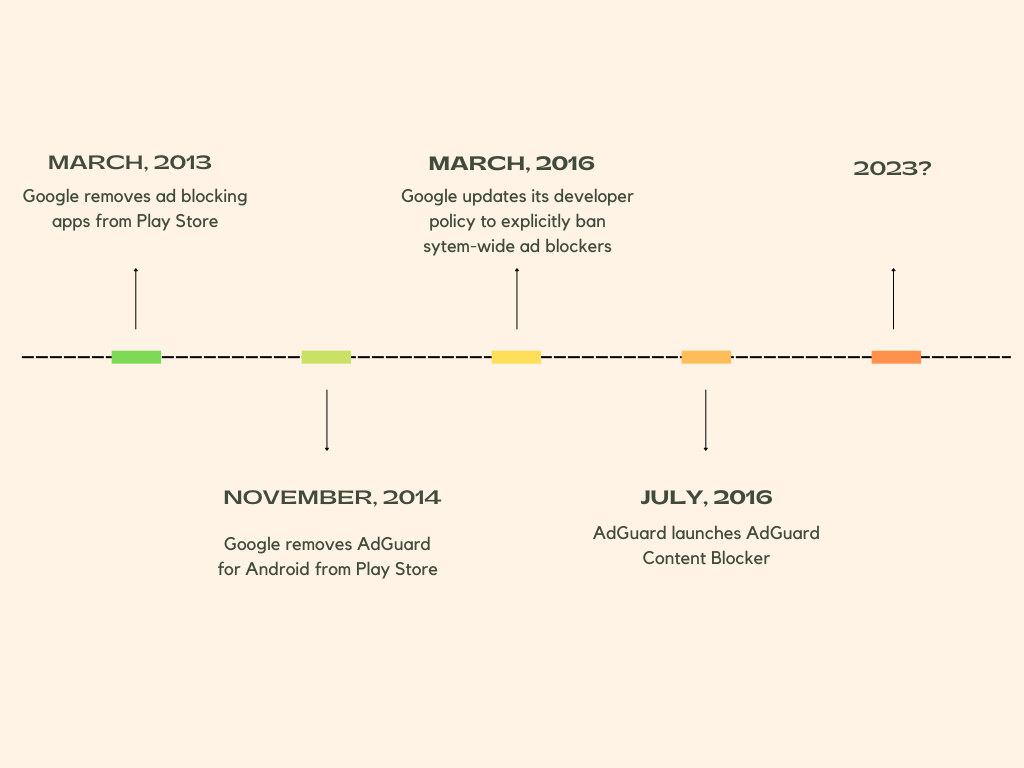
One of the most common questions we’ve been asked over the years is why AdGuard for Android is not on the Google Play Store. The short answer is — it was not our decision. Google is the one to blame. In March 2013, Google started purging ad-blocking apps from its Play Store, claiming that they had violated a loosely worded section of the developer agreement that forbade apps from interfering with “other properties or services” of third parties. The following year, this purge affected the newly-released AdGuard for Android. The app was taken down from the Google Play Store on November 25, 2014, but you can still download AdGuard for Android directly from our official website.
If you want to know more about how it came to that, how we adapted our app distribution model after the Play Store massacre, why you can still find an AdGuard content blocking app (but not AdGuard for Android) on Google Play, and what our hopes are for the future, read on.
Timeline of Google’s crackdown on ad blockers
Until 2013, Google tolerated ad-blocking apps in its Play Store. At the time, there were a number of apps on Google Play that offered content filtering functionality, such as AdAway, AdFree, Ad Blocker, and AdBlock Plus. Everything changed on March 13, 2013, when Google pulled several ad blocking apps from its store overnight. The apps’ developers received identical notices from Google informing them that they had violated section 4.4 of the Developer Distribution Agreement. This was a bolt from the blue for the ad blocking community, as the clause Google used to punish them was not new.
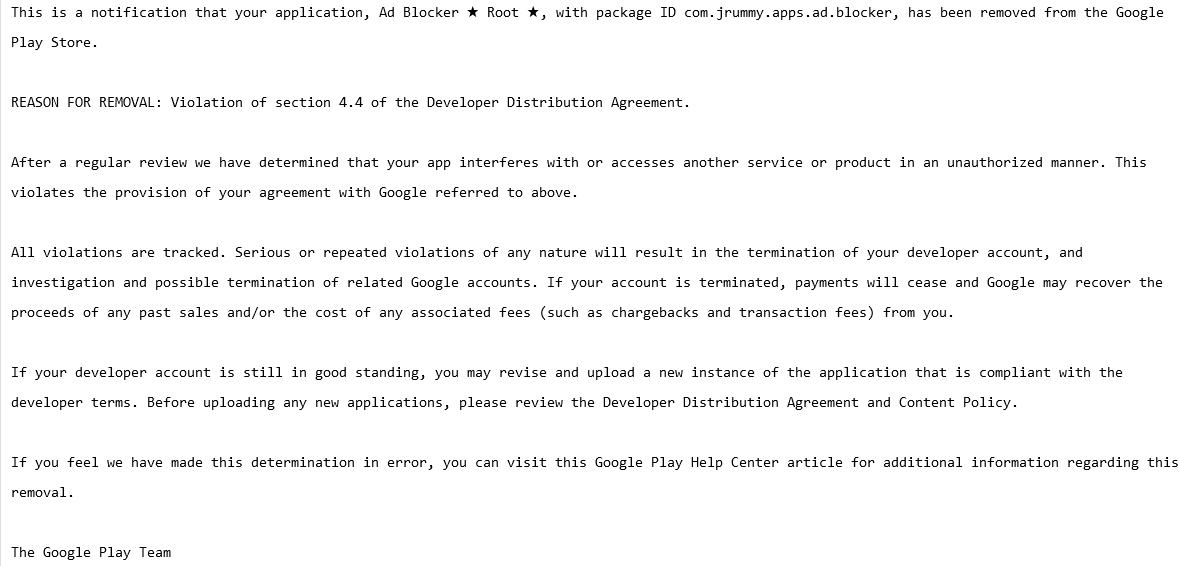
A notification that Ad Blocker received from Google. Source: Pastebin
In fact, section 4.4. “Prohibited Actions” was so vague that it could arguably be used to remove any app for almost any reason. Here is how the section was worded:
You agree that you will not engage in any activity with the Store, including the development or distribution of Products, that interferes with, disrupts, damages, or accesses in an unauthorized manner the devices, servers, networks, or other properties or services of any third party including, but not limited to, Android users, Google or any mobile network operator. You may not use customer information obtained from the Store to sell or distribute Products outside of the Store.
AdGuard for Android was not spared from the crackdown: on November 25, 2014, it was removed from the Play Store just two weeks after its official launch. The pretext was the same — violation of section 4.4. of the developer terms.
But it wasn’t the end of our story with the Google Play Store. In 2016, Google tweaked its developer policy to clarify what actions are prohibited, and for the first time directly named ad blockers as a target.
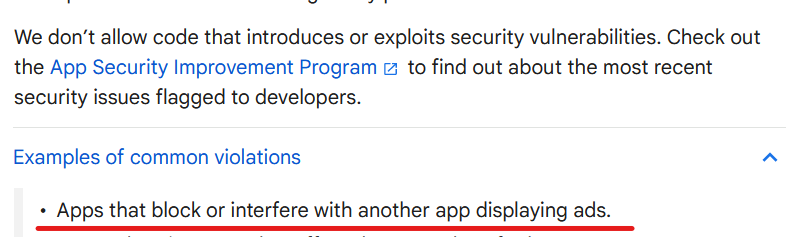
Source: Google’s developer policy
But there was a catch. The wording could be interpreted to leave some wiggle room for ad blocking applications that block ads within themselves, i.e. in-browser ad blockers. We can speculate as to why Google did not ban ad blocking outright, with one theory being that they did not want to incentivize side-loading and give Apple, which allows ad blocking in Safari, the upper hand. Whatever it was, ad blocking applications returned to the Google Play Store, but with severe limitations.
But I’ve found an AdGuard app on Google Play, what was that?
AdGuard Content Blocker, not to be confused with AdGuard for Android, is an example of such an app. It was launched in July 2016 and is the only AdGuard app available in the Google Play Store. Its scope is quite limited: it can only block ads in Yandex or Samsung Internet mobile browsers, the only ones that support the necessary content blocking API. If you want to use a different browser or filter traffic in other apps, AdGuard Content Blocker will not be able to help you.
Why did some apps survive Google’s ad blocking purge?
Still, there’s a lot of uncertainty when it comes to what ad blockers can and can’t do. Google has shown in the past that it can block ad blockers, even those designed specifically for mobile browsers that allow ad blockers, on a whim and unblock them, again, on a whim. Moreover, there are still apps on the Google Play Store that claim to block ads in other apps and work across all browsers, such as Blokada, and boast functionality that allows blocking trackers in apps, such as the DuckDuckGo Private Browser for Android.
Their developers can argue that they do not interfere with other apps and are therefore in compliance with Google’s policy. The thing is, with Google, you can never be sure. Google’s enforcement of its own rules has been inconsistent, and developers are left guessing whether their app will be found to have broken the rules. Not to mention, Google can tighten the screws on ad blockers by changing its policy at any time, so the threat of being pulled from the store hangs like a sword of Damocles over the ad blocking apps that are still available.
Is there life after Google Play Store?
After AdGuard for Android, which filters traffic for all apps on your device, could no longer be distributed through the Google Play Store, we had to find another way to reach our users and provide them with updates. We decided to distribute AdGuard for Android through our own website and some other channels. We also built our own self-sufficient update delivery system so you don’t have to worry about manually updating your app. All this time that we have been distributing AdGuard for Android from our official website we saw AdGuard for Android being installed nearly 30 million times, despite it not being on the Google Play Store.
Our other service, public AdGuard DNS, which doesn’t require installation to use, has now reached over 70 million daily users. So, in short, yes, there is life after and besides the Google Play Store, and overall we’re doing just fine despite the wrench Google has thrown in our works.
Will AdGuard for Android ever return to Google Play?
Of course, if we had the opportunity to return to the Google Play Store without sacrificing the app’s functionality, we would have taken it. The increased visibility this store provides would allow us to introduce the app to more people who can block ad-based tracking, thereby protecting their privacy. The reality is that most casual users install apps exclusively from the Google Play Store, and that means they are currently missing out on a chance to protect themselves from trackers and ads.
We believe that Google’s restrictions on ad blockers are unreasonable and anti-competitive. We hope that Google will change its stance and give people the choice and tools to protect themselves from pervasive tracking technology and invasive advertising.


















































