Apple integrates content-blocking feature into Safari. What we know so far
Apple is purportedly planning to integrate ad-blocking directly into its Safari browser, as reported by AppleInsider in an exclusive scoop. According to the publication, the feature will be dubbed “Web Eraser” and will be accessible through the updated page control menu set to debut with the forthcoming iOS 18.
True to its name, the feature is said to enable users to “erase unwanted content from any page of their choosing.” This will encompass nuisances like banner ads, images, text, and, if desired, can extend to “entire page sections.” The report indicates that the process of purging distractions or other undesired elements from web pages should be effortless and can be accomplished “with relative ease.”
Once you’ve gotten rid of all the distractions, they’re gone for good and won’t scurry back to the page when you close it. According to the report, Safari will keep track of the changes you’ve made to the page. So when you revisit it, Safari will display the page without the clutter you’ve banished, presenting it in its clean and modified state. If you are not satisfied with your job, you can let the exiled elements come back by asking the browser to restore the webpage to its original state.

Source: AppleInsider
A ‘must-have’ for any ad blocker
According to AppleInsider, Apple appears to have taken inspiration for the feature from 1Blocker, a third-party blocking app. But even according to 1Blocker itself, this feature is a staple among ad-blocking apps, and has been for years. We agree with 1Blocker when it says that this is “a must-have for any content blocking app.”

AdGuard has the same feature across all its desktop apps and browser extensions, as well as in AdGuard for iOS, our dedicated Safari content blocker. Depending on your device, it’ll take you from two to four clicks or taps to block any element on the page. For example, in AdGuard for iOS you have to tap the shield icon and select the “Block elements on this page” option.

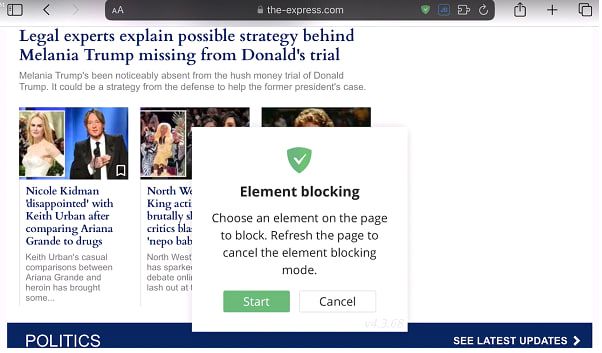
From there, you can click or tap on any element on the page that you’d like to hide.

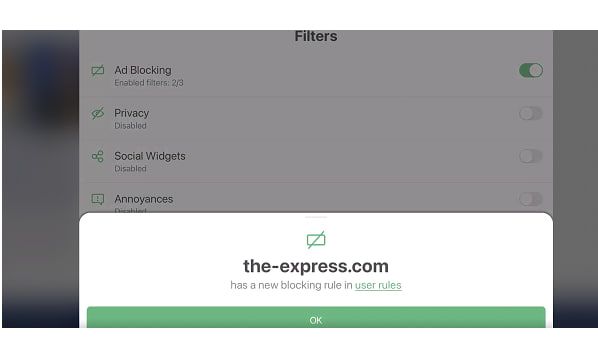
You can view the filtering rule associated with the blocked element by clicking on the checkmark icon.

Screenshot: Selective element ad blocking in the AdGuard for iOS
You can see the video of the entire process here
AI rumors
There have been several, though unconfirmed, reports that the Web Eraser feature might be AI-powered. While there is no indication that it indeed will be AI-driven in AppleInsider’s original report, there is a fertile ground for speculation, given AI’s widespread integration into various facets of our lives, including ad blocking. About a year ago we witnessed the birth of the very first AI-powered ad blocker for YouTube — GPT-AdBlocker — if you’re curious, we’ve tested it and results were quite a mixed bag.
It’s essential to draw an important distinction here. While AI has proven rather successful in tasks like identifying images and speech, identifying ad elements in a page’s code, and most importantly, creating corresponding filtering rules to hide them poses a different challenge. Eyeo, the parent company of AdBlock and Adblock Plus, has been making some progress in that regard, having worked on an AI model that would automatically classify URLs parameters and determine if a certain portion of a page has ads or not. The model has reportedly reached certain precision, but the company is still working on a proof of concept.
The unveiling of the new Apple’s browser version may occur at Apple’s annual Worldwide Developers Conference (WWDC), which spans from June 10 to June 14, just a couple weeks away. It’s anticipated that Apple will also announce iOS 18 during the event and commence beta testing for developers. As per AppleInsider, Safari 18, as the new software will be named, is set to debut “later in 2024.” So we have to be patient and wait for its official release to see if Apple’s in-built ad blocker has some AI features.
But we will be rather surprised if it does. The way we see it, an AI-driven ad blocker should be capable of automatically parsing page code, identifying elements, creating filtering rules, and using them to conceal undesired elements while ensuring the page does not break in the meantime and all the useful elements are displayed in an orderly fashion. While it is possible in theory, this will be incredibly hard to achieve. For one, configuring the AI to create error-free rules is very challenging, since some of these rules can be lengthy and complex.
adguard.com###app > main.main:nth-child(2) > div.welcome > div.product-presentation:nth-child(3) > div.product-presentation__in > div.product-presentation__products:last-child > div.product-presentation__product.product-presentation__product--windows > div.product-presentation__product-slider:first-child > div.swiper.swiper-container.slider.swiper-initialized.swiper-horizontal.swiper-pointer-events.swiper-backface-hidden > div.slider__arrow.slider__arrow--next:last-child
Example of a more complicated ad-blocking rule
Thus, even if AI accurately identifies the ads, there is a quite substantial risk of it botching the rules formulation part. You make one tiny mistake in the rule syntax, and the page looks completely differently from what you’ve intended. Not to mention the interdependencies within these rules. Sometimes, one cannot be added without the other, or one must consider the old rules when adding new ones, and so forth. It’s an incredibly complex and iterative process, in which every character is of outsized importance.
Overall, relying solely on AI for ad blocking isn’t trustworthy at the moment, and it’s susceptible to adversarial methods, meaning it’s easy to trick the model. However, using an AI model to spot bugs in filtering rules is a great idea and such tool would be a great aid for filter developers. We’ll definitely consider it at AdGuard once the technology reaches a sufficient level of maturity.
Concluding thoughts
Apple’s decision to integrate content-blocking into Safari is a boon for privacy. Ads aren’t just irksome and annoying, they’re also trackers, stealthily monitoring your online activity across various websites. These trackers collect data on your browsing habits, preferences, and interests, creating detailed profiles that can be exploited for targeted advertising or even sold to third parties without your consent.
As for the details of the implementation, we can only speculate until we see it with our own eyes. But we wouldn’t count on it being AI-driven to any significant degree; it’s more likely that Apple has drawn inspiration from some tried-and-true techniques that third-party ad blockers have been using for years.


















































