Big Sur: the good, the bad, and the ugly
Not so long ago we released AdGuard v2.5 for Mac, which, among else, made a heavy accent on compatibility with soon-to-come macOS Big Sur. The v2.5.1 patch that followed recently was packed with more compatibility-oriented changes.
I have to say that befriending AdGuard and Big Sur is not a simple task at all. Apple shakes things up really hard this year when it comes to macOS.
First of all, it's because of the deprecation of Kernel Extensions. If you're a frequent reader of our Blog, you probably remember that we mentioned this as early as in March. You can find plenty of information on this topic if you're intrested in digging deeper, but the bottom line is that Kernel Extensions is an API that AdGuard used to rely on in earlier versions, and with Big Sur macOS moves to a new API, and it's very, very different. All internal AdGuard processes had to be rebuilt, accommodating to the new API.
But that's not the only factor. The introduction of Big Sur comes with Apple switching from Intel processors to ARM. As you might guess, it takes its toll as well. Let's take a closer look at both reasons.
ARM support
We'll deal with this one first, because everything is fairly straightforward here. Apple has allowed developers to get so called Developer Transition kit, which includes an ARM-based Mac Mini computer prototype, among other things.
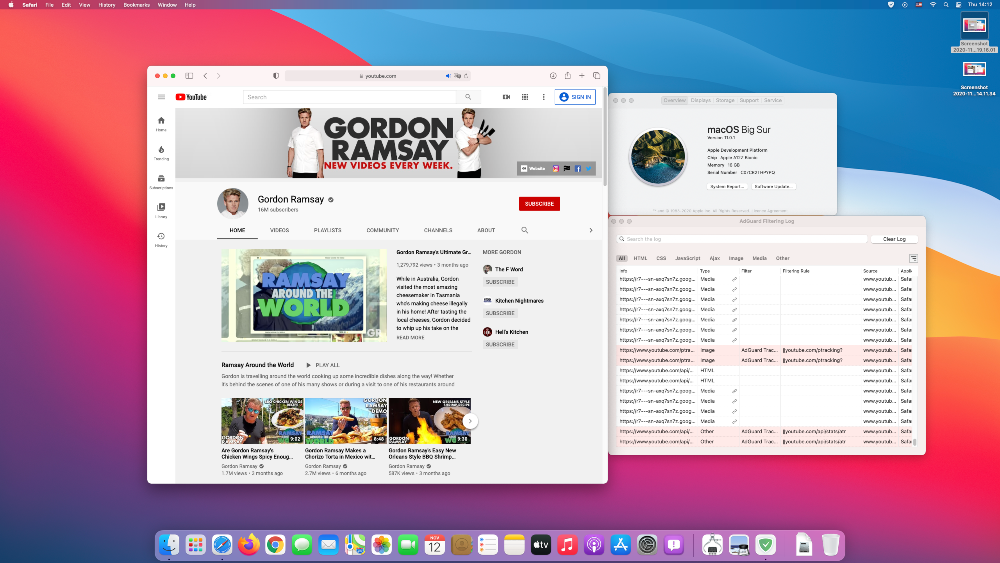
We've tested it out and are happy to report that AdGuard works smoothly with ARM processors.
Moving to Network Extensions
Network Extensions is an API that comes in place of the old Kernel Extensions API. Why Apple did it in the first place? Their motive is to prevent developers from working within the Kernel and confine them to User mode. And proper implementation of Kernel Extensions is quite challenging. You make a mistake and you'll end up crashing the system. Transitioning to User mode all the features that earlier were only possible to implement on Kext level should make the OS more stable altogether, or at least in theory that is. Unfortunately, everything comes at a cost.
As for AdGuard, as already mentioned, the API we'll have to use for system-wide filtering from now on is called Network Extensions. And — you guessed it — adopting it was rather painful as well. Big Sur is the first OS that marked the commonplace use of Network Extensions. We've reported a boatload of bugs and spent countless hours talking to Apple devs. Luckily, all wasn't in vain — all critical issues with Network Extensions have been resolved.
That said, not all these essential changes made it into macOS Catalina, so you'll have to rely on the ol' trusty Kernel Extensions there.
Despite all our efforts, though, there are still some restrictions when it comes to Network Extensions. Here's a rundown on known problems and ways to fix them:
Compatibility with local proxies
Some things have changed in regard to AdGuard working simultaneously with a proxy. Right off the bat, some good news: any remote (non-local) proxy will work normally in Big Sur alongside AdGuard and doesn't require any additional actions from you. But with a local proxy (localhost), you have to remove it from System settings and configure it in AdGuard.
To configure an upstream proxy in AdGuard for Mac in Big Sur, you need to go to AdGuard menu -> Advanced -> Advanced Settings.... Click on the Value area of the upstream.proxy setting to configure a proxy.
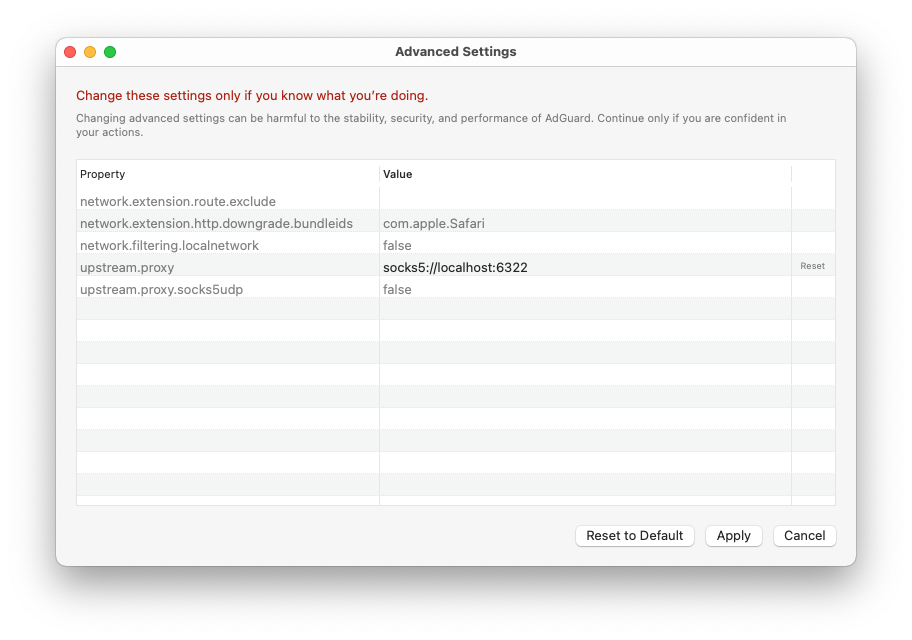
Enter a string that looks like scheme://user:password@host:port, where
schemeis eitherhttp,https,socks4orsocks5, depending on your proxy type.
If you use
socks5proxy type, set the value of theupstream.proxy.socks5udpsetting totrueto make AdGuard route UDP traffic to the proxy server.
userandpasswordare corresponding username and password of your proxy (if needed). Ignore either or both when not applicablehostis the IP address of your proxy serverportis the desired port number to be used by the proxy server
Example:
socks5://localhost:6322will configure a SOCKS5 local proxy that listens to port 6322 and doesn't require a username or a password.
Click Apply to make AdGuard route all traffic that went through it to the configured proxy server.
Instructions for some popular local proxies
Depending on what local proxy you're using, there may be slight differencies in setup and other specifics. More detailed instructions for a couple of popular proxies (Surge, Shadowsocks) can be found in our Knowledge Base.
VPN apps with legacy API
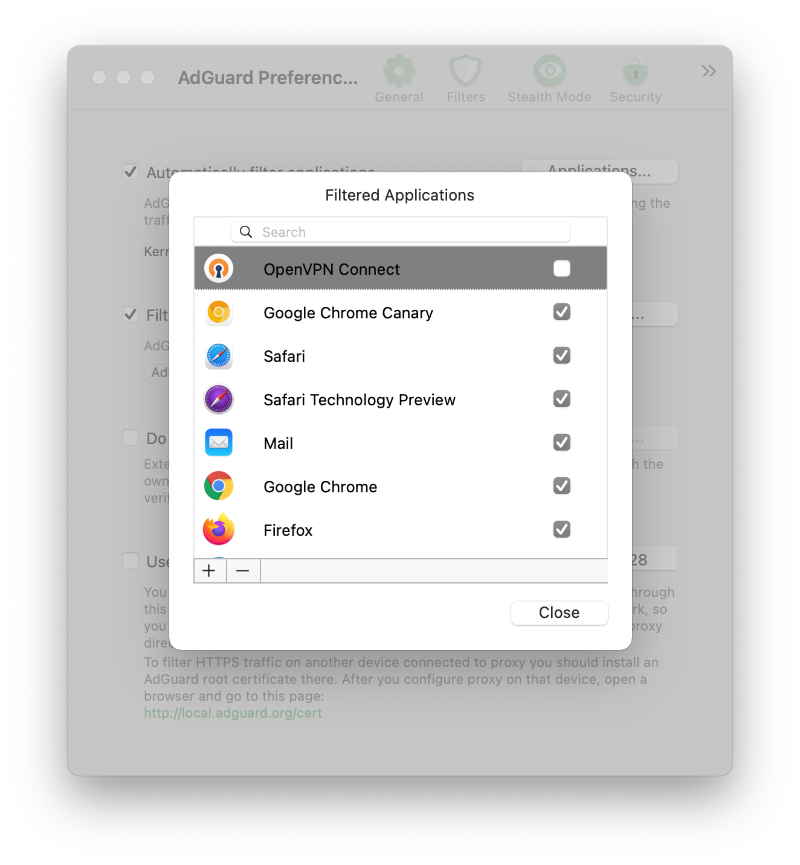
Despite AdGuard is displayed as a VPN in System settings, it shouldn't cause any conflicts when working alongside other VPN-based apps. However, if you're using a VPN-based app that was downloaded from outside the AppStore, there's a chance it uses the old VPN API and you have to exclude it from filtering:
- Open AdGuard's menu.
- Select Preferences....
- Switch to the Network tab.
- Click the Applications... button.
- Find the app you want to exclude and uncheck the checkbox next to it.
Alternatives to using a Network Extension
It's impossible to foresee each and every possible problem that can pop up in Big Sur, there are countless various hardware/software and settings configurations. If you face any compatibility issues, please contact our support team, but feel free to try one of these workarounds first:
Using "Automatic proxy" filtering mode
You can try switching AdGuard to Automatic proxy mode. This makes the system treat AdGuard like a proxy and thus avoid compatibility problems caused by Network Extensions.
- Open AdGuard's menu.
- Select Preferences....
- Switch to the Network tab.
- Click the Select Mode... button.
- Select Automatic Proxy.
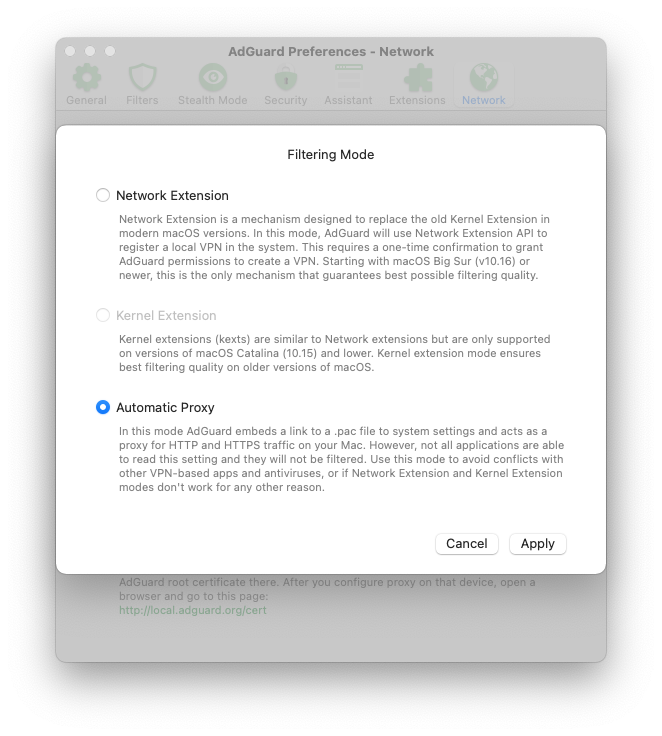
Now AdGuard has automatically added a .pac file to your Mac's network settings, so that the system will consider AdGuard a proxy and try to send all traffic through AdGuard.
Take into account that some apps may ignore this system setting and their traffic will not be filtered.
Enabling Kernel extensions
This is kind of a last resort. To enable Kernel Extensions, you would need to disable System Integrity Protection (SIP) first. It has a chance to work, but also carries a risk of causing more problems than it'll solve. If you feel determined, follow the instruction from this Knowledge Base article.
Once again, we only recommend using this method if everything else fails, and even then cautiously.
In conclusion
As you can see from this article, Big Sur is good news, bad news, and everything in between. Time will tell which side the pendulum swings, and whether there will be more problems or new possibilities in the future. For now, best you can do is arm yourself with knowledge from this article and be ready to face any potential complications — and let's hope Apple will enter the overdrive mode and fix everything in no time!


















































