Bing AI’s ads can trick you into downloading malware
In February 2023, Microsoft beat Google to the punch when it became the first tech giant to integrate a search engine with an AI-powered chatbot. The result of this daring experiment, GPT-4 based Bing AI, immediately attracted a massive user base, reaching 100 million active users in no time, and instantly boosting Microsoft’s profile as a worthy challenger to Google Search’s dominance.
Google Search has long been the cash cow of Alphabet, its parent company. In the second quarter of 2023, Alphabet made $74.6 billion in total revenue, and out of that, $42.6 billion came from ads on Google Search. Google Search also has a commanding lead over Bing and other rivals in terms of search ad revenue share, capturing 58% of the global market compared to Bing’s meager 6% as of 2022.
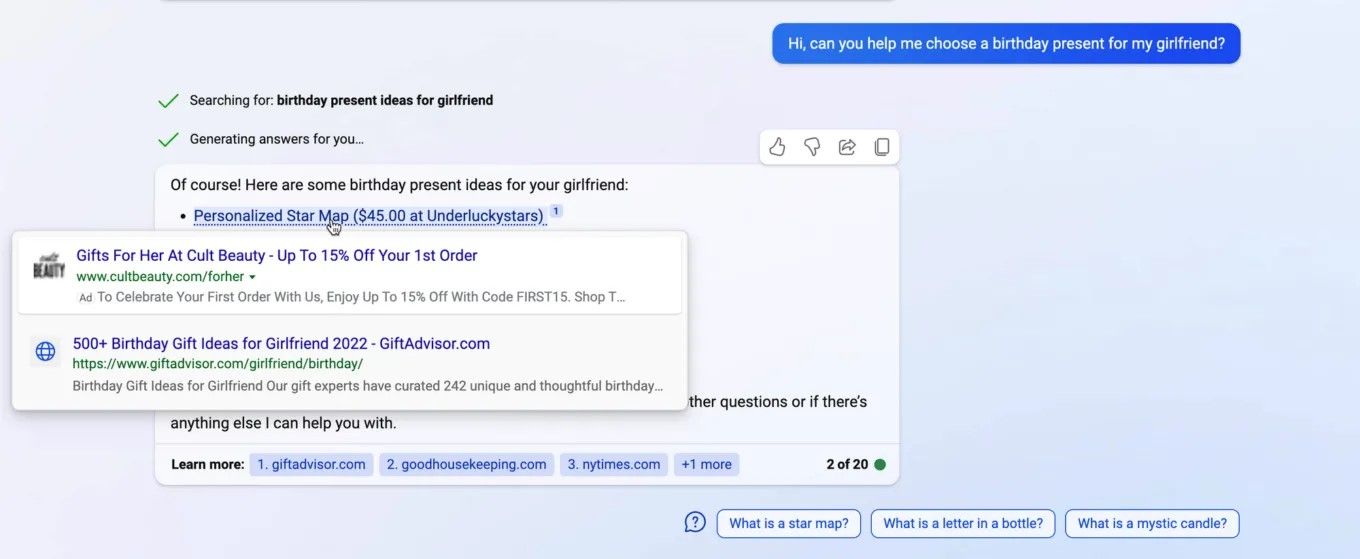
Perhaps hoping to shake up this status quo, Microsoft rolled out ads in Bing AI in March 2023. Since then, users have occasionally noticed ads sneaking into Bing AI’s human-like responses, mostly in the form of clickable annotations marked with a small, unassuming “Ad” label next to the link. These ad links would typically appear just below or above a link that led to an organic search result (in the screenshot below, the ad link is placed above the genuine search result).
Most recently third-party ads also came to Windows Copilot, a Bing Chat-powered feature built directly into the Windows 11 operating system. Ads for Amazon Prime were spotted in the Bing AI sidebar by Windows Latest.

Source: Windows Latest
There’s no option to disable ads in Windows Copilot (or Bing AI), and the only way you can get rid of them as of now is by turning the feature off. Microsoft started rolling out Windows Copilot as an optional update in late September, and it should be fully released by the end of the year. After it is fully rolled out, the feature will be turned on by default.
A magnet for cybercriminals
At first glance, there’s not much difference between ads in AI-powered search engines and traditional ones, but there is, and it’s a big one. Studies have shown that people subconsciously trust chat agents more when they sound and act like humans (which is what “friendly” AI-powered bots like Bing AI are pre-trained and fine-tuned to do). As a result, people may be much more easily swayed by the recommendations that AI-powered chat agents give them, as opposed to the recommendations of a depersonalized search engine. Naturally, this makes such chatbots a highly attractive target for cybercriminals, who have been exploiting the Google and Bing ad networks for years to deliver malware through ads.
But it’s one thing to know, or at least strongly suspect, that it’s only a matter of time before cybercriminals turn their attention to Bing Chat, and it’s another to actually see proof that it’s already happening.
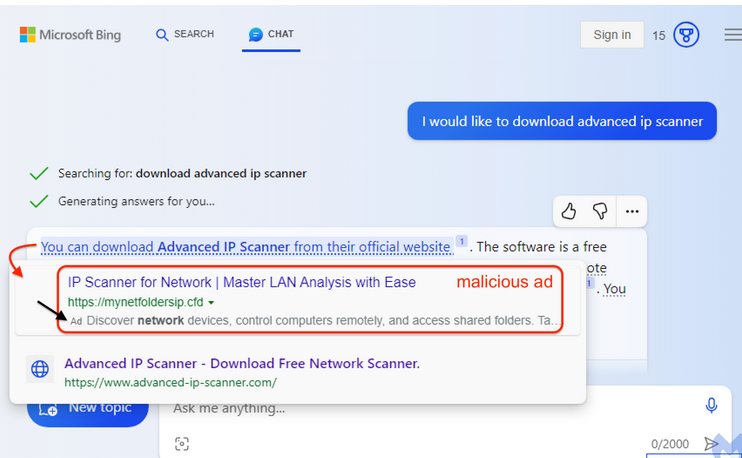
In its latest investigation, Malwerbytes uncovered just such a malvertising campaign running on the Bing AI.
Source: Malwarebytes
The malicious link appeared as an advertisement for a program called Advanced IP Scanner, a tool typically used by system administrators to locate all network devices. The ad link was placed above the link to the vendor’s official website. Although the ad link is accompanied with an ad label, it’s so tiny and inconspicuous, that it’s very easy to miss. So, what happens if the user, misled into thinking that the first link is the organic search result, clicks on it?
If you click on the link, you will go through a series of redirects that will check your system settings and determine if you are a suitable target. First, you would be redirected to a site called mynetfoldersip[.]cfd, which will scan your IP address and other information to see whether you are a regular user, a bot or, potentially, a security researcher. If you ‘pass’ this test and are determined likely to be an ordinary human, you will be sent to a site called advenced-ip-scanner[.]com with an intentionally misspelled “e” in “advanced” — another filter to weed out security-savvy users. This site pretends to be the official website of the Advanced IP Scanner, but is actually an impostor. If you haven’t smelled the fish by this point, you will be prompted to download a fake installer for the ‘Advanced IP Scanner,’ which contains three files. One of these files is poisoned, and will connect to an external server to download a payload when you run the program.
The researchers failed to identify what kind of a payload it was, but it could be anything from a virus to ransomware to information-stealing malware.
We have written before about how seemingly easy it is for bad actors to place malicious ads in search. The issue of malvertising, which stems from the inadequate and insufficient screening of ads and advertisers, has plagued the search industry for a long time. And as more and more digital advertisers enter the market, it becomes more and more difficult for search engines companies to get a handle on it.
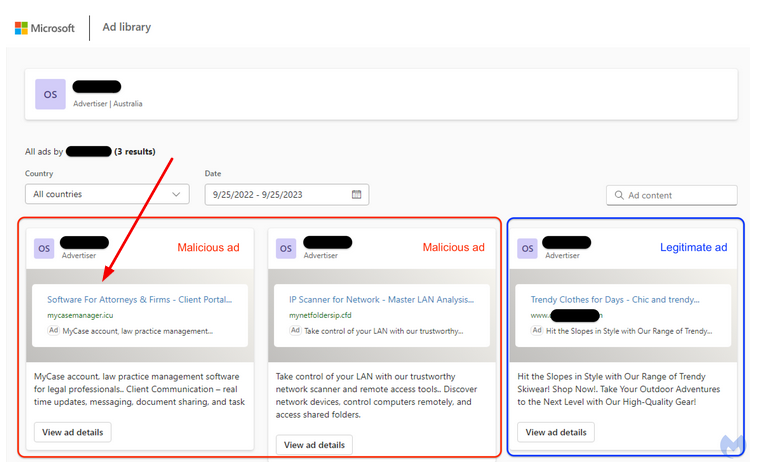
This time, Malwarebytes reported that the source of the attack was a legitimate Australian business, which was apparently hacked and forced to seed malicious ads. In addition to the fake Advanced IP Scanner program, the company’s advertising account was also spotted spreading a malicious ad tailored specifically for lawyers.
Source: Malwarebytes
What makes the problem worse
As we’ve mentioned before, the problem of malvertising is well-documented, it’s not limited only to Bing or Google either, and, in fact, it dates back over a decade. However, with the rise of AI-powered search engines (first and foremost, Bing AI) the problem risks getting dramatically worse.
One reason is that everything suggests that we are more likely to trust conversational chatbots than an impersonal search engine. Another is that, unlike a standard search engine interface with dozens of links on the same page, we are exposed to a limited set of answers within chatbot windows, which arguably makes these answers ever more persuasive.
If we speak about ad blocking, here we encounter yet another problem. Ad blockers are good at blocking search ads (in the AdGuard extension you can do this in one click by toggling Block search ads and website’s self-promotion), but when it comes to blocking ads in the AI-powered chatbots, this is largely an uncharted territory. In our previous articles, we have outlined our thoughts on blocking ads in Bing Chat specifically, and in AI-powered chatbots in general. Without going too far down the rabbit hole, let’s just say that it’s possible, even for ads that are an integral part of the chatbot’s response, but developing an actual solution to this problem will take some time.
However, what ad blockers can do right now is block these malicious domains so that even if you see the bad ad in Bing AI, you will be warned against actually navigating to the site. We’re constantly updating the list of “bad” domains to keep up with emerging threats like this, but there’s always a chance that something will slip through the cracks. So here are our general recommendations on how to avoid falling victim to these ads.
General recommendations
Do not click on ads, because why would you? To make sure you don’t accidentally click on an ad, pay attention to those tiny ‘ad’ and ‘sponsored’ labels that all advertising links are supposed to have
Before following a link, check its URL for obvious typos. They are usually a tell-tale sign that something’s fishy. In other words, “advenced” is not “advanced”
Use antivirus software — well, this advice is pretty self-explanatory
Use ad blocking software. Yes, ad blockers have yet to get up to speed as far as blocking ads in AI-powered chatbots is concerned, but we will get there eventually. In the meantime, some ad-blocking solutions can also protect you from malware and phishing sites thanks to special filters. The database used by AdGuard’s anti-malware module, for example, currently contains about 1.5 million phishing and malware sites and is constantly updated.


















































