Google’s new AI feature: a search for answers or a search for ads?
Google says its new generative AI feature will start a “new era of search” by “unlocking new types of questions” and “transforming the way information is organized.” But a closer look at Google’s own promotional materials reveals a downside: you may have to face a barrage of ads every time you use it. But how many ads is too many? For Google, it seems, the more, the better.
Google offered a sneak peek at ad placements in its brand new Search Generative Experience (SGE) at an event for advertisers on May 23. There, Google revealed that ads would not only appear before and after the AI-powered snapshot, as originally announced, but would also infiltrate the AI-generated responses. And if the example Google gave is anything to go by, it’s not a pretty sight.
In the presentation showed by Google, an SGE user searched for “outdoor activities in Maui” and was greeted by two Google ads at the top of the search results before he could even see the AI’s suggestions. After scrolling down, the user could see some tips on outdoor activities to enjoy in Maui, framed in green to indicate that they were generated by AI.
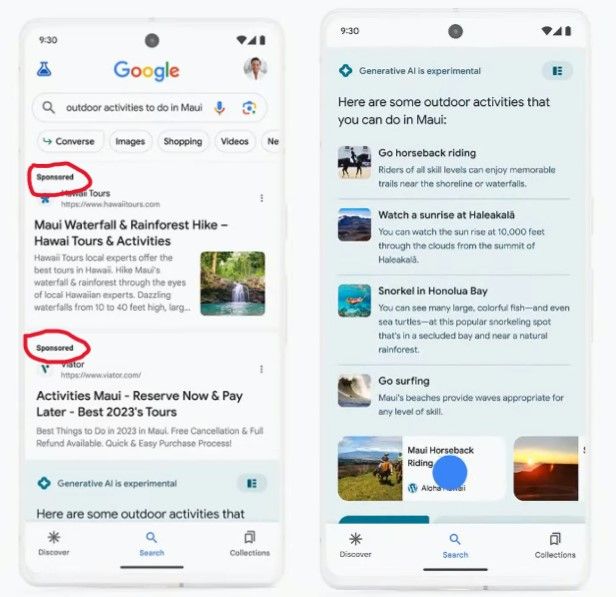
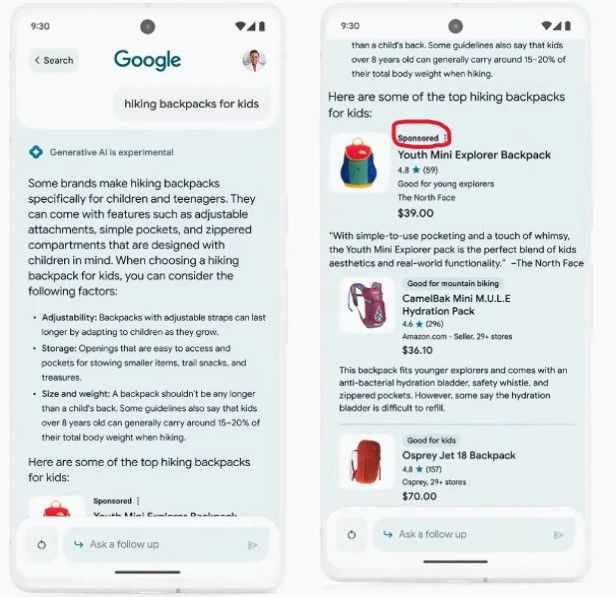
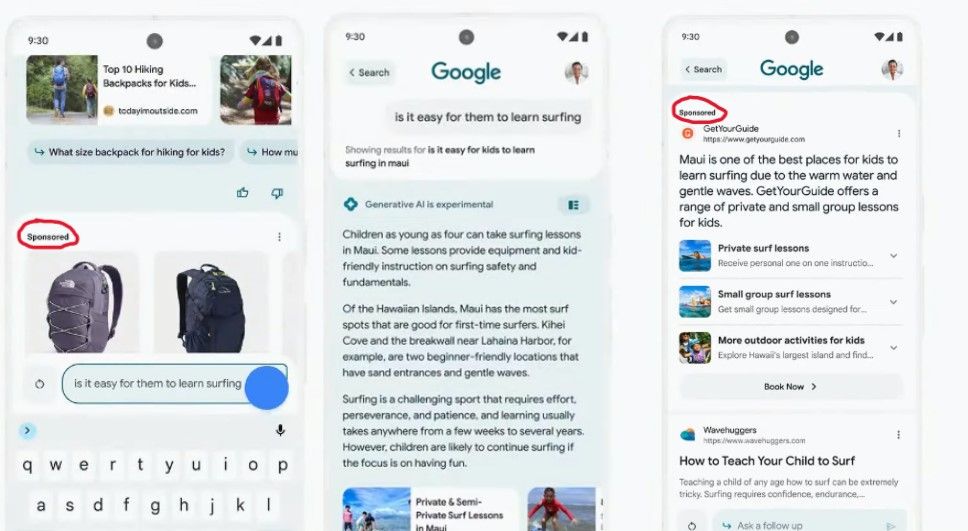
The first AI-generated response was ad-free, but the first follow-up question to the AI chatbot — “hiking backpacks for kids” — triggered an answer that already included ads. A sponsored result came first, followed by organic results.
‘Industry-leading’ ad labels that hide in plain sight
Touting the “new ad experience”, Google’s VP of Ads Jerry Dischler claimed that search ads within SGE would be hard to confuse with organic results. The former would “feature our industry-leading clear and transparent labels with the ‘Sponsored’ label in bold black text,” he said.
However, if you look at the backpacks in the screenshot above, without peering too intently, you may not be able to tell which one is the advertised one (or if they all are). That’s partly because, in Google’s example, other products also have labels: “good for mountain biking” and “good for kids,” which make the “sponsored” label less noticeable. Besides, what catches the user’s attention first is arguably the product image, the description and the price, and not a line of text in fineprint at the top.
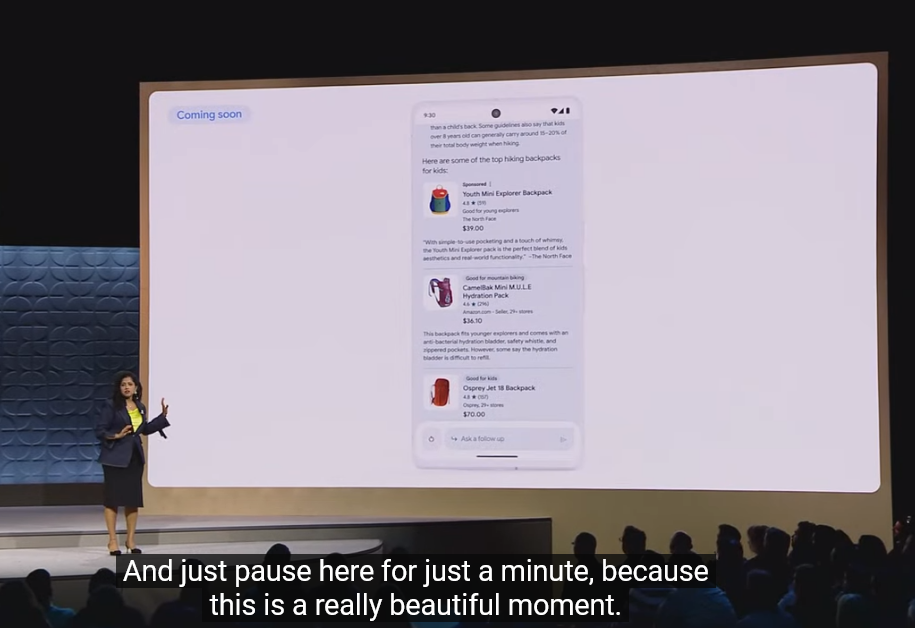
When describing the new ad placements and how they can help advertisers reach users with highly-relevant ads, VP of Google Ads Vidhya Srinivasan called it a “beautiful moment.” We thought she was being sarcastic, but she wasn’t. They say, beauty is in the eye of the beholder, but in our opinion, there is nothing beautiful about ads populating your chatbot’s answers.
Anyone familiar with Google’s history of ad labeling knows that over the years, Google has made ads in search more and more indistinguishable from organic search results. First, by removing background shading in 2013, and then by doing away with colored ad labels in 2019. Google’s claim that its ad labels are industry-leading is questionable, but even if we assume it’s true, it is not a compliment to Google, but rather a criticism of the industry’s poor standards for marking ads clearly.
As for “clear and transparent,” well, judging by the direction Google’s ad design is going, it seems that at some point the labels may become so “transparent” that we will barely be able to see them at all. Truth be told, it’s already hard to tell apart paid and genuine results in the SGE.
The never-ending ads galore
But let’s go back to ads in the SGE. Yes, we’re still not done with them. If the user scrolls to the bottom of the SGE experience, they’ll see another row of ads.
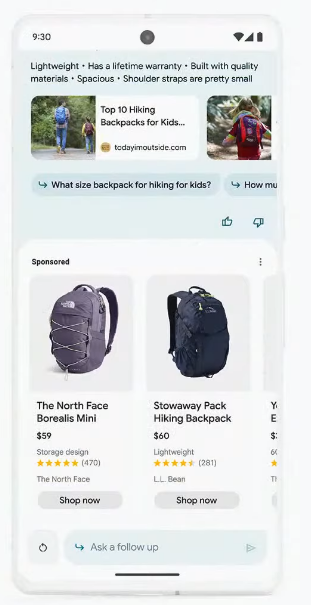
And if the user, assuming they are still not deterred by the amount of ads at this point, decides to ask more follow-up questions (“is it easy for them to learn surfing” in Google’s example), they should be ready to see more ads in replies.
The fact that Google is filling its Generative Search Experience with ads from day one is not surprising. After all, Google makes most of its money from advertising, and search ads account for a lion’s share of its ad revenue. To some extent, Google follows in the footsteps of Microsoft, which introduced ads into Bing AI, its own AI-supercharged search experience, back in April.
Blocking ads in Google’s SGE
Based on our initial observations, it seems that ads in Google’s SGE are similar to the ones in regular Google Search results, and can be blocked with conventional ad blocking methods. The way the ads appear, as seen in the videos and screenshots Google has provided, does not require us to come up with new, out-of-the-box solutions.
However, there’s a risk that Google could take a page from Bing’s playbook and integrate ads more closely or “natively” with AI-generated responses, making them an integral part of the message itself. In that case, simply removing the ads could render the entire response unhelpful, meaning we would have to explore innovative ways to block ads, perhaps using AI ourselves. We have discussed some of these possible new methods in more detail in our article about the challenges of blocking ads in Bing AI’s chat mode.
We may update this article once we get access to Google’s SGE and see the situation with ads firsthand. For now, we are cautiously optimistic that we will be able to block ads in SGE, which the most quick-witted have already nicknamed Google’s “Generative Ads Experience.”
It’s not OK, Google
At the risk of sounding too obvious, the excess of ads that Google might impose on users with its AI experience will ruin the otherwise cool idea of integrating AI with search. While we wouldn’t expect Google to refrain from including ads into its AI-powered search — after all Bing is doing that as well — oversaturating it with ads can backfire. If it does, Google will see it in the number of users who stick with or, rather, not stick with its SGE.
If you don’t want to see most ads in search results, use an ad blocker, such as AdGuard. As Google and Microsoft keep inventing new ways to sneak ads into their conversational AI’s answers, we will also be working on finding new ways to block them.
Another option is to use a completely ad-free paid search engine, such as Brave Search Premium. Sadly, another ad-free subscriptions-based search engine, Neeva, has just shut down. They had a noble vision of offering users personalization and privacy without ads — a vision that we share. But they faced a huge obstacle: getting users to switch from their default search settings. This shows how Google has entrenched itself as a dominant force on the search engine market, making it hard for users to choose alternatives. But by botching the introduction of AI with ads, Google may risk losing some of its loyal users and opening up opportunities for new competitors. We know it’s a long shot, but we would like to see that happen.


















































