Did ad blockers survive YouTube's offensive? Letting numbers talk
Since May this year, YouTube began ramping up its war on ad blockers, threatening to disable video playback for users with ad blockers unless they turned them off or paid for YouTube Premium. At the time, YouTube communicated its new policy via a pop-up message that was shown to a limited number of people. However, since the test affected only a very small percentage of users, it did not cause much of a stir.
In early September, the Google-owned service took its crackdown on ad blockers up a notch and began stopping videos from playing for a larger portion of ad blocking users if they ignored the warning.
In late October, YouTube confirmed that it had “launched a global effort” to make users disable ad blockers on the site. From that point on, there was no doubt that the policy, controversial as it may be, was here to stay. At least for the time being.
YouTube and ad blockers have never, and understandably so, been on friendly terms. Like many other Google-owned services, YouTube has been making the bulk of its money by showing targeted ads that are embedded directly in the user-generated content.
YouTube’s move to inflame the standoff with ad blockers was not entirely unexpected — after all, the platform was only following in the footsteps of many other service providers before it: for instance, some ad-supported websites have since long been displaying notices or even blocking use of the site entirely when they detect suspected ad blockers.
However, due to YouTube’s sheer size, which is reflected in the number of its monthly active users (over 2.5 billion!) and its cult status in the media-playing-and-streaming landscape, the escalation of the YouTube’s war against ad blockers drew a lot of media attention. Some started asking: “Is This the End of Ad-Free YouTube?”. Others went even further, suggesting that “YouTube’s new tactics could put an end to your use of ad blockers”.
It’s time to take stock and look at the statistics: did YouTube’s actions have an impact on ad blockers? And if so, how much of an impact have they had?
Panic uninstalls did not last long
When YouTube launched its offensive against ad blockers, we at AdGuard did not sit idly by. We took countermeasures and tried to get filter and extension updates out to users as quickly as possible. And even though YouTube had been modifying its ad blocking detection methods several times a day, we’ve tried to keep in step with all the changes. However, we needed time to make the necessary adjustments — not least because until YouTube expanded its test to a significant portion of its users, we had a very limited set of data to work with.
Read a comprehensive guide on how to watch YouTube with an ad blocker on if you still have problems doing so
Sometime in June — around the time YouTube started to get serious about its new anti-ad blocking crusade — we began to see what, in hindsight, might have been the first effects of this policy. From June to August, the number of active users of the AdGuard Ad Blocker extension for Chrome dropped by about 8%. And while that was not a huge decrease in absolute numbers, it was still noticeable.
But in late August, the trend reversed. The temporary slump in user growth was offset by the increased demand in the second half of the year. As a result, YouTube’s policy did not have a major impact on our user expectations for the year. Prior to YouTube’s crackdown, we had seen an upward trend in user numbers, and the surge in interest in the extension post the initial phase of YouTube’s offensive neutralized the negative effect it had caused in the first place.
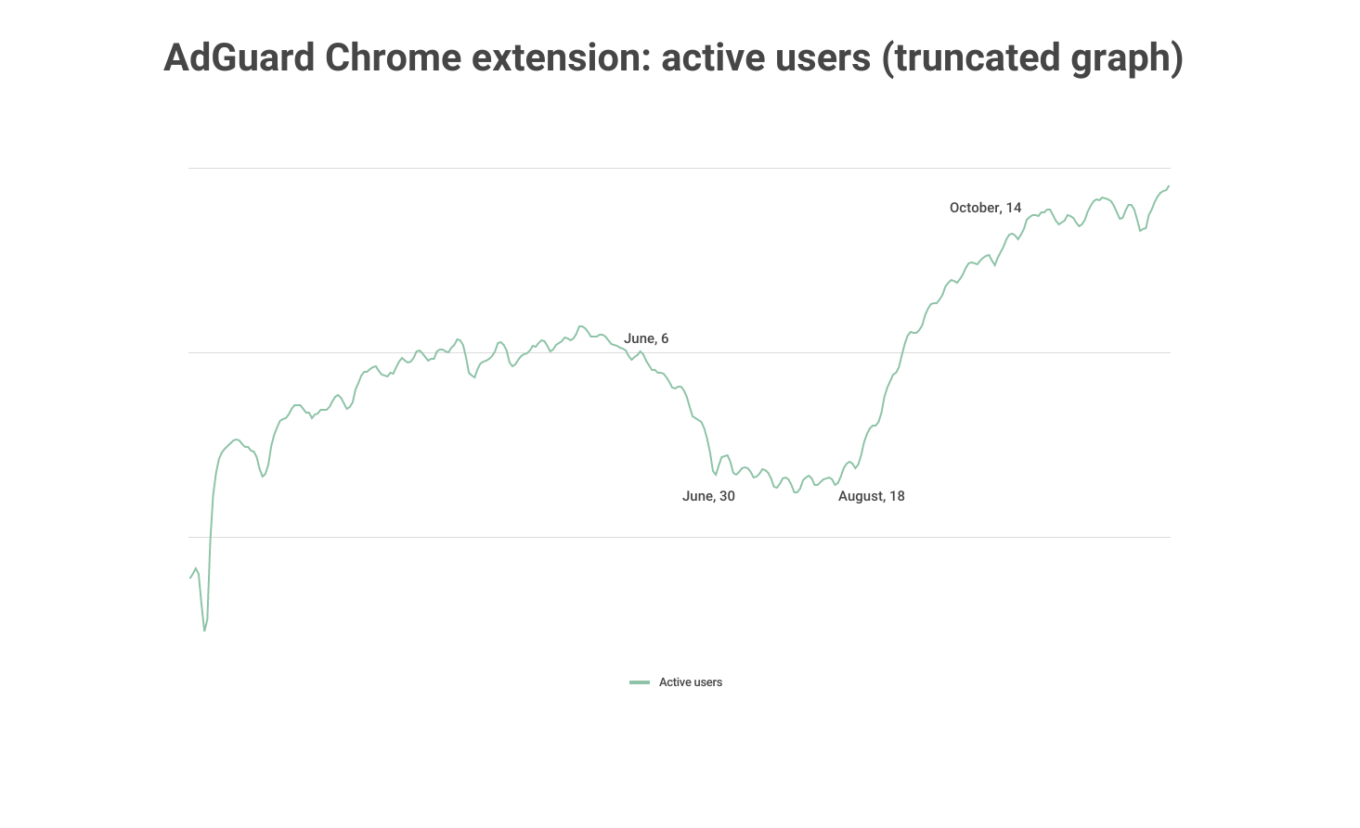
Note: For illustrative purposes, we have truncated the graph so the 8% drop in the number of users during the early stages of YouTube’s crackdown may appear more pronounced than it actually was
This may even feel counterintuitive given all the trials and tribulations, all the shenanigans that ad blockers had to go through in the second half of the year thanks to YouTube’s new policy.
After media reports and YouTube’s own statements implied that ad blockers were doomed, and especially after more and more users started noticing that their ad blocking extensions were not working properly on YouTube, we did indeed see a spike in uninstalls. However, at the same time, the number of installs also increased significantly! It may well be that the way ad blockers’ woes were amplified in the media inadvertently boosted their popularity and helped them woo new users.
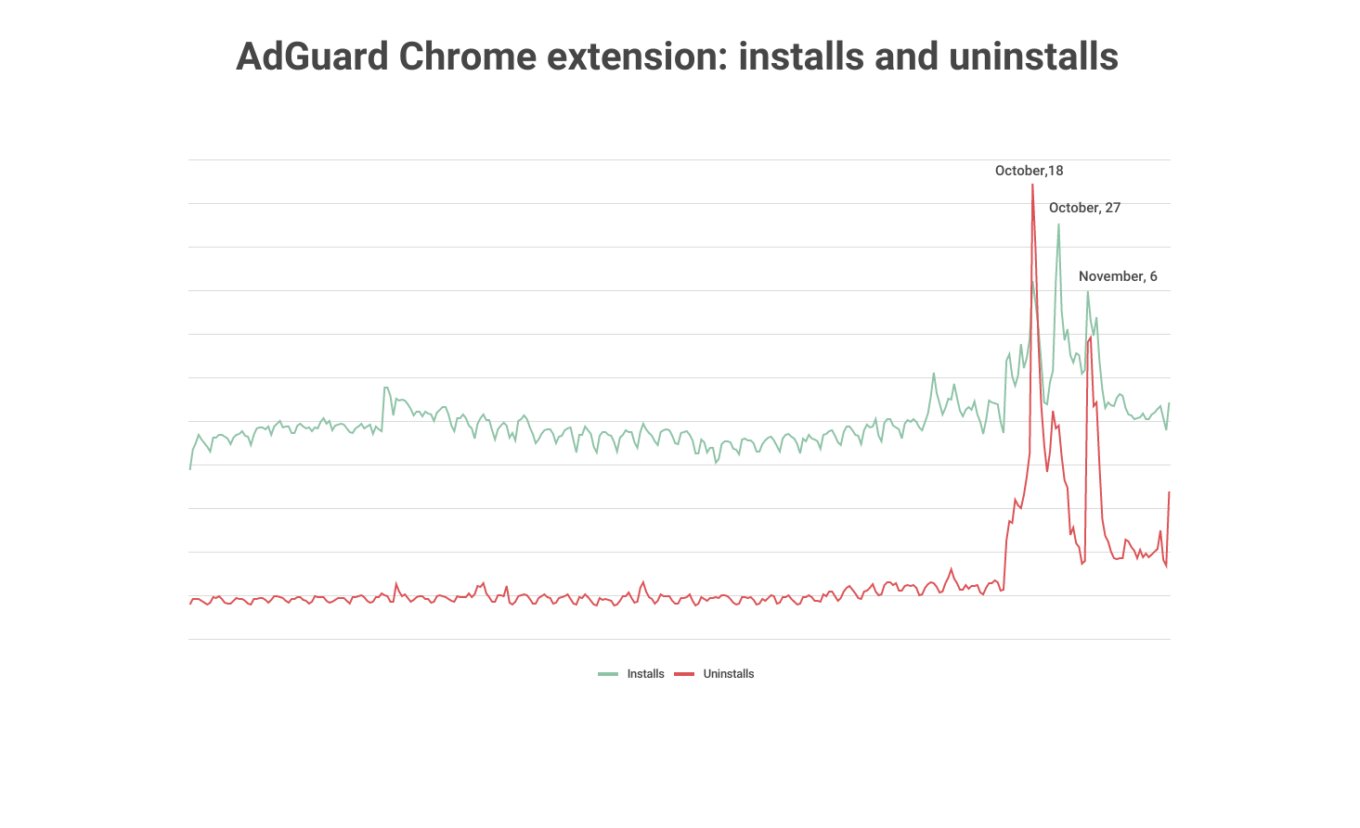
After a brief period of turbulence that lasted about a month, we saw the trend stabilize. And while the daily number of uninstalls was still higher than before YouTube's crackdown, it remained consistently lower than the number of daily installs.
Ad blockers felt the impact, but are far from dead
The takeaway from all of this is that ad blockers — first and foremost, ad-blocking extensions — were rocked by YouTube’s onslaught, but survived. In drawing this conclusion, we are speaking from our own first-hand experience in dealing with YouTube’s wrench in our works — and we, of course, cannot speak for others.
After a short adjustment period, we’ve managed to adapt to the pace of YouTube’s anti-adblock script changes. And while it’s up to users to judge whether we’ve done a good job, the numbers don’t lie. After an initial panic, users stopped deserting the AdGuard Ad Blocker extension for Chrome en masse. And, moreover, the interest has rebounded, as is evidenced by the growth in the number of active users.
It’s also important to note that ad-blocking extensions bore the brunt of YouTube’s policy, while desktop applications emerged relatively unscathed. This is because the filtering methods desktop apps employ are harder to detect because they are simply more advanced. So, if you are using an ad blocking extension and running into any issues with YouTube, try switching to a desktop YouTube ad blocker such as AdGuard for Windows or AdGuard for Mac.


















































