Rule limit issues
This article is about AdGuard Mini for Mac, which safeguards only your Safari browser. To protect your Mac entirely, download the AdGuard app
Safari content blocker rule limit
AdGuard Mini for Mac uses the Content Blocking API to apply filtering rules to pages in the Safari browser. Currently, a maximum of 150,000 rules are allowed for each content-blocking extension.
AdGuard Mini for Mac has 6 content blockers:
- AdGuard General
- AdGuard Privacy
- AdGuard Social
- AdGuard Security
- AdGuard Other
- AdGuard Custom
This makes a total of 900,000 filtering rules.
However, one extension can contain only up to 150,000 rules. If you exceed this limit, some of the rules will not be applied. This may lead to incorrect blocking.
How to check if you are exceeding the rule limit
- Open AdGuard Mini app.
- Go to Settings → Safari extensions.
- Below each extension, you can see the enabled filters and the number of active rules.
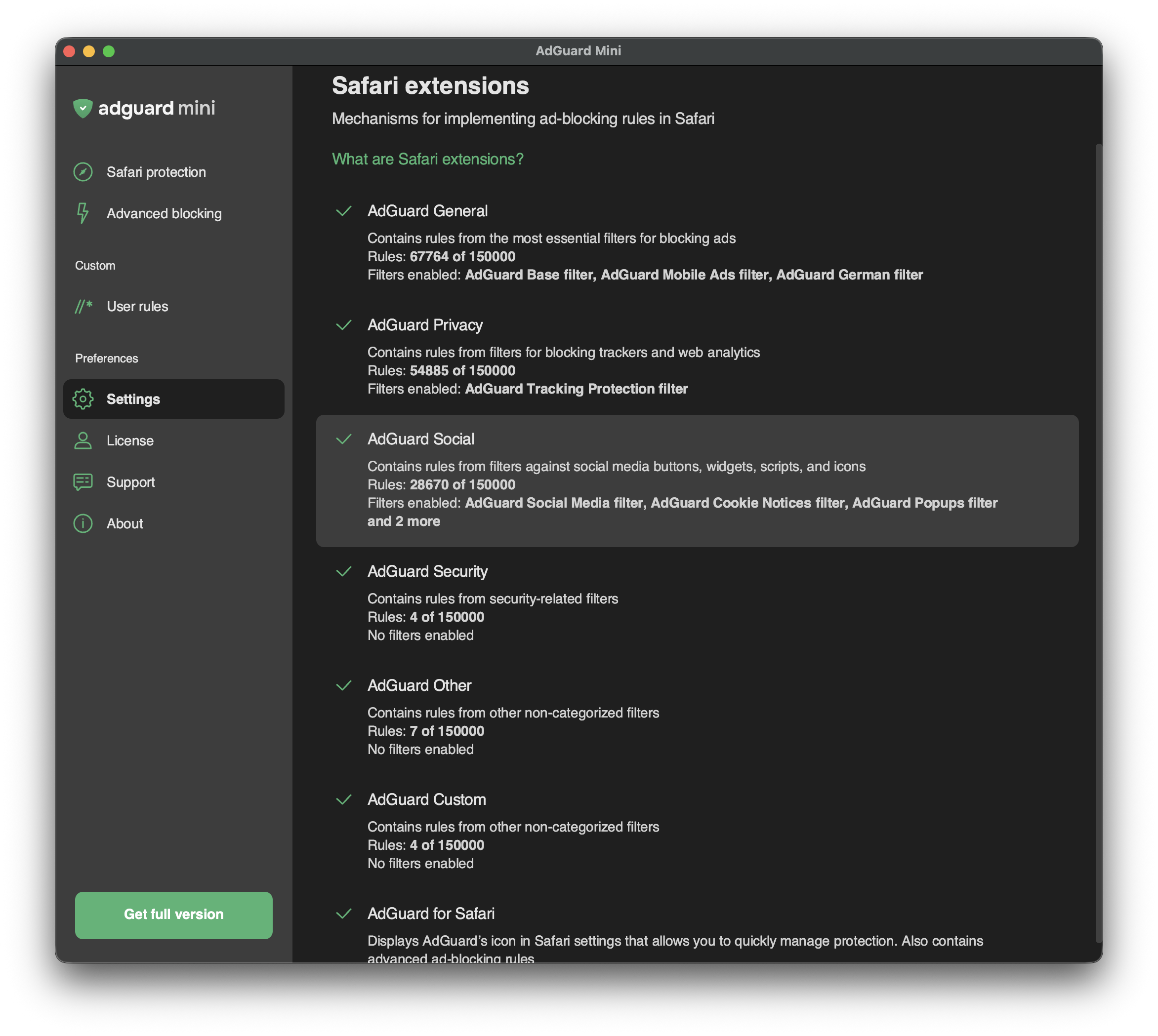
If more than 150,000 rules are enabled in a content blocker, you may need to disable some filters or user rules from it. Go to Filters, select the problematic category, and disable the filters or user rules you don’t need.