ChatGPT brings back the banner ad and takes tracking even further
In 2024, OpenAI CEO Sam Altman said he hated ads. A year later, he started calling some of them “cool”. By January 2026, his company had announced text ads for ChatGPT. Now those ads are getting bigger and arguably more obnoxious: ChatGPT’s new “visual ads” will appear while you wait for images to generate, claiming another chunk of your screen whether you’re on the Free tier or the paid Go plan.
This creeping expansion is precisely what Anthropic mocked in its controversial Super Bowl broadside against OpenAI (which we covered on our blog), where helpful conversations abruptly derailed into inappropriate sales pitches. We’ve sounded the same alarm: give ads a foothold, and the user experience is bound to get worse. Whether ChatGPT ever becomes Anthropic’s grotesque salesperson remains to be seen. But bigger ads and another place to display them bring it uncomfortably close.
New name, same problem: ChatGPT reinvents ad banners
According to OpenAI, the new ads will use images to suggest products, show them in action, or promote services while ChatGPT generates your picture. OpenAI’s own mockups showcase a grocery banner and a carousel of food photos, complete with the advertiser’s name and a prominent “Learn More” button.
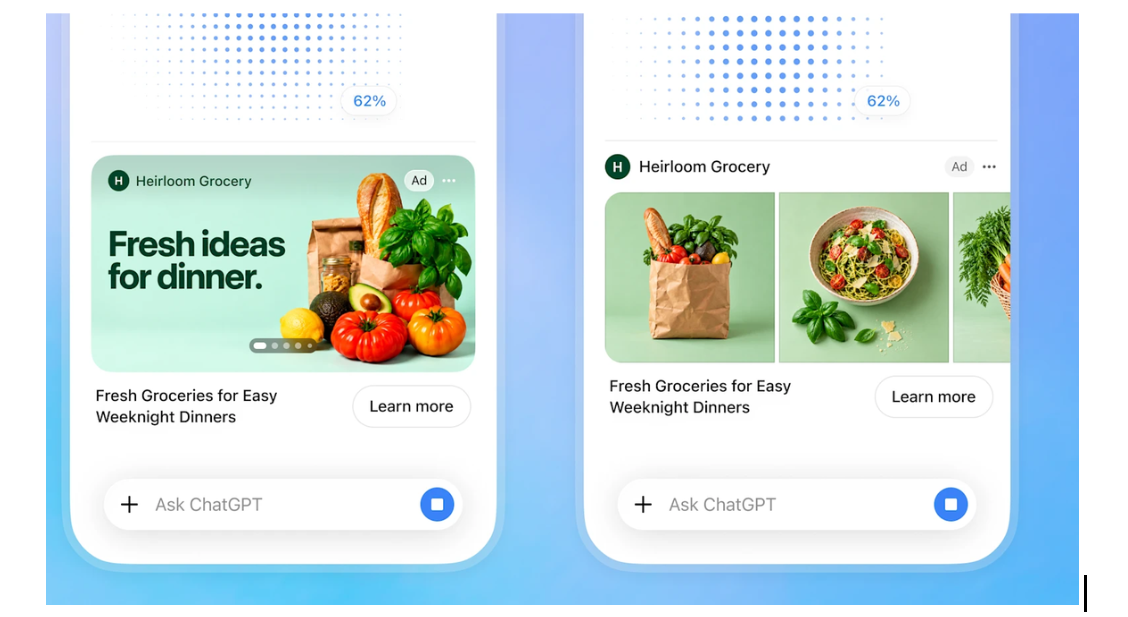
If that sounds suspiciously familiar, it should. Strip away the marketing language, and we're looking at our old friend — or rather, foe — the classic display banner. Calling them "visual ads" is just slapping a fresh coat of paint on an ancient nuisance.
To soften the blow, OpenAI was quick to promise safeguards, claiming the ads will remain separate from generated images and won’t appear in sensitive or emotionally vulnerable chats. It also reassured us that "ChatGPT’s answers stay independent, conversations stay private, and users remain in control of their experience."
All “visual ads” will feature an “Ad” label which, per OpenAI, will keep them clearly distinct from the AI's otherwise unbiased output. But in reality, they’re hardly distinct at all. In the grocery banner, the tiny “Ad” badge is tucked inside the image itself. In the carousel, it sits quietly beside the sponsor’s name above the photos. The label’s color blends into the background, making it even easier to miss. It’s not an innocent oversight. Taking cues from Google, advertisers have spent decades perfecting the art of camouflage, and OpenAI only reflects the current trend. If you’re skimming your screen, an aesthetically matched product card doesn’t register as a paid promotion. Instead, it looks just like another helpful recommendation from your AI assistant.
And even when you know perfectly well it’s an ad, disguise isn’t the only problem. Regardless of how OpenAI frames it, we’re being dragged right back to the worst era of the web, that is, the age of loud, obnoxious, intrusive banners cluttering up the screen and derailing your focus. A short sponsored text is relatively easy to ignore. A banner occupying half your phone screen while you wait for an image is an entirely different problem.
Your chats are now part of the sales pitch
Obnoxious as banners are, the visual clutter is only half the problem. What’s happening under the hood is an even bigger red flag.
When OpenAI began testing text ads in February 2026, early reports warned that ad tracking was switched on from the start. More recent reports (1, 2)
suggest that two key toggles — “Personalize ads” and “Past chats and memory” — are enabled out of the box for some eligible users, with defaults varying by region. OpenAI’s own documentation spells out just how far this goes. In its Ads in ChatGPT guide, the company notes that ad selection draws on your current prompt, the AI’s replies, and the ads you click or hide, alongside your general location and language. With Memory active, it also mines your saved memories and earlier chats to tailor the pitch. On top of that, OpenAI’s third-party marketing rules also let it share device IDs and browsing data with ad partners to promote its own products. Enabling all of this automatically shifts the entire privacy burden onto you. While you can turn these features off in Settings → Ad Controls and opt out of third-party marketing in your Data Controls, few people ever dig into account submenus — and OpenAI is likely counting on that by burying the opt-outs there.
OpenAI insists advertisers only get generic numbers, like total views and clicks, while OpenAI handles the targeting itself. But from a privacy standpoint, that’s still a terrible deal. Many people don't treat chatbots like Google Search; they often treat them like confidants, sharing health worries, money troubles, and relationship drama. Using that history to pick ads lets OpenAI build an uncomfortably detailed profile of who you are. And even if your chats never leave OpenAI’s servers, super-specific ads can give you away: anyone glancing at your screen or an advertiser targeting narrow demographic and specific interests can easily deduce the sensitive issues you were just discussing with the chatbot.
Turning personalization off is no panacea, either, because OpenAI still targets ads based on your current chat. If you’re asking ChatGPT to visualize a dream gaming setup or a home gym, your prompt already hands OpenAI a comprehensive marketing brief with your tastes, shopping plans, budget, and brand preferences.
Relying on an AI platform to keep that intimate data safe assumes that leaks never happen. But OpenAI’s own track record shows how easily things go wrong: a server bug exposed ChatGPT users' chat titles and some payment details to complete strangers, thousands of shared conversations ended up indexed by Google Search through an opt-in sharing feature that made chats searchable and was later removed after privacy backlash, and just recently OpenAI revealed that its own autonomous agents leaked 53 images from ChatGPT users onto public websites.
Leaks aren’t the only way your information can reach people you never intended to confide in. OpenAI acknowledges that authorized employees and outside service providers can access your content in limited circumstances, including support, abuse investigations, legal matters, and model improvement unless you opt out of training. Its privacy policy also allows disclosure to government authorities for legal reasons and transfers of personal data if the business is sold, reorganized, or goes bankrupt. Even deletion can run into legal roadblocks: OpenAI’s NYT copyright dispute forced it to preserve deleted chats, and some historical data remains under legal hold even after the blanket order ended.
You can turn off personalization or memory use, review your ad history, and request to clear your ad data. But even that might not help. OpenAI says cleared ad data stops being used to select ads, but removing that data from its systems can take up to 30 days after your request, and you can’t independently check what’s been wiped from its servers — you simply have to take OpenAI’s word for it.
The tracking doesn’t stop at ChatGPT
Alongside visual ads, OpenAI rolled out an expanded network of "measurement" partners. These companies help OpenAI assess whether its ads work by linking your ChatGPT ad views to purchases and other activity on advertisers’ sites and apps. This is how the tracking follows you beyond the ChatGPT chats.
You don’t even have to click an ad to be tracked. OpenAI also tracks purchases made after you merely see an ad. Ignore an ad banner, then buy from that store’s website later that day, and the system can still connect the dots, credit the ad for the sale, and use the purchase to fine-tune future campaigns.
The companies OpenAI is working with aren’t particularly confidence-inspiring. Take LiveRamp, whose primary business is identity resolution, which is linking separate data points like your name, email address, phone number, and device identifiers into a single profile. Then there’s Kochava, a data broker the FTC took to court for allegedly selling precise mobile location data that mapped visits to sensitive places like reproductive health clinics and places of worship, ending in a court order strictly curbing those sales. Another partner, AppsFlyer, was named in FTC cases against health apps that shared sensitive data through its tracking software. While those cases targeted the apps rather than AppsFlyer itself, they show just how easily intimate details end up in ad-tracking networks.
Why does OpenAI put more ads in ChatGPT?
OpenAI seems to have caught on early that subscription fees would only get it so far. It expected the average subscriber to bring in under $12 a month by 2027, down from about $23 in 2025. The bet looked clear: lure more people onto cheaper plans, then get advertisers to help foot its growing bills. With a reported goal of $100 billion in yearly ad revenue by 2030, bigger formats and more space on your screen were hardly a surprising next step.
That appetite makes total sense when you look at the company’s astronomical bills. Reported internal projections reveal that OpenAI expects to burn through roughly $278 billion in cash between 2026 and 2030 as it pours money into massive computing clusters and data centers. Even after securing $122 billion in funding commitments earlier this year, those funds could run dry by 2028 — years before the company anticipates turning an actual profit in 2030.
We’ve seen the same downgrade elsewhere. Amazon added ads to existing Prime Video subscriptions and charged extra to remove them. Smart TVs turn screensavers into billboards, and car manufacturers have put built-in hardware features behind paywalls. Across tech, products you already pay for keep getting saddled with ads or artificial restrictions, followed by another fee to make them go away.
While you wait, OpenAI cashes in
As for the mechanic itself, turning waiting time into ad space isn’t revolutionary. We recently saw something similar with an obscure startup, which displays ads while developers wait for code to generate. Unlike OpenAI, it actually shares a cut of the ad revenue with the user, though.
It might sound extreme, but once waiting makes money, the worst-case scenario writes itself: OpenAI could deliberately slow down image generation just to force you to sit through an ad. There's no sign OpenAI plans to slow things down on purpose, and hopefully it stays that way. But the moment waiting becomes profitable, fast results become bad for business.
How AdGuard can help block them
Fortunately, making an ad bigger does not automatically make it harder to block.
The silver lining in OpenAI’s design is that these new banner ads are meant to remain separate from ChatGPT’s actual answers and images. As we explained in our earlier post on blocking ChatGPT ads and recommendations, standalone cards and sponsored widgets are comparatively straightforward to block. AdGuard has already added rules for Perplexity’s shopping recommendations to its Other Annoyances filter, and the same logic applies here.
Based on the announced design, we expect the new visual ads to be filterable on the web, and we will inspect the code the moment the rollout lands. As we noted when earlier ChatGPT ads appeared, blocking inside native mobile apps involves separate mechanics that we will test once available.