Privacy-shy apps, DuckDuckGo's duplicity, Google's woes, Mozilla's tradeoff. AdGuard's digest
In this edition of AdGuard’s Digest: Apps overshare your data, DuckDuckGo flirts with a tech giant, patients sue Google, the EU sacrifices privacy to save children, Twitter launches a game, Mozilla’s having it both ways with Manifest V3, and more.
Mental health and prayer apps score dismal on the privacy chart
A new Mozilla survey has found that 28 out of 32 apps that deal with such issues as suicide, depression, sexual violence and religious beliefs have fallen "spectacularly" short of basic privacy standards. Six of the apps — Better Help, Youper, Woebot, Better Stop Suicide, Pray.com, and Talkspace — fared especially poorly. For instance, Pray.com which touts itself as "#1 app for Christians" loves sharing. And while sharing is caring, Pray.com took the notion too literally as it shares user data with third parties for advertising purposes. Moreover, the company can enrich the data with the information on gender, age, ethnicity, income and political views it buys elsewhere, and reserves the right to publish users' name, voice and other personal information for any commercial purpose. Another app on the blacklist is Better Help with its "incredibly vague and messy" privacy policy. The app can share data with advertisers and store client-therapist communications on the platform in an encrypted form. Moreover, it was reported that Better Help shares metadata with Facebook.
Mozilla says mental health apps are "a data harvesting bonanza". Another recently released survey which analyzed data security policies of the 23 most popular women's health apps came to the same conclusion. Half of the apps did not request consent from users to track them, while the absolute majority shared data with third parties.
We at AdGuard are deeply concerned about the low privacy standards employed by the apps. We commend Mozilla for shedding light on this issue. It is high time to change the situation. For now, we strongly recommend that you give apps only the most necessary permissions.
Duck-Duck-Go's tracking deal with Microsoft makes industry squeak
DuckDuckGo had some explaining to do after security researcher Zach Edwards revealed that its mobile browser does not stop Microsoft trackers from running. DuckDuckGo founder Gabriel Weinberg then admitted that his company indeed inked a search deal with Microsoft that allows the tech giant's trackers to operate in DuckDuckGo’s browser for Android and iOS, but not in its privacy-focused search engine.
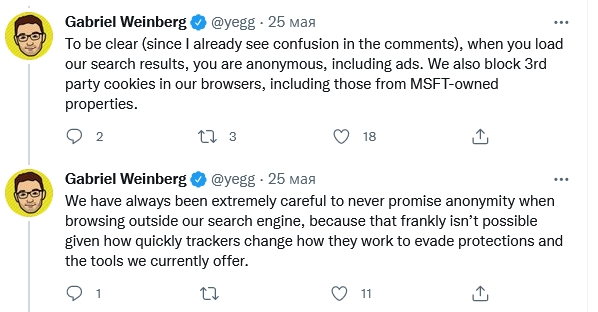
The agreement, on the surface of it, runs contrary to all what the company stands for. However, after the revelation sent shockwaves across the industry, DuckDuckGo stated that it has "never promised" anonymity when browsing. Weinberg argued that users of DuckDuckGo's browser do not need to worry as it still provides protection from 3rd-party cookies and fingerprinting by imposing restrictions on third-party tracking scripts, "including those from Microsoft". DuckDuckGo also said that the company is seeking "to remove the limited restriction" on blocking Microsoft trackers by renegotiating the deal.

For our part, we at AdGuard are deeply concerned by the deal and its potential impact on the industry, considering that DuckDuckGo and its search engine played a pioneering role for the protection of user privacy.
Surprise, surprise. Google in legal hot water over misuse of data
Old sins come back to haunt Google. The tech giant is now facing a class-action lawsuit that seeks unspecified damages for the alleged misuse of patients' medical records. The complaint was filed in the UK on behalf of 1.6 million people that had their data shared with Google's AI division, DeepMind, without their consent. DeepMind's app received the data from a public healthcare trust. The app was designed to help medics track patients' conditions for the early signs of a disease. The fact that the trust shared patients' data with DeepMind is not new — the current lawsuit is a distant echo of a data scandal that broke out in 2017. At that time only the trust was sued, with DeepMind getting off scot-free. DeepMind argued that it had not shared any data with its parent, Google. That defense now looks flimsy, especially after Google took over the app in 2018. The tech giant had been handling the patients' data up until last year.
We hope that this case will serve as a cautionary tale for tech companies prone to sharing user data without users' expressed consent. We also hope that justice will be served and that privacy violators will be punished.
EU may jeopardize end-to-end encryption and privacy with new child protection feature
Meta, Apple and other tech companies in the EU may soon be forced to scan messages for child sexual abuse materials (CSAM). The proposal is part of the new European Commission's plan to tackle child abuse. Under the law, companies would be tasked with identifying and stopping circulation of not only known CSAM, but also will have to detect new materials and "grooming" in text messages. Grooming is an act of befriending a child to try to persuade them to have a sexual relationship. Tech firms would report to a soon-to-be-created EU center whose staff would manuelly check the materials for false positives before sharing them with police. The law is a follow-up on the temporary regulation agreed by the EU last summer that allowed tech companies to scan images and texts for child abuse on voluntary basis.
The EU says that the "detection orders" to scan messages would be issued by a court or other relevant authority. They should be "limited in time" and target "specific" types of channels, users or groups of users.
The draft has already incurred wrath from privacy advocates. The Electronic Frontier Foundation (EFF) called it a "disaster for online privacy in the EU and throughout the world" that would undermine end-to-end encryption. The developer of the Germany-based secure email service Tutanota argued that monitoring of telecommunications will do little to catch child abusers. He pointed out that while 13,670 children were abused in Germany in 2019, only in 21 cases was an online surveillance order issued.
We at AdGuard believe that while it's important to protect children from digital harm, it should be done through other means and not at the expense of their own privacy. Adding to the concern is the fact that there is a worrying trend of abandoning privacy protections in the name of child safety. For instance, Apple is considering implementing its own CSAM's detection feature. You can read more about it in one of our past articles.
Mozilla solves Manifest V3 conundrum
Feedback is important, when it is heeded to. The case of Mozilla and a controversial set of changes introduced by Google for browser extensions' rules is a good example of this rule. Let us remind you: the changes are being implemented across Chromium-based browsers in the new version of extensions API — Manifest V3. It has drawn its fair share of criticism, including from yours truly for stripping extensions of access rights to web requests and, therefore, of many useful capabilities.
Extension developers that were part of the W3C workgroup expressed concerns over the proposal. And while the feedback effectively fell on deaf ears in Google, Mozilla took cues from it. The company has revealed that it will take the best of both worlds: it will implement Manifest 3 but in such a way that does not limit the functionality of existing and future browser extensions. Firefox will maintain support for blocking WebRequest, but it will also support new, narrower-scoped Google's API which was meant to replace the feature in MV3. Google is gradually phasing out the support for the extensions that employ Manifest V2, and plans to end it completely by June next year.
AdGuard can only salute Mozilla since this news means that content blockers will continue to function in their original, more "powerful" form on the platform. If we are to wage a bet, we believe that filter list maintainers may switch to Firefox as their primary browser, which, in turn, can spell doom for Chrome in the long run. Chrome may become too slow in blocking unwanted content, so users that value their privacy may as well migrate to Firefox.
Musk's Twitter takeover may be in limbo, but pivot to privacy is not?
In the previous edition of our digest we covered the impending purchase of Twitter by Elon Musk for $44 billion. At that time the deal seemed to be all but done. However, since then Musk put his bid to takeover Twitter on hold and is seeking to knock down the price of the tech giant. The billionaire argues that Twitter has underreported the number of "spam bots" on the platform. Twitter puts the number of fake users at 5%, while Musk believes it to be at least 20%.
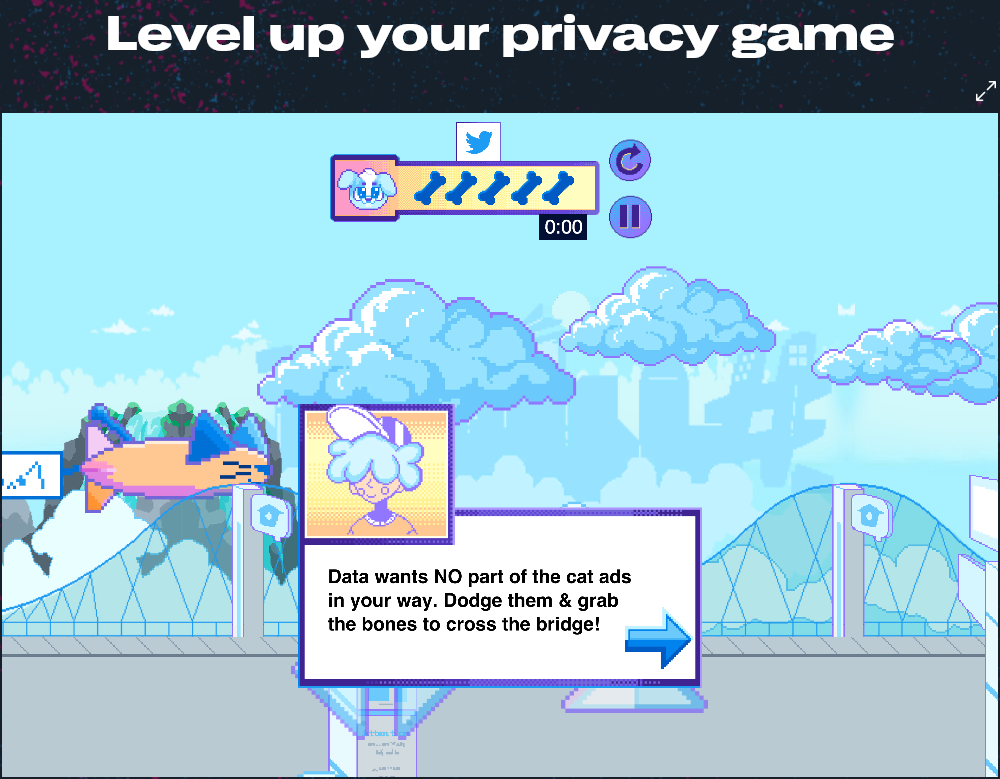
In the meantime we might already be seeing the early signs of Musk's influence on Twitter's policy. The billionaire previously said he wants to make Twitter more privacy-conscious. So, earlier this month Twitter has stripped its privacy policy of legal jargon. The company said it hopes that it will be easier for users to understand what data it collects, what for and how they can manage privacy settings. So that not only adults but also teens could get Twitter's privacy policy, the company launched a multi-level video web game called 'Twitter Data Dash'. A player should help a dog named "Data" to safely get to the park in "PrivaCity". To do so, one has to "dodge cat ads, swim through a sea of DMs, battle trolls" and learn how to "take control of your Twitter experience".
Well, not bad, for starters.
Privacy is the new black and Google wants to stay hip
Recently, Google has been straining itself to appear privacy-conscious in the eyes of users. So far with mixed effect: you're welcome to read our in-depth review of the Google privacy initiative — Privacy Sandbox — and its shortcomings here. Now Google has unveiled a new tool that should give users more control over what ads they see on YouTube, in Google search and in their Google feeds. They will be able to fine-tune their ad preferences through the new 'My Ad Center' hub. There, users will be able to tell Google directly which topics and brands they want to see "more or fewer ads about" or turn off "Personalized ads" altogether. Users will be able to disable the feature that allows advertisers to target them with ads based on their age, relationship status, and education.
The tech giant has also announced that it would place a yellow alert over the profile picture in all Google apps if it deems the account not secure enough. The alert should serve as a reminder for users to add another security layer, such as 2-Step Verification.
The credit is due where it's due. We have always approved of 2FA and highly recommend enabling it on your AdGuard account if you haven’t done so yet.




















































