规则数量限制的问题
信息
This article is about AdGuard Mini for Mac, which safeguards only your Safari browser. To protect your Mac entirely, download the AdGuard app
Safari 内容拦截器规则数量限制
AdGuard Mini for Mac uses the Content Blocking API to apply filtering rules to pages in the Safari browser. 目前,每个内容拦截扩展最多可使用 150,000 个规则。
AdGuard Mini for Mac has 6 content blockers:
- AdGuard 常用
- AdGuard 隐私
- AdGuard 社交
- AdGuard 安全
- AdGuard 其它
- AdGuard 自定义
这样,总共有 900 000 个过滤规则。
However, one extension can contain only up to 150,000 rules. 如果用户超过此数量限制,某些规则将无法应用。 这可能会导致错误拦截。
如何检查是否超出规则数量限制
- Open AdGuard Mini app.
- Go to Settings → Safari extensions.
- Below each extension, you can see the enabled filters and the number of active rules.
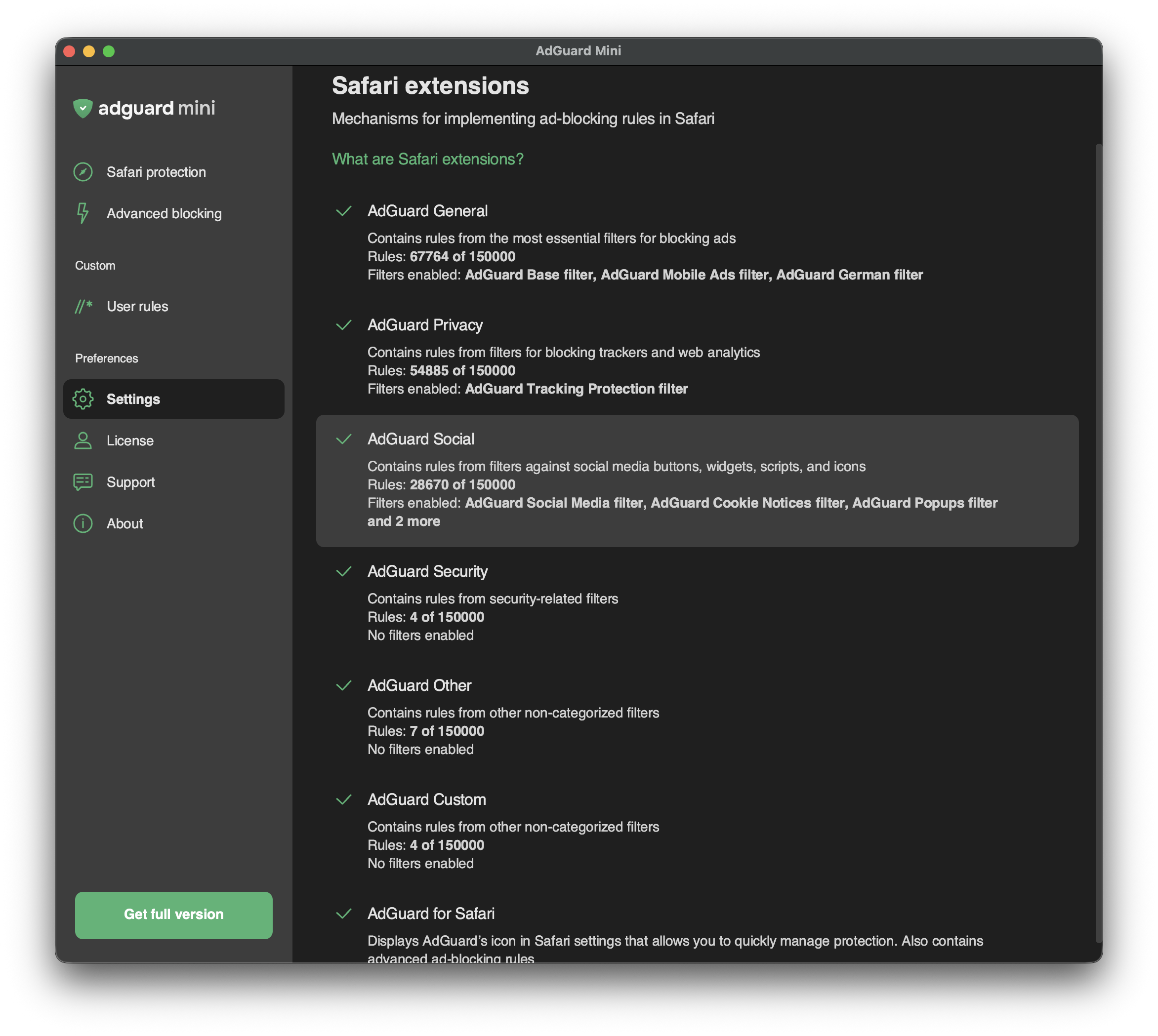
如果内容拦截器中启用的规则数量超过 150,000 个,则可能需要禁用其中的某些过滤器或用户规则。 请转到「过滤器」,选择有问题的过滤器类别,禁用不需要的过滤器或用户规则。