AdGuard Browser Extension MV3 comes to Microsoft Edge

Microsoft Edge is phasing out Manifest V2 (MV2) extensions, including AdGuard. But we’re not going anywhere — our Manifest V3 (MV3) version of AdGuard Browser Extension is now available in Microsoft Edge Add-ons.

What happened

As of now, MV2 ad blockers no longer appear in Edge Add-ons search results. This is part of Microsoft’s policy on moving away from MV2 extensions, which the company announced in August.

The Edge Add-ons notice said AdGuard’s MV2 extension “no longer meets Microsoft Edge standards”. But this doesn’t mean AdGuard is leaving the store. This is where our MV3 update comes in.

Please note: even though AdGuard Ad Blocker has moved to MV3, it may not currently appear in Edge Add-ons search results. This is a technical issue on Microsoft’s side, and we expect it to be resolved soon. In the meantime, you can safely download the extension via direct link.

What changes with MV3

With MV2, the extension sees each network request in real time and decides what to block. This changes with MV3: the browser receives a prebuilt ruleset and applies it itself.

This shift has a price: maintaining MV3 functionality close to MV2 is trickier. Rule counts are limited, certain filtering techniques cannot be reproduced exactly, and most filter updates must still be delivered with the extension itself, which means some improvements take longer to reach users.

Keeping MV3 as capable as our MV2 version takes a lot more work. But we’re up for it. For most users, everyday filtering should stay the same.

Setting up

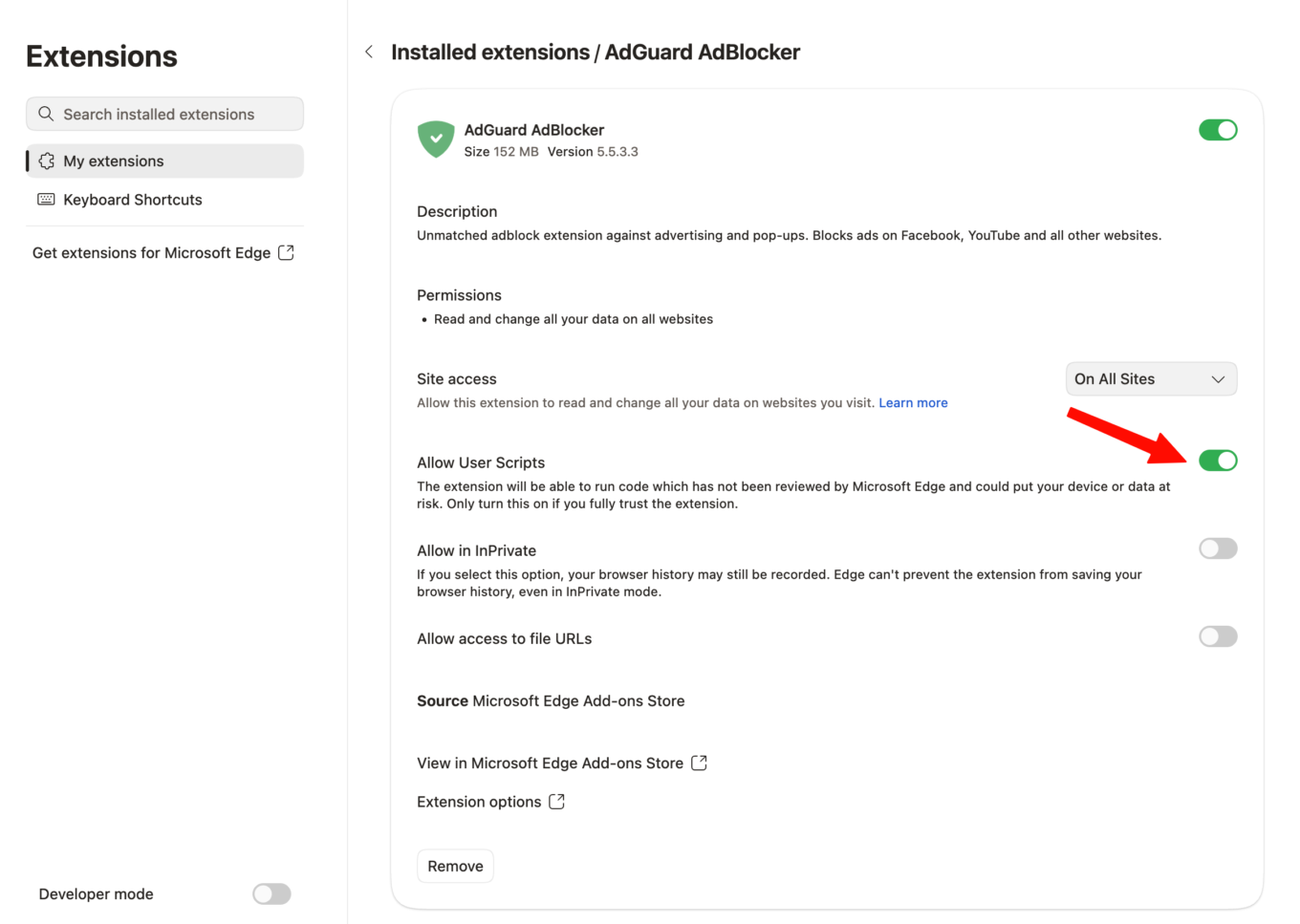
To use custom filters and user rules, turn on Allow User Scripts for the AdGuard Browser Extension in Edge. Here’s how to do that:

  1. Open edge://extensions, or click Extensions → Manage extensions
  2. Find AdGuard and click Details
  3. Turn on Allow User Scripts

Manage extensions

After that, the extension can apply your own rules and custom filter lists. This will allow the MV3 extension to work as intended.

What Edge users can expect

The old MV2 version can no longer be downloaded from Microsoft Edge Add-ons: it has been replaced with the MV3 version.

After switching to MV3, some filter updates may reach you later than before, but we will be working to keep all filters up to date with each release.

If you’d rather stay on MV2

Most browsers are following the same path as Edge by limiting MV2 support, so your options are limited. You can use a browser that still supports MV2 extensions, such as Firefox.

You can also skip browser policy changes altogether with AdGuard Ad Blocker. AdGuard apps for Windows, Mac, and Android block ads across your entire device, offer protection against fishing and malware, and prevent tracking.

💡
Use our coupon to get the AdGuard Ad Blocker license with a special discount.

And last but not least — your feedback matters. Update your extension and let us know what you think on GitHub and social media.


Liked this post?
AdGuard VPN AdGuard DNS AdGuard Mail AdGuard Wallet
The main screen of AdGuard for Windows
The Protection screen of AdGuard for Windows, showing the protection features and settings
The Statistics screen of AdGuard for Windows, showing stats for blocked ads and trackers
The App management screen of AdGuard for Windows, showing the protection management options for apps installed on the device
20,360 20360 user reviews
Excellent!

AdGuard for Windows: ad blocker for PC

AdGuard for Windows is more than an ad blocker. It is a multipurpose tool that blocks ads, controls access to dangerous websites, speeds up page loading, and protects children from inappropriate content

By downloading the program you accept the terms of the License agreement
Microsoft Store
By downloading the program you accept the terms of the License agreement
AdGuard for Windows v8.0, 14-day trial period
The main screen of AdGuard for Mac
The Stealth Mode screen of AdGuard for Mac
20,360 20360 user reviews
Excellent!

AdGuard for Mac: system-wide ad blocker

AdGuard for Mac is a unique ad blocker designed with macOS in mind. In addition to protecting you from annoying ads in browsers and apps, it shields you from tracking, phishing, and fraud
By downloading the program you accept the terms of the License agreement
Read more
AdGuard for Mac v2.19, 14-day trial period
The main screen of AdGuard for Android
The Tracking protection screen of AdGuard for Android
The App management screen of AdGuard for Android, showing the protection management options for apps installed on the device
The Statistics screen of AdGuard for Android, showing stats for blocked ads and trackers
The main screen of AdGuard’s private browser for Android
The QR code to download AdGuard for Android
20,360 20360 user reviews
Excellent!

AdGuard for Android: ad blocker for all apps

Blocks ads and trackers across all browsers, games, and other apps. Protects your privacy and lets you control how your apps use the Internet. Installed via APK
By downloading the program you accept the terms of the License agreement
Read more
Scan to download
Use any QR-code reader available on your device
AdGuard for Android v4.14, 14-day trial period
The main screen of AdGuard for iOS
The Protection screen of AdGuard for iOS, showing the protection features and settings
The Statistics screen of AdGuard for iOS, showing stats for blocked ads and trackers
The QR code to download AdGuard for iOS
20,360 20360 user reviews
Excellent!

AdGuard for iOS: ad blocker beyond Safari

The best iOS ad blocker for iPhone and iPad. AdGuard eliminates all kinds of ads and trackers in Safari and protects your privacy across all apps at the DNS level
By downloading the program you accept the terms of the License agreement
Read more
Scan to download
Use any QR-code reader available on your device
AdGuard for iOS v4.5
The main screen of AdGuard Content Blocker
The Filters screen of AdGuard Content Blocker
The Settings screen of AdGuard Content Blocker
20,360 20360 user reviews
Excellent!

AdGuard Content Blocker

AdGuard Content Blocker eliminates all kinds of ads in mobile browsers that support content-blocking technology — namely, Samsung Internet and Yandex Browser. Its features are limited compared to AdGuard for Android, but it is free, easy to install, and efficient
By downloading the program you accept the terms of the License agreement
Read more
AdGuard Content Blocker v2.8
The main screen of AdGuard Browser Extension
The Tracking protection screen of AdGuard Browser Extension
20,360 20360 user reviews
Excellent!

AdGuard Browser Extension

AdGuard is the fastest and most lightweight ad blocking extension that effectively blocks all types of ads on all web pages! Choose AdGuard for the browser you use and get ad-free, fast and safe browsing.
Install
By downloading the program you accept the terms of the License agreement
Install
By downloading the program you accept the terms of the License agreement
Install
By downloading the program you accept the terms of the License agreement
Install
By downloading the program you accept the terms of the License agreement
Install
By downloading the program you accept the terms of the License agreement
Read more
Install
By downloading the program you accept the terms of the License agreement
Read more
AdGuard Browser Extension v5.5
The main screen of AdGuard Assistant
20,360 20360 user reviews
Excellent!

AdGuard Assistant

A companion browser extension for AdGuard desktop apps. It allows you to block custom items on websites, add websites to allowlist, and send reports directly from your browser
AdGuard Assistant v1.4
20,360 20360 user reviews
Excellent!

AdGuard Home

AdGuard Home is a network-based solution for blocking ads and trackers. Install it once on your router to cover all devices on your home network — no additional client software required. This is especially important for various IoT devices that often pose a threat to your privacy
AdGuard Home v0.107
The main screen of AdGuard Pro for iOS
The Protection screen of AdGuard Pro for iOS, showing the protection features and settings
The Statistics screen of AdGuard Pro for iOS, showing stats for blocked ads and trackers
20,360 20360 user reviews
Excellent!

AdGuard Pro for iOS

AdGuard Pro for iOS comes with all the advanced ad-blocking protection features enabled. It offers the same tools as the paid version of AdGuard for iOS. It excels at blocking ads in Safari and lets you customize DNS settings to tailor your protection. It blocks ads in browsers and apps, protects your kids from inappropriate content, and keeps your personal data safe
By downloading the program you accept the terms of the License agreement
Read more
AdGuard Pro for iOS v4.5
The main screen of AdGuard Mini for Mac
The Safari protection screen of AdGuard Mini for Mac
The Create rule screen of AdGuard Mini for Mac
20,360 20360 user reviews
Excellent!

AdGuard Mini for Mac — Safari ad blocker

AdGuard Mini for Mac is a powerful Safari ad blocker. This lightweight app removes ads, blocks trackers, and speeds up page loading. It helps you browse the Web in Safari without distractions and keep your data private
Install
By downloading the program you accept the terms of the License agreement
Read more
AdGuard Mini for Mac v2.3
The main screen of AdGuard for Android TV with protection enabled
The Ad blocking screen of AdGuard for Android TV, showing its features and settings
The Settings screen of AdGuard for Android TV
The App management screen of AdGuard for Android TV, showing the apps where ads and trackers are blocked
20,360 20360 user reviews
Excellent!

AdGuard for Android TV

AdGuard for Android TV is the only app that blocks ads, guards your privacy, and acts as a firewall for your Smart TV. Get warnings about web threats, use secure DNS, and benefit from encrypted traffic. Relax and dive into your favorite shows with top-notch security and zero ads!
AdGuard for Android TV v4.14, 14-day trial period
The AdGuard mascot, Agnar, holding the Linux penguin
20,360 20360 user reviews
Excellent!

AdGuard for Linux

AdGuard for Linux is the world’s first system-wide Linux ad blocker. Block ads and trackers at the device level, select from pre-installed filters, or add your own — all through the command-line interface
AdGuard for Linux v1.4
20,360 20360 user reviews
Excellent!

AdGuard Temp Mail

A free temporary email address generator that keeps you anonymous and protects your privacy. No spam in your main inbox!
20,360 20360 user reviews
Excellent!

AdGuard VPN

75 locations worldwide

Access to any content

Strong encryption

No-logging policy

Fastest connection

24/7 support

Try for free
By downloading the program you accept the terms of the License agreement
Read more
20,360 20360 user reviews
Excellent!

AdGuard DNS

AdGuard DNS is a foolproof way to block Internet ads that does not require installing any applications. It is easy to use, absolutely free, easily set up on any device, and provides you with minimal necessary functions to block ads, counters, malicious websites, and adult content.
20,360 20360 user reviews
Excellent!

AdGuard Mail

Protect your identity, avoid spam, and keep your inbox secure with our aliases and temporary email addresses. Enjoy our free email forwarding service and apps for all operating systems
20,360 20360 user reviews
Excellent!

AdGuard Wallet

A secure and private crypto wallet that gives you full control over your assets. Manage multiple wallets and discover thousands of cryptocurrencies to store, send, and swap
Downloading AdGuard To install AdGuard, click the file indicated by the arrow Select "Open" and click "OK", then wait for the file to be downloaded. In the opened window, drag the AdGuard icon to the "Applications" folder. Thank you for choosing AdGuard! Select "Open" and click "OK", then wait for the file to be downloaded. In the opened window, click "Install". Thank you for choosing AdGuard!
Install AdGuard on your mobile device