The Year 2018 in AdGuard
Only few days left before the next year dawns on us, and traditionally this is the best time to draw a line, look back and recall what was done in the last 12 months (and what was not). Of course, we won't go over every single update for every AdGuard product, but instead let's have a look at the most important milestones, without concern for chronological order.
Honestly, we completed way less projects than we aimed for, but made up for it by laying the foundation for many exciting stuff that will go in full swing in the next year. So keep an eye on our announcements — there are quite a few big hitters coming soon! Ok, without further ado:
CoreLibs
Arguably, this can be called THE change of 2018. For the uninitiated: CoreLibs is a new cross-platform filtering engine that will power AdGuard products across all platforms for the foreseeable future. In detail it was described in the respective Blog article, feel free to go there and freshen your memory. The takeaway is, with it filtering has become faster and better.
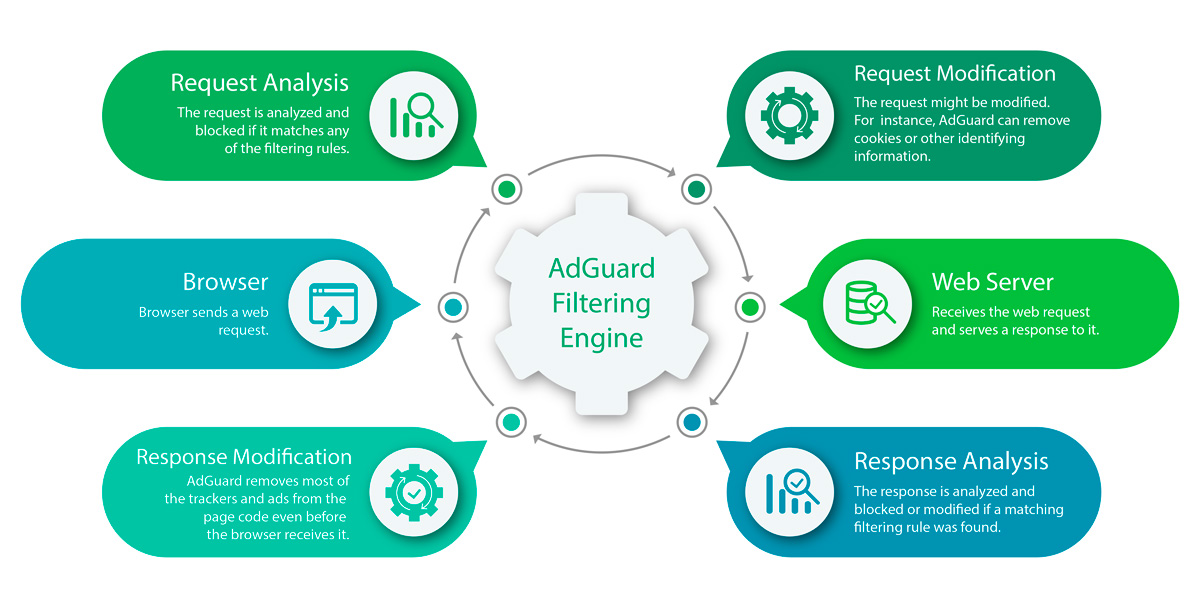
CoreLibs filtering Engine explained
Some of AdGuard products already reap the benefits of CoreLibs, other will follow soon. For example, after the introduction of CL AdGuard for Android v2.12 became three times faster! AdGuard for Mac users can enjoy CoreLibs only in Nightly update channel yet (more about Nightly just in a minute), and AdGuard for Windows users are the least lucky in that regard. We didn't manage to release AG for Windows v7.0 this year even as a beta, but the wait will be well worth it when it finally hits the release in 2019!
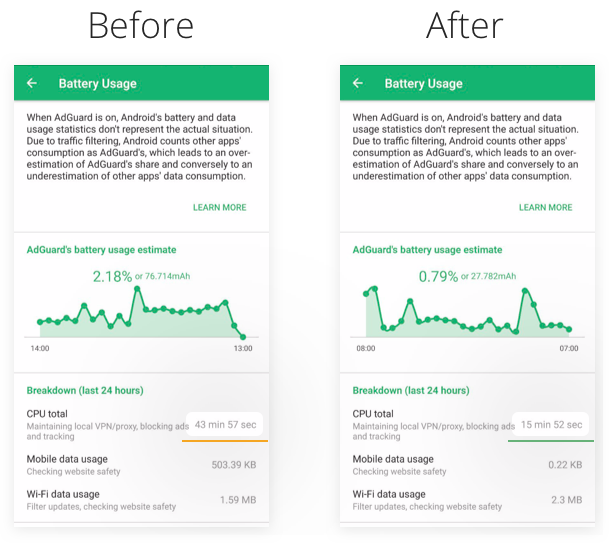
With CoreLibs, AG for Android works 3 times more effectively
What else to say about CoreLibs? It plays a perfect role in our new course on privacy protection. With its help we will be able to implement a Stealth Mode to all AdGuard products. Stealth Mode is already familiar to AdGuard for Windows users, it is a special module dedicated solely for privacy protection. A more than welcome addition, considering all the privacy breaches trends of 2018.
From the ad blocking perspective, CoreLibs is also very useful. Some ad providers put a lot of effort to circumvent the ad blockers, and have a reasonable success at it. CL will ensure AdGuard has an upper hand in this eternal fight once again.
Nightly builds
What are Nightly builds? They are the most recent, often even raw versions of AdGuard. Nightly to beta channel is what beta is to release channel. An extremely useful thing, a sort of a symbiosis between testers and developers. Testers get an exclusive access to new features before anyone else even hears about it, and developers get sweet sweet feedback. Everyone is happy, and even regular AdGuard users benefit from it: in the end, they get a more stable product with less bugs.
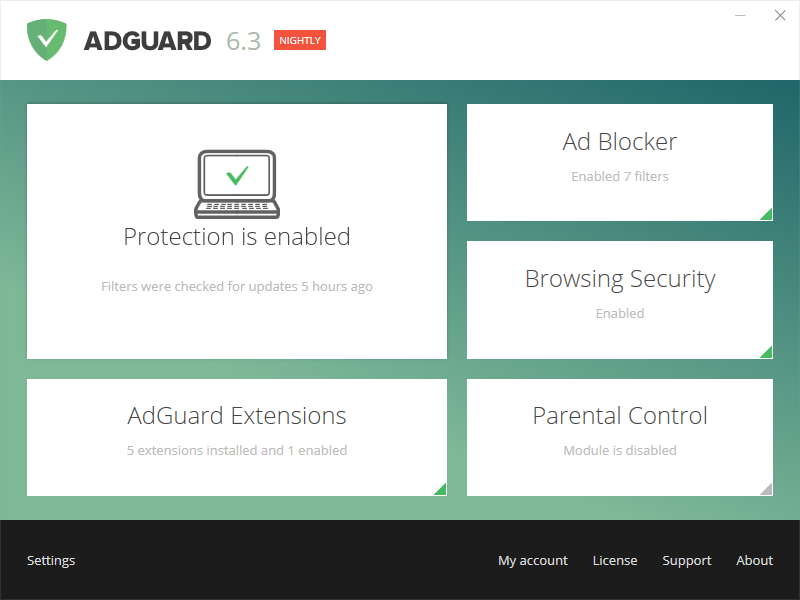
Want this neat little label too? Switch to Nightly!
If you think this is your thing and you want to join the ranks of Nightly testers, head here.
AdGuard for iOS
For our iOS product the year kicked off with great news: the release of AdGuard Pro for iOS v2.0.
The app was redesigned, not without some controversy, of course, but most users found this change pleasant. What everyone agreed on is that the app received a huge boost to ad blocking and privacy protection potential. New "Privacy settings" module and DNSCrypt support made this a reality. These and other, less flashy changes, made AdGuard Pro for iOS one of the most desirable apps for iOS users. We had some far-reaching plans, too.

You better be a fan of dark themes in apps!
Everything changed when the fire nation attacked. Apple announced changes to its policy regarding AppStore applications, which effectively banned any ad blockers that work outside of Safari. Free AdGuard for iOS app was not affected by it, but that couldn't be said about AdGuard Pro. It remained in the AppStore, but it was made clear to us that no updates were possible unless we remove the very functionality that makes AdGuard Pro what it is. Not a pleasant spot to be in, and we decided to discontinue the development of the Pro app for the indefinite period of time.

Apple bans ad blockers, 2018, colorized
As of now, the app still works, although it could have been so much better by now if not for the Apple's ridiculous stance on ad blockers. Meanwhile, most of our freed up efforts were aimed at the development of Safari Content Blocker, but we also have some thoughts about possible ways to further evolve AdGuard Pro. Stay tuned, we still have some fight left in us.
Goodbye, Amazon
This one's short and simple: Amazon went the same way Google and Apple did and basically banned system-wide ad blockers. We didn't have much choice but to leave the platform. Thankfully, Android users have more freedom when it comes to sideloading, so feel free to download the standalone version of AdGuard for Android.
AdGuard Home and DNS
Once the "holy trinity" of Google, Apple and Amazon decided that they know better what users can and what they can't do, it was only logical to provide some tools that would allow users to stay independent in their ad blocking preferences. And towards the end of the year we threw a one-two punch of AdGuard Home and AdGuard DNS releases. A quick reminder what are those beasts and what to do with them:
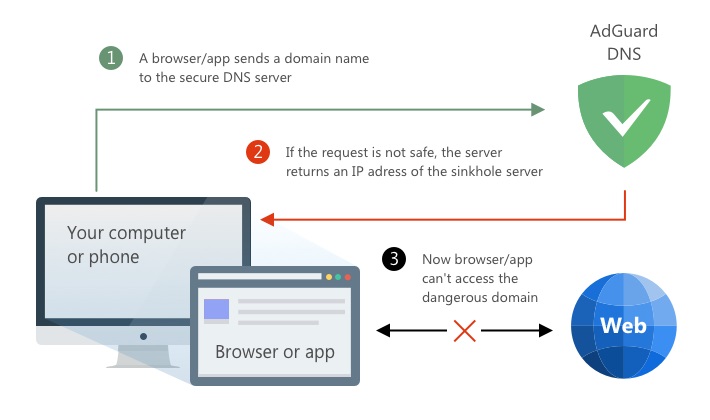
Roughly, this is how AdGuard DNS works
AdGuard DNS has been around since forever, it is a very easy, if not a little crude, way to block ads on virtually anything. PC, cell phone, smart TV, you name it. However, we hesitated to officially announce it, as so much needed to be polished. Finally, the time had come, and today AdGuard DNS is not only a solid way to block ads, but also a cutting-edge privacy protection tool.
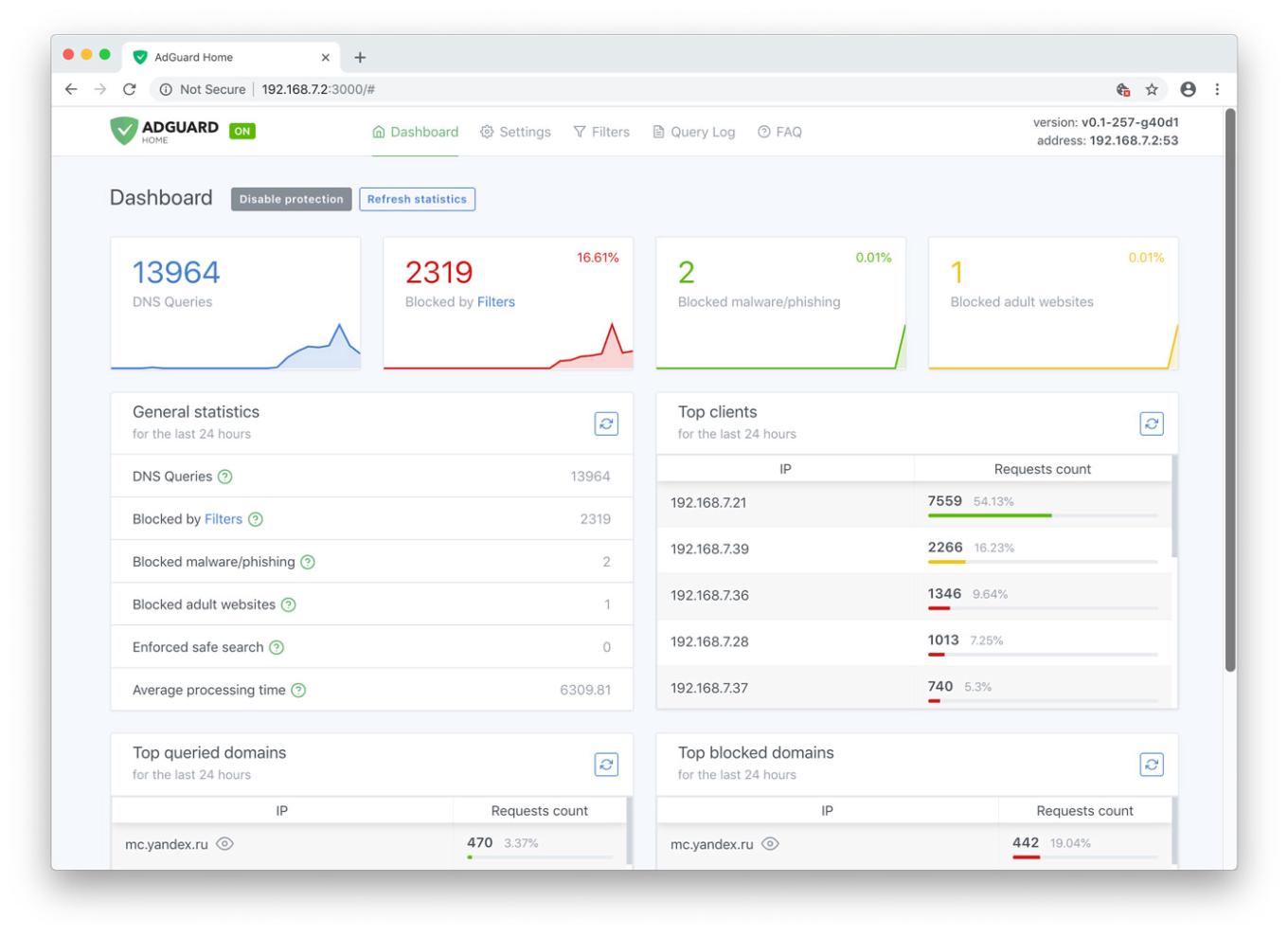
AdGuard Home web dashboard
AdGuard Home, on the other hand, is where you want to be if you need total control over all devices in your home, work or any other network. Granted, it is currently not an easy task to get it going for an average user. But the efforts spent are worth it: AdGuard Home combines the simplicity and effectiveness of the DNS approach with multiple customization options. You can manage the entire network's traffic from an intuitive web dashboard, accessible at any time from any device, including your smartphone. Funny detail: we wanted to add even more stuff before the release, but simply couldn't wait any longer, so we labeled it v0.9 as opposed to the full-fledged v1.0 that will come shortly :)
Both AdGuard DNS and AdGuard Home are only gaining steam, expect them to reach new heights in the next year!
Safari
And then the fire nation attacked again. No kidding! They put a spoke in ad blockers' wheel once more, you have to hand it to them for the sheer stubbornness. This time the victims chosen were the Safari extensions users. Long story short, only apps from the AppStore are allowed starting with Safari 12 (which is already mandatory on Mojave OS). Any extensions downloaded from the web are not supported anymore, and even extensions from the official Extensions Gallery are deprecated.
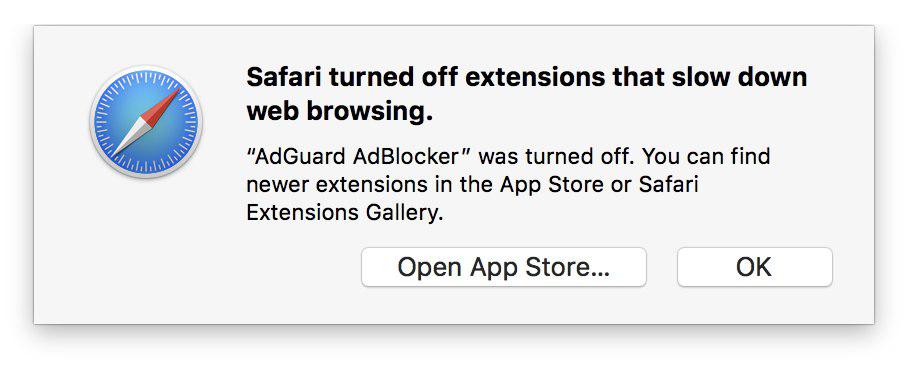
Yeah, right, "slow down web browsing". That's why.
What's the big deal, you may ask? Well, de-facto "extensions" from AppStore are apps, and they are severely restricted in capabilities compared to old ones. But don't despond, we responded quickly by developing a new product: AdGuard for Safari. It is available in AppStore, and despite all difficulties we managed to make it almost just as capable as the old Safari extension used to be.
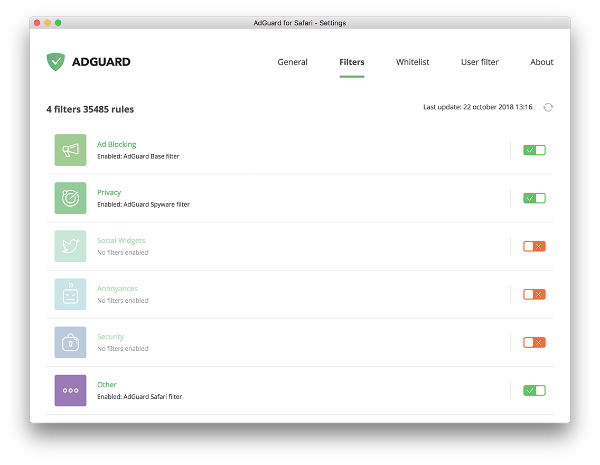
AdGuard for Safari
People tried it and received it well: AdGuard for Safari is currently holding a place in top10 in its category and top100 overall among all AppStore extensions. We, in our turn, don't rest on our laurels, but rather keep working hard and improve it. In 2019 we promise to make AdGuard for Safari as good, if not better, than its predecessor used to be.
AdGuard research lab
Ok, we don't have a research lab. That didn't stop us from discovering several real threats to users' privacy and online safety over the course of 2018! Maybe you even read about some of them in articles on other websites and industry-related blogs. Just some of the most prominent:
Stealing:
We analyzed top1000 Google Play apps (350+ mln total downloads) and found out that:
- almost half of them have permissions to extract your phone number and track phone calls
- 1 in 5 apps collects information about your email address
- more than 20% can read your contacts
- just under 10% read your text messages
- most of the apps send this data over plain HTTP, exposing it to any intermediate third-party
There's many more shocking details in the full article.
Cryptojacking:
Our anti-cryptojacking script allowed us to discover that half of the top cryptojacking domains actually belong to popular video hosting services. We were even able to identify 11 malicious Chrome extensions with total weekly user count just under 37,000.
Privacy:
Certainly, the most noticeable researches were on the topic of online privacy. Without going into details:
- We analyzed the top 2500 Google Play apps to discover that 41% of them collect data and send it to Facebook.
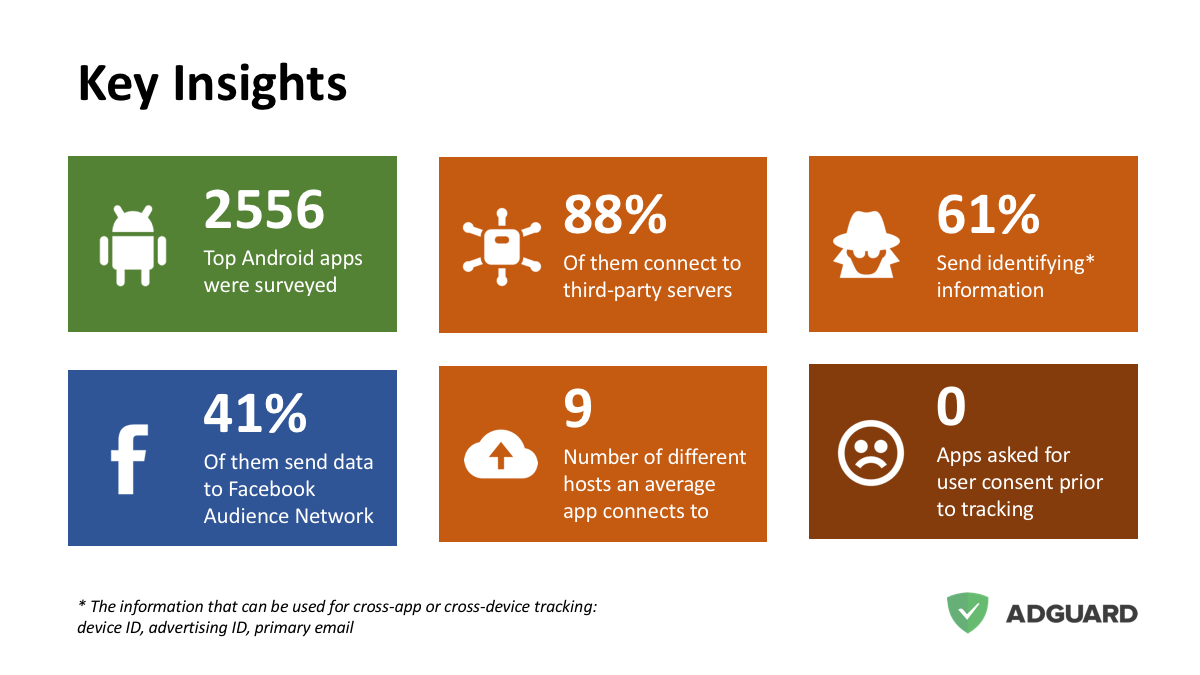
Key insights on our FB research
- A massive spyware campaign was revealed. Chrome extensions with 400k+ total users and Android apps with 1mln+ installs steal users' data, all run by a single shady company.
- Perhaps, the biggest find of ours was the "Big Star Labs" spyware campaign. We uncovered that several Android and iOS apps, Chrome and Firefox extensions with total number of users more than 11 million, were practically stealing users' data.
Fake ad blockers:
When choosing an ad blocker, be careful. The worst enemy is the one who disguises himself as a friend. We found out about several fake ad blocking extensions (20mln+ total installs) that were taking control of your browser and did harmful things. Thankfully, after our reports Google took all of them down, but who knows if there are more.
Plans for 2019
As always, plans are plenty. Just to name few:
New major updates for AdGuard for Windows, Mac and Android — all with new design, better performance and more options.
New AdGuard for iOS. Better than before! Also, we already mentioned we have thoughts about AdGuard Pro too.
As promised, AdGuard Home will finally reach v1.0. One of the main goals — make it more easily configurable and understandable for casual users.
CoreLibs, CoreLibs everywhere! Thanks to it, the development cycle for all our products will become shorter because we need to make changes to three separate products no more. Expect more frequent updates!
Some special features that we would like to keep secret for now. This way their announcement and release will be all the more exciting!
Acknowledgements
Throughout the year, we received help from several different sources. But most of all, we owe all of the above to you — our user. Not only AdGuard wouldn't make any sense without its users, but we were blessed with an awesome community that actively takes part in life of AdGuard. We want to thank you all: beta- and nightly-testers, contributors to our open-source projects, translators and localization moderators, reviewers and everyone in general who with their constant support inspired us to make AdGuard better. We appreciate your help and hope to see you by our side again in the next year.
And this pretty much wraps up 2018. No matter if you stayed with us for the entire year, or joined along the way, we hope you will spend many more years with AdGuard! Happy New Year!




















































